


Ever feel like you're trying to direct rush-hour traffic with nothing but hand signals? That’s what it’s like for many enterprise marketing teams still relying on manual processes. It’s a constant grind of disconnected tools, endless back-and-forth, and siloed data that makes delivering personalized experiences at scale feel nearly impossible.
Moving Beyond Manual Marketing Operations

In today’s market, the pressure on enterprise marketers is immense. You’re expected to orchestrate global campaigns, prove clear ROI on every dollar spent, and personalize customer interactions across dozens of touchpoints. Trying to do all that manually isn't just inefficient—it's a direct roadblock to growth.
This old way of working creates a ton of friction. Just think of the endless email chains for content approvals, the hours wasted uploading assets from one system to another, or the data silos that stop you from getting a complete picture of your customer. Every manual step is an opportunity for error, delay, and inconsistency, chipping away at your marketing impact.
The Shift to Intelligent Orchestration
The answer isn't just about sending emails faster. It’s about a fundamental shift from simply doing repetitive tasks to orchestrating intelligent, data-driven customer journeys. This is where a powerful Digital Experience Platform (DXP) like Sitecore, powered by its cutting-edge AI, becomes the central nervous system for your entire marketing operation.
A DXP like Sitecore, with its advanced AI, helps teams move from a reactive to a proactive stance. Instead of just managing tasks, marketers can design and deploy sophisticated workflows that actually anticipate customer needs and adapt in real time.
The market is already voting with its wallet. The marketing automation space, valued at $6.65 billion in 2024, is on track to hit $15.58 billion by 2030. This explosive growth shows that automation is no longer a "nice-to-have" tool but a core operational necessity.
The Role of DXP and Integrated Systems
To make this leap, your technology has to work together seamlessly. A modern DXP like Sitecore can act as the central hub, but its true power is unlocked when integrated with other key systems. For example, using SharePoint for content governance lets your team manage creation, reviews, and compliance in a structured environment before assets are automatically synced to Sitecore for launch.
This integrated approach enables true marketing workflow automation by connecting processes that were once separate:
- Content Lifecycle Management: A piece of content can go from a draft in SharePoint to final approval and automatic publication in Sitecore without manual intervention.
- Personalization at Scale: Sitecore AI can analyze user data to automatically serve up the right content to the right person at the right time.
- Omnichannel Campaign Execution: You can deploy coordinated campaigns across web, mobile, email, and social from one central platform.
By moving beyond manual operations, marketing teams are finally free to focus on what really matters: strategy, creativity, and building meaningful relationships with customers. To really get a handle on this shift, taking a deeper dive into the concepts and benefits of effective marketing workflow automation is a great next step.
What Is Marketing Workflow Automation in Practice?
Forget simple email sequences. In an enterprise environment, true marketing workflow automation is the central nervous system of your entire marketing strategy. It’s not just another tool—it’s an intelligent system that directs complex, multi-channel customer journeys, all powered by a DXP like Sitecore. This system connects everything from content creation and complex approval cycles to real-time personalization and deep analytics.
Think of it like a perfectly directed stage play. The workflow is both the script and the director, making sure every actor, prop, and lighting cue happens at the exact right moment. The goal? A seamless experience for your audience—the customer. Trying to pull this off manually with thousands, or even millions, of customer interactions is simply impossible.
At its heart, every automated workflow is built on three fundamental pillars. Get these right, and you’re on your way to designing marketing that actually works inside a DXP environment.
The Core Components of Automation
The real power of marketing workflow automation is its ability to run a series of steps based on specific conditions, creating a system that feels dynamic and responsive. These systems are all built from a few key ingredients that work together to bring a campaign to life.
Here are the essential pieces:
- Triggers: These are the starting pistols for any workflow. A trigger is a specific event that kicks off a sequence of actions. A classic example is a user downloading a whitepaper from your Sitecore-powered website.
- Actions: Once a trigger fires, the system takes one or more predefined actions. This could be anything from sending a follow-up email, adding the user to a specific marketing list, or pinging a sales rep.
- Decision Logic (Conditions): This is where the smarts come in. Decision logic uses "if/then" rules to steer the workflow down different paths based on user data. For example, if a user is from the manufacturing industry, then send them a relevant case study instead of a generic one.
Platforms like Sitecore give marketers a visual canvas to map out these components, letting them build sophisticated journeys without writing a single line of code. This is where a DXP really shines, blending customer data with marketing logic to deliver personalized experiences on autopilot.
Key Components of Enterprise Marketing Automation
The table below outlines the essential elements that make up a robust marketing workflow automation system within a DXP environment.
Understanding how these parts work together is crucial. A workflow is only as good as the data it has access to and the content it can deliver, all of which needs to be tracked and measured for success.
A Global Product Launch Example
Now, let's see how this all comes together. Imagine your company is launching a new product globally. A marketing workflow built in Sitecore and integrated with SharePoint for content governance would orchestrate the entire process flawlessly.
The workflow kicks off when a new promotional asset, like a launch video, is finalized and approved in SharePoint.
This approval is the initial trigger. SharePoint automatically syncs the approved video to Sitecore's content hub. The action is immediate: Sitecore’s automation engine pushes the video to all regional websites and schedules a series of social media posts.
At the same time, the workflow launches a targeted email campaign. Using decision logic, Sitecore AI analyzes your customer data. Customers who previously showed interest in similar products get a personalized announcement. Anyone who opens the email but doesn’t click is automatically sent a follow-up with a customer testimonial two days later. And those who do click the link to visit the product page? They’re entered into a lead nurturing sequence that serves them targeted ads and more relevant content.
In this scenario, the workflow isn't just a straight line. It's a dynamic, branching journey that adapts to each customer's behavior in real time, all orchestrated from one central platform. This is the practical power of enterprise marketing workflow automation.
What's the Real Value of Automation?
When you’re talking about marketing workflow automation, especially inside a powerhouse DXP like Sitecore, it’s easy to get lost in the weeds. But for any executive, the only question that really matters is: "So what?" To make a real business case, we have to move past the operational perks and focus on the tangible, bottom-line impact. This isn't just about giving your marketing team a better to-do list; it’s about building a predictable engine for growth.
The real value shows up when we stop counting completed tasks and start measuring strategic outcomes. Automation, particularly when it's smart automation guided by Sitecore AI, directly hits the KPIs that the C-suite actually cares about. It answers the big questions: How much faster can we launch a global campaign? How much fat can we trim from our operations? And what does all this do for revenue?
Connecting Automation to C-Suite KPIs
For decision-makers, the argument for automation is simple: it has to move the needle on high-level metrics. Every manual process carries hidden costs—delays, human error, and missed opportunities. Automation is designed to systematically root out and eliminate those costs. The end goal is to shift your team's brainpower away from monotonous tasks and toward strategic innovation where they can create real value.
Let’s get specific. Here are the enterprise-level KPIs where marketing workflow automation makes a measurable difference:
- Faster Time-to-Market: For any global company, launching a campaign is a beast. It involves juggling teams, regions, and endless approvals. Automation tears down that timeline by streamlining everything from content localization to cross-channel deployment. You can get your message to market weeks, or even months, faster.
- Serious Gains in Operational Efficiency: Just think about the thousands of hours your team burns on manual data entry, hunting for assets, or setting up the same campaigns over and over. By automating these workflows, you’re not just saving time—you’re cutting operational overhead and freeing up budget and people for high-value work like market analysis and creative strategy.
- A Major Lift in Lead-to-Conversion Rates: This is where Sitecore AI really shines. It enables a kind of predictive lead nurturing that leaves simple drip campaigns in the dust. By analyzing a customer's real-time behavior, it can serve up the perfect content at the perfect moment, guiding them through the funnel far more effectively and converting leads at a much higher clip.
These aren't just fuzzy benefits. We’re talking about hard numbers and real financial returns. Businesses often report an average of $5.44 in return for every $1 spent on automation. On top of that, companies using these systems see an average revenue increase of 34%. Those figures, highlighted in a report on the financial impact of marketing automation initiatives, show a direct line from automation to bottom-line growth through better conversion and retention.
Building the Business Case for Revenue Growth
At the end of the day, the strategic value of automation comes from its unique ability to fuel growth while simultaneously cutting costs. A well-designed system inside a DXP doesn't just speed up what you're already doing; it unlocks entirely new ways to generate revenue that were impossible before.
Take personalization, for example. Sitecore AI can identify tiny micro-segments in your audience and automatically deliver hyper-personalized offers at a scale that no human team could ever manage. That kind of tailored experience is what directly drives up average order value and builds fierce customer loyalty.
The core business case is simple: Automation transforms your marketing department from a cost center into a predictable revenue driver. It creates a direct line between marketing activities and financial outcomes, making it easier to prove ROI and secure future investment.
And it gets better. By integrating with platforms like SharePoint for content governance, you can ensure this high-speed marketing engine stays compliant and on-brand. SharePoint can manage the entire content lifecycle—from creation and review to legal sign-off—before seamlessly passing it to Sitecore for automated deployment. This creates a rock-solid, secure, and scalable foundation for all your marketing.
If you want to dig deeper into connecting these improvements to real financial results, check out our detailed guide on measuring digital marketing effectiveness.
Building Your Automation Engine with Sitecore and SharePoint
Architecting a top-tier marketing workflow automation system isn’t just about buying the right software. It’s about designing a blueprint that truly connects technology with your business processes. For large companies, this often means creating a powerful partnership between a Digital Experience Platform (DXP) like Sitecore—the customer-facing hub—and a content governance workhorse like SharePoint.
Think of it like this: SharePoint is your secure "content factory," while Sitecore is the dynamic "digital showroom." This dual-platform approach creates a tough, scalable system by neatly separating the painstaking work of content creation from the fast-paced world of marketing execution. The goal is to build a seamless assembly line for every marketing asset you produce.
Let’s say you’re creating a new case study, a product video, or a promotional graphic. That entire internal journey—from first draft to final sign-off—needs structure, version control, and strict compliance checks, especially if you’re in a regulated industry. This is where SharePoint shines.
The SharePoint Foundation for Content Governance
Before any piece of content ever gets in front of a customer, it has to run an internal gauntlet of reviews and approvals. SharePoint provides the sturdy framework for this make-or-break first stage. It acts as the single source of truth, ensuring every stakeholder, from legal to branding, can weigh in and collaborate within a controlled, auditable space.
This structured process is your best defense against rogue content and brand inconsistency. A typical workflow inside SharePoint looks something like this:
- Drafting and Collaboration: Content creators work on assets in a shared, version-controlled environment. No more wondering which file is the latest.
- Multi-Stage Review: The asset is automatically sent to the right reviewers—be it legal, compliance, or product marketing—based on rules you’ve already set.
- Final Approval: Once everyone signs off, the asset is officially marked as "final" and ready for the world.
This whole sequence is automated right within SharePoint. It puts an end to the chaotic email threads and manual spreadsheets that grind content production to a halt. It’s only when that final approval is given that the real integration magic begins.
Sitecore AI: The Engine of Personalization and Deployment
As soon as an asset gets the green light in SharePoint, an API-driven trigger signals that it's ready. This is the handoff from the factory to the showroom floor. The asset is automatically synced with Sitecore’s platform, landing exactly where it needs to be in the media library or content repository.
From there, Sitecore’s automation engine takes the wheel. And this is where Sitecore AI turns a simple content transfer into a genuinely intelligent deployment strategy. Sitecore doesn’t just receive the asset; it understands its context and purpose. Using data from the Sitecore xDB (Experience Database), the platform can immediately start weaving the new asset into personalized customer journeys.
For instance, a newly approved case study for the finance industry won't just collect dust in the media library. Sitecore's automation workflows can spring into action to:
- Identify Relevant Segments: Automatically spot website visitors who match the "finance professional" persona.
- Trigger Personalization: Serve the new case study to this specific segment through dynamic content blocks on the homepage.
- Initiate Nurturing: Enroll users who download the case study into a specialized email nurture sequence.
This is how automation transforms operational wins into a clear competitive advantage.
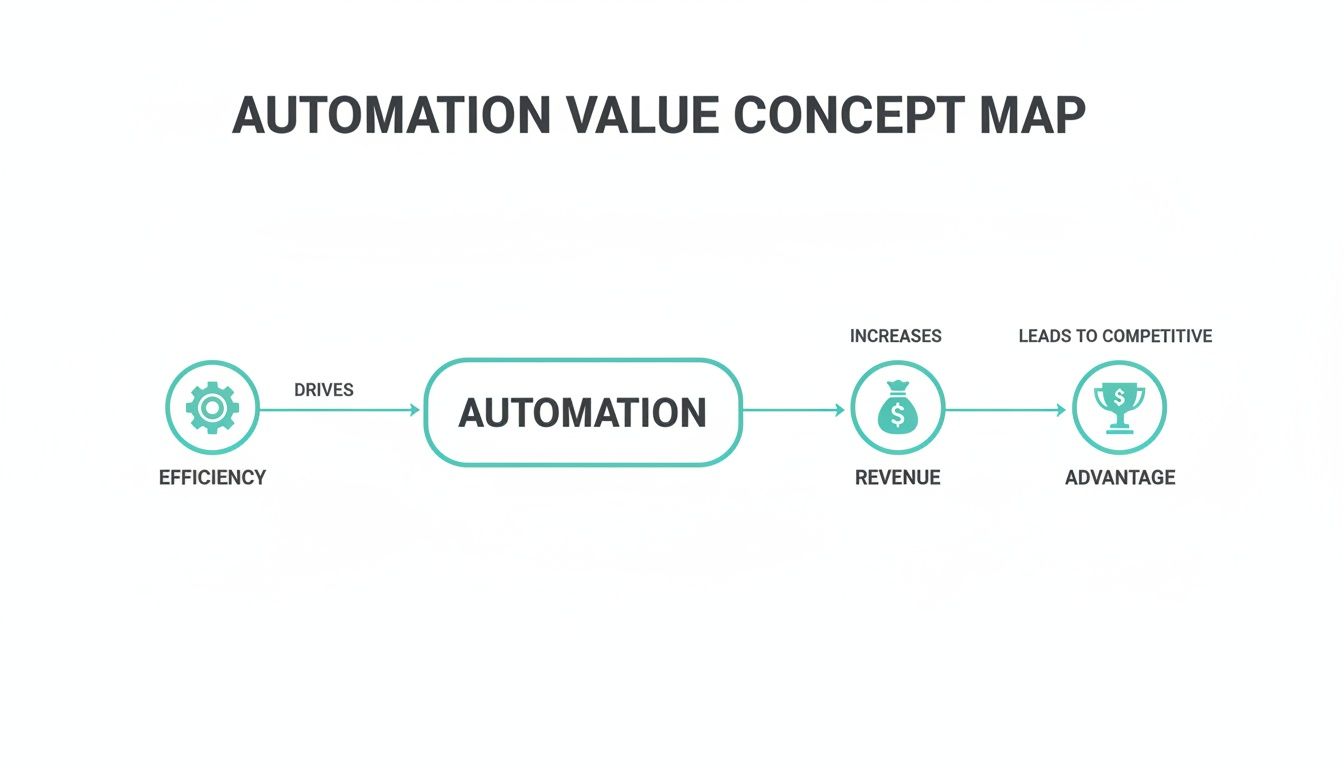
As you can see, the efficiency you gain from automation directly fuels revenue growth, which in turn builds a lasting competitive edge. For a deeper dive, you can find more valuable strategies in our guide to automated content marketing.
The Role of APIs and Composable Architecture
This whole process hangs on a composable DXP architecture where APIs and connectors are the glue holding everything together. The link between SharePoint and Sitecore isn't some clumsy, manual import/export routine. It’s a fluid, real-time synchronization managed by modern APIs, ensuring your data is always accurate and your operations are always moving at speed.
When looking at the technical foundations for your automation engine, it’s smart to explore platforms that simplify development. For example, solutions for low-code automation with Power Platform can be used to build custom connectors and simple apps that bridge gaps between major systems like SharePoint and Sitecore, making your workflow even more seamless.
This composable approach gives you incredible flexibility. It lets IT leaders and CTOs plug best-of-breed tools into their marketing stack without getting locked into a single, monolithic system. The end result is an agile, scalable automation engine that streamlines content operations while upholding the strictest governance standards.
Enterprise Automation Workflows You Can Implement

This is where the rubber meets the road—turning architectural theory into real business results. For a global enterprise, marketing workflow automation is about much more than just a simple email sequence. It’s about building intelligent, responsive systems that actively drive growth. When a DXP like Sitecore is at the heart of your stack, you can create sophisticated workflows that solve your most complex marketing challenges.
Let’s look at four practical use cases that show how Sitecore AI, combined with integrated systems like SharePoint, can deliver powerful solutions. These examples aren't just hypotheticals; they show what’s possible when your marketing engine runs on smart automation.
Predictive Lead Nurturing
One of the biggest headaches for marketers is keeping prospects engaged during a long sales cycle. Static drip campaigns just don't cut it anymore because they can't adapt to a lead's shifting interests. This is where Sitecore AI changes the game, enabling a predictive nurturing process that adjusts in real time.
Imagine a prospect downloads a whitepaper. Instead of pushing them into a rigid, pre-scripted email chain, Sitecore starts analyzing their behavior on your site. If they suddenly start visiting pricing pages, the AI can flag this for the sales team. If they start reading blog posts about a related service, the workflow can automatically send over a relevant case study. You’re guiding them down the funnel based on what they actually do, not what a script thinks they should do.
This completely flips the script on lead nurturing. It’s no longer a one-way broadcast but a dynamic, two-way conversation. The system listens to what users are telling you through their actions and responds with the most helpful content at that exact moment, which dramatically increases the chance of conversion.
Hyper-Personalization at Scale
Serving every visitor a unique, relevant experience is the holy grail of marketing. For an enterprise with millions of customers, though, it’s manually impossible. Sitecore’s AI-powered personalization engine makes this a reality by automating the delivery of countless content variations to thousands of micro-segments.
The system constantly crunches user data from the Sitecore Experience Database (xDB), spotting patterns and building dynamic audience segments on the fly. An automated workflow can then kick in to:
- Serve Dynamic Banners: Instantly show a unique hero image on the homepage based on a visitor’s industry or past purchases.
- Recommend Content: Suggest blog posts, videos, or product pages that align with their browsing behavior in that very session.
- Tailor CTAs: Swap out call-to-action buttons to match a user's stage in the journey—from "Learn More" for a first-time visitor to "Request a Demo" for an engaged prospect.
Streamlined Global Campaign Rollouts
For any multinational company, launching a campaign across dozens of regions is an operational nightmare filled with localization headaches, approval bottlenecks, and deployment chaos. By integrating Sitecore with a SharePoint solution, you can build a seamless, automated pipeline that makes global content management a breeze.
The workflow kicks off in SharePoint, where regional teams collaborate on localizing campaign assets. Once a country’s content gets the green light in SharePoint’s structured environment, a trigger automatically syncs it over to the correct regional instance in Sitecore. From there, Sitecore’s marketing automation takes over, deploying the entire localized campaign—emails, landing pages, social posts, you name it—right on schedule, no more manual work needed. It’s an efficient, compliant, and consistent way to manage global rollouts.
While the potential is huge, adoption levels vary. Research shows that 79% of marketers are now automating some part of their customer journey. But a closer look reveals that only 10% have achieved full automation, leaving most organizations in a partially automated state with a ton of room for improvement. You can find more data on marketing automation adoption rates on Emailvendorselection.com.
Proactive Customer Retention Flows
Spotting an at-risk customer before they churn is infinitely more valuable than trying to win them back after they’ve left. A proactive retention workflow in Sitecore can monitor customer behavior for signs of disengagement—like a drop in website logins, decreased product usage, or ignored support tickets.
When the system flags these risk factors, it can automatically trigger a re-engagement campaign. This might be a personalized email from a customer success manager, an exclusive offer for a new feature, or an invitation to a training webinar. By stepping in early with helpful, valuable content, you can address customer pain points before they escalate and build stronger loyalty. For more examples, see these enterprise workflow automation benefits and use cases.
Your Step-By-Step Implementation Roadmap
Putting marketing workflow automation into practice is a journey, not a flip of a switch. A successful rollout hinges on a structured approach that ties technology to clear business objectives right from the start. This high-level roadmap breaks down the essential phases for any enterprise ready to adopt or level up their automation game using powerful platforms like Sitecore and SharePoint.
Following a clear plan is the best way to navigate change management, sidestep common pitfalls, and make sure your automation journey delivers results you can actually measure.
Phase 1: Discovery and Goal Setting
First things first, you need to define what a "win" looks like for your business. Before you even think about the technology, get your key stakeholders in a room—marketing, sales, IT, and leadership—and lock down specific, measurable goals. Are you trying to shorten the sales cycle? Improve the quality of leads getting to sales? Or maybe boost customer lifetime value?
Getting crystal clear at this stage is absolutely critical. These objectives will become your North Star, guiding every decision that follows, from which processes to automate first to how you configure your Sitecore DXP.
A classic mistake is falling in love with a tool before you've even defined the problem. Let your goals drive the technology strategy, not the other way around. Figure out the "why" before you get lost in the "how."
Phase 2: Process Mapping and Prioritization
Next up, it’s time to pop the hood on your current marketing operations. Meticulously map out your existing workflows from beginning to end, shining a light on every manual touchpoint, bottleneck, and point of friction. This exercise isn't just about documentation; it’s about uncovering the processes that are eating up the most time and creating the biggest headaches.
Once you have that complete picture, it's time to prioritize. Judge each opportunity based on its potential impact versus how difficult it will be to implement. Always look for the "quick wins"—those high-impact, low-complexity workflows that can show value fast and build momentum for the entire project. A great example is automating the lead handoff from marketing to sales, which often delivers an immediate and noticeable boost in efficiency.
Phase 3: Technology Integration and a Pilot Program
With your priorities locked in, you can start architecting the technical solution. This is where you connect your core platforms, like linking SharePoint’s content repositories with Sitecore’s automation engine. The objective is to create a seamless, uninterrupted flow of data and assets between your systems.
But whatever you do, don't attempt a "big bang" launch. Instead, start small with a focused pilot program. Pick one of your prioritized workflows and roll it out to a single team or a specific region. This measured approach gives you some huge advantages:
- It Proves the Value: A successful pilot delivers tangible ROI and helps secure buy-in from the C-suite.
- It Uncovers Glitches: It lets you find and fix any technical or process-related issues on a small, manageable scale.
- It Gathers Real Feedback: You can collect direct input from users to fine-tune the workflow before rolling it out to everyone.
Phase 4: Full Rollout and Continuous Optimization
After a successful pilot, you're ready to begin the phased rollout across the rest of the organization. This stage demands comprehensive training, clear communication, and ongoing support to get everyone on board and using the new system. Having a detailed software implementation project plan is non-negotiable for keeping timelines and resources in check.
But going live isn't the finish line. True marketing workflow automation is an iterative process. Use Sitecore’s analytics to constantly monitor performance against the goals you set back in Phase 1. Collect feedback from your teams and always be on the lookout for new opportunities to refine existing workflows and build new ones. This culture of continuous improvement is what turns automation from a simple tool into a genuine engine for business growth.
Frequently Asked Questions About Marketing Automation
When it's time to invest more deeply in marketing workflow automation, enterprise marketing and IT leaders usually have some pointed questions. Let’s tackle some of the most common technical and strategic points that come up in the Sitecore and SharePoint ecosystem.
How Does Sitecore AI Go Beyond Standard Automation Rules?
Think of standard automation as a set of 'if-this-then-that' rules—effective, but rigid. You set up a path, and every customer follows it. Sitecore AI is different. It uses machine learning to watch what users are doing right now and predict what they'll do next.
Instead of shoving a customer down a pre-planned journey, the workflow adapts on the fly. The system can figure out the perfect moment to show someone a piece of content or an offer that will actually resonate. It's a huge leap from reactive, rule-based marketing to proactive, predictive personalization that genuinely boosts engagement and conversions.
The core difference is moving from a system that follows a script to one that can improvise based on live audience cues. Sitecore AI doesn't just execute your plan; it optimizes it in real time.
What Is SharePoint's Role in a Sitecore Automation Strategy?
In a sophisticated setup like this, SharePoint acts as your secure, collaborative "content factory." It’s built to handle the entire internal lifecycle of your marketing assets—from the first draft and version control to those complex, multi-stage reviews and compliance sign-offs. For any large organization, this is non-negotiable for maintaining brand governance.
Once an asset is finalized and approved inside SharePoint’s controlled space, it gets published seamlessly to the Sitecore DXP. From there, it's ready for immediate use in your automated campaigns. This integration smartly separates content governance from marketing execution, giving you both speed and control. Marketers can move fast, while legal and compliance teams maintain the oversight they need.
At Kogifi, we specialize in architecting these powerful, integrated DXP solutions. Discover how our Sitecore expertise can build your automation engine.