


Teams with fast code reviews have 50% better software delivery performance, according to DORA's guidance on generative AI and delivery. That's a better starting point for buying staff augmentation services than counting available developers. The question is whether a specialist will improve your team's decisions and delivery, then leave your employees capable of continuing without them.
For enterprise Sitecore programs, that means distinguishing genuine AI, personalization and headless architecture expertise from a familiar product name on a CV. For SharePoint, it means finding engineers who understand employee workflows, permissions and Microsoft 365 integration, not just web parts.
Table of Contents
- How Staff Augmentation Differs from Outsourcing and Managed Services
- When Augmentation Beats Hiring for DXP Programs
- Sitecore, AEM and SharePoint Roles to Augment
- Contracts, SLAs and Pricing to Budget
- Compliance, Data Protection and Regional Considerations
- Onboarding Specialists Without Creating Dependency
- Measuring Augmentation Results and Managing Risks
- Choose a Staff Augmentation Partner for Your Sitecore Program
How Staff Augmentation Differs from Outsourcing and Managed Services
Staff augmentation adds external specialists to your delivery team, while your managers direct their daily work. Outsourcing hands a defined project outcome to a provider. Managed services hand over an ongoing operation under agreed service levels.
Think of a kitchen. Augmentation adds a chef to your brigade, outsourcing means ordering a finished dish, and managed services means contracting a caterer to run the kitchen. None is better by nature. Each solves a different management problem.
Staff augmentation, outsourcing and managed services compared
| Criterion | Staff augmentation | Outsourcing | Managed services |
|---|---|---|---|
| Who directs daily work | Your team | Provider | Provider, against an SLA |
| Who owns the outcome | Your organization | Provider, against the project scope | Provider, against service levels |
| Typical contract | Time and materials or dedicated resource | Fixed scope or milestones | Recurring service agreement |
| Best fit | Filling a skill gap inside your team | Well-defined projects | Stable run-the-platform operations |
| Knowledge retention | Stays in-house only if your team pairs with specialists | Often stays with the provider | Stays with the provider |
Contract labels aren't enough. A dedicated team can operate under your product owner or under a provider's delivery manager. Before comparing proposals, establish who prioritizes tickets, approves architecture and accepts completed work.
Match control to the actual need
Say your XM Cloud migration needs a senior headless front-end engineer for a hypothetical six-month delivery window. Your architect defines the rendering approach, your marketing owner prioritizes components, and the specialist joins your release process. That's augmentation.
Running the platform overnight against a monitoring and incident-response SLA is a managed-service requirement. Adding an engineer doesn't automatically transfer responsibility for coverage, escalation or restoration.
A separately scoped integration with written acceptance criteria may suit project outsourcing. Our explanation of outsourcing in IT provides additional context for that model.
Practical rule: Buying someone's time doesn't transfer accountability for your roadmap.
Augmentation preserves control, but it also preserves your management workload. Your employees must provide decisions, reviews and product context. Knowledge remains accessible only when internal engineers participate in the work rather than receiving a document at departure.
Name the gap before choosing the commercial model: a missing skill, a fixed deliverable or an ongoing operation. If your procurement document can't distinguish those needs, it isn't ready for vendor pricing.
When Augmentation Beats Hiring for DXP Programs
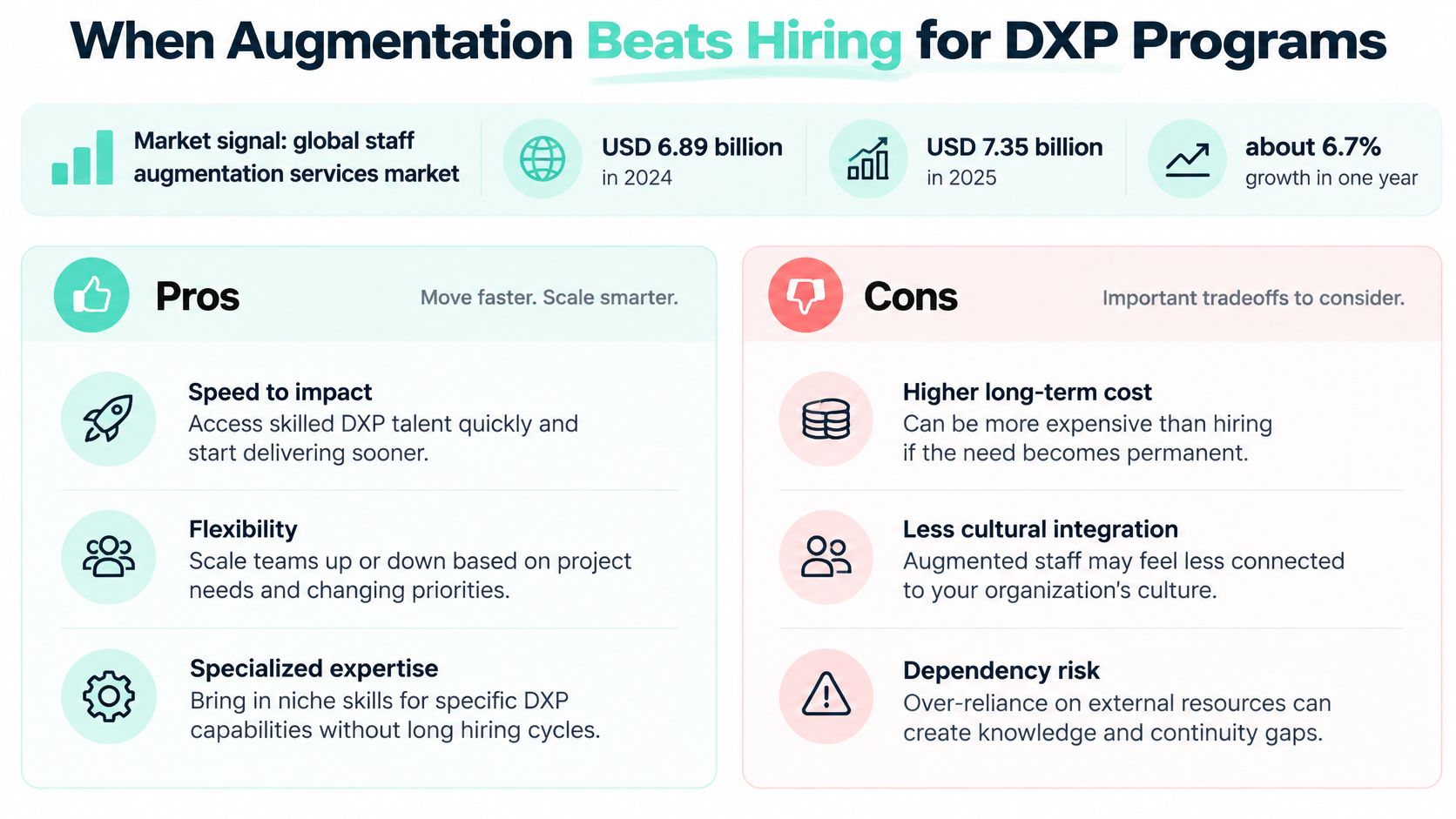
The global staff augmentation services segment was valued at USD 6.89 billion in 2024, rising to USD 7.35 billion in 2025, approximately 6.7% growth in one year, according to the Research and Markets forecast, which projects USD 11.94 billion by 2032, with 7.1% compound annual growth from 2025 through 2032.
The useful implication isn't that every enterprise should augment. It's that specialist capacity has become a distinct purchasing model for work that peaks during migrations, integrations, accessibility remediation and major releases.
- Augment for a defined window. Bring in migration, performance or platform-upgrade expertise when the demand has a credible endpoint.
- Hire for enduring ownership. Keep capabilities central to your platform and needed year-round within your permanent organization.
- Outsource a bounded outcome. Choose project delivery when acceptance criteria can describe the completed result.
Don't add developers to compensate for missing technical leadership. A team without an internal Sitecore architect needs a senior lead who can challenge implementation choices. Without an internal product owner, even excellent specialists will wait for decisions.
| Pros | Cons |
|---|---|
| Target specialist skills without permanent headcount | Internal leaders still manage delivery |
| Adjust capacity around delivery peaks | Onboarding consumes existing team capacity |
| Keep priorities under your control | Poorly planned exits create continuity risk |
Decision test: Is the need temporary? Is the skill core to our platform? Do we have someone who can direct the work? Answer those questions together before opening requisitions.
Sitecore, AEM and SharePoint Roles to Augment
Choose specialists by platform architecture and delivery gap, not by title alone. XM Cloud calls for headless skills, including the JavaScript Rendering SDK and frameworks such as Next.js. A developer experienced only in traditional MVC Sitecore work may not be ready to deliver an XM Cloud implementation.
Sitecore, AEM and SharePoint roles to augment
| Role | Core skills | Where it applies |
|---|---|---|
| Sitecore XM Cloud developer | Headless rendering, JavaScript Rendering SDK, Next.js | Headless sites delivered through Sitecore Experience Edge |
| Sitecore Personalize and AI specialist | Decision variants, propensity and forecast models, Stream-assisted content and A/B testing | Personalization and testing programs |
| AEM developer | Component development, integrations, content modeling | Adobe Experience Manager content estates |
| SharePoint SPFx developer | SPFx web parts, TypeScript, React, Microsoft Graph | Intranets and employee portals |
| Front-end engineer | React, Next.js, WCAG accessibility, performance tuning | Multilingual and accessible sites |
| DevOps and cloud engineer | Azure, CI/CD pipelines, monitoring, autoscaling | Hosting and release pipelines |
| QA automation engineer | Regression suites, accessibility checks, release gates | Upgrades and migrations |
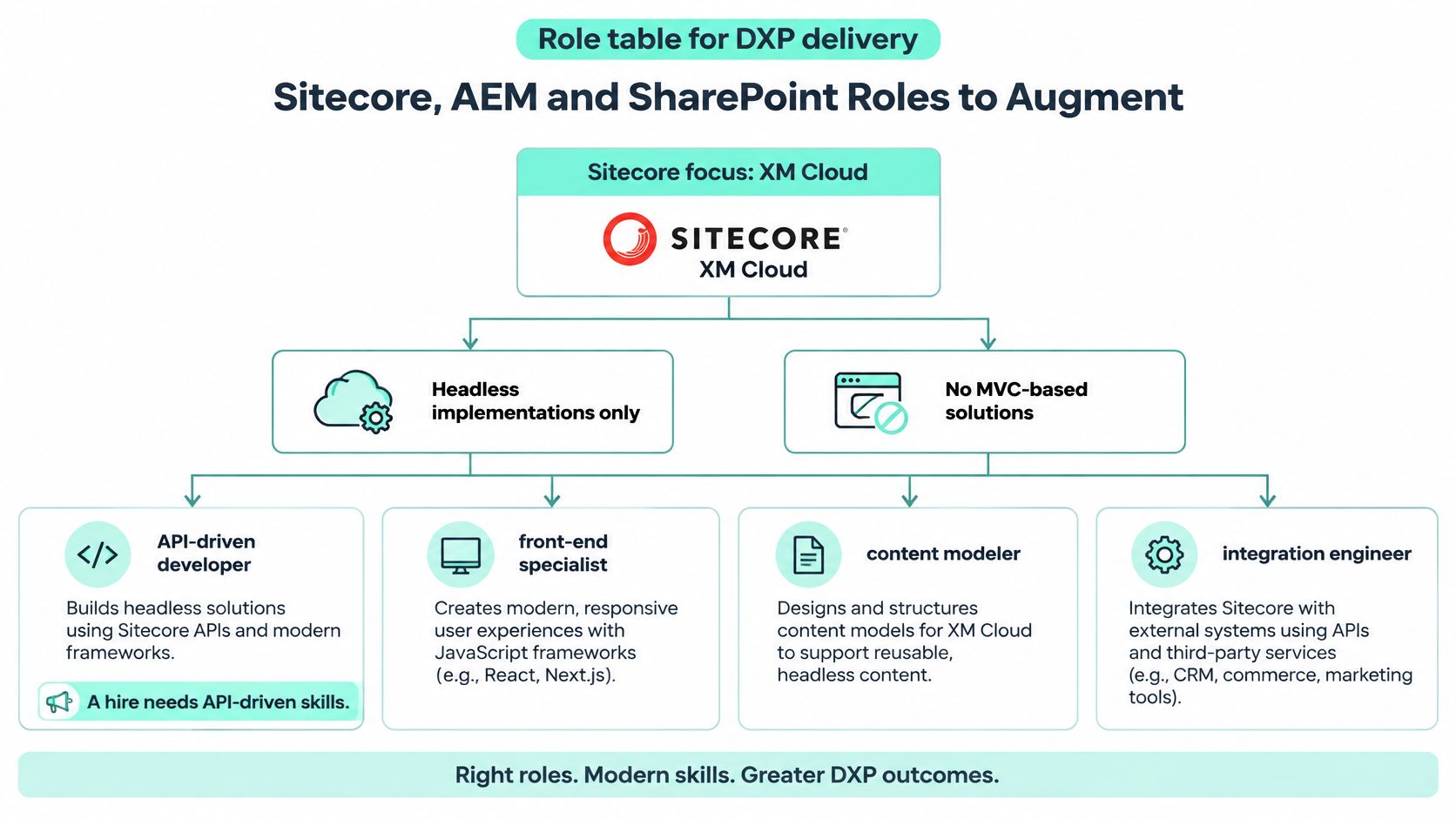
Buy Sitecore AI implementation judgment
Sitecore Stream supports brand-aware content, campaign briefs and AI-assisted workflows across XM Cloud, Content Hub and XP. An AI specialist should understand brand architecture, content approvals and product boundaries, and explain which decisions belong in content workflows versus personalization logic.
In XM Cloud, a site-assigned brand kit informs Content Copilot output. Stream content-optimization A/B/n testing requires JavaScript Rendering SDK version 22.1 or later, so check front-end compatibility before budgeting an AI rollout.
Personalize expertise is a separate requirement. Assess candidates' judgment on decision variants, propensity and forecast models, audience eligibility and fallback experiences. Stream does not replace that work. Kogifi's Sitecore platform services cover implementation, support and other platform needs.
Staff SharePoint around employee tasks
For SharePoint Online, assign SPFx engineers to components and Microsoft Graph integrations. Add Power Platform expertise for approval flows and business automation, and make permission design and workflow ownership explicit.
A bilingual English and Arabic intranet needs careful testing of right-to-left layouts, keyboard navigation and translated labels. Pair an SPFx developer with an accessibility reviewer, and source AEM specialists for AEM component and integration work rather than treating another CMS background as a substitute. If you are considering LATAM developers, assess them against the same platform requirements. Map each capability gap to a role in the table before writing the job description.
Contracts, SLAs and Pricing to Budget
In 2025, 76% of respondents said their companies included statement-of-work contract work in their contingent workforce programs, according to Staffing Industry Analysts' Workforce Solutions Buyers Survey. Contingent workforce procurement isn't limited to hourly staffing, but different billing models transfer different risks.
Augmentation billing models and their budget risks
| Billing model | How it is billed | Best fit | Main budget risk |
|---|---|---|---|
| Time and materials | Hourly or daily rate per specialist | Discovery and uncertain scope | Scope creep without a managed backlog |
| Dedicated team retainer | Monthly fee for a fixed team | Ongoing platform roadmap | Paying for idle capacity |
| Statement of work | Fixed price per milestone | Defined migrations or upgrades | Change requests after sign-off |
| Support retainer | Monthly fee covering support hours | Run-the-platform support | Overage on incident volume |
Write severity definitions, response and restoration targets, monthly reporting, regular performance reviews, and a named escalation path into the relevant service schedule. Separate engineer availability from an actual restoration commitment. An augmentation agreement does not become a support SLA just because someone can troubleshoot production.
We scale Outsourcing resources up or down around project needs and business cycles, with regular performance reviews, SLAs and transparent reporting. Define the notice period so a capacity reduction doesn't leave you paying for unused resources or remove essential coverage unexpectedly.
Compare the same delivery scenario
For a hypothetical six-month engagement with two Sitecore developers and one QA engineer, calculate time-and-materials exposure from each specialist's quoted rate multiplied by approved billable hours. Compare that with the written monthly dedicated-team fee multiplied by the engagement duration.
For per-person monthly pricing, use monthly rate × headcount × months, separating different role rates. Compare monthly commitments, leave coverage, overtime and internal review effort, not just the headline total.
Our Sitecore support retainers start from about €3,000 a month. That's a support-service starting point, not a development-team estimate.
Before signing, check:
- Rate card: Role rates, billing units and overage rules.
- Change requests: Approval authority and pricing method.
- Exit notice: Reduction, termination and transition obligations.
- Reporting duties: Delivery evidence, spend and service-level reporting.
Compliance, Data Protection and Regional Considerations
Resolve the questions that block safe onboarding: where personal data is processed, who legally employs the specialist, and where code and content reside. A supplier's registered address doesn't answer all of them.
Data protection. Identify whether specialists can access customer records, employee profiles, analytics identifiers or production exports. Have counsel establish processing terms appropriate to GDPR, UK GDPR and applicable US state privacy laws, including cross-border access arrangements. Use our website GDPR compliance guide as a planning resource, not a substitute for engagement-specific legal advice.
Employment status. Record the employer, contracting chain and practical working arrangement. Have local counsel review misclassification and co-employment exposure, including UK off-payroll working rules where relevant. Daily supervision and contractual labels must be assessed together.
Intellectual property. Require assignment of engagement-created code, configuration and documentation to your organization. Identify pre-existing libraries and third-party licenses separately so you know what you own and what you're licensed to use.
Hosting and residency. Map the Azure services used by Sitecore AI, the CMS environment, rendering host and Experience Edge delivery path. Confirm applicable regions, logs, backups and support-access locations against your residency policy before granting environment access.
Access control. Use named accounts, least privilege and multi-factor authentication. Record an offboarding deadline, revoke tokens and check service credentials rather than merely disabling a collaboration account.
International sourcing changes the legal review, not the standard of engineering access control.
Treat these checks as contractual prerequisites. An excellent specialist shouldn't begin production work while procurement is still determining who may access personal data or who owns the resulting implementation.
Onboarding Specialists Without Creating Dependency
Augmented specialists should join a stable, cross-functional team, not operate as isolated contributors with a separate backlog. DORA's guidance on empowering software delivery teams evaluates performance at team level because development and operations require collective ownership.
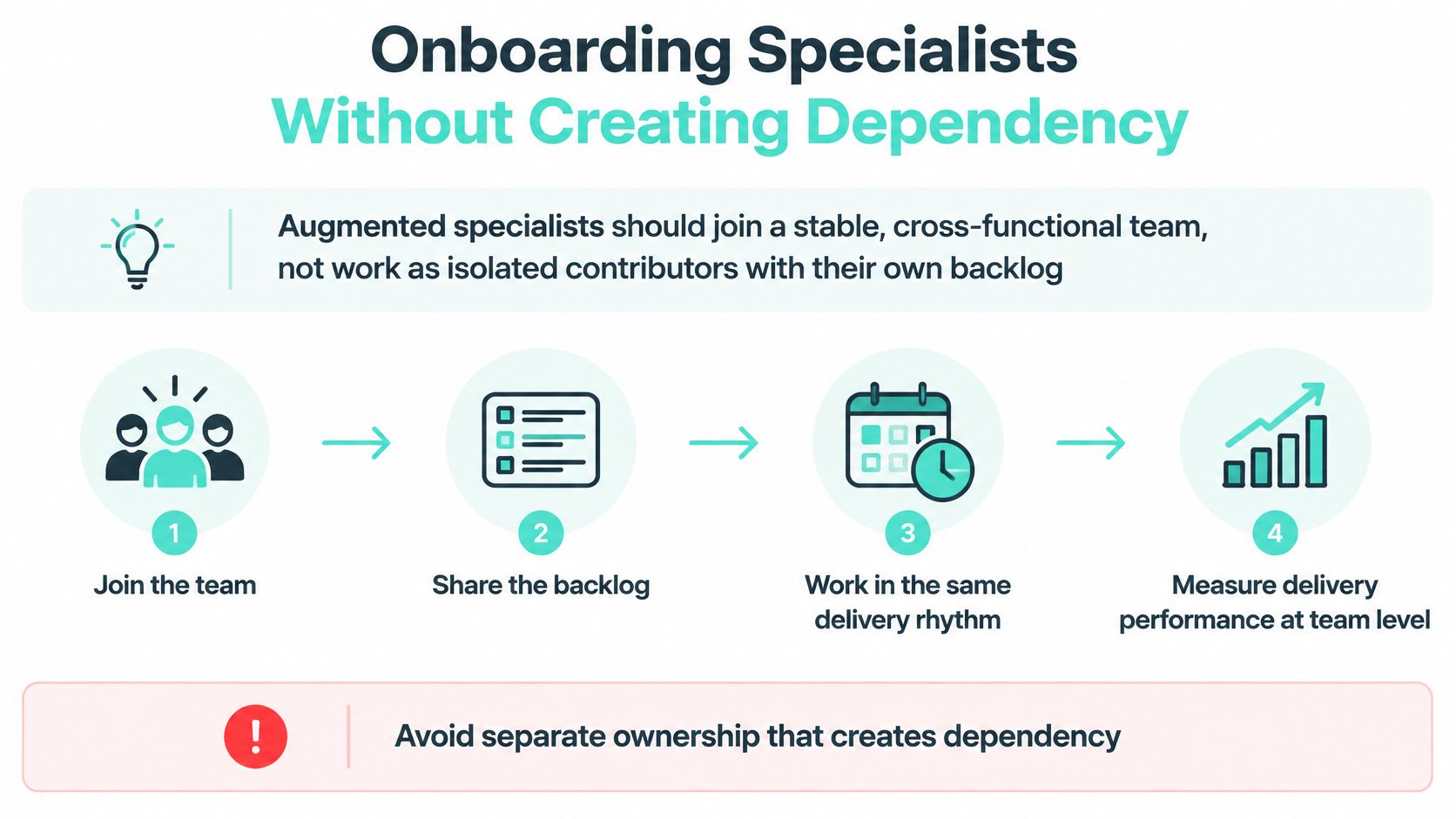
Use an onboarding sequence that removes specific sources of dependency:
Assign bounded work within one backlog. Give a specialist ownership of an implementation stream, such as XM Cloud rendering or SPFx components, without creating a competing prioritization process.
Prepare the engineering workspace. Establish repository access, branching rules and environment permissions before the first commit. Don't allow personal repositories or undocumented deployment shortcuts to become the easiest route forward.
Agree review expectations. Define review thresholds, small pull-request expectations and a turnaround target. Name a backup reviewer so approval doesn't depend on a single unavailable employee.
Pair with an internal owner. Start paired implementation during the opening sprints. The employee should understand why the specialist rejected alternatives, not merely which files changed.
Document while building. Record architecture decisions, runbooks, observability and incident responsibilities alongside implementation. Make documentation part of acceptance rather than an end-of-contract cleanup task.
Verify capability transfer. Schedule walkthroughs and record who can modify, deploy and diagnose each component. Attendance alone isn't proof that someone can take over.
Write the exit plan immediately. Include the handover checklist, access-revocation date and succession coverage. Update it when responsibilities change.
Make the handover executable
Sitecore teams need particular care around undocumented Helix component conventions in existing estates and XM Cloud environment configuration. Record component boundaries, serialization practices, deployment variables and environment-specific assumptions before the first release.
For Stream-enabled workflows, include brand-kit administration, approval responsibilities and the process for diagnosing unexpected output. For SharePoint, document application registrations, Graph permissions and automation connections, not just the visible interface.
Our Bugfixing & Recovery service includes incident reporting and knowledge transfer to the client's team. Apply that recovery discipline to augmentation handovers: have the departing specialist guide an internal engineer through a live component, then reverse the roles.
The internal engineer should make a controlled change, deploy it and explain how to recover from failure. That demonstrates retained capability more convincingly than a folder of presentation slides.
Measuring Augmentation Results and Managing Risks
Added people don't automatically add delivery value. Establish whether specialists help the team release useful changes reliably, rather than measuring occupied seats, hours purchased or individual ticket counts.
Delivery measures for an augmented team
| Measure | What it shows | Warning sign |
|---|---|---|
| Deployment frequency | Throughput of the team | Frequency rises while failures rise |
| Change lead time | Speed from commit to production | Lead time grows after new specialists join |
| Change-failure rate | Rework from hotfixes or rollbacks | Rate climbs in the first quarter |
| Time to restore | Recovery speed after a failed deployment | Incidents stay open longer |
| Review latency | Time specialists wait for code review | Pull requests sit for days |
Deployment frequency and change lead time describe throughput. Change-failure rate and recovery time describe stability. Review latency helps diagnose whether internal approvals, rather than implementation capacity, are constraining the engagement.
For a Sitecore AI rollout, add acceptance evidence tied to the intended experience: correct brand context, approved content, eligible audiences and dependable fallback behavior. Producing more content variants isn't a meaningful success measure if marketers can't evaluate or safely publish them.
Match each risk with a control
- AI-assisted coding risk: Require automated tests, security checks and explicit human review. Faster code generation doesn't justify bypassing release controls, especially around identity, personalization and data access.
- Key-person loss: Require paired implementation and executable documentation. Assign an internal deputy for configuration and release ownership.
- Scope drift: Keep acceptance criteria attached to each milestone or backlog item. Record decisions to defer work rather than letting unfinished obligations accumulate.
- Hidden vendor dependency: Keep repositories, environment ownership and administrative recovery routes in organization-controlled accounts. Check whether a replacement team could operate without the incumbent's private tooling.
More releases with more failures isn't a successful augmentation engagement.
Use a clearly defined evaluation window. For example, compare the delivery measures over a hypothetical three-month baseline and the following three-month engagement period, while recording changes in release scope and incident severity.
Treat a sustained rise in failure rate as a failed engagement even if throughput improves. Investigate whether the cause is weak testing, oversized changes, unfamiliar configuration or rushed reviews, then require corrective action.
Set the baseline before onboarding. Without it, both sides can attribute every improvement to staffing and every setback to the platform.
Choose a Staff Augmentation Partner for Your Sitecore Program
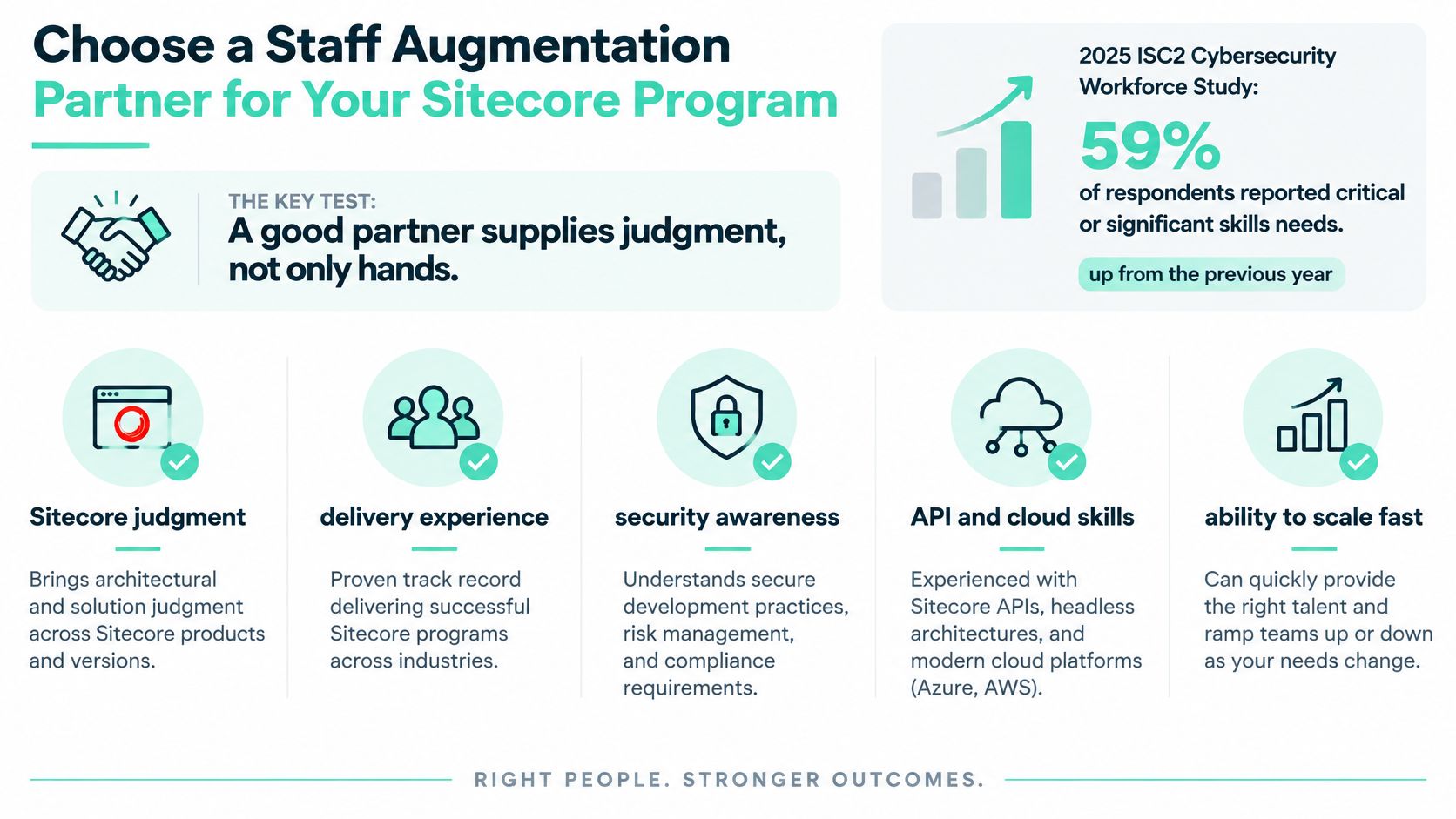
A good partner supplies judgment, not only hands. In the 2025 ISC2 Cybersecurity Workforce Study, 59% of respondents reported critical or significant skills needs, up from 44% in 2024, with AI the leading need at 41%. That's cybersecurity evidence, not a Sitecore staffing statistic, but it reinforces the distinction between available people and scarce expertise.
Score evidence rather than credentials
Use a consistent assessment:
- Platform experience: Require relevant Sitecore, AEM or SharePoint delivery examples.
- Decision quality: Test whether candidates challenge an unsuitable requirement and explain alternatives.
- Communication: Review a technical explanation and documentation sample.
- Mentoring: Observe how they teach an internal engineer.
- Outcomes: Check references for evidence of reliable delivery and retained client capability.
- Commercial accountability: Confirm decision rights, acceptance criteria, paired working, succession coverage and an exit plan.
Certifications and CV keywords are the weakest signal. A specialist who can explain why a proposed Stream workflow needs different governance is more useful than someone who lists every product without distinguishing their responsibilities.
For broader procurement comparison, Virtustant's staff augmentation services offer another service model to assess against these criteria. Use our Sitecore development agency evaluation guidance when examining platform-specific delivery evidence.
Kogifi should undergo the same scoring, reference checks and trial as every shortlisted vendor. We provide dedicated Sitecore teams and team extension for companies in the EU, UK and US, including consultancy and augmentation for short-term projects or resource gaps.
Shortlist three vendors and run the same two-week paid trial with each on equivalent, bounded backlog items. Score the implementation, reasoning and handover before signing a longer commitment.
Kogifi offers dedicated Sitecore teams, consultancy and staff augmentation for short-term projects and specialist resource gaps, alongside SharePoint development and support. Visit Kogifi to discuss your platform backlog and define the expertise, internal ownership and capability-transfer deliverables your engagement needs.