



GDPR enforcement is no longer a theoretical risk sitting in a legal register. Since the regulation took effect on 25 May 2018, the CMS GDPR Enforcement Tracker had recorded 2,685 fines with complete information by March 2026, or 3,062 cases when entries with limited details were included, representing roughly €6.11 billion in documented penalties. The broader tracker later reported more than 3,215 enforcement actions and €6.31 billion in total fines by September 2026. CMS GDPR Enforcement Tracker
For enterprise websites, the practical lesson is direct. A consent banner is only one control in a larger system that includes lawful basis decisions, privacy notices, processor contracts, data subject rights, security monitoring, breach response, and evidence that the platform honors user choices. This roadmap focuses on the implementation details that matter across Sitecore XM Cloud, Adobe Experience Manager, and SharePoint Online, with Sitecore as the primary reference point.
Table of Contents
Why GDPR Compliance for Websites Is an Ongoing Program, Not a One-Time Project
The common assumption is that a website becomes compliant when the privacy notice is published and the cookie banner goes live. That assumption fails because the website keeps changing after launch. Marketing teams add tags, developers release components, vendors update scripts, and customer journeys move between the browser, APIs, CDPs, CRMs, and marketing automation platforms.
The enforcement record shows why this matters. The documented fine total rose from about €4.48 billion across 2,086 fines in March 2024 to roughly €6.11 billion across 2,685 fines in March 2026, an increase of approximately €1.63 billion. CMS enforcement figures This isn't a launch-day compliance problem. It's an operating model problem.

Separate the legal baseline from the delivery machinery
Your legal baseline should identify the purpose of processing, candidate lawful basis, transparency obligations, retention logic, international transfer position, and rights available to the individual. The delivery machinery must then make those decisions enforceable in code and reviewable through evidence.
That means every release pipeline needs privacy checks, not just functional and accessibility checks. A new Sitecore rendering that embeds a marketing script can create a compliance issue even if the component passes visual QA. A new SharePoint Framework extension can create the same issue if it loads a third-party service before the visitor's preference state is resolved.
Architectural rule: If compliance depends on a developer remembering a manual step, the control will eventually fail.
Consent withdrawals, vendor churn, and CMS releases make quarterly reviews too slow for large estates. Teams that stop after deploying a banner often discover later that a tag manager, CDP, or marketing automation workflow still processes opted-out sessions. Practical reference material, including SupportGPT GDPR compliance, can help teams maintain the operational side of the program, but the controls still need clear ownership inside engineering, marketing, security, and legal.
The durable answer is a documented content governance framework tied to deployment, vendor onboarding, rights requests, and incident response. GDPR compliance for websites becomes defensible when the organization can show not only what it intended to do, but also what the production estate did.
Mapping Personal Data and Auditing Your Estate Before Any Tooling
A consent platform cannot fix an incomplete data inventory. Start by locating every place where personal data enters, moves through, or leaves the web estate, including flows that never touch the browser.
Build the system inventory first
List every public domain, subdomain, campaign microsite, regional property, authenticated portal, headless API, shared tenant, and embedded application. Include environments owned by marketing teams outside the core CMS. Sitecore XM Cloud's decoupled architecture can deliver content through several front ends, each with distinct rendering and tracking behavior.
Then document the data surfaces:
- Forms: Capture fields, validation rules, submission handlers, storage destinations, and notification recipients.
- Identity events: Record account creation, sign-in, xConnect contact creation, Azure AD authentication, and identity resolution.
- Behavioral tooling: Include analytics, session replay, A/B testing, personalization, chat, search, and recommendation services.
- Embedded services: Inventory social pixels, video players, maps, payment widgets, fonts, CDNs, and support tools.
- Back-end paths: Trace webhook payloads, server-side events, CRM synchronization, queue messages, and scheduled exports.
Server-side paths deserve the closest inspection. A browser scan will not reveal a webhook sending form data to a CRM or a scheduled job copying contact attributes into a marketing warehouse. Each flow needs a documented purpose, lawful basis candidate, retention position, recipient record, and transfer assessment. Apply the same method to AEM and SharePoint Online, where extensions, connectors, APIs, and external services can process data outside the page layer.
A focused web scraping legal checklist is useful when external data collection or automated acquisition is part of the wider digital program. It does not replace an inventory of first-party forms, identity events, or processor integrations.
Produce evidence legal counsel can review
For every processing activity, create a Record of Processing Activities row and attach a data-flow diagram for the relevant customer journey. A vendor-only spreadsheet is insufficient. Counsel needs to see what the estate collects, why it collects it, where the data goes, who receives it, how long it remains, and how a rights request or consent withdrawal changes the flow.
| Inventory Field | Example Entry | Source |
|---|---|---|
| Processing purpose | Product enquiry and follow-up | Form specification |
| Data category | Contact details and enquiry content | Form schema |
| Lawful basis candidate | Consent or contractual necessity, pending review | Privacy assessment |
| Recipient | CRM, email service, support queue | Integration map |
| Retention | Approved business retention rule | Records schedule |
| Transfer route | Hosting, processor, or regional service path | Vendor and architecture review |
| Control evidence | Consent log, DPA, deletion confirmation | Governance repository |
Use a structured website audit checklist to review visible pages and the integrations behind them. Record processor contracts beside the relevant data flow, not in a separate legal folder. Link each flow to its consent record, retention rule, deletion procedure, and breach runbook. That evidence gives engineering, privacy, and legal one operational view of what the production estate does.
Designing Cookie Banners and Consent Flows That Actually Withdraw
A compliant consent interface gives users a genuine choice and then enforces that choice everywhere the data moves. “Accept” can't be prominent while “Reject” is hidden behind extra clicks, vague wording, or a low-contrast link. Categories can't be preselected, and a single blanket preference shouldn't authorize unrelated purposes.
The rejection path must have the same practical weight as acceptance. Present the primary options together, explain purposes in plain language, and let users select separate states for analytics, personalization, advertising, and other non-essential processing.

Treat withdrawal as a first-class journey
Article 7(3) requires withdrawal to be as easy as giving consent. In practice, place a persistent preference control within easy reach on every page, including campaign pages, authenticated routes, and microsites. A footer link that disappears on a landing page isn't a reliable withdrawal mechanism.
Your preference service should issue a consent state that downstream systems can consume consistently. Store at least:
- Timestamp: When the choice was made.
- Policy version: Which notice and interface version applied.
- Purpose states: The categories accepted, rejected, or withdrawn.
- Evidence text: The exact wording and options presented.
- Scope: The site, region, account, or device context to which the choice applies.
CNIL recommends retaining consent choices for a maximum of 13 months, according to the cited cookie compliance guide. Cookie consent requirements and retention guidance Build re-prompting into the consent service rather than relying on a manual calendar reminder. The service should also distinguish between a refusal, an active withdrawal, and an expired preference.
Strictly necessary cookies can qualify for an exemption when they're essential to a service explicitly requested by the user. Examples include session authentication, shopping cart, load-balancing, and security cookies. Language preference alone shouldn't become an excuse to activate analytics or advertising.
Finally, test the entire path. Reject each category, reload the page, move to authenticated and unauthenticated routes, submit a form, trigger personalization, and inspect server-side calls. Then withdraw previously granted consent and confirm that browser tags, API requests, xConnect events, CDP writes, and marketing enrollments stop or switch to the approved state. A consent management platform implementation guide is useful only if the platform is integrated into these runtime tests.
Implementing Consent Controls in Sitecore XM Cloud, AEM, and SharePoint Online
Consent must travel through rendering, identity, analytics, personalization, forms, APIs, and automation. Treating it as a banner setting leaves gaps between the browser, server, and connected processors. Each platform needs a defined enforcement point and an evidence trail for every state change.
Sitecore XM Cloud is a cloud-native, hybrid headless CMS with content separated from the presentation layer. In a Next.js implementation, place the consent gate in the application shell and tag-loading strategy, not only in a CMS component. Sitecore CDP or Connect should store consent as a first-class identity attribute. Server-side personalization must check that state before sending Experience Analytics events, enrolling contacts in marketing automation, or invoking Forms submit handlers that pass data to processors. Keep deployment records showing which controls were released and when.
AEM needs the same discipline across the dispatcher, client libraries, Adobe Experience Platform, and third-party tag templates. The dispatcher or edge layer should block non-essential assets until consent resolves. Adobe Target, analytics requests, and other integrations should receive an explicit approved state. Page load alone is not evidence of consent. Test client-side and server-side paths separately, because a blocked browser tag does not prove that an API or edge integration stopped processing.
SharePoint Online has a different boundary. Extranet and partner sites may sit outside the main web consent fabric, while SPFx extensions and Power Automate flows create separate processing paths. Microsoft describes SharePoint Online as a Microsoft 365 cloud service, with Microsoft operating and patching the service-side infrastructure. SharePoint Online service responsibility context That reduces some infrastructure work, but your team remains responsible for forms, extensions, permissions, retention, and connected processors. Document those ownership boundaries in the processor register and breach runbook.
| Capability | Sitecore XM Cloud | Adobe Experience Manager | SharePoint Online |
|---|---|---|---|
| Consent entry point | Next.js shell or shared DXP component | Site header, client library, or edge-controlled experience layer | SPFx extension or shared hub experience |
| Identity surface | xConnect contacts, CDP, Connect, form events | ECID, Adobe Experience Platform, Target and analytics requests | Azure AD sign-ins, profiles, forms, Power Platform |
| Enforcement point | Tag loader, server-side personalization, submit handlers | Dispatcher, client libraries, edge logic, platform extensions | SPFx controls, conditional flows, connector policies |
| Main failure mode | Headless front ends bypass shared controls | Dispatcher and tag templates disagree | Hub, extranet, and automation estates diverge |
| Evidence | Consent event log and release records | Consent state, request logs, deployment evidence | Preference records, flow history, extension versions |
Forms often create the first durable personal-data record. Before production, inspect submission behavior, processor relationships, consent fields, retention settings, withdrawal handling, and deletion hooks. A comparison of tools better than Gravity Forms for forms can inform selection, but the deciding test is whether the component exposes these controls and produces usable evidence. Revoke consent after submission and confirm downstream marketing, analytics, and automation actions stop or follow the approved state.
Operationalizing Data Subject Rights Across Enterprise Web Properties
A data subject request is a distributed transaction, not a website ticket. The web team may receive it, but fulfillment usually spans the CMS, CRM, CDP, marketing platform, analytics warehouse, identity provider, and support systems. Assign one owner who can coordinate those systems and enforce the deadline.
The operating model must cover access, rectification, erasure, restriction, portability, objection, and objection to solely automated decision-making or profiling. Give consent withdrawal a separate path. Stopping future consent-based processing does not automatically locate or delete historical records.
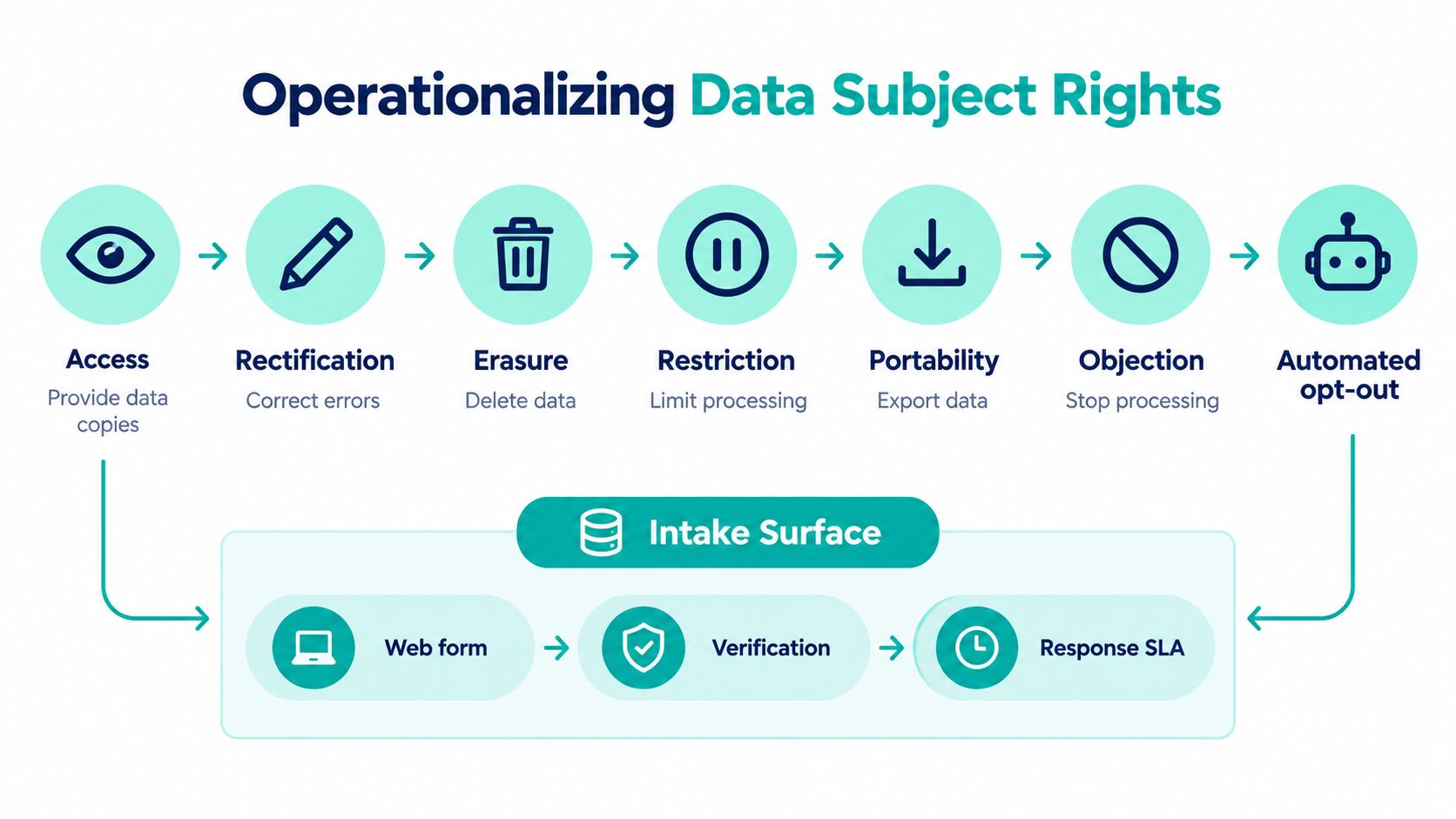
Design the intake and verification workflow
Provide a privacy portal or authenticated account route. Public forms are acceptable when the organization verifies identity before releasing or changing information. Keep verification proportionate, document the method and result, and protect the process against account takeover and social engineering.
Create a case record for every request with an owner, deadline, systems list, scope, and evidence status. The GDPR baseline is generally one month, with a possible further month for complex requests. Website rights workflow guidance Set an internal target of seven business days for the first response. That gives teams time to verify identity, clarify scope, and coordinate back-end work without waiting until the legal deadline is close.
Handle platform-specific persistence
Sitecore xDB or xConnect contacts can remain after a visible web profile changes. AEM user profiles stored in CRXDE require explicit review. Deleting an account does not prove that every related record is gone. In SharePoint Online, check profiles, list items, document versions, search indexes, and Power Automate destinations.
Marketing suppression lists create a separate control case. Erasure can remove a contact from active marketing records, while suppression may need to remain so the person is not unlawfully re-added. Record that distinction and identify every system retaining the minimal control record.
Build the evidence package from:
- Request timing: Intake, verification, processing, and closure timestamps.
- Identity evidence: The verification method and result.
- System confirmations: Responses from each relevant platform and processor.
- Exceptions: Legal retention, suppression, backup, or technical limitations.
- Final response: The approved communication and sign-off.
Turn the visual workflow into a runbook with named owners, platform integrations, escalation rules, and completion evidence. A diagram in a privacy presentation does not fulfill a request. A tested workflow across Sitecore, AEM, SharePoint Online, and connected processors does.
Processor Contracts, Security Controls, and Breach Response as One Chain
A processor contract has value only when it matches the data flow engineering runs. Security controls must protect the records listed in that flow. Breach response must identify which processors hold those records and provide a tested escalation path to reach them.
Create a controller-processor data-flow register before signing or renewing a Data Processing Agreement. For each processor, record the purpose, data categories, systems touched, recipient locations, transfer route, retention, security measures, subprocessors, and deletion behavior. Apply the register to Sitecore XM Cloud, AEM, SharePoint Online, CRM, analytics, and connected marketing services. This exposes gaps that a contract review alone will miss.
Make the contract enforce the architecture
Article 28 terms should cover confidentiality, documented instructions, assistance with rights requests, breach cooperation, deletion or return, subprocessor controls, and audit rights. Standard contractual clauses may apply to international transfers. Legal counsel must select the mechanism for the actual route and processing context.
Map each obligation to an operational control:
- Transport protection: Require TLS between browsers, APIs, CMS services, and processors.
- Storage protection: Use encryption at rest and pseudonymization or redaction where full identity is unnecessary.
- Access governance: Apply least-privilege roles across Sitecore, AEM, SharePoint, CRM, and analytics environments.
- Monitoring evidence: Retain access and processing logs under an approved governance policy.
- Change oversight: Review vendor releases and subprocessor changes for scope or data-collection drift.
A vendor notification belongs in the privacy and security workflow, not a procurement mailbox. It should update the data-flow register and trigger a decision about the DPA, DPIA, consent text, or implementation. In Sitecore XM Cloud and AEM, review tag, personalization, and identity integrations. In SharePoint Online, review connectors, Power Automate flows, and external sharing paths.
Run the breach clock from awareness
The breach runbook starts when the organization becomes aware of a personal-data breach, even while technical details remain incomplete. Detection may come from a SIEM alert, vendor notification, developer, employee escalation, or client-side script monitoring.
The response team should triage the affected data, individuals, systems, processor relationships, and likely risk. It must prepare supervisory-authority notification within the applicable 72-hour requirement, with user communications where the risk threshold requires them.
A breach post-mortem is the next input to the processor review and data-flow register.
Document detection, decisions, notifications, containment, recovery, and follow-up actions. Store the evidence with the organization's incident management best practices, so privacy response remains connected to the wider technology operation. Test the runbook with processors and platform owners, then record failures as changes to contracts, controls, and ownership.
Enterprise Checklist and a 90-Day Monitoring Cadence
An enterprise GDPR program needs control states that a program lead can verify. “Policy drafted” isn't a control state. “Consent withdrawal tested against production tag calls and logged with evidence” is.
Establish the ten control states
Use this checklist as the release gate for a new property, migration, or major integration:
- ROPA documented: Every relevant processing activity has an owner, purpose, data category, recipient, retention position, and transfer route.
- DPIA assessed: High-risk forms, profiling, monitoring, and identity flows have a documented assessment where required.
- Equal-choice banner deployed: Accept and reject options carry equivalent visual and interaction weight.
- Consent evidence recorded: The system stores timestamp, policy version, purpose states, and the exact presented text.
- Withdrawal reachable: Users can reopen preferences from every relevant route without hunting through legal pages.
- Processor clauses complete: Article 28 terms, subprocessor handling, security commitments, and audit rights are recorded.
- Rights workflows operational: All seven rights have intake, verification, routing, ownership, and response procedures.
- Breach runbook rehearsed: The team has practiced detection, triage, notification, communication, and post-mortem steps.
- Security controls verified: Encryption, least-privilege access, monitoring, and access reviews have current evidence.
- Accountability assigned: A DPO or accountable privacy owner is named, with engineering and business deputies.
Use a 90-day cadence
Days 0 to 30 should establish the baseline. Crawl cookies, tags, forms, APIs, and key user journeys. Compare production behavior with the privacy notice and consent categories. In Sitecore XM Cloud, test every front end consuming the headless content layer. In SharePoint Online, include hub sites, extensions, partner areas, forms, and Power Automate connectors.
Days 31 to 60 should test the supply chain. Review processor contracts, subprocessor changes, transfer records, and vendor data-collection behavior. Sample consent logs and verify that withdrawal states propagate into analytics, personalization, marketing automation, and form processing.
Days 61 to 90 should test response. Run a tabletop exercise for a rights request, then simulate a breach involving a website processor or client-side script. Finish with a written readiness scorecard listing failed controls, owners, due dates, and evidence links.
Store evidence in SharePoint with version history, access controls, and clear ownership. Schedule recurring automated crawls rather than relying on an annual audit. For enterprise estates, that monitoring cadence is what turns GDPR compliance for websites from a document set into a working platform capability.
Kogifi designs, modernizes, and supports enterprise web platforms across Sitecore XM Cloud, Adobe Experience Manager, and SharePoint Online, including consent controls, data flows, integrations, and incident-ready governance. If your estate needs an architecture review or a practical compliance implementation plan, visit Kogifi to discuss the next release safely.