


Your team probably has the same problem I see in large DXP estates all the time. Content exists everywhere, but nobody fully trusts what they find. Marketing is hunting for the latest approved hero image. Regional teams are reusing copy from old campaign pages because they can't see the current version. IT is asked to push updates across web, app, email, search, and partner portals, while governance gets tighter and personalization gets more demanding.
That pressure compounds fast in enterprises running multiple brands, markets, and languages. The issue usually isn't a lack of content. It's a lack of structure, ownership, and delivery discipline. Pages are still treated as the unit of work when the business needs reusable content objects, shared taxonomies, and clear workflow controls. That's why content operations slow down even when the stack looks modern on paper.
A content hub solves that problem when it's implemented as a strategic operating model, not just another repository. It becomes the place where teams manage content as reusable, governed, connected assets that can feed every channel consistently. In practice, that also means stronger governance, cleaner reuse, and a more realistic foundation for AI and personalization. If your organization is still relying on scattered CMS content, disconnected DAM folders, and manual approvals, a solid content governance framework is usually the first signal that a hub approach is overdue.
Table of Contents
- Introduction From Content Chaos to Strategic Asset
- A hub is not just a prettier blog
- Content Hub vs. Traditional Systems
- Why this matters to marketers and architects
- Why composable architecture changes the conversation
- How the hub becomes the system that other services trust
- Think in content atoms, not finished pages
- Metadata and taxonomy do the heavy lifting
- Workflow matters as much as structure
- Sitecore Content Hub as the operational core
- Where Sitecore AI changes the model
- Why this works better than isolated AI tools
Introduction From Content Chaos to Strategic Asset
Most enterprises don't set out to create content chaos. It happens gradually. One business unit launches a microsite. Another team stores campaign assets in a DAM with different naming conventions. Local markets adapt copy offline because turnaround from central teams is too slow. After a while, nobody can answer basic questions with confidence. Which version is approved, which channel owns it, and which audience should see it?
That's the moment when “what is a content hub” stops being a definitional question and becomes an architectural one. A hub isn't just a content destination for external readers. In enterprise delivery, it's the operational center for how content is structured, governed, reused, and distributed. It turns content from a publishing byproduct into a managed business asset.
The practical shift is important. Instead of building pages from scratch for every campaign, teams assemble experiences from trusted components. Instead of moving files between systems and emails, they work from a shared model. Instead of relying on tribal knowledge, they depend on metadata, workflow, and permissions.
A mature hub doesn't just store content. It defines how content moves from idea to approval to omnichannel delivery.
That's why content hubs matter so much in Sitecore programs. Once you move into headless delivery, personalization, and AI-assisted production, the underlying content model becomes more important than the page template. If that model is weak, everything downstream becomes harder. If it's strong, teams can scale without losing control.
Decoding the Modern Content Hub
A modern content hub is a centralized platform for managing content across its full lifecycle. That includes creation, review, organization, reuse, delivery, retirement, and archival. The key distinction is that the hub manages content as modular assets with context, not as one-off pages trapped inside a website tree.
A hub is not just a prettier blog
A lot of teams first hear the term in SEO conversations. That's fair, because content hubs perform well when they're built around topic clusters and pillar pages. According to Terakeet's content hub analysis, content hubs can drive up to 30% more search traffic and generate 50% more backlinks than traditional blogs by organizing content around specific topic clusters rather than chronological posts.
That SEO value is real, but it's only one layer. In enterprise delivery, the bigger gain is operational. The hub becomes a digital catalog for all approved content types: articles, imagery, product messaging, campaign snippets, legal disclaimers, videos, downloadable assets, and taxonomy-enriched fragments that can appear in many channels. If you're exploring delivery patterns beyond page-centric publishing, a practical next step is understanding content as a service, because that operating model is closely tied to how successful hubs behave.
For founders and lean teams thinking about how distribution fits after creation, this guide to MicroPoster for founders is also useful because it highlights a different but related challenge: getting structured content to the right channels consistently.
Content Hub vs. Traditional Systems
The easiest way to explain a hub to non-technical stakeholders is to compare it to a modern library catalog. The catalog tells you what exists, how it relates to other materials, who can access it, and where it can be used. Disconnected systems are just shelves in separate rooms.
| System | Primary Purpose | Content Focus | Key Limitation |
|---|---|---|---|
| Content Hub | Centralize, govern, relate, and distribute reusable content assets | Structured, modular, channel-agnostic content plus connected media and metadata | Requires strong information architecture and governance to work well |
| CMS | Publish and manage website pages | Page layouts, templates, web content | Content often stays tied to page structures and a single channel |
| DAM | Store and manage media assets | Images, video, documents, brand files | Usually doesn't model editorial relationships or delivery logic well |
| PIM | Manage product information | Product attributes, specifications, catalog data | Focuses on product records, not broader campaign and experience content |
Why this matters to marketers and architects
The trade-off is straightforward. Traditional systems are simpler when the requirement is narrow. If all you need is page publishing, a CMS can be enough. If all you need is asset storage, a DAM may be enough. But once content has to move across regions, channels, workflows, and personalization layers, isolated systems create friction.
Practical rule: If teams are copying and pasting approved content between systems, they don't have a content hub. They have a manual integration pattern.
That's why the most effective implementations don't treat the hub as a cosmetic content center. They treat it as the structure behind distribution, governance, and reuse.
The Content Hub's Role in a Composable DXP
The monolithic CMS was built for a time when the website was the primary digital product. That's no longer the operating reality for enterprise brands. Today, content needs to reach websites, apps, commerce flows, search experiences, customer portals, and internal tools. That's why composable DXP architecture has become the default direction for many modernization programs.
Why composable architecture changes the conversation
In a composable model, organizations assemble a stack of specialized services connected through APIs. Search is one service. Personalization is another. Commerce, CDP, analytics, front-end rendering, and workflow can all be decoupled. This gives teams more flexibility, but it also creates a new dependency. Every service needs trusted content in a usable format.
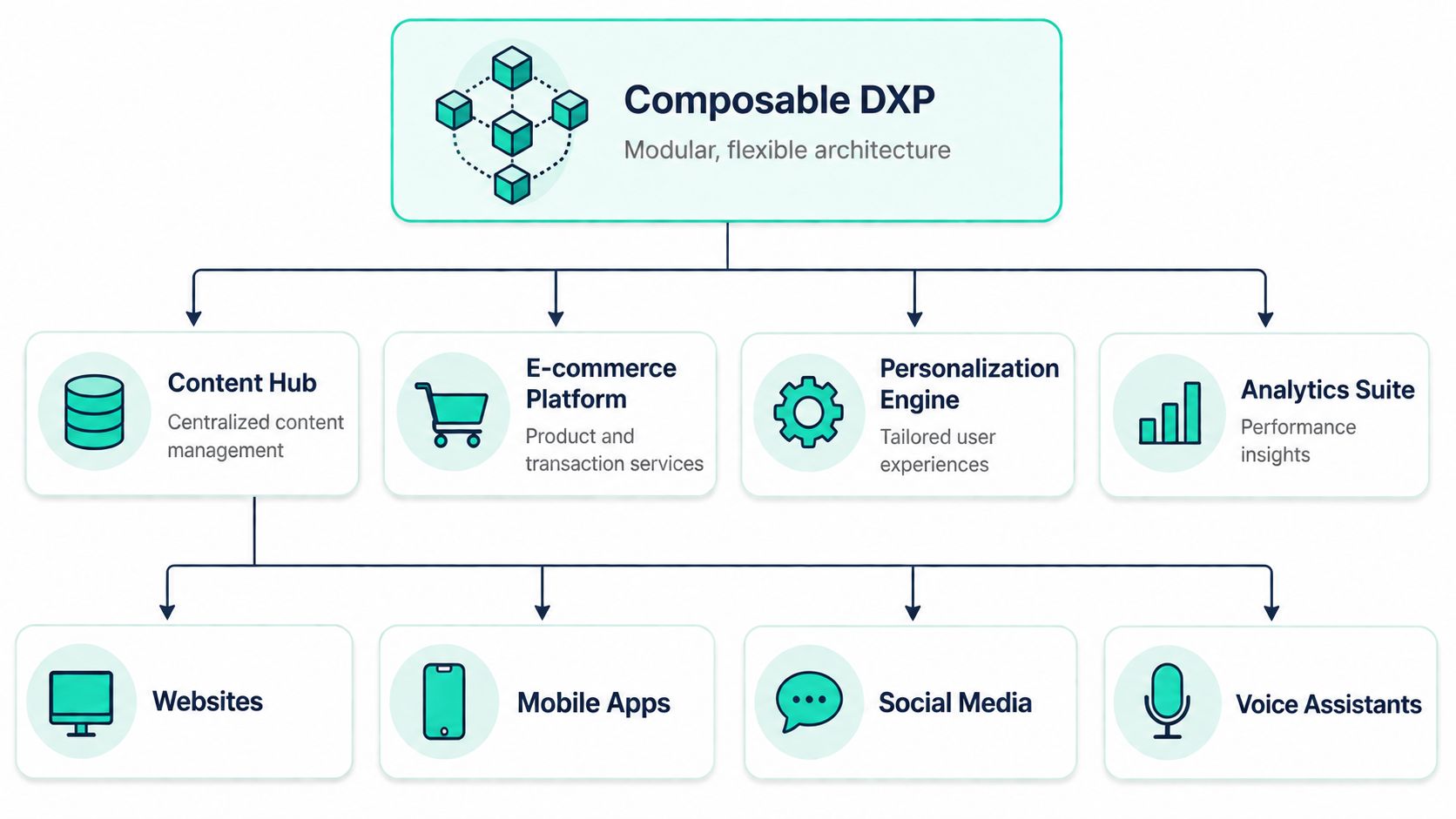
That's where the hub becomes central. A Contentstack guide to unified content hubs describes a content hub as a modular, metadata-enriched architecture that unifies siloed digital assets into a single cloud-native platform, reducing content discovery latency by 40–60% and accelerating campaign deployment cycles through reusable omnichannel component libraries.
The architecture implication is bigger than the number. When content is modeled once and reused many times, the organization stops rebuilding the same message in multiple systems. That reduces duplication and makes future channel expansion far less risky.
How the hub becomes the system that other services trust
In a Sitecore composable stack, this pattern is easy to see. Sitecore Content Hub can hold structured content and assets. XM Cloud can handle presentation and delivery. Search, CDP, and Personalize can consume content and audience context. AI services can assist with adaptation and orchestration. None of that works well if the content foundation is inconsistent.
A strong hub supports composability in three practical ways:
- It separates content from presentation. Authors create approved content objects without hard-coding them into a page.
- It standardizes reuse. The same asset or message can support web, mobile, email, kiosk, and partner experiences.
- It de-risks platform change. If your front end changes later, your content model still holds.
Teams often think composable means buying more tools. In practice, it means defining one trusted content core that the rest of the stack can consume.
This is also where many projects fail. They adopt headless delivery but keep page-centric authoring models. The result is API-based complexity without actual reuse. A content hub fixes that by putting content structure before channel rendering.
Core Components and Data Modeling
A content hub only works when the underlying model is disciplined. The software matters, but the information architecture matters more. If the content types are vague, metadata is inconsistent, and workflows are optional, the hub turns into another storage problem.

Think in content atoms, not finished pages
The most reliable approach is to model atomic content. That means breaking content into the smallest reusable pieces that still have business meaning. A headline. A summary. A CTA label. A product claim. A disclaimer. A teaser image. A regional variation. A category tag.
When teams skip this step, they usually store whole pages or large body fields and call it structured content. That doesn't scale. Reuse becomes manual, governance gets blurry, and personalization becomes expensive because every variation requires page-level editing.
A useful design test is simple:
- Can this element be reused somewhere else? If yes, it probably deserves its own field or object.
- Does this content vary by market, audience, or channel? If yes, model that variation intentionally.
- Does a workflow or approval rule apply to it? If yes, don't bury it inside a generic rich text field.
Metadata and taxonomy do the heavy lifting
Metadata is what makes the hub searchable, governable, and automatable. Taxonomy is what makes it intelligible at scale. Without those layers, content might still exist centrally, but it won't be discoverable or trustworthy.
That's why teams should define metadata around business use, not just file properties. Useful fields often include audience, product line, region, lifecycle status, campaign, language, owner, compliance category, accessibility state, and usage rights. The goal isn't to create dozens of fields for the sake of it. The goal is to make content retrievable and enforceable.
For organizations that are also rationalizing asset libraries, this perspective aligns closely with modern digital asset management software selection, because the dividing line between DAM and hub often comes down to how much structure and cross-channel context the business needs.
A quick walkthrough helps here:
Workflow matters as much as structure
Even a well-modeled hub fails if governance is weak. Authors need clear states such as draft, review, approved, localized, expired, and archived. Legal and brand teams need controlled approval points. Delivery systems need confidence that they are consuming only approved variants.
Good data modeling reduces editorial effort later. Bad data modeling creates endless exceptions, manual checks, and one-off fixes.
That's why the best hubs are built jointly by content strategists, solution architects, and business owners. If any one of those groups is missing, the model usually drifts toward either technical purity with low adoption or author convenience with low reuse.
The AI-Powered Hub with Sitecore Experience Cloud
The conversation gets more interesting when the content hub becomes the operating core of an AI-enabled DXP. In this context, Sitecore particularly stands out. In mature implementations, the hub isn't just a place to store and organize assets. It becomes the source that feeds generation, variation, delivery, and personalization across the stack.
Sitecore Content Hub as the operational core
In the Sitecore ecosystem, Content Hub is the natural place to anchor governed content operations. It supports the discipline that enterprise teams need: structured assets, metadata, workflow, and controlled reuse across brands and regions. That's already valuable on its own, especially when paired with XM Cloud for headless presentation and multi-site delivery.
The bigger strategic value appears when Content Hub is connected to Sitecore's wider portfolio. Search can expose the right material. CDP can inform audience context. Personalize can use behavior signals to influence what gets delivered. The hub is no longer a repository. It becomes the content layer the DXP depends on.
If you want a practical view of how teams streamline approvals, reuse, and publishing in that model, this article on streamlining workflows with Sitecore Content Hub is a helpful complement.
Where Sitecore AI changes the model
Sitecore's current direction makes the AI piece explicit. According to the SitecoreAI announcement, SitecoreAI is a composable SaaS platform featuring Agentic Studio and ready-made AI agents, fully integrated into XM Cloud, Content Hub, Search, CDP, and Personalize to provide a unified, AI-powered digital experience platform built beyond the website.
That matters because most organizations don't need isolated AI drafting tools. They need AI that operates within brand rules, connected data, and delivery workflows. Sitecore's broader AI layer also includes capabilities described by CMSWire's review of Sitecore Stream: brand-aware AI, AI copilots and agents, and agentic workflows that balance automation with human input.
For marketing leaders, that means faster adaptation without surrendering control. For IT leaders, it means AI operating inside an enterprise platform model rather than through disconnected point solutions.
Why this works better than isolated AI tools
A standalone generative tool can produce copy. It usually can't tell whether the claim is approved for a market, whether the image is licensed for that region, whether the CTA aligns to a current journey, or whether the output should be sent to web, app, or email first. A hub-centric AI model can support that discipline because the content, metadata, workflow, and channel rules already exist.
Sitecore Personalize strengthens that further. As described in Altudo's guide to Sitecore, Sitecore Personalize analyzes user behavior and real-time interactions to deliver personalized content and recommendations through context-aware delivery at scale. That makes the hub more than a storage layer. It becomes a live supply chain for experience orchestration.
A broader industry signal points in the same direction. The Optimizely overview of content hubs notes an emerging model where hubs act as dynamic, AI-driven composable assets connected to CRM and omnichannel systems. It cites HubSpot's 2026 rollout, where 78% of B2B teams use AI to remix content across channels and connect it directly to CRM data. Since that figure is tied to a future-dated rollout, it should be read as a projection rather than a settled baseline.
For teams trying to separate hype from useful practice, these AI-powered content marketing insights are worth reviewing because they frame the operational question correctly: AI is most valuable when it's tied to workflow, brand context, and measurable delivery outcomes.
The strongest AI content programs don't start with prompts. They start with a governed content model that AI can safely use.
Unlocking Key Business Benefits
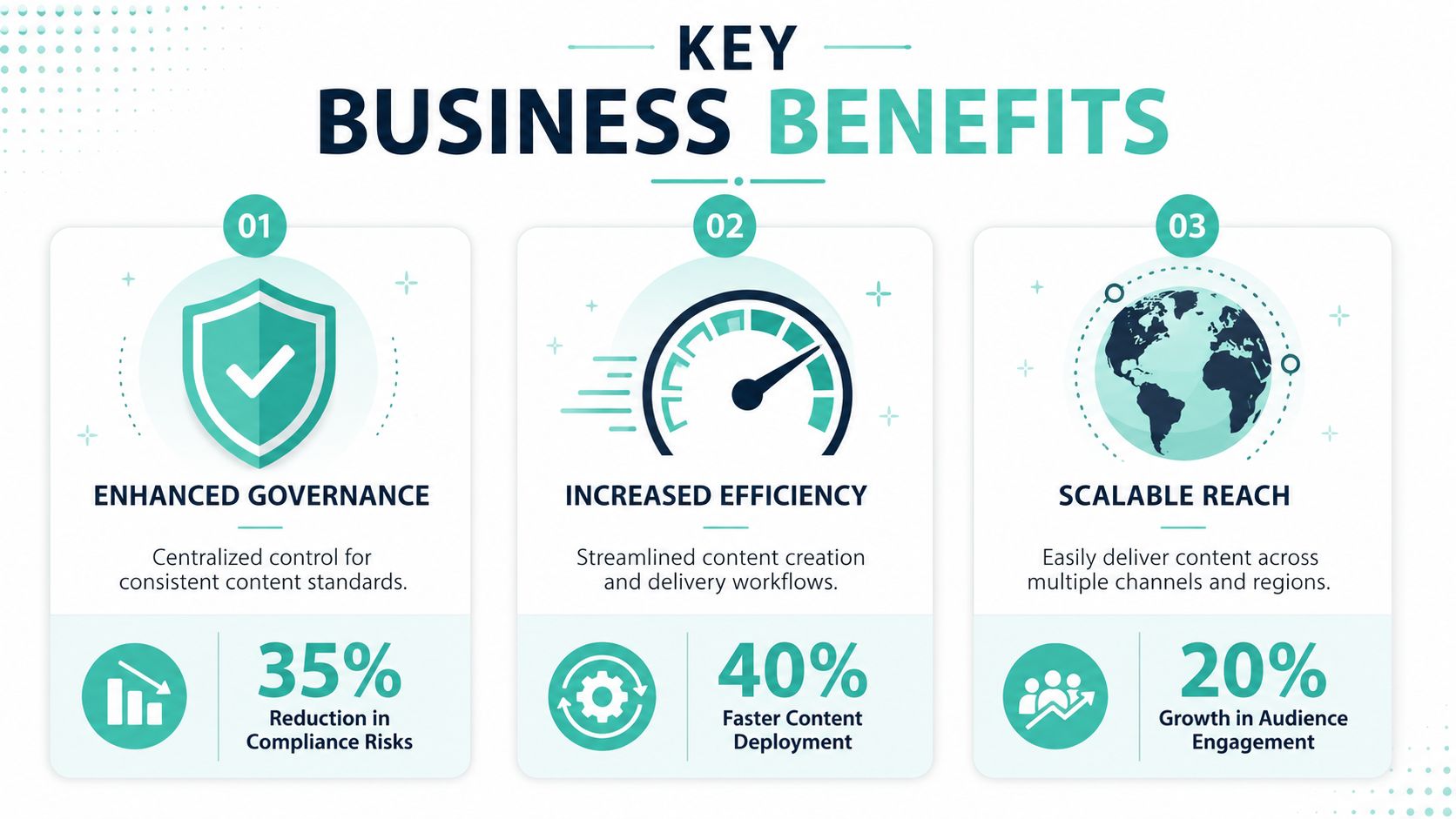
The business case for a content hub is stronger when you stop describing features and start looking at operating outcomes. The value usually shows up in four places: governance, speed, reuse, and experience consistency. Those gains matter to both marketing and IT because they affect release quality as much as campaign throughput.
Governance, speed, and reuse
Governance is the first win. When teams work from a single approved content source, brand inconsistency drops because authors are selecting governed assets rather than recreating them. Legal and compliance reviews also become more manageable because approval can attach to reusable objects instead of being repeated across every page variation.
Speed is the second win. According to Kontent.ai's analysis of content hub value, hubs that provide a source of truth enable global delivery centers to achieve a 90% reduction in time-to-market for new brand rollouts through standardized architectures and automated lifecycles. That result is especially relevant for enterprise programs with multiple regions, business units, or franchise-style digital operations.
Reuse is the third win, and it's often underestimated. A hub lets teams create once, adapt many times, and retire centrally. That changes content economics. Instead of funding repeated production cycles for similar experiences, the organization invests in better structure and shared components.
Here's where leaders usually see the difference:
- Global brand teams gain tighter control over what local markets can adapt and what must remain fixed.
- Campaign managers can launch faster because approved modules already exist.
- Platform owners reduce duplication across business units and channel stacks.
- Accessibility and localization teams get more reliable inputs because reusable content objects can carry status and language context.
Personalization and employee experience
A hub also improves omnichannel personalization, but only when content is modeled for it. If every experience still depends on bespoke page editing, personalization remains expensive and shallow. With reusable assets and structured fields, teams can adapt messages for different audiences without rebuilding entire pages.
That same strategy also applies internally. For employee experience, many organizations use SharePoint Online as a content hub for intranets, policy libraries, knowledge centers, and internal campaign content. The principle is the same even though the platform emphasis changes. Centralized ownership, metadata, permissions, and structured navigation reduce search friction and make internal communications easier to trust. In Microsoft 365 estates, that often pairs well with SPFx components, Power Platform automation, and governed document lifecycles.
Internal hubs fail for the same reason external hubs fail. Teams publish into them, but nobody invests in taxonomy, ownership, or lifecycle rules.
That's why the business outcome isn't only “better content management.” It's a cleaner operating model for digital experience delivery across customer-facing and employee-facing channels.
Your Path to Implementation with Kogifi
Most organizations don't need to boil the ocean to start. They need a phased implementation path that fixes the operating model first and then aligns the platform to it. The best programs begin with clarity about what content exists, who owns it, and where reuse is realistically possible.
Start with operating reality, not platform demos
Begin with a content audit. Identify duplicate assets, page-bound content that should become reusable, missing metadata, weak approval paths, and channels that depend on manual copying. That gives you the baseline for deciding whether the hub is primarily solving governance, omnichannel delivery, asset reuse, or all three.
Then define the content model and taxonomy before migration starts. Many projects encounter difficulties at this stage. Teams rush into implementation, import old mess into a new platform, and end up with a cleaner interface around the same structural problems. For Sitecore programs, the decision between headless and coupled delivery should also be made at this stage, based on channel strategy, not preference alone.
The implementation path is easier to visualize in stages:
Build for scale, then train for adoption
After the model is defined, choose the platform pattern that fits the estate. In Sitecore, that often means connecting Content Hub, XM Cloud, Search, CDP, and Personalize in a composable architecture. In employee experience scenarios, SharePoint Online may serve as the hub for internal knowledge, forms, announcements, and workflow-driven publishing. In both cases, multilingual requirements, accessibility expectations, permissions, and lifecycle controls need to be designed in from the start.
Migration should be selective. Don't move every legacy asset just because it exists. Move what has value, map it to the new model, and archive the rest. Then invest in team enablement. Authors need training on modular thinking. Reviewers need confidence in workflow. Administrators need governance rules they can sustain.
A practical rollout usually follows this sequence:
- Audit what you have. Find duplication, risk, and high-value content.
- Define the target model. Establish content types, metadata, taxonomy, and workflows.
- Select the right architecture. Match the hub pattern to Sitecore, SharePoint, or a broader composable estate.
- Integrate and migrate carefully. Prioritize approved, useful, reusable content.
- Train teams on the new behavior. Adoption is an operating model issue, not just a platform issue.
- Optimize continuously. Refine taxonomy, workflows, and reuse patterns as teams mature.
If you're evaluating how to modernize Sitecore, SharePoint, or a broader composable DXP estate, Kogifi can help assess the current stack, shape the target architecture, and implement a content hub that supports governance, AI, and omnichannel delivery without adding unnecessary complexity.