


Moving your Content Management System (CMS) to the cloud is no longer just an IT upgrade—it’s a core business strategy for modern enterprises. A CMS in cloud gives you the agility, scalability, and global reach needed to meet today's customer expectations. It fundamentally shifts how you manage and deliver digital experiences.
Why Your Enterprise CMS Belongs in the Cloud
Think of a traditional on-premise CMS like a local bookstore. It has fixed hours, a limited inventory stored in a physical backroom, and only serves customers in a specific area. If you want to expand, you have to build a whole new store—a costly and time-consuming process.
A CMS in the cloud, on the other hand, is like a global digital marketplace. It’s always open, its inventory is virtually limitless, and it’s accessible to anyone, anywhere, on any device. Scaling up to handle a sudden surge in demand, like a viral marketing campaign, happens automatically. There’s no need to build new infrastructure. This simple analogy captures the essential difference between being constrained by physical hardware and being empowered by distributed, on-demand resources.
The Strategic Shift to Cloud-Powered Experiences
This move is a direct response to the need for greater business agility. Marketing teams can’t afford to wait weeks for IT to provision new servers just to launch a microsite or a new regional campaign. They need the freedom to innovate and deploy content at the speed of the market. A cloud-based CMS delivers that autonomy, dramatically accelerating time-to-market for critical business initiatives.
The move from rigid on-premise systems to flexible cloud infrastructures is especially critical for sophisticated platforms like Sitecore and SharePoint. A remarkable 94% of enterprise organizations worldwide are now using cloud computing, a near-universal adoption that has reshaped digital content management and underscores the strategic importance of this transition.
The core benefit of a cloud CMS is its ability to transform content management from a static, backend function into a dynamic engine for creating personalized, omnichannel customer experiences.
Paving the Way for Modern Digital Experience Platforms
This transformation is powered by sophisticated platforms designed for the cloud. Two major players in the enterprise space are Sitecore and SharePoint, each offering powerful capabilities that serve as the foundation for a modern Digital Experience Platform (DXP).
- Sitecore: As a leader in the DXP space, Sitecore's cloud offerings—particularly its composable solutions like XM Cloud—enable businesses to deliver highly personalized content across countless touchpoints, from websites to mobile apps and IoT devices. Sitecore's deep focus on customer data and personalization makes it a powerhouse for marketing-driven enterprises.
- SharePoint: As an integral part of Microsoft 365, SharePoint Online excels in enterprise content management and internal collaboration. It creates a secure and intelligent digital workplace that integrates seamlessly with other business-critical tools, serving as the knowledge backbone for the modern organization.
Understanding how a cloud-based CMS can serve your organization is the first step toward building a more resilient and responsive digital strategy. As we explore further, we'll see exactly how these platforms leverage the cloud to deliver tangible business outcomes.
Choosing The Right Cloud Architecture For Your CMS
Picking the right cloud architecture for your CMS is a lot like choosing the foundation for a new building. It dictates how strong, flexible, and future-proof your digital presence will be. This decision really comes down to understanding the three main service models: Infrastructure as a Service (IaaS), Platform as a Service (PaaS), and Software as a Service (SaaS).
Think of it using the classic "pizza-as-a-service" analogy. With IaaS, you're basically renting the kitchen—the servers and storage—but you have to bring your own oven, ingredients, and do all the cooking yourself. In a PaaS model, the kitchen and oven are provided, so you just need to show up with your ingredients and assemble the pizza. SaaS is the easiest of all: you just order the pizza, and it shows up at your door, ready to eat.
This diagram gives you a great visual breakdown of how a modern cloud CMS stacks up against the old-school, on-premise way of doing things.
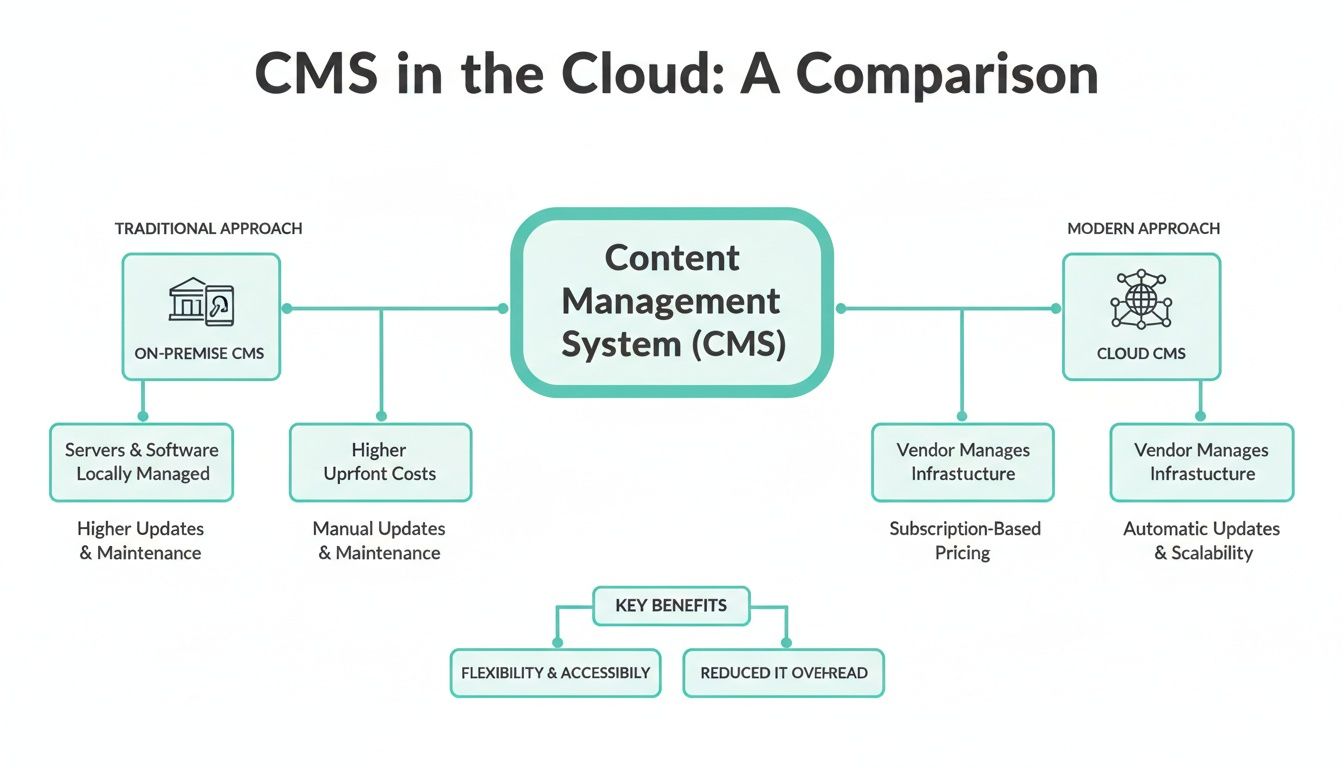
The biggest takeaway here is the shift in responsibility. Moving to the cloud means you can offload all the headaches of managing infrastructure, freeing up your team to focus on what actually drives value for the business.
H3: Matching Sitecore And SharePoint To Cloud Models
Different CMS platforms are built to fit into these models, each offering a different mix of control and convenience. Sitecore, a leader in the DXP space, is a great example of this flexibility, offering solutions that span the entire spectrum.
- Sitecore on PaaS: When you deploy Sitecore XP on a platform like Microsoft Azure, your team gets a significant amount of control. You manage the application and your data, while Azure takes care of all the underlying hardware. This setup is ideal for enterprises with highly specific customization needs, complex legacy integrations, or stringent compliance requirements that necessitate direct oversight of the application environment.
- Sitecore as SaaS: On the other hand, with Sitecore XM Cloud, you get a fully managed SaaS solution. Sitecore handles everything—updates, security, performance—so you don't have to. This model is built for speed and agility, letting marketing teams focus completely on creating content and personalizing experiences without getting bogged down in technical maintenance.
SharePoint, specifically through SharePoint Online, is a pure SaaS solution that lives inside the Microsoft 365 ecosystem. This provides a ready-to-go intranet and document management system that works seamlessly with tools like Microsoft Teams. As a SaaS platform, all infrastructure management and updates are handled by Microsoft, ensuring you're always on the latest version without any manual intervention. You can dig deeper into how different SaaS platforms handle shared resources in our guide on what is multi-tenant architecture.
H3: Comparing Cloud Service Models For Your CMS
Making the right architectural choice between IaaS, PaaS, and SaaS really comes down to your organization’s resources, technical know-how, and business goals. To help clarify the decision, this table breaks down what each model offers and who manages what.
Ultimately, a SaaS model like XM Cloud or SharePoint Online gets you to market the fastest with the least management overhead. A PaaS approach for Sitecore XP strikes a balance, giving you a healthy mix of control and convenience. The right choice aligns your tech stack with what your business is trying to achieve.
H3: Making The Right Architectural Choice
The momentum behind cloud services is impossible to ignore. The market is driven by the demand for AI-integrated content management on platforms that can scale. When you're mapping out your cloud strategy, it's crucial to compare leading cloud providers like Google Cloud, AWS, and Azure to see which one is the best home for your CMS, especially for PaaS deployments of platforms like Sitecore XP.
Your choice of cloud model directly impacts your operational agility. SaaS accelerates marketing velocity, while PaaS enables deep technical customization. The right decision aligns your technology stack with your core business objectives.
A Deep Dive into Sitecore's Cloud DXP Solutions
While the architecture model sets the stage, the real power of a cms in cloud comes down to the platform itself. Sitecore has made a decisive pivot to the cloud, but this isn't just about hosting their old platform online. They've completely re-imagined their product lineup around a composable, cloud-native strategy. It’s less of a "lift and shift" and more of a ground-up rebuild designed to harness everything the cloud can offer.
At the heart of this strategy is a move away from the traditional, all-in-one platform. Instead, Sitecore now offers a suite of specialized, best-in-class products that are designed to work together seamlessly through APIs.
Think of it like building a high-end audio system. You could buy a single boombox that does everything passably well. Or, you could select a top-tier amplifier, specialized speakers, and a high-fidelity turntable. Each component is the best at what it does, and when connected, they produce a far superior sound. That’s the core idea behind Sitecore's composable Digital Experience Platform (DXP).
Understanding Sitecore's Composable Cloud Products
The modern Sitecore DXP is a collection of powerful, API-first tools built for specific jobs. This modular approach lets you assemble the exact DXP you need, so you aren't paying for a bundle of features you'll never touch.
The core components include:
- Sitecore XM Cloud: This is the flagship SaaS CMS, built on a headless architecture. It effectively separates your content repository (the "body") from the presentation layer (the "head"). This lets developers use modern frameworks like Next.js to push content to any channel—websites, mobile apps, digital kiosks, you name it.
- Sitecore OrderCloud: A truly headless, API-first commerce platform for both B2B and B2C. It's built to handle complex scenarios like multi-tenant marketplaces and intricate ordering workflows, offering a degree of flexibility that most traditional commerce platforms simply can't match.
- Sitecore Personalize: This is the real-time personalization and decisioning engine. It empowers marketers to run A/B tests, serve targeted content, and create dynamic user journeys based on behavior—all without needing a developer for every little change.
These tools are designed to be interconnected yet independent. A global manufacturing brand, for example, could use OrderCloud to manage complex B2B orders from its network of distributors while using XM Cloud to power consistent marketing campaigns across its various regional websites.
XM Cloud SaaS vs. Sitecore XP PaaS
One of the biggest decisions for any business in the Sitecore ecosystem is choosing between the modern SaaS offering, XM Cloud, and the more traditional PaaS deployment of Sitecore Experience Platform (XP). This choice has a huge impact on everything from development workflows and operational overhead to your overall speed to market.
Sitecore XM Cloud is a fully managed SaaS product. Sitecore takes care of all the infrastructure, updates, and security patches for you, automatically. This frees up your IT team from endless maintenance cycles and lets developers focus on what they do best: building incredible front-end experiences. Its headless nature also translates to faster performance and greater flexibility for omnichannel content delivery.
On the other hand, Sitecore XP deployed on a PaaS environment like Microsoft Azure gives you much more control. This model is often the go-to for organizations with unique security protocols, complex legacy integrations, or the need to heavily customize the platform's core. While it offers more direct control, it also comes with greater responsibility for management and updates.
Deciding between these two powerful options is a critical step, and you can learn more about how to make the right choice between Sitecore XP or Sitecore XM Cloud in our detailed guide.
The decision between XM Cloud and XP on PaaS is a strategic one. XM Cloud prioritizes agility and a modern Jamstack architecture for omnichannel speed, while XP on PaaS provides maximum control and customization for complex, deeply integrated enterprise environments.
The Business Advantages of a Cloud-Native Sitecore
Moving to Sitecore's cloud-native solutions brings tangible business benefits that extend well beyond IT efficiency.
For marketing teams, XM Cloud's visual authoring tools, like Pages and Components, offer an intuitive drag-and-drop interface. This empowers content creators to build and launch new digital experiences on their own, drastically reducing their reliance on developer sprint cycles.
For developers, the headless architecture is a game-changer. They can use the latest front-end technologies and frameworks they already know and love, which boosts productivity and makes it easier to attract and retain top talent. This separation also leads to a major boost in site performance, since front-end experiences are delivered via a high-speed Content Delivery Network (CDN). The result is faster page loads and better user engagement. This modern approach to cms in cloud completely transforms the digital content lifecycle, from start to finish.
SharePoint Online: Powering Your Internal Collaboration Engine
While platforms like Sitecore excel at external, customer-facing experiences, SharePoint Online is the champion of the internal digital workplace. It's the connective tissue inside the Microsoft 365 ecosystem, evolving far beyond its on-premise server origins into a smart, cloud-based intranet that modern enterprises run on.
At its core, SharePoint’s job is to bring order to internal information and simplify how teams work together. Its real power comes from being woven directly into Microsoft 365. It's not just another app; it's the foundational content layer for the tools millions of people use every single day.
Think about it: when someone drops a file into a Microsoft Teams channel, where does it go? It lands in a secure SharePoint site behind the scenes. This tight integration creates a single, reliable source for all of your company's knowledge, eliminating the chaos of scattered files and conflicting versions.
Building an Intelligent Digital Workplace
SharePoint Online is much more than a glorified file cabinet. It’s a full-fledged platform for creating dynamic and engaging internal communication hubs. Companies use it to build modern intranet portals that act as the central source for company news, department updates, and essential employee resources.
A well-built SharePoint intranet acts like a personalized dashboard for every employee. It surfaces relevant news, upcoming events, and quick links to documents and tools based on their specific role and department. This targeted approach ensures that crucial information actually gets seen instead of being lost in the noise.
Modern intranets are assembled using a flexible, modular framework. Content creators can easily build pages using "web parts"—pre-built blocks for things like news feeds, videos, or document libraries—without ever touching a line of code.
Automating Workflows and Powering Team Sites
One of the biggest wins for SharePoint in the cloud is its deep connection to the Power Platform, especially Power Automate. This allows businesses to turn clunky, manual processes into slick, automated digital workflows that save a ton of time and prevent human error.
Here are a few real-world examples of how this works:
- Document Approvals: A marketing team can set up a workflow that automatically sends new campaign briefs to managers for review. The system handles all the notifications and tracking at each step.
- New Hire Onboarding: HR can build a process that automatically assigns onboarding tasks, shares training materials from SharePoint, and notifies the right departments when a new employee starts.
- Contract Management: The legal team can track contract review cycles, get automatic reminders for renewal dates, and keep everything in a secure, compliant library with a complete audit trail.
Beyond company-wide portals, SharePoint is the engine for focused team collaboration. A project team can quickly spin up a dedicated site with its own document library, task list, and shared calendar, all tied to a Microsoft Teams channel. This creates a self-contained workspace that keeps all project-related content perfectly organized and easy to find. The platform’s versatility makes it a go-to for countless business needs, and you can explore expert SharePoint solutions to see how it can be tailored to specific challenges.
SharePoint Online’s greatest strength lies in its ability to centralize and secure organizational knowledge. By providing a unified platform for content, communication, and process automation, it creates a more connected and productive workforce.
Your Essential Cloud CMS Migration Checklist

Successfully moving an enterprise cms in cloud environments is less about technical wizardry and more about having a structured, methodical game plan. Think of your plan as a roadmap—it guides you through every stage, de-risks the entire project, and keeps surprises to a minimum. We've broken down the journey into four distinct, manageable phases.
The whole process is a lot like relocating a corporate headquarters. You wouldn't just start hauling desks and computers over to a new building. You’d assess the new space, create a detailed floor plan, pack everything with a system, and then set up the new office for maximum productivity. A CMS migration follows that same logic.
Phase 1: Assessment and Planning
This first phase is the bedrock of your entire project. It's tempting to rush through it, but that's a classic mistake that leads to scope creep, busted budgets, and nasty technical surprises down the road. This is your "look before you leap" moment.
Start with a deep audit of your current content and infrastructure. You need a crystal-clear picture of what you have, what’s still valuable, and what can finally be left behind. It’s the perfect time to archive old content and get rid of redundant digital assets.
Next, define what success actually looks like with clear, measurable Key Performance Indicators (KPIs).
- KPIs: Are you trying to achieve a 20% reduction in infrastructure costs? A 50% improvement in page load times? Or maybe you want to launch marketing campaigns 30% faster?
- Stakeholder Alignment: Get everyone on the same page. Marketing, IT, sales, and leadership all need to agree on the project's goals and timelines.
- Budget and Resources: Nail down a realistic budget and assemble your A-team. This could be your internal experts, a specialized partner, or a mix of both.
Phase 2: Technical Preparation
Once you have a solid plan, it's time to get into the technical groundwork. This is where you architect the new cloud environment and pick the right tools for the job. Your choice of platform—like moving from an on-premise Sitecore XP instance to the SaaS-based XM Cloud—will heavily shape this stage.
Your team will need to map out how the CMS will live and breathe in its new home. That includes configuring networking, setting up security groups, and defining access controls based on industry best practices.
Vendor selection is another make-or-break step. If you're shifting to a solution like Sitecore Managed Cloud or need an experienced hand to guide the migration, choosing the right partner is non-negotiable. To keep things on track, always follow comprehensive cloud migration best practices.
Phase 3: Data and Content Migration
Now for the main event. This is where your content and data actually make the move to their new cloud home. You've got a few strategies to consider, each with its own pros and cons when it comes to speed, cost, and complexity.
- Lift-and-Shift: This is the quickest way in. You move your existing CMS application to the cloud with minimal tweaks. It’s fast, but you won't get to tap into all the cool cloud-native features right away.
- Re-platforming: Here, you make some smart optimizations to your application so it fits better in the cloud. A good example is moving a Sitecore XP instance from your own servers to Azure PaaS.
- Full Re-platforming/Re-architecting: This is the most transformative path. It often means moving to a completely new system, like migrating from Sitecore XP to the modern, composable architecture of Sitecore XM Cloud.
A common pitfall is underestimating the effort required for data cleansing. Migrating messy, unstructured, or outdated content only moves the problem. Use this opportunity to clean, tag, and restructure your content for the new system.
Phase 4: Post-Migration Optimization
Flipping the switch isn't the finish line. Once your cms in cloud is live, the work shifts to optimization, training, and continuous improvement. This last phase is all about making sure you get the full value out of your investment.
Right after launch, run performance tuning and security audits to ensure the new environment is stable, fast, and locked down. Keep a close eye on application performance, user traffic, and your new infrastructure costs.
Finally, don't forget your people. User training and change management are absolutely crucial. Your content editors, marketers, and developers need to feel confident using the new system. Solid training and ongoing support will drive adoption and empower your teams to make the most of their powerful new platform.
Your Strategic Partner for Cloud DXP Transformation
Making the leap to a cloud-based CMS is a massive undertaking. It’s not just about swapping out technology—it’s about making critical decisions on architecture, platforms, and migration strategies that will shape your budget, timeline, and business for years to come. Getting it right requires a partner who’s been there before, and that’s where we come in.
We’ve spent over a decade focused on one thing: enterprise-grade DXP and CMS implementations. Our team lives and breathes the Sitecore ecosystem, and we’ve guided countless organizations through the complex shift from on-premise Sitecore XP to modern, composable platforms like XM Cloud. We know the pitfalls, the shortcuts, and how to unlock the true potential of a headless, cloud-native setup.
From Implementation to Long-Term Success
Our job doesn’t end when the platform goes live. We stick around as your long-term strategic partner, making sure your digital platform delivers a real, measurable return on investment. With proven migration frameworks for both Sitecore and SharePoint, we take the risk out of the process and get you to value faster.
We’re here to provide continuous support and keep you ahead of the curve:
- Platform Implementations: We build powerful Sitecore and SharePoint solutions from the ground up, designed around your specific business goals.
- Expert Migrations: From content audits to post-launch tuning, we manage every step of the migration to ensure a seamless and painless transition.
- 24/7 Support: Our dedicated teams are always on, monitoring your platform to keep it stable, secure, and performing at its best. You can finally get some peace of mind.
A successful DXP transformation is never just a tech project; it's a business initiative. The real goal is to build a lasting competitive advantage by delivering digital experiences that customers love and that drive meaningful growth.
We help you turn your DXP from a cost center into a powerful engine for business growth. By implementing advanced personalization, omnichannel content delivery, and smart, AI-driven strategies, we make sure your platform is ready for whatever comes next. Partnering with a dedicated DXP specialist like Kogifi means you aren’t just installing software—you’re building a foundation for digital excellence.
Frequently Asked Questions About Cloud CMS
Moving your CMS to the cloud is a big step, and it's natural to have questions. Here, we tackle some of the most common ones we hear from enterprises looking at platforms like Sitecore and SharePoint.
What Is the Biggest Advantage of Moving Our Sitecore CMS to the Cloud?
Hands down, the biggest win is gaining incredible scalability and business agility. Imagine launching a major marketing campaign and watching your cloud-based Sitecore instance automatically scale up to handle the traffic spike—no frantic calls to IT, no manual server provisioning.
This capability completely removes infrastructure bottlenecks and frees up your IT team from the grind of server maintenance. More importantly, it empowers your marketing department to launch new campaigns and digital experiences on their own schedule, dramatically improving your time-to-market.
Is a CMS in the Cloud Secure for Enterprise Data?
Absolutely. Major cloud providers like Microsoft Azure offer enterprise-grade security that often goes far beyond what most companies can achieve in their on-premise data centers. These platforms are built with multi-layered security protocols, automated threat detection, and a long list of stringent compliance certifications.
For platforms like SharePoint Online or Sitecore Managed Cloud, think of it as a shared responsibility. The cloud provider handles the heavy lifting of securing the infrastructure, which lets your internal team concentrate on what they control best: application-level security and user access policies.
How Do We Calculate the ROI of Migrating Our CMS to the Cloud?
A solid ROI calculation looks at both cost savings and new value creation. On the savings side, you need to factor in the obvious wins, like reductions in hardware maintenance, data center energy bills, and the hours your IT staff spends managing servers.
But the value side is where it gets exciting. You can measure the financial impact of improved website uptime, faster content deployment cycles, and a boost in developer productivity. Even better, you can tie the ability to use cloud-native services for personalization directly to key business metrics like conversion rates and customer lifetime value, proving a clear and powerful return.
Should We Choose Sitecore XM Cloud or Sitecore XP on PaaS?
This decision really hinges on your organization's strategic goals and technical realities. Sitecore XM Cloud is a SaaS solution, perfect for businesses that want to prioritize speed, agility, and a modern headless architecture for delivering content anywhere. It's the go-to choice for teams that want to completely offload infrastructure management.
On the other hand, running Sitecore XP in a PaaS environment gives you much more direct control and deep customization over the infrastructure. This makes it a better fit for organizations with very specific compliance needs or complex legacy integrations that demand a more hands-on, tailored environment.
At Kogifi, we don't just implement platforms; we build long-term digital strategies. Our deep expertise in Sitecore and SharePoint ensures your cloud CMS migration is not just a technical shift, but a true business transformation. Find out how we can help at https://www.kogifi.com.