


Your team knows the pattern. Marketing wants to launch a new campaign page this week. Legal needs a country-specific variation. Product wants the same content reused in an app. IT is already overloaded, so every small change joins a queue. The website becomes a bottleneck instead of a growth channel.
That's why cms in web development isn't a basic tooling conversation anymore. At enterprise level, the CMS sits in the middle of speed, governance, personalization, accessibility, and channel expansion. If the platform is rigid, every team feels it. If the architecture is right, content moves faster, customer journeys become more coherent, and developers spend more time on differentiated work instead of routine publishing support.
Table of Contents
- A CMS manages content and a DXP orchestrates outcomes
- Why Sitecore changed the enterprise conversation
Beyond Content Management The Modern Role of a CMS
A CMS used to be described as a way to edit website pages without touching code. That description is still true, but it's far too small for how enterprise teams operate now. The CMS has become the publishing backbone for websites, campaign microsites, support portals, regional experiences, and increasingly the structured content that feeds other digital channels.
Independent market trackers report that 64% to 71% of all websites now use some form of CMS, while the share of websites built with no CMS fell from 61.7% in 2015 to 29% in 2026 according to these compiled CMS adoption statistics. That shift matters because it shows the CMS moved from editorial convenience to digital infrastructure.

Why the CMS became core infrastructure
Enterprise teams don't just publish pages. They manage approval chains, localization, legal review, reusable components, brand standards, and content dependencies across business units. A weak CMS forces those needs into spreadsheets, email threads, and developer tickets. A strong CMS turns them into governed workflows.
IBM's definition is still useful here. A CMS handles the creation, management, storage, and modification of digital content, with layers that let teams update content without manually handling code and database queries. That's the operational baseline modern organizations need.
If you want a plain-language refresher on the category itself, this overview of what a CMS platform is is a useful starting point.
A CMS earns its place when it removes routine publishing work from engineers without removing control from architecture, security, or governance teams.
What enterprise teams actually need from a CMS
In practice, enterprise buyers are not asking, “Can editors change text?” They're asking harder questions:
- Can teams publish faster: without waiting on developers for every routine update?
- Can content be reused: across web, app, portal, and campaign experiences?
- Can governance scale: across regions, brands, and regulated approval paths?
- Can the platform adapt: when the front end, commerce stack, or personalization model changes?
That's where the cms in web development conversation becomes strategic. The platform affects launch velocity, operating model, and how easily the business can support new channels.
Traditional CMS buying often focused on templates and page editing. Enterprise CMS selection now has to account for content structure, APIs, composability, cloud operations, and AI readiness. That's a different class of decision. It's much closer to choosing a digital operating model than choosing a website tool.
The Evolution from CMS to Digital Experience Platform
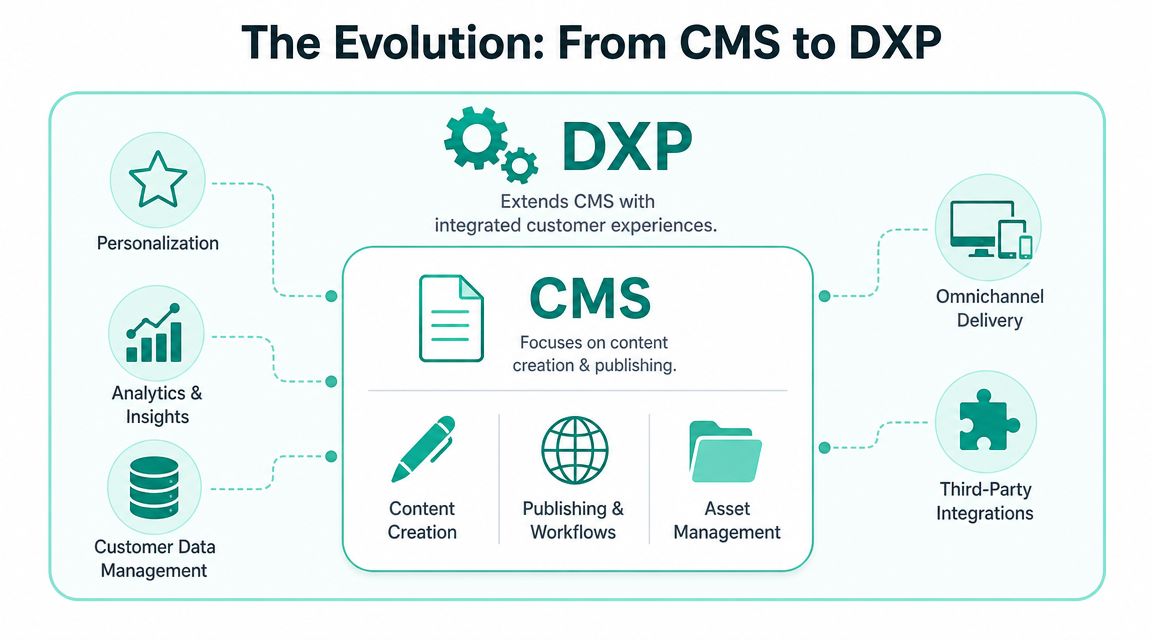
A CMS manages content. A digital experience platform, or DXP, connects that content to audience context, delivery logic, analytics, and journey orchestration. The difference sounds subtle until you look at how customers interact with brands. They move across devices, touchpoints, and sessions. A page-by-page content system can't coordinate that on its own.
A CMS manages content and a DXP orchestrates outcomes
Think of the CMS as the content engine. It stores components, templates, media, and workflows. A DXP builds on that foundation by adding surrounding capabilities that shape the user experience.
A mature DXP typically brings these layers together:
- Personalization: content changes based on audience signals, behavior, or journey stage
- Analytics and insight: teams can see what content performs and where journeys break
- Customer data connectivity: experiences can reflect account, segment, or behavioral context
- Omnichannel delivery: content reaches websites, apps, portals, and other interfaces consistently
- Integration capability: commerce, DAM, search, CRM, and automation tools can work as one system
This is the practical leap from publishing to orchestration. If a CMS answers “how do we manage content,” a DXP answers “how do we use content to drive customer outcomes.”
For a broader strategic definition, this article on what a digital experience platform is maps the category well.
Why Sitecore changed the enterprise conversation
Sitecore became important in this market because it didn't stop at content administration. It linked content, customer understanding, and experience delivery. That shift is even more relevant now with composable products such as Sitecore XM Cloud, Sitecore Search, Sitecore Personalize, Sitecore CDP, and Sitecore OrderCloud.
The architectural logic is straightforward. Content on its own has limited value. Content combined with audience context, decisioning, and flexible delivery becomes a revenue and service tool.
A few practical examples make the distinction clearer:
| Platform focus | What it does well | Where it falls short |
|---|---|---|
| Basic CMS | Publishes pages and manages editorial workflow | Limited cross-channel orchestration |
| Advanced CMS | Adds stronger governance, asset control, and structured reuse | Still needs surrounding systems for journey intelligence |
| DXP | Connects content, context, delivery, and optimization | Requires stronger strategy and operating discipline |
If your teams are still measuring CMS success only by how quickly a page gets published, they're evaluating yesterday's problem.
Sitecore's AI direction matters because it pushes the platform beyond rules-only personalization. Enterprise teams increasingly want assistance with content variation, search relevance, pattern detection, and journey optimization. That doesn't remove the need for strategy. It raises the value of having clean content models and disciplined governance underneath the experience layer.
Comparing CMS Architectures Monolithic Headless and Hybrid
Architecture determines who owns what, how quickly you can change channels, and where your long-term cost sits. Most enterprise missteps happen here, not in feature demos. A platform can look excellent during procurement and still create delivery friction if the architecture doesn't match your team structure.
Monolithic architecture
A monolithic CMS keeps content management and presentation closely coupled. Traditional Sitecore XP implementations are a familiar example of this model. Authoring, rendering, page assembly, and many delivery behaviors live in one integrated platform.
That can work very well when the website is the primary digital product and the organization values integrated tooling over front-end flexibility. Marketers often like the visual control. Developers can benefit from a tightly connected stack when customization patterns are stable.
The trade-off appears when front-end teams want to move faster with modern frameworks, or when the same content needs to feed many channels with different presentation requirements.
Headless architecture
A headless CMS separates content storage and management from presentation, which lets developers change the front-end stack without rewriting content models. This decoupling is the main architectural reason headless systems scale better across websites, apps, and other channels because the same content can be delivered through APIs to multiple experiences, as explained in this overview of headless CMS architecture.
That's why Sitecore XM Cloud fits modern enterprise programs so well. Content stays structured and governed in the CMS, while the front end can evolve independently. Teams can build with modern frameworks, tune performance more precisely, and support channel expansion without rebuilding the content foundation.
The trade-off is equally real. Headless moves more responsibility to engineering. Teams must own the front end, API consumption, deployment patterns, and the surrounding orchestration layer. That's a major gain for organizations with strong digital engineering capability. It can become overhead for teams expecting an all-in-one web platform.
Hybrid architecture
A hybrid CMS sits between those models. It supports traditional page management while also exposing content through APIs. This is often the most practical path for organizations that need both marketer-friendly authoring and channel flexibility.
Hybrid works well in these situations:
- Mixed maturity: one team needs visual page assembly, another needs app delivery through APIs
- Phased modernization: the organization can modernize front ends without replacing every workflow at once
- Portfolio diversity: corporate sites, campaign sites, portals, and service interfaces can share a platform with different delivery styles
Practical rule: Choose the architecture that matches your operating model, not the one with the most fashionable label.
A deeper comparison of headless CMS vs traditional CMS is useful when you're mapping this to team capability and roadmap horizon.
CMS Architecture Comparison
| Criterion | Monolithic (e.g., Traditional Sitecore XP) | Headless (e.g., Sitecore XM Cloud) | Hybrid |
|---|---|---|---|
| Developer flexibility | Lower. Front-end choices are more constrained by platform patterns. | High. Teams can choose and evolve modern front-end frameworks. | Moderate to high, depending on implementation. |
| Marketer autonomy | Strong when visual editing is well configured. | Depends on implementation quality of components and authoring model. | Usually strong if page editing and APIs are both designed well. |
| Scalability across channels | Best when web is the main channel. | Strong for web, apps, portals, and API-driven reuse. | Good for organizations serving both web and non-web touchpoints. |
| Implementation complexity | More predictable in tightly integrated environments. | Higher. More engineering ownership across front end and orchestration. | Moderate. Requires clarity about when to use each delivery mode. |
| Best fit | Stable web estates with strong platform standardization. | Composable digital programs with multiple channels and modern engineering teams. | Enterprises modernizing in stages or supporting mixed delivery needs. |
The wrong choice usually shows up later as governance friction, duplicated content models, or expensive integration work. The right choice feels boring in the best way. Teams know who owns the front end, who owns content structure, and how new channels will be added.
Essential Enterprise CMS Requirements for 2026
Feature checklists rarely help at enterprise level. Most major platforms can publish, version, approve, and store assets. The better question is whether the CMS can support a global operating model without becoming the source of delay, inconsistency, or compliance risk.

The operational checklist that matters
In enterprise CMS workflows, centralized authoring, preview, and publishing controls reduce developer dependency for routine updates, which shortens release cycles and lowers the risk of content drift across regions and channels, as described in Adobe's guidance on how enterprise CMS workflows operate. That's not a convenience feature. It's operational control.
The capabilities that matter most now are these:
Scalability and cloud-native performance
The platform has to support traffic spikes, multisite estates, and distributed teams without fragile release patterns. Cloud-native delivery matters because digital launches rarely happen on a calm day.Headless and API-first delivery
Structured content should move cleanly into websites, apps, portals, and future touchpoints. If content is locked into page templates, omnichannel delivery becomes expensive.Workflow automation and governance
Legal review, translation, regional approval, expiry handling, and content ownership all need to be defined inside the platform, not managed in side processes.Security and compliance
Security needs to be designed into identity, permissions, publishing controls, and integrations. For regulated sectors, governance quality matters as much as design quality.
Why AI changes the buying criteria
AI is changing what buyers should look for in a CMS, but not in the shallow way many vendor demos suggest. The value isn't just “the platform has AI.” The value is whether the platform has the right content structure, metadata, and delivery model to make AI useful and governable.
Sitecore's AI-related direction becomes relevant here because personalization, search refinement, content variation, and journey assistance depend on structured content and composable services. That's why Sitecore XM Cloud and the broader composable stack fit enterprise modernization better than older page-centric thinking.
What to test during evaluation:
- Can AI work on structured content rather than isolated page blobs
- Can marketers use the outputs without constant developer intervention
- Can governance teams review, approve, and constrain AI-assisted experiences
- Can the same content support both personalized web delivery and non-web channels
For teams reviewing platform criteria, these content management system best practices are useful because they connect governance decisions to day-to-day delivery quality.
Good enterprise CMS design creates repeatable publishing discipline first. AI becomes valuable when it operates on that discipline, not when it tries to compensate for its absence.
Accessibility and multilingual governance also belong on the list of essential requirements. Global organizations need reusable content, local control, clear approvals, and predictable standards across markets. If those controls are weak, scale turns into inconsistency.
CMS in Action Sitecore and SharePoint Use Cases
A common enterprise pattern looks like this. Marketing wants faster launch cycles, personalized journeys, and consistent brand control across regions. Operations, HR, legal, and compliance need governed documents, internal publishing, and reliable search for employees. Calling both problems "content management" hides an architectural decision with budget, team, and platform consequences.
Sitecore and SharePoint both sit in the CMS category, but they solve different jobs.
Retail experience delivery with Sitecore
For a global retail brand, the public website is usually part of a larger revenue engine. The platform has to support campaign launches, product storytelling, search quality, localized publishing, and customer data flowing into experience decisions. A traditional page editor can publish content, but it struggles once teams need coordinated journeys across markets, brands, and channels.
A practical Sitecore architecture often includes:
- Sitecore XM Cloud for structured content, page assembly, and SaaS authoring
- Sitecore OrderCloud for commerce services that can fit existing storefront and fulfillment models
- Sitecore Search for product and content discovery tuned to user intent
- Sitecore Personalize and CDP for audience-based offers, testing, and journey orchestration
The right design depends on operating model, not product count. I usually advise clients to start with the capabilities tied directly to business outcomes. Faster campaign deployment, better product discovery, higher conversion on key journeys, or lower localization overhead. Add services when the use case is clear and the team can run them well.
That trade-off matters. A composable stack gives enterprise teams flexibility and cleaner separation of concerns, but it also raises the bar for integration design, front-end ownership, and governance. Sitecore is a strong fit when the organization is serious about external experience orchestration and is prepared to support it properly.
Internal knowledge and governance with SharePoint
SharePoint addresses a different set of requirements. Its strength is internal communication, document control, collaboration, and role-based access across departments. That makes it a better fit for intranets, policy libraries, knowledge hubs, and team sites than for high-velocity customer experience programs.
In regulated sectors, that distinction is practical. Employees need current policies, approved forms, department news, and controlled records in one governed environment. Content accuracy matters as much as findability, and permissions often matter more than presentation flexibility.
SharePoint fits well when teams need:
- Document-centric governance with version history, permissions, and controlled internal access
- Departmental publishing so business units can manage their own content inside a shared framework
- Microsoft ecosystem alignment with collaboration workflows already tied to Microsoft 365 tools
The strategic point is simple. Sitecore usually leads on external digital experience, personalization, and multi-site brand delivery. SharePoint usually leads on internal knowledge management, collaboration, and document governance.
Some enterprises need both. In those cases, the best results come from clear platform boundaries, shared governance standards, and an integration model that avoids forcing one system to do the other system's job.
Kogifi is one implementation partner often involved in those programs across Sitecore, SharePoint, and broader DXP delivery models.
How to Select and Migrate to a Modern Enterprise CMS
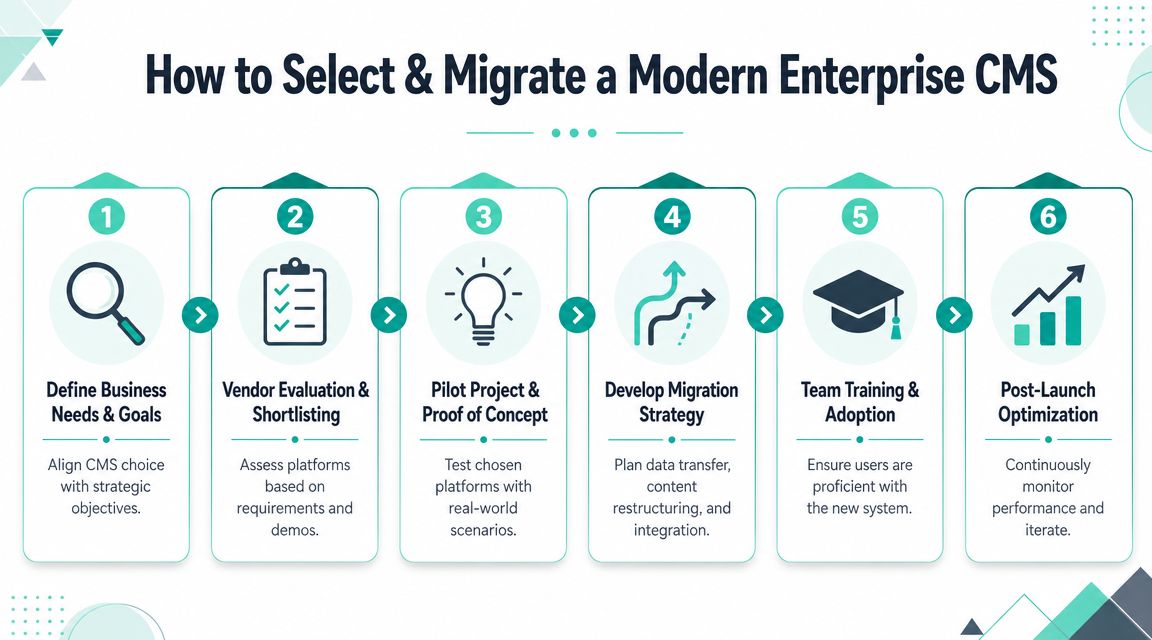
Enterprise teams get into trouble when they treat CMS selection as a software procurement exercise. The platform decision reshapes workflows, front-end ownership, content governance, and integration responsibilities. That means the wrong choice doesn't just disappoint users. It creates years of delivery drag.
A hard truth in current architecture conversations is that headless isn't automatically simpler or cheaper. The full cost of headless CMS adoption extends beyond license fees. The delivery model shifts significant work to engineering teams for building and maintaining the front end, APIs, and orchestration layer. The hidden cost center is often ongoing integration and governance, not content storage itself, as discussed in this overview of headless CMS cost trade-offs.
Selection criteria that hold up after launch
A good selection process tests operating reality, not marketing promises.
Business fit first
Start with the journeys, publishing model, markets, compliance needs, and integration map. If those aren't clear, product scoring becomes guesswork.Team capability alignment
A composable, headless model works best when engineering can own front-end delivery and integration patterns over time. If that ownership doesn't exist, the architecture needs to reflect that.Authoring model validation
Marketers should test real workflows. Create a landing page. Reuse a component. Localize content. Route approvals. Preview content before publish. Such testing exposes platform assumptions.Governance depth
Permissions, workflow design, multisite rules, taxonomy, and content lifecycle management need early definition. Most migration pain comes from avoiding that work.
A short technical walkthrough often helps teams frame the migration sequence:
Migration work that usually determines success
The cleanest migrations are not the fastest ones. They're the ones that make deliberate decisions about content quality and target-state architecture.
Audit the current estate
Identify content types, templates, integrations, workflows, and ownership gaps. Most legacy estates contain duplication and orphaned logic.Design the content model
This is the heart of modernization. Define reusable content types, component relationships, metadata, localization strategy, and governance rules.Separate migration from redesign where possible
Doing both at once can be justified, but it raises risk. Teams should know when they are replatforming, reauthoring, or reinventing UX patterns.Train operating teams, not just admins
Editors, regional marketers, developers, and support teams all need clear roles in the new platform.
The migration succeeds when the target operating model is clearer than the source system, not when every old behavior gets replicated in a new tool.
Activate Your Digital Potential with a Strategic Partner
A familiar enterprise scenario looks like this. Marketing wants faster campaign launches, regional teams need local control, IT needs enforceable standards, and leadership expects measurable improvement in conversion, speed, and cost to operate. The platform decision sits in the middle of all of it.
Enterprise CMS strategy is now an operating model decision. Basic publishing is no longer enough. Teams are choosing how content, data, personalization, analytics, search, governance, and AI will work together across brands, markets, and channels. That is why the real question is not which system has the nicest authoring screen. The question is which architecture will hold up under scale, complexity, and change.
For some organizations, that points to Sitecore XM Cloud and a composable DXP model. It fits teams that need structured content, modern front-end delivery, experimentation, and AI-supported optimization without tying every experience decision to one release cycle. For others, SharePoint remains the right fit for controlled internal publishing, document-heavy processes, and collaboration. Large enterprises often need both, with clear boundaries between customer experience delivery and internal knowledge management.
The partner matters because platform selection is only one part of the outcome. Poor decisions usually show up later in the form of duplicated content, weak governance, disconnected integrations, rising support costs, and personalization that never gets past a pilot.
Strong delivery teams handle five areas well:
- Platform fit assessment against business and operating requirements
- Target-state architecture for content, integrations, hosting, and delivery
- Implementation planning with realistic ownership across marketing, product, and IT
- Migration sequencing that reduces risk without carrying legacy problems forward
- Post-launch support, optimization, and governance
AI has raised the standard here. Enterprises are no longer asking only whether a CMS can publish content. They are asking whether the platform can support machine-assisted content operations, decisioning, experimentation, and governance without creating new control issues. That shift is why older CMS programs often stall, while modern DXP programs create measurable value after launch.
The strongest programs treat the CMS as part of revenue infrastructure. It supports faster publishing, better reuse, cleaner governance, and more relevant digital experiences across the full customer lifecycle.
If your team is evaluating Sitecore, SharePoint, or a broader DXP modernization path, Kogifi can support platform audits, architecture planning, implementation, upgrades, and ongoing SLA-based support.