





Your team probably knows the pattern already. Marketing wants a new landing page variant, a campaign-specific content block, and tighter personalization. IT looks at the backlog and sees that one change touches templates, rendering logic, analytics wiring, deployment sequencing, and regression testing across half the platform. What should be a focused release turns into a coordination problem.
That's usually where the true meaning of modular design becomes clear. It isn't a stylistic preference for architects. It's a way to stop every change from becoming platform surgery.
In DXP work, modular design matters most when multiple teams share one ecosystem. Sitecore authors need reusable building blocks. Developers need safe boundaries between features. Enterprise architects need a platform that can evolve without breaking every dependency around it. The same logic applies in SharePoint Online, where intranet features, workflows, and integrations tend to grow faster than the original information architecture.
Table of Contents
- Encapsulation keeps complexity contained
- Reusability turns one build into many outcomes
- Loose coupling makes change survivable
- How modular thinking shows up in Sitecore delivery
- Where Sitecore AI changes the model
- What works in real implementations
- Why speed alone is the wrong scorecard
- The business KPIs that matter more
- Trade-offs you need to accept early
- Start with what repeats
- Prove the model before scaling it
- Governance is what keeps modular from turning messy
Why Monolithic Platforms Are Holding You Back
A monolithic platform usually looks efficient at the start. One vendor, one deployment model, one codebase, one team owning everything. The trouble shows up later, when every feature becomes tightly tied to everything else.
A common example is the campaign release that should have been simple. The content team asks for a new hero variation, a promotion block, and audience-specific messaging. But the platform couples page structure, business rules, presentation, and deployment so tightly that a small marketing request drags in backend developers, QA, DevOps, and release management.
That's not just slow. It's fragile.
Most monoliths don't fail because they lack features. They fail because every change has too many side effects.
This is why the meaning of modular design is more strategic than technical. A modular platform breaks the system into parts with clear responsibilities and interfaces, so teams can change one area without reopening the whole estate. In practice, that means a personalization component can evolve separately from navigation, search, forms, or campaign presentation.
The logic is familiar outside software too. In manufacturing, modular process system design has become “one of the most economically advantageous strategies” and can enable up to 40% faster installation timelines and 25% lower project risk compared to traditional on-site construction. The reason is straightforward. More work happens in a controlled setting, with clearer interfaces between parts, less rework, and fewer site-level surprises.
Digital platforms benefit from the same discipline.
What monolithic teams usually feel first
- Release friction: A small UI change gets bundled into a larger release because independent deployment isn't realistic.
- Testing overload: Teams retest unrelated areas because hidden dependencies keep surfacing.
- Authoring bottlenecks: Content authors wait for developers when reusable patterns don't exist.
- Innovation drag: New channels, AI features, and integrations get postponed because the current platform is hard to extend.
What modular design changes
| Problem in a monolith | Modular response |
|---|---|
| One change affects many systems | Clear boundaries reduce blast radius |
| Reuse is inconsistent | Shared components create repeatability |
| Deployments are risky | Teams isolate and update features more safely |
| Channel expansion is slow | Standard interfaces support new touchpoints |
A technical lead usually doesn't need another abstract definition. They need a platform that's less brittle under real delivery pressure. That's where modular architecture earns its keep.
The Building Blocks of a Modular Architecture
The cleanest way to explain modular architecture is to compare it with a home entertainment setup. If you have separate speakers, a receiver, and a streaming device, each part does one job well. Standard connections let you replace one device without rebuilding the whole room. An old all-in-one boombox works until one part fails. Then the entire unit becomes the problem.
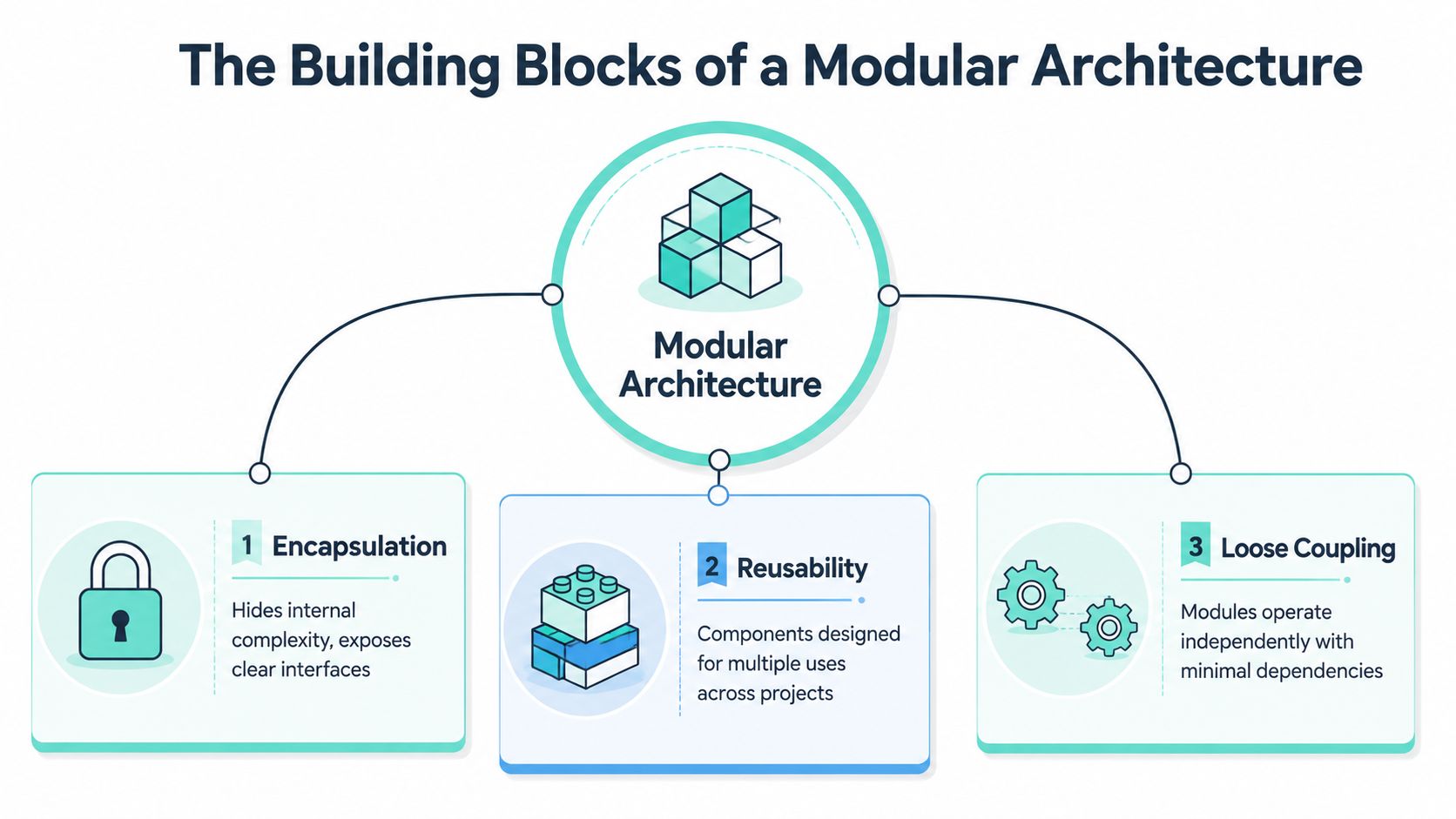
That's the core meaning of modular design in software. Modular design subdivides systems into discrete, scalable, and reusable modules with well-defined interfaces, enabling product variability while maintaining standardization. Those modules can be independently created, modified, replaced, or exchanged.
Encapsulation keeps complexity contained
Encapsulation means a module hides its internal workings and exposes a clear interface. A search component, for example, shouldn't require every consumer to understand its indexing logic, ranking rules, fallback behavior, or API choreography. Other parts of the platform should only need the contract.
This matters in Sitecore and SharePoint because enterprise teams rarely have one delivery stream. When multiple squads work on the same estate, encapsulation prevents accidental coupling through shortcuts and shared assumptions.
Practical rule: if a team must understand a component's internals to use it safely, the boundary isn't strong enough.
Reusability turns one build into many outcomes
Reusable modules are where design effort starts paying back. A strong component isn't just copied between pages. It can support multiple brands, content types, or business scenarios without being rewritten each time.
In DXP work, this usually shows up as a shared library of renderings, content models, form patterns, or personalization-ready blocks. In information architecture, reusable patterns also improve website crawlability and user experience because structure becomes more predictable for both users and search engines.
For teams moving toward composable delivery, the architectural shift often begins with headless architecture in enterprise CMS projects. The front end becomes another module, not the platform itself.
Loose coupling makes change survivable
Loose coupling means modules depend on stable contracts, not each other's internals. At this juncture, many implementations drift off course. Teams say they're modular, but then a component directly depends on another component's data shape, layout assumptions, or business rules.
A practical test helps:
- Can you replace the component without rewriting neighboring modules?
- Can you deploy a change without retesting unrelated areas?
- Can authors reuse it in more than one context without developer intervention?
If the answer is no, the system may be componentized visually, but it isn't modular architecturally.
Loose coupling is what makes modularity resilient under change. Encapsulation and reusability matter. Loose coupling is what keeps them from collapsing under scale.
Unlocking Agility with Sitecore's Modular Capabilities
Sitecore is at its best when teams treat it as a composable ecosystem, not as a single application that must carry every concern in one place. That distinction shapes everything from solution structure to deployment boundaries to authoring flexibility.
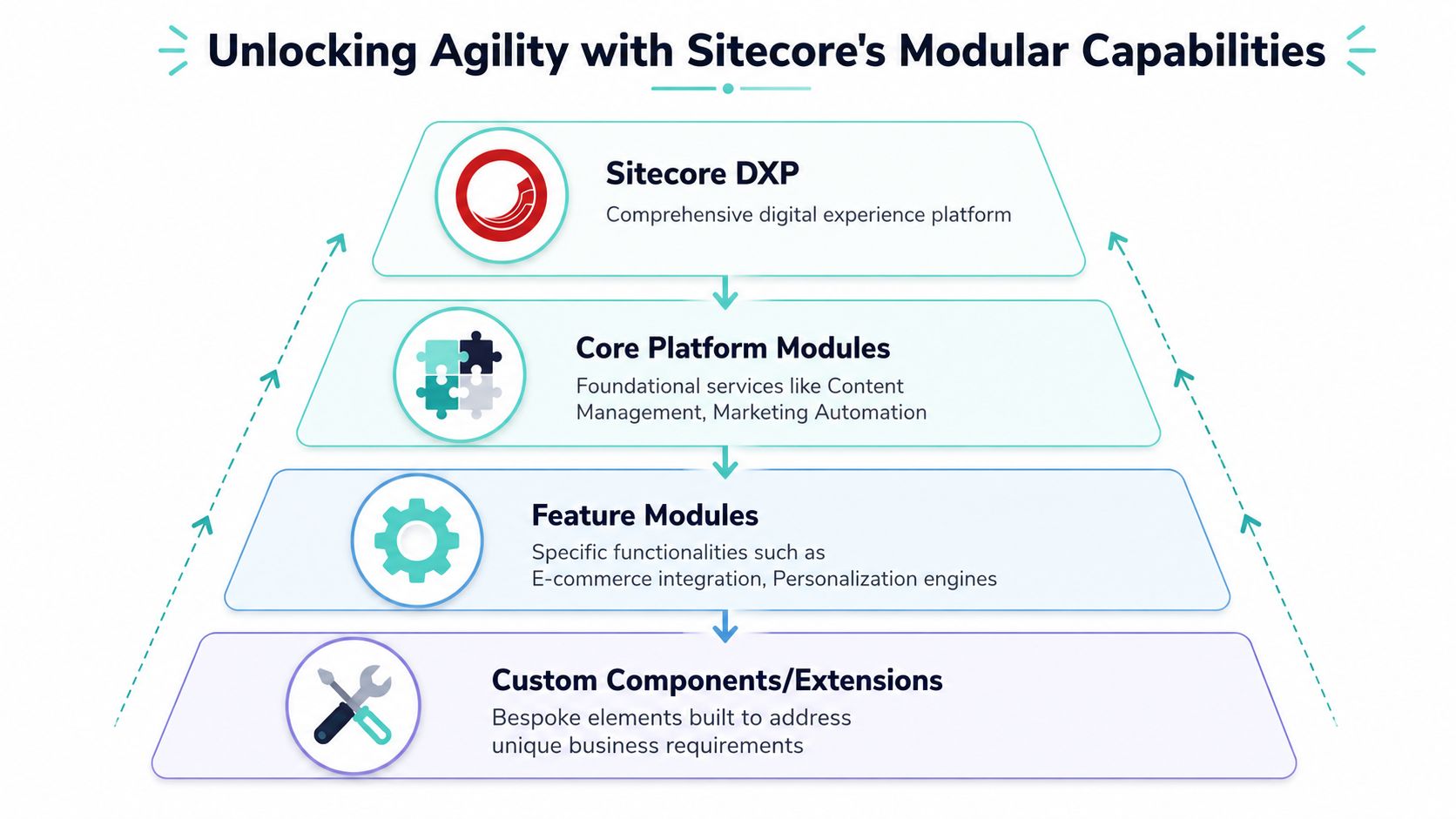
The most mature Sitecore implementations usually follow a modular discipline from the start. Features are grouped by responsibility. Rendering logic, templates, integrations, and business rules are organized so teams can extend the platform without turning it into a dependency knot.
How modular thinking shows up in Sitecore delivery
In practical delivery terms, modular Sitecore architecture means separating platform concerns from feature concerns. Shared foundations belong in one layer. Business capabilities such as search, promotions, forms, product discovery, or localization sit in their own bounded areas. Brand-specific presentation sits above that, without contaminating the underlying feature model.
That's why headless Sitecore projects tend to outperform traditional coupled builds in long-term maintainability. XM Cloud, paired with a modern front end, makes the separation explicit. Content management lives in one layer. Presentation evolves independently. Integrations can be introduced without forcing the CMS to become the runtime for every digital concern.
This is also where Helix-style thinking remains useful, even when teams modernize their stack. The principle still holds. Build by responsibility, not by page. Build for reuse, not for one-off campaign velocity.
A useful commercial lens on this exists in practical ways to increase online sales with modern digital experience patterns, because modular storefront and campaign capabilities let teams test and refine faster without rebuilding the whole experience.
Where Sitecore AI changes the model
Sitecore's AI direction pushes modularity further than classic component reuse. According to CMSWire's coverage of SitecoreAI, SitecoreAI is a composable SaaS platform with Agentic Studio and ready-made AI agents that operate beyond the website, enabling autonomous decision-making across content, data, and marketing execution.
That matters architecturally. Instead of treating AI as one embedded feature inside the CMS, SitecoreAI introduces specialized capabilities as composable services. Teams can apply AI to optimization, orchestration, and execution without forcing all logic into the page layer.
Later in the delivery flow, that creates cleaner ownership boundaries:
- Content teams focus on message intent, variants, and governance.
- Experience teams shape front-end composition and channel presentation.
- Data and marketing teams use AI-driven decisioning without rewriting core templates.
- Platform teams manage integration patterns and operating rules.
Sitecore's own product direction is easier to understand when you see it through a modular lens. AI isn't replacing architecture. It's becoming another class of module.
Here's a concise product view from Sitecore itself:
What works in real implementations
The strongest Sitecore AI use cases are narrow enough to govern and valuable enough to operationalize. One clear example is content experimentation. Within SitecoreAI capabilities, optimized content generated by AI helps marketers create A/B tests to identify which text performs best against business goals. That's a modular capability with a clear business function. It doesn't need to own the whole platform to be useful.
Another good example is industry-specific acceleration. The Kogifi Airport DX Accelerator on Sitecore is built for scalable, personalized passenger journeys and airport operations in hub environments. The lesson isn't sector-specific. It's architectural. Vertical solutions work when reusable platform capabilities and domain-specific modules stay distinct.
A modular Sitecore estate doesn't try to make every component smart. It gives the right components enough context to act intelligently.
What doesn't work is equally predictable:
| Pattern that works | Pattern that fails |
|---|---|
| Shared contracts for data and rendering | Feature teams bypassing contracts for speed |
| Component libraries with governance | “Reusable” components that fork by brand |
| AI modules tied to defined business goals | AI added everywhere with no ownership model |
| Separation between content, presentation, and services | CMS templates carrying presentation and logic together |
When teams ask for the meaning of modular design in a Sitecore context, this is the answer that matters. It's the discipline of building capabilities that can evolve independently while still composing into one coherent digital experience.
Applying Modular Principles to SharePoint Online
SharePoint Online has its own version of the monolith problem. It usually starts when an intranet grows by accretion. One communications site gets a custom news layout. Another team adds document shortcuts. HR wants a policy center. Operations asks for task workflows. Before long, the intranet works, but it doesn't behave like a system.
Modular design is what brings order back.
SPFx is the modular unit of modern SharePoint
In modern SharePoint, the SharePoint Framework gives teams a practical module boundary. SPFx web parts and extensions are self-contained building blocks. You can design, version, deploy, and update them with far less platform-wide risk than older customization models.
That's the architectural win. A page isn't the unit of design anymore. The module is.
A mature intranet usually standardizes a library of parts such as:
- News and announcement modules: reusable blocks for editorial publishing across departments.
- Event and people modules: consistent components for calendars, directories, and team visibility.
- Knowledge access modules: document surfacing, policy highlights, and contextual links to working resources.
- Workflow touchpoints: lightweight entry points into Power Automate or Power Apps without hardcoding each process into the page.
This approach becomes much stronger when it sits inside a broader SharePoint Online delivery model for enterprise collaboration. The platform handles identity, permissions, content, and Microsoft 365 integration. SPFx and Power Platform handle specialized experience modules on top.
Where teams get it wrong in intranet builds
The biggest SharePoint mistake isn't technical debt in the classic sense. It's inconsistency. Different site owners commission similar features multiple times, each with slightly different behavior, naming, and governance. Users then move between sections of the same intranet and feel like they're using different products.
A modular intranet avoids that by defining what should be shared and what can vary.
Shared modules should standardize interaction patterns, not erase local business context.
That distinction matters. HR and Finance don't need identical page layouts. They do need consistent search behaviors, card patterns, metadata conventions, and workflow entry points. If every department gets its own bespoke web part for common needs, maintenance cost rises and trust in the intranet falls.
Power Platform adds another useful layer of modularity. A leave request app, onboarding checklist, approval flow, or service request process can exist as its own business module, integrated into SharePoint without making SharePoint itself responsible for every rule and state transition. That keeps the intranet cleaner and makes future changes far easier.
The meaning of modular design in SharePoint is simple. Build the intranet as a managed collection of reusable parts, not as a set of isolated pages owned by whoever shouted first.
Beyond Speed to Market The Real KPIs of Modular Design
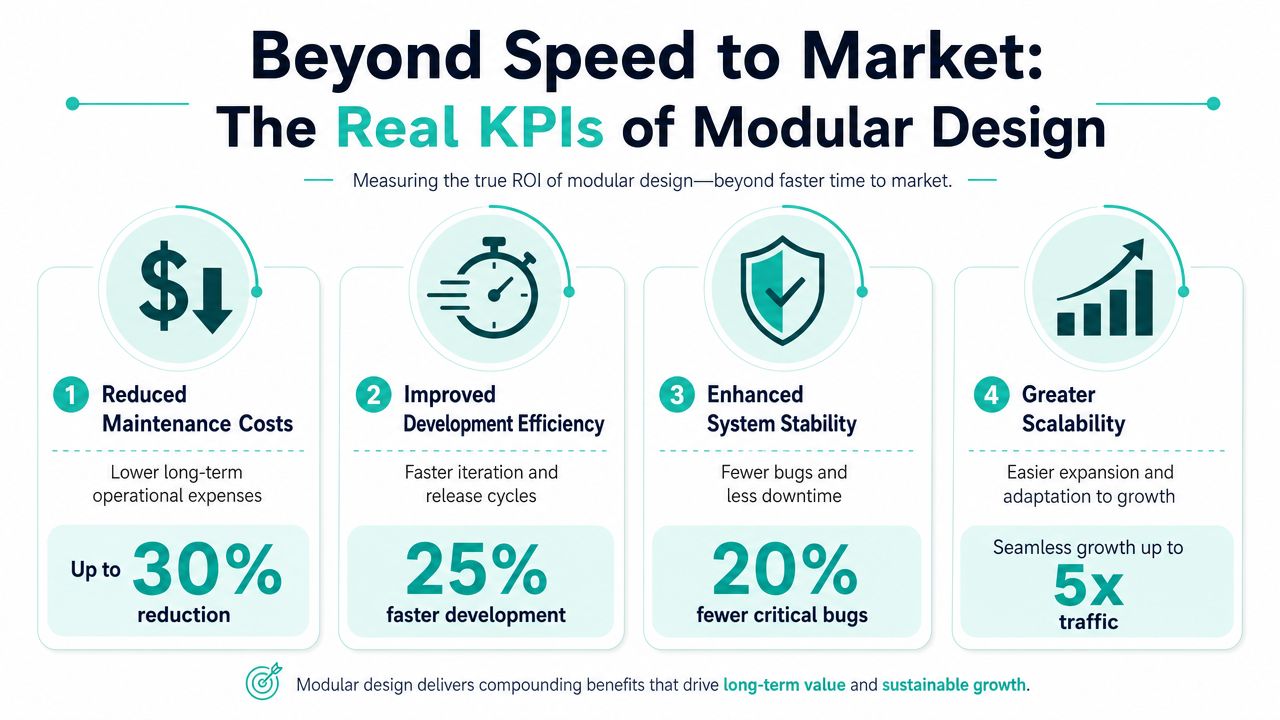
A lot of teams justify modular work with one promise: faster releases. That's valid, but it's incomplete. If speed is the only KPI, teams often stop at surface-level componentization and miss the broader business value.
That blind spot is common. A 2024 McKinsey analysis referenced here states that only 34% of companies track modular ROI beyond speed metrics. The same reference says Adobe's 2025 Digital Impact Awards winners demonstrated 18% higher customer retention and 45% faster campaign iteration speed through real-time component reuse. The article also cites a barrier that many technical leads will recognize immediately: a lack of standardized KPIs.
Why speed alone is the wrong scorecard
A platform can ship faster while still getting worse. Teams can build dozens of loosely governed components, duplicate logic across brands, and call it composable because pages assemble quickly. That doesn't create architectural value. It creates maintenance spread.
A better question is this: what business outcomes become easier to sustain because the architecture is modular?
For DXP teams, the answer usually includes campaign agility, reuse across markets, personalization operations, safer experimentation, and better continuity when one service or integration changes. In content operations, a modular model also lets teams connect delivery performance to measurable publishing goals. That's where content KPIs for enterprise CMS platforms become more useful than generic velocity metrics.
The business KPIs that matter more
Use a scorecard that reflects platform behavior and commercial value, not just engineering throughput.
- Component reuse rate: Are teams using the shared library, or rebuilding near-duplicates?
- Campaign iteration speed: How quickly can marketers test and publish variations with existing modules?
- Retention and conversion movement: Do modular experiences support better continuity across touchpoints?
- Operational stability: Are releases becoming safer because dependencies are clearer?
- Governance compliance: Do brands and regions stay within agreed design and content boundaries?
A strong modular platform should improve how the business executes, not only how developers structure code.
If you can't link modularity to repeatable business operations, you're measuring architecture in isolation.
Trade-offs you need to accept early
Modular design has costs. Upfront design takes longer. Governance has to be explicit. Teams need to agree on contracts, naming, ownership, and versioning before the component library starts growing.
The other risk is over-fragmentation. If modules become too granular, teams spend more effort composing parts than solving user problems. I've seen this happen in DXP programs where every tiny visual variation becomes its own artifact. Reuse drops because nobody can tell which version is safe to use.
A simpler comparison helps:
| Good modularity | Bad modularity |
|---|---|
| Components map to business capabilities | Components map to every minor visual difference |
| Ownership is clear | Everyone can change everything |
| Interfaces are stable | Contracts shift with each sprint |
| Reuse is intentional | Duplication hides behind naming changes |
ROI appears when modularity becomes a stable operating model, not just a build style.
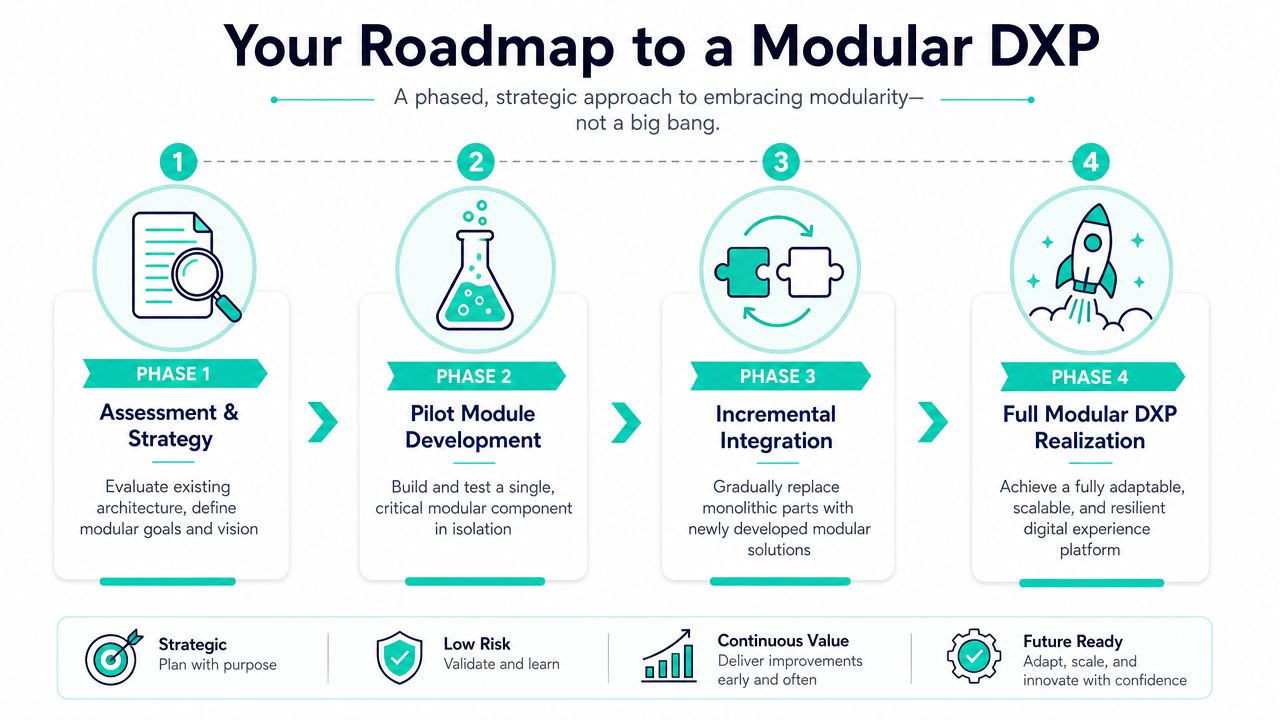
Your Roadmap to a Modular DXP
Most organizations shouldn't replace a monolith in one move. That usually creates unnecessary risk, duplicate work, and governance gaps. A modular DXP is built through controlled separation, not a dramatic rewrite.
Start with what repeats
Audit the current estate and look for repeated patterns, not isolated pain. Repeated hero variants, article layouts, campaign landing blocks, search widgets, document experiences, and workflow touchpoints are the first candidates for modularization.
This exercise should include more than UI. Review content models, integrations, permissions, author workflows, analytics tags, and localization patterns. Repetition across those layers is where modular design starts producing operational value.
Prove the model before scaling it
Pick one bounded pilot. Good candidates are campaign landing experiences in Sitecore, a shared content block library, or a SharePoint intranet feature set that several departments need. The pilot should matter enough to test real governance, but it shouldn't sit on the most politically sensitive part of the estate.
What you want from the pilot isn't only a working component set. You want answers to practical questions:
- Who owns each module after launch
- How versioning works
- What counts as reusable versus local
- How authors request enhancement without forking the library
A strangler-style pattern usually works best. Replace parts of the old platform incrementally as new modules prove themselves.
Governance is what keeps modular from turning messy
Teams often think design systems solve this by themselves. They don't. A modular DXP also needs architectural governance, authoring rules, and release discipline.
That means agreeing on:
- Boundaries: what belongs in a shared module versus a local implementation.
- Contracts: data structures, rendering expectations, and integration rules.
- Lifecycle: how modules are reviewed, updated, deprecated, and documented.
- Ownership: which team approves change when multiple brands or departments rely on the same capability.
The meaning of modular design becomes tangible at this point. It's a governed system of reusable business capabilities that can evolve without destabilizing the whole platform.
If your Sitecore or SharePoint estate is starting to feel harder to change than it should, Kogifi can help you move toward a modular architecture with practical delivery patterns, platform expertise, and a modernization approach that fits enterprise reality rather than slideware.






