The numbers alone should change how enterprise teams think about customer experience optimization. The global customer experience management market was valued at $12.04 billion in 2023 and is projected to nearly triple by 2030 with a CAGR of about 15.6%, which signals that CX optimization has moved from a support activity to an operational necessity for enterprise survival, according to customer experience market projections.
That shift matters because most large organizations still treat experience problems as isolated issues. A slow page becomes a front-end problem. A poor onboarding journey becomes a content problem. Inconsistent service across countries becomes an operations problem. In practice, customers experience all of it as one thing. They don't separate your CMS, your CDP, your service workflows, your localization model, and your intranet governance. They judge the whole journey.
That's why customer experience optimization works best when teams treat it as a managed system. In regulated, multilingual organizations, that system usually depends on two foundations. First, a modern DXP that can personalize content, automate decisions, and govern brand consistency across markets. Second, an internal digital workplace that keeps employees aligned, informed, and able to resolve issues quickly. Sitecore AI and SharePoint Online sit at the center of that model.
Teams that need a refresher on the broader discipline of CX management can start with this primer on customer experience management fundamentals.
Table of Contents
- Introduction to Customer Experience Optimization
- What customer experience optimization actually changes
- The KPIs that matter and how to calculate them
- Turn experience goals into engineering targets
- A governance model that survives real enterprise complexity
Introduction to Customer Experience Optimization
Customer experience optimization is the discipline of improving how customers move through your digital estate, complete tasks, get support, and build trust in your brand over time. That sounds broad because it is broad. It spans design, content, search, analytics, service workflows, accessibility, localization, governance, and platform architecture.
In enterprise environments, confusion starts when teams mix up customer experience optimization with one narrow practice. Some think it means personalization only. Others reduce it to analytics dashboards or support SLAs. Neither view is enough. Optimization means tuning the whole system so the customer encounters less friction and the business can respond faster with better decisions.
A useful analogy is an orchestra. Your website, mobile app, email platform, search layer, DAM, CDP, support tooling, and employee portal are all instruments. If each instrument plays well on its own but follows a different score, the customer hears noise. A modern DXP gives the organization a shared score. Sitecore adds a strong control layer for content operations, personalization, search, and AI-assisted workflows. SharePoint supports the internal side, where policies, approvals, service knowledge, and employee processes often determine whether the external experience feels smooth or chaotic.
Customer experience optimization becomes much easier when teams stop asking, “Which department owns this?” and start asking, “Where does the journey break?”
This matters even more in regulated and multilingual organizations. Compliance reviews can slow content delivery. Translation workflows can fragment brand consistency. Accessibility gaps can block task completion. Regional teams may need local flexibility without creating a separate stack for every market. That's why the most effective programs aren't only customer-facing. They connect Sitecore-based delivery, structured governance, and SharePoint-supported operations into one repeatable operating model.
Understanding Key Concepts and Measurable KPIs
Customer experience optimization only becomes real when teams can measure it. If you can't see friction, you can't remove it. If you can't compare one journey against another, you can't prioritize improvements.

What customer experience optimization actually changes
The simplest definition is this: customer experience optimization improves the quality of interactions across channels, content, and data so customers can complete tasks with less effort and more confidence.
That has practical consequences:
- Channels need continuity: A customer who starts on mobile shouldn't feel like they've entered a different company when they switch to desktop or contact support.
- Content needs relevance: Product information, help content, forms, and transactional messaging should match the customer's context, language, and stage in the journey.
- Data needs unification: Behavioral, transactional, and sentiment data must connect, or teams will optimize guesses instead of journeys.
A lot of teams get stuck because they chase “good experience” as a vague aspiration. Better practice starts with observable behaviors. Did the user complete the task? Did they need help? Did they return? Did a support case close on the first interaction? Did satisfaction improve after a specific change?
The KPIs that matter and how to calculate them
A useful KPI set mixes sentiment, effort, and operational performance. The core ones are straightforward:
| KPI | What it tells you | Simple formula |
|---|---|---|
| NPS | Loyalty and willingness to recommend | % promoters minus % detractors |
| CSAT | Satisfaction after a touchpoint | satisfied responses divided by total responses x 100 |
| CES | Effort required to complete a task | average score from effort survey |
| First-contact resolution | Whether support solved the issue immediately | cases resolved on first contact divided by total cases x 100 |
| Resolution time | How long issues stay open | total resolution time divided by number of resolved cases |
These metrics matter because they connect to commercial outcomes. A 10-percentage-point increase in customer satisfaction can generate 2 to 3% higher revenue, and large brands can see over $1 billion in added revenue from a one-point gain in CX Index, according to customer experience revenue benchmarks.
That's why benchmark design matters. If your CSAT rises while resolution time worsens, your model may be masking a backlog. If NPS falls only in one region, the issue may be localization quality, not product-market fit. If CES spikes after a release, the root problem may sit in navigation, authentication, or form design.
A strong reporting layer needs more than a dashboard. It needs reliable measurement logic. Teams working on attribution and performance alignment often benefit from clearer thinking about measuring digital marketing effectiveness, especially when customer experience and conversion reporting live in separate systems.
Practical rule: If a KPI can't be tied to a specific journey, audience segment, or operational owner, it won't drive change.
Strategic Frameworks and Governance
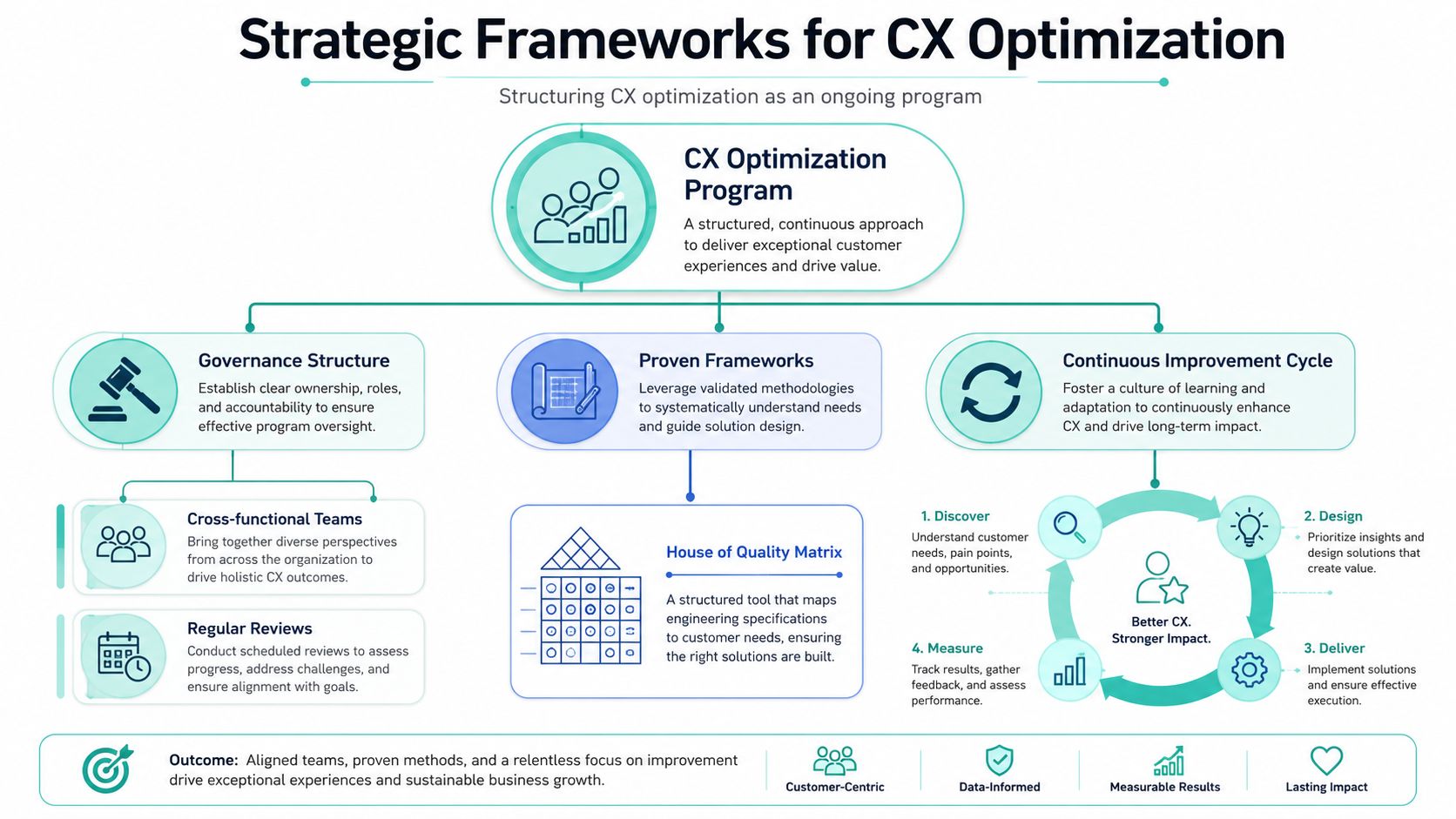
Good intentions don't scale. Governance does. Customer experience optimization breaks down when teams launch disconnected initiatives with no shared decision model, no service ownership, and no way to translate customer needs into build priorities.
Turn experience goals into engineering targets
One of the most practical enterprise tools is the House of Quality matrix. It sounds academic, but it solves a common problem. Marketing describes a customer need such as “fast task completion.” Engineering hears “improve performance” and doesn't know which threshold matters. Support hears “complaints are rising” and can't isolate the cause.
The matrix links customer requirements to technical specifications. According to this explanation of customer experience benchmarking and the House of Quality, applying a House of Quality matrix quantifies the impact of technical specs, such as page load under 2 seconds, on customer requirements so that KPIs like NPS and CSAT become engineering targets.
That changes the conversation. Instead of saying “make the site feel better,” teams can set targets such as:
- Performance thresholds: Page speed, search response, and form completion latency
- Support thresholds: Resolution time and first-contact resolution by queue
- Content thresholds: Translation readiness, approval cycle clarity, and asset governance status
- Accessibility thresholds: Keyboard navigation support, semantic structure, and language consistency
A governance model that survives real enterprise complexity
Most enterprise programs need three layers of ownership.
Executive sponsor
This person approves priorities, removes blockers, and keeps CX connected to business objectives. Without that sponsorship, optimization becomes a backlog of “nice to have” work.Cross-functional steering group
This group usually includes digital, content, IT, data, service, legal, and regional representatives. Their job is to review signals, agree priorities, and govern standards.Delivery squads
These teams execute changes. In a Sitecore environment, one squad might own search and content findability, another might own onboarding journeys, and another might manage personalization logic and CDP integration. In SharePoint, squads often own intranet workflows, knowledge access, and employee service requests.
A simple monthly governance rhythm works well:
- Review journey metrics: Look at satisfaction, effort, and operational signals together
- Examine behavioral evidence: Session behavior, search exits, failed forms, and support escalation patterns
- Set ranked priorities: Focus on the highest-friction moments, not the loudest stakeholder requests
- Approve experiments: Define what will be tested, for whom, and how success will be measured
- Document standards: Keep architecture, taxonomy, accessibility, and content rules current
A steering committee shouldn't debate design taste. It should decide which friction points matter enough to fix now, and which teams own the result.
This structure is where Sitecore and SharePoint complement each other. Sitecore governs customer-facing content, personalization, asset use, and decisioning. SharePoint governs internal policies, approvals, service knowledge, and collaboration. One without the other often leaves a gap between what the customer sees and what employees can support.
Implementation Roadmap for DXPs and CMS
Large enterprises rarely struggle because the platform lacks features. They struggle because implementation behaves like construction without a blueprint. Industry reporting from Gartner has long shown that many digital experience programs underperform not from tool choice alone, but from weak execution, governance, and adoption planning. In regulated, multilingual organizations, that risk grows fast. A Sitecore and SharePoint rollout has to account for customer journeys, internal workflows, accessibility, translation, approvals, and measurement as one connected system.

A useful roadmap works like airport operations. Passengers see signs, gates, and service desks. Staff rely on security rules, maintenance logs, and dispatch systems behind the scenes. Sitecore usually owns the public-facing experience layer. SharePoint often supports the internal knowledge, policy, and approval layer that keeps the public layer accurate.
Phase one through phase three
Phase 1: Audit and benchmark
Start with the current operating reality. Review platforms, integrations, content models, analytics quality, accessibility status, localization workflows, and release cadence. Enterprise friction often hides in ordinary places: duplicated page types, weak taxonomy, regional workarounds stored in spreadsheets, and approval steps that live only in someone's inbox.
Capture four outputs before any redesign begins:
- Journey inventory: Customer and employee journeys ranked by business importance and risk
- Platform assessment: Current CMS or DXP constraints, dependencies, and support issues
- Measurement baseline: Existing KPIs, event tracking coverage, and reporting gaps
- Compliance review: Accessibility, retention, language governance, and legal requirements
Teams that need to turn audit findings into delivery milestones can use a practical project implementation plan for enterprise digital delivery.
Phase 2: Platform selection and target architecture
Architecture decisions should reflect operating needs, not vendor fashion. If the business needs multilingual public experiences, structured personalization, reusable components, and cloud delivery, Sitecore XM Cloud is often the better fit. If the organization is still carrying heavy historical investments, Sitecore XP may serve as a transition platform while teams modernize in stages. For internal communications, policy libraries, document workflows, and regional knowledge hubs, SharePoint Online remains a strong choice, especially with SPFx and Power Automate extensions.
The selection pattern usually looks like this:
| Need | Best-fit pattern |
|---|---|
| Multi-brand public sites with reusable components | Sitecore XM Cloud with headless front end |
| Legacy Sitecore estate needing phased modernization | Sitecore XP with migration roadmap |
| Employee portals and knowledge hubs | SharePoint Online |
| Workflow-heavy internal requests | SharePoint plus Power Platform |
| Mixed regional compliance and language needs | Headless architecture with centralized governance |
In regulated sectors, one question matters early: where will policy-controlled content live, and who approves it? A pharmaceutical firm, airport operator, or public sector body cannot treat customer-facing content and internal guidance as separate universes. Sitecore can publish the approved message. SharePoint can hold the source policy, version history, review trail, and market-specific guidance that prove the message is still valid.
Phase 3: Design the content and component model
This phase determines whether teams get reuse or rework. In Sitecore, a Helix-based structure helps keep features modular and dependencies clear. In practice, that means authors, developers, translators, and compliance reviewers all work against a model that is structured enough to govern, but flexible enough to support local variation.
That model should define:
- Component library: Hero, promo, alert, form, card, search module, FAQ, location module, and regulated-content patterns
- Content types: Structured authoring for pages, articles, products, FAQs, support topics, and localized variants
- Taxonomy and metadata: Categories, audience tags, compliance labels, market labels, and campaign attributes
- Design system rules: Shared tokens, UI standards, and accessibility requirements across Sitecore and SharePoint surfaces
A multilingual enterprise should also decide, at this stage, which content is transcreated, which is translated directly, which can inherit from a global master, and which must remain region-specific for legal reasons. If that decision waits until production, editors usually create manual exceptions that are expensive to maintain.
Phase four through phase six
Phase 4: Integration, CI/CD, and data unification
Architecture transitions into daily operations through key practices. Sitecore XM Cloud works best with disciplined source control, automated builds, deployment validation, and close alignment between environments. The front end often uses Next.js for component-based rendering and performance control. SharePoint solutions commonly extend with SPFx web parts and Power Automate for approvals, notifications, and internal workflow routing.
Core work in this phase usually includes:
- CI/CD setup: Automated deployment for templates, components, and front-end builds
- Identity and permissions: SSO, role design, and approval workflows
- CDP integration: Unify behavioral and transactional signals for segmentation
- DAM and search alignment: Govern assets and improve findability across channels
- Service integration: Connect CRM, case management, booking, or partner systems
For regulated, multilingual programs, integration design needs one more layer of discipline. Sitecore AI features become useful only when inputs are governed. If audience labels, content metadata, consent states, language variants, and market restrictions are inconsistent, AI-driven suggestions and decisioning can produce the wrong recommendation in the wrong region. SharePoint helps here by storing controlled reference material, approval states, and operational guidance that support those rules.
A simple test helps expose weak design. Ask whether a French-speaking visitor in Quebec, a German regulator, and a frontline support agent would all see or access the right version of the same policy-backed message. If the answer depends on manual intervention, the implementation is not ready.
Phase 5: QA, accessibility, and multilingual readiness
Testing should confirm that the experience works under real operating conditions. That includes device changes, language switching, permissions, workflow states, and edge cases in regulated content. A broken label on a form matters. So does an outdated downloadable document in the wrong regional library.
A strong enterprise QA cycle covers:
- Functional testing: Forms, integrations, redirects, search, and workflow states
- Accessibility validation: Keyboard support, labels, headings, contrast, error states, and language attributes
- Localization QA: Translation fallback rules, right-to-left handling where needed, and region-specific content logic
- Editorial QA: Governance checks for templates, metadata, and approval states
- UAT with business owners: Real task scenarios, not just feature confirmation
Sitecore and SharePoint should also be tested together, not in isolation. For example, if a public Sitecore page links to a policy summary that support staff access through SharePoint, both systems need aligned titles, version dates, and terminology. Otherwise customers read one answer while employees follow another.
Phase 6: Launch, observation, and optimization
Launch creates the first reliable stream of real user evidence. Teams should monitor journey health daily after release, then shift into a structured review cycle with clear owners. Early signals usually show up in search exits, failed tasks, support deflection rates, translation errors, and approval bottlenecks.
Operating advice: Delay AI-driven personalization until taxonomy, content structure, language rules, and event tracking are trustworthy. Automation spreads confusion quickly when the underlying model is inconsistent.
Post-launch ownership should include a clear backlog for:
- search tuning
- personalization refinement
- content pruning
- accessibility fixes
- workflow improvements
- regional rollout sequencing
The strongest implementations treat Sitecore and SharePoint as one service system with two audiences. Customers need clear, relevant experiences on the front end. Employees need accurate knowledge and governed workflows behind the scenes. In regulated enterprises, customer experience optimization depends on both.
AI-Driven Personalization Use Cases
The current conversation around AI often collapses into vague promises. Enterprise teams need a narrower question: which AI capabilities improve customer experience optimization without breaking governance, accessibility, or brand control?

Where Sitecore AI fits in the operating model
Sitecore's AI direction is relevant because it's being built into the platform stack rather than bolted on as a disconnected assistant. According to an overview of Sitecore AI capabilities, Sitecore AI launched in June 2025 and unifies XM Cloud, Sitecore DXP, CDP & Personalize, Search, and DAM in a single cloud-native environment with real-time decisioning and Agentic Studio for automated workflows.
That matters for three reasons.
First, real-time decisioning connects data and delivery. If a visitor's behavior changes, the platform can respond with different content, offers, or support prompts without waiting for a manual campaign cycle.
Second, Agentic Studio gives teams a structured way to automate recurring content and decision workflows while keeping humans in control. In regulated environments, that human review step isn't optional. It's how you prevent off-brand claims, unsupported wording, and policy drift.
Third, the broader Sitecore AI portfolio already points toward a practical operating model. Coverage of Sitecore Stream AI describes capabilities such as brand-aware AI, AI copilots and agents, and agentic workflows that balance automation with human input across CMS, DAM, and CDP-connected scenarios.
Use cases for regulated and multilingual organizations
The best use cases start with bottlenecks people already recognize.
Content operations and localization
Brand-aware AI can help draft regionally adapted variants, summarize source material for editors, and suggest metadata or SEO improvements. Editors still approve the final output, but they spend less time on repetitive setup work.
Behavior-based personalization
When Sitecore CDP and Personalize are connected properly, teams can tailor homepage modules, article recommendations, or next-best-action prompts based on audience behavior and profile signals. That's especially useful when one platform serves multiple countries, brands, or audience types.
DAM governance
AI can support asset tagging, reuse guidance, and policy-aligned selection. In multilingual environments, this reduces the risk of outdated visuals or regionally incorrect assets appearing in live experiences.
A few teams also use modular extensions to fill narrower needs. Independent Sitecore AI tooling examples include Sitecore Gen AI for content creation automation, AI Content Profiler for behavioral personalization and automatic profile assignment, and S-3PO for rewriting text and generating images in Sitecore-centered workflows.
Teams exploring personalization strategy often need the broader discipline, not just the tooling. This guide to real-time personalization is a useful companion when you're aligning use cases with audience signals and governance.
After strategy comes implementation detail. This short walkthrough shows one way modern Sitecore teams think about AI-enabled delivery.
Use AI where repeatable judgment exists. Keep humans where legal nuance, editorial accountability, or customer trust is on the line.
SharePoint also has a role here. Internal personalization is often less glamorous but just as important. Routing employees to market-specific policies, service instructions, or compliance content through audience targeting and workflow automation can remove internal friction that customers would otherwise feel downstream.
Orchestrating Omnichannel Experiences
Customers don't think in channels. They think in tasks. They need to compare an option, ask a question, submit a form, track a request, or solve a problem. The organization may split those moments across web, email, mobile, social, support, and internal operations, but the customer experiences one continuous journey.
Build a shared customer context
Omnichannel orchestration starts with a shared data layer. In practice, that means a CDP or equivalent unified profile model that can receive behavior events, transactional updates, and feedback signals, then expose that context to delivery systems.
The mechanics usually look like this:
- Capture events consistently: Page views, search actions, downloads, form starts, form completions, and support triggers need common naming conventions.
- Connect identity carefully: Anonymous and known behaviors should merge only through approved identity logic.
- Expose segments to channels: Sitecore can use segment and behavior signals for web personalization, while connected systems can use them for triggered communications or service prioritization.
- Return outcomes to the model: If someone opens a case, completes onboarding, or abandons a key step, the next interaction should reflect that state.
Often, enterprise teams become confused regarding omnichannel. They assume it means publishing the same message everywhere. It doesn't. It means maintaining continuity of context while adapting the presentation to the channel.
Keep journeys consistent across regions and channels
A product launch is a simple example. A user visits a product page on the website, downloads a technical document, and leaves. A connected model can trigger a follow-up email with relevant support content, suppress beginner-level messages for already engaged users, and update the service team if the same account later submits a migration question.
The trick is governance. Without clear standards, one region uses one naming convention, another region translates journey stages differently, and support logs don't align with campaign events. The journey breaks in reporting first, then in customer perception.
A workable orchestration model usually includes:
| Layer | What it governs |
|---|---|
| Data layer | Event naming, identity rules, segmentation logic |
| Content layer | Shared messaging, legal review rules, localized variants |
| Decision layer | Trigger conditions, suppression rules, next-best-action logic |
| Operations layer | Service handoff, internal alerts, knowledge availability |
Sitecore handles much of the customer-facing orchestration through content, personalization, search, and connected data signals. SharePoint supports the operations layer by giving internal teams one place to access current policies, campaign guidance, and service instructions. That matters in multilingual organizations, where employees need the same clarity customers expect.
A strong omnichannel program doesn't remove channel differences. It removes the need for customers to repeat themselves.
Common Pitfalls and Lessons from Enterprise Case Studies
Enterprise CX programs rarely fail because teams do not care about customers. They fail because the operating model underneath the experience is inconsistent. In regulated, multilingual organizations, that inconsistency usually shows up in four places first: customer data, governance, content architecture, and employee knowledge access.
A useful way to read these case patterns is to treat them like faults in a building foundation. The website may look polished from the outside, but small cracks below the surface spread into missed personalization, translation delays, approval bottlenecks, and service errors.
Pitfall one through pitfall three
Pitfall 1: Fragmented customer data
A financial services organization may store web behavior in one system, product usage in another, support history in a third, and survey feedback in a fourth. Each team can produce reports. Few can explain the whole customer journey with confidence.
The practical problem is not a lack of data. It is a lack of connection between signals. Without a shared profile and identity logic, an onboarding drop-off looks like a content issue to one team, a product issue to another, and a service issue to a third. The CX Foundation discussion of customer experience optimization explains why connected data matters for churn reduction and journey analysis.
In day-to-day operations, a connected model helps teams answer questions such as:
- which journeys correlate with lower satisfaction scores
- whether support demand follows product friction or unclear guidance
- which audience segments need different content, offers, or intervention timing
For Sitecore teams, this matters most when AI-driven decisioning enters the picture. AI can only personalize well when the underlying profile is trustworthy. If consent rules differ by market, profile attributes are poorly governed, or language variants are not mapped consistently, the system will make weak recommendations at best and risky ones at worst.
Pitfall 2: Treating governance as bureaucracy
Governance often gets framed as a publishing slowdown. That is the wrong mental model. Good governance works like traffic control at a busy airport. It does not stop movement. It keeps many teams moving in the right direction without collisions.
Enterprise organizations usually make one of two mistakes. Some allow every region to define taxonomy, metadata, component usage, and personalization rules independently. Others require central approval for nearly every update, which creates delays and encourages off-platform workarounds.
The stronger pattern is shared control with clear boundaries. A central team owns architecture, accessibility standards, AI guardrails, taxonomy, and reusable components. Regional teams manage localized content, legal nuance, and market execution inside those rules. Sitecore supports this structure well because shared templates, workflow controls, and reusable components can coexist with local authoring and multilingual variants.
In regulated sectors, that governance model should also specify where SharePoint fits. SharePoint should hold policy libraries, approval records, regional process documentation, and internal guidance tied to the same content and compliance standards used in customer-facing systems. That connection is often missing in CX programs, and it is one reason external consistency breaks down during service delivery.
Pitfall 3: Using a monolithic publishing model for multilingual delivery
This problem appears often in transport, utilities, healthcare, government-adjacent services, and other organizations that publish across regions with different legal and language requirements. One large CMS instance tries to serve every audience through copied templates, manual translation handoffs, and local exceptions layered over global pages.
The result is predictable. Authors stop trusting the model. Translation queues grow. Accessibility fixes arrive late. Regional teams create unofficial versions in documents or side portals because the main system is too rigid.
A structured, component-based approach works better. Sitecore gives teams more control when content is modeled for reuse, localization, and channel variation from the start. Instead of cloning full pages for each market, teams can manage approved components, language variants, and governed metadata in a more precise way. In multilingual enterprise contexts, that is not just an editorial improvement. It reduces review effort and lowers compliance risk because teams can trace what changed, where, and for which region.
Systems become fragile when language, accessibility, and compliance requirements are added after platform decisions are already fixed.
Pitfall four and the internal experience gap
Pitfall 4: Ignoring the employee side of customer experience
Many case studies focus on websites, apps, and campaign journeys because those are visible. The less visible failure point is the employee environment behind them. If service agents, compliance reviewers, country managers, and field teams cannot find current guidance quickly, customer experience quality drops no matter how advanced the front-end stack looks.
This issue becomes more severe in regulated enterprises because employees often need the right answer, in the right language, with the right approval history, within a narrow response window. Personalization strategies may be defined correctly in Sitecore, but the customer still receives inconsistent follow-up if the support team is working from outdated PDFs, disconnected portals, or unclear escalation paths.
That is why SharePoint should be treated as part of CX architecture, not just as an internal communications tool.
A modern SharePoint Online environment, supported by SPFx components and Power Platform workflows, helps organizations improve the parts of customer experience that customers never see directly but always feel:
- Policy access: Employees can find the latest approved guidance by market, product, and role
- Case support: Service teams can reach role-specific knowledge without searching across scattered repositories
- Request workflows: Approvals, escalations, and exception handling can be tracked and audited
- Regional alignment: Country teams can access localized instructions while following enterprise standards
Consider a large energy provider with several support queues, regional business units, and years of documentation spread across shared drives and aging portals. Agents open internal tickets because they cannot confirm the current policy or locate the right exception process. Customers then wait longer, get transferred, or receive conflicting guidance.
The fix is rarely more training alone. The fix is an internal knowledge architecture that matches the complexity of the external experience. SharePoint can organize controlled knowledge, workflow routing, and regional publishing. Sitecore can present the right external content, message, and next action. Together, they close a gap that many CX programs leave open.
The broader lesson from enterprise case work is straightforward. Customer experience optimization depends on two coordinated systems. One shapes what customers see. The other shapes how employees respond. In regulated, multilingual environments, both need the same discipline around governance, language control, approvals, and AI use.
Conclusion and Next Steps
Customer experience optimization works when organizations stop treating experience as a soft concept and start running it like an operating discipline. The essentials are clear. Define measurable KPIs. Create governance that maps customer needs to technical decisions. Build on platforms that support modular delivery, personalization, accessibility, and localization. Then connect the external journey to internal operations so employees can support what customers see.
For enterprise teams working in regulated, multilingual environments, that usually means two coordinated foundations. Sitecore supports composable digital experience delivery, AI-assisted personalization, search, DAM governance, and structured content operations. SharePoint Online supports employee workflows, knowledge access, approvals, and regional coordination. Used together, they close a gap that many CX programs leave open.
A simple readiness checklist helps:
- Measurement: Can you tie customer signals to specific journeys and owners?
- Governance: Are standards, approvals, and component rules documented and enforced?
- Architecture: Does your platform model support headless delivery, reuse, and integrations?
- Operations: Can employees access the right guidance without friction?
- AI enablement: Are automation and personalization governed well enough for regulated use?
If the answer is “not consistently” in any of those areas, that's where work should start. Audit first. Prioritize one or two high-friction journeys. Stabilize data and governance. Then expand into AI-driven personalization and omnichannel orchestration once the foundation is strong.
Kogifi helps enterprise teams design, modernize, and support Sitecore and SharePoint platforms for multilingual, regulated, and high-complexity environments. If you need a practical starting point, Kogifi can help with platform audits, migration planning, AI enablement, intranet modernization, and ongoing optimization programs.