


A customer lands on your site from a high-intent campaign, views a premium product line, compares specifications, adds one item to the cart, hesitates at shipping, then leaves. Your stack captured the visit, but the experience stayed generic the whole time. No adaptive offer. No relevant reassurance. No content shift based on intent.
That's the gap most enterprise teams are dealing with right now. They already have customer data, analytics, and content tools. What they often don't have is a reliable way to turn live behavior into an in-session decision.
Real-time personalization closes that gap. In a Sitecore environment, that means more than swapping banners or testing homepage modules. It means combining unified customer context, event streaming, decisioning, and delivery so the experience changes while the session is still active. That's where the value sits, and it's also where the architecture gets serious.
Table of Contents
- Why Real-Time Personalization is a Business Imperative
- Traditional segmentation versus live decisioning
- What “real-time” actually changes
- Capture the right events
- Unify and enrich customer context
- Decide in session
- Activate through APIs and front-end components
Why Real-Time Personalization is a Business Imperative
Most digital teams don't need another definition of personalization. They need to know why the current approach isn't enough.
The short answer is that customer expectations already moved. 71% of customers expect personalized interactions, and top brands are reported to earn 40% more revenue from personalization than brands that don't prioritize it, according to Contentful's overview of real-time personalization. That's not a creative trend. It's an operating requirement for revenue teams, commerce teams, and DXP owners.
The business problem usually shows up in familiar ways. A returning buyer gets the same homepage as a first-time visitor. A customer with high cart value sees no urgency message or trust signal. A prospect from a campaign lands on a page that never adapts to what they click next. The session contains intent, but the stack reacts too late.
Practical rule: If your system can only personalize after the session ends, it's not helping at the moment of decision.
Real-time personalization means reacting during the current visit using live signals such as clicks, items viewed, cart updates, and location. For enterprise teams, that changes the conversation from audience planning to operational responsiveness. The question isn't “Can we segment this user?” It's “Can we change the experience before they leave?”
A good way to pressure-test your current maturity is to look at how your teams observe live behavior. If your analysts, merchandisers, or marketers need a more tangible view of in-session activity, it helps to discover real-time insights with Live View Pro and compare that style of live monitoring to your own stack. The point isn't the tool itself. The point is whether your organization can see intent while it still matters.
What works is narrow, immediate adaptation tied to a decision point. What doesn't work is building a large personalization backlog full of generic “personalize everything” ambitions. Enterprise programs get traction when they focus on moments where live context changes the outcome.
From Static Segments to Live Experiences
A lot of teams still use the word personalization when they really mean segmentation. Those aren't the same thing.
The major shift wasn't a product launch or a sudden market event. It was the move from static segmentation to in-session decisioning, where personalization happens during the active browsing session rather than only from previously collected data. That shift depends on streaming customer data and unified profiles that update instantly, as described in Braze's explanation of real-time personalization.
Traditional segmentation versus live decisioning
| Attribute | Traditional Segmentation | Real-Time Personalization |
|---|---|---|
| Primary data source | Historical attributes and prior campaign data | Live behavioral signals plus historical context |
| Decision timing | Before the session or in scheduled batches | During the current session |
| Typical audience logic | Predefined rules and broad cohorts | Context-aware decisions based on current intent |
| Experience updates | Slow and often channel-specific | Immediate and adaptable across touchpoints |
| Customer view | Snapshot from past behavior | Continuously refreshed profile |
| Best use case | Campaign planning and broad targeting | Conversion moments and next-best experience delivery |
Traditional segmentation still has a place. It's useful for campaign planning, lifecycle messaging, and broad audience definitions. It just won't solve the problem of a user who changes intent three clicks into a session.
What “real-time” actually changes
In practice, real-time personalization is a data capability before it becomes a content capability. The stack has to ingest events as they happen, reconcile them against known customer context, and return a decision quickly enough for the front end to act on it.
That's why older personalization programs often stall. The content team is ready. The channel owners are ready. But the customer context is fragmented across web analytics, commerce, CRM, app data, and email activity. Without a unified profile and low-latency decisioning, teams fall back to batch logic and call it personalization.
A useful Sitecore-oriented primer on this maturity shift is 5 simple steps toward better personalization with Sitecore Personalize. It aligns well with what enterprise teams discover in delivery. You rarely jump straight from static segments to advanced omnichannel decisions. You move by tightening the loop between signal, context, and action.
Personalization gets expensive when every decision depends on stale data and manual orchestration.
What works is combining current-session behavior with just enough historical context to make the next step more relevant. What doesn't work is building giant segment trees and expecting them to behave like live intelligence.
The Architecture of Instant Personalization
Most failed personalization programs don't fail because the idea was wrong. They fail because the architecture can't support the decision window.
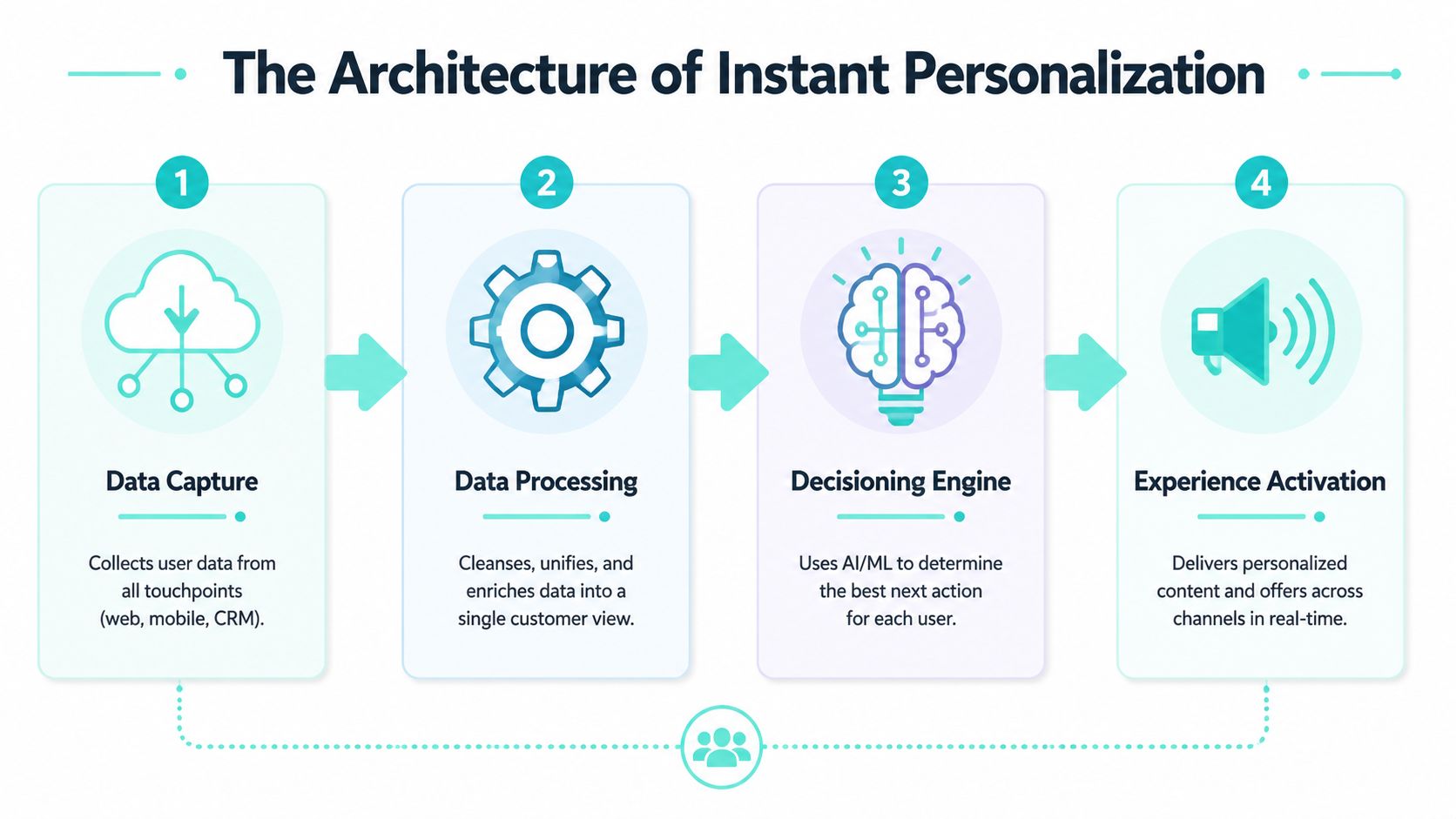
A real-time personalization stack is typically a streaming pipeline. Event data is captured from user interactions, processed by a low-latency analytics or machine learning layer, and exposed through a real-time API that updates the experience during the same session, as outlined in Tinybird's explanation of real-time personalization architecture.
Capture the right events
The first stage is event capture. This sounds obvious, but many enterprises collect too much low-value noise and miss the events that are relevant for decisioning.
Useful signals usually include:
- Navigation intent: Page views, referrers, category transitions, internal search terms
- Commerce behavior: Product views, cart updates, checkout steps, abandonment signals
- Engagement depth: Repeated visits to high-consideration pages, media interaction, form progress
- Contextual signals: Device type, geography, channel source, authenticated status
If your team is still mapping this capability, a grounded starting point is an enterprise customer data platform approach. The reason CDP work matters here is simple. Bad identity resolution upstream creates bad personalization downstream.
Unify and enrich customer context
Raw events on their own don't produce a useful experience. They have to be tied to a customer profile, session context, and some business meaning.
For these efforts, teams usually need discipline around identity, profile stitching, and data quality. Anonymous and known users need a path to continuity. Consent state needs to travel with the profile. Historical traits need to be available without slowing the session decision.
A practical model looks like this:
- Collect events from web, app, commerce, CRM, and service touchpoints.
- Resolve identity across anonymous and authenticated behavior where permitted.
- Enrich profiles with attributes that matter to a decision, such as lifecycle status or product affinity.
- Publish usable context to the decisioning layer through a fast service boundary.
Decide in session
Decisioning is where architecture turns into experience. The system uses current behavior, profile context, and business rules or models to select the next best action.
That action can be simple. Reorder homepage modules. Swap a support message. Suppress a generic upsell. Trigger a content variant for a user showing exit risk. Complex programs often start with surprisingly simple decisions, because those are easier to test and govern.
Architect's note: The best decisioning logic is rarely the most elaborate. It's the logic that can be explained, tested, and improved without breaking the experience.
Teams also underestimate the people side of this layer. Real-time systems need engineers who understand APIs, event models, identity, and model integration. If you're building internal capability around this, resources like ThirstySprout for AI engineer hiring can help hiring managers shape better technical conversations.
Activate through APIs and front-end components
The last mile is delivery. The front end needs a fast way to request the decision and render the right experience without flicker, delay, or channel mismatch.
That's where composable DXP architecture earns its keep. APIs, componentized front ends, and clean content models make it possible to activate decisions across sites, apps, and other surfaces without rebuilding the logic for every channel.
What works is separating data capture, profile management, decisioning, and rendering into clear responsibilities. What doesn't work is burying all of that inside page templates and hoping authors can manage the complexity manually.
Activating Personalization with the Sitecore Composable DXP
Sitecore becomes practical rather than theoretical. In enterprise delivery, the strongest pattern is to let Sitecore products do distinct jobs well instead of forcing one layer to handle everything.

Real-time personalization differs from traditional segmentation because it combines live behavioral signals with historical context and updates user context in milliseconds, which typically requires a CDP, streaming ingestion, and instant decisioning logic, as described in VWO's breakdown of real-time personalization. That requirement maps cleanly to the Sitecore composable stack.
How Sitecore CDP and Sitecore Personalize split the work
Sitecore CDP is where customer data becomes operational. It helps unify profile data across touchpoints so the decision isn't based only on the current page view. Identity, behavior, and historical activity become part of one usable customer record.
Sitecore Personalize is where the decision gets made and activated. It evaluates the current context, applies rules or experimentation logic, and returns the content, offer, or experience variation to deliver. In a mature implementation, that means marketers can control many experiences without waiting on a full development cycle, while architects keep the data and API model stable.
For composable teams, composable DXPs for scalable personalization is a useful reference because it reflects the actual delivery model. You don't build personalization by stuffing logic into the CMS. You build it by connecting decisioning, content, and delivery cleanly.
What useful activation looks like
The strongest Sitecore use cases are usually event-driven and specific. Examples that work well in practice include:
- Exit-sensitive product journeys: A user views several high-value products, pauses at the cart, and gets a contextual reassurance message such as delivery clarity, service support, or relevant financing content.
- Homepage reordering: A returning visitor's clickstream shows repeated interest in one product family, so homepage modules reprioritize around that category rather than staying editorially fixed.
- Journey suppression: A logged-in customer who already completed a key action stops seeing generic acquisition prompts and gets account-relevant guidance instead.
- Cross-channel continuity: A user's recent app or email interaction influences what the site highlights when they return.
These aren't flashy for the sake of it. They're operationally sane. Each one has a trigger, a decision rule, an experience payload, and a measurable outcome.
A quick product view is useful here:
One implementation detail matters more than is commonly realized. Content has to be structured for activation. If authors can only personalize whole pages, you'll end up with fragile experiences. If content is modular, tagged, and reusable, Sitecore Personalize can do much more with less overhead.
Kogifi typically works in that layer between strategy and implementation, helping organizations wire Sitecore CDP and Personalize into a composable DXP model without collapsing governance into custom code. That only works when the use cases stay tied to real decisions instead of broad personalization ambitions.
Extending Personalization Beyond the Website
Enterprise personalization usually underperforms when it stops at the public site. The profile is richer than one channel, and the business value often sits in continuity across environments.
A unified customer or user profile can influence web, mobile, portal, service, and workplace experiences. That matters in organizations where the same person may appear as a prospect, customer, partner, employee, or member depending on the touchpoint.
SharePoint as a personalization surface
SharePoint is often treated as a separate intranet concern, but it can benefit from the same logic. The mechanics are different from public website personalization, yet the principle is the same. Use context to reduce noise and increase relevance.
Examples include:
- Role-aware intranet content: Show different internal resources based on department, geography, business function, or current initiative.
- Journey continuity: If a user has recently engaged with a product family on the public site, internal teams such as sales or support can see aligned knowledge resources or campaign materials in SharePoint.
- Task prioritization: Surface policy updates, training modules, or document hubs based on current workflow rather than static navigation.
This is especially useful in large organizations where employees spend too much time navigating generic intranet structures. Personalization in SharePoint shouldn't mimic consumer marketing. It should reduce friction for work.
One profile across public and internal experiences
The deeper architectural point is that personalization becomes more valuable when systems share context responsibly. A mobile app interaction can influence a website visit. A website behavior can influence service messaging. A customer status change can alter what appears in partner portals or internal workspaces.
When teams separate channels too aggressively, they also separate context. Then every touchpoint behaves like it's meeting the user for the first time.
What works is defining a central decisioning and profile strategy, then exposing that logic to different surfaces through APIs and controlled integrations. What doesn't work is trying to recreate separate personalization systems inside every platform.
For Sitecore and SharePoint environments, that usually means keeping the customer understanding centralized while letting each channel render the experience in its own way. The website might change content modules. SharePoint might reorder resources, target announcements, or surface relevant documents. Same logic. Different activation pattern.
Measuring Success and Ensuring Compliance
This is the part many teams postpone, and it's where weak programs become expensive.
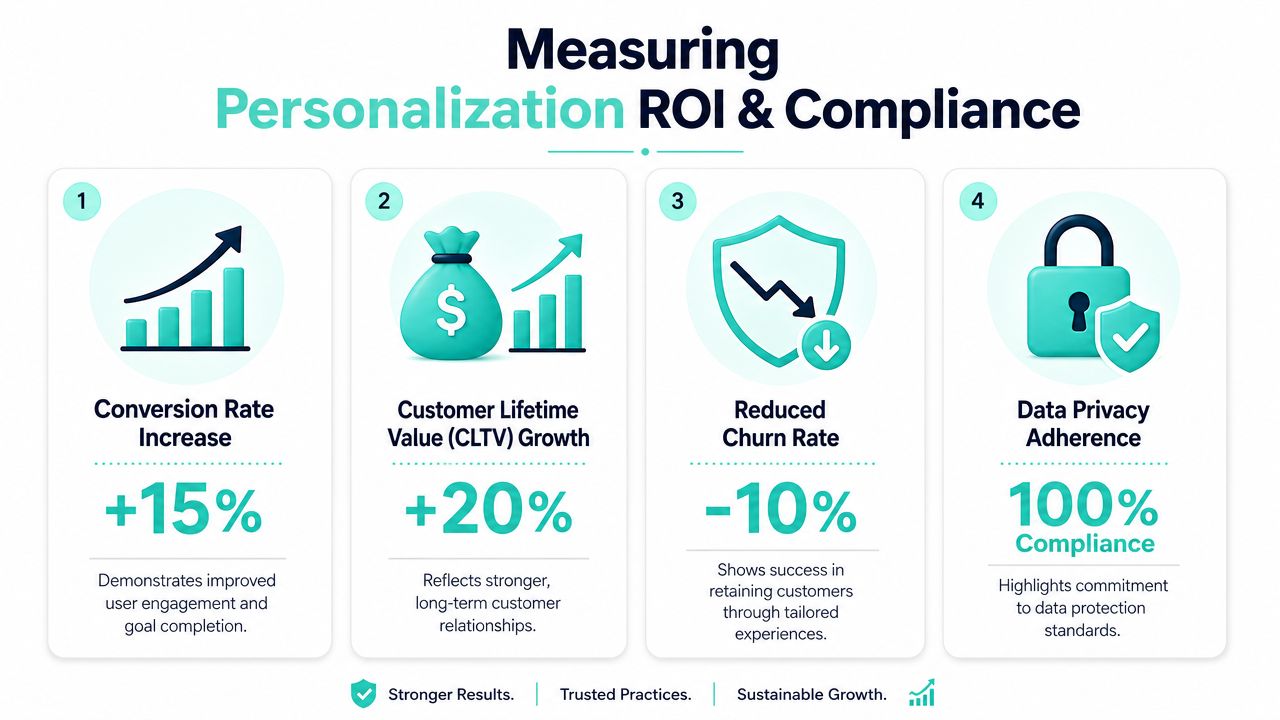
Measuring ROI and attribution in real-time personalization is often underserved because most discussions focus on how to personalize, not how to prove incremental impact. Guidance in this area also suggests starting with one trigger and expanding only after proving value, which implies that returns are often concentrated in specific moments rather than spread evenly across every interaction, as noted in Hightouch's article on real-time personalization.
Measure incremental impact, not activity
The first mistake is measuring output instead of lift. Teams celebrate the number of experiences launched, audiences targeted, or rules configured. None of that proves business value.
A better measurement model looks like this:
- Start with one trigger: Pick a narrow moment with clear intent, such as cart hesitation, repeat product exploration, or support deflection on a key page.
- Create a control path: Hold back part of the audience so you can compare personalized and non-personalized outcomes.
- Track business KPIs: Use conversion rate, average order value, customer lifetime value, retention indicators, lead quality, or engagement depth depending on the journey.
- Review by channel and segment: The same trigger may behave differently across web, app, email, and authenticated journeys.
Sitecore Personalize is useful here because experimentation doesn't have to be separate from activation. The teams that get value quickly are the ones that treat every personalization decision like a hypothesis with a measurable result.
Key takeaway: If you can't isolate lift, you're not running personalization. You're running variation.
It also helps to be realistic about attribution. Enterprise users move across channels and devices. A personalized web moment may influence an app conversion or assisted sale later. You won't always get perfect attribution, but you can still prove directional value if the experiment design is disciplined.
For privacy-aware delivery models, how to personalize without compromising anonymity is a sensible companion read because it addresses a common enterprise tension. Teams want more relevance, but they can't ignore consent and data minimization.
Privacy and governance have to be built in
Privacy isn't a legal footnote. It shapes the architecture.
A sound governance model should define:
- Which signals are permitted for personalization and under what consent state.
- How identity is handled across anonymous and known users.
- Where decision logs are stored for review, auditing, and troubleshooting.
- Who can publish experiences and what approval path is required.
- How fallback content behaves when profile data is unavailable or consent changes.
What works is embedding consent checks and governance rules directly into the activation process. What doesn't work is treating compliance as a downstream review after the logic is already in production.
Your Real-Time Personalization Implementation Roadmap
Most enterprise teams don't need a massive transformation plan on day one. They need a rollout sequence that reduces risk and creates proof.
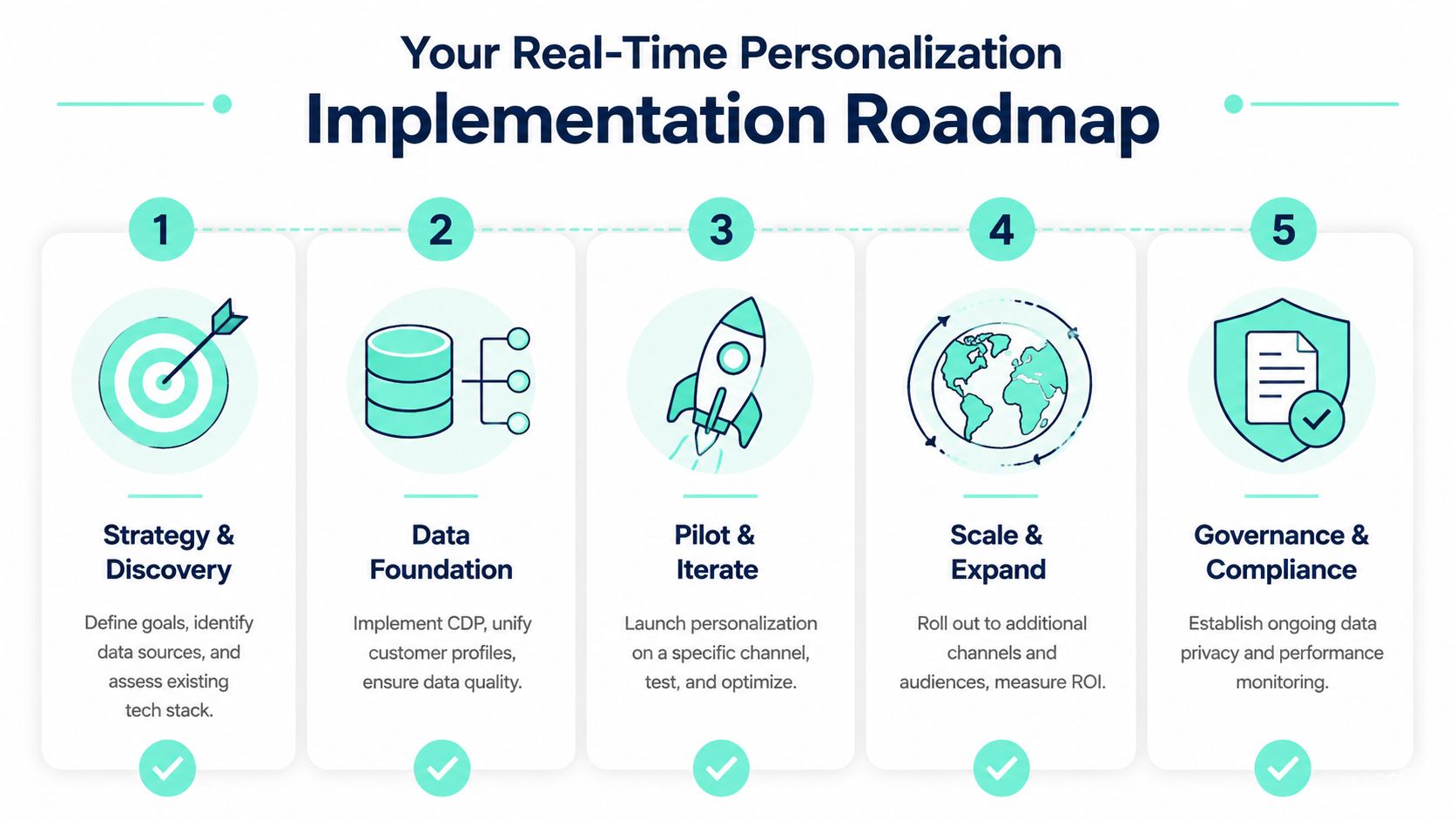
A practical rollout sequence
Audit the current data estate
Identify where behavioral, transactional, and profile data lives today. Then check whether those systems can expose events fast enough for in-session use. Many organizations discover that the actual blocker isn't content. It's fragmented identity and inconsistent event quality.Choose a small number of high-value use cases
Don't start with a personalization vision statement. Start with one to three moments where live context should change the experience. Cart hesitation, repeat product comparison, onboarding friction, or content prioritization for known accounts are usually better pilots than broad homepage personalization.Design the stack around clear responsibilities
Decide where data capture happens, where profiles are unified, where decisioning lives, and how channels consume the result. In a Sitecore composable model, that usually means keeping content, profile logic, and activation interfaces cleanly separated.Launch the pilot with controls
Run the use case with holdouts or A/B paths. Define success before launch. If the result is ambiguous, tighten the trigger or simplify the experience rather than adding more complexity.Create governance before scale
Define ownership across architecture, marketing, analytics, privacy, and content operations. Real-time personalization becomes fragile fast when nobody owns event taxonomy, consent handling, or experience QA.Scale only what proved value
Expand to adjacent channels and surfaces after the first use cases show reliable impact. The biggest mistake here is assuming every page, journey, or audience deserves personalization. Often, the strongest returns come from a handful of high-intent moments.
The right mindset is simple. Start small. Prove value. Build muscle. Then expand.
If your team is planning a Sitecore-based personalization program, Kogifi can help assess the current stack, define practical use cases, and shape a composable implementation path that fits enterprise governance, performance, and cross-channel delivery needs.