


A large DXP programme rarely fails because the team forgot to create tasks. It fails because the work starts before the organisation has agreed what success looks like, who can make decisions, how change will be handled, and what happens when the first integration behaves differently in production than it did in a sandbox.
That's the situation many enterprise teams are in right now. The budget is approved. Sitecore XM Cloud or SharePoint Online is selected. Architects have sketched the target state. Marketing wants more autonomy, IT wants less operational drag, and leadership wants a launch date. Without a solid project implementation plan, that mix turns into scope drift, stalled approvals, weak adoption, and expensive rework.
A useful plan in this context is not a generic PMO template. It is a working delivery document for a complex platform change. As Epicflow's definition of an implementation plan puts it, a project implementation plan is a step-by-step roadmap covering tasks, roles, resources, schedules, success metrics, and contingency measures. In enterprise DXP work, that roadmap also has to account for content operations, governance, training, personalization workflows, search behaviour, legal review, multilingual publishing, and post-launch support.
If your team is also responsible for vendor selection or procurement, it helps to see how strong delivery plans influence winning project management contracts, because buyers often judge implementation credibility long before build starts. And if the business still needs alignment on the platform category itself, this primer on what a DXP is gives the right framing.
Table of Contents
Introduction
A project implementation plan for a DXP initiative has to do more than schedule work. It has to translate business ambition into execution logic that delivery teams, marketers, editors, IT operations, and leadership can all follow. In a Sitecore project, that might mean deciding when personalization starts, who owns taxonomy, how component reuse will work across brands, and when content editors enter the workflow. In a SharePoint project, it often means defining document governance, intranet ownership, permission boundaries, search expectations, and business process automations before the homepage design gets approved.
The practical value is simple. The plan reduces ambiguity before ambiguity becomes cost. Teams know which dependencies are real, which assumptions are risky, and which decisions require escalation instead of endless meetings.
Why feature lists fail
The weakest plans look organised on paper. They list pages, integrations, templates, and milestones. Then delivery starts and nobody can answer basic questions such as these:
- What business outcome matters most: faster publishing, better personalization, reduced platform overhead, or improved employee findability?
- Who decides on trade-offs: product owner, programme sponsor, enterprise architect, or marketing lead?
- What is launchable: a complete estate, a country rollout, a core journey, or a governed minimum viable platform?
A Sitecore XM Cloud programme can technically launch with migrated templates and content. It can still fail commercially if the team never agreed how Sitecore Personalize will be used, which segments matter, or what editorial process supports experimentation. A SharePoint intranet can ship with polished web parts and still disappoint if employees can't find policies, leaders don't own their content, and governance turns every update into a ticket.
Practical rule: if your implementation plan can't explain how the business will work differently after launch, it isn't ready.
What a usable scope statement includes
A useful implementation plan should lock down six items early:
- Business objectives tied to platform capability.
- Delivery boundaries that define what is in and out.
- Ownership for content, architecture, data, and approvals.
- Measures of success that can be reviewed after launch.
- Dependencies across identity, search, analytics, integrations, and legal review.
- Contingencies for delays, cutover issues, and adoption friction.
Enterprise DXP work separates from generic software delivery. Sitecore and SharePoint both touch a broad set of actors. If those actors aren't represented in the implementation plan, the programme tends to look healthy right until approvals stop moving.
Defining Scope and Success Before You Build
Scope is not a list of requested features. It is the business contract for the change. In DXP programmes, poor scope definition usually shows up as late design reversals, surprise content work, conflicting brand expectations, and integrations that were assumed rather than confirmed.

The strongest evidence for doing this properly comes from implementation research, not opinion. Sites that completed high-fidelity pre-implementation activities, including readiness and feasibility work, achieved a 93% success rate in program start-up, with p < 0.001 in a large-scale evaluation across programmes and implementation sites, as reported in this pre-implementation fidelity study. That finding maps directly to DXP work. Readiness matters before architecture matters.
Why feature lists fail
A Sitecore migration often begins with a request like “move the current site to XM Cloud.” That sounds clear, but it isn't. The programme still needs answers to questions such as:
- Which sites move first?
- Will Helix component reuse be mandatory across brands?
- Is personalization part of phase one or a post-launch track?
- Which legacy integrations are worth preserving?
- What editorial workflow changes are acceptable?
For SharePoint, “build a new intranet” is equally vague. Key scope questions usually concern ownership. Who maintains department pages? Will SPFx components be centrally controlled? Which Power Platform automations are in the release plan? Are document libraries replacing other systems or only surfacing them?
A feature inventory doesn't resolve those issues. It just delays them.
A DXP project goes off course when stakeholders approve output without agreeing on operating model.
This is why early workshops need to force business choices, not just collect ideas. Architects, delivery leads, content owners, and sponsors should leave discovery with explicit priorities. If the organisation wants faster campaign publishing, then modular authoring, component governance, and editorial training move up the stack. If the priority is intranet adoption, then search, navigation, and content ownership matter more than homepage polish.
A structured project discovery process helps turn those discussions into decisions instead of notes.
What a usable scope statement includes
For Sitecore and SharePoint work, the scope statement should read like a controlled operating brief. It should include:
- Target outcomes: what the platform must enable after launch.
- In-scope capabilities: for example content migration, search, personalization setup, multilingual support, or Power Platform workflows.
- Out-of-scope items: legacy parity requests, deferred integrations, custom edge cases, or country-specific exceptions.
- Approval model: who signs off design, content model, architecture, and launch readiness.
- Definition of done: not “development complete,” but business-ready acceptance.
A good scope statement also makes trade-offs visible. If a multi-brand Sitecore estate needs a shared component library, some local teams will lose design freedom. If a SharePoint intranet needs stronger governance, page creation may become more controlled. Those are not delivery problems. They are planned choices.
Crafting Your Dynamic Timeline and Milestones
Rigid timelines look reassuring in steering meetings. They age badly once real dependencies appear. DXP programmes are especially exposed because content readiness, legal review, integration behaviour, analytics validation, and stakeholder approval do not move in a straight line.
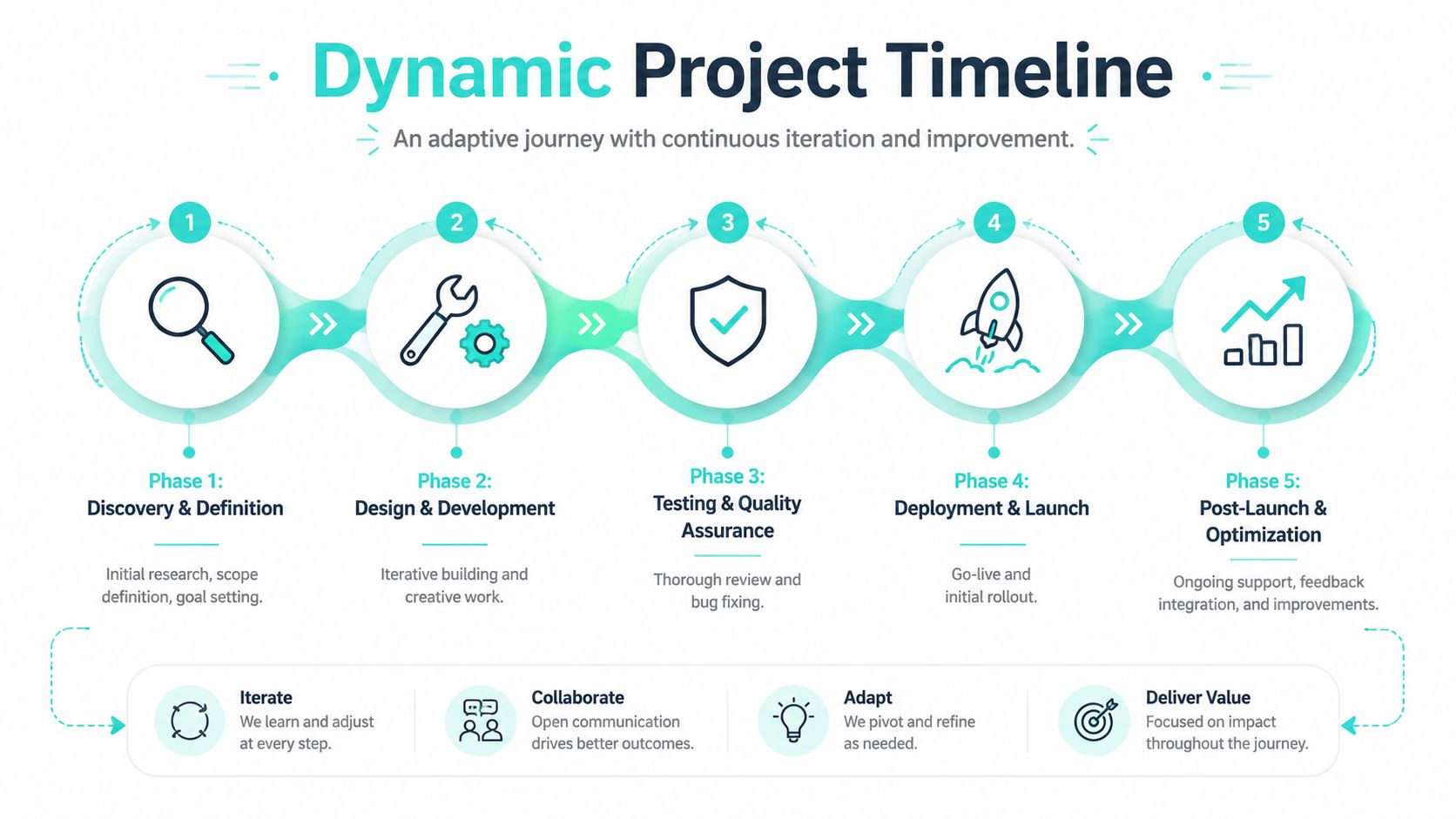
The data is clear on the delivery model. Agile-based implementation plans fail at 9%, compared with 29% for Waterfall, based on the comparison reported in these project management statistics from Speakwise. The same source set also supports flexible, collaborative timeline governance, and the planning guidance provided for implementation templates notes that bi-weekly recalibration checkpoints can reduce failure rates by 45% in complex digital work, discussed in this implementation plan template analysis.
Why rigid dates break DXP programmes
A classic waterfall timeline usually assumes these things will happen on schedule:
- content authors deliver on time
- integration owners are available when needed
- UAT reviewers behave like a single stakeholder
- non-functional testing reveals only small defects
- launch approvals follow the original route
In enterprise reality, none of that is dependable enough for a fixed sequence. Sitecore work often hits shifts around personalization logic, search tuning, analytics tagging, or component variants. SharePoint work often changes when departments realise the governance model affects how they publish, share, or automate content.
That doesn't mean the schedule should become vague. It means the plan should be adaptive by design.
A useful pattern is to structure the programme into stable phases and flexible sprint goals. The phases tend to remain consistent:
- Discovery and definition
- Design and development
- Testing and quality assurance
- Deployment and launch
- Post-launch optimisation
If you work across operational transitions too, this kind of staged thinking is also useful outside CMS projects. A good example is this PEO transition timeline guide, which shows how timeline clarity and transition checkpoints reduce confusion when multiple parties are involved.
How to structure milestones that matter
The most common timeline mistake is using technical completion as the milestone. That hides whether the business can use what has been built.
Use milestones that represent a testable outcome:
| Weak milestone | Better milestone |
|---|---|
| Front-end complete | Primary user journey is fully testable |
| Components built | Approved component set supports real authoring scenarios |
| Migration scripts ready | Priority content moved and validated by business owners |
| Search configured | Users can find key information through agreed search paths |
| Personalization enabled | Segment logic and content variants are ready for controlled testing |
This matters even more with Sitecore AI. If the plan includes XM Cloud, Sitecore Personalize, or Content Hub, you don't want AI features bolted on after launch as a vague “optimization phase.” The implementation plan should identify when data inputs, content variants, testing rules, and marketer workflows will be ready. Sitecore's AI capabilities are strongest when they are designed into the programme rather than added as a late enhancement.
Review the timeline every two weeks against reality, not optimism.
A dynamic timeline also needs explicit recalibration triggers. For example, if content modelling slips, if taxonomy isn't approved, or if identity integration is delayed, the team should know what gets moved, what gets descoped, and who approves the change. That keeps the timeline alive. Otherwise it becomes a historical record of assumptions.
Establishing Governance and Clarifying Roles
Many troubled DXP implementations have enough skilled people. What they lack is a decision model. Governance solves that. It tells the team who decides, who advises, who executes, and who needs visibility without blocking progress.
For Sitecore projects, governance usually spans architecture, component standards, personalization ownership, content model control, release approval, and support readiness. For SharePoint, it often covers information architecture, permissions, page ownership, intranet publishing standards, Power Platform automation rules, and support handover.
Governance is the operating model
A practical governance model should answer four questions early:
- Who owns platform direction
- Who can approve scope changes
- Who governs content and publishing standards
- Who signs off launch readiness
Without that structure, the loudest stakeholder tends to control delivery in the moment. That creates redesign churn, approval reversals, and technical debt that nobody wanted but everybody tolerated.
The governance model also has to include change management. That is where many implementation plans stay too technical. The delivery team builds a solid Sitecore platform, but marketers haven't learned how to manage variants, use workflows, or interpret personalization outcomes. Or the SharePoint intranet launches with the right architecture, but departments still store critical knowledge in old channels because nobody changed habits.
The adoption risk is not abstract. 70% of enterprise digital transformations fail due to poor stakeholder adoption and resistance, not technical flaws. Projects that integrate dedicated cultural change management, including training, communication, and feedback loops, achieve 3.5x higher success rates, according to the analysis cited in this project implementation plan review.
A related discipline is content ownership. If your governance model is weak, publishing quality erodes quickly. This is why a solid content governance framework belongs inside the implementation plan, not outside it.
Example RACI matrix for component approval
A simple RACI matrix removes a surprising amount of friction. Here is a practical example for a DXP component approval workflow.
Example RACI Matrix for a DXP Component Approval
| Task | Project Manager | Lead Developer | Marketing Head | Content Editor |
|---|---|---|---|---|
| Define component purpose | C | R | A | C |
| Confirm technical feasibility | I | A | C | I |
| Review editorial usability | C | C | I | A |
| Approve design and messaging fit | I | C | A | C |
| Schedule release into sprint | A | R | I | I |
The exact names may differ, but the pattern matters. One accountable owner per decision. Clear consulted roles. No ambiguity around who executes.
If everyone can approve a component, nobody owns the consequence of approving it.
In practice, governance also needs meeting cadence. A steering group should handle strategy and escalations. A delivery forum should handle sprint-level decisions. A content or editorial governance group should review authoring standards, workflows, and taxonomy. Put those routines in the implementation plan so they survive beyond kickoff.
Anticipating Risk and Planning Your Response
DXP programmes always carry risk. The question isn't whether risk exists. The question is whether the team identifies it early enough to respond calmly.
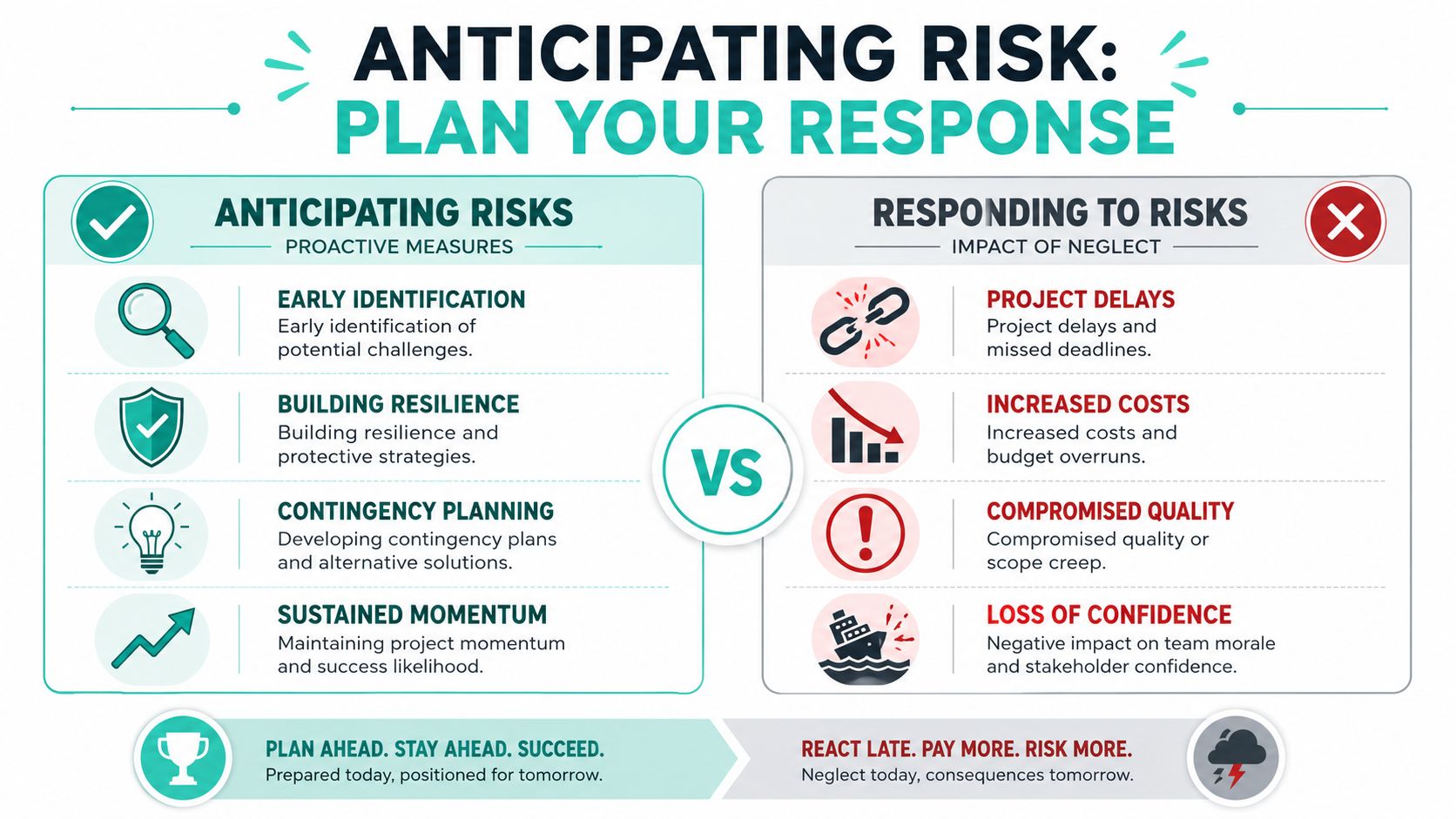
Large digital programmes are not safer because they are better funded. They are often more fragile. Projects with budgets over $1 million fail 50% more often than projects under $350,000, and 37% of projects fail due to a lack of clear requirements. The same source states that organisations using defined project management practices achieve a 92% success rate. Those figures come from this project management statistics summary.
The risk pattern in large DXP work
On Sitecore implementations, common high-impact risks include:
- Content migration errors: broken mapping, missing metadata, malformed URLs, unmanaged redirects.
- Integration failures: CRM, DAM, search, identity, commerce, or analytics dependencies behaving differently outside test conditions.
- Performance issues: page assembly, caching gaps, search latency, or personalization logic affecting response patterns.
- Operational gaps: unclear support model, no rollback path, weak monitoring, or incomplete launch runbooks.
On SharePoint programmes, the risk profile is different but just as serious:
- Permission sprawl
- Poor intranet search quality
- Broken document governance
- Inconsistent page ownership
- Power Platform automations that depend on unmanaged inputs
Here's the embedded video referenced for this topic:
A practical identify assess mitigate model
The cleanest way to manage risk is with a live register that teams review.
Identify
Write risks in operational language. “Search may underperform due to incomplete metadata model” is useful. “Search issues” is not.
Assess
Score each risk by likely impact on launch, business operations, or user trust. DXP teams often over-focus on technical severity and underweight editorial and adoption impact.
Mitigate
Assign an owner and define a concrete action. Examples include trial migrations, performance test windows, launch rehearsals, cutover runbooks, fallback content paths, or explicit rollback procedures.
A concise risk table often works better than long prose:
| Risk | Likely impact | Early mitigation |
|---|---|---|
| Incomplete content mapping | Delayed migration and broken journeys | Validate priority content types before bulk migration |
| Identity integration delay | Login-dependent journeys blocked | Build and test a non-production path early |
| Weak editorial adoption | New features unused after launch | Train authors on real scenarios before go-live |
| Cutover missteps | Launch disruption | Rehearse cutover and rollback with named owners |
Testing should be treated as a risk control, not a phase that sits near the end. In Sitecore projects, that includes component QA, search validation, personalization checks, analytics verification, and launch-day smoke testing. In SharePoint, it includes permissions testing, search result quality, page governance checks, and workflow validation.
The implementation plan should also define what happens when a trigger is hit. If key content isn't approved by a certain date, what changes? If a third-party integration slips, which launch scope survives? Teams that answer those questions early don't panic when plans need to move.
Measuring Impact with Post-Launch Support and KPIs
Go-live is not the end of implementation. It is the point where the platform starts proving whether the design, governance, and delivery choices were correct. A mature project implementation plan includes hypercare, support ownership, KPI review, and a pathway for optimisation.
The KPI values shown in the infographic are part of the required visual, but they should not be treated as universal benchmarks. In practice, each programme should define its own measures during discovery and tie them directly to support and optimisation work.
Launch is the first production test
A post-launch support model should define:
- Incident ownership: who triages, fixes, and communicates.
- Support windows: what counts as critical, urgent, or routine.
- Monitoring responsibilities: platform health, search behaviour, broken journeys, and content issues.
- Handover criteria: what must be documented before BAU support takes over.
For SharePoint intranets, useful post-launch measures are usually adoption-oriented. Search behaviour, publishing consistency, content freshness, and workflow usage reveal whether the intranet is becoming part of daily work. For Sitecore, the measures usually sit closer to content performance, personalization readiness, campaign agility, and operational stability.
A practical KPI set also helps avoid vanity reporting. “The platform launched” is not a business metric. “Editors can publish reusable campaign pages without developer support” is much closer to one.
Where Sitecore AI changes the KPI model
Sitecore AI deserves specific attention. Sitecore's portfolio embeds AI across products such as XM Cloud and Content Hub, enabling brands to plan, create, and deliver content at scale, as described in the announcement of Sitecore AI and the AI-first era of digital experience. In practice, that matters because post-launch optimisation can be designed into the implementation plan from the start.
Sitecore AI also supports personalization workflows where engines identify optimal user segment combinations without manual rule configuration, discussed in this overview of AI in Sitecore for digital experiences. And with Sitecore Personalize, teams can run multivariate tests where AI determines the best content combinations for different segments, as explained in this article on using Sitecore Personalize for multivariate testing.
That changes how KPI planning should work. Instead of measuring only static outcomes, the implementation plan can include:
- readiness of audience segments
- availability of content variants
- quality of test design
- editorial ability to act on AI-led findings
- governance for ongoing optimization
For teams defining the broader reporting layer, these metrics for content marketing are a useful reference point for tying content performance to business outcomes.
The best post-launch KPI model doesn't just measure whether the platform is stable. It measures whether the organisation can improve it continuously.
Conclusion
A strong project implementation plan protects DXP initiatives from predictable failure. It defines business success before build starts, keeps timelines flexible without losing control, gives teams a real governance model, treats risk as an operating discipline, and makes post-launch value measurable. That matters even more in Sitecore and SharePoint programmes, where platform capability and organisational behaviour are tightly connected.
The plan should stay active throughout delivery. If it turns into a static kickoff document, the project starts drifting almost immediately. When it stays tied to decisions, milestones, ownership, and support, it becomes the backbone of successful delivery.
If you're planning a Sitecore or SharePoint implementation and want experienced guidance on architecture, governance, AI-driven personalization, or delivery recovery, talk to Kogifi.