


Your teams already have documents everywhere. Brand assets sit in Sitecore. Policies live in SharePoint. Product specifications are buried in old folders, email attachments, and local exports someone saved “just in case.” The problem usually isn't lack of storage. It's lack of control.
That's where a modern document controller system earns its place. In enterprise environments, a primary failure mode isn't merely poor filing. It's people acting on the wrong document, approving the wrong revision, or publishing content that passed through no defensible governance path at all. For organizations already invested in Sitecore and Microsoft 365, the best answer usually isn't another standalone repository. It's an architecture that brings control, traceability, and automation into the platforms teams already use every day.
Table of Contents
- Why control matters more than storage
- What it looks like in practice
- Where organizations usually get it wrong
- Versioning that prevents operational mistakes
- Access control that matches responsibility
- Audit trails that stand up under scrutiny
- Workflows that remove human delay
- Content Hub as the control layer for approved assets
- AI where it actually helps document control
- XM Cloud and controlled publishing
- What doesn't work
- Turning SharePoint into a controlled environment
- SPFx and Power Platform for enforcement
- A practical pattern for policy control
- What usually breaks in SharePoint projects
- Security controls that support defensible operations
- Compliance is a design problem
- What an audit-ready system looks like
- Start with cleanup, not configuration
- Build taxonomy around decisions people make
- Roll out in phases that limit disruption
- Add AI to lifecycle monitoring, not just search
- What to evaluate beyond the demo
- Measure outcomes the business can feel
- What good value realization looks like
What Is a Document Controller System
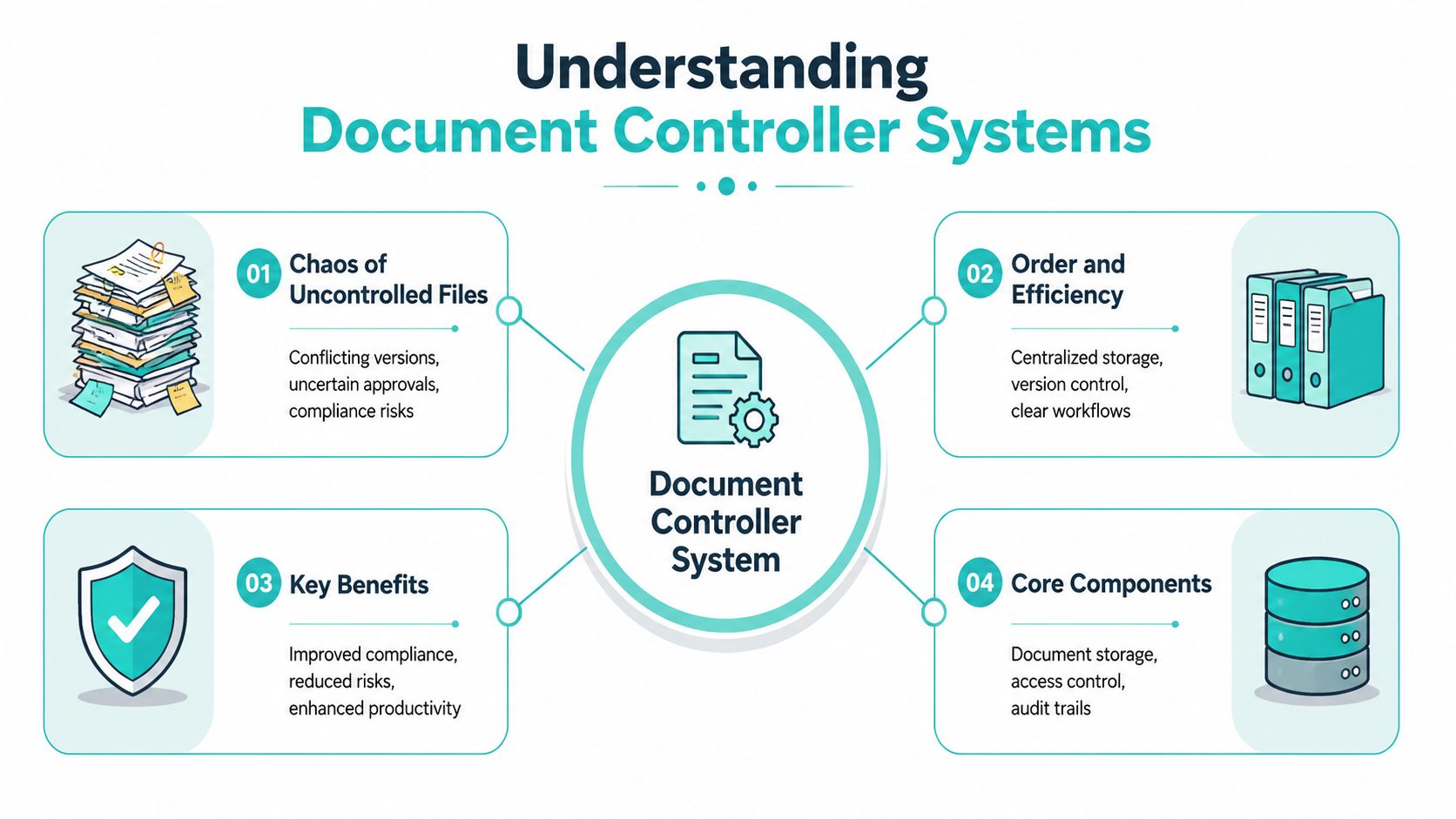
A document controller system is what turns a pile of digital files into an operationally reliable body of knowledge. Without it, teams work from conflicting versions, approvals get lost in email, and nobody can say with confidence which file is the current one. That chaos becomes expensive fast in regulated, multi-team environments.
A proper system goes further than document management. Basic document management stores files and helps people retrieve them. A document controller system governs the full lifecycle. It controls how documents are created, reviewed, approved, distributed, revised, retained, and archived. It also enforces who can touch what and records what happened along the way.
Why control matters more than storage
In quality-led organizations, a document controller system is critical for meeting standards such as ISO 9001 and ISO 13485 because it maintains a single master version, supports a full audit trail, and keeps access aligned with policy, as explained in Cognidox's analysis of document management versus document control. The same source notes that 72% of senior executives believe bad decisions are as frequent as good ones in their organizations, which is exactly the kind of operating risk that controlled information frameworks are designed to reduce.
That distinction matters in architecture. A shared drive can store ten copies of a process document. A document controller system should make one approved version authoritative and make obsolete versions unmistakably non-current.
Practical rule: If users can't tell in seconds whether a document is current, the system isn't controlled.
What it looks like in practice
The most effective implementations combine repository discipline with workflow enforcement. That means:
- Controlled versioning: One authoritative document record with revision history.
- Approval governance: Review and sign-off steps tied to roles, not informal habits.
- Access boundaries: Sensitive files exposed only to authorized users.
- Retention logic: Documents don't linger forever without lifecycle rules.
This is also why enterprise content architecture matters. A document controller system shouldn't sit apart from your wider content estate if your teams already manage structured content, assets, and publishing workflows elsewhere. A useful starting point is to align it with broader enterprise content management solutions so governance rules don't stop at one department boundary.
Where organizations usually get it wrong
The common mistake is treating control as a folder structure problem. It isn't. Folders help navigation, but they don't prove approval, retirement, or traceability. They also don't stop someone from downloading an outdated file and circulating it again.
Another mistake is over-designing metadata before defining ownership. Every controlled document needs a responsible owner, a review path, and a policy for what happens when the related process changes. Without that, even a well-built repository degrades into a cleaner-looking mess.
Core Capabilities of a Modern Document Controller System
The difference between a credible document controller system and a dressed-up file library comes down to a handful of capabilities that must work together. If one pillar is weak, control breaks somewhere else.
Versioning that prevents operational mistakes
Version control sounds straightforward until multiple teams collaborate under deadline. In real environments, the challenge isn't just storing old revisions. It's making the current approved revision obvious at the point of use and ensuring obsolete versions don't drift back into circulation.
A mature system uses formal revision identifiers, preserves history, and retires superseded documents according to policy. That creates a clean chain from draft to approval to archive. It also protects process integrity, which is where many implementations fall short. Teams often focus on file handling and miss the larger issue of outdated process documents still being visible when the business process has already changed.
Access control that matches responsibility
Security and governance are inseparable here. A reliable document controller system uses role-based access control, or RBAC, so the right people can review, edit, approve, or view documents according to their function. That's not just a security feature. It's an operating model.
A reviewer shouldn't have the same privileges as a process owner. A wider employee audience may need read access to final policies but no ability to alter them. In regulated environments, permission design has to be intentional or the audit story will fall apart later.
| Capability | What it does | Why it matters |
|---|---|---|
| Version control | Maintains approved revisions and history | Stops teams from using obsolete files |
| RBAC | Restricts actions by role | Reduces exposure and protects approval integrity |
| Audit trails | Logs user actions | Supports traceability during audits and investigations |
| Workflow automation | Routes documents through controlled stages | Reduces manual delays and approval bottlenecks |
Audit trails that stand up under scrutiny
A useful audit trail isn't a vague activity feed. It records who accessed, edited, approved, or deleted a document, and when. That level of traceability matters during internal reviews, external audits, and legal discovery.
As outlined in The Digital Project Manager's review of document control software, advanced systems pair RBAC with real-time audit trails for traceability, and automated workflows can reduce cycle times by up to 40% when routing documents through creation, review, and approval. That combination is what separates passive storage from active governance.
The fastest way to lose confidence in a controlled document set is to leave approval history open to interpretation.
Workflows that remove human delay
Manual routing is where many document processes stall. Someone forgets to notify a reviewer. A draft sits in a mailbox. Another person assumes approval happened because the file appeared in a shared folder.
Automation removes that ambiguity. The system should move a document through states such as draft, in review, approved, published, and retired based on defined business rules. It should also surface exceptions, not just happy paths. If a reviewer is overdue or a mandatory approver is missing, the process should stop visibly rather than fail unnoticed.
That's why workflow design deserves as much attention as repository design. If your process model is weak, better storage won't save it.
Integrating with Sitecore's AI-Powered DXP
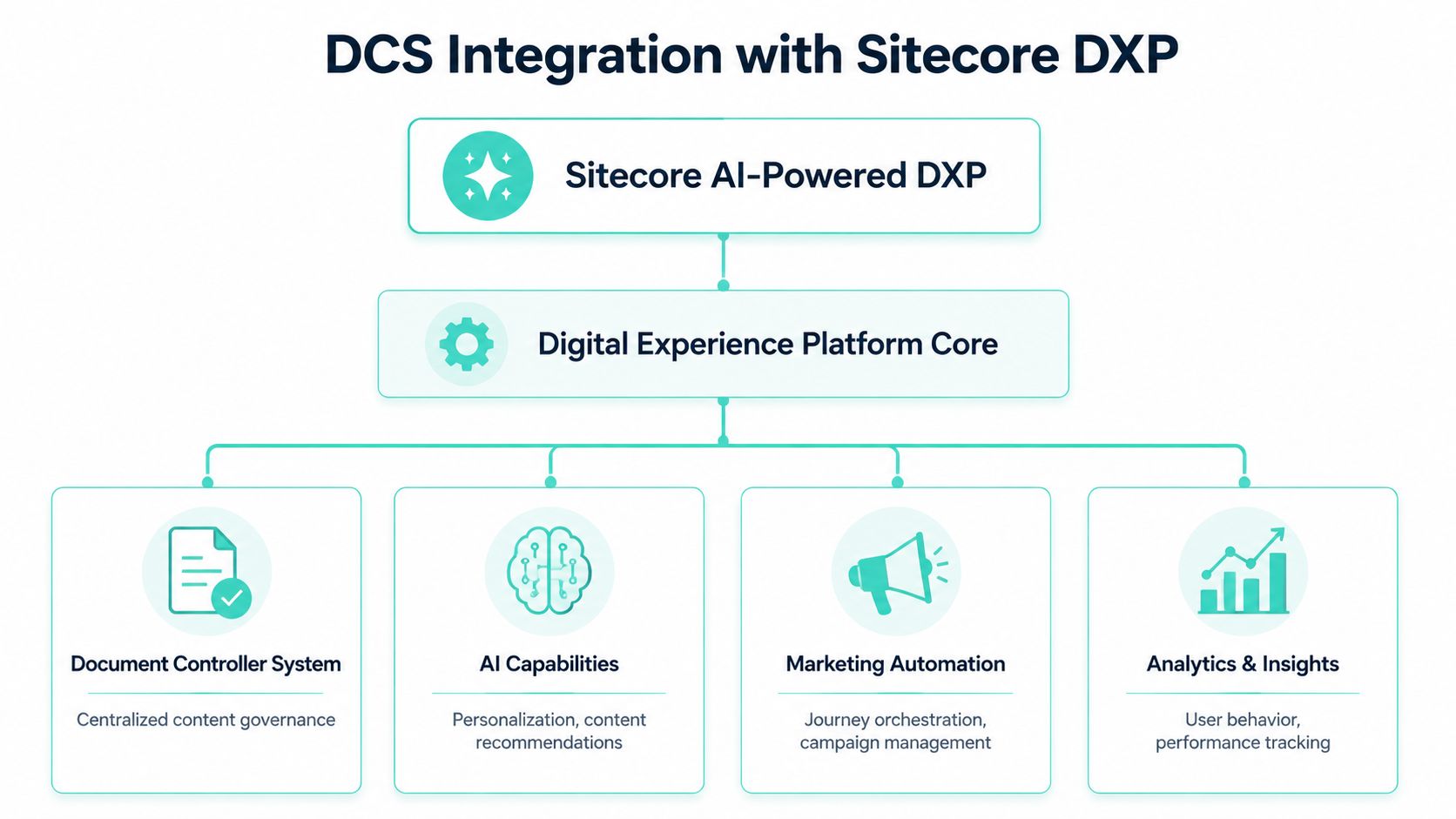
Organizations using Sitecore already have a strong foundation for controlled content. The missed opportunity is treating Sitecore only as a website platform when it can also serve as a governed content layer for documents, assets, and approvals that affect customer experience.
That matters because external content often has the same control requirements as internal documentation. Brand assets, regulated claims, campaign components, product sheets, and approved copy all need version discipline, ownership, and release governance. If those controls are disconnected from the DXP, teams create parallel systems and duplicate risk.
Content Hub as the control layer for approved assets
In a Sitecore estate, Content Hub is often the right place to establish authoritative control for marketing and brand content. Instead of passing approved assets around by email or local download, teams can manage asset status, metadata, usage permissions, and lifecycle states in one governed environment.
That approach works especially well when documents are more than files. A brochure, product image set, legal disclaimer, and campaign headline may each have separate review paths but still feed the same digital experience. Content Hub gives those items a managed lifecycle rather than leaving them as disconnected artifacts.
A practical model usually includes:
- Authoritative asset records: Keep one governed record for each approved content item.
- Lifecycle states: Define draft, legal review, approved, published, and retired states.
- Metadata discipline: Tag by market, language, brand, product, and channel.
- Usage alignment: Connect approved content to downstream publishing destinations.
AI where it actually helps document control
The strongest current advantage in Sitecore is that AI is already built into the platform, not bolted on as a side tool. As described in Perficient's overview of AI in Sitecore, Sitecore's AI capabilities are embedded across its product portfolio, including Content Hub and XM Cloud, enabling scalable speed and personalization without requiring separate AI modules.
In document control terms, that changes the operating model. AI can support metadata enrichment, improve search relevance, help classify content, and make governed assets easier to discover and reuse. That's useful because a controlled document nobody can find is still a process failure.
XM Cloud and controlled publishing
XM Cloud becomes particularly valuable when approved content needs to move into omnichannel delivery without bypassing governance. Teams can create a publishing model where only approved items from governed workflows become available for experience assembly. That prevents a common problem in enterprise marketing stacks, where content production gets disciplined but page assembly remains informal.
A well-architected pattern often looks like this:
- Controlled asset or content item originates in Content Hub or a governed authoring flow.
- Metadata and approval state determine whether it can move downstream.
- XM Cloud consumes only approved content objects.
- Personalization logic uses governed content, not ad hoc uploads.
For organizations refining this model, a useful parallel reference is a structured content publishing workflow that treats approval, readiness, and release as part of one continuous system rather than separate tasks.
Controlled content should power personalization. Personalization should never bypass control.
What doesn't work
Using Sitecore as a dumping ground for downloadable files rarely succeeds. The platform is most effective when you model content and assets intentionally, define approval gates, and treat metadata as operational infrastructure. If teams still rely on offline approvals or manual naming conventions to indicate status, the DXP won't solve the underlying control problem.
The better pattern is governance by design. Sitecore then becomes part of the document controller system, not an exception to it.
Building a Controlled Intranet with SharePoint Online
Monday morning exposes weak document control faster than any architecture diagram. An employee opens a bookmarked PDF for an old travel policy, a manager finds a different version in Teams, and HR insists the current copy lives on the intranet. SharePoint Online usually sits underneath all three paths. The problem is not the platform. The problem is that collaboration areas and controlled publishing areas were never designed as separate operating models.
For enterprises already invested in Microsoft 365 and Sitecore, that distinction matters. SharePoint should hold the governed internal document estate. Sitecore should surface the right approved content in richer digital experiences when needed. Used together, they give enterprises a practical way to control authoring, approval, and employee access without forcing every document into the DXP.

Turning SharePoint into a controlled environment
SharePoint Online works well as a document controller system when the information architecture reflects governance, not just team convenience. In practice, that means separate libraries for controlled documents, content types that enforce required metadata, approval flows tied to named owners, and permissions set around responsibility for the document, not membership in a broad workspace.
Folders still have a place, but they should not carry the governance model by themselves. Metadata should define document class, business owner, approval state, review date, and publishing scope. That design gives you filtering, reporting, lifecycle automation, and cleaner handoffs into intranet publishing.
A workable internal structure usually includes:
- Controlled libraries for formal documents: policies, SOPs, standards, forms, and approved templates
- Collaboration spaces for draft work: team sites where authors develop content before it enters formal control
- Publishing destinations: intranet pages or hubs that expose only approved material to employees
- Review and retention rules: so outdated content does not remain discoverable by accident
Teams that need a baseline on the platform itself should start with Kogifi's explanation of what SharePoint Online is and where it fits in Microsoft 365.
SPFx and Power Platform for enforcement
Out-of-the-box SharePoint is flexible. Controlled intranets need more opinionated behavior. SPFx components can show document status, force users toward the current approved file, and remove ambiguous actions from high-risk libraries. Power Automate can route approvals, trigger periodic reviews, collect attestations, and notify owners before a document slips past its review date.
That is where architecture choices matter. If every department builds its own flow logic, the intranet becomes harder to govern over time. I usually recommend a small set of reusable patterns: one approval template for controlled policies, one review cycle template for recurring validation, and one publishing pattern for read-only employee access. Standardizing those patterns lowers support overhead and makes audit preparation much easier.
Privacy also needs attention when AI features enter the intranet roadmap. Enterprises using Microsoft Copilot, Sitecore AI services, or custom retrieval workflows should define what content can be indexed, summarized, or recommended. LocalChat's guide to data privacy AI is a useful reference for teams setting boundaries around sensitive internal content before broader AI rollout.
A practical pattern for policy control
A reliable SharePoint model separates authoring from consumption. Authors and reviewers work in a draft area with versioning and workflow controls. Approved documents move into a controlled library that feeds intranet pages, quick links, and search experiences. Employees read the published version only.
| Layer | Primary audience | Control expectation |
|---|---|---|
| Draft workspace | Authors and reviewers | Edit rights, workflow progression |
| Controlled library | Process owners and approvers | Formal versioning and approval |
| Intranet publishing surface | General employees | Read-only access to current documents |
This pattern solves a common enterprise problem. People do not need every version. They need the right version, clearly labeled, easy to find, and harder to misuse than the stale copy saved on a desktop months ago.
A brief product walkthrough helps show how this model feels in practice:
What usually breaks in SharePoint projects
The technical build is rarely the point of failure. Ownership drift is.
A well-designed intranet still degrades if process owners never review content, if site sprawl creates parallel sources of truth, or if employees can reach obsolete files more easily than the current approved version. Search configuration matters. Page design matters. Clear document ownership matters more.
The practical standard is simple: the approved version must be the easiest version to find, open, and trust. That requires governance baked into the intranet itself, with accountable owners, scheduled reviews, controlled permissions, and publishing rules that support the way the business operates.
Meeting Compliance Security and Audit Requirements
A document controller system is often funded as an efficiency initiative, but its deeper role is risk reduction. If your organization has to prove who approved a document, who accessed it, which version was active at a given time, and whether retention rules were followed, you're not dealing with convenience. You're dealing with governance.
Security controls that support defensible operations
The minimum bar is clear. Sensitive documents need protection in transit and at rest, access must align with role, and every meaningful action should be traceable. In practice, that means combining encryption, RBAC, and audit logging with review and retention policies that auditors can follow.
Organizations using these systems also see tangible operational effects. According to business.com's document management statistics overview, organizations leveraging document control systems can reduce annual printing and paper consumption by 40 to 60 percent, and advanced security features such as 256-bit SSL encryption are essential for protecting sensitive information and supporting data privacy requirements.
Compliance is a design problem
Standards such as ISO 27001, ISO 9001, and regulated frameworks such as GxP don't just care that documents exist. They care that controls are reliable, repeatable, and reviewable. That pushes architecture decisions in specific directions.
A compliant operating model typically requires:
- Controlled approval paths: Documents can't become authoritative through informal sharing.
- Evidence of change history: Revisions, decisions, and approvals must be preserved.
- Retention enforcement: Files need defined lifecycle handling, not indefinite sprawl.
- Restricted exposure: Users should only see the documents appropriate to their role.
These controls also matter more now because AI features are entering content and knowledge workflows quickly. If your teams use AI-assisted search, summarization, or workflow support, privacy architecture needs to be considered alongside document architecture. A useful companion perspective is LocalChat's guide to data privacy AI, especially for teams evaluating how controlled content should and shouldn't flow into AI-enabled experiences.
What an audit-ready system looks like
Audit-ready doesn't mean cluttered with logs. It means the system can answer simple questions cleanly:
- Which version was current on a given date?
- Who approved it?
- Who accessed or changed it?
- Was the document retained, archived, or removed according to policy?
If your team has to reconstruct those answers from email trails and shared drive timestamps, the system isn't audit-ready.
When compliance pressure rises, weak document control shows up before weak design does.
That's why security, lifecycle, and evidence design should be settled early. Retrofitting them after rollout is expensive and often incomplete.
A Phased Approach to System Migration and Rollout
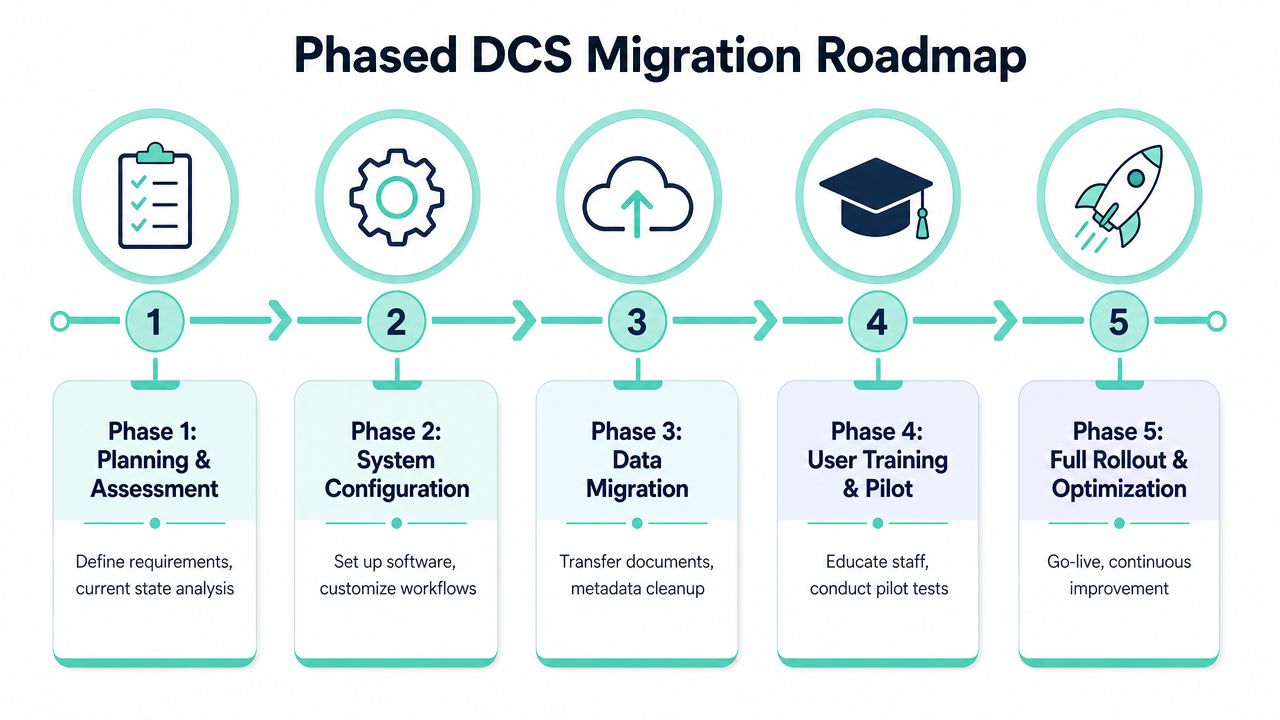
Document control programs rarely fail because the target platform is wrong. They fail because migration treats old content as if it deserves a fresh start without review. It usually doesn't. The true work is deciding what should move, what should be retired, and what needs remediation before it enters a controlled system.
Start with cleanup, not configuration
Before building workflows, classify the content estate. Identify authoritative repositories, duplicate stores, ownerless documents, and file sets that are no longer valid. If you migrate everything untouched, you preserve disorder on a better platform.
A practical assessment usually separates content into four buckets:
- Keep and govern: Current, business-critical documents with clear ownership.
- Remediate first: Valuable content with poor metadata, unclear status, or broken naming.
- Archive: Legacy material with retention value but no active operational role.
- Retire: Obsolete or redundant files that shouldn't enter the new system at all.
Build taxonomy around decisions people make
Taxonomy should support routing, findability, and accountability. If metadata only describes documents after the fact, it won't help operations much. Strong metadata models make approval, retrieval, and retention easier because they reflect how the organization works.
That includes fields such as document type, business area, owner, approval state, effective date, and review trigger. In Sitecore-centric estates, metadata should also support content reuse and publishing controls. In SharePoint-centric intranets, it should support audience visibility, records handling, and policy review.
Roll out in phases that limit disruption
Controlled systems are best introduced domain by domain. Start where risk and clarity are both high. Policies, SOPs, quality documents, and approved templates usually make better pilot candidates than messy team knowledge libraries.
A rollout sequence often works best like this:
- Pilot one high-value document domain with defined owners and review paths.
- Validate workflow behavior with real approvers, not only project stakeholders.
- Train users by role so authors, reviewers, and readers each learn the parts that matter to them.
- Expand by business unit or document class once exceptions and edge cases are understood.
For teams planning wider content modernization in parallel, a structured CMS migration checklist is often useful because the same migration discipline applies to governed document estates.
Add AI to lifecycle monitoring, not just search
One of the more important shifts in document control is the move toward AI-driven document lifecycle automation. As discussed in Dean Jones's article on the shift beyond traditional document control, the trend is moving away from static revision control and toward predictive approaches that can flag outdated documents before they cause errors.
That's the right place to use AI first. Not as a substitute for governance, but as a way to detect drift. Examples include surfacing likely stale documents, identifying metadata gaps, or highlighting content that no longer matches current process language.
Implementation advice: Use AI to find exceptions earlier. Don't use it to weaken approval rules.
The migration goal isn't just a cleaner repository. It's a system that becomes more proactive over time.
Evaluating Solutions and Measuring Long-Term ROI
A weak decision at vendor selection usually does not fail in the demo. It fails six months later, when one business unit needs a new approval path, Legal asks for audit evidence, and IT discovers that a simple metadata change now needs outside support. That is the point where architecture matters more than features.
For enterprises already invested in Sitecore and Microsoft 365, the evaluation criteria should reflect that reality. The goal is not to buy another isolated repository. The goal is to build a controlled document environment that fits the platforms already running content, collaboration, identity, and search across the business.
What to evaluate beyond the demo
A polished interface says very little about whether the system will hold up under real operating conditions. Evaluation should focus on how the platform behaves when governance gets complicated, content volumes increase, and regional teams start introducing exceptions.
These are the criteria I would put in front of any enterprise selection team:
- Governance fit: Can the system support your approval chains, retention rules, document classes, and access controls without custom logic for every exception?
- Platform alignment: Does it work cleanly with Sitecore, SharePoint Online, Microsoft 365, and your identity model, or will integration become its own project?
- Administrative control: Can internal teams manage taxonomy, permissions, and workflow changes themselves, or will every change request go back to a specialist partner?
- Audit response: Can compliance, legal, and quality teams retrieve version history, approvals, and ownership records quickly, without technical intervention?
- Scale across the enterprise: Will the control model remain clear across multiple brands, regions, languages, and business units?
Partner selection belongs in the same conversation. Delivery quality affects long-term cost as much as license price does. Kogifi Corp's TopDevelopers profile is one example of the kind of validation buyers should look for, especially where Sitecore and Microsoft implementation depth matters.
Measure outcomes the business can feel
ROI should be tied to operational improvement, risk reduction, and lower support overhead. If the scorecard only tracks user sentiment, the business case will stay soft.
A practical scorecard usually includes:
| KPI area | What to measure |
|---|---|
| Retrieval efficiency | How quickly employees can find the current approved document |
| Approval performance | Time from draft submission to final approval |
| Compliance readiness | Effort required to answer audit requests and produce evidence |
| Content quality | Reduction in outdated, duplicate, or ownerless documents |
| Publishing reliability | Fewer cases where obsolete or unapproved documents reach users |
There is also a cost layer that teams often miss during procurement. Poor document control creates manual checking, duplicate storage, local workarounds, and avoidable review cycles. Those costs rarely appear as one budget line, but they show up every week in slower approvals, inconsistent publishing, and extra IT support effort.
In Sitecore and SharePoint estates, good architecture improves those numbers in ways the business can see. Sitecore can help identify stale or misclassified content at scale. SharePoint supports controlled authoring and collaboration. Together, they reduce the gap between content production and governed publication, which is where many enterprise document processes break down.
What good value realization looks like
Long-term value comes from a system that people trust as the source of truth. Trust is built when approved content is easier to find than local copies, when ownership is clear, and when audit history stays intact from authoring through publication.
That is why the strongest document controller systems are usually built around existing enterprise platforms, with governance designed into the process instead of added after rollout. In a Sitecore and Microsoft environment, that means using the strengths of both platforms deliberately. SharePoint handles controlled collaboration well. Sitecore extends that controlled content into digital experience channels, with AI helping teams spot lifecycle issues before they become compliance or quality problems.
If your organization needs a document controller system that fits enterprise Sitecore and Microsoft 365 architecture, Kogifi can help design the governance model, workflow architecture, and platform integration needed to make it work in practice.