


A Sitecore XM Cloud team is preparing for a campaign launch. Marketing wants to change a hero treatment across several brand sites before the morning call, while engineering is still merging a personalization change in the same component. On the Microsoft 365 side, a SharePoint team is preparing a new intranet web part for selected departments, but the package has already entered the tenant release process.
Both teams face the same operational question: how can they deploy safely without exposing unfinished work to everyone at once?
Feature flag management provides the control layer. It separates deployment from release, lets teams activate functionality for a defined audience, and creates a reversible path when a rollout behaves unexpectedly. In a composable DXP estate, however, the difficult part isn't adding another conditional. It's controlling the growing network of flags across Sitecore XM Cloud, Content Hub, Sitecore Stream, SharePoint Online, SPFx, and Power Platform without creating a second form of technical debt.
Table of Contents
- What Feature Flag Management Really Solves
- From Toggles to a Managed Discipline
- Feature Flags Inside the Sitecore XM Cloud Stack
- Feature Flags Across SharePoint and Sites
- Rules that work in multi-brand estates
- Establish the vocabulary first
- Move evaluation to the request path
- Add observability before broad rollout
- Make retirement part of delivery
- Assign responsibility by decision type
- Make naming reflect the estate
- Use AI as an assistant, not an authority
What Feature Flag Management Really Solves
A campaign team needs to change a hero treatment across several Sitecore XM Cloud sites while engineering is still merging a personalization update. At the same time, a SharePoint team wants to expose a new SPFx web part to selected departments, although the package is already moving through the tenant release process. Both teams need controlled activation without coupling every audience change to another deployment.
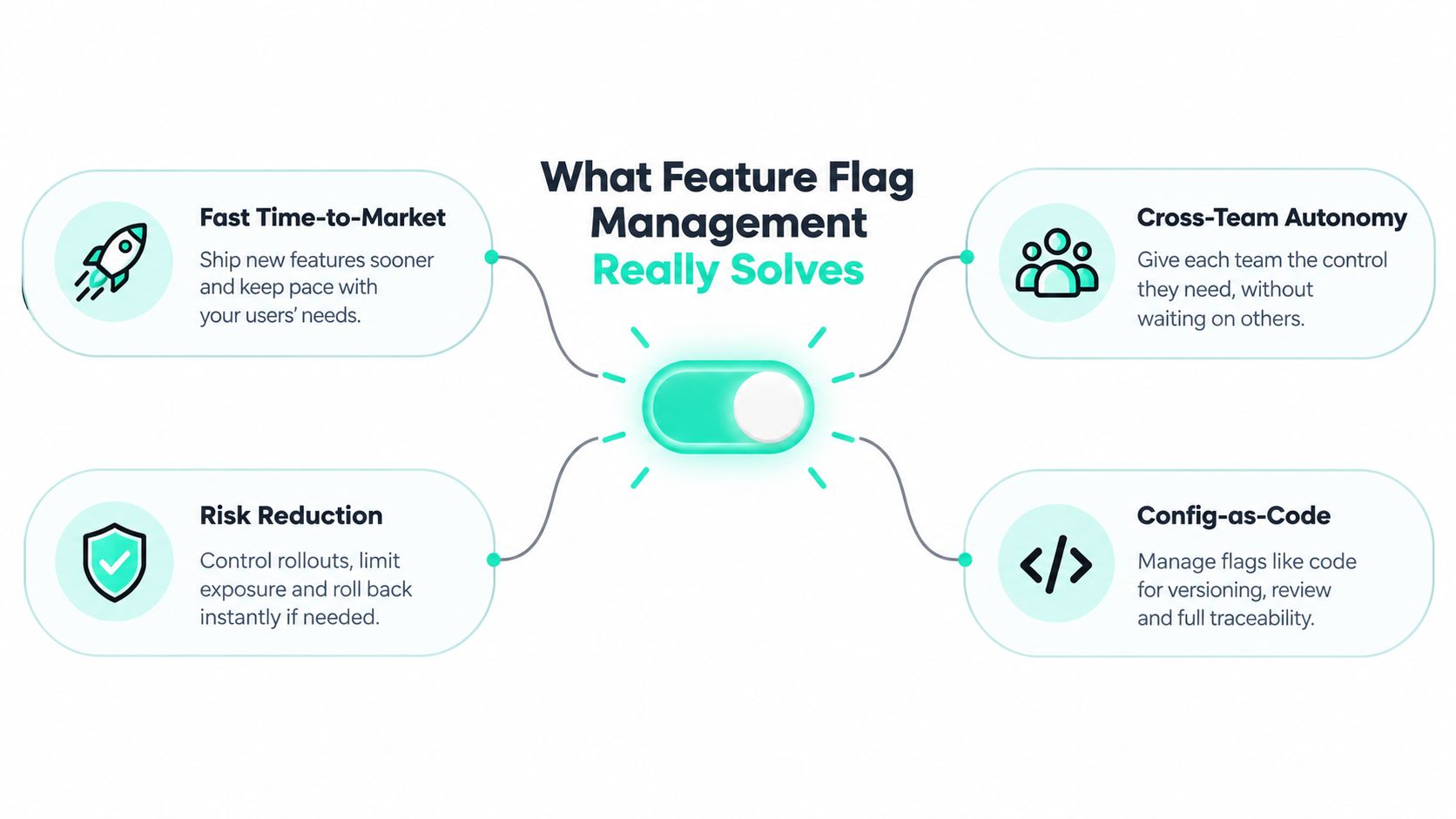
Feature flag management provides that control. It separates deployment from release, so a JSS component can reach an XM Cloud environment while remaining inactive until content, personalization, accessibility, and campaign owners approve it. The same approach can govern Content Hub workflows, Sitecore Stream experiments, SharePoint Online web parts, and Power Platform processes.
In a multi-brand estate, a conditional statement alone is insufficient. An ad hoc if inside a Next.js component may solve an immediate problem, but it rarely records who owns the decision, which environment uses it, when the flag expires, or how it connects to a campaign. A managed flag has a name, purpose, owner, environment scope, targeting rule, audit history, and retirement path.
Feature flags became a mainstream DevOps practice by at least 2020. A survey of 550 software developers and decision-makers found that 95% of organizations had implemented, begun implementing, or planned to implement feature flags, while 81% expected usage to increase over the following 12 months (industry survey analysis). Risk reduction and faster development each received 46% of responses as operational reasons, while faster deployment received 45%.
The delivery pressure is real. 61% of respondents said their organizations released new versions at least weekly, and 72% said they had lost customers or users because of application development errors in the same survey. For XM Cloud teams, flags can reduce exposure during changes to rendering hosts, personalization variants, Content Hub integrations, and AI-assisted Sitecore Stream workflows. For SharePoint teams, they can avoid redeploying an SPFx package whenever a department, hub site, or business process needs a controlled change.
Practical rule: A flag should make a release safer or more flexible. If it only hides unfinished code without an owner and removal plan, it postpones the problem.
The trade-off is greater release speed versus estate-wide liability. Flags give marketing, product, and engineering more control, while unmanaged flags create hidden branches across brand sites, tenants, environments, and shared component libraries. Mature management treats activation as a governed control-plane decision, rather than a collection of booleans scattered through application code.
From Toggles to a Managed Discipline
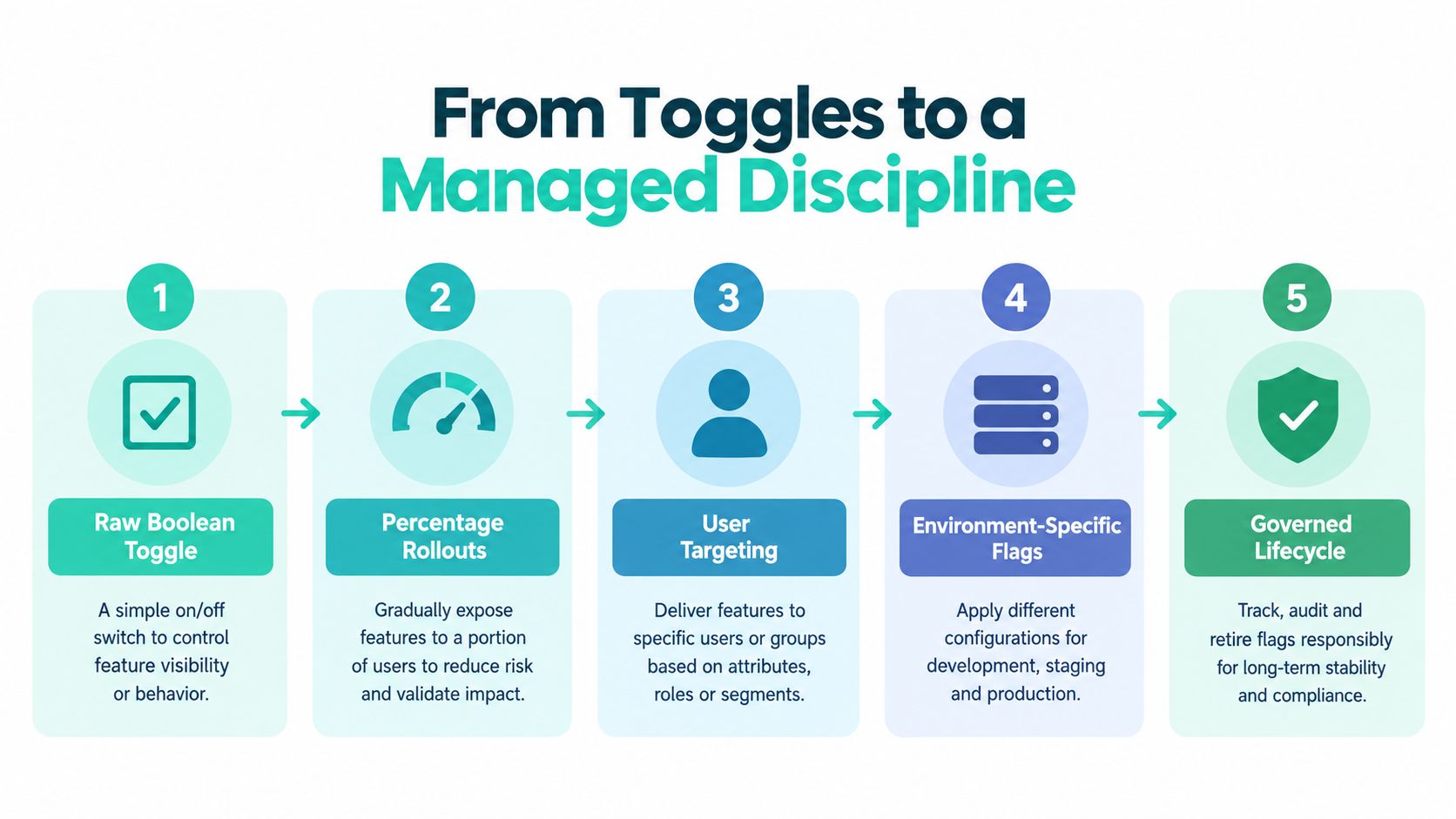
Start with the smallest useful decision. A raw boolean can protect a component or integration while a team validates the implementation. Keep the check behind a central abstraction rather than embedding it directly in every rendering component. That makes the decision discoverable and gives testing and cleanup a clear location.
The next layer introduces controlled exposure. Percentage rollouts allow a team to release gradually, while user targeting can restrict a feature to internal users, a market, a subscription group, or a Microsoft Entra ID cohort. Cohort-based evaluation is especially useful when the audience has a stable business identity, such as a regional marketing group or a SharePoint department.
In XM Cloud and headless Next.js, evaluate the flag as high in the request stack as possible. The decision should normally happen at the edge, in middleware, or in the server-side rendering path before personalization rules and component rendering resolve. A client-side check can expose targeting logic, cause a visible layout change, and create content-state flicker. Sitecore's composable topology and CDN-served pages make early evaluation even more important because the request should receive a coherent experience rather than assemble one after hydration.
For a feature that spans several services, evaluate once at the beginning of the request and pass the result downstream. The Unleash guidance on using feature flags at scale recommends avoiding repeated decisions in each component, because duplicated checks can produce inconsistent results. A local in-process SDK cache or ruleset snapshot also avoids turning every evaluation into a network lookup.
The transition from configuration to a dedicated flag service usually happens when targeting, auditability, environments, and ownership matter more than repository simplicity. At that point, the flag is no longer just a switch in source control. It becomes a managed release object with a lifecycle.
Teams connecting rollout decisions to commercial outcomes can also use this resource on connecting feature flags to revenue to frame the relationship between delivery controls and business measurement. For a broader view of experimentation infrastructure, see this guide to an experimentation platform.
The video belongs later in the workflow than the initial toggle. Once the decision is evaluated consistently, teams can connect it to experiments, analytics, and release approvals without putting the flag logic inside presentation code.
Feature Flags Inside the Sitecore XM Cloud Stack
Sitecore XM Cloud creates several places where a feature flag can influence the delivered experience. It is a headless content management system and a foundation for a composable digital experience platform, with Experience Manager, Sitecore SXA, the Sitecore Next.js SDK, Experience Edge, and Pages working together across authoring and delivery (Sitecore XM Cloud documentation).
The flag must therefore be designed around the request context, not just the component. That context can include the Sitecore site, locale, device, authentication state, campaign, and personalization attributes. The architecture should establish one decision before downstream services render the page, then pass the resolved state to the rendering host and any dependent integrations.
| Layer | Flag Touchpoint | What It Controls |
|---|---|---|
| Next.js rendering host | Server-side component gate | Whether a JSS rendering or variant is included |
| Edge or middleware | Request context evaluation | Site, locale, device, cohort, and environment rules |
| Experience Edge payload | Layout or context extension | Flag state passed to downstream rendering logic |
| Content Hub | Asset and content workflow | Staged access to AI-assisted generation, translation, tagging, or visual search |
| Sitecore Stream | Text component and experiment workflow | Content optimization, A/B testing, and brand-aware generation |
| Analytics layer | Evaluation and exposure event | Which audience received which state |
Content Hub is particularly relevant because its AI-assisted capabilities sit inside content operations rather than only inside the front end. Sitecore documents visual search, AI-assisted content generation, AI-assisted translation, and grounded image tagging as Content Hub capabilities (AI in Content Hub). A flag can stage these capabilities by role, market, workflow, or environment, but the flag shouldn't replace Content Hub permissions or approval workflows.
Sitecore also states that AI capabilities need to be enabled and configured by a superuser or a user with sufficient permissions, and that most AI features require Sitecore Stream. AI-assisted content generation can be switched on or off through configuration (Content Hub AI configuration). That creates a useful separation. Permissions determine who can use a capability, while a feature flag can control the rollout context.
Sitecore Stream adds another layer. Its Content Copilot can generate and optimize text-based components, support A/B testing, and, for Stream Premium users, use brand kits containing brand context, dos and don'ts, and tone guidance (Sitecore Stream in XM Cloud). The integration risk appears when a flag chooses one variant while Sitecore personalization chooses another. Establish a single precedence model, log both decisions, and avoid independent targeting rules that can disagree.
For delivery teams, that discipline belongs alongside cloud infrastructure optimization, because edge configuration, caching, serverless rendering, and observability affect whether flag state remains consistent.
Feature Flags Across SharePoint and Sites
SharePoint Online applies the same principle to a different trust model. An SPFx web part or extension can be deployed to an app catalog without being visible to every audience. Azure App Configuration can hold the flag state, while Microsoft Entra ID group claims provide a practical targeting boundary for departments, pilot groups, or governance teams.
The implementation choices differ by surface:
| Layer | Sitecore XM Cloud | SharePoint Online |
|---|---|---|
| Presentation | JSS components and Next.js renderings | SPFx web parts and extensions |
| Targeting | Site, locale, device, personalization context | Entra ID groups, site scope, user roles |
| Configuration | Edge config, SDK snapshot, or flag service | Azure App Configuration and environment settings |
| Content | Content Hub and Experience Edge | SharePoint sites, lists, pages, and templates |
| Automation | Sitecore workflows and deployment pipelines | Power Automate and Power Platform environments |
| Governance | Brand, market, and component ownership | Tenant, hub, site, and information-architecture ownership |
Flags can control SharePoint hub navigation, site-template behavior, list and form customizations, and the availability of an SPFx extension. Power Platform introduces related patterns. A Power Automate flow can use environment variables as a release gate, a Power Apps switch can bind to a Dataverse option set, and a Copilot Studio capability can be packaged inside a managed solution before controlled activation.
The comparison becomes more important when content carries compliance weight. A marketing page in XM Cloud and a regulated document experience in SharePoint shouldn't share identical evaluation assumptions. SharePoint flag decisions must respect site-level sensitivity labels, permissions, retention requirements, and audit policies. A rollout that is safe for a campaign web part may be inappropriate for a site containing restricted operational or regulated content.
The same flag vocabulary can span both estates, but the authorization model cannot be assumed to be identical.
A central Azure App Configuration store can provide a shared source of truth, with separate environments, namespaces, and approval paths for XM Cloud and SharePoint. Sitecore middleware can consume a local snapshot for request-time evaluation, while an Azure Function or server-side SPFx endpoint can resolve the equivalent decision for SharePoint. Teams working on SharePoint solutions should document where the decision is made, what identity claims it may use, and which audit trail records the change.
The practical objective isn't to force both platforms into one implementation. It's to make the governance language consistent while preserving platform-specific security and delivery behavior.
Why Lifecycle Governance Is the Hard Part
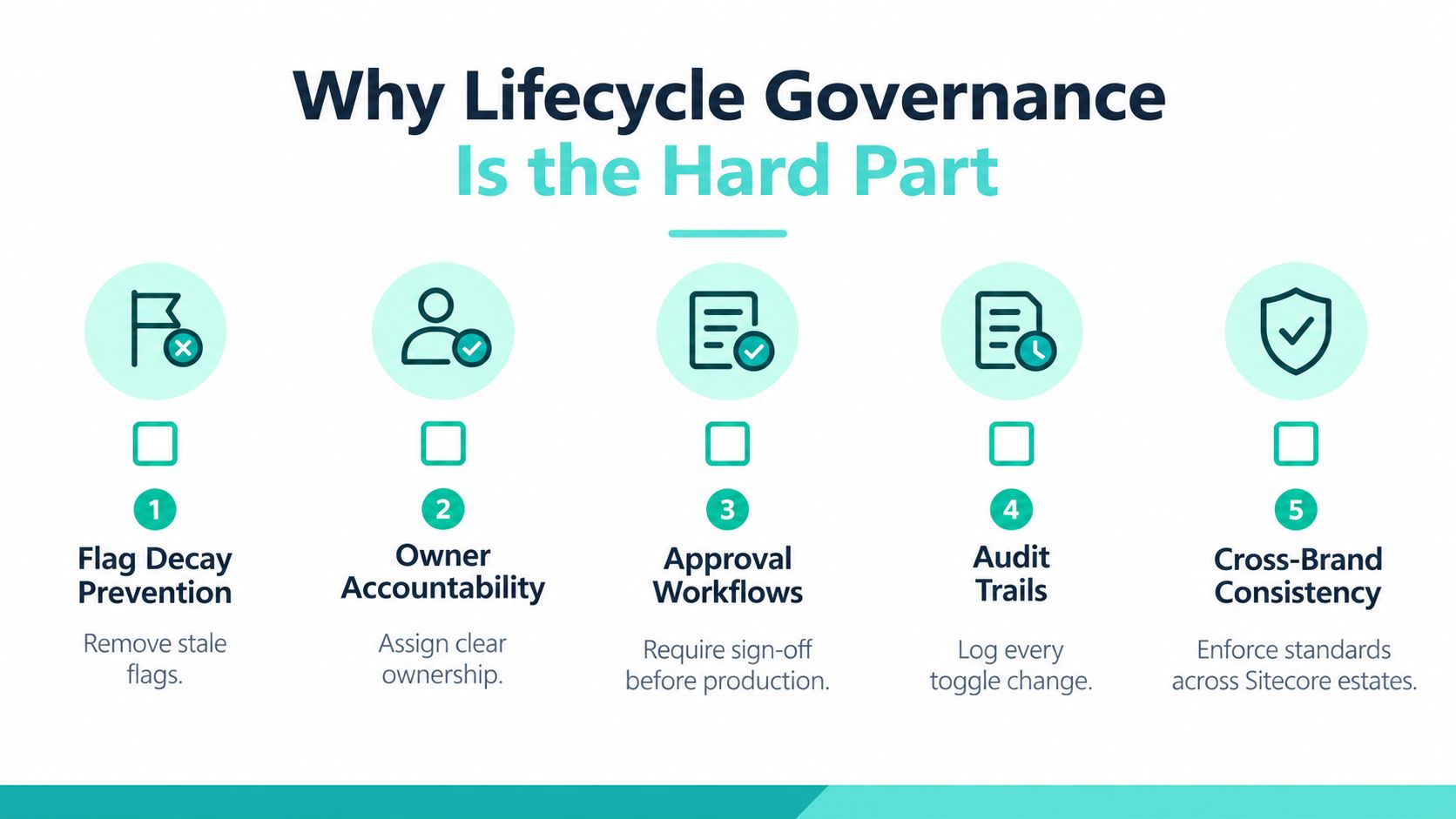
A flag creates value during uncertainty. It becomes debt when the uncertainty ends but the flag remains. Stale flags obscure the current code path, expand test combinations, complicate incident response, and create dependencies between teams that may not share a release calendar.
The scale of the problem is material. A 2024 industry analysis reported that 73% of feature flags stay in codebases indefinitely, while engineering teams can lose more than $125,000 per year to flag-related overhead. It also reported that engineers spend 3 to 5 hours each week dealing with flag complexity (industry analysis of feature-flag adoption and debt). These figures make cleanup a delivery concern, not an administrative preference.
The conceptual practice dates back to the 2010s, with Martin Fowler's 2010 article, “Feature Toggles”, widely treated as an important milestone in framing controlled rollout, testing, and rollback as deliberate engineering practices. The modern problem is that the toggle often outlives the release decision.
Rules that work in multi-brand estates
For Sitecore XM Cloud, naming should identify the brand, component, purpose, and delivery context. Link the flag to the relevant JIRA epic or work item, require an accountable owner, and record whether it is a release flag, experiment, operational kill switch, or long-lived configuration. Next.js linting or repository checks can detect references that no longer resolve to an active flag definition.
SharePoint needs the equivalent controls across tenant, hub, and site ownership. Azure App Configuration metadata should identify the owning team and review status, while retention labels and change records should remain authoritative for governed content. A flag shouldn't override a site's compliance boundary without explicit notice.
A recent industry projection says stale-flag rates could reach 65% to 68% in 2026, and that automated cleanup adoption may reach only 30% of organizations with 100 or more engineers (State of Feature Flag Debt 2026). Because that source describes a projection, teams should treat it as a warning about direction rather than as a measurement of their own estate.
Use a quarterly review with explicit removal criteria. The accountable owner should confirm whether the flag is still needed, whether the default state is permanent, and whether code, content, tests, documentation, and dashboards can be simplified.
For a broader governance structure, teams can use this content governance framework as a reference point when aligning flag ownership with component, site, and editorial responsibilities.
An Implementation Roadmap for Enterprise Estates
Large estates rarely need a disruptive rewrite. A controlled pilot on one Sitecore brand site or one SharePoint hub can establish the operating model before teams extend it to other environments.
Establish the vocabulary first
Create a taxonomy before selecting SDKs. Separate release flags, experiment flags, operational kill switches, permission gates, and configuration values. A name should expose its scope and intent, such as a brand, component, business capability, and lifecycle category.
Choose a central target such as Azure App Configuration or a dedicated feature-management service. Define environment boundaries and connect XM Cloud environment slots and SharePoint tenant app catalogs to the appropriate configuration scope. Keep secrets in environment-managed stores. A flag value is configuration, but an SDK credential is a secret and must never be treated as content.
Move evaluation to the request path
For XM Cloud, resolve the decision in Next.js middleware, the edge layer, or server-side rendering before personalization and component composition. For SPFx, use a server-side or Azure Functions-backed endpoint where the evaluation requires protected context, and use Entra ID group claims for controlled audience membership.
This step prevents each web part or component from inventing its own targeting logic. It also gives the observability layer one place to record the decision.
Add observability before broad rollout
Record evaluation and exposure events with enough context to diagnose behavior without logging unnecessary personal data. Application Insights custom events can capture rollout state and technical outcomes, while Sitecore Analytics custom events can connect exposure to personalization-aware experiments. Power BI can present flag volume, age, ownership, and review status across both estates.
Make retirement part of delivery
A quarterly flag audit should be a release activity, not a separate cleanup campaign. Automated pull requests can remove stale references from Next.js components, while SharePoint change advisory workflows can review configuration tied to retired web parts, site templates, or Power Platform solutions.
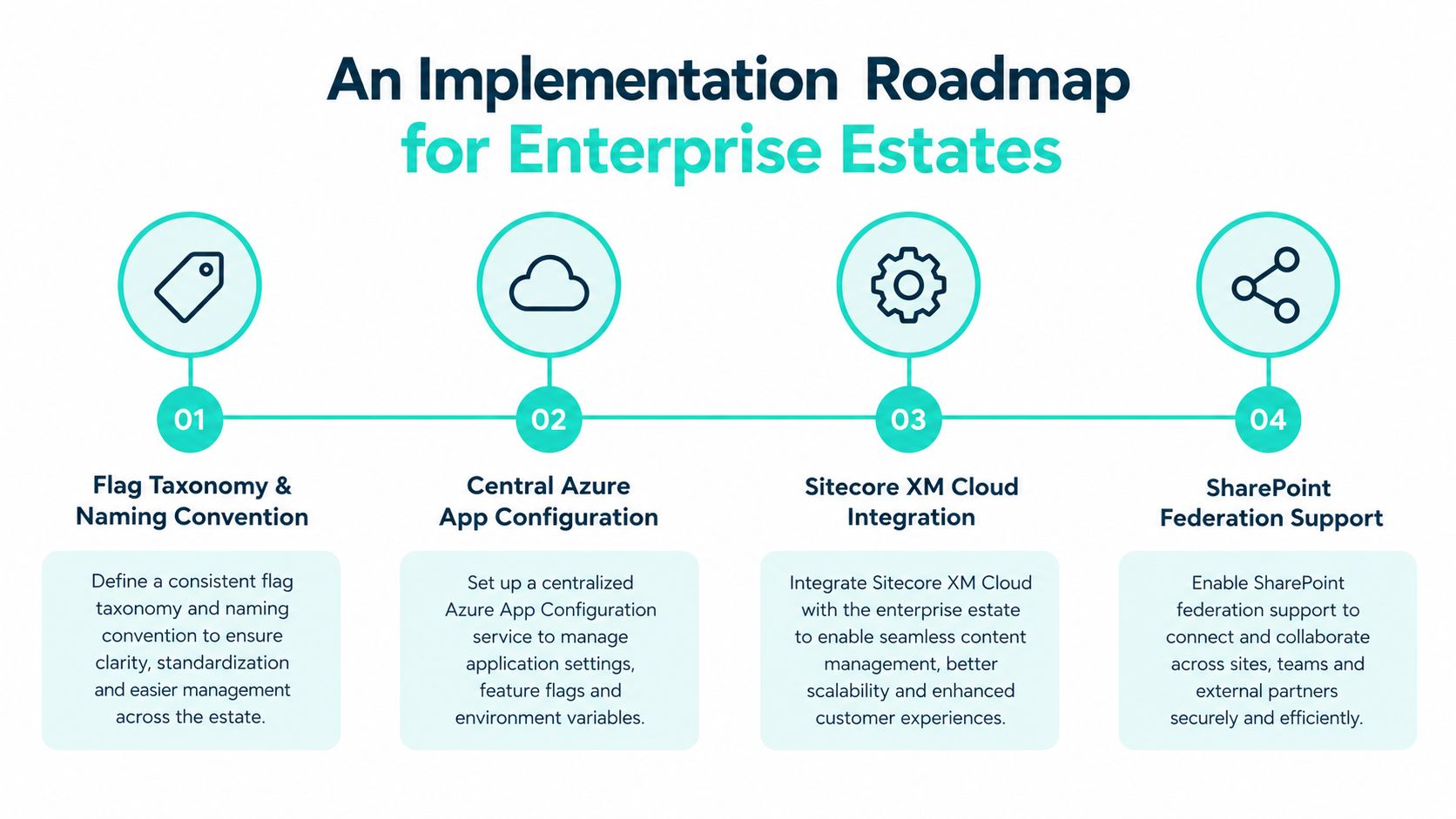
A practical pilot starts with one capability that has a clear owner and reversible behavior. The team can validate naming, approvals, request evaluation, telemetry, and cleanup before adding cross-brand dependencies. That sequence avoids the common failure mode of centralizing flag storage while leaving ownership and retirement informal.
Metrics, Security, and Compliance That Matter
Feature flag dashboards often expose activity without explaining risk. A useful operating model measures whether teams can understand, control, and retire decisions across the estate.
| KPI | Target / Threshold | Primary Data Source | Compliance Control |
|---|---|---|---|
| Rollout velocity | Review against the approved release plan | Flag audit logs and deployment telemetry | Approval evidence and segregation of duties |
| Stale-flag rate | Governance action when flags lack a current owner or review | Flag inventory and repository scans | Lifecycle review record |
| Blast radius | Restrict initial exposure to the approved site, group, market, or environment | Evaluation events and identity context | Least-privilege targeting |
| Time to cleanup | Escalate when removal misses the agreed release review | Pull requests, release records, and flag history | Decommissioning evidence |
| Owner compliance | Every active flag has an accountable owner and review date | Configuration metadata | Access and accountability audit |
The threshold should be defined by the organization's release policy rather than borrowed from another estate. A flag with a broad audience, sensitive content, or a dependency on personalization deserves stricter approval than a local visual experiment.
Security starts with context. A flag that changes a hero component is not equivalent to one that routes users toward a personalized experience, changes access to a SharePoint process, or controls publication of financial or healthcare disclosures through Content Hub. Cohort rules should avoid unnecessary personal data, and evaluation logs should capture the decision context needed for audit without becoming a new store of sensitive identity information.
Protect SDK keys through XM Cloud environment variables or an equivalent secret-management service. Client-side code should never receive credentials that allow configuration writes. Read-only delivery paths and administrative control paths should remain separate.
Segregation of duties matters in regulated programs. The person who authors a flag should not automatically be the only person who approves production activation. SOX and SOC 2 evidence may include the flag definition, approval record, change history, deployment reference, exposure scope, and retirement confirmation. GDPR analysis should cover cohort attributes, retention, purpose limitation, and whether a flag decision changes access to personal data.
Audit question: Can the team show who changed the flag, who approved it, which audience received it, and when the decision was retired?
For Sitecore, connect exposure events to XM Cloud deployment and analytics telemetry. For SharePoint, correlate configuration changes with tenant and site change records. A single dashboard can summarize estate health, but the underlying systems must preserve their authoritative logs.
Building an Operating Model That Lasts
Technology won't keep feature flag management healthy if the organization hasn't decided who owns the decisions. A Sitecore Composable DXP team, a SharePoint information-architecture team, marketing operations, engineering, content governance, and the Microsoft 365 Center of Excellence may all touch the same user journey. Their responsibilities need to be explicit before a shared configuration store becomes a shared source of confusion.
Assign responsibility by decision type
Product or marketing teams can define the desired audience and release intent. Engineering should own implementation quality, fallback behavior, and code removal. Content teams should approve editorial and brand implications, particularly where Content Hub or Sitecore Stream generates or optimizes text. The M365 governance team should control SharePoint scopes, sensitivity boundaries, and Power Platform solution movement.
A responsibility matrix should record who can create, approve, activate, disable, and retire each flag category. Kill switches deserve special treatment because operational urgency may require rapid action, followed by mandatory review and documentation.
Make naming reflect the estate
A Sitecore flag should identify its site or brand, rendering or capability, and purpose. A SharePoint flag should expose tenant, hub, site, or solution scope. Naming conventions should remain stable through reorganizations, because ownership can change while the decision's business context remains.
Retirement must mirror the release cadence. A release flag should have a removal condition tied to the successful launch, while an experiment should be removed when the result has been accepted or rejected. Long-lived operational switches need periodic confirmation that they still protect a real failure mode.
Cross-estate governance should survive changes in team structure. Store ownership, approvals, and dependencies in a system that remains accessible when a brand site moves between delivery teams or a SharePoint hub is consolidated.
Use AI as an assistant, not an authority
Sitecore Stream's brand-aware AI can provide context, tone guidance, and optimization support, but AI-assisted flag governance should remain advisory. Future governance tooling could use Sitecore Stream signals to identify components whose flags no longer receive meaningful exposure, suggest cohort rules, or surface drift between brand policy and active content behavior.
The final decision should stay with an accountable human. An AI system can recommend that a flag is dead or that a rollout conflicts with a brand rule. It shouldn't independently disable a production kill switch, alter a regulated-content audience, or approve a change without a recorded owner.
The durable operating model is therefore straightforward: central vocabulary, local platform integration, explicit owners, observable decisions, and a removal path attached to every flag at creation. That structure lets Sitecore and SharePoint teams move quickly without treating speed as an excuse to leave permanent branches in the estate.
Kogifi designs, builds, and maintains enterprise Sitecore XM Cloud and SharePoint Online platforms, including headless Next.js delivery, SPFx, Power Platform, cloud integrations, governance, and operational support. If your estate needs a practical feature flag architecture that connects rollout control with content, personalization, and compliance, visit Kogifi to discuss an implementation plan.