


Your team probably already has a partial answer to the asset problem. Marketing stores approved visuals in SharePoint. Creative keeps working files in Adobe tools. Video teams pass masters through local drives or cloud folders. Sitecore authors upload copies into the CMS because they need to publish now, not after another request cycle.
That setup works until content volume, governance, and speed start pulling in different directions. Then the practical question lands on the CTO's desk: do we need a DAM, a MAM, or both?
The mistake is treating this as a simple feature comparison. In most enterprise estates, MAM vs DAM is really an architectural decision about where content is created, where it becomes approved, and how it moves through your composable DXP. The old binary of “MAM for video, DAM for images” no longer captures how modern teams operate. A more useful framing is lifecycle. Some organizations need upstream production control and downstream distribution governance in the same stack. That's why the 2026 discussion increasingly treats MAM as a production-layer capability and DAM as a distribution-layer capability, with many organizations needing both depending on the asset lifecycle, not just the file type, as noted in this DAM architecture perspective.
If you're evaluating a cloud-based digital asset management approach, that lifecycle view matters even more. Cloud migration doesn't fix weak operating models. It only exposes them faster.
Table of Contents
- Introduction The Modern Asset Management Dilemma
- DAM as the enterprise distribution layer
- MAM as the production system of record
- Global brand operations with Sitecore XM Cloud
- Broadcast and sports workflows with upstream media operations
Introduction The Modern Asset Management Dilemma
Most enterprises don't suffer from a lack of files. They suffer from a lack of control over asset state.
The final campaign video exists, but nobody is sure whether the version in Sitecore matches the version legal approved. Regional teams can access logos, but they can't tell which variants are still compliant. Product imagery lives in several places, and authors in XM Cloud or Sitecore XP often upload another copy because that's faster than chasing the original.
That's where the MAM vs DAM decision gets misread. It isn't just a procurement exercise. It affects how your composable DXP behaves under pressure. If you choose a system optimized for distribution when your bottleneck sits in production, editors work around the platform. If you choose a system optimized for production when the actual issue is enterprise reuse and governance, marketers bypass it and rebuild local libraries.
The right question isn't “what file types do we have?” It's “where does operational friction show up in the content lifecycle?”
In Sitecore environments, that distinction is especially important. XM Cloud, Content Hub, headless delivery, search, personalization, and campaign operations all depend on trusted content objects. In SharePoint-heavy estates, the same issue appears differently. Teams assume document management will stretch into asset management. Sometimes it does for a while. Then search quality, rights control, and omnichannel reuse start slipping.
A sound decision starts by separating production workflows from distribution workflows. Once you do that, the architecture gets clearer. You can identify which platform should own raw media, which platform should own approved assets, and which integrations need to move metadata and renditions cleanly across the stack.
Understanding the Foundations DAM and MAM
DAM and MAM overlap, but they didn't start from the same problem.
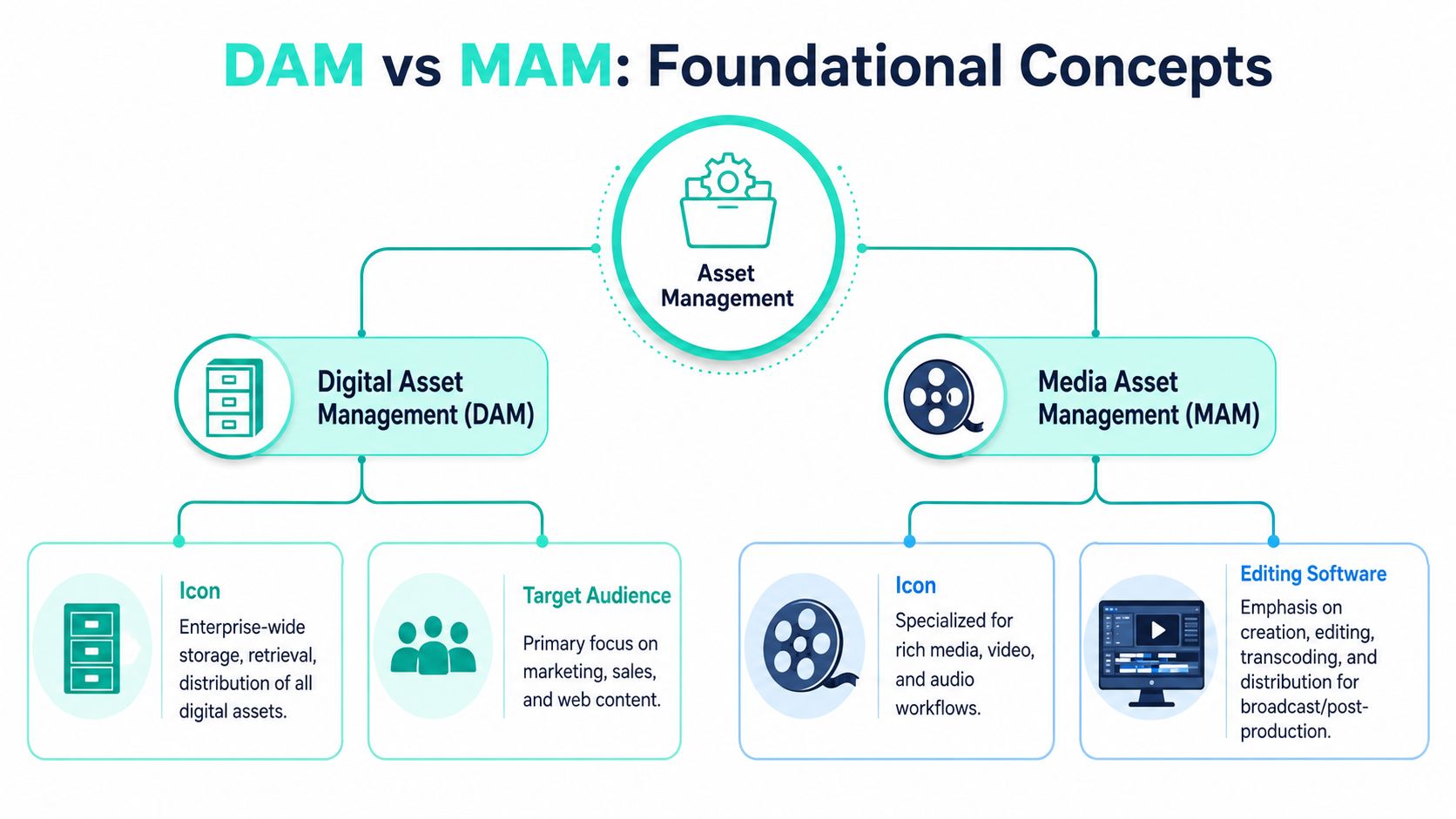
Media Asset Management emerged first in TV and film workflows where teams had to store, transfer, edit, and archive very large video files. Digital Asset Management broadened the model later to manage approved marketing assets such as images, documents, and video across business teams. That historical split still matters because MAM remains tied to production-heavy operations, while DAM is aligned to brand, marketing, and enterprise distribution, as described in this comparison of digital asset management and media asset management.
DAM as the enterprise distribution layer
A Digital Asset Management platform acts like an enterprise content library with governance built in. It's where organizations manage approved assets that need to be reused across websites, campaigns, portals, sales enablement, and partner ecosystems.
Its strengths usually include:
- Centralized approved content: logos, campaign imagery, documents, product visuals, and finished video.
- Metadata discipline: taxonomies, keywords, usage rights, ownership fields, and lifecycle status.
- Distribution readiness: integrations to CMS, commerce, marketing automation, and portals.
- Access control: business-friendly permissions for regional teams, agencies, and internal departments.
In Sitecore terms, DAM aligns with the downstream half of the experience stack. It helps ensure authors in XM Cloud, Content Hub, or adjacent channels consume approved assets rather than ad hoc copies. If you're comparing platforms, this overview of digital asset management software categories is a useful starting point.
MAM as the production system of record
A Media Asset Management platform is built for assets that are still being worked on. It handles rich media pipelines where the file itself is heavy, the workflow is collaborative, and the output may pass through multiple editorial stages before anyone calls it approved.
That means MAM is usually the right home for:
- Ingest and editorial workflows: raw footage, audio capture, proxies, review cycles.
- Time-based media operations: editing, versioning, transcoding, and post-production collaboration.
- Technical media handling: codec support, media preparation, and archive management.
- Production handoff: publishing finished outputs into systems used by marketing or distribution teams.
Practical rule: If the business value depends on controlling work in progress, not just storing finished files, you're already in MAM territory.
A lot of confusion disappears once teams stop treating both systems as rival libraries. They solve different operational problems. One governs approved assets at scale. The other manages rich-media production before approval exists.
A Detailed Technical and Workflow Comparison
The sharpest line in MAM vs DAM sits in workflow and asset complexity. DAMs support broad asset classes across departments. MAMs are purpose-built for complex video and audio production workflows including editing, transcoding, versioning, archiving, and distribution. When teams need precise control over large media files and collaborative post-production, MAM is the better technical fit. When the priority is centralized access to finished content across marketing, sales, education, or other business units, DAM is the better fit, based on this workflow-focused comparison.
MAM vs DAM Feature Comparison
| Criterion | Digital Asset Management (DAM) | Media Asset Management (MAM) |
|---|---|---|
| Primary operating model | Approved asset repository for enterprise reuse | Production environment for rich-media workflows |
| Typical users | Marketing, brand, sales, web, HR, partner teams | Editors, producers, media operations, post-production |
| Asset state | Final or approved assets | Raw, in-progress, versioned media |
| Metadata style | Enterprise taxonomy, rights, usage, campaign context | Production metadata, technical media context, version workflows |
| Video handling | Supports finished video for search, governance, reuse | Supports deeper editorial handling of time-based media |
| Workflow depth | Review, approval, publishing, syndication, distribution | Ingest, edit, transcode, review, version, archive |
| Integration priority | CMS, DXP, commerce, portals, martech, collaboration platforms | Adobe, Avid, Premiere, storage tiers, media toolchains |
| File complexity tolerance | Broad multi-format support, usually downstream-ready content | High tolerance for large, codec-heavy, production-grade media |
| Governance strength | Brand control, access rules, metadata consistency | Production control, editorial handoffs, archive transitions |
| Best fit in composable DXP | Distribution layer and source of approved media | Upstream production layer feeding approved outputs downstream |
Where architecture usually breaks
The biggest implementation mistake is asking one system to absorb the other's workload.
A DAM struggles when editors expect it to behave like a production control plane. You'll see weak handoffs around transcoding, awkward management of in-progress cuts, and pressure to bolt on external review steps. The platform may still hold files, but the actual editorial process moves elsewhere.
A MAM struggles in the opposite direction. It can hold assets, but that doesn't mean it becomes a strong enterprise distribution layer for Sitecore, SharePoint intranets, regional campaign portals, and partner networks.
Here's what to test before you select anything:
- Metadata model fit: Does the platform support the fields your business governs, or only the fields your production team needs?
- Workflow ownership: Who uses it every day. Editors, brand managers, web authors, or all three?
- API role: Is the system expected to feed XM Cloud components, SharePoint pages, campaign operations, or media editing tools?
- Rendition strategy: Where are delivery renditions created, and where are they consumed?
- Storage behavior: Does your operating model need archive transitions and production storage tiers, or just searchable approved assets?
A platform can pass a demo and still fail in production if its unit of work is wrong. DAM thinks in approved assets. MAM thinks in active media workflows.
For CTOs, that unit-of-work question is usually more valuable than any feature checklist.
Enterprise Use Cases in a Composable DXP
The choice becomes clearer when you follow the asset through a real enterprise stack.
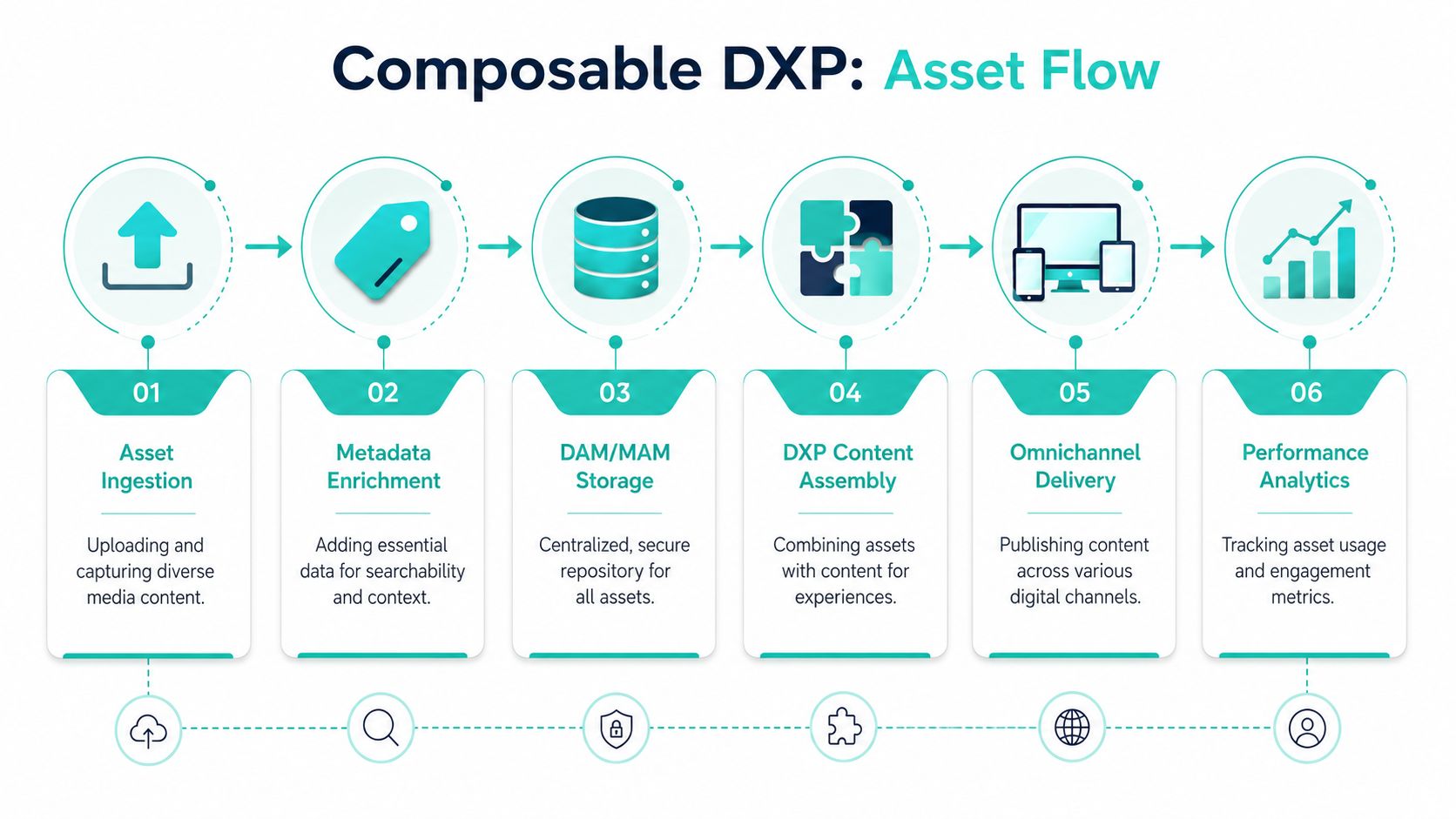
A MAM is technically optimized for production-grade rich media. It supports deeper editorial integrations, broader codec coverage, tiered storage, and workflows for creating, editing, reviewing, and publishing media. DAMs, by contrast, are centered on approved assets for distribution and brand governance. For video-heavy pipelines, that means MAM aligns more naturally with media operations and toolchain integration with editors such as Adobe, Avid, or Premiere, as explained in this production-oriented DAM vs MAM analysis.
Global brand operations with Sitecore XM Cloud
A multinational brand running Sitecore XM Cloud rarely needs raw production control inside the web stack. What it needs is a trusted source of approved assets that can flow into web experiences, regional landing pages, product storytelling, and campaign variants.
A good DAM-centric pattern looks like this:
- Creative and brand teams approve assets once
- Metadata captures market, language, channel, rights, and lifecycle state
- Sitecore authors pull approved assets into components and content assemblies
- Regional teams reuse the same master assets with local rules instead of creating duplicates
In this model, the DAM acts as the asset backbone for the composable DXP. XM Cloud consumes governed content. Search and personalization operate on trusted inputs. SharePoint can still support collaboration and document processes, but it doesn't need to carry the burden of enterprise asset governance.
If your estate includes both structured content and rich media, media asset management systems in a broader content architecture become relevant when upstream production and downstream experience delivery need separate ownership.
Broadcast and sports workflows with upstream media operations
Now flip the scenario. A sports network or media brand produces large volumes of footage, highlight clips, social edits, and archive material. Their bottleneck isn't finding the approved logo. It's controlling footage as it moves from ingest to review to finished outputs.
That environment usually needs a MAM-first operating model:
- Raw footage lands in MAM.
- Editors work with proxies, versions, and review cycles.
- Production workflows handle transcoding and publish-ready outputs.
- Finished clips move downstream to a DAM for broader reuse, governance, and syndication.
- Sitecore or other delivery channels consume the approved outputs, not the raw media layer.
In this context, composable architecture earns its keep. The MAM owns production truth. The DAM owns distribution truth. The DXP consumes from the right layer at the right moment.
Hybrid architecture works best when handoffs are explicit. Don't let authors guess whether they should pull from the production system or the approved library.
That one design choice prevents a surprising amount of rework.
Integrating Asset Management with Sitecore and SharePoint
Integration strategy matters more than product labels. In enterprise estates, the platform only works if authors, editors, and business teams can stay inside their normal operating tools without breaking governance.

A widely used structural distinction is that MAM is a subset of DAM, not a separate universe. One industry source puts it plainly: “not all DAM systems are MAM systems, but all MAM systems are DAM systems.” That reflects how DAM has become the broader enterprise category across marketing, sales, education, HR, and related functions, while MAM remains specialized for media-heavy environments such as broadcasting, film, and sports, according to this DAM and MAM market interpretation.
Where Sitecore Content Hub fits
Sitecore Content Hub is where this distinction starts to blur in a useful way. In practice, it often serves as the downstream content and asset hub inside a Sitecore estate. It supports the operational needs that matter to digital teams: governed assets, workflow, structured content relationships, and API-driven delivery into Sitecore channels.
For CTOs running XM Cloud, that usually translates into three practical patterns:
- DAM-first for brand-led operations: Content Hub manages approved assets consumed by XM Cloud sites, campaign pages, and omnichannel content teams.
- Hybrid for video-intensive organizations: A dedicated MAM manages production-stage media, while Content Hub receives finished outputs and becomes the broader distribution layer.
- Content operating model consolidation: Teams use Content Hub to coordinate assets, content operations, and downstream publishing without pushing production logic into the CMS itself.
That's also the point where advisory support can matter. Kogifi's work with DAM platforms such as Bynder sits in the same architectural conversation, especially when organizations need to compare downstream asset governance options alongside Sitecore-centered approaches.
A short walkthrough can help if your team is evaluating how Sitecore handles media operations inside the wider platform environment:
When SharePoint is enough and when it is not
SharePoint is often the incumbent because it already exists. That makes it tempting to use as a de facto DAM.
Sometimes that's reasonable. If your asset estate is document-heavy, your workflows are internal, and your main need is collaboration rather than governed omnichannel reuse, SharePoint can do the job well enough. It's especially useful for policies, templates, internal enablement content, and team-level working libraries.
It becomes a weak substitute when the business expects more than storage and collaboration.
Common failure points include:
- Brand governance gaps: approved and obsolete assets coexist too easily
- Metadata inconsistency: teams create local structures instead of one enterprise taxonomy
- Publishing friction: web and campaign teams duplicate files into CMS or marketing tools
- Rights ambiguity: business users can't easily see what can be reused where
- Video limitations: production workflows sit outside the platform anyway
For Sitecore and SharePoint environments, a practical split often works better than a replacement mindset. Let SharePoint remain the collaboration and document workspace. Let a DAM own approved digital assets. Add MAM only where production-grade media workflows justify it.
Making Your Choice The Selection and Migration Checklist
Selection gets easier when you stop asking which acronym sounds broader and start asking where value is created, delayed, or lost.
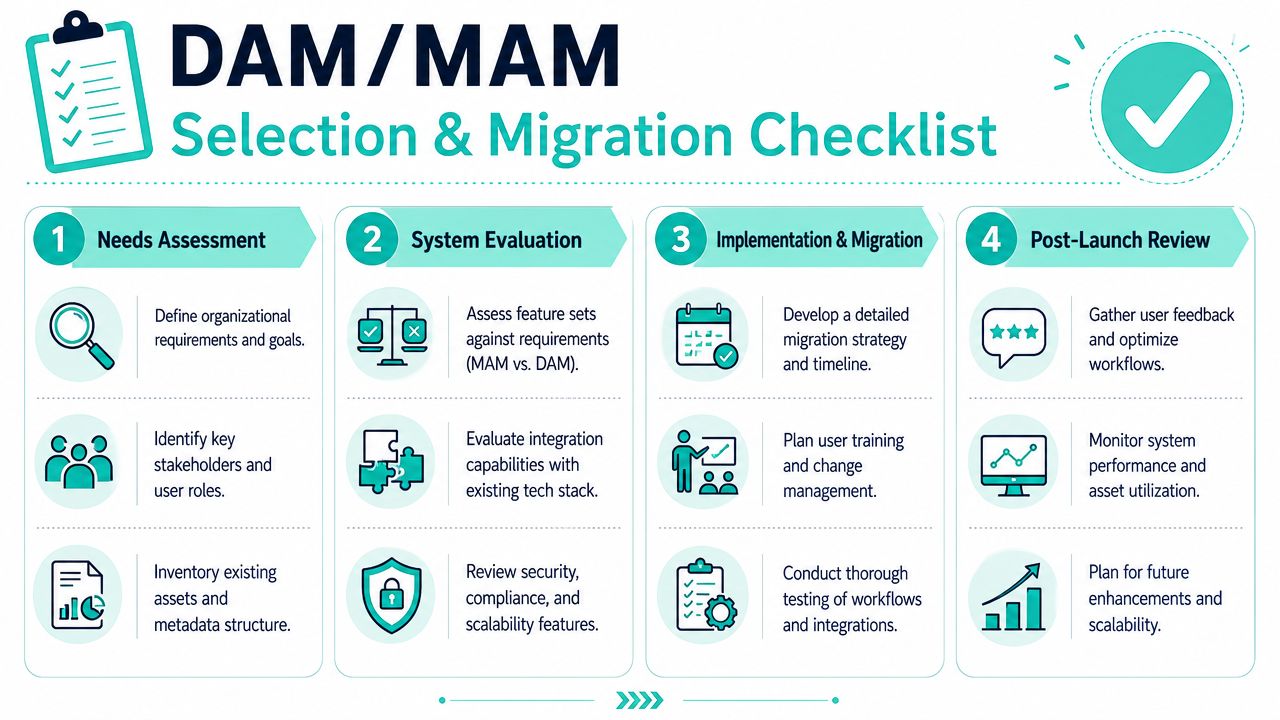
Selection questions for stakeholders
Use these questions in workshops with marketing, IT, creative operations, and platform owners:
- Where does work happen before approval? If editors, producers, and media teams spend most of their time refining assets in progress, a MAM should be part of the design.
- Who consumes the final asset most often? If web authors, marketers, sales teams, and regional users are the main audience, DAM usually deserves priority.
- What must integrate first? Adobe and editorial toolchains point toward MAM needs. XM Cloud, Sitecore Content Hub, portals, and partner distribution point toward DAM priorities.
- What breaks today? Search, approvals, duplication, video handling, or rights visibility. The recurring failure tells you which layer is missing.
- What should SharePoint continue doing? Keep document collaboration there if it works. Don't force it to become your global approved-asset engine unless the use case is simple.
Decision shortcut: Choose the platform that solves the daily operational bottleneck, not the platform with the longest feature sheet.
Migration decisions that reduce rework
A weak migration can undermine a good platform choice. The hardest part usually isn't loading files. It's deciding what deserves to survive.
Start with a content audit. Remove redundant, obsolete, and trivial assets before you migrate. If teams don't trust the repository today, moving everything into a new one won't change that.
Then focus on governance:
Define asset states clearly
Raw, working, approved, expired, archived. If those states are fuzzy, your workflows will be fuzzy too.Design metadata around retrieval and risk
Don't begin with every possible field. Begin with the fields people need for search, reuse, compliance, and channel delivery.Map ownership
Brand approves one class of assets. Legal governs another. Regional teams localize a third. Make those roles explicit in the workflow.Phase the rollout
Move one business-critical domain first, such as campaign assets for Sitecore or finished video for web reuse. Prove the operating model, then expand.Test integrations with real author journeys
It's not enough that the API works. Sitecore authors, SharePoint users, and creative teams need to complete common tasks without workarounds.
Migration succeeds when users stop asking where a file is and start trusting where it belongs.
Conclusion Architecting for ROI and Future Growth
The best MAM vs DAM decision usually isn't a pure either-or choice. It's an architecture choice that matches platform responsibility to content lifecycle.
If your business depends on rich-media production, MAM should own upstream media operations. If your growth depends on consistent brand distribution across web, commerce, intranets, and campaigns, DAM should own approved asset governance. In many Sitecore estates, especially those using XM Cloud and Content Hub, the most durable model is a hybrid one where production and distribution each have a clear system of record.
That approach reduces duplicate storage, cleaner handoffs, and fewer author workarounds. It also gives CTOs a better path to composability. Each platform does the job it was designed to do, and integrations move assets and metadata at the right stage of the lifecycle.
The business outcome is straightforward. Less friction in content operations. Faster publishing. Better reuse. Stronger governance. More confidence that your DXP is working from trusted assets instead of accumulated copies.
If you're assessing how DAM, MAM, Sitecore Content Hub, XM Cloud, and SharePoint should fit together in one operating model, Kogifi can help map the asset lifecycle, integration points, and governance decisions before platform choices turn into expensive rework.