


In a modern enterprise, digital assets are often a source of total chaos. This mess slows down marketing, frustrates creative teams, and puts a cap on what’s possible. A Media Asset Management (MAM) system is what brings order to that chaos, acting as a dynamic engine for your entire content operation—not just another digital storage locker.
Taming the Chaos of Your Digital Content

Imagine trying to run a global library without a catalog. That's the reality for many businesses drowning in digital files. Marketing teams waste hours digging for the right video clip, designers accidentally grab an outdated logo, and entire campaigns get delayed. This disorganization hits the bottom line hard and makes it impossible to deliver a consistent, high-quality customer experience.
Media asset management systems were built to solve this exact problem. They create a central, intelligent hub for all rich media, turning a jumble of scattered files into a searchable, controllable, and incredibly valuable corporate asset.
The Strategic Value in Modern DXPs
For any organization running a sophisticated Digital Experience Platform (DXP) like Sitecore, a robust MAM isn’t just a nice-to-have; it's essential. Sitecore's powerful personalization and AI engines, like Sitecore Search and Discover, require a constant, well-organized stream of properly tagged media to create dynamic, individual experiences at scale. Without an integrated MAM, such as Sitecore's own Content Hub, you're leaving the true potential of your DXP on the table.
The same strategic importance applies to platforms like SharePoint, which many companies use for internal collaboration. When connected to a central MAM, SharePoint becomes exponentially more powerful. It ensures every employee—from sales to HR—has instant access to the latest brand-approved videos, presentations, and training materials, creating a single source of truth for corporate assets.
A Media Asset Management system moves beyond simple storage to become the active, intelligent core of your content supply chain, ensuring brand consistency and accelerating your time-to-market.
Market Growth and Business Impact
The rapid adoption of this technology speaks for itself. The demand for media asset management systems is booming, with the market growing from USD 1.84 billion in 2023 to a projected USD 5 billion by 2032. That's a massive 15.2% compound annual growth rate, fueled by the explosion of digital content—especially high-resolution video—that companies are now expected to manage. You can find more insights on the MAM market growth at gminsights.com.
To get a handle on this ever-growing mountain of content, you need to understand what a strong digital asset management workflow looks like. Adopting a strategic approach is key to winning in a competitive market, and mastering your media is the first step. For a deeper dive into foundational strategies, check out our guide on digital asset management best practices.
What a Modern MAM Actually Does
Think of a modern Media Asset Management (MAM) system less like a digital filing cabinet and more like the central nervous system for your company’s entire content operation. It’s designed to automate the grunt work and unlock new ways to use your media, transforming raw files into valuable assets that are ready to go at a moment's notice.
The whole process kicks off with intelligent ingest and transcoding. Imagine your global marketing team gets video files from a dozen different production partners. They’re all in different formats—4K, HD, MOV, MP4. A MAM takes all of them in, automatically standardizes them into the formats you need, and even creates lightweight proxy versions for quick previews and edits. No one has to lift a finger.
Turning Data Into Discovery With AI
Once your assets are in the system, the real magic starts. This is where a platform's AI capabilities, like those found within the Sitecore product suite, deliver massive value. Instead of someone manually typing in keywords, modern MAMs use AI-powered auto-tagging to analyze and enrich media files on their own.
Sitecore's AI services can "watch" a video and generate tags for objects, people, locations, and even sentiment. For an image, it might identify products, logos, colors, and text. Suddenly, a chaotic library becomes a highly searchable database.
A simple search for "happy woman drinking coffee on a sunny patio" can instantly pull up the perfect image from millions of options. That’s something you could never do with a manual folder system. This is the power of AI-driven discovery.
This feature is essential for platforms like SharePoint, where a single MAM might serve an entire organization. An HR team can find training videos featuring specific machinery, or a sales team can pull up customer testimonials from a particular industry—all thanks to deep, contextual metadata. The result is a huge reduction in search time and a big boost in content reuse.
Speeding Up Operations With Automated Workflows
Another cornerstone of any good MAM is workflow automation. These systems let you design and enforce the complex processes that go into creative review, legal approval, and content distribution.
For example, when a new ad creative gets uploaded, the MAM can automatically:
- Ping the brand manager for an initial look.
- Send the asset over to the legal team if it contains licensed music or talent.
- Once approved, push the final version directly to your Sitecore DXP for a new web campaign.
- At the same time, it can send specific versions to your social media scheduler and partner portals.
This kind of orchestration gets rid of messy email chains, manual handoffs, and the all-too-common risk of someone using an unapproved asset. It protects your brand with tight version control, tracking every single change so that only the latest, approved version is ever used publicly. The system keeps a complete audit trail, giving you a clear history of every asset’s journey.
Complex media files, especially video, need specialized handling. To learn more about systems built specifically for visual content, check out this a guide to video asset management systems and see how they handle things like time-based metadata and production workflows. All these core features work together to create a smooth content supply chain that empowers your teams, gets campaigns out the door faster, and maximizes the return on every single digital asset you own.
How to Integrate a MAM with Sitecore and SharePoint
Think of integration as the bridge connecting your central media library to the platforms where your content actually comes to life. For businesses running on Sitecore and SharePoint, a Media Asset Management (MAM) system isn't just some optional add-on; it's the engine that drives a consistent, efficient, and intelligent content supply chain. A smart integration strategy ensures these powerful platforms can pull the right media at the right time, unlocking their true potential.
The best integrations are the ones you never notice. A content editor working inside Sitecore shouldn't have to jump over to a different system to find an approved product video. Likewise, an employee searching for a training module on a SharePoint intranet should find it instantly without even knowing a MAM is working behind the scenes. That seamless connection is the gold standard.
Powering Personalization with Sitecore AI
For brands using Sitecore, especially its AI-powered personalization engine, a solid link to a MAM is absolutely critical. Sitecore AI needs a rich, diverse, and well-organized pool of media to weave its magic and deliver those tailored experiences. Without a steady flow of approved and correctly tagged assets, its ability to personalize content at scale is hamstrung from the start.
Imagine a global retail brand using an integrated MAM like Sitecore Content Hub to feed its Sitecore DXP with dynamic product videos and ad creatives. When Sitecore’s AI flags a user's interest in a specific product line, it instantly pulls the corresponding high-res videos and promotional images straight from the MAM. This all happens automatically in milliseconds, allowing the brand to serve up hyper-personalized content across websites, mobile apps, and email campaigns to boost engagement and sales. To truly master this synergy, you need to understand how to align your tools, as we cover in our guide on streamlining your workflows with Sitecore Content Hub.
This concept map shows how a modern MAM sits at the center of the action, orchestrating everything from ingest and metadata to final delivery.
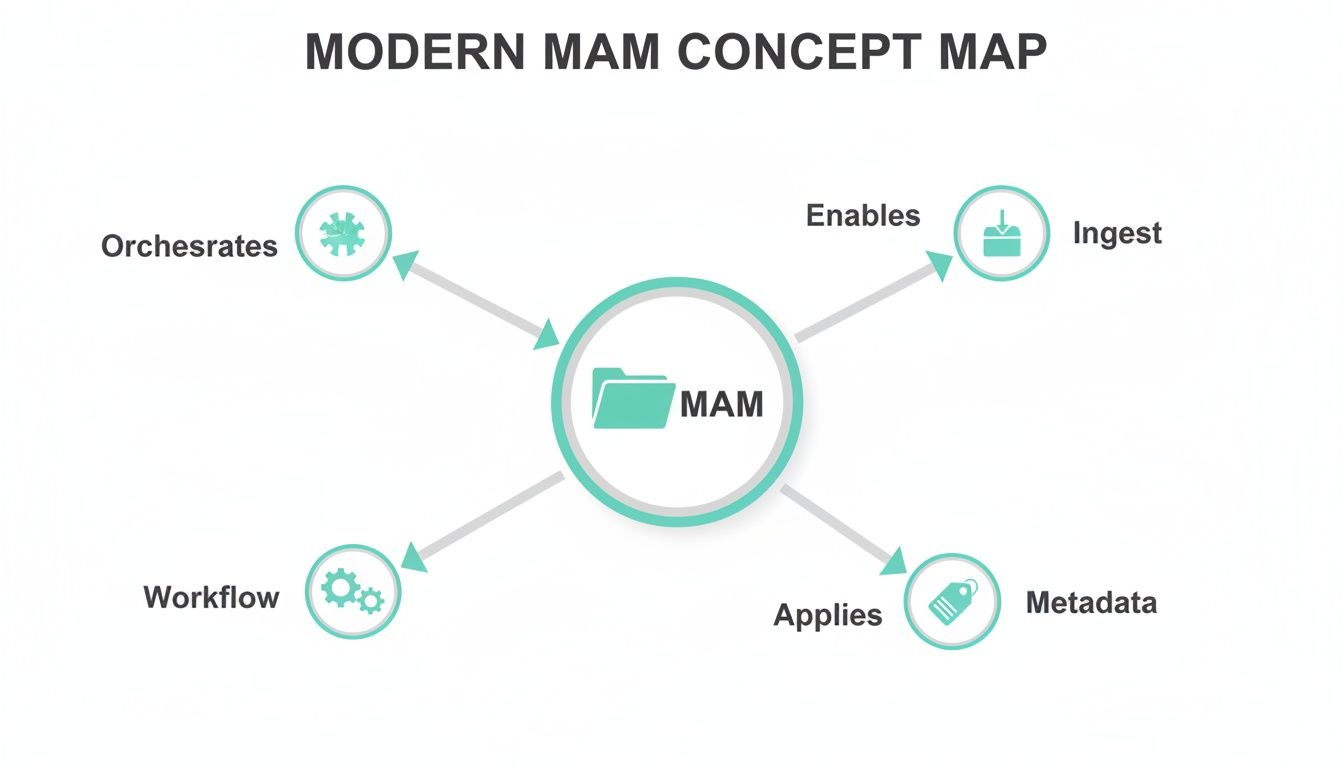
As you can see, the MAM acts as a central hub, making intelligent content management possible across the entire organization.
Centralizing Corporate Knowledge with SharePoint
When it comes to internal communications and collaboration, SharePoint often serves as the corporate backbone. Integrating it with a MAM transforms it from a simple document repository into a dynamic media hub that reinforces brand consistency and empowers your entire team. This connection makes sure only the latest, on-brand assets get used across the organization.
Think about a multinational corporation that relies on its SharePoint intranet to support thousands of employees. By connecting it to a central MAM, the company ensures that:
- Training Videos: New hires get access to standardized, high-quality training videos directly within the SharePoint portal, creating a consistent onboarding experience no matter where they are.
- Brand Assets: The marketing team can push updated logos, presentation templates, and brand guidelines from the MAM straight into a dedicated SharePoint library, so every employee is always using the correct materials.
- Sales Enablement: The sales team can quickly find and share the latest product demo videos and case studies with prospects—all sourced from the MAM but accessible within their familiar SharePoint environment.
This integration puts an end to the all-too-common problem of outdated or off-brand assets floating around in internal documents and presentations.
Choosing Your Integration Strategy
Connecting a MAM to Sitecore or SharePoint generally comes down to one of two approaches: native connectors or API-first development. Native connectors are pre-built integrations offered by the MAM vendor, such as Sitecore's own connectors for its products, essentially a plug-and-play solution. They are often faster to get up and running but might not offer a ton of flexibility.
An API-first approach, on the other hand, uses the MAM's Application Programming Interface to build a custom connection from the ground up. This method gives you maximum flexibility, letting you tailor the integration to fit your unique workflows and business rules perfectly.
In the end, the goal is to create a fluid ecosystem where media flows effortlessly from its central repository to every single touchpoint. By thoughtfully integrating your MAM with key platforms like Sitecore and SharePoint, you can build a scalable foundation for exceptional digital experiences—for both your customers and your own teams.
Why Cloud-Based MAM Is a Strategic Imperative

For years, on-premises media asset management systems were the only game in town. They were reliable, sure, but also rigid, expensive, and a huge drain on IT resources. This old-school approach creates bottlenecks that modern brands just can't afford, from sluggish collaboration across continents to the inability to handle a sudden surge in demand.
Migrating to a cloud-based MAM is no longer a simple IT upgrade; it’s a core business decision. It signals a shift from a capital-heavy (CapEx) model—buying and maintaining bulky hardware—to a predictable, operational (OpEx) subscription. This move frees up cash and lets your IT team focus on driving value instead of just keeping the servers running.
Unlocking Global Collaboration and Agility
On-prem systems often operate like digital islands. When your creative teams are spread across the globe, getting them to work together effectively becomes a nightmare. Transferring massive video files is painfully slow, leading to frustrating delays and a mess of version control issues.
Cloud-based media asset management systems tear down these barriers completely.
A cloud setup provides secure, global accessibility, letting any authorized user—anywhere in the world—access and work on media assets in real time. For modern marketing and creative teams, this isn't a luxury; it's essential. A video editor in London can work on the exact same source files as a brand manager in New York, with no clunky downloads or security worries.
Fueling Advanced AI and Processing Power
The real magic of the cloud happens when you start dealing with heavy-duty tasks like large-scale video processing or AI-driven content analysis. On-prem hardware has its limits. Trying to auto-tag an entire video archive can bring your local servers to their knees. This is a massive roadblock for organizations using platforms like Sitecore, whose AI services require rich, deeply analyzed media to power its personalization engine.
Cloud-based MAMs offer virtually limitless, on-demand scalability. Need to transcode thousands of videos or run complex AI analysis on petabytes of data? The cloud just spins up the resources you need, when you need them. This is what makes real-time, AI-powered media intelligence a reality.
This raw processing power is why the market is shifting so fast. The global MAM market, valued at USD 1.53 billion in 2022, is expected to hit USD 3.81 billion by 2029, a surge driven almost entirely by the move to the cloud. This growth is a direct response to the explosion of data, with daily creation projected to reach 2.5 quintillion bytes by 2025. You can see more on the MAM market's cloud-driven expansion at fortunebusinessinsights.com.
Building a Resilient Digital Foundation
Ultimately, a cloud MAM gives you the resilience and agility you need to compete today. It gets rid of the single points of failure that come with physical servers and delivers enterprise-grade security and disaster recovery that are incredibly expensive and difficult to build in-house. A modern infrastructure like this is the bedrock for any successful digital operation, including a well-run SharePoint intranet that depends on constant, secure access to corporate media.
By moving to the cloud, you’re positioning your organization to adapt to market shifts, scale content operations without friction, and get the full value out of your DXP and AI investments. For more on this, check out our deep dive into the benefits of cloud-based content management systems. This isn't just a technical change—it's about building a future-proof foundation for every digital experience you create.
Choosing the Right MAM for Your Enterprise
Picking a Media Asset Management (MAM) system isn't just another software purchase. It's a strategic move that will define your entire content operation for years to come. Think of it less like buying a tool and more like investing in a central nervous system for your media, one that needs to amplify the power of platforms like Sitecore and SharePoint.
Get this decision right, and you unlock efficiency and creativity. Get it wrong, and you’re looking at costly rework, frustrated teams, and missed opportunities. That’s why walking in with a clear evaluation plan is non-negotiable.
Before you even glance at a vendor demo, you need to do some internal homework. Take a hard look at your current workflows and future ambitions. Are your creative teams burning hours just trying to find the right video file? Is brand inconsistency a recurring nightmare? Answering these tough questions first ensures you’re shopping for a solution to your actual problems, not just chasing shiny features.
Prioritizing Sitecore and SharePoint Integration
For any company running on the Sitecore Digital Experience Platform (DXP), a seamless MAM integration isn't a "nice-to-have"—it's the main event. A top-tier MAM, like Sitecore Content Hub, should feel like a natural extension of your Sitecore environment. Your content editors shouldn’t have to leave the Sitecore interface to search, find, and place media directly from the MAM.
This deep connection is absolutely critical for making the most of Sitecore AI's personalization engine. That AI needs a steady, reliable stream of well-tagged assets to weave its magic and deliver those dynamic, one-to-one experiences at scale. A disconnected MAM acts like a kink in the hose, starving the AI of the very content it needs to perform. When you evaluate potential systems, you have to dig deep into the integration, making sure it goes beyond basic file access to include metadata synchronization and workflow automation.
The same principle applies to internal collaboration powered by SharePoint. The goal is to establish the MAM as the undisputed single source of truth for every corporate media asset, all accessible from within the familiar SharePoint interface. This simple change ensures that everyone, from sales to HR, is always using the latest, approved brand assets for everything from presentations to training videos.
A truly effective MAM doesn't just store your assets; it unlocks their value within the platforms your teams use every day. The quality of its integration with Sitecore and SharePoint will directly determine your ultimate return on investment.
Core Evaluation Criteria for Enterprise MAM
Beyond just how well it plays with your other platforms, a few other criteria separate the truly enterprise-ready media asset management systems from the rest of the field. A thorough evaluation should cover:
- Robust Scalability: Your chosen system needs to handle a tidal wave of high-resolution video and rich media without breaking a sweat. A cloud-native architecture is usually the best bet for this kind of elastic scalability.
- Advanced AI and Automation: Look for smart AI features that do more than just basic auto-tagging. The system should be able to handle automated transcoding, intelligent workflow routing, and sophisticated metadata management to slash manual effort.
- Enterprise-Grade Security: The platform must provide granular user permissions, comprehensive audit trails, and digital rights management (DRM). This is essential for protecting your valuable assets and staying compliant.
- Reliable Vendor Support: A MAM is a mission-critical system. You need a vendor with a proven track record, a clear product roadmap, and a solid support model to guide you through implementation and beyond.
A Phased Rollout for Long-Term Success
Trying to implement a new MAM across an entire enterprise all at once is a recipe for disaster. This "big bang" approach is incredibly risky and often leads to low user adoption as people get overwhelmed. A phased rollout is a much smarter strategy.
Start small. Kick things off with a pilot project in a single department or for a specific brand. This allows you to prove the system's value, work out the kinks, and build some internal buzz.
This early win generates buy-in from key stakeholders and gives you valuable lessons you can apply to the broader rollout. Navigating this complex process is where having a strategic partner becomes invaluable. An expert can help you define requirements, manage the selection process, and oversee the migration and integration to ensure a successful transformation. If you're just starting to explore your options, our guide to the best digital asset management software offers a great overview.
Common Questions About Media Asset Management
Even with a solid strategy in place, the world of media asset management can feel a bit murky. Let's clear up a few common questions that always seem to pop up. Getting these details straight is key to building a strong business case and making sure everyone—from the marketing team to IT—is on the same page.
Think of this as moving the conversation from "What is this thing?" to "How do we get the most value out of it?"
MAM vs. DAM: What Is the Core Difference?
People often use the terms Media Asset Management (MAM) and Digital Asset Management (DAM) interchangeably, but they’re built for different jobs. At its core, a DAM is a library for your brand’s marketing materials. It’s designed to store, organize, and share finalized, static assets—think logos, approved photos, and finished campaign PDFs. It’s the single source of truth for your brand.
A MAM, however, is built for the entire messy lifecycle of complex, dynamic rich media, especially video and audio. Its real power is in handling massive, high-resolution files and the complicated workflows that come with producing them. This means it can do things like automatically transcode a video into ten different formats, create lightweight proxy files for remote editing, and even add time-based metadata to specific moments in a video.
Think of a DAM as a pristine art gallery displaying finished masterpieces. A MAM, on the other hand, is the entire bustling artist's studio—managing everything from raw canvases and paint (raw footage) to the complex process of creation, review, and final exhibition. For platforms like Sitecore and SharePoint, this distinction is vital.
How Does a MAM System Improve Marketing ROI?
A MAM gives a direct boost to marketing ROI by cutting out inefficiency and opening up new possibilities. It creates real, measurable value, especially when it’s wired into a sophisticated DXP environment like Sitecore.
First, it slashes the time spent hunting for assets. With all your media in one place and tagged by AI, your teams can find the exact clip they need in seconds, not hours. That means they can build and launch campaigns much, much faster.
Second, it locks down brand consistency. When everyone is pulling from the same approved source, you avoid costly mistakes, legal headaches from using the wrong asset, and the slow creep of brand dilution. It’s a simple fix for a huge problem.
Finally, a MAM makes intelligent content repurposing and personalization possible at scale. A single high-res video can be automatically chopped up and formatted for every social platform or campaign. When you connect it to something like Sitecore AI, the MAM becomes a content engine, feeding the personalization system an endless supply of approved media variants. This lets you deliver the perfect asset to the right person at the right time, driving up engagement and conversions.
What Are the First Steps for a MAM Implementation Project?
A successful MAM implementation starts long before you ever look at a piece of software. It’s a project built on strategy, not technology. One of the most common—and expensive—mistakes we see is rushing into vendor demos without a clear plan.
The journey needs to follow a structured, strategic path:
- Conduct a Comprehensive Audit: First things first, you need to audit your existing media and workflows. You have to get a handle on what content you have, where it’s scattered, who uses it, and what the biggest pain points are right now.
- Assemble a Cross-Functional Team: Get key people from marketing, IT, legal, and creative in the same room. This group’s job is to nail down the business goals, create governance policies, and be the project's internal champions.
- Define Technical and Integration Requirements: This is where you get specific about how the MAM needs to talk to your other core systems. For example, you’d map out exactly how it needs to integrate with Sitecore and SharePoint, defining how assets and data will flow between them to support both your website personalization and internal collaboration.
Only after you’ve done this foundational work should you start looking at vendors. When you start with a detailed plan, you can measure every system against your unique business goals, which leads to a much better outcome.
At Kogifi, we specialize in integrating powerful media asset management systems with enterprise platforms like Sitecore and SharePoint to create seamless, efficient digital experiences. Discover how our expertise can transform your content operations.