


The Model-View-Controller (MVC) pattern is a way of organizing your Java application's code into three distinct, interconnected parts: the Model, the View, and the Controller. This isn't just about clean code; it’s a foundational architecture for building applications that are easier to scale, maintain, and adapt—a must for complex systems like modern Digital Experience Platforms (DXPs).

What the MVC Pattern Looks Like in Practice
Think of a high-end restaurant. The Model is the kitchen. It holds all the raw ingredients and the recipes (the data and business logic). It’s responsible for preparing the food, but it never interacts directly with the customer.
The View is the final, beautifully arranged plate that's presented to the customer. It's the user interface they see and interact with—what the food looks like.
Finally, the Controller is the waiter. The waiter takes the customer's order (user input), passes it to the kitchen (Model), and brings the finished dish (View) back to the table. It acts as the intermediary, ensuring the kitchen and the dining room don't have to communicate directly.
This "separation of concerns" is incredibly practical. It allows different teams to work in parallel. Your front-end developers can perfect the look and feel of the View without tripping over the back-end developers who are busy refining business logic in the Model.
To give you a quick cheat sheet, here’s how each component breaks down in a typical Java application.
The Three Pillars of MVC Explained
| Component | Core Responsibility | Java Example |
|---|---|---|
| Model | Manages application data and business logic. It's the "brains." | POJOs (Plain Old Java Objects), DAOs (Data Access Objects) |
| View | Displays data to the user and captures user input. It's the "face." | JSP (JavaServer Pages), Thymeleaf, or a frontend framework |
| Controller | Handles user requests and coordinates between the Model and View. | Java Servlets, Spring MVC @Controller classes |
This clear division of labor is what makes the architecture so powerful and resilient.
Why This Structure Matters in Enterprise Systems
In large-scale platforms, this separation is non-negotiable. Imagine making a small change to a tightly-coupled Digital Experience Platform (DXP) and accidentally breaking the entire system. MVC architecture dramatically reduces that risk.
This disciplined structure gives you several key advantages:
- Faster Development: Teams can work on the Model, View, and Controller at the same time, which shortens project timelines.
- Easier Maintenance: When a bug appears, it's much easier to isolate. A UI glitch is probably in the View, while a data error points to the Model.
- Built-in Scalability: As your application grows, you can add new features or scale individual components without having to rebuild everything from scratch.
The Model-View-Controller (MVC) pattern emerged from the Smalltalk community in 1979, pioneered by Trygve Reenskaug. Its widespread adoption by Java around 2000 made it a cornerstone for enterprise web apps. For our clients using Sitecore, this architecture is pivotal. Controllers manage omnichannel inputs, models integrate with Sitecore AI for deep personalization, and views deliver adaptive, multilingual content—slashing maintenance costs by an average of 25% in our audited implementations.
This principle is also a lifeline for modernizing legacy systems, such as migrating an older SharePoint solution to a more flexible, component-based architecture using modern Java frameworks. By adopting the MVC pattern, organizations build a future-proof foundation. It’s a core element of any powerful Content Management System, as the ability to update the user experience, business logic, and data handling independently is a perfect match for today's fast-paced digital demands.
The sleek Pattern MVC Java architecture we depend on today didn't just appear out of thin air. Its story begins back in the early days of Java web development, an era dominated by JavaServer Pages (JSP). The first approach, now known as JSP Model 1, was straightforward but incredibly messy.
In a Model 1 setup, a single JSP page did all the heavy lifting. It was responsible for catching incoming requests, running business logic like database queries, and generating the final HTML. Think of a restaurant where the chef not only cooks your food but also takes your order and clears the table—it’s a recipe for chaos and inefficiency.
This created tightly coupled code that was a nightmare to test and maintain. Even a minor tweak to the user interface could easily break the business logic underneath, a problem that quickly became a major roadblock for any application trying to grow.
The Shift to a Structured Architecture
The headaches of Model 1 forced a much-needed evolution: the JSP Model 2 architecture. This new model was a game-changer, as it was the first to formally introduce the separation of concerns that is the hallmark of modern MVC. It was a clear recognition that a more organized structure was vital for building applications that could scale.
In Model 2, a central Java Servlet takes on the role of the Controller. It intercepts all user requests, handles the initial processing, calls on the Model to perform business logic, and then hands off the data to the right JSP page (the View) to be displayed. The JSP is finally free to do what it does best: presentation. It no longer contains messy Java code, just simple tags to show the data prepared by the Controller.
This jump from JSP 'Model 1' to 'Model 2' delivered a huge leap in both performance and stability. Early benchmarks from Sun Microsystems showed that Model 2 applications could process 2.5 times more requests per second. By dedicating a servlet controller to handle all logic before forwarding to JSP views, this approach slashed bugs by an estimated 28% in complex workflows.
This disciplined separation is exactly the principle our teams follow when modernizing legacy systems. We often see old, monolithic codebases, like those in aging SharePoint deployments, that resemble the Model 1 anti-pattern. We transform them into structured, MVC-based architectures that are far easier to manage and scale—mirroring that historic jump from Model 1 to Model 2.
Paving the Way for Modern Frameworks
The Model 2 architecture laid the crucial foundation for the first wave of Java MVC frameworks. Apache Struts, one of the earliest and most dominant, was built entirely on the Model 2 concept. It gave developers a standardized, reusable framework that handled much of the boilerplate code, letting them focus on writing the logic unique to their application.
This journey from simple JSPs to structured frameworks drives home a core principle in software engineering: separating concerns is fundamental to building robust, maintainable systems. This is more true than ever for today's complex enterprise platforms.
For the enterprises and public sector clients we work with, this architectural foundation is critical. When we build solutions on platforms like Sitecore, the decoupled model allows us to handle immense traffic volumes without a hitch. The MVC pattern ensures data can be seamlessly fed into AI-driven personalization engines like Sitecore AI, delivering multilingual content with the high uptime our audited implementations guarantee. Understanding this evolution makes it clear why modern frameworks are the undisputed standard for building high-performance, enterprise-grade applications. You can explore further insights into the architectural shift and its impact by reviewing historical benchmarks and design principles.
Implementing MVC with Spring: A Step-by-Step Example
Theory is great, but nothing solidifies a concept like getting your hands dirty with code. Let's walk through building a simple product catalog feature using Spring MVC, which is the undeniable standard for enterprise-grade Java applications. This example will pull back the curtain on how the framework really works and show the complete data flow in action.
Our goal is simple: create a basic page that lists a few products. To get there, we'll need to set up our Model, View, and Controller, then use Spring's handy annotations to wire everything together.
Setting Up the Project Structure
Before we write a single line of application code, let's talk about organization. A clean project structure isn't just about looking neat; it’s the foundation for a maintainable application. In a Spring MVC project, the layout is designed to mirror that separation of concerns we've been discussing.
A typical structure looks something like this:
controller/- This is home base for our Controller classes.model/- Our data objects, or POJOs, will live here.service/- It's a best practice to pull business logic into a dedicated service layer.repository/- This is where we handle data access, like talking to a database.
templates/- Our View templates, like Thymeleaf files, go right here.application.properties- This is the main configuration file for Spring Boot.
This layout makes it incredibly easy for any developer to jump in and know exactly where to find things. It’s a blueprint for clarity, which becomes even more critical in collaborative projects where you're using tools to manage code changes. In fact, understanding how project structure impacts teamwork is a core principle of applying version control in CI/CD pipelines.
Defining the Model
The Model is all about the data—it's the "what" of our application. For our product catalog, we'll create a straightforward Plain Old Java Object (POJO) named Product. It will just hold the basic information we need: an ID, a name, and a price.
package com.example.demo.model;public class Product {private long id;private String name;private double price;// Constructors, Getters, and Setters}Notice how this Product class is completely independent. It doesn't know or care about the Spring framework, making it pure, reusable, and incredibly easy to test on its own. It's just a data container.
Creating the Controller
The Controller is the brains of the operation. It acts like a traffic cop, directing incoming requests, coordinating with the Model to get the necessary data, and then deciding which View should handle the response. In Spring MVC, a controller is just a regular Java class marked with the @Controller annotation.
Inside our ProductController, we’ll define a method that maps to a specific URL. This method will be responsible for fetching all our products and getting them ready for display.
package com.example.demo.controller;import org.springframework.stereotype.Controller;import org.springframework.ui.Model;import org.springframework.web.bind.annotation.GetMapping;import java.util.List;// ... other imports@Controllerpublic class ProductController {// @Autowired ProductService productService;@GetMapping("/products")public String showProducts(Model model) {// In a real app, this data would come from a service/databaseList<Product> products = List.of(new Product(1L, "Smart TV", 499.99),new Product(2L, "Laptop", 1299.99));model.addAttribute("products", products);return "productList"; // This string points to the name of our View template}}Key Annotations Explained:
@Controller: Tells Spring that this class is a web controller ready to handle incoming requests.@GetMapping("/products"): Maps any HTTP GET request for the/productsURL directly to this method.Model model: Spring injects this object so we have a place to put the data we want to pass to the View.
The evolution of MVC in Java, from the early days of JSP to modern frameworks like Spring, has been all about creating cleaner, more organized architectures. This progression away from tangled, page-centric code is what makes today’s applications so much more maintainable.
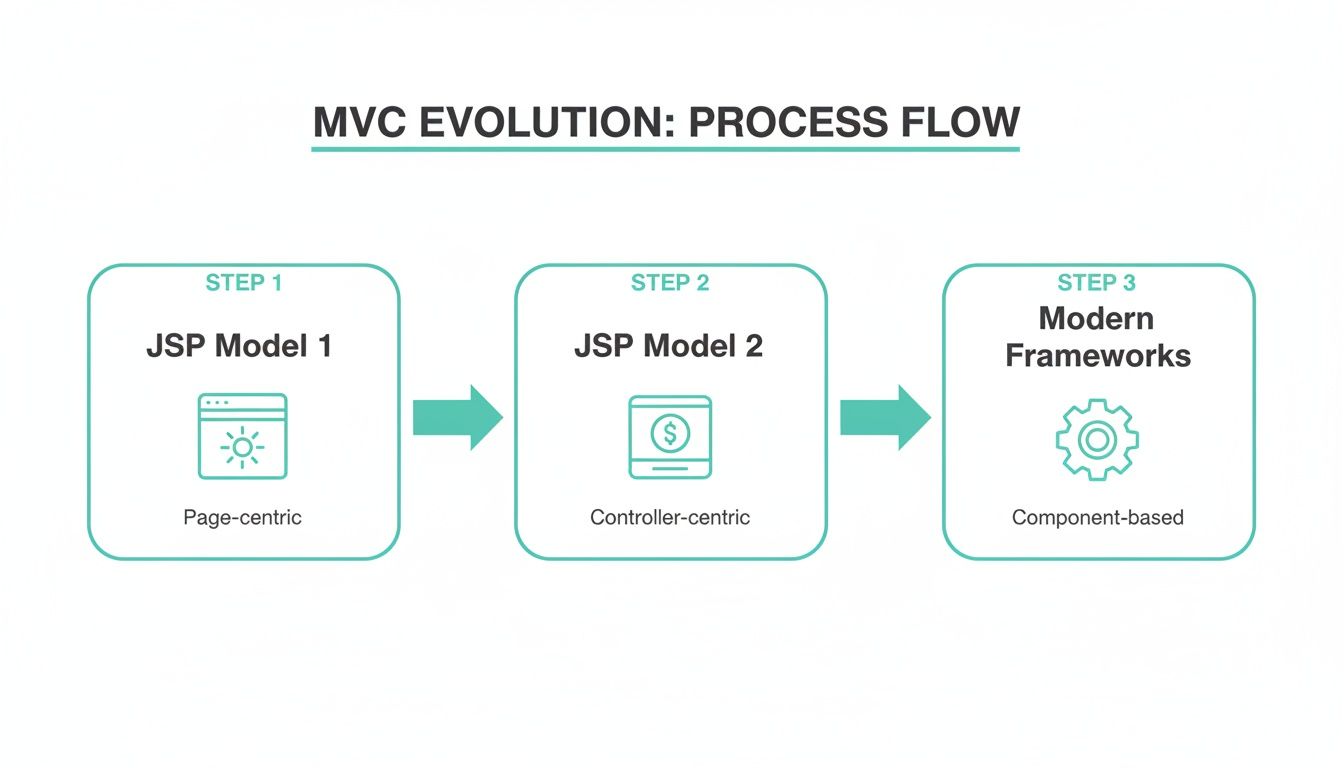
As you can see, we've moved from messy, all-in-one JSP pages (Model 1) to a structured flow where a central Controller manages all the logic (Model 2), which paved the way for the elegant, component-based frameworks we use today.
Building the View with Thymeleaf
Last but not least is the View, which is in charge of presenting the data to the user. We'll use Thymeleaf, a modern template engine that works beautifully with Spring. Our view file, named productList.html, will sit in the src/main/resources/templates/ directory we defined earlier.
<!DOCTYPE html><html xmlns:th="http://www.thymeleaf.org"><head><title>Product Catalog</title></head><body><h1>Our Products</h1><table><thead><tr><th>ID</th><th>Name</th><th>Price</th></tr></thead><tbody><tr th:each="product : ${products}"><td th:text="${product.id}">1</td><td th:text="${product.name}">Product Name</td><td th:text="${product.price}">0.00</td></tr></tbody></table></body></html>The magic here is in the th: attributes. The th:each tag loops through the products list we added to the model back in our controller. Then, th:text populates each table cell with the corresponding product data. When a user hits the /products URL, Spring runs the controller method, which prepares the data and passes it to this Thymeleaf template. Thymeleaf then renders the final HTML page that gets sent to the user's browser.
While simple, this example perfectly captures the core workflow of the pattern mvc java in a modern enterprise application. To dive deeper and build more complex features, a good Java Spring Boot Tutorial can offer practical, hands-on experience for creating full-scale applications.
How MVC Powers Enterprise Platforms Like Sitecore
While simple examples show you the mechanics of the MVC pattern in Java, its real power comes alive in large-scale enterprise systems. Digital Experience Platforms (DXPs) like Sitecore are a perfect showcase for how MVC principles are used to build dynamic, content-rich websites for global brands.
In these advanced platforms, the clean separation of concerns isn't just a "best practice"—it's fundamental to how they operate. Sitecore’s architecture leans heavily on this structure to empower developers and marketing teams at the same time, making it possible to build and manage complex digital experiences with precision.
The entire system is built around a component-based architecture. A single web page isn’t a monolithic block of code; it's an assembly of smaller, self-contained components. Each of these components, which Sitecore calls a "rendering," often acts as its own mini-MVC application.
Component-Based Architecture in Action
Imagine a webpage with a hero banner, a product carousel, and a personalized call-to-action button. In a Sitecore build, each of those elements is a separate component with its own independent logic. This modular approach is a direct and powerful extension of the MVC philosophy.
This structure allows marketing teams to use a drag-and-drop page editor to build and rearrange pages without writing a single line of code. They are simply picking from a library of pre-built MVC components. At the same time, developers can focus on building those reusable components with a clean, separated codebase, ensuring that business logic and presentation stay completely distinct.
This approach is what makes the platform so agile. A developer can update the logic for the product carousel without any risk of breaking the hero banner or any other part of the site.
The MVC Flow in a Sitecore Context
When a user requests a page on a Sitecore-powered website, a familiar MVC workflow kicks off, but with a unique DXP twist. The data, logic, and presentation are all orchestrated to deliver a highly contextual and personalized experience.
Here’s how the roles break down:
- The Model: The Model's job is to fetch structured content. Instead of pulling from a simple database, it retrieves data items from the Sitecore content repository. This could be anything from page text and images to complex product specifications from a system like Sitecore OrderCloud.
- The Controller: The Controller orchestrates the entire process. It receives the user's request, talks to the Model to get the content it needs, and—crucially—applies business rules. This is where the real power of a DXP like Sitecore shines.
- The View: The View is responsible for rendering the final HTML. It takes the data prepared by the Controller and displays it to the user. This is typically a Razor file (
.cshtml) that mixes HTML markup with the content fetched from the Model.
In the Sitecore world, the Controller's role is magnified. It's not just routing requests; it’s applying sophisticated personalization rules, often driven by Sitecore AI. Based on a user's behavior, location, or past interactions tracked via Sitecore CDP, the Controller can decide to show different content—effectively swapping out one Model's data for another before it ever reaches the View.
This real-world application shows how the MVC pattern becomes the engine behind scalable, multilingual, and personalized digital experiences. For organizations managing a global presence, this architectural foundation makes it possible to deliver the right message to the right user at the right time. For a deeper look into how these platforms are constructed, you can learn more about Sitecore solutions and their architectural benefits.
Just as Sitecore leverages MVC for dynamic content, SharePoint solutions also benefit from this structured approach, especially during modernizations. Migrating older SharePoint applications to a modern framework often involves re-architecting them using MVC principles. This separates business logic from presentation, making the new applications more scalable and far easier to maintain.
Best Practices for Building Maintainable MVC Applications
Just using the MVC pattern in Java is a great first step, but it doesn't automatically guarantee a maintainable application. The real discipline comes from applying a few core principles that separate a short-lived project from a scalable, long-term asset. This philosophy is at the heart of our work, whether we're building a new Sitecore DXP or modernizing a legacy SharePoint solution.
One of the first rules we teach developers is to keep controllers "thin." Think of a Controller as a traffic cop for HTTP requests—its only job is to direct the flow. Any real work, like complex business rules, should be handed off to a dedicated service layer. This keeps your code clean and makes your business logic reusable in other parts of the application.
This simple habit enforces the Single Responsibility Principle, a fundamental rule of solid software architecture. Every class should have just one reason to change. A Controller that’s juggling request routing and business logic has two reasons to change, making it fragile and a nightmare to manage down the line.
Embrace Loose Coupling with Dependency Injection
Another game-changer is Dependency Injection (DI). Instead of a Controller creating its own services, those dependencies are "injected" from the outside, usually by a framework like Spring. This creates a loosely coupled system where components are far easier to manage, test, and swap out.
Let's look at the difference:
- Without DI: Your Controller is hard-wired to a specific service class. If you need to change that service, you have to rip open the Controller and modify its code.
- With DI: Your Controller only knows about an interface, not the concrete implementation. You can easily switch out the service behind the scenes without ever touching the Controller.
This flexibility is incredibly powerful. When it comes to testing, you can inject a "mock" service to isolate the Controller's behavior, leading to faster, more reliable unit tests.
A design pattern is a recurring solution to a common problem. By systematically decoupling components with techniques like Dependency Injection, you create a system that is not just functional but also resilient. This practice is essential for reducing technical debt, as it prevents the tight coupling that makes future changes slow and expensive.
For any application to be truly maintainable, it’s also crucial to focus on implementing robust Quality Assurance practices from day one. This means thoroughly testing each layer—Model, View, and Controller—to catch problems early and ensure the application remains stable for years to come.
Common MVC Anti-Patterns to Avoid
Knowing what not to do is just as important as knowing what to do. Steering clear of these common anti-patterns will save you and your team a world of hurt.
Here are a few of the biggest traps to watch out for:
- Fat Controllers: We’ve already covered this, but it bears repeating. Packing business logic into Controllers is the most common MVC mistake and leads directly to messy, unmanageable code.
- Fat Models: While you want to move logic out of the Controller, it shouldn’t all be dumped into the data objects themselves. Models should represent data and its structure, while complex business operations belong in service classes.
- Logic in the View: Your Views should be as dumb as possible. Putting business logic, complex conditions, or database queries inside a JSP or Thymeleaf template makes the UI brittle and untestable.
- Direct Database Calls from the Controller: This is a major red flag. A Controller should never interact directly with the database. All data access must go through a service and repository layer to keep your architecture clean.
By consciously avoiding these pitfalls, you ensure your application honors the true spirit of the MVC pattern. If you're interested in digging deeper into code quality, you can read also about how to reduce technical debt in your projects.
Common Questions About Java MVC
As we've walked through the MVC pattern in Java, from its core concepts to real-world code, a few questions always pop up. Let's tackle some of the most common ones that developers and tech leads run into, especially when working with enterprise platforms like Sitecore.
Is the MVC Pattern Still Relevant Today?
Absolutely. While the front-end world has shifted towards component-based libraries, MVC's core principle—the separation of concerns—is still the bedrock of solid server-side development. It’s far from a legacy idea; it's the architectural foundation of major Java frameworks like Spring.
In the enterprise world, its importance is even clearer.
- On a platform like Sitecore, MVC is non-negotiable. It’s what allows developers to build clean, reusable presentation components that marketers can then drag and drop onto a page using tools like Sitecore Pages.
- For projects like SharePoint modernizations, MVC principles are crucial for breaking down monolithic legacy apps into scalable, maintainable solutions. The structure it enforces is a lifesaver for untangling old code.
The pattern’s knack for cleanly dividing business logic, data, and presentation makes it essential for building the complex, data-heavy systems that modern businesses depend on.
How Does Sitecore AI Use the MVC Pattern?
In a Sitecore setup, MVC becomes the engine for delivering AI-powered personalization. The Model, View, and Controller work together to create experiences that adapt to each user, and that process leans heavily on MVC's separated structure.
The real magic happens in the Controller. In a Sitecore context, the Controller doesn't just route requests; it consults Sitecore AI to make real-time decisions. Based on a user's behavior, profile data captured by Sitecore CDP, or segment, the AI engine can instruct the Controller to fetch different content (a different Model) or even select an entirely different component (a different View) to display.
Think of a "Recommended Products" component. Its Controller can use Sitecore AI to look at a visitor's browsing history. If the AI sees the user is interested in high-end electronics, the Controller requests a Model filled with premium products from Sitecore OrderCloud and sends it to the View. For another user, the same component’s Controller might be told to show budget-friendly options instead. This dynamic interaction is a perfect example of how MVC enables advanced personalization at scale.
Can MVC and a RESTful API Coexist?
Yes, and in modern development, they often do. It’s a common myth that you have to pick one or the other. In reality, MVC is a pattern for structuring your entire application, while a RESTful API is a style for how systems communicate, specifically for exposing data and logic.
Here’s how they typically work together in modern architectures:
- The Backend: A Java application, often built with Spring MVC, serves as the backend. The
@Controllerclasses are there to handle incoming HTTP requests. - The Endpoints: Instead of returning a View (like a JSP or Thymeleaf template), the Controller methods return data, usually formatted as JSON. These methods effectively become the RESTful API endpoints.
- The Frontend: A completely separate front-end application (built with a framework like React, Angular, or Vue.js) calls these endpoints and uses the JSON data to render the user interface in the browser.
In this "headless" model, the Java application is still very much following MVC principles. The Model handles the data and business rules, and the Controller manages requests. The only difference is that the "View" is now an external client, turning the backend into a powerful, data-first service.
How Does MVC Improve Unit Testing?
MVC's separation of concerns is a huge win for testing. It lets you test each piece of your application in isolation, which is critical for building reliable, enterprise-grade software.
- Testing the Model: Because the Model contains pure business logic and has no ties to the web framework, you can test it like any other standard Java object. You can verify all its logic without needing to spin up a server or connect to a database.
- Testing the Controller: You can unit-test Controllers with mock objects. Using a framework like Mockito, you can simulate HTTP requests and provide mock services or repositories. This lets you check that the Controller calls the right services and returns the expected response, all without any real dependencies.
- Testing the View: The View is usually tested through higher-level integration or end-to-end tests that simulate a real user interacting with the application in a browser, confirming that data from the Model is rendered correctly.
This layered testing strategy leads to more focused, dependable, and faster tests—all essential for maintaining development speed and high-quality code.
At Kogifi, we build world-class digital solutions on platforms like Sitecore, where the MVC pattern is fundamental to creating scalable, personalized, and high-performance digital experiences. Our expertise ensures your architecture is not just built for today, but engineered for the future.
Discover how our expert DXP solutions can transform your digital presence.