


In a world of tightening privacy rules and intelligent ad blockers, the old ways of collecting data are on life support. This is where server-side tracking comes in. It’s a modern approach that moves data collection away from the user's browser and into a secure server environment that you own and control. Let's be clear: this shift isn't just a technical upgrade—it's a core business strategy.
Why Server-Side Tracking Is a Business Imperative

The traditional method, client-side tracking, completely depends on scripts running inside a visitor's web browser. That approach is becoming incredibly fragile. Ad blockers, privacy-first browsers, and regulations like GDPR are punching huge holes in your data, making it nearly impossible to accurately measure marketing ROI.
Every time your analytics tags fire from the browser, they're exposed and vulnerable. This weakness translates directly into lost conversions, fragmented customer journey data, and skewed performance metrics. For enterprise organizations running on sophisticated Digital Experience Platforms (DXPs) like Sitecore, this data loss actively sabotages your personalization and AI-driven initiatives.
The Problem with Browser-Based Data
Relying entirely on client-side data collection creates some serious risks that hurt both marketing effectiveness and IT stability. Without a solid data foundation, even the most powerful platforms are essentially flying blind.
Here are the key challenges:
- Data Inaccuracy: Ad blockers and browser privacy settings can stop tracking scripts from ever loading, giving you an incomplete picture of user behavior. This leads to bad decisions and wasted ad spend.
- Performance Degradation: Forcing the browser to load dozens of third-party scripts slows your website to a crawl. That hurts the user experience and can tank your SEO rankings.
- Security and Compliance Gaps: When you send data straight from the browser to third-party vendors, you lose control over what information gets shared, opening you up to compliance risks. Strong data security is not just an add-on; it's fundamental to building user trust.
Reclaiming Control with a Server-First Approach
Server-side tracking completely flips the model on its head. Instead of countless scripts all trying to send data from the browser, a single, clean data stream is sent to your own server endpoint. From that central point, you decide what data goes where and how it's sent to your analytics and marketing platforms.
This architectural shift is about more than just technology; it's about building a resilient, trustworthy, and high-performance data foundation for the future. You regain control over your most valuable asset—your customer data.
For businesses on SharePoint or those leveraging the full Sitecore product portfolio—from XM Cloud to Sitecore Personalize—this control is absolutely essential. It guarantees the data fueling your AI models and personalization engines is both complete and accurate.
In fact, companies that make this switch often see a 20-40% increase in tracked conversions, directly recovering revenue that was previously invisible due to client-side data loss. It's an improvement that makes adopting server-side tracking a clear business imperative.
Understanding the Data Collection Shift
To really get why server-side tracking is such a big deal, you first have to picture how data collection has traditionally worked. The old method, client-side tracking, is like a chaotic food court. Every vendor—think analytics tools, ad platforms—sets up their own little stall right in front of the customer. Each one has its own script, which slows down the whole experience and creates tons of potential points of failure.
Server-side tracking, on the other hand, is like a well-run central kitchen. A customer places one clean order. That order goes straight to your private kitchen—your server—where you're in complete control. You prepare the data, check its quality, and then send only the necessary information to each vendor in a secure, orderly way. This simple architectural flip is the core of the entire shift.
The Vulnerability of Client-Side Tracking
The biggest weakness of client-side tracking is its total reliance on the user's browser. Every piece of tracking logic, every script from Google, Meta, or LinkedIn, has to be downloaded and executed right on the visitor's device. This direct-to-browser approach leaves your entire data collection process exposed to an environment you can't control.
This makes your data pipeline incredibly fragile and wide open to a whole host of problems:
- Ad Blockers and Privacy Tools: These extensions are specifically designed to sniff out and block requests to known tracking domains. When a script gets blocked, that data is just gone. Poof.
- Browser Restrictions: Modern browsers like Safari (with its Intelligent Tracking Prevention) and Firefox are actively cracking down. They limit the lifespan of cookies and restrict cross-site tracking, which can completely shatter your ability to analyze the user journey.
- Network Instability: A spotty mobile connection or local network issue can stop tracking scripts from loading correctly, punching even more holes in your data.
With client-side tracking, your data integrity is basically left to chance. It all hangs on the unpredictable conditions of each user's browser and network—a shaky foundation for making critical business decisions.
Centralizing Data with a Server-Side Approach
Server-side tracking completely flips this dynamic by moving all the heavy lifting away from the browser. Instead of dozens of scripts firing on the client's machine, you typically have just one lightweight script sending a unified data stream to a server endpoint that you own and manage.
Here’s a quick breakdown of how these two approaches stack up.
Client Side vs Server Side Tracking A Quick Comparison
The table below offers a clear look at the fundamental differences between these two methodologies across key operational and business metrics.
As you can see, the shift to a server-side model isn't just a minor technical tweak; it's a strategic move toward building a more reliable, secure, and future-proof data foundation.
This single, first-party request is far less likely to be blocked by privacy tools. Once that data arrives safely at your server, you have complete authority over it. You can validate, clean, and enrich the information before deciding what gets forwarded to third-party tools.
For organizations deep in the Sitecore product portfolio, this means the data feeding into Sitecore Personalize or Sitecore AI is pre-vetted for accuracy and completeness, which massively improves the effectiveness of your personalization efforts. You can learn more about how this all connects by exploring our insights on 360-degree analytics and customer data platforms.
If you’re a SharePoint user, this centralized control ensures that any data sent from internal portals or public-facing sites meets strict corporate governance and security standards before it's ever shared with an external analytics system. This architectural shift—from a decentralized, browser-based mess to a centralized, server-controlled system—is the key to building a resilient and trustworthy data foundation for the future.
How Server Side Tracking Boosts Website Performance
In the world of enterprise digital experiences, every millisecond counts. A slow, clunky website doesn't just annoy visitors—it actively drives them away, hitting your revenue and brand reputation where it hurts. This is why one of the biggest and most immediate wins of moving to server side tracking is a massive jump in website performance.
Think about a typical website running on client-side tracking. The visitor's browser is stuck doing all the work: downloading, processing, and running a bunch of JavaScript files. There's one for analytics, another for ads, a third for social media pixels... you get the picture. This "tag soup" clogs up the browser, delaying how fast content loads and becomes interactive.
For e-commerce managers and digital teams on powerful platforms like Sitecore or SharePoint, this performance drag is a critical business problem. It directly causes higher bounce rates, kills user engagement, and can even tank your search engine rankings.
Lightening the Browser's Workload
Server-side tracking completely flips the script. Instead of forcing the user's browser to juggle a dozen different tracking scripts, you consolidate everything into a single, lightweight data stream sent straight to your server. This single request offloads all the heavy lifting from the user's device to your own powerful server infrastructure.
The impact is instant and easy to measure. By cutting out that client-side burden, web pages load faster and become responsive in a snap. This isn't just a technical tweak; it's a strategic move to put the user experience first.
Server-side tracking isn't just a technical upgrade; it's a revolution in website performance. For enterprise platforms like Sitecore, where experience is everything, every millisecond shaved off load times translates to better engagement and higher conversions. By offloading tracking scripts from browsers to servers, businesses achieve significant load time improvements, reducing bounce rates and boosting engagement.
The Clear ROI of a Faster Website
This performance boost pays off in real, tangible business results. A faster site delivers a better user experience, which is the bedrock of digital success. The investment in server infrastructure for server side tracking provides a clear and compelling return.
Here are the key performance benefits you can expect:
- Reduced Bounce Rates: When pages load quickly, visitors are far more likely to stick around and explore your content instead of clicking away in frustration.
- Increased Conversions: For e-commerce sites built on platforms like Sitecore, a zippier checkout process means fewer abandoned carts and more sales.
- Improved SEO Rankings: Search engines like Google use page speed as a major ranking factor. A faster site can lead to better visibility in search results.
One of the most significant advantages of implementing server-side tracking is its ability to improve website speed and overall performance. By streamlining data collection, you create a more efficient and user-friendly digital environment. For a deeper dive into this topic, check out our guide on how to optimize website performance, where we cover additional strategies. Ultimately, this approach helps you recapture lost revenue and build customer loyalty with a reliably fast digital platform.
Achieving True Data Sovereignty and Privacy
In a world filled with strict privacy laws, just collecting data isn't enough—controlling it is mission-critical. Server-side tracking is the architectural shift that unlocks true data sovereignty, putting the power back into your hands instead of leaving it with third-party vendors and unpredictable browsers.
This approach essentially turns your data pipeline from an open channel into a secure, private fortress. By routing all user interaction data through a server environment you own and control, you become the gatekeeper for the entire stream.
And this is where the magic really happens. Before a single byte of information ever reaches an external analytics or marketing platform, you get to inspect it, clean it, and decide what goes through. This level of control is a lifesaver for global brands navigating the maze of regulations like GDPR.
Owning Your Data Stream
True data ownership means you have the final say on what information leaves your ecosystem. With server-side tracking, you can set up precise rules to manage your data flow, which is fundamental for both compliance and building user trust.
This control gives your teams the ability to:
- Anonymize PII: Automatically strip out or hash personally identifiable information (PII) like email addresses or user IDs before the data ever reaches an external tool.
- Filter Sensitive Data: Block confidential or irrelevant information from ever being sent to third-party vendors, which shrinks your compliance risk.
- Enrich with First-Party Data: Securely add valuable information from your internal systems, like a CRM, to create richer user profiles for personalization without ever exposing the raw data.
For a deeper dive into protecting the massive amounts of data gathered this way, this CTO's Guide to Data Security in Big Data is a fantastic resource. This kind of governance transforms compliance from a reactive headache into a proactive, strategic advantage.
Transforming Compliance into a Competitive Edge
As privacy regulations evolve, server-side tracking has become a compliance powerhouse for enterprise marketing teams. It thrives because it processes first-party data on your servers, neatly sidestepping many browser-based blocks and restrictions. This control is especially critical in regions with stringent data laws.
This control lets you execute sophisticated strategies that respect user privacy while still driving powerful results. For organizations using tools like Sitecore AI, it's a game-changer. The high-quality, pre-vetted data stream from a server-side setup fuels more accurate and effective AI-driven personalization.
By taking full ownership of your data, you build a foundation of trust with your users. You can confidently deliver personalized experiences knowing you are respecting their privacy choices and adhering to the highest compliance standards.
SharePoint-based portals also see huge benefits. Data from both internal and external users can be managed under strict corporate governance, ensuring sensitive information stays locked down in your server environment before any anonymized metrics are passed along to analytics platforms.
This strategic control over your data also sets you up for the future. When new privacy regulations inevitably pop up, you won't have to scramble to update dozens of third-party scripts. Instead, you can adapt by simply tweaking the rules in your central server environment, making your entire data strategy both resilient and future-proof. You can learn more about how to personalize without compromising anonymity in our related guide.
Integrating with Sitecore and Enterprise Systems
So, you understand the theory of server-side tracking. Now, how do you make it work inside a complex enterprise platform like Sitecore or SharePoint? This isn't just about plugging in a new tool; it's about architecting a smarter, future-proof data foundation that fuels better decisions and personalization.
A popular and highly effective approach is to use a server-side Google Tag Manager (sGTM) container as a central data hub. Think of it as a routing station you control. You send a single, clean data stream from your Sitecore instance to your own server environment. From there, you can enrich, clean, and forward that data with surgical precision to your entire marketing and analytics stack.
Architecting for Sitecore AI and the Composable DXP
For CTOs and their teams working with Sitecore’s powerful product suite—from Sitecore XP and XM Cloud to Sitecore Personalize and OrderCloud—server-side tracking is the missing piece of the puzzle. The AI-driven magic in these tools is only as good as the data you feed them. A server-side architecture is your guarantee that the data is complete, accurate, and trustworthy.
Imagine your Sitecore XP instance is capturing rich user behaviors and goals. In a typical client-side setup, that data is fragmented and often gets lost due to ad blockers or network issues. With a server-side approach, you can stream those events directly from Sitecore’s backend to your sGTM container.
This creates a first-party data asset that you can enrich in real time. For example, before sending an event to Sitecore Personalize, you could pull in customer data from your CRM or ERP, creating a truly unified profile that powers hyper-relevant experiences on the fly.
By centralizing data flow on the server, you transform Sitecore from a content management system into the command center of a cohesive digital ecosystem. This architecture directly supports a composable DXP strategy, allowing you to seamlessly integrate best-of-breed tools without sacrificing data integrity or performance.
A Practical Blueprint for Sitecore Integration
Getting this right requires a methodical approach. The goal is to build a robust and secure pipeline that captures, enriches, and distributes data seamlessly.
Here’s a high-level integration pattern for a Sitecore environment:
- Data Collection: A single, lightweight script on your Sitecore front-end sends a unified data stream to your dedicated server-side endpoint (e.g.,
data.yourdomain.com). This keeps the browser fast and happy. - Server-Side Hub: Your sGTM container receives this raw data. This is your central processing and distribution hub, running in a secure cloud environment you completely control.
- Data Enrichment: Here's where the magic happens. Inside your secure server, you can connect to other internal systems. You might pull a user’s loyalty status from a CRM or their order history from an e-commerce platform to add valuable context to the event data.
- Distribution Logic: With the newly enriched data, you create rules to send specific information to different destinations. For instance, you might send fully anonymized conversion data to ad platforms while piping detailed behavioral data into Sitecore AI and your analytics tools.
This flow is all about maintaining data sovereignty—a core benefit of this model. You decide what goes where.
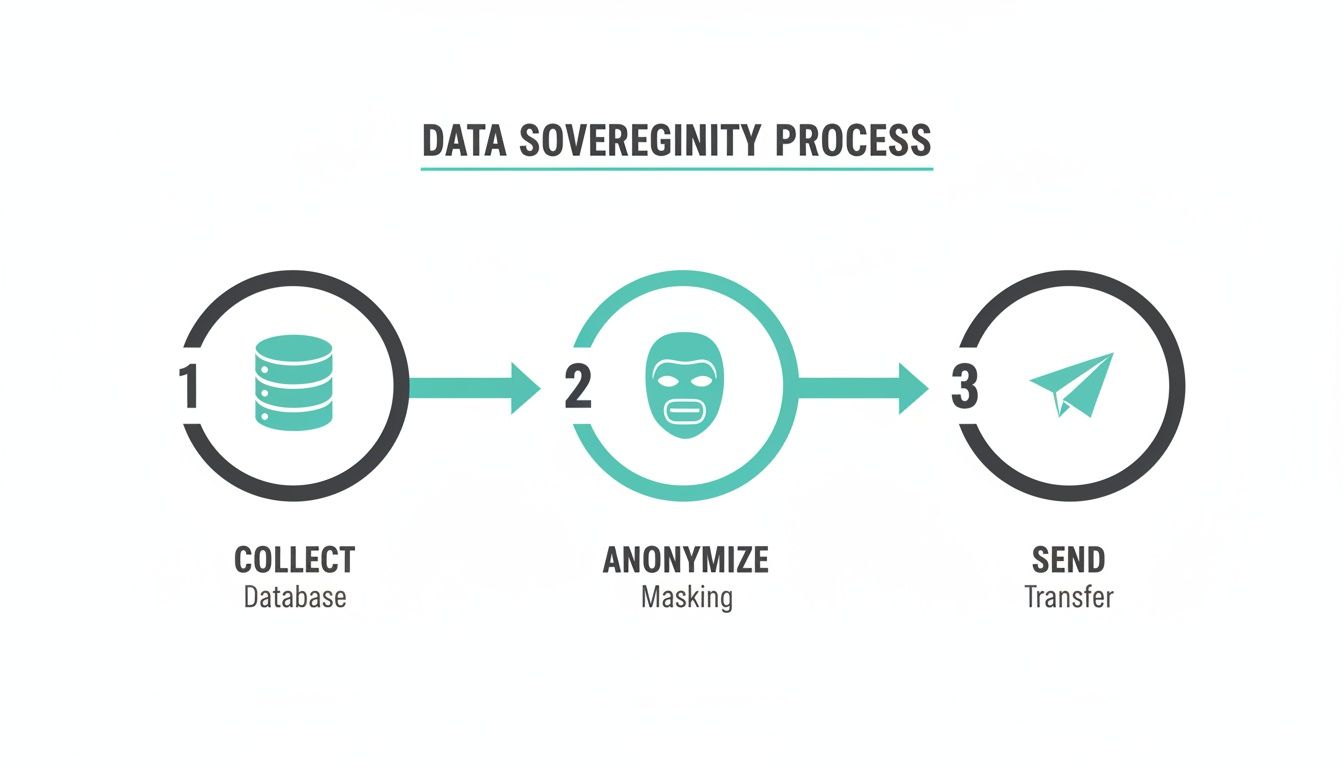
The process is simple in concept: collect raw data, transform or anonymize it on your server, and then securely send it to its final destination. It’s all under your direct control.
Integrating with SharePoint Solutions
The same architectural principles work beautifully for SharePoint environments, though the goals are often different. For public-facing SharePoint sites, you want to understand user engagement with content. For internal portals, the focus shifts to tracking employee interaction while sticking to strict corporate privacy policies.
With server-side tracking, a SharePoint administrator can:
- Monitor engagement securely: Track document downloads, video views, and navigation patterns without sending internal user data to third-party cloud services.
- Enforce data governance: Filter out any sensitive or personally identifiable information (PII) at the server level before sending aggregated, anonymized data to an analytics platform.
- Improve portal performance: Cut down on the number of client-side scripts running on internal portals, ensuring a fast and responsive experience for employees.
This level of control is non-negotiable for organizations balancing analytics needs with tough security protocols. By setting up a server-side data hub, IT teams can deliver valuable insights to business units without ever compromising on data security or corporate compliance.
Your Strategic Implementation Roadmap
Making the switch to server-side tracking isn't just another IT task; it’s a strategic business move. This kind of project demands careful planning, a clear destination, and a step-by-step approach to get the most out of your DXP investment, especially when you're working within a complex Sitecore or SharePoint setup. Here's your high-level roadmap to get it right.
First things first: you need a full audit of your current client-side tracking. It's time to map out every single tag, data point, and third-party vendor that fires from the browser. This discovery phase is non-negotiable—it tells you what data you can’t live without and what can be cleaned up or even retired.
Think of this as creating a detailed architectural blueprint before starting construction. A successful migration depends entirely on knowing exactly what you're rebuilding, why you're rebuilding it, and what success will look like when you're done.
Defining Your Business Objectives
Once you have a clear picture of what you have, you can define what you want. What's the end game? Are you trying to reclaim conversion data swallowed by ad blockers? Is the goal to speed up your website, or do you need to tighten data sovereignty for GDPR compliance?
Your goals will directly shape your architecture. For instance, a Sitecore-powered e-commerce site might want to enrich user profiles with offline CRM data to power Sitecore AI personalization. On the other hand, a SharePoint intranet might simply need secure, anonymized tracking to gauge employee engagement.
Designing the Architecture and Migration Plan
With your objectives locked in, you can start designing the server-side architecture. This is where you'll pick your cloud infrastructure, set up your server-side GTM container, and establish a custom domain for your data endpoint. A critical piece of this stage is planning a phased migration to avoid disrupting the business.
A proven, highly effective strategy follows these steps:
- Run in Parallel: Start by sending data to your new server-side endpoint at the same time as your existing client-side setup. This "shadow mode" lets you collect data through both pipelines without touching your live reporting.
- Validate and Compare: For a set period, meticulously compare the data coming from both sources. This validation step is absolutely essential to ensure your new server-side implementation is capturing everything accurately.
- Migrate Tag by Tag: Once you’re confident in the data, begin moving your marketing and analytics tags over one by one. Start with something low-risk, confirm it's working perfectly, then move on to others like the Meta Pixel or LinkedIn Insight Tag.
- Decommission Client-Side Tags: After all your tags are successfully running server-side, you can finally remove the old, redundant scripts from your site. This is the moment you unlock the full performance and security benefits.
This deliberate, phased approach ensures data continuity, builds confidence across marketing and IT teams, and guarantees a seamless transition. For complex platforms like Sitecore and SharePoint, partnering with specialists who know the terrain is key to navigating this process smoothly and turning your data strategy into a real competitive advantage.
Frequently Asked Questions
Let's tackle some of the most common questions that come up when discussing server-side tracking. Getting these answers straight is key to understanding its real value for your enterprise platform.
Does Server-Side Tracking Make Our Website GDPR Compliant?
Not automatically, no. But it's probably the single most powerful tool you can use to achieve compliance. Think of it as giving you the technical control panel needed to enforce your privacy policies.
By funneling all data through your own server first, you get to decide exactly what information leaves your ecosystem and goes to third-party vendors. This means you can hash, redact, or completely anonymize personally identifiable information (PII) before it ever hits an external server. This is a direct win for GDPR principles like data minimization.
Of course, true compliance still hinges on having a proper legal basis for collecting data, getting valid user consent, and maintaining transparent privacy policies. For a Sitecore user, this means you could feed clean, anonymized data to Sitecore AI for personalization without ever compromising user privacy.
What Are the Main Costs of Server-Side Tracking?
The biggest line item is the server infrastructure needed to host your tracking endpoint. This usually means setting up an account with a cloud provider like Google Cloud Platform or AWS.
These costs are almost always usage-based, so they scale with the volume of requests your website handles. For a high-traffic enterprise platform, this should be treated as a predictable operational expense. It's really important to see this not as a cost, but as an investment. The money you get back from recovered conversion data, better ad performance, and the long-term value of a stable data foundation almost always delivers a significant return.
Can We Implement Server-Side Tracking in Phases?
Absolutely. In fact, for any large organization—especially one running a complex platform like Sitecore or SharePoint—a phased rollout is the only way to go. A "big bang" migration is just asking for trouble.
A smart way to start is by running server-side tracking in parallel with your current client-side setup for just one tool, like Google Analytics. This "dual-tracking" or "shadow" mode lets your team compare the new data stream against the old one, making sure everything is perfectly accurate before you flip any switches.
Once you’ve validated that first tool, you can start methodically moving your other marketing tags—like the Meta Pixel or LinkedIn Insight Tag—over to the server-side container. After every tag is migrated and checked, you can finally remove the old client-side scripts and unlock the full performance gains. This systematic approach takes the risk out of the equation and guarantees a smooth, successful transition.
At Kogifi, we specialize in designing and implementing robust server-side tracking architectures for enterprise platforms like Sitecore and SharePoint, ensuring your data strategy is both powerful and compliant. https://www.kogifi.com