





Server-side tracking is all about taking back control. Instead of letting a user's browser send data directly to third-party analytics and marketing tools, you route that information through your own server first. This simple but powerful shift gives you full ownership and oversight of your data stream.
The Inevitable Shift to Server-Side Tracking
Think of your website's data like mail. For years, most businesses have used client-side tracking, which is like a congested, unreliable public postal service. Data gets sent directly from a visitor's browser to dozens of destinations—Google Analytics, marketing platforms, you name it. But along the way, that mail often gets lost, intercepted by ad blockers, or flat-out rejected by new browser privacy settings. The result? Incomplete and untrustworthy delivery reports, leaving you guessing what’s really going on.
Server-side tracking changes the game entirely. It’s your own secure, private courier service. All data is first sent to a central, trusted hub: your server. From there, you get to verify, clean up, and enrich this information before securely distributing it to the platforms that need it. This isn't just a trend; it's a necessary evolution driven by a perfect storm of digital challenges.
Why the Change Is Happening Now
The old way of tracking is on its last legs. Several major factors are pushing businesses to adopt a more robust, server-centric model to protect their data integrity and marketing investments.
- Intelligent Tracking Prevention (ITP): Browsers like Safari and Firefox now have built-in privacy features that aggressively limit or block third-party cookies and tracking scripts, leading to massive data gaps.
- Ad Blocker Proliferation: A growing number of users run ad blockers that prevent tracking scripts from ever loading in the first place, making those visitors completely invisible to your analytics.
- Privacy Regulations: Laws like GDPR and CCPA demand strict data governance. Server-side tracking gives you precise control over what data is collected and what gets shared with third parties, making compliance much simpler.
This is especially critical for enterprise Digital Experience Platforms (DXPs). For a platform like Sitecore, which relies on rich, accurate data to power its AI and personalization engines, getting incomplete client-side information cripples its effectiveness. Kogifi's deep expertise in implementing server-side solutions for Sitecore and SharePoint ensures that the data fueling your business decisions is complete, compliant, and trustworthy.
By establishing a clean data pipeline, we help you unlock the full potential of your DXP, turning fragmented data into powerful, actionable intelligence. In today's environment, this new standard is essential for staying competitive.
Client-Side vs. Server-Side Tracking at a Glance
To really grasp the difference, it helps to see the two approaches side-by-side. The old way worked for a simpler time, but the new standard is built for the realities of the modern web.
Ultimately, server-side tracking gives you a single source of truth, making your data more reliable and your marketing efforts far more effective.
How Server-Side Tracking Actually Works
To really get what server-side tracking is, let's start with an analogy. Think of the old client-side model like sending luggage at a chaotic airport. Every piece of your luggage (data) gets shipped off separately to its final destination—Google, Facebook, you name it. Each bag goes through its own security check, its own customs line, and its own handler. It's a system with a lot of potential failure points.
Server-side tracking completely changes the game. Instead of sending dozens of separate packages, all your luggage first goes to a central, secure distribution hub: your server.
This hub receives a single, unified stream of event data from the user's browser. This data is just a simple record of what someone did, like a "page view," "add to cart," or "form submission." The moment it arrives on your server, you're in complete control.
The Role of the Server Container
The engine making all this possible is the server container, which is a secure environment running on your server that acts as a proxy between your website visitors and your data collection endpoints. This container is your data's air traffic controller. It takes in the raw data from the browser and then decides where it goes next.
This is a huge deal for enterprise platforms like Sitecore. A Sitecore DXP is a goldmine of customer interaction data. When you channel all that rich behavioral information through a server container, you build a solid foundation for data governance and open the door to some seriously powerful integrations. You're not just sending basic page views anymore; you're sending the whole story of the customer journey.
A server container essentially acts as a proxy between your website visitors and your data collection endpoints. It gives you the power to inspect, modify, and control data before it ever leaves your own managed environment.
This graphic really drives home the difference in how data flows between the two methods.
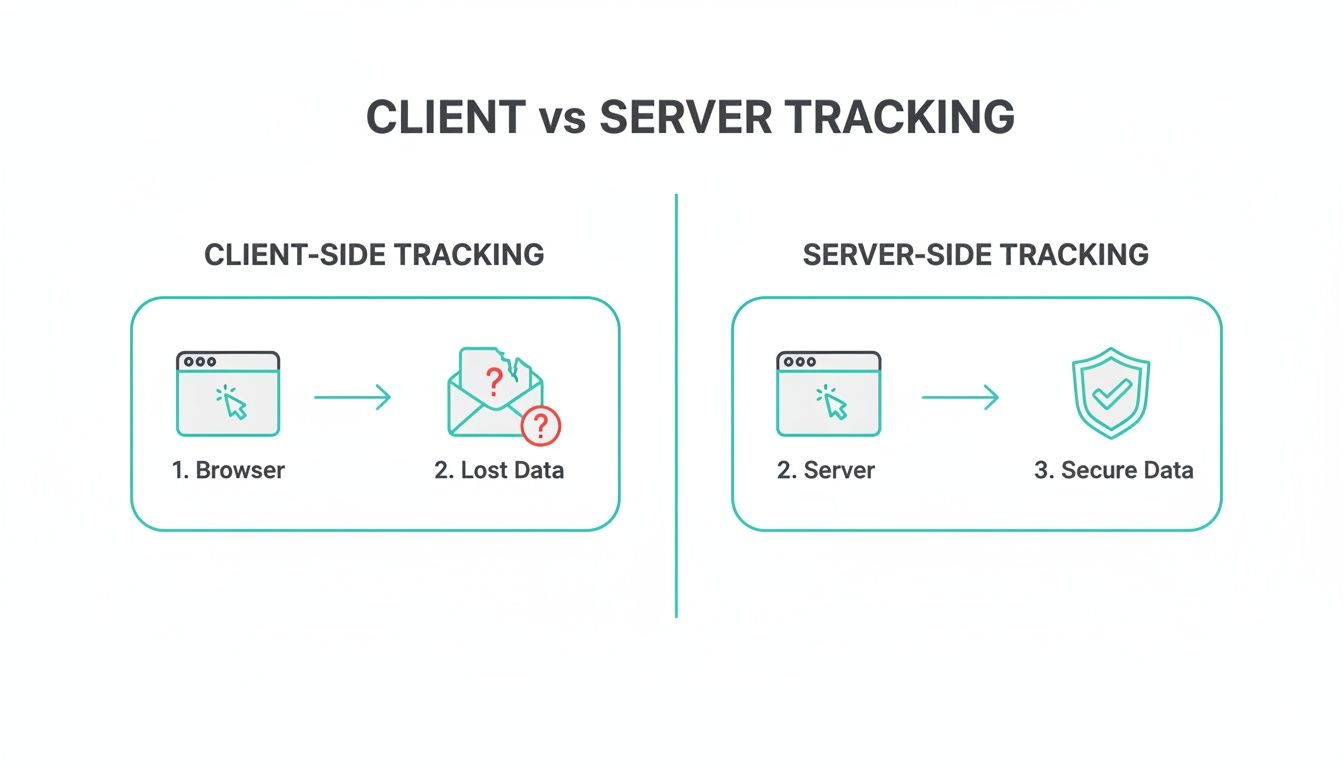
You can see right away how client-side tracking is leaky and prone to data loss, while the server-side approach creates a secure, reliable pipeline.
From Raw Data to Enriched Insights
Once the data is safe inside your server container, the real magic begins. Here’s what you can do:
- Verification and Cleansing: The server can validate all incoming data, filtering out spam or bot traffic. This ensures only high-quality information makes it through to your analytics tools.
- Data Enrichment: This is where it gets powerful. You can merge the raw event data with information from other systems, like your CRM or product database. For example, you could add customer lifetime value or product margin details to a purchase event before sending it to your analytics platform.
- Controlled Distribution: You get to be the gatekeeper. You decide exactly what data goes to each marketing partner. You might send detailed conversion data to your ad platforms but only send anonymized behavioral data to an analytics tool, keeping you compliant and protecting user privacy.
To get a clear picture of customer interactions, businesses have to track user behaviour and custom website analytics. Server-side tracking is simply the most accurate and secure way to do it.
This level of control is a massive advantage for Sitecore AI. By feeding Sitecore's personalization engine a complete and enriched dataset, you empower it to make much smarter decisions. This leads to truly relevant experiences that are flat-out impossible with the fragmented data you get from client-side methods. If you want to dive deeper, you can explore our guide on customer data integration solutions. Ultimately, this controlled, server-first approach is how you maximize the return on your DXP investment.
The Business Case for Server Side Tracking
Let's move past the technical jargon for a minute. The real reason to care about server side tracking boils down to business results. This isn't just another IT project; it's a strategic move that directly strengthens your bottom line by improving data accuracy, website performance, and compliance.
For any organization running a complex site on a platform like Sitecore or SharePoint, these three pillars build a rock-solid case for making the switch. By collecting data on your own server first, you create a trusted foundation for every marketing and analytics decision you make.
Achieve Unmatched Data Accuracy
The biggest win here is getting your lost data back. Traditional client-side tracking is fragile, sending data directly from a user's browser to third-party tools. That direct line is easily cut by ad blockers, privacy settings, and modern browser updates, leaving huge gaps in your analytics.
Server-side tracking is quickly becoming the new industry standard, especially now that browsers like Chrome—which holds over 65% of the global market share—are ditching third-party cookies. Client-side methods that rely on these cookies can lose up to 30-50% of their data to blockers and VPNs. In contrast, businesses that have already adopted server-side tracking are reporting near-perfect data accuracy.
This restored data integrity is especially critical for tools like Sitecore AI. If the AI is working with an incomplete picture of user behavior, its personalization algorithms will only deliver mediocre results. Complete data fuels smarter AI and, ultimately, personalization that actually works.
Deliver Superior Website Performance
Website performance isn't just a tech metric—it has a real impact on user experience, conversion rates, and even your SEO rankings. Every script you add to your site for client-side tracking adds weight, forcing the user's browser to do more work and slowing everything down.
A slow website frustrates users and hurts your business. With server-side tracking, you consolidate dozens of heavy browser scripts into a single, lightweight request to your server, dramatically improving site speed and responsiveness.
You'll really notice this performance boost on content-heavy DXP sites built with Sitecore or SharePoint. Faster load times mean lower bounce rates and higher engagement, which sends all the right signals to search engines and improves your organic visibility. For e-commerce sites, a speedier checkout can directly lead to more sales.
Ensure Ironclad Privacy and Compliance
In a world governed by strict privacy laws like GDPR, you can't afford to be careless with customer data. Server-side tracking puts you back in control, letting you decide exactly what information gets shared with third-party vendors.
You can filter, hash, or strip out personally identifiable information (PII) before it ever leaves your own server environment. This makes compliance incredibly straightforward. Instead of trying to manage data policies across dozens of different client-side tags, you do it all from one secure, auditable place. This is fundamental to building trust with your audience. We dive deeper into this in our guide on how to personalize without compromising anonymity.
Often, the journey to server-side tracking starts with a simple need for more reliable data. Before you can measure anything effectively, you need a solid foundation. For more on this, Understanding Web Analytics and Measuring Site Performance is a great read. By implementing SST, Kogifi helps organizations build high-performance, compliant DXP solutions that turn data into a reliable strategic asset.
Integrating SST with Sitecore and SharePoint

The real power of server-side tracking isn't just in the concept; it’s in the execution, especially when it's deeply integrated into an enterprise Digital Experience Platform (DXP). For organizations running on the Sitecore ecosystem or managing complex SharePoint environments, this is where theory becomes a serious competitive advantage.
Think of your DXP as a high-performance engine. It needs clean, high-octane fuel to run at its peak. Server-side tracking is that fuel. By creating a direct, server-to-server data pipeline, you ensure the information feeding your platform’s AI and personalization tools is complete, trustworthy, and delivered in real-time.
Powering Sitecore AI and Personalization
The entire Sitecore portfolio, particularly Sitecore CDP and Personalize, is built to deliver one-to-one experiences at scale. But here’s the catch: its effectiveness is entirely dependent on the quality of the data it receives. When you rely solely on client-side tracking, the data feeding these powerful tools is often choppy and incomplete, thanks to ad blockers and browser privacy restrictions.
Integrating a server-side container creates a rock-solid bridge to Sitecore's data layer. It’s a pretty straightforward process:
- A single, lightweight script on your website sends behavioral data to your server-side container.
- Your server receives this raw event data—page views, clicks, form submissions—and gets to work verifying its authenticity.
- The server then enriches this data, maybe by adding details from your CRM or ERP, before securely forwarding a complete and accurate event stream directly to Sitecore CDP.
This direct pipeline ensures that Sitecore CDP can build a true 360-degree customer profile. Every single interaction, from every touchpoint, is captured and stitched together, giving Sitecore Personalize the pristine data it needs to make genuinely relevant, AI-driven decisions.
With a complete dataset, the AI’s recommendations become sharper and its segmentation more precise. This is how you move beyond basic personalization and start delivering truly individualized content and offers based on a full picture of user behavior. If you're weighing your options, understanding these distinctions is key; our comparison between Sitecore CDP, Personalize, and Google Analytics breaks it down further.
Enhancing SharePoint Intranet Analytics
Server-side tracking isn't just for public-facing websites. It offers tremendous value for internal platforms like SharePoint. Measuring employee engagement on a corporate intranet is notoriously tricky, as traditional analytics often fail to capture meaningful interactions within complex web parts and document libraries.
By implementing server-side event tracking, you can finally get a clear picture of how employees are actually using the intranet.
- Accurate Document Tracking: Go beyond just clicks on a document link. You can measure actual downloads and views processed on the server.
- Component Interaction: See which SharePoint web parts are genuinely useful and which are just taking up space, helping you optimize the portal layout.
- User Journey Mapping: Trace how employees navigate through sites and subsites to find information, revealing bottlenecks and opportunities to improve information discovery.
This integration involves configuring SharePoint to fire server-side events based on user actions. These events are captured and processed through your server-side container, giving you a clean and reliable data stream for analysis. It’s the kind of insight that allows IT and communications teams to make data-driven decisions that improve internal processes and boost productivity.
An Architectural Vision for Enterprise DXPs
The core principle for both Sitecore and SharePoint is the same: make your server the central hub for data collection and distribution. This model provides a clear architectural vision for any enterprise looking to get the most out of its DXP investment.
Integration Patterns for Sitecore:
This server-first approach does more than just fix data accuracy—it builds a future-proof foundation for your tech stack. As new marketing tools or analytics platforms come along, you can simply add a new data stream from your server container without ever touching your website's code. This agility is a massive advantage, allowing your DXP to evolve with your business needs while you maintain complete control over your most valuable asset: your customer data.
Understanding the Global Adoption Landscape
The shift to server-side tracking isn't happening everywhere at once. It’s more like a strategic wave, with some regions leading the charge and others just starting to catch on. For any international brand, understanding this global map is key—it shows you where the market is heading and where you can get a serious competitive edge.
This divide between early adopters and laggards is creating a new kind of digital gap. On one side, you have companies ready for the future of data. On the other, you have businesses still leaning on outdated, unreliable tracking methods. This is why picking a partner who gets these international trends is so important. An expert team, like Kogifi, can roll out scalable, future-proof solutions on platforms like Sitecore or SharePoint, no matter the region or its rules.
Europe Leads the Privacy-First Charge
If you want to see the future of server-side tracking in action, look to Europe. Regions like DACH (Germany, Austria, Switzerland) and the Nordics are way ahead of the curve. They were the first to feel the sting of strict privacy laws like GDPR, which made their old browser-based tracking methods practically useless overnight.
Facing major data loss from browser restrictions and cookie limitations, these businesses didn't just adapt; they pioneered server-side solutions to stay compliant and keep their data accurate. They’ve moved past the experimental phase and are now embedding server-side tracking deep into their digital foundations, giving everyone else a clear roadmap to follow.
The United States: A Sleeping Giant Awakens
The American market is a totally different story. While Europe has forged ahead—with a significant portion of enterprises in DACH and Nordic regions already using SST—the U.S. has been a "sleeping giant," largely clinging to its reliance on third-party cookies. It’s a strange paradox, especially when you consider that the U.S. holds 43.3% of the global server market share.
But that giant is starting to stir. Global server revenue hit a staggering $112.4 billion in Q3 2025, a 61% jump from the previous year. The U.S. market grew the fastest, soaring by 79.1% as companies poured money into new AI infrastructure. The hardware is more than ready; the foundation is set. Now, it's just a matter of time before American companies make the leap to catch up with their European peers.
For global brands running on DXP solutions, the takeaway is clear: prioritize a server-side setup now. It's the only way to guarantee 100% accurate data transfer and get a welcome boost in site speed. You can dive deeper into these trends in the JENTIS Tracking Report.
Opportunities for Emerging Markets
For businesses in high-growth regions like Saudi Arabia, this isn't a challenge—it's a golden opportunity. Instead of wrestling with outdated systems and messy migrations, they can leapfrog straight to a modern, server-first architecture. By watching how Europe and the U.S. have navigated this shift, they can adopt best practices from day one.
By learning from the global adoption curve, emerging markets can build their digital presence on a foundation of data accuracy and privacy from the outset, positioning themselves as leaders in their respective regions.
This approach lets them unlock the full potential of their DXP investments, whether it's using Sitecore AI for deep personalization or SharePoint for advanced internal analytics. The key is working with a partner who understands these global dynamics and can implement a solution that’s both powerful and built to last.
7. Your Implementation Roadmap and Best Practices
So, you're ready to make the switch to server-side tracking. Where do you start? The first step is always a thorough audit of what you already have. This isn't just about listing tags; it's about understanding your entire data pipeline, identifying gaps, and pinpointing dependencies.
This foundational work helps you figure out which data streams are most critical to your business and flags any tags that might cause headaches down the road.
- Phase 1: Audit Your Data Pipeline - Map out all your existing tags and endpoints. This is the fastest way to see what's working and what's missing.
- Phase 2: Set Up Server Infrastructure - Get your servers provisioned or containerized and install your server-side container tool.
- Phase 3: Run Parallel Tracking Streams - This is crucial. Run your new server-side stream right alongside your old client-side one for a direct comparison.
- Phase 4: Validate And Switch Over - Use real user data to confirm everything matches up before you start turning off the old tags.
Phased Migration Strategy
Jumping in all at once is a recipe for disaster. Breaking the migration into smaller, manageable steps is the only way to do this without introducing massive risk. For example, you could start with just a single, important conversion event to test the waters.
- Pick one critical data stream and migrate it. Keep the scope minimal.
- Compare the results from your new server-side setup with your existing client-side tags.
- Dig into any discrepancies using real user sessions to understand what’s happening.
Best Practices For a Smooth Transition
Adopting a few key guidelines will keep things moving and ensure your marketing and IT teams are actually working together, not against each other.
- Start with a Single Critical Data Stream: This limits the number of variables you have to worry about and makes troubleshooting much easier.
- Establish Data Governance From Day One: Don't treat this as an afterthought. You need to control data quality from the very beginning.
- Define a Clear Operational Model: Document who does what. When roles and responsibilities are clear, things get done faster.
On top of that, consider the numbers. Server-side tracking can help capture significantly more user data by bypassing the 42.7% of traffic using ad blockers and 31% using VPNs, giving you a much more complete picture than client-side methods. You can learn more about market data on Precedence Research.
If you want to architect your server container for maximum agility, you might also find our article on an API-First Approach for Tracking Migration useful.
Common Mistakes To Avoid
Even the best-laid plans can go sideways. I've seen a few common mistakes derail server-side projects, so keep an eye out for these.
- Underestimating Infrastructure Costs: This is a big one. Those server costs can add up, so budget accordingly to avoid nasty surprises.
- Failing To Validate Data in Parallel: If you don't run both systems at once, you'll never spot the persistent gaps in your new setup.
- Ignoring Team Training: Your team can't use what they don't understand. A lack of training leads to misconfigured tags and painful delays.
“Running parallel systems and involving stakeholders early is the single best way to catch issues before they impact reporting.”
Implementation Checklist
A simple checklist keeps everyone accountable and ensures no crucial steps are missed. Here’s what every migration plan should include:
- Audit Report Document: A record of all existing tags, triggers, and endpoints being tracked.
- Infrastructure Diagram: A visual map of your server containers and how data flows through them.
- Validation Plan: A clear outline of test cases, metrics for success, and the QA process.
- Rollback Strategy: Your "in case of emergency" plan. Define the steps to revert changes if something goes wrong.

Here at Kogifi, we provide hands-on support through this entire process—from the initial audit and infrastructure setup to ongoing governance and team training.
Partner with us to make your move to server-side tracking a success. We'll help you boost performance, ensure privacy compliance, and build confidence in your data.
Contact our experts today to schedule a custom audit. We offer a free readiness assessment, proven templates, and 24/7 technical support to help you start your phased migration and accelerate your ROI.
Your Server-Side Tracking Questions, Answered
When you’re thinking about adopting server-side tracking, it’s natural for practical questions to pop up. This isn't just about swapping out one piece of tech for another; it’s a strategic move that touches everything from your budget and team workflows to your entire technology stack.
Let’s tackle these common questions head-on. Getting clear answers will help you plan a smooth and successful implementation, so you can unlock the full value of a secure, accurate data pipeline.
Isn't Server-Side Tracking More Expensive?
While you'll have an initial investment for server infrastructure, like cloud hosting fees, the long-term ROI is where the real story is. The biggest cost you're facing today is lost data. Client-side tracking regularly misses 30-50% of data due to ad blockers and browser rules, and server-side tracking helps you get it back.
Recapturing that data dramatically improves the efficiency of your ad spend. Better data leads to better decisions, which means more effective campaigns and higher conversion rates. Once you factor in the performance boosts that improve SEO and user experience, server-side tracking quickly becomes a cost-effective strategy. Think of it as an investment in data integrity that pays for itself.
How Does This Work With Sitecore AI and Personalization?
Server-side tracking and Sitecore's AI and personalization engines are a perfect match. It feeds a complete, accurate, and unified stream of customer behavior directly into platforms like Sitecore CDP and Personalize. This is a total game-changer for those tools.
Incomplete, client-side data forces Sitecore’s AI to make decisions with one hand tied behind its back. High-quality, server-side data allows the AI to generate more precise insights and deliver the kind of hyper-relevant user experiences that were previously impossible.
With a full, trustworthy dataset, Sitecore can finally build true 360-degree customer profiles. This empowers the AI to move beyond basic segmentation and deliver genuinely individualized content, offers, and journeys based on a complete picture of what your users are actually doing.
Can We Implement This in Phases?
Absolutely! In fact, a phased approach isn't just possible—it's the best practice we recommend. Trying to do an "all-or-nothing" switch is a recipe for unnecessary risk and headaches. A much smarter way is to start small.
You could begin by migrating a single critical process, like tracking lead form submissions or e-commerce conversions, to a server-side setup. By running this new server-side stream in parallel with your old system, you can directly compare the data and validate its accuracy before you turn off any client-side tags. This methodical approach minimizes risk, gives your teams time to adapt, and builds confidence in the new system with each successful phase.
Do I Need a Technical Team to Manage It?
You’ll definitely need a technical team or a partner like Kogifi for the initial setup, configuration, and infrastructure management. That foundational work is crucial.
However, modern server-side tools are designed with marketing teams in mind. Once the groundwork is laid, your marketing department can manage which data gets sent to which platforms—much like they use Google Tag Manager today—without needing to file an IT ticket for every little change.
Ready to unlock the full potential of your DXP with accurate, complete data? The experts at Kogifi specialize in integrating server-side tracking with complex enterprise platforms like Sitecore and SharePoint. We provide end-to-end services, from strategic audits to hands-on implementation and 24/7 support. Contact us today to schedule your custom audit and build a future-proof data foundation.






