


A good user experience design strategy is more than just a slick interface—it’s the architectural blueprint that connects your business goals with what your users actually need. It forces you to treat UX as a core business driver, making every design choice intentional and impactful. For any large enterprise, this means weaving that strategy into a powerful Digital Experience Platform (DXP) like Sitecore right from day one.
Laying The Foundation For A Powerful UX Strategy
A successful UX strategy is built on a simple premise: deeply understand the user, clearly define the problem, and then design a solution that works for both the customer and the business. Get this foundation wrong, and projects often spiral into costly redesigns and missed opportunities.
When you integrate this strategic thinking with a DXP like Sitecore from the outset, you sidestep those issues entirely. You end up creating a customer journey that's not just coherent but also built to scale.
This approach means your technical architecture is ready for personalization, your content is structured for any channel, and your analytics are set up to measure what truly matters. It's about building your digital experience on solid ground, not shifting sand. As you start laying the foundation, it's also smart to familiarize yourself with different product strategy frameworks to help shape your thinking.
The Financial Impact Of A Strong UX Strategy
Putting money into a well-thought-out UX strategy isn't just a best practice; it's a critical financial decision. The numbers don't lie. For every dollar invested in user experience, you can expect a return of $100. That’s a staggering 9,900% ROI.
It’s a hard statistic that shows how enterprises using platforms like Sitecore's AI-powered DXP can supercharge their digital presence. In a market where 88% of consumers will abandon a website after just one bad experience, a thoughtful UX strategy isn't just nice to have—it's essential for survival.
This simple three-step process shows how a foundational UX strategy flows.
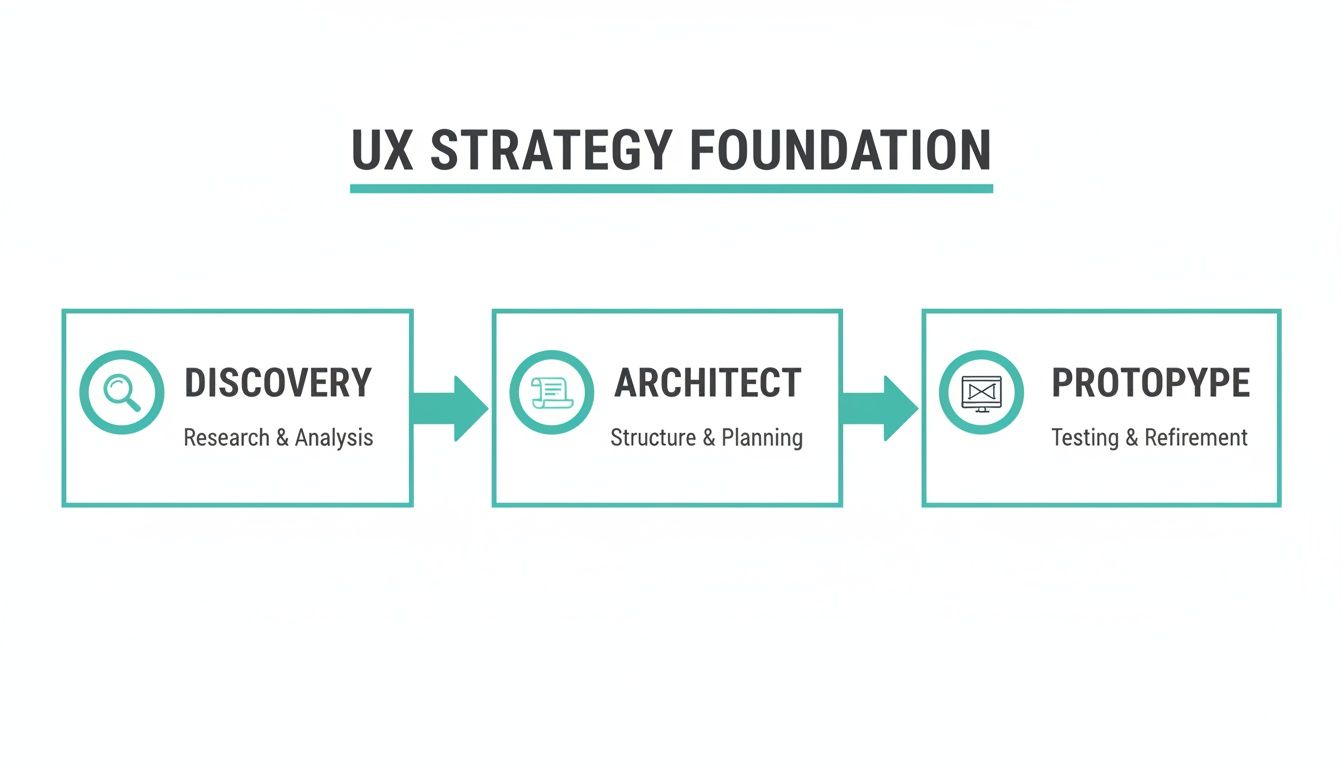
As you can see, a solid strategy moves logically. It starts with understanding and research (Discovery), moves to structure (Architect), and only then gets into visual design (Prototype).
Core Components Of A Modern UX Strategy
A modern user experience strategy is held up by several key pillars that work in concert. These aren't just one-off steps in a process but ongoing disciplines that ensure the final product is both cohesive and genuinely user-centric. You can explore these approaches in more detail by reading about different user experience design methods.
This table breaks down the essential components of a modern UX strategy and highlights their direct business impact.
| Core Components Of A Modern UX Strategy |
| :--- | :--- | :--- |
| Strategy Component | Primary Focus | Key Business Outcome |
| Discovery & Research | Uncovering user needs and business goals through interviews, analytics, and competitive analysis. | Reduced risk of building the wrong product; identifies new market opportunities. |
| Information Architecture (IA) | Organizing and structuring content so users can find what they need intuitively and quickly. | Increased user engagement, higher conversion rates, and improved SEO performance. |
| Prototyping & Testing | Creating interactive models to validate design concepts with real users before development. | Lower development costs by catching usability issues early; builds user confidence. |
Each of these pillars is crucial for building an experience that not only delights users but also delivers tangible results for the business. Let's briefly look at what each one entails.
- Discovery & Research: This is where you dig deep. You’re analyzing user behaviors, clarifying business objectives, and sizing up the competition to find real needs and untapped opportunities.
- Information Architecture (IA): This is the science of organization. It’s all about structuring your content and navigation in a way that feels natural, so users can find information without having to think too hard.
- Prototyping & Testing: Here, you make your ideas tangible. By creating interactive models, you can test concepts with real people and validate your assumptions before a single line of code is written.
Driving Your Strategy With Data-Driven Discovery
A resilient user experience strategy doesn’t begin with wireframes or visual mockups. It starts with deep, evidence-based discovery. This is all about asking the right questions long before you even think about providing answers. It’s the difference between guessing what your users want and knowing what they need.
For enterprise-level projects, this means digging much deeper than surface-level surveys. We’re talking insightful stakeholder interviews to align on business objectives, in-depth competitive analyses to spot market gaps, and heuristic evaluations on existing systems to find those crucial quick wins. This discovery phase is what turns abstract goals into a concrete action plan.

Uncovering Insights From Existing Platforms
Often, the most valuable data is hiding in plain sight, right within your current digital ecosystem. An existing SharePoint intranet, for example, is a goldmine of information about employee workflows, pain points, and content needs. Analyzing search logs, usage analytics, and user feedback can reveal precisely where the current experience is falling short.
The same goes for legacy e-commerce platforms or customer portals. By examining user session recordings and heatmaps, you can pinpoint the exact sources of friction that are killing your conversions. This isn't just about finding problems; it’s about identifying real opportunities to create a vastly superior experience.
From Raw Data To Actionable Personas
Once you’ve gathered all this qualitative and quantitative data, the real work begins: synthesizing it into something actionable. This is where user personas and journey maps come into play. A well-crafted persona isn’t just a generic character sketch; it’s a data-backed archetype of your key user segments.
These personas need to be built with specific goals in mind, especially when you're working with a DXP like Sitecore. For example:
- A "Procurement Manager" persona might prioritize efficiency and easy access to technical specifications.
- An "IT Decision-Maker" persona is likely more focused on security documentation and integration capabilities.
A strong persona doesn't just describe a user; it provides a lens through which your entire team can view the project. It becomes the ultimate tie-breaker in design debates and ensures the user always has a seat at the table.
This detailed understanding is what fuels Sitecore’s personalization engine. By mapping each persona’s unique journey—their goals, pain points, and touchpoints—you create a clear blueprint for delivering tailored content and experiences. The data from your SharePoint analysis might inform an internal communications journey, while e-commerce analytics could shape a customer's path from discovery to purchase.
This strategic pivot towards deep research is a major trend for enterprises, especially those building composable DXP architectures where Sitecore expertise really shines. This investment is more than justified. Solid UX research, including methods like surveys and rigorous usability testing, directly improves user satisfaction, speeds up development, and boosts conversions. If you're looking to get started, you can check out our guide on how to conduct usability testing for some practical steps.
Alright, you've done the hard work of understanding your users. Now comes the fun part: building the house they'll live in. This is where a solid Information Architecture (IA) and a smart content strategy come into play, forming the very skeleton of your digital experience.
Think of your user personas and journey maps as the architectural blueprints. They tell you where the rooms should go. Now, you need to frame the walls and run the wiring. We're moving from who the users are to how they'll navigate the space you're creating for them. This means building a site map that actually makes sense to a human, not just one that mirrors your internal org chart.
Building for Scale with Sitecore and SharePoint
For big enterprise platforms, your IA can't just be a diagram on a whiteboard; it has to translate directly into the tech.
In a platform like Sitecore, a well-thought-out IA is the foundation for a component-based architecture. You stop thinking in terms of static "pages" and start thinking in modular, reusable chunks of content. A "Customer Testimonial," a "Product Feature," an "Event Detail"—these become structured components.
This is a game-changer. It means your marketing team can spin up new landing pages and campaign experiences on the fly, without needing to loop in a developer for every little change. Even better, it tees up your content perfectly for personalization. Sitecore's AI can start mixing and matching these components, serving the most relevant testimonial to the right user segment automatically.
Over in the SharePoint world, a good IA translates into content types and metadata. Instead of just creating a "Documents" folder and hoping for the best, you create structured content types like a "Policy Document" or a "Project Update." Each of these has specific metadata fields—like "Department," "Effective Date," or "Project Lead"—that make content incredibly easy to find, filter, and govern.
This structured approach transforms your content from a messy liability into an intelligent asset. It becomes findable, reusable, and ready to be pushed to any channel, whether it’s the company intranet or a public-facing portal.
Making Content Strategy and IA Work Together
Your IA is the set of shelves, and your content strategy is what you put on them. They have to be designed in tandem, or you'll end up with a mess.
One doesn't work without the other. Here’s how to get them in sync:
- Run a content audit: You need to know what you have before you can organize it. Find what's great, what's outdated, and what’s missing entirely.
- Map out your workflows: How does content get made? Define a clear, repeatable process for creation, approval, and publishing within your CMS, be it Sitecore, SharePoint, or something else.
- Establish governance: Decide who owns what. Set clear rules for how content is maintained, reviewed, and eventually archived. Nobody wants to be the person responsible for a 10-year-old press release showing up on the homepage.
When you nail this integration, you create an experience that’s not just easy to get around but is also genuinely valuable to the user. To dig deeper into this, check out these best practices for enterprise IA design. Getting this foundation right is what allows you to eventually do the cool stuff, like AI-powered content recommendations and true omnichannel experiences.
You’ve done the hard research and laid a solid architectural groundwork. Now comes the exciting part: turning that strategy into something your users can actually see, touch, and interact with. This isn't a single leap but a deliberate, step-by-step journey, starting with simple wireframes and evolving into high-fidelity prototypes that feel just like the real thing.
But the goal here isn’t just to churn out a bunch of static mockups. You’re building something far more valuable: a comprehensive Design System.
Think of a Design System as your single source of truth—a living library of every reusable component you'll ever need. We're talking everything from the simplest buttons and form fields to complex navigation headers. It's where your brand guidelines, code standards, and core design principles all live together. For any large-scale Digital Experience Platform (DXP) project, this isn't a nice-to-have; it's a necessity. Without one, keeping your brand consistent and your development moving is next to impossible.
The Power Of A Sitecore-Ready Design System
When your enterprise runs on a platform like Sitecore, a Design System becomes a massive accelerator. The magic happens when every component in your design system is built to map directly to Sitecore's component-based architecture. This allows your development teams to assemble new pages and experiences with incredible speed and confidence.
Suddenly, a new marketing campaign doesn’t mean building a landing page from the ground up. Instead, your team can grab pre-approved, pre-coded components straight from the library. The result is a page that’s perfectly on-brand, accessible, and ready to go. This tight integration is the backbone of a modern user experience design strategy, bridging the gap between design vision and technical reality.
SharePoint And The Need For Consistency
The same exact logic applies to internal platforms like SharePoint. A well-executed Design System ensures every team site, communication portal, and custom web part shares a unified look and feel.
This isn't just about making things look pretty. It reinforces the company's brand internally and, more importantly, makes the digital workplace predictable and easy to navigate, which dramatically improves usability and employee adoption.
A Design System de-risks your project by shifting critical feedback loops to the beginning of the process. You're not just designing pages; you're building a scalable toolkit that empowers your entire organization to create better experiences, faster.
Before a single line of expensive code is written, you need to get these interactive prototypes in front of real users. This early-stage user testing is your best defense against building a product that completely misses the mark. Watching people interact with your prototype will immediately expose usability flaws and validate your design assumptions—all while changes are still cheap and easy to make.
This feedback is the final, crucial piece of the puzzle. It ensures the vision you bring to life is one your users will actually love and use.
A brilliant UX strategy is just a piece of paper until it’s plugged into your technology. This is where the rubber meets the road—the critical handoff from blueprint to build, where your strategic vision finally comes alive inside a platform like the Sitecore Digital Experience Platform (DXP). The goal here isn't just to build pages; it's to translate every bit of your research into real, automated experiences.
This is where your user personas stop being static documents. They become the direct foundation for creating rules in Sitecore Personalize. For example, that "First-Time Home Buyer" persona you spent weeks defining can now trigger a specific set of hero banners, content blocks, and call-to-action buttons—all designed to guide them toward mortgage resources the moment they land on your site. The strategy tells you what the user needs, and Sitecore gives you the tools to meet that need instantly.
Tapping Into Sitecore’s AI Engine
Let's be real: true one-to-one engagement at scale is impossible to pull off manually. This is exactly why Sitecore's AI-driven tools are so central to bringing a modern UX strategy to life. Tools like Sitecore Discover and the Sitecore CDP (Customer Data Platform) go way beyond simple "if-then" rules. They actually learn from user behavior in real time.
Imagine a user browses three different products in the same category. The AI engine doesn't need you to have pre-programmed a rule for that specific scenario. It can automatically:
- Surface related products based on what similar users have viewed.
- Trigger a personalized email with a special offer on that product category.
- Rearrange the homepage components on their next visit to feature that product line more prominently.
Suddenly, your user journey map is no longer a static diagram hanging on a wall. It’s a living, self-optimizing system. The AI becomes the engine that executes the journey paths you've strategically laid out.
The real power of a DXP like Sitecore is its ability to turn your UX strategy into an automated, learning system. It closes the loop between user insight and user experience, ensuring every interaction is relevant and moves the customer closer to their goal—and yours.
Integrating SharePoint For A Cohesive Internal Experience
While Sitecore is busy managing the external customer experience, many enterprises lean on SharePoint for their internal digital workplace. A truly comprehensive UX strategy doesn't ignore this. It accounts for the internal experience by ensuring consistency and a seamless flow of information between these critical systems.
Your SharePoint intranet is often the source of truth for detailed product specs, company news, and support documentation. By creating a cohesive design system and content model that works across both Sitecore and SharePoint, you nail down brand consistency.
More importantly, you can surface relevant internal content from SharePoint directly within a logged-in Sitecore experience. This gives partners or high-value customers the detailed information they need without any friction. A well-designed user experience design strategy must also account for a strong content foundation, and you can learn more about how to create a content strategy to support your DXP.
Here's an example of what Sitecore's composable DXP looks like, which is the foundation for activating a modern UX strategy.

This kind of interface shows how different products within the ecosystem—from personalization to content management—connect to enable a single, unified strategy. When you make the technology serve the strategy, not the other way around, you ensure the final product delivers the exceptional, personalized experience you envisioned from day one.
Common Questions About UX Strategy And Sitecore
Even the most well-thought-out UX strategy runs into practical questions when it meets a powerful enterprise platform. Let's dig into some of the most common questions we get about connecting user experience design to a DXP like Sitecore. Getting these answers right is the key to a successful launch.
How Do You Measure The ROI Of A UX Strategy?
Measuring the return on your UX investment is all about connecting design improvements to real business goals. This goes way beyond just looking at website traffic. You need to track Key Performance Indicators (KPIs) that actually mean something to the bottom line—think conversion rates, task completion percentages, and customer loyalty scores like the Net Promoter Score (NPS).
Inside Sitecore, the platform's advanced analytics are your best friend here. You can monitor how users are engaging, see exactly where they drop off in conversion funnels, and track custom goals.
For example, say you redesign the checkout flow. You can directly measure its impact by comparing cart abandonment rates before and after the change. That's how you tie a UX improvement to a tangible financial outcome.
What Is The Role Of Sitecore AI In A Modern UX Strategy?
Think of Sitecore AI as the engine that brings your UX strategy to life and scales it automatically. Your strategy defines who you're talking to (your personas) and what they need to accomplish (their user journeys). Sitecore AI then executes that plan in real time.
It moves beyond basic, rule-based personalization. Instead, it uses machine learning to analyze user behavior on the fly and predict what they'll do next. This capability is deeply integrated into the Sitecore product portfolio, including Sitecore Personalize, Sitecore Discover, and the Sitecore CDP.
This means the components and content you've so carefully designed are served up dynamically, creating a true one-to-one experience that would be impossible to manage by hand. It turns a static blueprint into a living, self-optimizing system.
Sitecore AI doesn't replace your strategy; it executes it with a level of precision and scale that manual efforts can't match. It ensures the right content finds the right user at the perfect moment, every time.
Can A Good UX Strategy Be Implemented On SharePoint?
Absolutely. While people often think of SharePoint as just an internal file-sharing tool, a solid UX design strategy is what separates a frustrating intranet from a successful one. For intranets and employee portals, the focus simply shifts to things like information findability, task efficiency, and driving user adoption.
A successful implementation on SharePoint means creating a logical information architecture that makes sense to employees, designing intuitive navigation, and customizing web parts to streamline common workflows.
The goal is to transform a generic SharePoint site into a user-centric digital workplace that actually boosts productivity and makes internal communication easier—a core area of our expertise.
At Kogifi, we specialize in transforming your strategic vision into a high-performing digital reality. Discover how our expertise in Sitecore and SharePoint can elevate your user experience.