


Embarking on a CMS migration is a defining moment for any enterprise. This is far more than a technical task; it's a strategic pivot to future-proof your digital ecosystem, elevate customer experiences, and unlock the full potential of advanced platforms like Sitecore AI and SharePoint by engaging expert CMS migration services. It's a foundational move toward long-term digital agility and a measurable return on investment.
Why a Strategic CMS Migration Is Non-Negotiable
A CMS migration redefines how your organization interacts with its audience. It's an opportunity to finally shed the limitations of legacy systems—poor performance, disjointed customer data, and security vulnerabilities—and embrace a modern, composable architecture. The decision is often driven by the need for greater flexibility, deeper personalization capabilities, and the integration of artificial intelligence into the customer journey.
Platforms like Sitecore are at the forefront of this shift. Migrating to the Sitecore ecosystem isn’t just about moving content; it’s about preparing your organization to deliver one-to-one personalization at scale. This involves a strategic re-architecture to fully tap into Sitecore's composable DXP, which includes:
- Sitecore Personalize: An AI-powered engine for real-time personalization and A/B testing.
- Sitecore Content Hub: A centralized solution for content planning, creation, and management across all channels.
- XM Cloud: Sitecore's fully managed, cloud-native CMS that enables headless content delivery.

Unlocking Business Value Beyond Technology
Similarly, migrating or upgrading a SharePoint environment is a strategic move to improve internal collaboration, document management, and business process automation. A well-executed SharePoint migration streamlines workflows and enhances security, directly impacting operational efficiency. For many, a cloud-first approach is key. You can learn more about this process by reading our guide on building an https://www.kogifi.com/articles/enterprise-cloud-migration-strategy.
This shift toward modern platforms reflects a broader industry trend. The global cloud migration services market was valued at USD 12.34 billion in 2024 and is projected to reach USD 81.88 billion by 2033, growing at a robust 23.4% CAGR. This rapid expansion highlights just how critical migration services have become as enterprises move from outdated systems to powerful cloud-based infrastructures.
A successful CMS migration directly correlates with improved business outcomes. It’s not about swapping one technology for another; it’s about aligning your digital platform with your core business objectives, from customer acquisition to employee productivity.
From Static Pages to Dynamic Experiences
The core purpose of a modern CMS is to create and manage dynamic, engaging digital experiences. To fully grasp the importance of this move, exploring the top benefits of content management systems can highlight the value gained from a successful migration. Without a strategic plan, a migration becomes a missed opportunity—a simple "lift-and-shift" that just carries old problems into a new environment.
A planned approach allows you to re-evaluate everything: your content strategy, information architecture, and integration points. It's the moment to ask the tough questions. Does our content still serve our audience? Is our site structure intuitive? Can we connect our CRM and e-commerce data to create truly personalized user journeys within the Sitecore DXP?
Answering these questions is what turns a technical project into a business transformation, ensuring your investment delivers substantial and lasting value for years to come.
Building Your Blueprint with Discovery and Auditing
A migration without a solid plan is just wishful thinking. The discovery and auditing phase is where we turn high-level goals into a concrete, actionable blueprint. Think of it as the single most important step to prevent scope creep, surprise costs, and a launch day full of headaches. This is where your CMS migration services partner proves their worth.
For a powerful platform like Sitecore, this initial groundwork is everything. It dictates how you'll set up its personalization and AI features down the road. This isn't just about making a list of pages; it’s a full-blown investigation into your entire digital estate—your content, your technical architecture, and all the third-party integrations that keep your business running.

Uncovering and Categorizing Every Digital Asset
First things first: you need to know exactly what you have. This means creating an exhaustive inventory of every single asset—from your highest-performing blog posts and product pages all the way down to ancient PDFs and videos stashed away in forgotten folders. If you skip this, you’re almost guaranteed to leave critical content behind, breaking user journeys and tanking your SEO.
But this goes way beyond a simple page count. We dig into the data, analyzing performance metrics like traffic, engagement, and conversion rates to see what's actually working. This data-driven approach lets us systematically find and kill the ROT—Redundant, Obsolete, and Trivial—content. Getting rid of this digital dead weight is a non-negotiable. It cuts migration costs, makes the new system easier to manage, and immediately improves the user experience.
We’ve seen it time and again: a thorough content audit often reveals that up to 60% of an organization’s content is ROT. Migrating all that junk is like moving old, broken furniture into a brand-new house—expensive and pointless.
As you build this blueprint, a practical guide to technical website auditing can be a huge help. This foundational work ensures your new platform starts on solid ground.
Mapping a Future-Ready Information Architecture
With the content audit done, the next move is to map your existing site structure to a smarter, more scalable one in your new CMS. This is rarely a simple one-to-one transfer.
For a Sitecore migration, it means architecting a component-based content model that can power true personalization and omnichannel experiences. If you're moving to SharePoint, it's about designing a logical hierarchy of sites, libraries, and content types that reflects how your teams actually work together.
This mapping process is multi-faceted and includes:
- Taxonomy Development: Building a robust classification system with tags and categories. This is the backbone of Sitecore's AI-driven content delivery and makes SharePoint's search actually useful.
- Content Modeling: Defining the structure and relationships between your different content types. In Sitecore, this translates to flexible components that marketers can mix, match, and reuse across countless pages and channels.
- User Journey Alignment: Restructuring the architecture to guide users intuitively toward their goals, whether that’s finding information or completing a purchase.
A detailed content map and taxonomy are your best insurance against a chaotic launch. It guarantees no critical assets are lost in translation and sets your new CMS up for better findability, personalization, and SEO performance from day one. To get a better sense of how this works, you can read our deep dive into the discovery phase for a project. This level of prep is what separates a simple technical lift from a genuine business transformation.
Choosing Your Path: Lift-and-Shift vs. Re-architecture
The migration path you choose is one of the most critical decisions you'll make. It’s not just a technical detail—it’s a strategic choice that will define your project's outcome and what your platform can do for years to come. You're essentially choosing between two main enterprise approaches: the straightforward "lift-and-shift" (also called rehosting) and the more ambitious, future-focused re-architecture. Getting this right means understanding the trade-offs in cost, time, and ultimate business value before a single line of code is written.
While the "lift-and-shift" approach held 35.4% of the market share in 2025, the real story is in the growth. The refactoring and re-architecting segment is set to explode, with a projected 19.4% CAGR from 2026 to 2035. This isn’t just a random fluctuation; it's a clear signal that companies are moving beyond simple infrastructure swaps and toward genuine modernization. You can dig into these public cloud migration market trends to see where the industry is heading.
When a Lift-and-Shift Makes Sense
A lift-and-shift is exactly what it sounds like: you pick up your existing CMS and its content and move it to a new home with as few changes as possible. It's the quickest and usually the cheapest option upfront, which makes it a solid choice in a few specific situations.
Imagine a company running its internal document management on a simple SharePoint 2016 intranet. If their only goal is to get onto SharePoint 2019 for security support, and they have no plans to add new features, a lift-and-shift is perfectly logical. The business process isn't changing, so why reinvent the wheel?
A lift-and-shift is a tactical move. It solves an immediate problem, like escaping an unsupported platform, but it intentionally postpones a more fundamental transformation. It’s about continuity, not evolution.
But this speed comes with a major catch: you bring all your old problems with you. Every piece of technical debt, every clunky user experience, and every outdated content model gets packed up and moved right into your shiny new environment.
The Imperative for Re-architecture with Sitecore
When your destination is a powerful Digital Experience Platform (DXP) like Sitecore, a lift-and-shift is almost always a mistake. The whole point isn't just to move content from A to B; it's to unlock the incredible capabilities of Sitecore’s composable, AI-driven architecture. Just plopping an old site onto new Sitecore infrastructure is a massive missed opportunity.
Re-architecting for Sitecore means completely rethinking your content. You stop thinking in terms of rigid, monolithic pages and start building a library of flexible, reusable components. This "atomic" content model is the foundation for everything that makes Sitecore special. It’s what lets you:
- Power AI Personalization: Sitecore Personalize needs structured, granular content components to dynamically assemble unique experiences for every single visitor.
- Embrace Headless Delivery: A re-architected content model is what allows you to push content effortlessly to your website, mobile apps, kiosks, and any other channel you can dream up using XM Cloud.
- Streamline Content Operations: With tools like Sitecore Content Hub, marketers can plan, create, and manage modular content that gets reused across countless campaigns and touchpoints—no developers needed.
Choosing to re-architect is an investment in your future agility. It’s your chance to jettison years of technical debt, modernize your tech stack, and build a platform that can actually adapt to what your customers want. It turns your CMS from a dusty old repository into a genuine strategic asset.
Getting Technical: Executing the Migration and Protecting Your SEO
This is where the rubber meets the road—the point where all the planning, mapping, and strategizing turns into a real, working platform. The technical migration is the hands-on process of moving your data, templates, and critical integrations from the old CMS to the new one. It's a phase that demands absolute precision, especially when you're dealing with the intricate, composable architectures of modern platforms like Sitecore.
Often, the first move is setting up the new cloud environment. For Sitecore, this means provisioning the necessary infrastructure to support XM Cloud or a self-hosted instance, ensuring it is optimized for performance and scalability. This cloud-native approach is a core strength of the platform, enabling marketing agility and faster campaign launches.
Staging and Validating with Pilot Migrations
You wouldn't move your entire company to a new office without sending a small team to check it out first, right? The same logic applies here. Before we touch the bulk of your content library, we always run pilot migrations. This involves hand-picking a representative sample of your content—maybe a few complex product pages, a key blog category, or a section with unique templates—and running it through our migration scripts.
This small-scale test run is incredibly valuable. It’s our chance to:
- Validate Data Integrity: We confirm that every piece of content, from body copy to obscure metadata fields, maps perfectly to the new templates in Sitecore or SharePoint.
- Test Automation Scripts: This is where we find and squash bugs in our scripts. It's far better to fix an issue affecting 100 pages now than to discover it after migrating 100,000.
- Refine the Process: The pilot always uncovers little surprises and potential bottlenecks, giving us a chance to adjust our game plan before the main event.
Think of it as a dress rehearsal. Finding a problem at this stage is a win, not a setback.
This visual breaks down the two core approaches: a straightforward "lift-and-shift" versus a more strategic re-architecture.
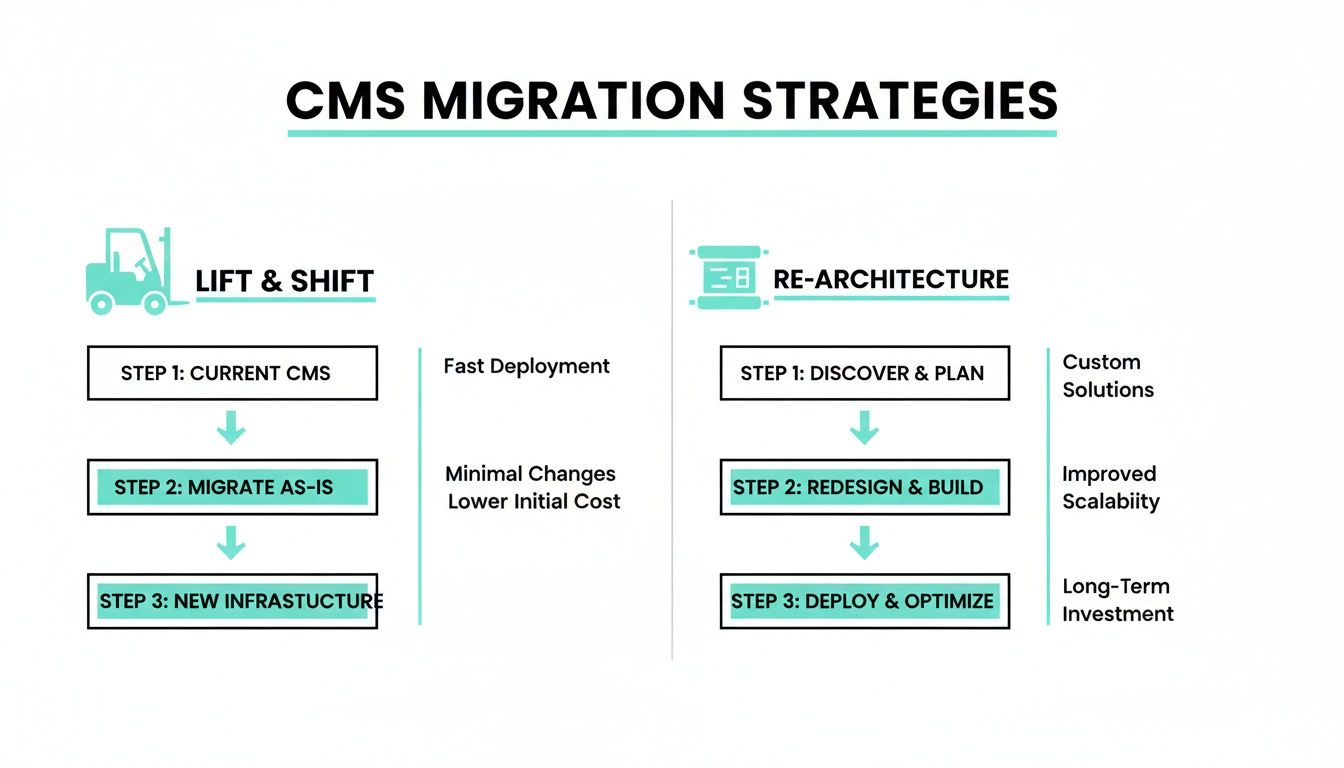
While a lift-and-shift is certainly faster, the real long-term value comes from re-architecting your content and platform. That’s how you unlock future growth and take advantage of all the new capabilities you're paying for.
Protecting Your SEO Equity Is Non-Negotiable
Let’s be blunt: a CMS migration without a rock-solid SEO preservation plan is just asking for trouble. Your organic search rankings are one of your most valuable assets, built up over years of hard work. Protecting them requires a proactive, almost obsessive approach where the development and SEO teams are joined at the hip.
Losing years of accumulated SEO authority due to broken links or missing metadata is a common and entirely avoidable migration failure. A flawless technical launch means nothing if your audience can no longer find you.
The absolute cornerstone of this effort is the 301 redirect map. This is simply a master spreadsheet that maps every single URL from your old site to its new home. This map tells search engines like Google that a page has moved permanently, and it's what ensures the vast majority of your ranking power gets passed along. Forgetting even a few high-traffic URLs can cause an immediate and painful drop in organic traffic.
But redirects are just the beginning. A complete SEO migration checklist covers several other critical tasks. You can dive deeper into the full scope with this detailed guide to SEO best practices during a CMS migration.
A few key actions we never skip include:
- Migrating All Metadata: This isn’t just page titles and meta descriptions. We’re talking alt text for images, structured data (like Schema.org markup), and every other signal that helps search engines understand what your pages are about.
- Updating XML Sitemaps: The moment the new site goes live, a fresh XML sitemap must be generated and submitted to Google Search Console. This is like sending Google a change-of-address card, helping it discover and index your new URLs quickly.
- Implementing Canonical Tags: Using
rel="canonical"tags correctly is crucial for preventing duplicate content issues, especially if the new platform generates pages that can be accessed via multiple URLs.
By baking these SEO preservation tasks directly into the technical migration workflow, we ensure your new platform not only works perfectly but also holds—and eventually grows—its hard-earned visibility from day one.
Ensuring a Flawless Launch with Rigorous Testing
The moments right before go-live are your last line of defense. This is where you catch the issues that could otherwise damage user trust and sink your revenue post-launch. For any enterprise migration, especially with platforms like Sitecore or SharePoint, this phase demands a multi-layered Quality Assurance (QA) and User Acceptance Testing (UAT) process that leaves nothing to chance.
A solid testing strategy goes way beyond just clicking through a few pages. It’s a series of methodical tests designed to find and squash problems before your customers ever see them. This isn't just a final check—it's a core component of expert CMS migration services.
The Anatomy of a Bulletproof Testing Plan
To make sure the transition is smooth, we use a comprehensive testing matrix that covers every single angle of the new platform. Each type of testing has a unique job, and together, they ensure the final product is stable, secure, and ready for the real world.
Our approach always covers:
- Functional Testing: We verify that every single component works exactly as it's supposed to. Think contact forms, search bars, and any complex custom modules you’ve built.
- User Journey Validation: We go beyond individual features to test critical user paths. Can a new customer find a product, add it to their cart, and check out without hitting a snag? This ensures the site meets both business goals and user needs.
- Performance and Load Testing: Your new site has to be fast and tough. We simulate high-traffic events to find and eliminate bottlenecks, making sure the platform can handle peak loads without slowing to a crawl.
- Accessibility Compliance: We audit against Web Content Accessibility Guidelines (WCAG) standards to make sure the site is usable for everyone, including people with disabilities. This isn't just a best practice; in many cases, it's a legal requirement.
- Cross-Browser and Device Compatibility: Your audience is on every device and browser imaginable. We test rigorously across all major platforms to guarantee a consistent experience for every single visitor.
A common mistake is to treat testing as a rushed, last-minute task. In reality, a successful QA process should account for at least 20-30% of the total project timeline. Rushing this is the fastest way to guarantee a painful launch.
From Test Cases to Go-Live Strategy
Detailed test cases are the backbone of any good QA process. We write scripts that cover the "happy path" and every weird edge case we can think of. What happens when a user types gibberish into a form or navigates in an unexpected way? Catching these things is what separates a standard check from a professional QA deep-dive.
Once testing is done and all the critical bugs are fixed, the focus shifts to the go-live strategy. This is a meticulously planned sequence of events designed to minimize downtime and risk. We put a content freeze in place, which stops any new changes from creeping in while we make the final deployment preparations.
Finally, the most critical piece of any launch is a documented rollback plan. This is your safety net. If a show-stopping bug appears right after launch, the plan gives you a step-by-step guide to quickly and cleanly revert to the old system. This ensures that even in a worst-case scenario, business disruption is kept to an absolute minimum. To make sure you're fully prepared, use our comprehensive website migration checklist to ensure no step is overlooked.
Common Questions About Enterprise CMS Migrations
When you're staring down the barrel of an enterprise CMS migration, a lot of questions pop up. It's only natural. Understanding the real-world timelines, potential pitfalls, and the value of bringing in the right expertise is key to making a smart decision. Here are a few of the most common questions we get about large-scale CMS migration services.
How Long Does a Typical Enterprise CMS Migration Take?
This is the classic "how long is a piece of string?" question. There's really no one-size-fits-all answer because the timeline is tied directly to your project's scope and complexity.
A more straightforward "lift-and-shift," say for a SharePoint intranet, might wrap up in 3-6 months. That approach is all about moving what you already have into a new environment with minimal changes.
But if you're talking about a full re-architecture for a move to a composable DXP like Sitecore, you're looking at a much bigger time investment. These projects involve rethinking your content from the ground up, plugging in new APIs, and custom development to really tap into AI features. You can expect these to take anywhere from 9 to 18 months.
The biggest factors that swing this timeline are:
- Content Volume and Complexity: How much stuff do you have, and how many different types of content are we talking about?
- Integration Requirements: The number of third-party systems like CRMs or PIMs that need to talk to the new platform.
- Design and UX Changes: How much of the front-end experience are you looking to overhaul?
- Testing and Validation: The rigor of QA and user acceptance testing needed to make sure everything works perfectly on day one.
A solid project plan, hammered out during the discovery phase, will give you a realistic timeline with clear milestones everyone can track.
Why Choose a Specialized Partner for Our Sitecore AI Migration?
Moving to a powerful, AI-driven platform like Sitecore isn't just a technical swap—it's a strategic shift for the entire business. A specialized partner brings a depth of platform-specific knowledge that a generalist vendor just can't offer. Our teams aren't just developers; they're certified Sitecore architects who live and breathe its composable DXP architecture every day.
That specialization is what helps you unlock everything Sitecore's ecosystem has to offer. We know the ins and outs of connecting its core components in a way that actually drives business value.
For example, we make sure your migration is set up to fully tap into:
- Sitecore Personalize: We structure your content and data models so the AI engine can deliver true one-to-one personalization right from the start.
- Sitecore Content Hub: Our team ensures your content operations are streamlined, making it simple to manage and push assets across every channel.
- XM Cloud: We help you get the most out of a headless, cloud-native setup, paving the way for serious agility and scale.
Choosing a specialized partner means you're buying a strategic advantage, not just a piece of technology. It's the difference between simply installing a platform and truly activating its potential to deliver a measurable return through amazing customer experiences.
What Is the Role of AI in a Modern Sitecore Migration?
AI isn't some shiny add-on anymore; it’s the central nervous system of a modern Sitecore DXP. When we plan a migration, we design the architecture from the ground up to support AI-driven features. This means creating a granular, component-based content model that lets Sitecore’s AI analyze, assemble, and serve up personalized content on the fly.
For instance, during a migration, a huge part of our focus is on mapping user data and content taxonomy in a way that feeds the personalization engine. This means your new platform can automatically recommend the right products, show dynamic content based on what a user is doing, and optimize entire customer journeys without anyone lifting a finger.
And it doesn't stop there. Sitecore's AI also helps with content creation and management in tools like Content Hub. It can suggest blog topics, optimize your copy for SEO, and even automate tagging. When you build your migration strategy around these capabilities, you're not just getting a new CMS; you're getting an intelligent system built for constant optimization and growth.
At Kogifi, we provide the deep Sitecore and SharePoint expertise needed to turn your migration into a strategic success. Our teams ensure your platform is not only technically sound but fully optimized to drive business growth. Learn how our CMS migration services can transform your digital presence.