


Most advice on B2B website personalization tells marketing teams to greet returning accounts by name, swap hero headlines dynamically, and launch dozens of persona pages at once. That playbook fails on enterprise web estates. Swapping copy without clean identity resolution, verified consent, or buying-group alignment creates brittle pages that confuse stakeholders and erode trust.
The commercial upside is real, which is why leadership keeps funding these programs. According to McKinsey figures cited in Flint's analysis of website personalization ROI, effective personalization can increase revenue by 5% to 15% and improve marketing-spend efficiency by 10% to 30%, though results depend on industry, data quality, organizational capability, and execution. Those ranges don't come from cosmetic copy tweaks. They come from treating personalization as a governed decision system built on unified data, explicit consent, buying-group consistency, and measured lift.
In a disciplined architecture, showing a strong neutral page is often the right decision. When consent is absent, account signals are weak, or multiple decision-makers need identical baseline proof, holding back a variant protects the deal. Building that discipline starts with separating enterprise buying mechanics from consumer e-commerce habits.
Table of Contents
- How B2B Website Personalization Differs From Consumer Tactics
- Audience Segments That Drive Relevant Experiences
- Data, Identity and Platform Requirements Behind Personalization
- Use Cases Across the B2B Buying Journey
- Measuring Whether Personalization Improves Pipeline
- Implementation Path From Pilot to Enterprise Scale
How B2B Website Personalization Differs From Consumer Tactics
B2B website personalization changes what a site displays based on a visitor's account, role, and position in an active buying process rather than a single shopper's cart.
This isn't a fringe marketing experiment anymore. In Adobe's 2023 B2B Commerce Growth Strategies Survey, 74% of B2B businesses expected their websites to generate more than half of their sales during 2023, while 72% of organizations collected behavioral and transactional data across e-commerce storefronts and 68% used that data to personalize website experiences. The same survey reported that 66% of B2B customers expected the same level of personalization, or better, in professional purchasing as they received in personal shopping. Even when expectations match consumer standards, the underlying system architecture can't borrow consumer rules.
| Factor | Consumer e-commerce | B2B website |
|---|---|---|
| Buying unit | One shopper | Several roles per account, often a buying committee |
| Decision length | Minutes to days | Weeks to months |
| Primary signals | Browsing, cart and purchase history | Account, industry, role, buying stage and documentation visits |
| Offer type | Fixed-price products | Solutions, configured quotes and contract-based offers |
| Identity | Logged-in customer | Anonymous visitors, account-level recognition and authenticated portals |
| Success metric | Conversion rate and average order value | Qualified pipeline, opportunity progression and sales acceptance |
Why Buying Committees Break Single-Shopper Design
Every row in that table forces a different technical trade-off. Consumer platforms optimize for immediate checkout velocity because one buyer evaluates a fixed-price item and pays within minutes or days. Enterprise teams sell configured solutions and contract-based offers across evaluation cycles that run for weeks or months, involving engineers, finance leads, legal reviewers, and operations managers inside the same account.
Say an industrial manufacturer sells automated assembly hardware. A plant engineer lands on a product family page looking for tolerances, integration protocols, and CAD downloads, so the page surfaces the technical specification sheet. Two days later, a procurement lead from that same company visits the product line to vet commercial risk, so their path highlights the supplier qualification page and service-level terms. Both visitors see the same core product claims and navigation, yet each reaches the next decision without hunting through irrelevant brochures.
Architectural rule: Personalize the path to the next decision, never the core truth of the offer. If an engineer and a procurement lead compare notes and see conflicting capability claims, personalization has damaged the sale.
Three Questions Every Rule Must Answer
Before any team builds a single variation in a DXP, I recommend forcing the proposal through three operational checks:
- Who is the visitor? Define whether the system knows the individual through a portal login, recognizes an account tier, or sees only an anonymous session with a declared role.
- What decision are they making? Tie the rule to a real step in the evaluation, such as checking compliance, estimating integration effort, or confirming renewal options.
- What counts as a useful next page? Name the exact destination asset or workflow the visitor should reach next, rather than optimizing for vague time-on-site goals.
If a proposed variant can't answer all three questions in plain language, leave the page neutral.
Audience Segments That Drive Relevant Experiences
Segmentation sits underneath every rule you ship, because a personalization engine is only as reliable as the signal feeding it. Poorly defined audiences trigger misfired modules, waste content authoring hours, and create maintenance debt across global web estates.
Matching Signals to Page Variations
Enterprise B2B programs work best when they anchor rules on six verifiable segment bases rather than dozens of speculative micro-personas. Each basis draws from a distinct signal source and drives a focused, testable change on the page.
| Segment basis | Signal source | Example experience change |
|---|---|---|
| Industry | Firmographic enrichment and form fields | Matching case studies and compliance proof on the first screen |
| Buying stage | Pages viewed and content downloads | Pricing and integration detail for evaluators; introductory guides for researchers |
| Role | Declared role, email domain or portal login | Technical documentation for engineers; ROI summary for executives |
| Account status | CRM match or existing customer login | Renewal and support paths instead of new-logo offers |
| Geography and language | Locale setting or declared country | Local language, regional support hours and compliance notes |
| Known versus anonymous | Consent state | Neutral, useful default content for unidentified visitors |
Industry segmentation pairs firmographic enrichment or form declarations with sector-relevant validation. When an energy or healthcare visitor lands on a solution overview, surfacing matching case studies and regulatory compliance proof on the first screen removes early skepticism without rewriting the entire page.
Buying stage relies on pages viewed and content downloads across sessions. Early researchers need introductory architecture guides and problem framing, while active evaluators returning to documentation pages benefit from pricing frameworks and integration detail.
Role draws from declared job function, email domain hints, or authenticated portal logins. Engineers want API references and deployment specifications, whereas executives look for total cost of ownership and ROI summaries. A structured approach to segmentation in AI-driven personalization prevents role rules from colliding when one account generates mixed behavioral signals.
Account status comes from a verified CRM match or an active customer login. Nothing erodes credibility faster than pitching a free trial or new-logo discount to a long-standing enterprise client who logged in to check a support ticket or contract renewal path.
Geography and language depend on browser locale settings or a visitor's explicitly declared country. Regional teams use this signal to display local language copy, regional support hours, and jurisdiction-specific compliance notes cleanly.
Earning Consent Through a Fair Value Exchange
Privacy rules and buyer skepticism set hard boundaries on how aggressively you can collect and activate these signals. In Forrester findings cited in Adobe's Personalization at Scale report, only 27% of B2B buyers would share personal information for more relevant advertising, whereas 46% would share it for value-added experiences such as educational content tied to their goals. The same report notes Nielsen's 2025 global marketing survey finding that 42% of marketers recognize changing privacy rules and the shift toward a cookieless internet as major challenges to audience understanding and measurement.
Treating personalization as covert tracking guarantees low trust. Frame every data request as a transparent trade where the buyer immediately gets tailored technical utility in return.
Start segmentation with declared needs and explicit role selectors, such as a quick "Choose your role" switch or a clear preference center. Layer behavioral signals onto the profile only after the visitor accepts tracking under regional consent rules like GDPR.
For known versus anonymous traffic, enforce one strict boundary: serve neutral, useful default content whenever identity is unconfirmed or consent is declined. Never expose inferred company names or guessed individual intent on an anonymous page. Surprising a visitor with "Welcome back, Acme Corp" when they haven't logged in feels like surveillance, not service.
Data, Identity and Platform Requirements Behind Personalization
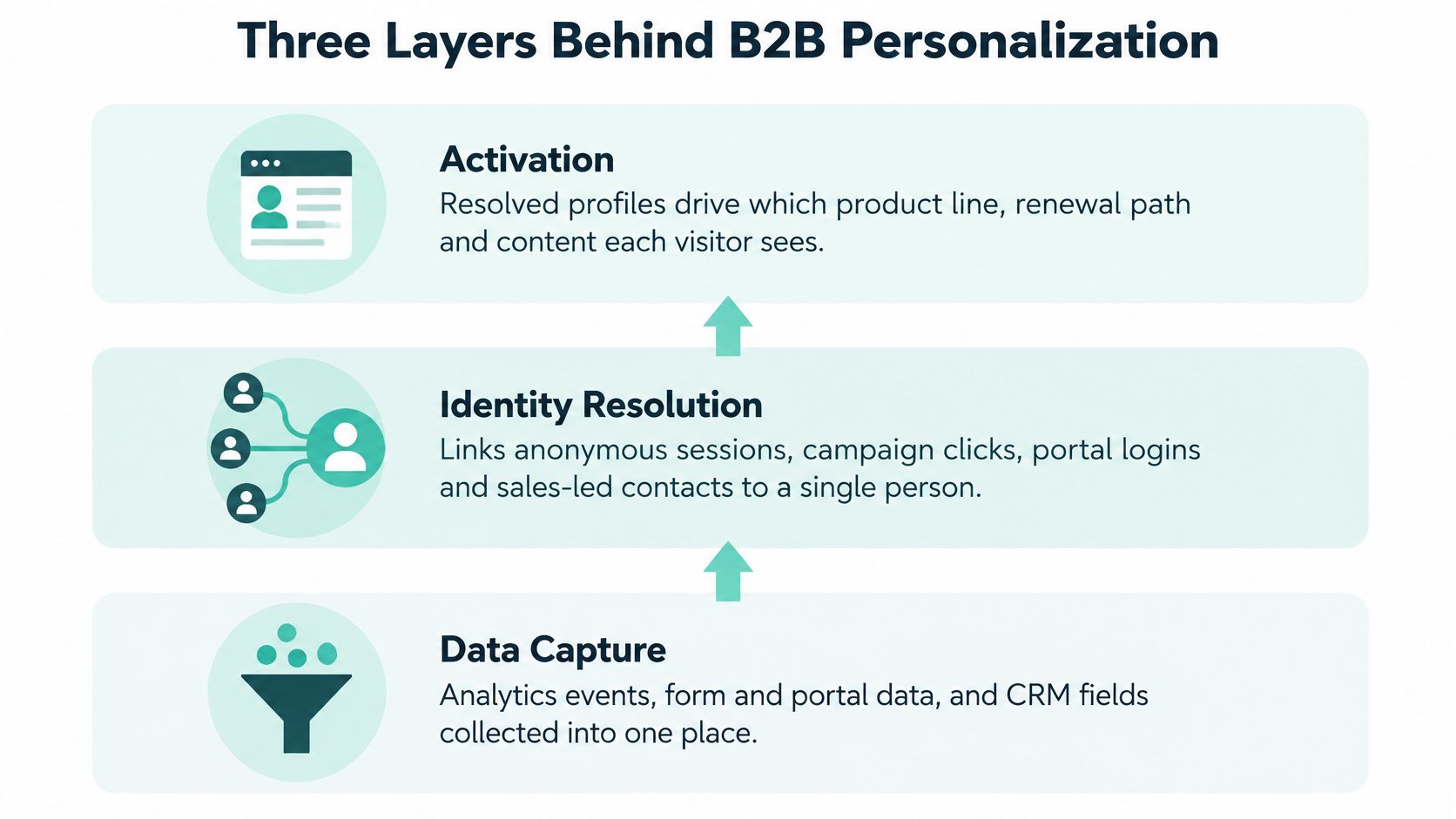
Reliable B2B website personalization rests on three stacked architectural layers, and skipping the bottom two guarantees failure at the top. Many organizations buy an experience engine first, write thirty page rules, and then discover that form fills, portal logins, and CRM opportunities live in disconnected silos.
Building From Data Capture to Real-Time Activation
The foundation is data capture. Every meaningful touchpoint, from web analytics events and gated form submissions to customer portal interactions and CRM account fields, needs a consistent schema and consent tag before it enters storage.
Above capture sits identity resolution. B2B prospects rarely stick to one browser or device; they browse anonymously on Monday, click an email campaign on Wednesday, authenticate inside a partner portal on Friday, and talk to sales the following week. As documented in the Sitecore CDP product overview, Sitecore's customer-intelligence layer handles data unification, identity resolution, unified profiles, audience building, segmentation, and real-time activation, combining visitor interactions into one live customer profile so personalization, on-site search, experimentation, and analytics respond as soon as intent shifts. Understanding the architectural boundary in a CDP vs CRM comparison keeps teams from trying to force real-time web decisioning directly onto a transactional sales database.
At the top sits activation, where page components, search results, and experiments adapt to the resolved profile. In headless Sitecore deployments, execute decisioning server-side or at the edge wherever possible. Client-side DOM swapping causes visible flicker, hurts Core Web Vitals, and introduces layout shift that degrades accessibility.
Mapping Capabilities Across Sitecore and SharePoint
Choosing the right tools requires matching every architectural layer to a concrete product and verifying subscription entitlements before authoring begins. According to the SitecoreAI launch announcement, SitecoreAI operates as a composable SaaS platform built on XM Cloud and Microsoft Azure, unifying content management, customer data, personalization, and search while offering existing XM Cloud customers an easy upgrade with no migration required and continuity of data. Alongside that core, Sitecore Stream documentation confirms that its embedded AI layer spans XM Cloud, Content Hub, Experience Platform (XP), CDP, Personalize, and Search with brand-aware AI, copilots and agents, and agentic workflows, though specific advanced functions require the Stream Premium tier.
| Layer | Capability | Product |
|---|---|---|
| Data capture | Analytics events, form and portal data, CRM fields | Sitecore CDP with web, portal and CRM connectors |
| Identity and profile | Data unification, identity resolution, unified profiles | Sitecore CDP |
| Activation | Point-and-click rules and A/B tests in the page editor | XM Cloud |
| Activation | Content, customer data, personalization and search on one platform | SitecoreAI |
| AI assistance | Brand-aware AI, copilots and agentic workflows | Sitecore Stream (Standard and Premium tiers) |
| Portal and documents | Authenticated portal and document visits as profile input | SharePoint |
Enterprise B2B estates frequently run external websites on Sitecore while housing partner portals, technical manuals, and dealer resources inside Microsoft SharePoint. The same three-layer model applies there: authenticated SharePoint document views and portal sessions feed rich intent and account-status signals back into the profile layer, while SharePoint web parts can consume audience attributes to surface role-relevant documents. However, don't assume out-of-the-box parity across every SharePoint tenant. Teams must audit SPFx customizations, Entra ID claims, API rate limits, and data residency rules against the live SharePoint environment before committing to cross-platform rules.
Through Kogifi's Sitecore partnership, we consistently advise enterprise marketing and IT leaders to complete a full platform and entitlement audit before writing a single personalization rule. Mapping Stream tiers, CDP event quotas, and SharePoint integration patterns upfront prevents licensing surprises and mid-project rewrites.
Use Cases Across the B2B Buying Journey
Personalization works best when it stays quiet, predictable, and confined to a single module on the page. Rebuilding whole templates per persona multiplies authoring overhead and breaks message consistency across the buying committee.
Look at how targeted, authenticated portal adjustments work in practice before walking through specific website scenarios.

Five Role-Based Scenarios With Clear Fallbacks
Each scenario below follows a strict operational rule: one named role, one verified trigger, one adapted module, and one defined fallback tested prior to launch.
1. Returning procurement lead at an existing customer. Elena manages vendor renewals for a logistics enterprise and arrives via a direct bookmark after authenticating earlier in the quarter. Her CRM account match triggers the hero utility strip to display her active product line and a direct support renewal path instead of new-logo acquisition offers. If the account match fails or consent expires, the module defaults to the standard product overview.
2. Sector-specific proof for an energy or manufacturing buyer. David, an operations director at a power generation utility, clicks through from an industry campaign with verified firmographic context. The proof-point strip just below the fold swaps in energy sector case studies and grid compliance certifications on the first screen. Without a confirmed industry signal, the component renders the default cross-industry proof set.
3. Technical evaluator researching system integrations. Priya, a solutions architect, has downloaded two API guides and viewed the security overview across three visits. That buying-stage signal adapts the secondary call-to-action card to link directly to technical documentation and the certified partner finder. When no stage signal exists, the card displays the general solution overview.
4. Logged-in distributor entering a partner portal. Marcus signs into a SharePoint-backed dealer hub connected to the company's Sitecore estate. His authenticated partner role reveals a dashboard widget surfacing live order status, warranty bulletins, and dealer pricing resources. For any unauthenticated visitor hitting the same route, the public partner program recruitment page appears instead.
5. Multinational buyer navigating regional rules. Henrik visits from Northern Europe and selects his country in the site header to check commercial terms. The declared country routes the commercial sidebar to localized pricing rules, currency formats, and regional support hours. Without a country selection, the global default contact block applies.
Keeping Module Changes Centrally Governed
Every scenario above keeps the headline, primary navigation, and core product claims identical across stakeholders. Coordinating these web triggers with downstream business-to-business marketing automation ensures email follow-ups mirror what the buyer saw on the site.
To see how modern enterprise authoring workflows structure real-time variations without heavy developer bottlenecks, watch this walkthrough of Sitecore's experience capabilities.
According to the Sitecore XM Cloud product overview, real-time personalization and A/B testing are built into every page using shared customer data and intent signals, allowing marketers to configure point-and-click rules directly inside the page editor without maintaining a separate personalization tool or writing custom code per variant. Keeping rules inside the central authoring workflow preserves brand governance and forces every content editor to attach a tested fallback component before publishing.
Pre-launch rule: No personalized variant goes live until its neutral fallback passes visual QA, keyboard navigation checks, and empty-signal testing.
Measuring Whether Personalization Improves Pipeline
Most personalization dashboards celebrate higher click-through rates while ignoring whether deals close. That assumption doesn't hold up against buyer behavior.
In Adobe's 2025 AI and Digital Trends B2B Journeys report, only 36% of organizations reported using data and algorithms to customize web experiences, and 42% of senior executives said generative-AI programs were stalled because they couldn't identify high-impact B2B use cases. More tellingly, a 2025 Gartner survey cited in that same industry research found that 53% of B2B buyers said personalization harmed their most recent purchase experience. Engagement clicks can climb right alongside buyer frustration when aggressive variations interrupt research or hide standard navigation.
Metrics That Track Real Buying Outcomes
Measuring true incrementality means moving reporting out of isolated web analytics and tying variant exposure directly to CRM milestones.
| Metric | Why it matters | Caution |
|---|---|---|
| Qualified pipeline by segment | Shows whether personalization reaches sales-ready accounts | Needs CRM attribution; web analytics alone cannot show it |
| Opportunity progression | Tests whether relevant content moves deals forward | Long cycles need a long observation window |
| Sales acceptance rate | Shows whether handoffs from the website improve | Requires shared sales and marketing qualification definitions |
| Repeat engagement by buying role | Checks that each stakeholder gets useful content | Requires stable identifiers across visits |
| Form completion and clicks | Quick signal of interest | Can rise while the buying experience gets worse |
| Accessibility and error rate on personalized pages | Confirms variants do not break the experience | Needs automated and manual checks on every variant |
Treat form completions and clicks strictly as leading diagnostic indicators. They tell you whether a button got noticed, not whether a buying committee understood the commercial terms or moved into technical validation.
Monitoring repeat engagement by buying role catches a failure mode that standard A/B tools miss entirely: message drift across one account. If procurement leads stop returning after seeing customized commercial offers while engineers keep reading technical docs, inspect both variants side by side to ensure they tell a coherent story.
Holdout Design and Deliberate Suppression
Proving lift requires disciplined experimentation inside a dedicated experimentation platform wired into your CRM. Instead of personalizing for 100% of a segment and guessing at causality, run persistent account-level holdouts. Assign a defined share of eligible accounts to receive the neutral baseline experience throughout the evaluation window so that multiple stakeholders from the same company don't contaminate the test by landing in opposite cohorts.
Report absolute lift alongside confidence intervals broken down by industry, buying stage, and known versus anonymous traffic, rather than hiding weak results behind one blended percentage. Set an explicit promotion threshold before the test starts: scale a personalization rule only when positive lift holds across at least two distinct segments and never reduces sales acceptance rate.
Deliberate suppression is a mark of engineering maturity, not program failure. If confidence intervals cross zero, consent rates drop in a specific jurisdiction, or buying-group alignment matters more than role-level tailoring on a compliance page, turn the rule off and log why the neutral experience won.
The strongest B2B personalization programs know exactly when to suppress a variant. Keeping a clean, fast neutral page when evidence is thin outperforms noisy customization every time.
Implementation Path From Pilot to Enterprise Scale
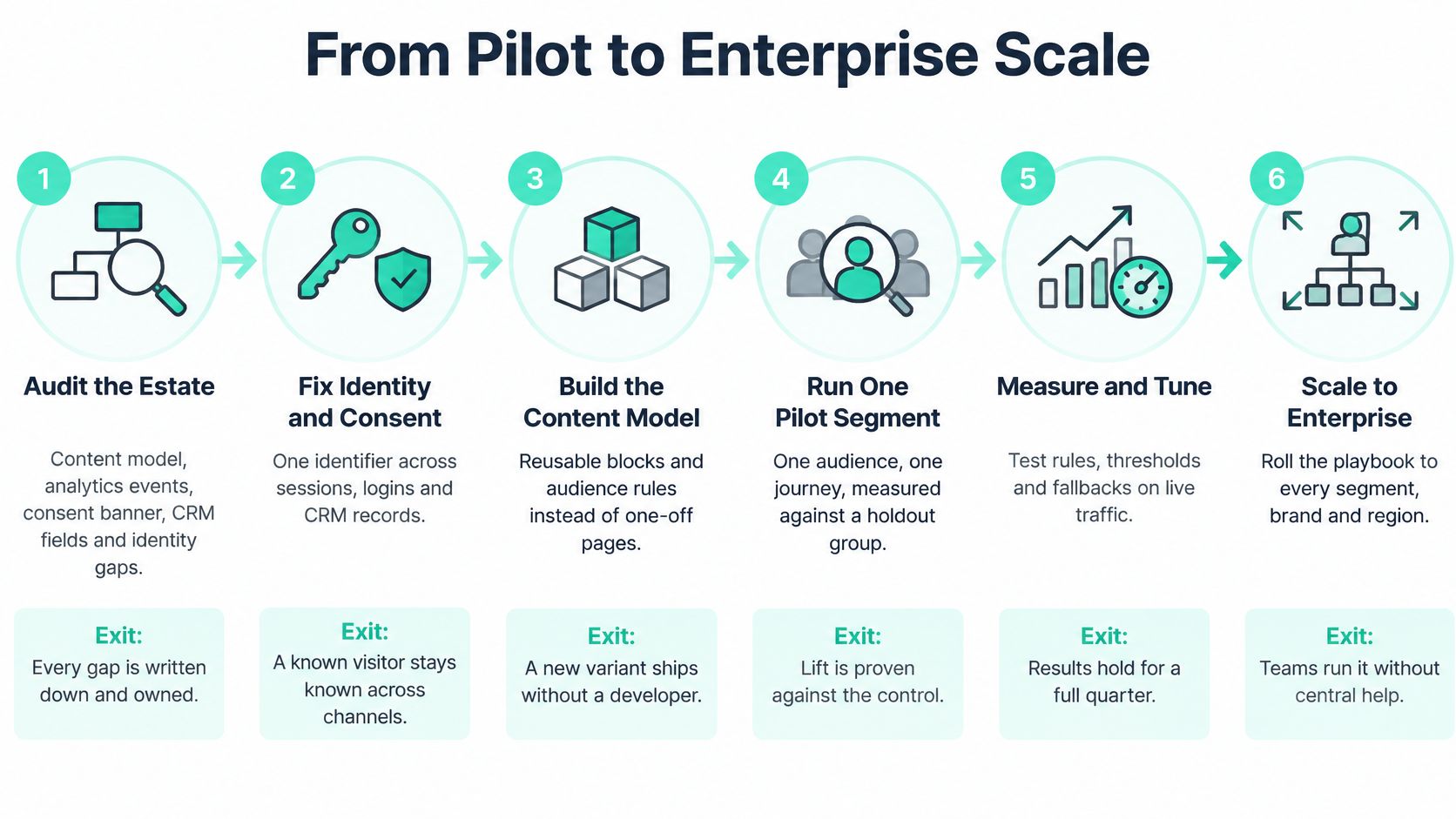
Rolling out B2B website personalization across multiple brands and regions fails when teams attempt a big-bang launch. Treat deployment as a staged engineering program where each phase has one concrete exit criterion that acts as a readiness gate.
Six Phases From Audit to Multi-Brand Scale
Audit the estate before writing a single rule. Inventory your content model, analytics event taxonomy, consent banner configuration, CRM account fields, and SharePoint portal permissions to expose broken tracking and identity silos. Spending two weeks here prevents months of rework after launch. Exit criterion: Every technical and governance gap is logged with an owner, and the exact consent state required by each planned rule is formally recorded.
Define three to five segments tied to real sales questions. Skip bloated persona decks and map a tight set of high-impact audiences directly to the recurring objections sales teams hear during discovery and procurement. Keep the list short enough that content teams can maintain fresh proof assets for every bucket. Exit criterion: Sales leadership and marketing operations sign off on the exact field definitions for each segment.
Build the unified data and identity foundation. Connect web forms, authenticated portals, and CRM account records into one profile layer so intent updates in real time. Enterprise manufacturers already run mature Sitecore data layers this way; for example, the FANUC website uses the Sitecore Experience Database (xDB) to collect data for personalized experiences based on customer behavior. Whether migrating from xDB to Sitecore CDP or integrating SharePoint portal events into a unified profile, test cross-channel stitching thoroughly before touching page layouts. Exit criterion: A single test visitor's interactions resolve cleanly into one profile across anonymous browsing, authenticated portal sessions, and CRM-matched states.
Ship a controlled pilot on one high-value page family. Pick a single template group with clear commercial intent, such as core product or industry solution pages, and deploy one tightly scoped rule set alongside a neutral control. Confine variations to modular slots so regional editors don't fork full layouts. Exit criterion: Every variant's fallback module renders accurately with zero layout shift when signals are missing or consent is withheld.
Run account-level holdouts and widen rules selectively. Measure pipeline progression, sales acceptance, and role-level repeat visits over a full buying observation cycle rather than calling a winner after seven days of clicks. Retire underperforming rules quickly and promote only proven winners. Exit criterion: The pre-agreed statistical lift threshold holds across segments without degrading sales acceptance.
Scale across brands and regions with shared governance. Package winning variations into reusable component libraries and central rule templates so regional teams in Europe, North America, or the Middle East adapt proven patterns instead of reinventing logic from scratch. Exit criterion: Every personalized component passes a mandatory fallback verification, WCAG accessibility review, and front-end performance budget prior to release.
Extending Governance Across SitecoreAI and SharePoint
Once a single pilot proves measurable pipeline impact, automation accelerates multi-brand expansion without multiplying headcount. Within SitecoreAI, teams can introduce Agentic Studio and pre-built AI agents to orchestrate content variations, monitor segment engagement, and streamline campaign workflows while keeping human review gates over high-stakes commercial pages.
Where partner extranets and technical knowledge bases live in SharePoint, align document metadata taxonomies with your Sitecore audience definitions so logged-in dealers, engineers, and enterprise clients experience consistent role logic from public marketing pages right into gated documentation. Across our work spanning Omnichannel, 360 Analytics, Personalization, Digital Strategy, and Segmentation, the teams that sustain ROI long term are the ones that treat governance, consent, and shared components as permanent infrastructure.
Start your roadmap with a focused platform and data audit of your current Sitecore and SharePoint estate, then select one high-intent page family for a controlled pilot.
Kogifi designs, builds, and governs enterprise B2B personalization programs on Sitecore XM Cloud, SitecoreAI, Sitecore CDP, and Microsoft SharePoint, helping global marketing and IT teams connect unified data, consent controls, and measurable experimentation. Whether you need a platform readiness audit, a headless Sitecore implementation, or a secure SharePoint partner portal integrated with your DXP, explore how our specialists deliver governed digital experiences at Kogifi.