


In 2022, the HTTP Archive Web Almanac detected CMS-driven systems on 45% of desktop websites and 47% of mobile websites, measured across roughly 5.4 million desktop sites and 7.9 million mobile sites. Managed content is no longer a niche publishing tool. It's the layer most of the web renders through.
Most integration failures are seam failures. A price arrives a day late, a permission stops at the wrong boundary, an alt text field loses its owner once content leaves the CMS. The CMS did its job; the connection didn't.
The useful way to think about a connected estate is four layers, each failing differently: the systems and the data they exchange, the architecture that links them, the API boundary that has to be secured, and the accessibility contract that survives every rendering path. Treat all four as design decisions and the failures stop being surprises.
Table of Contents
- Why CMS Integration Now Shapes Platform Success
- The Systems a CMS Connects and What Flows Between Them
- Choosing an Integration Architecture for Your Estate
- Enterprise Use Cases Behind Connected Content
- Securing the API Layer Between Connected Systems
- Keeping Accessibility Intact Across Every Integration
- Sitecore and SharePoint Integration Patterns in Practice
- Confirm Your Integration Path Before the Next Release
Why CMS Integration Now Shapes Platform Success
W3Techs' long-run CMS history shows how fast the ground moved. In January 2015, 61.7% of websites ran no identifiable content management system and only 23.3% ran WordPress. By January 2022 the no-CMS share had dropped to 33.8%, a fall of 27.9 percentage points in seven years, while WordPress climbed to 43.2%. Managed content went from the minority case to the default.
CMS integration means linking the content management system to every other system that needs its content, its data or its user identities, so the connection keeps working when either side ships a change. The CMS is where structured content, templates, publishing workflows, localization and metadata live. The interesting question is no longer whether to connect it. It's what it connects to, and who owns each link.
A CMS without integration is a library catalogue desk that can't reach the shelves. The catalogue is flawless. The borrowing records sit in another system, the search terminal can't query it, and the reading room has no idea what's actually available.
From Page Templates to Shared Infrastructure
The connection list is longer than expected. An identity provider for sessions and roles. A commerce platform for products and prices. Search for indexed content. Analytics and a customer data platform for behavior. Marketing automation for consent and journeys. Translation services for locale versions. A digital asset management system for images and alt text. Every one is a contract with its own owner, release cadence and way of breaking.
W3Techs tracks the series from 2010 onward because platform choices, delivery architectures and governance models keep changing. A team that chose a monolith in 2016 is now delivering headless content to five channels, and the integrations that were adequate then are the ones causing incidents now. Static architecture assumptions age faster than the CMS itself.
That's why integration sits above the CMS in priority. The platform you pick determines your ceiling. The integration model you build determines whether you ever reach it.
The Systems a CMS Connects and What Flows Between Them
| System | Data exchanged | Typical integration method | Primary risk |
|---|---|---|---|
| Identity provider | User sessions, roles and permissions | SSO through OAuth 2.0 or OpenID Connect | Access drift between brands and sites |
| Commerce platform | Products, prices and stock levels | REST or GraphQL APIs with webhooks | Stale prices during promotions |
| Search | Indexed content and metadata | Connector or index sync via API | Retired or restricted items remain indexed |
| Digital asset management | Images, video and alt text | Asset API with renditions | Missing or outdated alt text |
| CRM and marketing automation | Leads, consent and journey triggers | Event webhooks and REST APIs | Consent settings not reaching personalization rules |
| Translation service | Strings, locales and translated versions | Connector or file exchange | Outdated or missing locale versions |
| Analytics and customer data platform | Events and visitor profiles | Tag and event APIs | Duplicate or conflicting tracking across channels |
The table hides the harder truth: every link runs in two directions. Pages, products, assets and locale variants flow out of the CMS toward channels and indexes. Consent flags, stock counts, customer attributes and asset renditions flow back in. Each direction needs a named owner and a stated staleness tolerance, because "eventually consistent" means something very different for a price than for a blog post.
The difficulty is normal, not exceptional. In 2024, 36% of technology leaders named trouble integrating their CMS with other systems as a current challenge, in a Hygraph survey of 400 technology leaders.
The classic failure is a price. Commerce updates a product at 09:00, the CMS page still shows yesterday's number because the sync runs nightly, and the campaign landing page promises a discount checkout won't honor. The second classic is consent: a customer opts out in the CRM, the personalization engine never hears about it, and the next visit renders an offer built on data the business isn't allowed to use. Neither failure presents itself as an integration bug in a status meeting. Both are ownership gaps.
When the CRM link is the one drifting, the fix is usually field mapping and sync direction rather than new code. A practical walkthrough of how Captiwate connects CRM data shows how records, consent and lifecycle stage get mapped before anything reaches a personalization rule.
Prices, consent and alt text don't fail loudly. They fail quietly, a day at a time, until someone reconciles the two systems by hand.
Run this exercise before choosing any architecture:
- Inventory the estate. List every system that touches content, including the spreadsheet a regional team still uses for prices.
- Name the record of truth. For each data type (price, consent, alt text, locale string, stock level), write down the one system allowed to be authoritative.
- Record direction and latency. Note which way data flows and how stale it can get before someone notices: seconds for stock, minutes for prices, hours for translation.
- Assign a team, not a name. Put a team against each row. Names change jobs.
That list is the input to every architecture decision that follows.
Choosing an Integration Architecture for Your Estate
| Architecture | How content reaches other systems | Release independence | Best fit |
|---|---|---|---|
| Point-to-point connectors | Direct custom links between each pair of systems | Low; a change touches many links | Two or three systems with a stable scope |
| Middleware or integration platform | A central hub translates and routes messages | Medium; the hub becomes a shared dependency | Many systems from mixed vendors |
| Headless API-first | CMS exposes content through APIs and the front end renders it | High; front end deploys separately from the CMS | Multi-channel, multi-brand estates |
| Composable DXP | Packaged services linked through shared APIs and events | High; components can be replaced independently | Enterprises with a dedicated platform team |
Point-to-point is a house where every room has its own phone line to every other room. Fine with three rooms. With eight, you're maintaining a wall of cable. A middleware hub is the switchboard: fewer wires, but the operator becomes a single point of failure. Headless is a set of rooms sharing one front door, where the CMS owns the content, the front end owns rendering, and neither waits on the other's release calendar.
What Actually Decides the Choice
- System count. Two or three links are maintainable by hand. Past six, someone needs to own the map.
- Sites, brands and locales. Content reused across four brands multiplies every contract by four, and every contract carries a test surface.
- Release cadence. If marketing wants weekly page changes and the front-end team ships fortnightly, a coupled architecture makes one team wait on the other.
- Team skills. A composable estate demands platform engineering. A team of two editors and one developer won't run a service mesh of content services.
- Security surface. Every additional consumer is an additional credential, quota and audit path.
- Blast radius. Ask what breaks when one link dies. If the answer is "every brand at once," coupling is too high.
A short view of how the four options sit against each other:
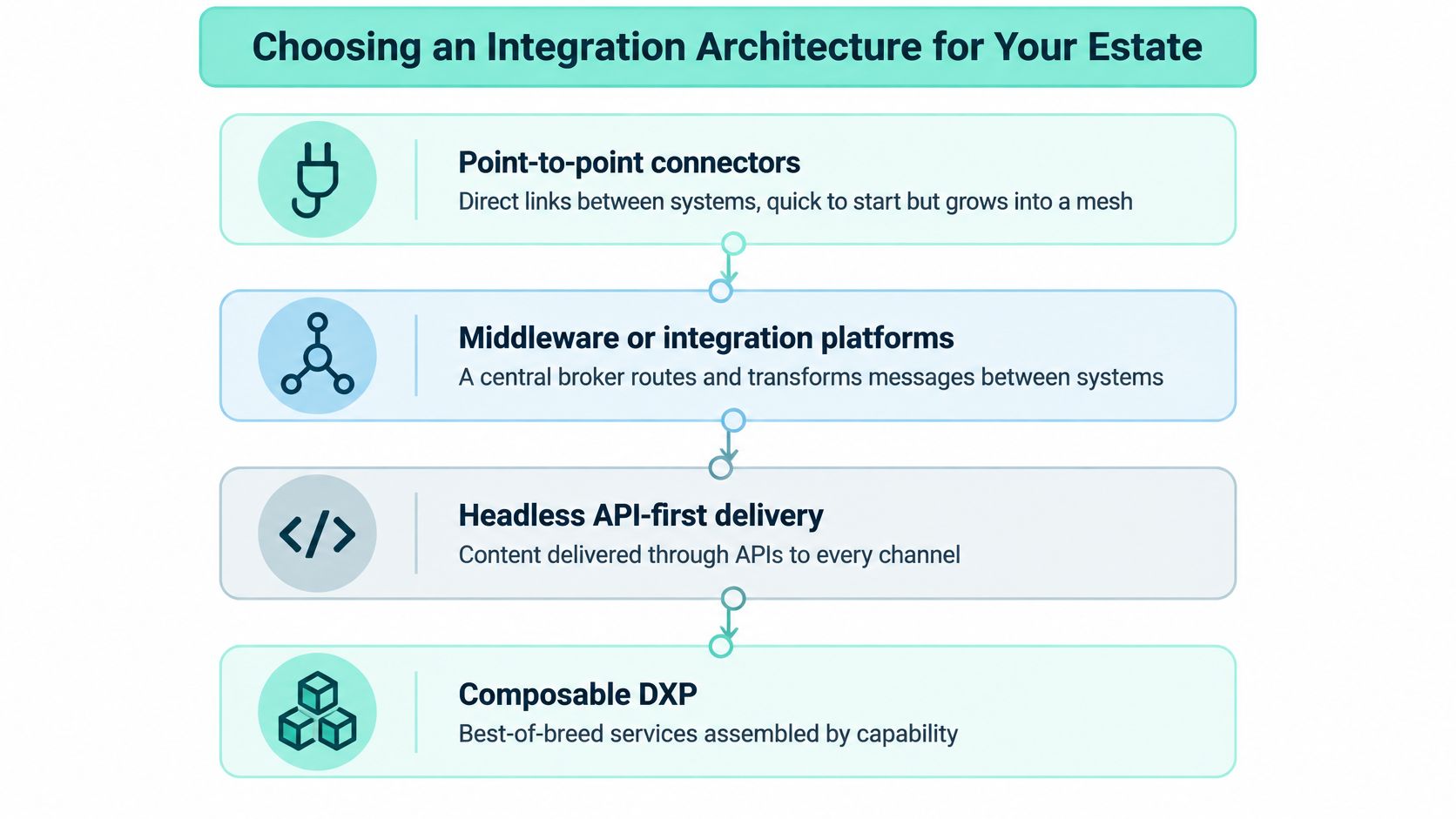
With two or three systems and one site, point-to-point is the cheapest thing that works, and I would start there rather than sell a platform nobody asked for. Once several brands, languages and channels share content, API-first headless design cuts coupling, at the cost of a gateway, an authentication model and a contract for every consumer. You're buying independence with operational surface. If you're weighing that move, an API-first approach sets out how the contracts and consumers should be structured before the first front end ships.
Vendor comparison deserves the same rigor as architecture. A HeyNews guide to testing newsletter tools applies a criteria-based evaluation (deliverability, integration depth, switching cost) and the same checklist logic works when you're choosing between two content services for a composable estate.
A composable estate also needs a platform team that owns the contracts between components. Without that team, composability becomes distributed point-to-point with more invoices.
Enterprise Use Cases Behind Connected Content
Four patterns account for most of the connected estates a multinational runs. Each has one check that catches the failure before a customer does.
- Multi-brand networks. Several brands draw products, prices and stock from one commerce platform, so a sync failure shows the wrong offer on every brand at the same time. The check is a named owner for prices with an on-call rotation, plus an hourly comparison of the rendered page against the commerce API for your top hundred SKUs. The CRM side of the same pattern is usually where the CMS and CRM connection decides whether segment data reaches the page at all.
- Multilingual publishing. Translation arrives through connectors and, on Sitecore, through the translation assistant in XM Cloud, which Sitecore documents as a Stream-powered feature inside the authoring workflow rather than a separate interface (Sitecore's XM Cloud AI tooling overview). Locale versions behave as their own data type with their own completeness state. The check is a locale completeness report per release: which pages exist in which languages, and which are falling back to a default.
- Multi-CMS estates. Plenty of enterprises never consolidated. In 2024, 47% of respondents said they ran two or three CMS platforms at once, in Storyblok's State of CMS 2024 survey of more than 1,700 CMS users. The check is a canonical content ID that survives export, import and syndication, so a page's identity doesn't change when it crosses systems.
- Asset reuse. Images have to reach the CMS, commerce and creative tools from one source. In 2024, 86% of digital-asset-management users rated composability extremely or very important, especially API connections to CMS, ecommerce, PIM and creative tools, per Cloudinary's survey of 420 DAM users across 14 countries. The check is a rendition contract: which sizes exist, which alt text travels with them, and who signs off when a crop changes the meaning of an image.
Every pattern shares one rule. The check has to exist before the campaign, not after a customer complains.
Securing the API Layer Between Connected Systems
A CMS API isn't a data pipe. It's a reachable boundary, and both attackers and your own consumers will find its edges. NIST's guidance on API protection for cloud-native systems frames API risk as a lifecycle problem present in design, development, deployment and runtime, and names two threats that show up first in content estates: denial-of-service through bandwidth saturation or resource exhaustion, and performance degradation when one consumer monopolizes shared resources.
The boundary behaves like one controlled door, not a corridor of open service endpoints:

The Controls That Hold
- One gateway in front of every service. CMS, commerce, identity, search and partner endpoints sit behind the same gateway, so policy is applied once instead of five times in five styles.
- Per-client quotas and rate limits. A marketing automation job and a partner feed don't get the same budget. Limits per client stop one runaway integration from starving the rest.
- Schema validation at the edge. Reject malformed payloads at the door. Bad payloads that reach the CMS become broken renders, partial imports and support tickets.
- Correlation IDs in every log line. One identifier that follows a request from the gateway through the CMS into commerce makes cross-system debugging a query rather than an archaeology project.
- Centralized authentication and authorization. NIST recommends standardized mechanisms such as OAuth 2.0 or JWT for end-user-to-resource access. One policy engine beats five bespoke token checks.
- Separate machine identity from user identity. An API key or client credential identifies the calling application; a bearer token represents the person. Mixing the two is how a background sync ends up with a marketing manager's permissions.
- Firewall inside the gateway layer. Deploying a web application firewall as part of the gateway avoids repeated request parsing and the latency and compute overhead that WAF policy enforcement otherwise adds.
Practical rule: if you can't trace one personalization request across CMS, CDP and commerce by a single correlation ID, you don't have observability. You have three log files.
For teams building this layer, the walkthrough below covers how the request path fits together across gateway, CMS and downstream services.
Then rehearse the failures that matter in a composable stack: cache behavior, token expiry, retry storms, payload limits and dependency failure. Test them on staging, because a CMS publish or a personalization call cascades through everything connected to it. A token that expires mid-cache-warm, a client retrying a 500 four times a second, or a payload just over the limit each produces an outage that gets logged as a CMS incident and isn't. The top enterprise CMS security risks cluster around this boundary far more often than around the CMS itself.
Keeping Accessibility Intact Across Every Integration
Accessibility gets treated as a front-end task: fix the templates, run the audit, ship, move on. Connected estates break that model, because one content model now renders through several front ends, and assistive technology sees whatever the weakest integration produces.
WCAG 2.2 organizes requirements around four principles: content must be perceivable, operable, understandable and compatible. Compatibility is the one that bites in a headless estate, because content is rendered by front ends and browsers the CMS team doesn't control, and accessibility information can come from markup or from technology-specific data structures exposed through an accessibility API. That makes the component contract, not the page template, the unit that has to preserve programmatic names, roles, states, relationships and keyboard behavior.
The gap is measurable. WebAIM's 2025 analysis of one million home pages found 50,960,288 distinct accessibility errors, an average of 51 errors per page, with 94.8% of pages carrying at least one detectable WCAG 2 failure. The recurring categories were image alternative text, link naming, heading structure and color contrast, exactly the fields integrations touch: shared components, localized copy, personalization rules, imported product data and third-party widgets.
The Ownership Questions to Answer First
- Alt text and language metadata. Which system is authoritative: the DAM, the CMS field, or the translation memory? Pick one and make the others read from it.
- Component enforcement. Are the rules encoded in the reusable component, or left to editorial discipline? Discipline doesn't survive a rebrand.
- Variant testing. How are translated and personalized variants tested, and against which assistive technology? A default-language pass proves nothing about the Arabic or German build.
- Third-party surveillance. Who monitors embedded forms, chat widgets and campaign scripts after release? Vendors change their markup without telling you.
Automated checks in CI catch the structural failures cheaply. Manual keyboard and screen-reader testing catches the interaction failures automation misses. Encoding accessibility metadata into reusable components and constraining authoring fields for alt text and headings is the version that scales across brands and locales. Design-system decisions carry most of this weight, and accessible website design covers how those component contracts get set before content ever reaches the CMS.
A technically clean headless implementation can raise your compliance risk, because it multiplies the rendering paths that each need the same semantics.
Sitecore and SharePoint Integration Patterns in Practice
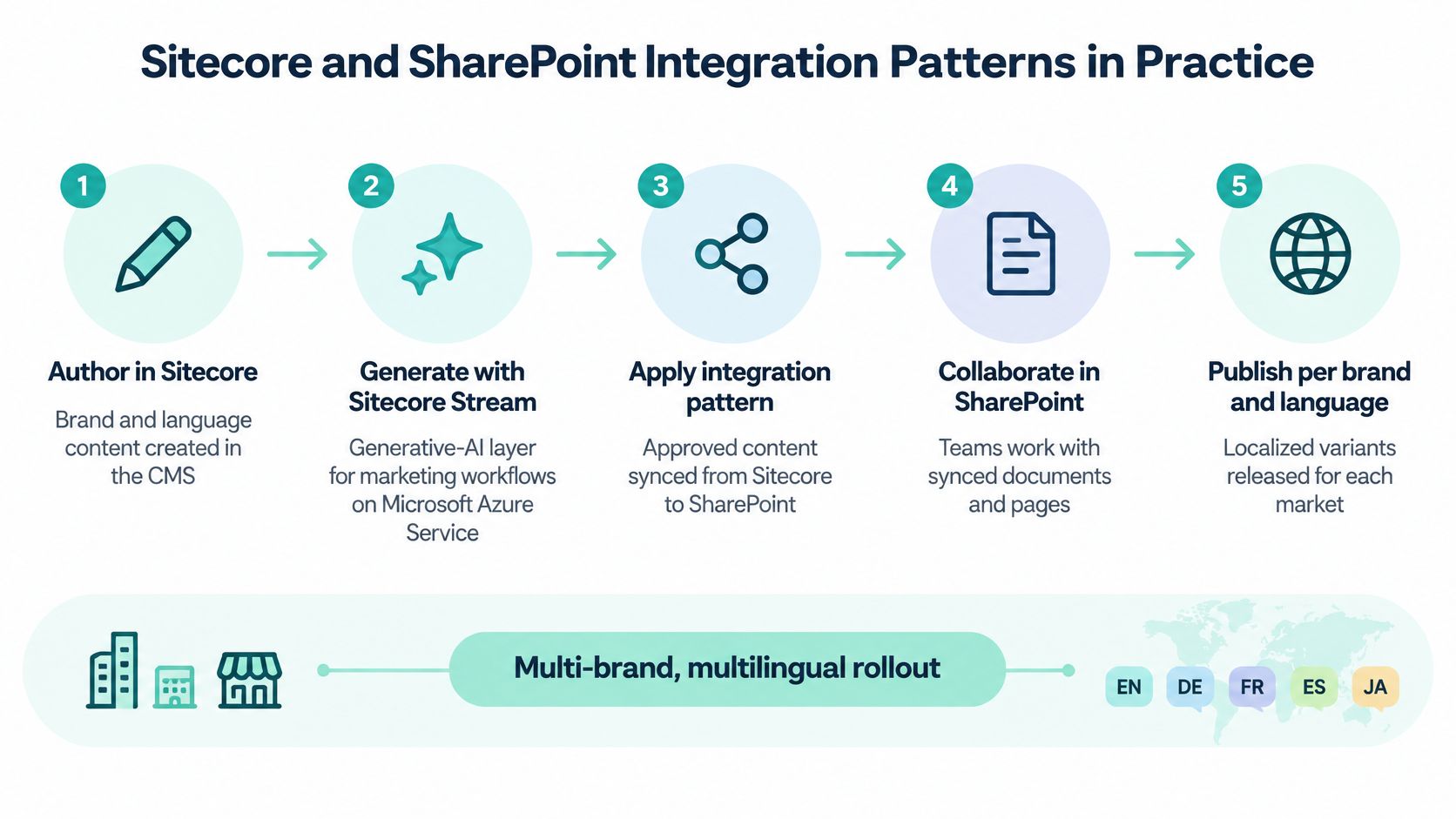
Say a manufacturer runs four brands in three languages, sells through dealers, and keeps dealer documentation on a SharePoint intranet that only employees can reach. The marketing sites sit on Sitecore, the imagery lives in Content Hub, and the support team answers the same category of question every day. A rollout that holds looks like a process rather than a project plan:
Where Sitecore Stream Fits
Sitecore Stream is the generative-AI layer for marketing workflows, built on Microsoft Azure OpenAI Service, and Sitecore describes it as orchestrating marketer experiences across XM Cloud, Content Hub and Experience Platform rather than acting as a standalone chatbot (Sitecore's Stream launch announcement). Its scope covers ideation, content production, campaign briefing, personalization and coordination across the portfolio, with embedded assistants operating inside supported products.
The availability matrix shows how far that reach extends: Stream appears in connection with XM Cloud, Content Hub, XP, CDP, Personalize and Search (Sitecore's Stream tiers and availability). That makes it an integration story, not a feature toggle. Content, assets, customer profiles, experimentation and search can share one governed operating model instead of five disconnected ones. Sitecore's own product material describes XM Cloud as connecting cloud-based web content management, personalization, customer data and AI in one platform.
The practical consequence for a multi-brand estate is that Stream's output has to inherit the permissions of its sources. A marketer in brand B shouldn't get brand A's unreleased campaign copy because an assistant summarized it.
What the SharePoint Knowledge Source Will and Won't Do
On the Microsoft side the constraints are documented and specific. Microsoft's Copilot Studio quotas and limits page allows a maximum of 25 SharePoint site URLs when generative orchestration is enabled, returns SharePoint list data only from the first 2,048 rows, supports modern pages but not modern pages containing SPFx components, and documents a 512 MB file limit alongside a 7 MB restriction for makers without a Microsoft 365 Copilot license in the same tenant (Microsoft's Copilot Studio quotas and limits documentation).
| Limit | Documented value | Design consequence |
|---|---|---|
| Site URLs per agent with generative orchestration | 25 | Group intranet sites into a few scoped agents |
| SharePoint list query rows | First 2,048 rows only | Split large lists by view or publish key data as pages |
| Modern SharePoint pages with SPFx components | Not supported | Keep knowledge pages free of SPFx web parts |
| General file size limit | 512 MB | Chunk long documents into sections before publishing |
| File size for makers without a Microsoft 365 Copilot license in the tenant | 7 MB | Publish smaller extracts or license the tenant |
Each limit forces a real design change. Twenty-five site URLs is a reason to group the intranet into scoped agents by audience or business unit instead of pointing one agent at everything. A 2,048-row ceiling means splitting large lists by view or publishing the key data as pages the agent can read. Unsupported SPFx pages push knowledge content out of web-part-heavy portals into clean pages. The 7 MB restriction decides whether you publish an extract or license the tenant.
The Rollout Sequence
- Model. Content types, locale structure, and which fields are shared across brands versus owned by one.
- Connect. Stream-enabled authoring and translation on Sitecore, scoped knowledge sources on SharePoint.
- Secure. Gateway policy, quotas, machine versus user identity, and per-brand permission boundaries.
- Test on staging. Our engineers handle Sitecore content serialization as part of platform implementation, which keeps models reproducible across environments, and we test custom code, OSGi bundles and integrations on mirrored staging environments before deployment during updates and upgrades.
- Release. Per brand and per locale, with the locale completeness report signed off rather than assumed.
Confirm Your Integration Path Before the Next Release
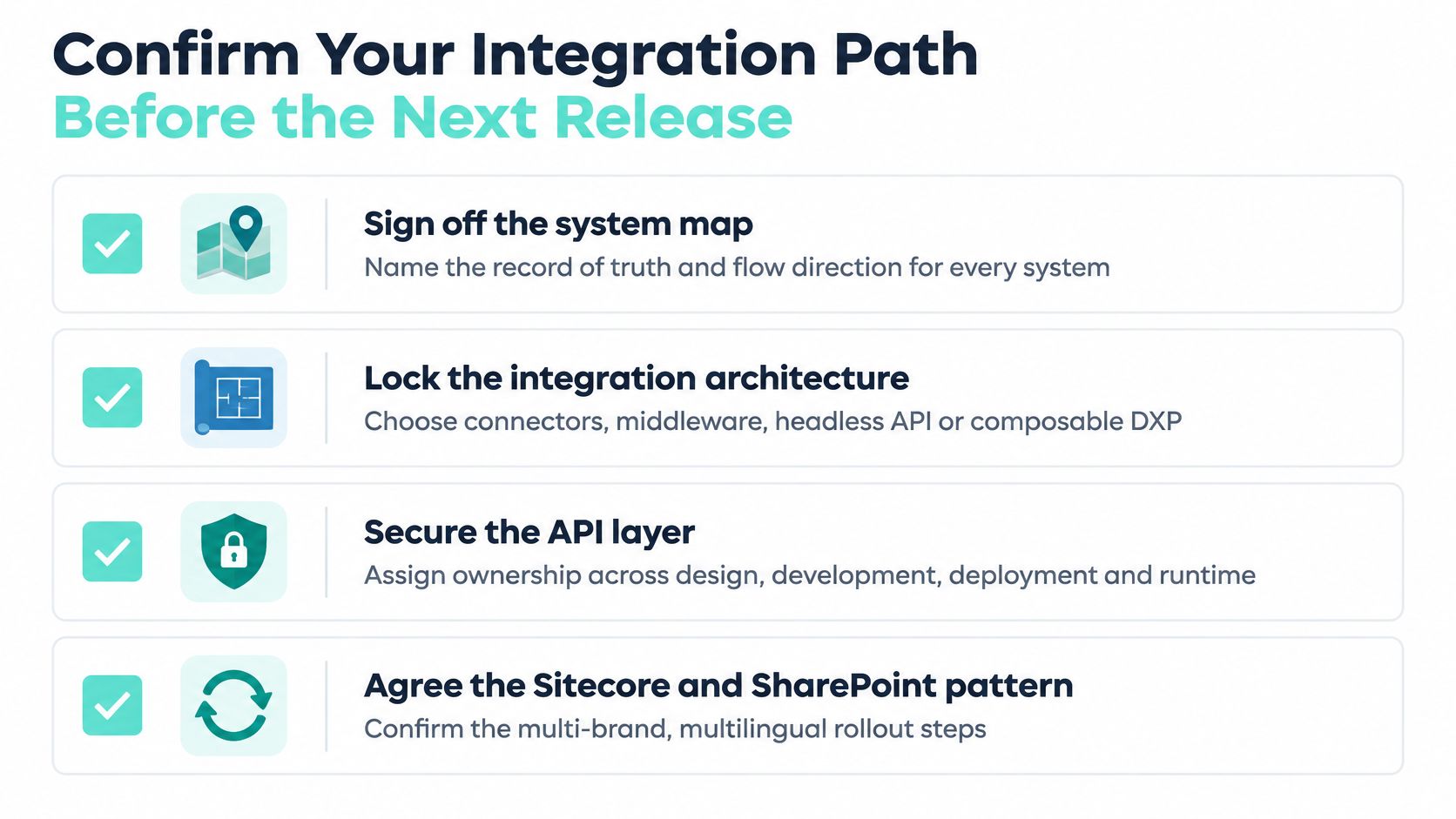
Four decisions should be closed before the next release, and each one maps to a failure mode above.
- Sign off the system map. Name the record of truth and the flow direction for every data type, and put a team against each row.
- Lock the architecture against your counts. Number of systems, sites, brands and release cadences. Two or three systems and one site still favors connectors; shared content across brands and channels favors API-first, with a gateway budgeted from day one.
- Confirm the API boundary and the accessibility contract. Every shared API behind a gateway with quotas, schema validation, correlation IDs and separated machine and user identity. Every shared component with a named accessibility owner and an alt text source.
- Set retrieval permissions before any generative tool reads content. A generative layer only sees what its sources expose, so scope the sources and the tenant licensing before a pilot, not after one.
Then rehearse the failures on staging: cache behavior, token expiry, retry storms and dependency failure. A release that passes functional tests and fails on a token refresh is the common case, not the exotic one.
For Sitecore and SharePoint estates, the practical next step is an integration audit that maps current connections onto these four decisions and flags the links that break under the knowledge-source limits or the Sitecore release path. We're a Sitecore Silver Partner with experience across Sitecore, Adobe Experience Manager and Microsoft 365, and our Sitecore Support Readiness Check covers what breaks or needs rework in integrations on each path. Ask for that risk map before you commit to a launch date.
Kogifi designs, builds and maintains Sitecore and Microsoft 365 platforms, including the integration layer between them, from Stream-enabled XM Cloud authoring to SharePoint knowledge sources that respect Microsoft's documented limits. If your estate spans multiple brands, languages or systems, we can map the connections, secure the API boundary and prove the rollout on staging before it reaches production. Visit Kogifi to start with a platform audit.