


93% of employees accessed their SharePoint intranet during a three-month measurement period, according to SWOOP Analytics' benchmark of 238,000 visitors across 28 organizations. Reach isn't the main design problem. Giving those employees a trustworthy answer and a direct route to completing work is.
The strongest SharePoint intranet design starts with an AI-ready content system, not a homepage theme. Sitecore's separation of content management, experience data, decisioning, and search provides a useful architectural pattern. Apply that discipline to SharePoint, then build the pages employees need.
Table of Contents
- The Scorecard a SharePoint Intranet Must Hit
- Sitecore AI Practices That Keep Intranet Content Reliable
- How to Discover Tasks and Lock the Architecture
- Tips for Frontline Mobile and Accessible Journeys
- SPFx Libraries Power Automate and Hub Governance
- Measure Adoption and Choose the Build Path
The Scorecard a SharePoint Intranet Must Hit
Employees spent an average of 5.85 minutes a day on their intranet in the 2025 benchmark reported by Business Manchester, with 3.36 visits per day and approximately 2.19 pages per visit. That's a daily attention budget spread across short trips, not an invitation to browse a corporate magazine.
Start the homepage with search, five high-frequency task links, and evergreen resources. Keep news in an audience-targeted strip below the essential tools. Employees looking for a request form shouldn't have to pass a leadership carousel to reach it.
Make behavior the design specification
SharePoint intranet design scorecard
The employee-behavior figures below come from that benchmark. The task-usability figures are Nielsen Norman Group findings, examined in the architecture section.
| Signal | Observed value | Design response |
|---|---|---|
| Reach in three months | 93% of employees | Design for almost everyone, including people who rarely browse |
| Time on the intranet | 5.85 minutes a day | Put the task on the first screen; don't ask users to explore |
| Visits per day | 3.36 | Support repeat short trips, not one long reading session |
| Pages per visit | 2.19 | Keep priority tasks within two clicks of search or the homepage |
| Share of pages that are news | 52% | Cap news real estate; don't let announcements crowd out tools |
| Evergreen pages visited | 67% versus 41% of news pages | Promote policies, procedures, and reference above the news strip |
| Basic task success | 74% | Block launch until priority tasks beat this baseline |
| Time to find a department head | 2 minutes 46 seconds | Fix labels, metadata, and people search before visual polish |
Treat the placement and click-depth recommendations as design targets, not measurements from the benchmark. Test them against your workforce rather than presenting them as universal usability laws.
News, reference material, and transactions need different page templates. A news article should expose its publication context; a policy should expose its authority and applicability; a transaction should make the next action unmistakable. Consistency means predictable behavior, not forcing every content type into the same layout.
Agree what counts as a successful visit
For HR journeys, Benely's guide to employee self service portal software is a useful discussion resource when distinguishing information pages from services employees need to complete. Turn that distinction into requirements: viewing leave guidance isn't the same outcome as submitting a leave request.
Sponsor rule: Approve the employee outcomes before approving the visual treatment.
Give sponsors a scorecard with task completion, search success, mobile completion, and content freshness alongside reach. Assign a business decision-maker to each outcome so an unresolved service dependency doesn't disappear inside a design backlog.
Use SharePoint Online governance best practices to frame publishing authority and site accountability. Walk through the scorecard with sponsors before anyone chooses colors or web parts. If they can't agree which employee tasks matter most, the project isn't ready for visual design.
Sitecore AI Practices That Keep Intranet Content Reliable
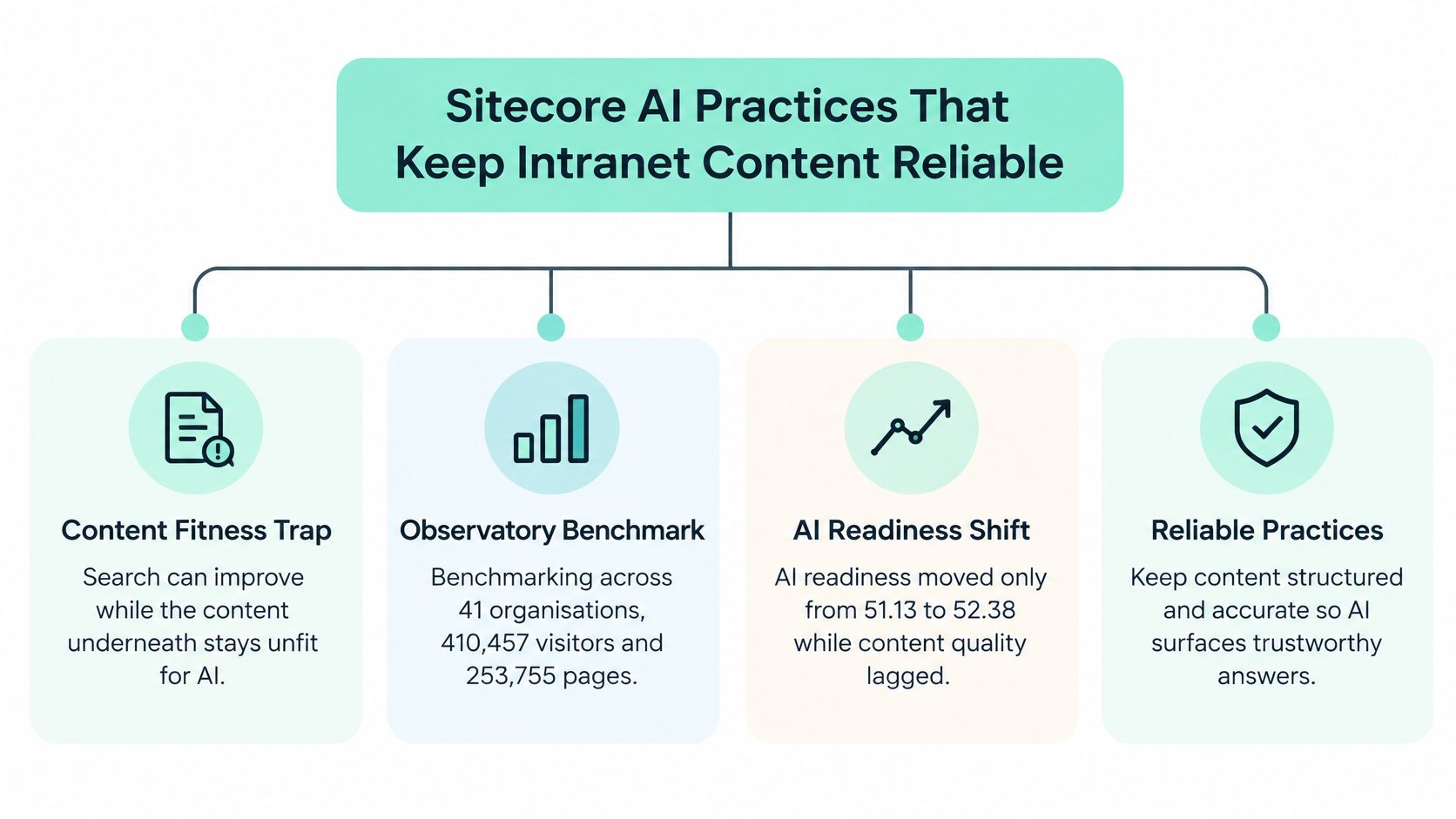
AI readiness moved only from 51.13 to 52.38 while search effectiveness rose from 34.16 to 66.30, according to the SWOOP Analytics benchmarking report summarized by Quantum, covering 41 organizations, 410,457 visitors, and 253,755 pages. Better retrieval doesn't automatically make the underlying material trustworthy.
That's the architectural mistake to avoid: installing an answer interface before establishing which content deserves to supply the answers. A fluent summary of an obsolete procedure is still an obsolete procedure.
Borrow the separation of responsibilities
The Sitecore product documentation separates content publishing, experience data, decisioning, and discovery. Use those boundaries as a design pattern, not as a shopping list for an employee portal.
- XM manages published content. Apply the same discipline to institutional knowledge: structured fields, controlled publishing, and an authoritative destination rather than scattered copies.
- xConnect and xDB collect and search experience data. The intranet equivalent is a deliberate measurement model that distinguishes a search, a page view, and a completed service interaction.
- Sitecore Personalize handles real-time next-best-action orchestration and testing. Borrow its decisioning discipline when choosing which employee action to surface, while keeping access control separate.
- Sitecore Search supports predictive discovery, while Sitecore Discover supports personalized, conversion-focused experiences. Translate the objective carefully. An employee portal should optimize successful work, not retail-style conversion.
These are distinct jobs. Don't expect a content generator to repair permissions, a search product to resolve conflicting policies, or personalization to compensate for an unclear service model.
The operating pattern is straightforward.
Treat generated content and generated logic differently
Sitecore Stream's documentation describes an AI layer built on Microsoft Azure OpenAI Service, with assistance for content creation, campaign briefs, and message personalization. Supported workflows and the Sitecore Cloud Portal expose Campaigns, Brand kits, and Brand Assistant, while some capabilities require Stream Premium.
For an intranet team, the useful lesson is controlled assistance inside an editorial workflow. Supply approved terminology and source material, then require an accountable editor to validate meaning, applicability, and publication status. Generated copy shouldn't acquire policy authority merely because it reads well.
The Sitecore Personalize Code Assistant documentation describes a different responsibility: generating JavaScript for Conditions, Programmables, and Session traits. Those areas cover audience filtering, offer decisioning, and session-event aggregation into a guest-profile attribute.
That output is executable logic, not editorial copy. Require code review, test cases, and checks for unexpected audience inclusion or exclusion before release.
An assistant should summarize approved knowledge, not decide which conflicting policy is authoritative.
Before enabling conversational answers, audit ownership, review dates, duplication, archival rules, permissions, and metadata. Separate expiring news from durable reference material and institutional knowledge. For multilingual estates, identify the authoritative version and the translation relationship explicitly, so an assistant doesn't merge instructions that apply to different locations.
How to Discover Tasks and Lock the Architecture
Run discovery before designing a page layout. Nielsen Norman Group measured a 74% average success rate for basic intranet tasks and a time of 2 minutes 46 seconds to find department-head information. A polished interface can still leave employees unable to complete ordinary work.
Use that task-success finding as a warning, not an acceptable launch target. Your priority journeys should perform materially better in representative testing.
Establish the task model
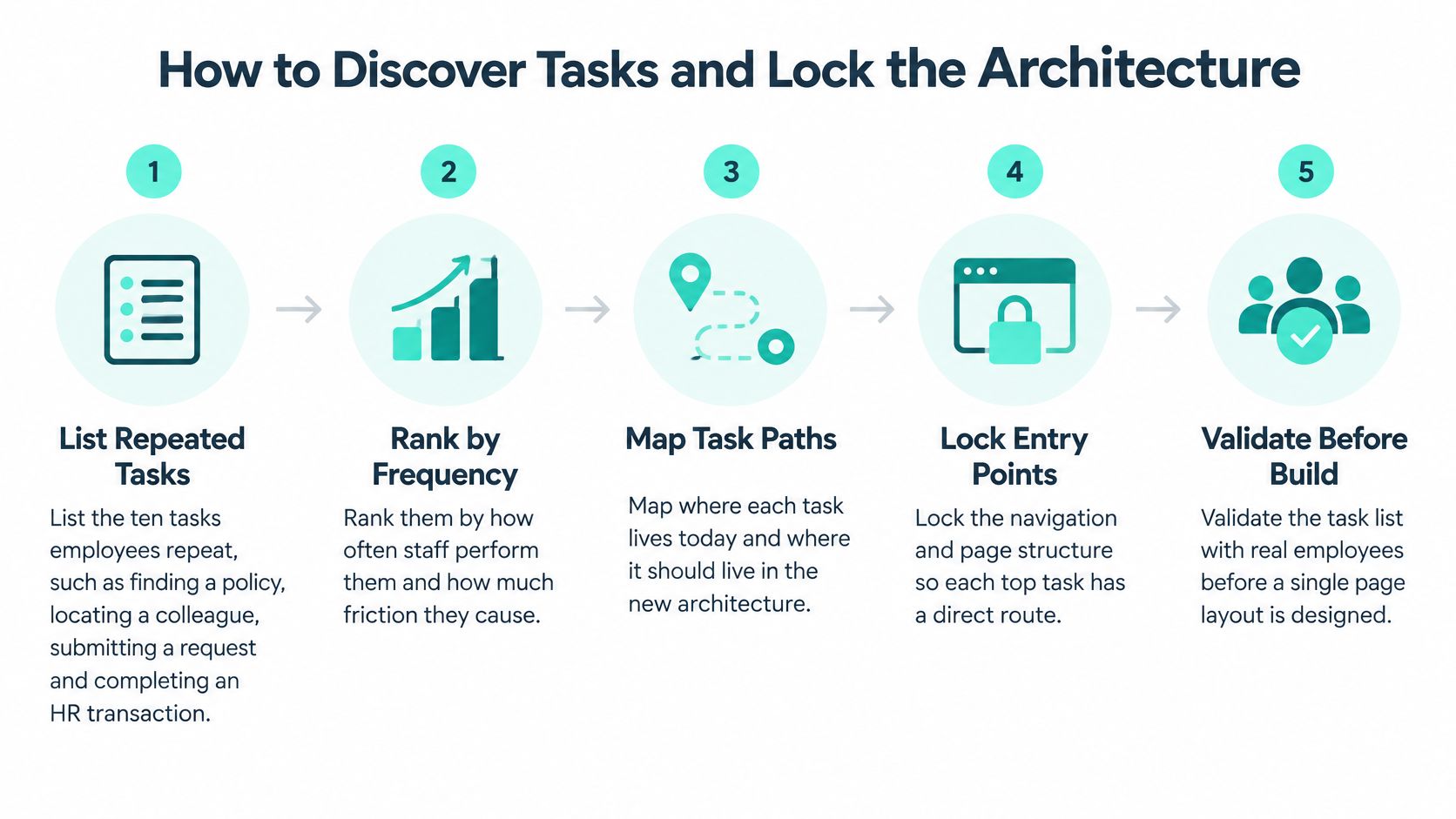
List the ten tasks employees repeat. Start with finding a policy, locating a colleague, submitting a request, and completing an HR transaction. Rank candidates by frequency, operational risk, and current friction. This prevents the homepage from becoming a list of what departments want to announce.
Map the audience, permission boundary, and device. For each task, record who performs it, what they're entitled to see, and where they perform it. A contractor reading a procedure on a shared device isn't the same scenario as an HR administrator updating it. This prevents accidental assumptions about identity and access.
Inventory the existing sources. Record canonical pages, duplicate policies, disconnected forms, and filenames standing in for metadata. Decide whether each item should be retained, rewritten, merged, or retired. Otherwise, migration preserves the old confusion.
Create three top-level content classes. Use news, reference, and transactional services, then add the metadata each class needs. These are organizing classes, not a restriction on business-specific content types. This prevents employees from having to guess whether instructions live in an announcement, a document library, or a departmental page.
The sequence should remain task-led even when stakeholders arrive with preferred layouts.
Validate routes before freezing hubs
Draft navigation around employee intent. Test labels such as Request equipment or Find a procedure instead of relying entirely on department names. Run moderated sessions with representative staff, including people who use assistive technology. This catches menus that make sense only to their authors.
Record outcomes, not preferences. Measure completion, time-on-task, zero-result searches, click depth, and mobile versus desktop completion. Ask participants to perform realistic scenarios without coaching. A participant saying the site looks clear isn't evidence that they can use it.
Freeze hubs and targeting only after labels pass. Audience targeting should improve relevance without becoming the only route to required information. It isn't a security boundary. This prevents a personalization rule from making an otherwise accessible policy practically invisible.
Put the acceptance measures in the backlog. Attach scenarios, expected destinations, and failure conditions to the relevant work items. Development should begin against tested routes, not an unapproved menu.
A structured discovery phase gives content owners a concrete decision to sign: a one-page hub map showing tasks, destinations, audiences, and accountable functions.
If stakeholders are also evaluating answer-engine visibility for public content, The SEO Agent's AEO tool roundup can support that separate conversation. Don't confuse public answer visibility with internal permission-aware retrieval. The intranet must return the right authorized source, not just produce an answer.
Finish discovery by resolving department-shaped navigation, copied pages, filename-only findability, and deferred search configuration. An unresolved architecture decision is a delivery dependency, not something to hide inside a later content sprint.
Tips for Frontline Mobile and Accessible Journeys
A field worker needs a safety procedure on a phone while standing beside equipment. The page must expose the applicable instructions immediately, without a promotional banner, a dense menu, or a file that requires a desktop application.
Use that scenario as a design test, not an edge case.

Industrial organizations represented 59% of respondents in the 2025 Intranet Observatory, which identifies limited equipment and inadequate mobile accessibility as barriers for field employees. Organizations where all departments contributed content were also more likely to report excellent search, 58% versus 35%.
Findability therefore needs participation from operational teams, not just a better search box. Ask safety, maintenance, and shift supervisors which terms workers use, and include those terms in content and metadata.
Make the procedure usable under real conditions
Use a single-column layout, generous tap targets, concise instructions, and compressed supporting media. Put applicability, warnings, and the required action before supplementary explanation.
Where policy permits offline copies, provide a downloadable procedure that opens without connectivity and displays its version and validity clearly. Offline access needs a replacement process; an old local copy mustn't remain the worker's reference.
Inclusive design test: A responsive page isn't necessarily an accessible or usable journey.
Segment testing by device, connectivity, role, language, and assistive technology. For an English and Arabic estate, treat both as complete locales with correct reading direction, navigation behavior, and content responsibility. Don't assume mirroring the desktop layout completes localization.
Use the video as a discussion aid, then test your own employee scenarios.
Give editors a pre-publish check
Editors don't need to redesign the platform to catch common failures.
- Heading order: Confirm that headings describe the content and follow a logical hierarchy.
- Meaningful links: Replace vague instructions with destination-specific text that works outside the surrounding sentence.
- Images and controls: Add useful alternative text and check accessible names on custom controls.
- Keyboard and focus: Complete the journey without a mouse and verify that focus remains visible.
- Readable presentation: Check contrast, text resizing, spacing, and comfortable line lengths.
- Mobile completion: Time the actual task on a mid-range phone using a weak connection.
Apply accessible website design practices to the complete service journey, including forms and confirmation screens. For a practical HR scenario, the LeaveWizard employee portal guide can help frame a leave-request walkthrough. Test submission and status checking, not merely whether the portal opens.
SPFx Libraries Power Automate and Hub Governance
Build a small component library, not a custom page for every department. The SharePoint Framework overview defines SPFx as a client-side page and web-part model with integration across SharePoint, Microsoft Teams, and Viva Connections, including Adaptive Card Extensions for interactive employee experiences.
Use those extension points where they solve a task that standard components can't handle. Don't commission a custom web part merely to restyle a list.
Standardize the component contract
Create shared theme tokens, property-pane conventions, loading states, error handling, and accessibility behavior. Define components around employee needs: people search, policy lists, request status, and news cards.
Each component needs a clear data source and permission model. A request-status card should expose a safe failure state when the service is unavailable, not an empty box that suggests the employee has no requests. Use SPFx web parts as reusable product components with versioned releases and regression tests.
After taxonomy approval, inventory source libraries before associating sites with hubs or moving content. Check versions, broken links, sensitivity labels, owners, and duplicate policies. Migrate durable procedures and reference material first, then decide which announcements still deserve publication.
Preserve modified dates and named owners where supported by the migration tooling. Throttle large moves, validate destination permissions, and implement supported redirects or replacement notices for old entry points. Don't promise automatic redirection for every SharePoint URL.
Give each content class a lifecycle
Every published page needs an accountable business owner, audience, review date, sensitivity classification, and disposition rule. Use centrally governed templates while local owners maintain business meaning.
Lifecycle rules by intranet content class
The review intervals below are recommended operating rules, not benchmark findings.
| Content class | Accountable owner | Review cycle | Where it lives | Automation |
|---|---|---|---|---|
| News and announcements | Communications | At the stated expiry date or campaign close | Home hub news strip | Reminder to archive or renew |
| Policy and procedure | Function owner named on the page | 6 or 12 months, selected by risk | Knowledge hub with required metadata | Escalation if the review date passes |
| Reference and how-to | Knowledge owner | 12 months, or sooner when instructions change | Knowledge hub, searchable by task | Flag duplicates before publish |
| Request or HR transaction | Service owner | When the process changes | Systems hub, linked from the task bar | Power Automate for status, not ownership |
| People and org lookup | HR or directory owner | With each org change | People search, not a static page | Sync from the directory, don't hand-edit |
Configure content types, required metadata, versioning, approval, and search refiners around those rules. Apply retention and sensitivity controls where the content requires them, rather than treating every page identically.
Power Automate should send review reminders, escalate overdue decisions, and route requests. Automation doesn't replace the owner. Train editors before granting publishing rights and provide an exception route for urgent operational announcements.
Pilot the operating model
Pilot with a representative business unit and inspect page freshness, failed searches, broken links, and permission errors before expanding hub by hub. Schedule quarterly editorial housekeeping to prune obsolete content and resolve exceptions.
Keep the homepage focused on search, five task links, and a news strip. Compress images and reject script-heavy custom components on the initial screen. For the safety-procedure journey, record page weight and time to the first useful action on a mid-range phone over a weak connection.
Measure Adoption and Choose the Build Path
Judge the intranet by completed work, not published pages. A visit is useful evidence of reach, but it doesn't establish that an employee found the applicable procedure or successfully submitted a request.
Give the service owner a dashboard that pairs usage with quality. Include returning users, successful searches, task completion, stale-page share, broken links, and unresolved permission errors. Define the denominator for each measure so teams don't compare unlike populations.
Turn failures into assigned work
A search is not successful merely because it returns results. Inspect reformulations, abandoned result pages, and whether employees reach the approved destination. Where analytics can't establish completion, use a task test or a service-system event rather than inventing certainty.
Assign each failure to the team able to resolve it.
- Wrong or conflicting answer: The content owner decides which source is authoritative and retires the competing material.
- Relevant page not retrieved: The search and information-architecture owners inspect terms, indexing, and metadata.
- Form opened but not completed: The service owner checks validation, identity, attachments, and confirmation behavior.
- Mobile or assistive-technology failure: The delivery team reproduces the journey and fixes the blocking interaction.
Rerun priority-task tests after meaningful changes. If people still struggle, repair the source, route, or service dependency before adding another homepage component.
Choose delivery capacity from the dependencies
An internal team can manage routine publishing once templates, training, and editorial accountability are established. A specialist delivery team is more appropriate when bilingual hubs, custom SPFx, Power Platform, and identity integrations must work together in the same release.
Our RAC delivery illustrates that combined scope. Kogifi rebuilt the legacy intranet of RAC, Riyadh Airports Company, as a bilingual English/Arabic SharePoint Online root site for around 500 to 1,000 employees. Delivery included SPFx custom components, Power Platform automation, and Microsoft 365 integrations.
We defined seven intranet hubs: Home, For You, Systems, News & Announcements, Company, Knowledge, and Blogs. The intranet is in active production use and is ready for a later phase covering external integrations and continued enhancements.
That hub structure is a business-specific outcome, not a template every organization should copy. Choose your own boundaries from employee tasks, content responsibility, and service dependencies.
Fund a pilot that proves the system
Start with an ownership and metadata audit of the current estate. Produce a dated delivery plan covering the proposed hubs, reusable components, migration decisions, integration dependencies, and the first pilot unit.
Name who can approve the content, who can change the source system, and who accepts the employee journey. If those responsibilities aren't settled, a development estimate will conceal unresolved decisions.
For organizations running both public experience platforms and employee intranets, keep the architectural discipline consistent without forcing identical technology. Reuse the Sitecore-style separation of content, data, decisioning, and discovery, then implement the employee experience with the SharePoint services and controls that fit the task.
Kogifi's SharePoint and Sitecore teams can audit your content ownership, metadata, permissions, and AI readiness, then translate the findings into a hub architecture and pilot plan. Visit Kogifi to discuss a SharePoint intranet build that includes reusable SPFx components, workflow automation, and measurable employee journeys.