


A regional brand site goes live in a few weeks. A contractor still has production access after the project ends. A shared component that looked harmless at launch quietly forks into five versions, each with different tracking, accessibility, and approval behavior. The tools are present. The failure is ownership.
That pattern appears across both Sitecore AI and SharePoint Online. A headless public site and an employee intranet may serve different audiences, but they still depend on named owners, group-based access, lifecycle rules, controlled releases, reliable search, and evidence that decisions were reviewed. The following seven practices treat both platforms as one governance estate. They focus on the controls that survive staff changes, regional complexity, AI-assisted publishing, and production pressure.
Table of Contents
1. Sitecore AI Organization Project and Environment Structure with Role-Based Access
A Sitecore AI estate needs a structure that reflects business accountability before anyone receives access. Use Organizations, Projects, and Environments to separate platform administration from delivery work. A brand, region, or market can have its own Project, with development, staging, and production Environments governed by different role assignments.
A multinational manufacturer might run separate Projects for each brand, each with its own production Environment, while consuming a common component library. An airport group could isolate passenger-facing websites from internal partner portals through distinct Projects and tightly scoped publishing roles. The point isn't administrative neatness. A production mistake in one Project shouldn't expose every live experience.
Put access behind job functions
Map roles to job functions before provisioning accounts. Assign Sitecore permissions to named Microsoft Entra ID security groups rather than individuals, then document the matrix in the governance handbook. Keep production administration with a small, named platform team, and use just-in-time elevation where the available controls support it.
A quarterly access review should compare active accounts with HR and contractor records. The review should identify former staff, expired vendor relationships, dormant accounts, and users who moved into roles that no longer justify publishing or administration rights.
Practical rule: A person can receive access through a group, but a business owner must remain accountable for why that group can act in a specific Environment.
Reference the current Sitecore XM Cloud product documentation when defining role boundaries. Role names and capabilities can change between releases, so copying an old permission matrix into a new implementation creates false confidence.
2. Helix-Based Shared Component Library and Design System Governance
Shared components are where multi-brand Sitecore programs either gain an advantage or accumulate hidden debt. A headless Sitecore AI back end commonly connects to a front end built with Next.js or another supported head. The reusable layer between them needs ownership, versioning, tests, and a clear rule for brand-specific variation.
Use Helix principles to separate Foundation, Feature, and Project concerns. Foundation code should contain broadly reusable capabilities. Feature modules should represent coherent business functionality. Project code should handle site-specific composition and branding. A retailer might maintain one header, footer, and product card library while each brand applies its own design tokens. A financial services group might share an accessibility-tested form component between a public site and a secure client portal.
New shared components should pass an admission process before they enter the library. Require documentation, automated tests, usage guidance, and an accessibility check. Storybook or an equivalent tool lets teams preview components outside the CMS, which makes review easier for designers, developers, content authors, and product owners.
Govern change, not just reuse
Breaking changes need advance notice and a migration path. Publish the change at least one release cycle before removal, and support the previous major version during migration when the delivery model permits it. Track component reuse each quarter. A component used by very few sites may be a candidate for retirement, while a heavily reused component deserves stronger ownership and regression coverage.
Kogifi describes practical design system governance for enterprise component reuse. The same principle applies to SharePoint SPFx components. A web component and an intranet extension both need an owner, supported versions, release notes, and a route for emergency fixes.
3. Hub-and-Spoke Multi-Site Content Model and Site Template Governance
A hub-and-spoke model works when the center defines the rules and the spokes retain only the variation they genuinely need. The hub should establish shared content types, page templates, navigation patterns, taxonomy, and reusable fragments. Regional or local sites can extend those assets only where the governance board has explicitly allowed it.
A global energy provider could launch regional sites from one hub, while local teams add legal notices and language variants. A university group could standardize program pages across faculties but allow each faculty to manage its own news and events. In both cases, the publishing model must distinguish global, regional, and local content.
Use an inherit, extend, or override decision table for every important content type. It should state who owns the content, which fields are mandatory, whether local teams can change the layout, and what happens when the global template changes.

Treat overrides as governance signals
Every new global template should pass design and SEO review. Pilot it in a sandbox site before adding it to the hub. Track local overrides as a health indicator. A rising override count usually means the shared model no longer reflects business needs, or local teams are bypassing it because the central process is too slow.
Language fallback rules belong in the same design. A missing translation shouldn't create a broken page, misleading navigation, or an accidental mix of regions. The hub-and-spoke architecture guidance provides a useful way to frame central standards and local autonomy. Apply that logic to Sitecore sites, SharePoint hubs, and any shared content service that feeds both.
4. CI/CD Pipeline and Environment Promotion Governance
A release isn't governed because someone approved it in a chat message. Code, configuration, templates, renderings, and serialized content should move through a traceable path from development to test, staging, and production. Source control becomes the record of what changed. Automated checks become the first line of quality control.
Sitecore CLI and the Sitecore Content SDK support managing templates, renderings, and configuration as code. A manufacturer might release product configurator changes weekly through a pipeline that checks accessibility and performance before production approval. An airport operator could use separate pipelines for public information sites and high-availability operational systems, with different approval policies for each.
Keep environment-specific secrets in a managed vault. Never commit them to source control. Limit direct production edits to documented emergency cases, then back-port those changes into source control within 24 hours, as part of the operating rule rather than an informal promise.
Make rollback a tested capability
Define rollback procedures before a go-live window. Rehearse them with the people who will respond to an incident. The release gate should cover more than application code:
- SEO controls: Check redirects, canonical behavior, metadata, structured data, and indexation settings.
- Measurement: Validate analytics tags, consent banners, event tracking, and campaign parameters.
- Localization: Confirm language variants, fallback behavior, right-to-left layouts, and translated navigation.
- Operations: Confirm monitoring, alert routing, feature flags, and the documented rollback path.
Use the current Sitecore CLI and XM Cloud deployment documentation when designing supported pipeline patterns. The same promotion discipline helps SharePoint teams control SPFx packages, Power Platform solutions, and approved configuration changes.
5. Governance for AI-Assisted Content and Personalization in Sitecore AI
AI-assisted publishing changes the approval question. The issue isn't whether Sitecore can help create content. The issue is whether the organization can explain what the system generated, which source data it used, who reviewed it, and why a personalization rule treated one audience differently from another.
Sitecore's direction spans more than one writing assistant. Its portfolio includes brand, campaign, content, experience, and optimization copilots, with Sitecore Stream AI capabilities across its CMS, digital asset management solution, and customer data platform. XM Cloud also supports variant generation, while A/B/n testing can optimize components, control traffic, and serve the best-performing variant. Sitecore states that component variants are stored at the edge, connecting assisted optimization with delivery mechanics. These capabilities are described in the Sitecore AI portfolio announcement.
A financial services brand may allow AI to draft a blog summary but require compliance approval for any rate or eligibility statement. An education institution may personalize course recommendations while testing for exclusionary audience rules.
Create an evidence trail
Maintain a register of enabled AI features by Environment. Give every feature an owner and review date. Define which outputs require human approval, which source references authors must verify, and which claims require legal or compliance sign-off. Require source citations or product data references for factual statements generated by AI.
Personalization rules need the same discipline. Test them with control groups, check for unintended exclusion, and record the rule purpose, audience definition, data source, consent condition, and retirement date. Sitecore XM Cloud Plus combines content management, AI-powered search, personalization, customer data management, and analytics, while Sitecore describes intelligent search recommendations and generative text and image features in its portfolio overview XM Cloud Plus announcement. The broader the capability set, the more important the control register becomes.
6. Multilingual and Accessibility Compliance Governance
Multilingual delivery and accessibility fail when teams treat them as final checks. A translated page can still have broken navigation. A technically valid component can still frustrate someone using a screen reader. Governance must place language and accessibility requirements inside design, development, translation, content approval, and release workflows.
Define supported languages, fallback rules, translation ownership, and per-language publishing approvals. Use language-specific content versions, translation management integrations, automated accessibility tests in the pipeline, and manual audits with assistive technologies. A Middle Eastern government portal may need Arabic and English navigation with right-to-left component variants. A European manufacturer may run automated WCAG scans on every pull request and schedule recurring production audits with assistive technology.
Block releases where users face material harm
Accessibility defects should block releases for critical journeys such as checkout, login, and forms. Include native-speaker review in translation workflows rather than relying only on machine translation and post-editing. Make hreflang tags, language switchers, heading structure, and form labels part of template governance, not page-level reminders.
The publishing team should maintain an accessibility statement with audit dates and known limitations. Test with people who rely on assistive technology at least once a year. The review should include keyboard navigation, screen readers, zoom, contrast, focus behavior, error recovery, and content comprehension.
The same controls matter in SharePoint intranets. Shared templates, SPFx components, navigation, and forms should receive accessibility review before broad adoption. Regional owners can manage local language content, but the platform team should retain authority over the shared experience patterns that protect consistency and access.
7. Performance SLA and Incident Monitoring Governance
Performance governance begins with user impact, not a dashboard full of infrastructure metrics. A travel portal should monitor booking API latency separately from page rendering so the incident reaches the correct team. A utilities provider can use a Core Web Vitals review to prioritize caching and image optimization, but it still needs to understand whether customers can complete the task that brought them to the site.
Define monitored signals for both Sitecore AI sites and SharePoint intranets. Include availability, Core Web Vitals, search response times, integration health, identity dependencies, partner APIs, and error rates. Link each signal to an owner, escalation route, service objective, and incident runbook.
Include the dependencies people forget
Third-party integrations frequently cause user-visible outages. Include booking, identity, payment, consent, translation, search, and partner systems in the SLA map. Track cost per visit alongside performance so tuning decisions account for both experience and operational efficiency.
Run a game-day exercise every half-year to test incident response and failover. Review the result with platform, security, product, communications, and business owners. A good post-incident review identifies the detection gap, the decision point, the customer impact, the recovery action, and the control that should change.
Kogifi describes website uptime monitoring and incident governance, including 24/7 support, SLA-backed hosting, and incident response for Sitecore and AEM estates. For SharePoint, apply the same operating model to search outages, broken integrations, inaccessible documents, and intranet navigation failures.
8. SharePoint Online Site Lifecycle Access and Information Governance
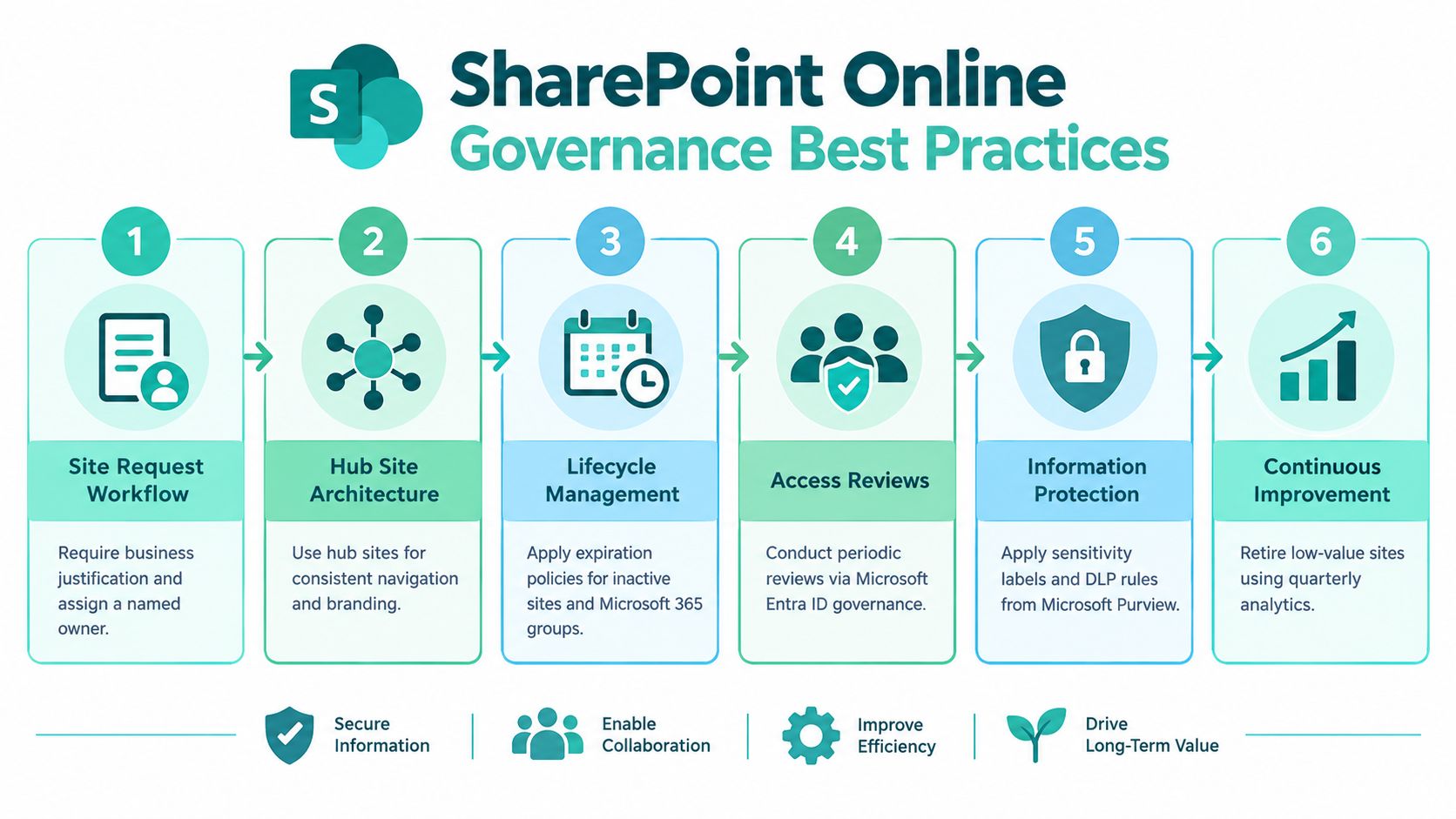
SharePoint governance fails when site creation is easy but retirement is vague. Every site should have a documented business purpose, named owners, sensitivity classification, sharing profile, retention approach, and review or expiration date. Hub sites can organize the intranet, while Microsoft 365 group expiration policies, SharePoint Advanced Management, and Microsoft Purview sensitivity labels support lifecycle and information protection.
Access is a measurable risk-control priority. Microsoft reports that the average organization has more than 50% of its sensitive data accessible to all employees, and that 22% of folders are accessible company-wide in its Microsoft 365 governance guidance Microsoft 365 governance guidance. The same source reports that lift-and-shift migrations commonly carry forward 60% to 80% of existing permission inconsistencies. Copying a legacy permission model into SharePoint Online is therefore a migration shortcut, not a governance strategy.
Use Microsoft Entra security groups instead of individual grants wherever possible. Separate owners, members, and visitors. Apply least privilege. Restrict anonymous and unmanaged external sharing, and review privileged and guest access on a defined schedule.
Govern data protection and findability together
Version history records the date, time, and user associated with changes, and authorized users can view, restore, or delete earlier versions. Microsoft describes it as protection against accidental changes and malicious activity such as ransomware, but version history cannot replace access governance, retention labels, sensitivity controls, or ownership reviews Microsoft version history guidance.
Distinguish collaborative drafts from regulated records. Retaining every draft forever expands storage and discovery scope. Retaining too few versions weakens recovery and auditability. Define versioning by library and content type, assign owners for storage growth, and align retention with formal records policies.
Findability needs its own measurement. A 2026 report of 110 SharePoint users found that 81% reported daily use, while 38% encountered findability problems weekly or daily, and 36% said improved search would have the greatest positive effect on their experience SharePoint user experience report. Review zero-result queries, reformulation, authoritative-content clicks, time to find information, stale content, and user confidence.
A bank might use sensitivity labels for customer-related content and review regulated-site access quarterly. A university could associate faculties with hub sites and archive inactive project sites under its approved lifecycle policy. A structured content governance framework should also cover approval workflows, required metadata, content types, retention, and named owners.
Before implementation, verify current Microsoft 365 licensing and feature availability. Assign at least two owners to every site. Approve SPFx components and Power Platform solutions through managed catalogs, apply DLP policies by Environment, publish a simple classification guide, and review intranet analytics quarterly. Teams needing specialist support can also find SharePoint developer talent.
8-Point Governance Comparison: SharePoint Online & Sitecore Best Practices
| Item | Implementation complexity 🔄 | Resource requirements ⚡ | Expected outcomes ⭐ / 📊 | Ideal use cases 💡 | Key advantages ⭐ |
|---|---|---|---|---|---|
| Sitecore AI Organization, Project and Environment Structure with Role-Based Access | High 🔄🔄🔄, upfront design, environment separation | Medium‑High ⚡⚡, identity & platform admin effort | Strong governance and containment ⭐⭐⭐ / 📊 limits blast radius, auditable permissions | Large multi‑brand or regulated enterprises | Limits production impact, speeds safe onboarding, audit trails |
| Helix-Based Shared Component Library and Design System Governance | Medium‑High 🔄🔄, layering, ownership and versioning rules | Medium ⚡⚡, dev owners, tooling (Storybook) and CI | Improved reuse and consistency ⭐⭐ / 📊 faster TTM, fewer defects | Multi‑brand front‑ends, Next.js headless implementations | Reduces duplication, central fixes, single accessibility rollout |
| Hub-and-Spoke Multi-Site Content Model and Site Template Governance | High 🔄🔄🔄, content modelling and inheritance rules | Medium ⚡⚡, governance board and template maintenance | Rapid, consistent rollouts across sites ⭐⭐ / 📊 uniform SEO, lower translation cost | Global country/brand sites, rapid microsite launches | Central control with allowed local overrides; shared taxonomy |
| CI/CD Pipeline and Environment Promotion Governance | Medium‑High 🔄🔄, pipeline, gates and approval policies | High ⚡⚡⚡, DevOps skills, automated tests and toolchain | Stable, frequent releases with audit trail ⭐⭐⭐ / 📊 reduced drift, faster rollback | Teams needing repeatable, auditable deployments (regulated) | Low‑risk frequent releases, clear approvals and rollbacks |
| Governance for AI-Assisted Content and Personalization in Sitecore AI | Medium 🔄🔄, policy, review workflows and logging | Medium ⚡⚡, reviewers, legal/data coordination | Faster content ops with risk controls ⭐⭐ / 📊 reduced legal/reputational risk | Organisations using generative AI / personalized experiences | Risk‑classified AI uses, mandatory human review, audit logs |
| Multilingual and Accessibility Compliance Governance (WCAG‑Aligned) | Medium‑High 🔄🔄🔄, language models, RTL, accessibility criteria | High ⚡⚡⚡, translation, QA, assistive‑tech testing | Legal compliance and inclusive UX ⭐⭐⭐ / 📊 better accessibility, SEO benefits | Public sector, multinational organisations, regulated sites | WCAG alignment, per‑language workflows, language fallback rules |
| Performance, SLA and Incident Monitoring Governance | Medium 🔄🔄, SLOs, monitoring and runbooks | Medium‑High ⚡⚡⚡, monitoring tools, on‑call and reporting | Proactive reliability and measurable SLAs ⭐⭐⭐ / 📊 fewer outages, faster response | High‑traffic portals, mission‑critical services | Early detection, incident runbooks, SLA‑linked reporting |
| SharePoint Online Site Lifecycle, Access and Information Governance | Medium 🔄🔄, lifecycle policies, classification and labels | Medium ⚡⚡, M365 features, owners, periodic reviews | Reduced sprawl and better compliance ⭐⭐ / 📊 clearer ownership, less oversharing | Enterprise intranets and secure collaboration platforms | Hub architecture, sensitivity labels, periodic access reviews |
Turning Governance Into a Standing Operating Rhythm
Governance becomes useful when it changes what people do every week, not when it fills a policy repository. Start with ownership and structure. Sitecore Projects and Environments need accountable platform and business owners. SharePoint sites and hubs need named owners, a purpose, a sensitivity classification, and a review date. Group-based access should replace scattered individual grants wherever possible.
Then govern the shared layer. Sitecore Foundation, Feature, and Project components need version rules, documentation, tests, and retirement decisions. SharePoint SPFx components, templates, metadata, and Power Platform solutions need the same treatment. A shared asset isn't governed because it exists in a library. It is governed when someone owns its quality, compatibility, security, and lifecycle.
Release gates connect architecture to production. Code, configuration, and serialized content should move through controlled Environments. AI-generated content and personalization need source checks, human review, consent alignment, and an evidence trail. Language variants and accessibility need to block material defects before publication. Monitoring then confirms whether the release works for users, not only whether the deployment completed.
The intranet requires a separate but connected rhythm. Review permissions, guest access, sharing links, retention, version history, search failures, stale content, and orphaned sites. Microsoft's governance framework treats SharePoint as an operating model covering site creation, permissions, information architecture, lifecycle, storage, classification, customization, protection, navigation, search, and support ownership Microsoft site governance guidance. That scope is a better operating model than a short list of admin-center settings.
A practical first move is a 90-day audit. In the first phase, inventory Sitecore roles, production access, component owners, AI features, SharePoint sites, hubs, groups, guests, sharing links, and retention settings. Next, rank exposure using sensitivity, broad access, external sharing, inactivity, broken inheritance, business criticality, and ownership gaps. Finally, assign remediation owners, define service levels, close the highest-risk gaps, and schedule recurring reviews.
Document the results in a governance register. Include the decision, owner, date, evidence, exception, and next review. Teams wanting an outside assessment can start at Kogifi, which works across Sitecore, Adobe Experience Manager, Microsoft 365, and SharePoint estates. Its governance work can include platform audits, headless XM Cloud delivery, multilingual experiences, SPFx intranets, performance tuning, monitoring, and incident response. A broader perspective on security governance is also available in the Nutmeg Technologies governance guide.
Kogifi provides Sitecore XM Cloud and SharePoint Online delivery, including Helix-based component libraries, Next.js architectures, SPFx components, Power Platform automation, governance audits, monitoring, and SLA-backed support. Visit Kogifi to discuss a practical review of your Sitecore AI or SharePoint estate and turn ownership, access, lifecycle, and release controls into a working operating rhythm.