


Most advice about how to customize a 404 page starts with color, illustration, humor, and a homepage button. That order is backwards for an enterprise website. A polished error screen that returns HTTP 200, loses the original URL at the edge, or redirects every failed request to the homepage can damage SEO diagnostics, campaign attribution, and operational visibility while appearing perfectly healthy in a browser.
Across Sitecore, SharePoint, CDNs, WAFs, and headless front ends, the first job is to preserve the technical meaning of the error. The second is to help the visitor recover. Design matters, but only after routing, observability, accessibility, and indexing behavior are correct.
Table of Contents
Why Most Enterprise 404 Pages Fail at SEO and Analytics
A 404 Not Found response means the server couldn't find the requested resource. It doesn't say whether the absence is temporary or permanent. HTTP standards distinguish that response from 410 Gone, which is intended for content the organization knows has been permanently removed. RFC 9110 retains this distinction and also explains that a server may return 404 instead of 403 when it shouldn't reveal whether a restricted resource exists.
That technical nuance gets lost when teams treat the error page as a visual component. A CMS may render a branded “page not found” template while the CDN or application returns 200. Search engines and monitoring tools then receive a successful response for a missing resource. Google's guidance on troubleshooting crawling errors makes the practical requirement clear: the page should explain that the resource is unavailable while the server returns an actual 404 status.
A homepage redirect creates a different failure. It sends the visitor somewhere, but it removes the original error context and makes it harder to tell whether a campaign URL expired, an internal link broke during migration, or a route was mistyped. It can also hide defects from teams responsible for fixing them.
Practical rule: A useful 404 page must be both a valid HTTP response and a recovery interface. Neither layer can substitute for the other.
The soft 404 problem
Soft 404s often appear in headless implementations where a front-end route catches an unknown path, renders a React component, and never changes the response status. The visitor sees a convincing error screen, but the delivery chain reports success. Similar problems occur when a rewrite rule sends every unknown route to the homepage or when an edge function caches the error representation under a path that later becomes valid.
Before redesigning the interface, teams should understand their actual failure patterns. A practical guide to finding broken links on a website can help identify paths that need investigation, but the resulting list still needs technical classification. An unknown external URL, a broken internal reference, a deleted campaign landing page, and a locale-routing defect shouldn't receive the same remediation.
Why the correct status affects governance
A true 404 gives SEO, analytics, and operations teams a common signal. It allows monitoring to detect route failures, helps developers correlate spikes with releases, and preserves the distinction between content that may return and content that has been intentionally retired. If the organization knows a replacement is permanent and fully equivalent, a 301 redirect may be appropriate. If no equivalent exists, returning 404 or 410 is more honest than sending users to an unrelated destination.
The architecture determines whether that honesty survives delivery. In Sitecore XM Cloud, the CMS, edge layer, and Next.js application must agree on the result. In SharePoint Online, the platform's routing behavior can limit direct server control, so the recovery experience and telemetry need a different design.
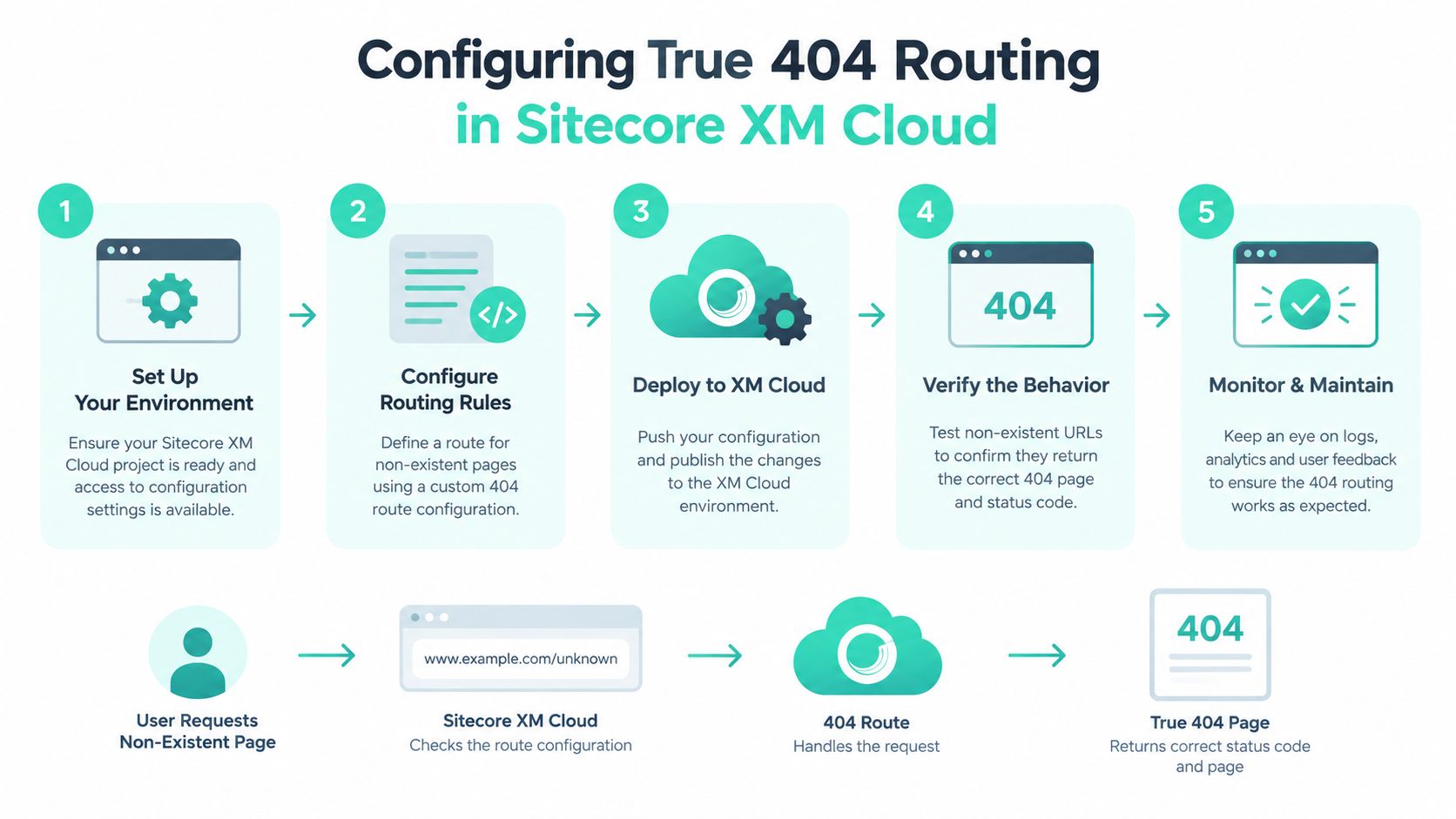
Configuring True 404 Routing in Sitecore XM Cloud
Sitecore XM Cloud is a managed, self-service cloud deployment platform delivered through a headless CMS. Its headless model gives teams flexibility, but it also distributes responsibility for error handling across content resolution, the front end, and edge delivery. Sitecore's product documentation describes XM Cloud as supporting multiple websites and edge-delivered component variants, which makes consistent routing governance especially important across brands and locales. Cloud infrastructure optimization guidance is relevant here because error handling is part of the delivery path, not just the CMS presentation layer.
Resolve content before rendering
Start with the content lookup. The application should distinguish between a published item, an unpublished item, an invalid route, and a route that maps to a valid item with missing dependencies. A missing Sitecore item or an unpublished version should trigger the front-end framework's not-found path rather than rendering the standard page shell with an error message inside it.
In a Next.js implementation, the route resolver should invoke the framework's not-found mechanism when the Sitecore query returns no usable item. The important outcome isn't the name of the function. It's that the server-rendered response carries status 404 and the response body contains the intended fallback. A client-side state such as isMissing = true isn't sufficient if the initial HTTP response remains 200.
Test the route variations
Test representative paths through the complete chain, not only through the local development server:
- Localized paths: Verify that unknown routes under every supported language or market return 404 and use the correct language metadata.
- Trailing slashes: Decide whether the canonical route includes a slash and ensure missing variants don't enter a redirect loop.
- Query parameters: Confirm that tracking parameters don't convert a missing page into a cached valid response or create uncontrolled error variants.
- Client-side routes: Test direct navigation, browser refresh, and internal transitions separately. A route that works after hydration may still fail when requested directly.
- CDN behavior: Inspect status codes, cache headers, and body content at the edge. The origin may be correct while the CDN rewrites or caches the response incorrectly.
The template should normally carry an appropriate title, avoid indexability, and avoid canonicalizing an unknown URL to the homepage. Structured data should be used only when it accurately describes the fallback content and doesn't imply that the missing page exists.
Separate moved content from absent content
A redirect belongs in the content governance layer when a deleted URL has a real successor. It shouldn't be a universal error handler. Redirecting every unknown path to the homepage removes useful evidence about broken links and can make a migration look cleaner than it is.
Sitecore Stream adds another consideration for teams working across XM Cloud, Content Hub, and Experience Platform. Sitecore documents it as an AI layer built on Microsoft Azure OpenAI Service, with embedded assistants for content creation, campaign briefs, and personalization inside supported Sitecore products. That capability can support editorial workflows, but it doesn't replace deterministic route resolution. AI can help identify likely replacement content for human review. The server still needs an explicit decision about whether to return 404, 410, or 301.
Building Fallback Experiences in SharePoint Online
SharePoint Online intranets don't always expose the same server-side controls available in a traditional application. Native page routing, hub associations, permissions, and Microsoft 365 search all influence what an employee sees after following an outdated link. The practical objective is therefore broader than setting a response code. It's preserving enough context for the employee to locate the current policy, project page, or service owner.
A useful pattern is a centralized Page Not Found experience associated with the relevant hub structure. The fallback should retain the attempted path, display a plain-language explanation, and offer a search field that sends the employee into the right Microsoft 365 or SharePoint search context. For teams building custom components, SPFx web parts provide a practical extension point for contextual recovery features.
Use SPFx for context, not decoration
An SPFx component can read the current path and query parameters, then construct a useful search prompt. It might extract meaningful terms from a former document route, preserve the user's selected hub or site context, and show links to the nearest active navigation node. The component shouldn't assume that a URL slug is a reliable title. A renamed policy page may have no obvious relationship to its former path.
Permission handling needs equal attention. Search results should respect the employee's existing Microsoft 365 permissions, and the fallback shouldn't expose document names or metadata that the user isn't allowed to see. If a result can't be displayed, the interface should offer a safe broader search or a contact route rather than revealing internal identifiers.
Make hub navigation resilient
Hub navigation should provide a stable recovery path even when a child site changes. Keep links to durable destinations such as the HR landing page, service catalogue, department home, or document centre. Where possible, maintain redirect mappings for relocated pages, but don't turn every missing route into a hub homepage redirect. The distinction preserves useful diagnostics for SharePoint administrators.
A strong intranet fallback also helps employees recognize what happened. “This policy may have moved” is more useful than a generic failure message, especially when the link came from an old email or a saved browser bookmark. The page can suggest searching by topic, department, or document type without claiming that a matching result exists.
For large estates, record the attempted URL, referring page where available, site or hub context, locale, and device category. That evidence helps administrators separate stale navigation from content retirement, permission changes, and links copied into long-lived internal documents.
Designing the Interface for Maximum User Recovery
A polished 404 page can still damage SEO and analytics if it hides a routing defect. Confirm that the response remains a real 404 before refining the interface. A page that returns a 200 status, serves stale edge content, or renders the wrong route can become a soft 404, mislead search engines, and obscure failures in a headless delivery stack.
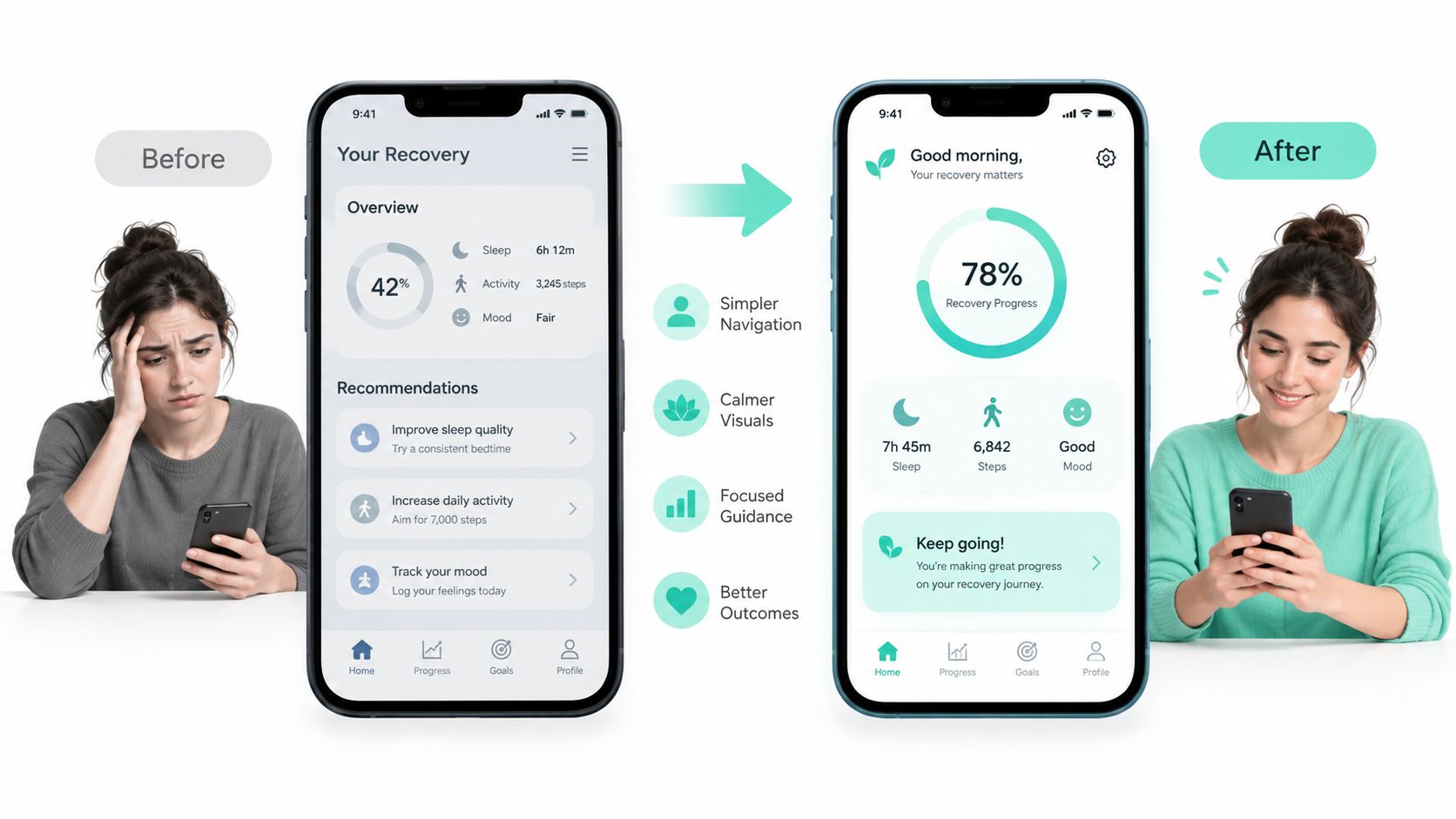
Once the response is technically correct, help the visitor choose a useful next action. A homepage button alone forces the user to restart without explaining where to go. The interface should combine an understandable message with search, context, and relevant destinations.
Industry reporting based on Springtrax and related broken-link analysis cites an approximate 73.72% exit rate among visitors who encounter broken pages, with about 23% making a second attempt to find the missing content. These figures are directional rather than universal, because outcomes vary by sector, device, brand familiarity, and error-page quality. They still show why a dead-end screen is a poor default. The analysis of better 404 page design provides the underlying context.
Put the strongest recovery action first
Recovery design starts with interface fundamentals covered in our guide to designing user interfaces. The primary action should match the information architecture. Documentation sites often need search first. Product catalogues may need the nearest category and product-family links, while intranets may need a hub selector or search scoped to the employee's business area.
Use these building blocks:
- Clear explanation: State that the requested page could not be found. Do not expose stack traces, route identifiers, or internal system details.
- Accessible search: Provide a labeled input, visible focus state, keyboard operation, and an obvious submit action.
- Breadcrumb context: Show the last reliable category, site, hub, or product area.
- Curated destinations: Offer a short set of high-value links rather than an indiscriminate list.
- Safe homepage route: Keep the homepage available, but do not make it the only recovery option.
Avoid suggestions generated only from the URL slug. Slugs may be abbreviated, localized, migrated, or unrelated to the current information architecture. Search and curated links should rely on relationships maintained by the platform or application.
Measure recovery, not just abandonment
Define recovery as a subsequent page view within 30 to 60 seconds of the 404 session, then compare outcomes by referrer, language, device, and URL pattern. A practical experiment can compare search-first and curated-link-first layouts for at least two weeks. Monitor search initiation latency, successful-result rate, subsequent page views, exit rate, and conversion continuation.
A lower exit rate does not prove that the visitor solved the task. Pair recovery events with search-result success, meaningful destination engagement, and continued task completion. If those signals remain weak, revise the destinations or search experience instead of celebrating a single improved metric.
Tracking Error Events and Segmenting Analytics Data
A 404 page becomes operationally valuable when it tells the team what failed and why. Client-side analytics alone isn't enough because the browser may never execute the tracking code, especially when the error page is deliberately lightweight or JavaScript fails. Server-side logs should preserve the requested path, referrer, locale, and device context before the response is returned.
The client can then add behavioral events such as search initiation, selected result, selected navigation link, and subsequent page view. Keep the event model separate from ordinary conversion funnels. A missing page isn't a product page view, campaign landing-page view, or completed journey, and mixing it into those reports can distort marketing decisions.
Build useful error dimensions
Segmenting by URL and referrer usually reveals more than counting total 404s. A practical diagnostic model distinguishes several patterns:
| Pattern | Likely interpretation | Useful response |
|---|---|---|
| Internal referrer with repeated path | Broken navigation or migration gap | Fix the source link and add a redirect only when an equivalent exists |
| External campaign referrer | Expired or mistyped campaign URL | Review campaign governance and landing-page ownership |
| Direct traffic with a familiar path | Bookmark, typo, or old document | Improve search recovery and assess durable redirects |
| Concentrated locale failures | Translation, route, or fallback defect | Test localized resolution and language negotiation |
| High-volume unusual paths | Bot requests or automated probing | Filter operational noise and review security controls |
This classification should guide engineering priorities. A single popular internal link that produces repeated 404 sessions may deserve faster remediation than a larger volume of irrelevant automated requests.
Preserve the evidence without polluting reports
Log the original path before any rewrite. Store the referrer when available, but treat it as incomplete because privacy controls, browsers, and security policies can remove it. Capture the selected locale and device category, then associate the event with deployment or release information in the observability platform.
The analytics implementation should mark the session as an error session and exclude it from standard acquisition and conversion reporting. A later page view can be recorded as recovery, but it shouldn't retroactively turn the missing URL into a successful landing page.
Event tracking guidance for Google Analytics can help teams structure these events, but the taxonomy should reflect the organization's actual DXP and business journeys. Sitecore teams may also connect error events to item IDs, site names, and publication states. SharePoint teams can add hub, site, and content-type context while respecting permissions.
A 404 log is not a trash bin. It's a prioritized backlog of route, content, campaign, and infrastructure evidence.
Validating Accessibility and Edge Delivery Performance
A polished 404 page can still damage search visibility and reporting if the delivery chain is wrong. Validate the complete request path through the CDN, WAF, origin, CMS, headless rendering layer, and localized routes. The same missing URL should return the same technical outcome whether the request is handled at the edge, by Sitecore or SharePoint, or by the client application.
Run the technical acceptance checks
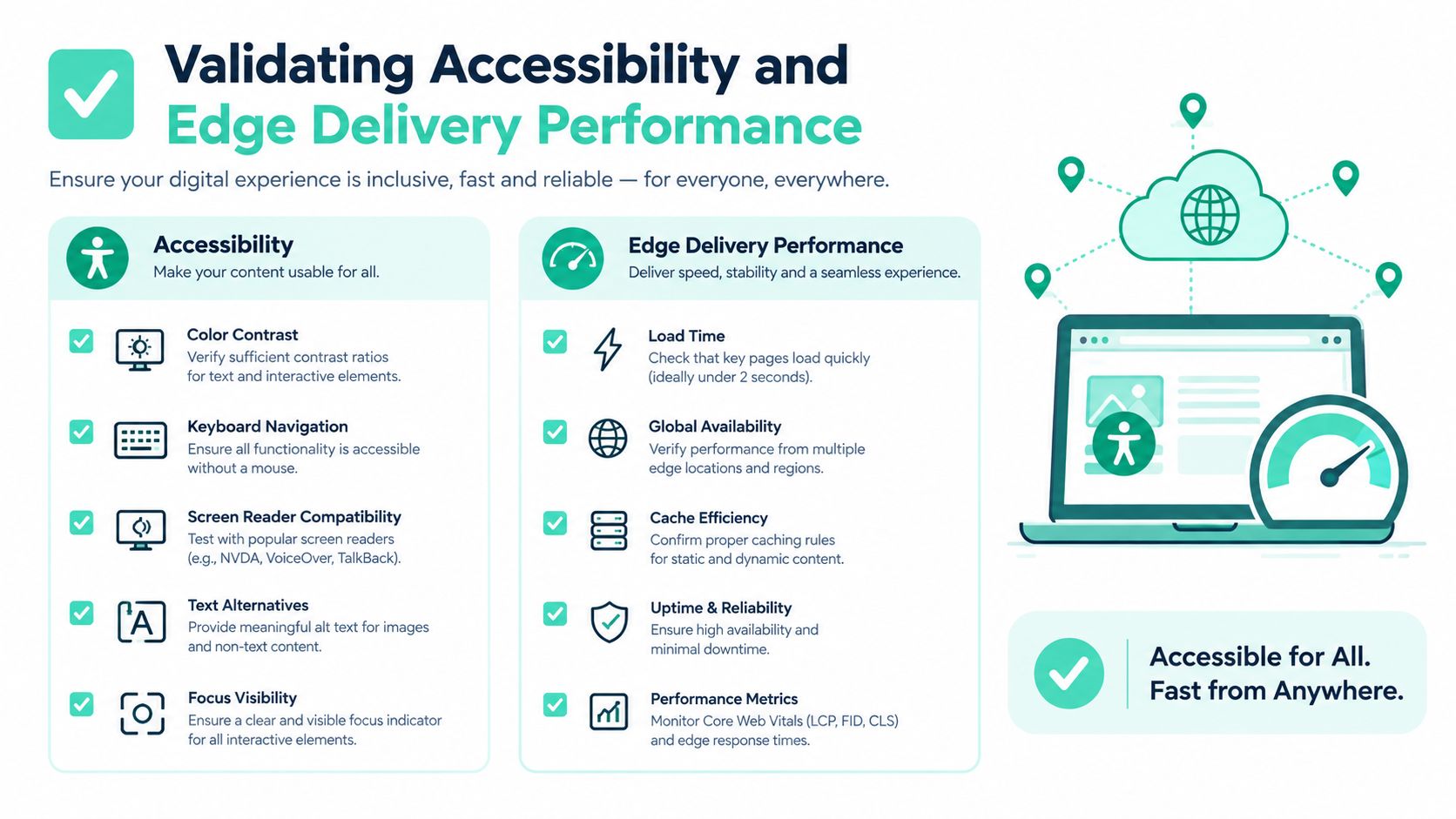
Use a representative test matrix instead of one deliberately broken path:
- Status behavior: Confirm that an unknown URL returns 404 and a knowingly permanent removal returns 410 where governance requires it.
- Canonical behavior: Check that the error page doesn't canonicalize every missing path to the homepage or another unrelated URL.
- Indexability: Verify robots directives and response behavior so the error template isn't treated as ordinary content.
- Route variants: Test locale prefixes, trailing slashes, query parameters, uppercase and lowercase behavior where relevant, and SPA navigation.
- Cache handling: Inspect CDN cache headers and confirm that a cached error cannot be served for a subsequently published resource.
- WAF interaction: Ensure security rules do not convert a normal missing request into an application error or block the fallback itself.
- Loop prevention: Request missing assets referenced by the error template and confirm that they do not trigger nested error-page requests.
- Failure modes: Disable JavaScript and test slow mobile connections so the core message, search, and navigation remain usable.
A branded page returning 200 is a soft 404, even when its copy says “Page not found.” That response can distort search interpretation and hide routing defects in monitoring. Treat it as a release blocker, not a later SEO cleanup item.
Test the human interface
The page needs one clear semantic heading, a descriptive title, a labeled search input, meaningful link text, sufficient contrast, and visible keyboard focus. Test keyboard-only navigation and screen readers. The search field should follow a logical focus order, while error messaging must not depend on color, animation, or a client-side effect.
Keep the payload small. Set mobile LCP below 1.5 seconds as the team's acceptance threshold, and avoid unnecessary chat, personalization, and full application-shell bundles. A recovery page should load the route back to useful content, not the entire production experience.
The fallback must remain useful when the client-side renderer fails. Server-render the explanation and key links where the architecture permits, then provide a basic route to search or navigation without depending on a personalization service. Edge caching also requires a purge or revalidation path, because a cached 404 can conceal a newly published page.
For teams auditing Sitecore XM Cloud, SharePoint Online, SPFx components, routing, accessibility, and edge behavior, Kogifi provides DXP implementation, modernization, performance, and Microsoft 365 delivery services. Visit Kogifi to discuss a 404 recovery flow that preserves HTTP correctness while giving users a clear path back to useful content.