


Picking a CMS for Salesforce isn't just an IT task—it's a core business decision that directly impacts how you talk to your customers and, ultimately, your bottom line. A generic CMS can't make sense of the rich customer data sitting in Salesforce, which means you're leaving personalization—and revenue—on the table. This guide cuts through the noise to help you make the right choice.
Why Your CMS for Salesforce Choice Is a Strategic Decision

Choosing your CMS is a strategic fork in the road. It determines whether you're just syncing leads or truly transforming Salesforce into the brain of a connected digital experience engine. The right integration turns customer data into personalized content, and personalized content into conversions.
This guide explores two distinct paths for integrating a CMS with Salesforce. We'll dive deep into how an enterprise DXP like Sitecore unlocks next-level personalization with its AI-driven product suite. We'll also look at how SharePoint can create secure, collaborative internal hubs.
The Core CMS Integration Choices
Your decision really comes down to your main business objective. Are you aiming for sophisticated AI-powered personalization and a composable architecture, or prioritizing secure internal collaboration? Let's break down the options.
- Enterprise DXP (e.g., Sitecore): Built for businesses that want to deliver advanced, AI-driven personalization and need a composable architecture that goes far beyond what native tools can offer. Sitecore's full product portfolio—including Content Hub, OrderCloud, and Sitecore AI—is engineered for this purpose.
- Collaboration Platform (e.g., SharePoint): The best fit for building secure internal portals and document management systems that tie into the broader Microsoft 365 stack.
The "best" CMS is the one that aligns with your strategic goals. A platform like Sitecore is engineered to use Salesforce data for complex, global customer journeys—a task that's simply out of scope for more basic solutions.
This table breaks down the fundamental differences, setting the stage for the more detailed comparison ahead.
This framework shifts the conversation from a simple feature-to-feature comparison to one centered on business outcomes. Now, let’s get into the specifics of how to pick the solution that will give you the best return on your investment.
Before you can pick the right CMS for Salesforce, you first need to get a handle on the two main ways to connect them. Each path comes with its own set of benefits and trade-offs, and your choice will ultimately define how you balance power and team collaboration.
The first route is to bring in a full-blown Enterprise DXP, with Sitecore's product suite being a prime example. The second is to use a collaboration platform like SharePoint.
The Enterprise DXP Approach with Sitecore AI
For ambitious, global companies, an Enterprise Digital Experience Platform (DXP) like Sitecore represents the most powerful integration model. This path is for businesses that see customer data as more than just records in a CRM—it's the engine for building intelligent, personalized experiences at a massive scale. Sitecore is built to merge Salesforce data with real-time behavioral insights from every single touchpoint.
This isn't just about syncing data. With Sitecore's AI and machine learning, you can get far more sophisticated:
- Orchestrate complex customer journeys, dynamically changing content based on where a user is in the sales funnel, as defined right in Salesforce.
- Implement predictive personalization that anticipates what a customer needs before they even ask, using both historical and real-time data.
- Build a composable DXP, giving you the freedom to pick and choose best-of-breed tools, like Sitecore's Content Hub for content operations or OrderCloud for B2B commerce, instead of getting locked into one vendor's ecosystem.
The Sitecore approach is built on the idea that your CMS should actively use Salesforce data to drive real business outcomes. It’s not just about showing content; it’s about delivering the right content to the right person at the right moment to boost conversions and build loyalty.
The Collaboration-Platform Approach with SharePoint
On the other end of the spectrum is the collaboration-platform approach, where SharePoint is a clear leader. This strategy shines in situations where secure, internal content management is the top priority. It's the perfect fit for building robust employee intranets, partner portals, or secure document libraries that need to link up with Salesforce data.
This model is less concerned with public-facing marketing and more focused on operational efficiency and security. For instance, a company can set up a SharePoint portal where sales teams access confidential product specs and training materials, with permissions synced directly from their Salesforce profiles. You can learn more about how a CMS and CRM can work together in our detailed article. This setup effectively turns SharePoint into a secure content hub that supports sales and service teams with a single, unified view of customer documents and internal knowledge.
Salesforce Integrations with Enterprise DXPs: A Deep Dive Comparison
Choosing a CMS for Salesforce isn't just about ticking off features. It’s about deciding what your business truly needs. Do you require the specialized power of a true Digital Experience Platform (DXP) like Sitecore to orchestrate complex, global customer experiences, or an enterprise collaboration engine like SharePoint?
This comparison cuts through the marketing noise to give CTOs and CMOs a clear look at the trade-offs, focusing on Sitecore’s impressive AI capabilities and SharePoint's role as a secure internal hub.
The AI Engine: A Tale of Two Philosophies
The fundamental difference between Salesforce’s native tools and Sitecore’s DXP is how they approach artificial intelligence. Salesforce Einstein is a powerhouse within its own environment, built to optimize processes and surface insights from CRM data. It’s fantastic for things like lead scoring or recommending the next-best-action for a sales rep.
Sitecore AI, on the other hand, was built for a much bigger stage. It’s designed to act on data from the entire customer journey, not just what’s already sitting in your CRM. It brings together Salesforce data with real-time behavioral signals from your website, mobile app, and other digital touchpoints. This creates a level of nuanced personalization that Einstein, on its own, simply can't match.
Sitecore's AI-driven personalization is its killer feature. It has the power to merge deep historical customer data from Salesforce with anonymous, real-time behavioral signals. This creates a complete customer profile that enables hyper-relevant, in-the-moment experiences, turning unknown visitors into known, loyal customers.
It’s a strategic difference. Einstein helps you work with the customers you know. Sitecore AI helps you find and guide new ones from their very first click.
Scalability and Architectural Flexibility
For any global enterprise, scalability means more than just handling traffic. It's about managing multilingual content, juggling multiple brand sites, and enforcing complex governance. This is where Sitecore's composable DXP architecture shines.
It's built for complexity. Its suite of products—like Content Hub for centralized content operations and OrderCloud for B2B commerce—can be assembled to fit your exact needs. This composable model gives you the freedom to integrate other best-of-breed tools, avoid vendor lock-in, and build a tech stack that’s ready for the future. A deep dive into enterprise DXPs must also weigh their extended capabilities, such as advanced digital asset management AI, which is critical for delivering content at scale.
SharePoint offers another flavor of scalability, one focused on internal collaboration. It’s a workhorse for empowering thousands of employees with secure access to documents and internal sites, making it a master of operational efficiency rather than a tool for public-facing marketing.
Here is a quick overview of how these platforms stack up across key enterprise capabilities.
Capability Matrix: Sitecore AI vs SharePoint
This table gives a side-by-side look at how each platform performs in critical areas like AI-powered personalization, content delivery, B2B functionality, and architectural design.
This matrix makes it clear that for complex, omnichannel enterprise strategies, Sitecore provides the flexibility and power needed.
SharePoint: The Enterprise Collaboration Hub
While Sitecore is busy perfecting the external customer experience, SharePoint is all about empowering the internal teams that make it happen. Its superpower is creating secure portals, intranets, and document management systems that integrate beautifully with both Microsoft 365 and Salesforce.
A perfect example is a sales team accessing a SharePoint portal to grab the latest battle cards and product specs. Their access permissions can be tied directly to their Salesforce profile, creating a single source of truth for all sales enablement content.
SharePoint's integration with Salesforce serves a few key purposes:
- Secure Document Management: Attach and manage sensitive client documents from SharePoint directly inside Salesforce records.
- Internal Portals: Build knowledge bases for sales and service teams that pull in contextual data from Salesforce.
- Streamlined Workflows: Automate business processes between Microsoft 365 and Salesforce to boost productivity.
SharePoint doesn’t compete with Sitecore for public websites. Instead, it’s a complementary tool that strengthens the internal operations that support those external experiences. To better understand how to evaluate these different approaches, it helps to compare CMS systems and their underlying philosophies.
Data Governance and Security Considerations
Integrating platforms makes data security exponentially more complicated. Salesforce has a robust security model, but protecting data across multiple systems requires a comprehensive governance strategy.
A DXP like Sitecore, designed from the ground up for enterprise security, uses a multi-layered strategy. Its composable architecture allows for isolated security contexts for different applications, which shrinks the potential blast radius of a breach. Platforms like Sitecore Content Hub also enforce rigorous governance, ensuring only approved and compliant assets are used across any channel. This is non-negotiable for enterprise-grade deployments.
SharePoint’s security model is one of its biggest selling points. Built on the trusted Microsoft security framework, it offers the granular permission controls and compliance features that regulated industries like finance and healthcare depend on, providing a secure vault for content that fuels the customer lifecycle managed in Salesforce.
Architecting Your Integration for Performance and Scale

A successful CMS for Salesforce integration is more than just connecting two systems. It's about designing a solid architecture built for speed, security, and growth. For any IT leader or solution architect, the choice of integration pattern is a defining one. This decision directly impacts everything from data sync speeds to delivering a consistent experience across all your digital touchpoints.
We’ll walk through the main integration patterns, looking specifically at how enterprise platforms like Sitecore and SharePoint hook into Salesforce to create a unified, powerful system. The objective isn't just to build something that works today, but an architecture that can handle whatever you throw at it tomorrow.
Connector-Based Integration with Sitecore
When speed and reliability are your top priorities, a connector-based approach is almost always the right place to start. Sitecore provides official, pre-built connectors designed to bridge its DXP with Salesforce. These aren't simple data-sync tools; they're sophisticated integrations that fast-track development and lower project risk.
Going with a connector gives you some major advantages right out of the gate:
- Bidirectional Data Flow: The connector sets up a deep, two-way sync. For instance, a visitor’s real-time website behavior tracked in Sitecore can be sent to Salesforce, while updated contact details in Salesforce are pulled back to Sitecore to personalize their very next visit.
- Reduced Development Time: These connectors handle the tricky API authentication, data mapping, and error handling out-of-the-box. This easily saves hundreds of development hours, letting your team focus on building value instead of custom plumbing.
- Maintained and Supported: An official connector from a vendor like Sitecore means the integration is kept up-to-date and supported, protecting your investment as both platforms evolve.
A connector-based architecture is the fastest path to a robust integration. It establishes a reliable data highway between Sitecore and Salesforce, creating a unified customer profile that powers Sitecore’s AI-driven personalization engine right from the start.
This approach is perfect for enterprises that need to get a powerful, integrated solution to market quickly, all while ensuring the connection is stable and follows best practices.
API-First Integration for Composable Architectures
While connectors are a fantastic starting point, an API-first strategy delivers the ultimate flexibility. It’s the backbone of modern headless and composable architectures. This approach treats all platform functions as a series of endpoints that can be called by any application, giving you the agility to deliver consistent experiences across web, mobile, IoT devices, and any other channel you can dream up.
Sitecore's composable DXP is built on this very philosophy. Products like Content Hub and OrderCloud expose rich APIs that enable custom, granular integrations with Salesforce. This is a game-changer for complex global operations. Imagine a B2B manufacturer using Sitecore OrderCloud for its e-commerce platform. An API-first integration allows real-time inventory checks, customer-specific pricing, and complex order data to flow seamlessly between the commerce engine and Salesforce CRM.
This architectural pattern is non-negotiable for:
- Omnichannel Consistency: Delivering the same personalized content and product information to a mobile app, a customer portal, and an in-store kiosk.
- Future-Proofing Your Stack: Making it easy to swap in new best-of-breed tools without having to rebuild your entire integration from scratch.
- Custom Workflows: Building highly specific business logic that goes way beyond what a standard connector can do.
To build a truly modern digital platform, you have to understand the core principles of this model. You can get a much deeper look into this architectural style in our detailed guide on the API-first approach.
Integrating SharePoint for Secure Portals
SharePoint plays a completely different role in a Salesforce integration architecture than Sitecore does. Its strength lies in creating secure internal portals, partner extranets, and compliant document repositories. Here, the integration is all about operational efficiency and secure information sharing, not public-facing marketing.
Best practices for a solid SharePoint-Salesforce integration include:
- Leveraging Microsoft Power Automate: Use low-code workflows to connect SharePoint document libraries with Salesforce records. For example, you can automatically create a new folder in SharePoint every time a new Opportunity is created in Salesforce.
- Using Third-Party Connectors: Several specialized tools can create a seamless bridge, allowing users to view and interact with SharePoint documents directly within the Salesforce UI.
- Enforcing Strict Permissions: Make sure your SharePoint permissions mirror Salesforce's security model. This is critical for preventing unauthorized access to sensitive documents.
This creates a powerful combination where Salesforce manages the customer relationship, and SharePoint securely manages all the associated content and documentation—all within a familiar Microsoft ecosystem. When designing your CMS for Salesforce integration, it's vital to follow robust architectural principles. Discover how to apply these relevant insights into your strategy, like these 10 Data Architecture Best Practices for Scalable Systems in 2025. Following these guidelines ensures your solution remains secure, scalable, and performs under enterprise-level demand.
How Enterprises Win with Sitecore AI and SharePoint
Architectural theory is one thing, but the real test of a CMS for Salesforce is its impact on the bottom line. Let's move from diagrams to real-world applications and see how enterprises are actually using Sitecore and SharePoint to boost revenue and streamline operations.
These scenarios show what happens when a powerful DXP integration turns Salesforce from a simple system of record into a true engine for business growth.
Use Case 1: B2B Manufacturing with Sitecore AI
A global B2B manufacturer was struggling with a long, complex sales cycle. Anonymous prospects spent months researching technical specs on their site before ever making contact. The goal was to pinpoint high-value buyers early on and deliver targeted content to get them sales-ready.
Their solution was to integrate Sitecore AI with Salesforce. Here’s how it works:
- Anonymous Personalization: An engineer lands on the site to research a specific component. Sitecore gets to work, tracking every page view, document download, and time spent on the page to build a detailed anonymous profile.
- Predictive Nurturing: Sitecore's AI analyzes this behavior and recognizes that it matches the patterns of past high-value customers. It immediately starts personalizing the experience, serving up relevant case studies and technical articles tailored to the visitor's industry.
- Lead Qualification: The visitor finally fills out a "request a sample" form. This single action triggers a data push from Sitecore to Salesforce, creating a new Lead record that includes the visitor's complete behavioral history.
- Sales Handoff: When the sales team gets the lead, they have full context. They can see every piece of content the prospect engaged with, making the first call incredibly effective. The lead is already warmed up and informed, significantly shortening the sales cycle.
This integration allows the manufacturer to orchestrate the entire customer journey. Sitecore AI uses Salesforce data to understand what a qualified lead looks like, and then uses real-time website behavior to find and nurture those leads automatically.
Use Case 2: Financial Services with SharePoint
A large financial services firm had a different set of challenges centered on security and compliance. They needed a secure portal for wealth management clients to access statements, sign documents, and talk to their advisors. Meanwhile, their internal teams required a unified view of all client documents and interactions, all governed by strict access controls.
By integrating SharePoint with Salesforce, the firm built a secure and highly efficient client ecosystem.
- Secure Client Portal: The firm constructed its client portal on SharePoint. When a client logs in, the portal securely uses their Salesforce Contact ID to pull in relevant data, like account summaries and a list of their dedicated advisors.
- Compliant Document Management: Every client document, from onboarding forms to quarterly reports, is stored in SharePoint’s secure document library. SharePoint’s powerful permission model ensures that only authorized advisors and compliance officers can view specific files. You can learn more about how an enterprise CMS powers AI personalization and elevates these kinds of portals.
- Unified Advisor View: Inside Salesforce, advisors get the complete picture without switching screens. An embedded SharePoint component on the Salesforce Account page displays all associated client documents directly. This simple change boosted efficiency and dramatically reduced the risk of errors.
This setup plays to each platform's strengths. Salesforce remains the single source of truth for customer relationship data, while SharePoint provides the secure, compliant backbone for content and collaboration. The outcome is a frictionless experience for both clients and internal teams, which builds trust and drives operational excellence.
So, how do you make the right call for your business? Picking the right CMS for Salesforce isn't about finding a single "best" solution—it's about aligning your technology choice with your most important business goals. There's no one-size-fits-all answer here.
The path you take should be a direct reflection of what you want to achieve. Are you aiming to build out sophisticated, AI-driven customer journeys? Or is the priority to lock down internal collaboration and secure your data?
This decision tree helps visualize how different strategic priorities point toward very different DXP solutions.
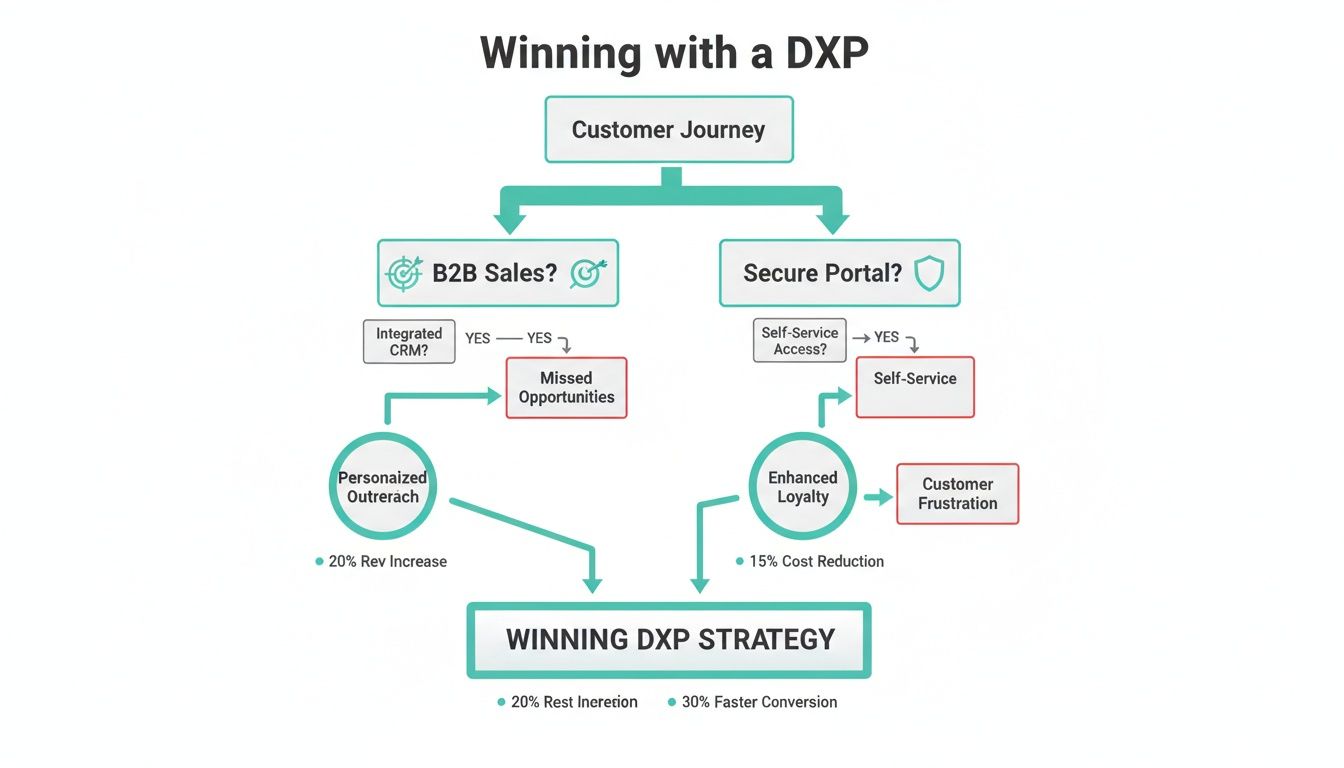
As you can see, the best choice really comes down to whether your focus is on winning new customers and refining their external experience, or on boosting internal productivity and security.
For Unmatched AI-Driven Personalization: Sitecore
When your enterprise demands the absolute best in AI-powered personalization and a future-ready composable DXP, we consistently recommend Sitecore. Its product portfolio is engineered to take Salesforce to the next level by blending rich CRM data with real-time behavioral insights from across your digital properties. This combination allows you to orchestrate the entire customer journey with a precision that drives real revenue growth.
The real power of integrating Sitecore with Salesforce is its ability to act on data from the entire customer lifecycle. It’s not just about managing contacts you already know; it's about using AI to find, nurture, and convert new prospects on a global scale.
For Secure Collaboration in the Microsoft Ecosystem: SharePoint
For organizations already heavily invested in the Microsoft stack, SharePoint is the logical and powerful choice. Its core strength has always been secure document management and internal collaboration. When you connect SharePoint to Salesforce, it transforms into a secure content repository for your sales and service teams, creating a single, compliant source for all customer-related documents and interactions.
This is the go-to approach for businesses in regulated industries or any company that needs to give its internal teams secure, streamlined access to critical information.
- Choose SharePoint if: Your main goal is building secure internal portals, improving document management, and streamlining workflows for teams that live in both Salesforce and Microsoft 365.
- Choose Sitecore if: Your focus is on public-facing digital experiences, delivering content across multiple channels, and using predictive AI to boost conversions and customer loyalty.
For a true enterprise-level transformation, the strategic decision really comes down to the market-leading DXP muscle of Sitecore versus the secure, collaborative power of SharePoint.
Frequently Asked Questions
Choosing the right CMS for Salesforce often brings up a lot of questions, both for marketing leaders and the tech teams that support them. Here are some straightforward answers to the most common ones we hear.
Can Sitecore AI Personalize for Anonymous Visitors?
Absolutely. In fact, this is one of Sitecore's biggest strengths. Sitecore’s AI is brilliant at tracking real-time behavioral data from anonymous visitors as they move through your website. It builds a rich profile based on every click, download, and page view.
This lets Sitecore serve up personalized content and unique experiences long before a visitor ever gives you their email. Once they finally do identify themselves, that entire behavioral history gets synced to their new Salesforce record. Your sales team instantly gets a deep, contextual understanding of that person's journey.
How Does SharePoint Integrate for Secure Portals?
SharePoint integration with Salesforce is almost always about creating secure internal and partner-facing portals, not public-facing websites. It's built for document management and collaboration, fitting perfectly within the Microsoft ecosystem.
A typical integration uses Microsoft Power Automate to link the two systems. For instance, you could set up a workflow that automatically creates a new SharePoint folder whenever a new Account is added in Salesforce, keeping all related documents organized.
The real goal of a SharePoint-Salesforce integration is to establish a single, secure source of truth for customer documents and internal knowledge. It centralizes content for sales and service teams right inside the Salesforce UI, which boosts both efficiency and compliance.
When Should I Choose Sitecore over SharePoint?
The choice between Sitecore and SharePoint really boils down to your main business goal. They play very different roles when integrated with Salesforce.
- Choose Sitecore if your focus is on public-facing digital marketing. It's the right tool for omnichannel content, predictive AI, and personalizing the customer experience to drive conversions.
- Choose SharePoint when your objective is building secure internal portals. It excels at streamlining document management and improving collaboration for teams already invested in the Microsoft 365 suite.
Ultimately, Sitecore is engineered to master the external customer journey. SharePoint is built to optimize your internal operations and security.
Ready to transform your Salesforce data into a powerful digital experience engine? Kogifi specializes in implementing advanced DXP solutions with Sitecore AI to drive measurable business results. Contact us today to architect your success.