Your team probably has the same problem I see in large organizations all the time. Campaigns live in one tool, customer data sits in another, product usage signals stay trapped in analytics, and regional teams keep building local workarounds that nobody governs centrally. The result isn't just inefficiency. It's inconsistent experiences, weak attribution, and personalization that breaks the moment a customer moves from one channel to another.
That's why marketing automation SaaS matters now in a different way than it did a few years ago. This category has moved from niche tooling to a strategic layer. Industry trackers estimate global marketing automation revenue at just over $8 billion in 2024, up 12.6% year over year, with projections reaching $21.7 billion by 2032, and 70% of marketing leaders planned to increase investment in 2025 according to Statista's marketing automation market overview. For enterprise teams, that shift is less about buying another campaign tool and more about building an operating model that can support coordinated, omnichannel marketing without stitching together fragile processes by hand.
Table of Contents
- Moving Beyond Disconnected Marketing Efforts
- Audience and identity must be usable
- Orchestration has to span channels and moments
- AI only matters when it improves decisions
- Analytics must connect action to outcome
- Where Sitecore fits in the architecture
- How Sitecore AI changes the workflow
- What works and what usually fails
Moving Beyond Disconnected Marketing Efforts
In most enterprise environments, the problem isn't lack of software. It's lack of coordination. Marketing owns campaign tools, sales owns CRM, product teams own behavioral data, and content teams publish into a CMS that often has no direct connection to lifecycle orchestration.
That fragmentation creates a predictable set of failures. A lead downloads a report but gets treated like a new visitor on the next visit. A customer who already adopted one product line still receives beginner onboarding emails. Regional teams duplicate journeys because nobody trusts the central data model. Teams then call this a personalization problem, but the root issue is architectural.
Disconnected marketing efforts usually fail long before launch day. They fail when teams define audiences differently in each system.
Marketing automation SaaS solves this when it's implemented as a workflow and decision layer, not as an email engine. In practice, that means one place where audience conditions, journey triggers, campaign rules, and outcome data can work together across web, email, paid media, service touchpoints, and sales follow-up.
The distinction matters. A basic automation tool can send messages on a schedule. An enterprise automation platform can react to customer context. Those are not the same capability.
Three signs you need a platform shift:
- Journey gaps across channels: Teams can launch channel-specific campaigns, but they can't sustain a coherent customer journey from anonymous visit through renewal or expansion.
- Attribution disputes: Marketing, sales, and digital teams all report different numbers because each tool defines conversion and influence differently.
- Localization without governance: Regional or business-unit teams need flexibility, but there's no shared model for segments, triggers, naming, or approval.
DXP integration becomes decisive. If your automation layer doesn't understand your content, your customer data, and your delivery channels together, it becomes another silo. For large organizations, the right answer is rarely more point tools. It's a system that acts as the central nervous system for digital engagement and can support the complexity your teams already live with.
Core Capabilities of an Enterprise Automation Platform
An enterprise platform has to do more than automate sends. It needs to unify audiences, coordinate journeys, support decisioning, and prove business impact. If one of those pieces is weak, teams end up compensating with spreadsheets, exports, and manual intervention.
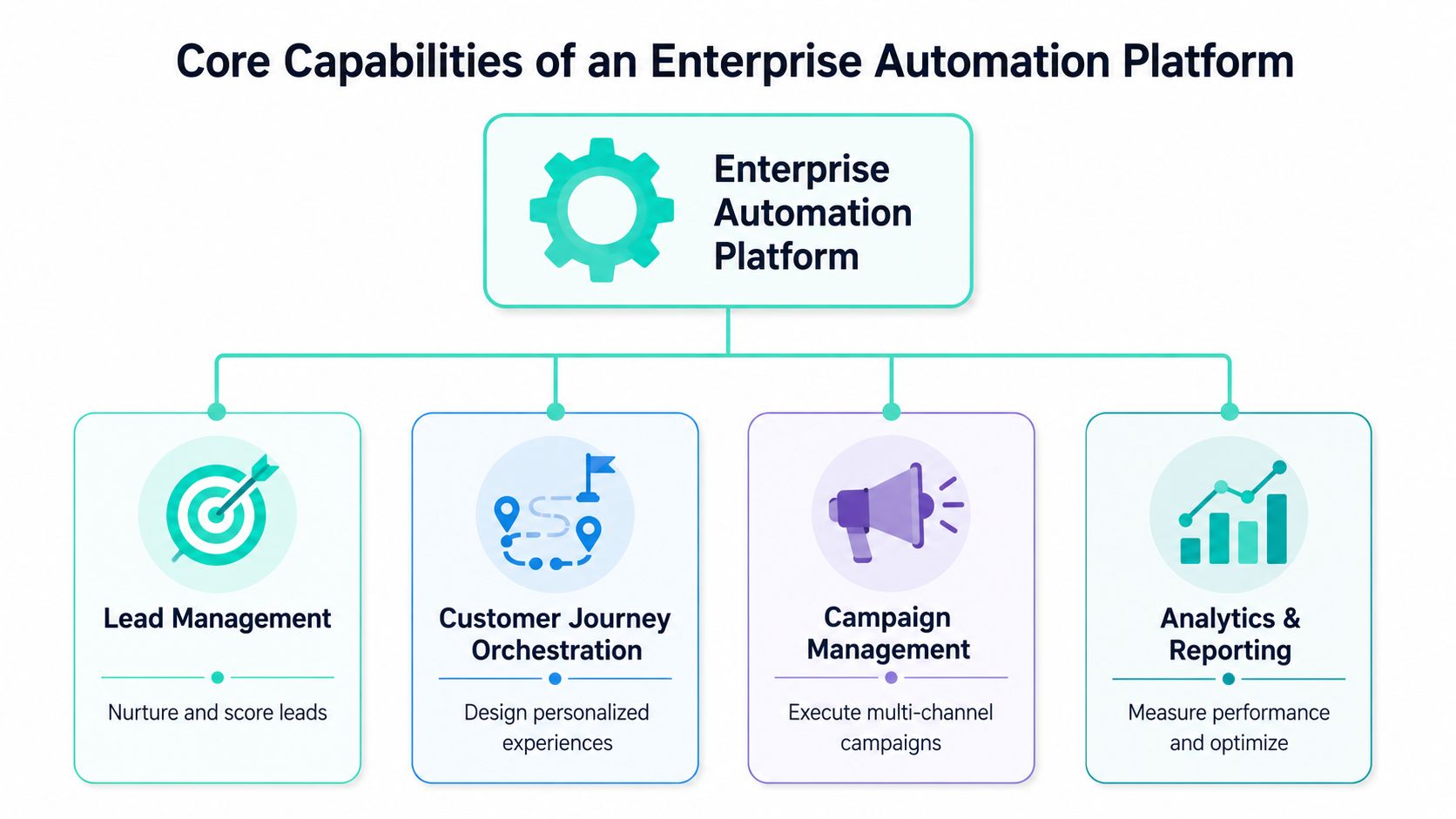
A useful way to assess the stack is to compare it against the practical workflow demands your teams already have in marketing workflow automation. The platform should reduce operational friction, not hide it behind a prettier interface.
Audience and identity must be usable
Most organizations already have customer data. The harder problem is making that data usable in real time and across channels.
A strong platform gives teams one audience model that can combine known profiles, anonymous behavior, consent status, account relationships, and lifecycle state. It should support segmentation that marketers can work with, while still preserving the identity rules and data quality controls that IT requires.
What works:
- Shared audience definitions: Sales, digital, and campaign teams use the same lifecycle criteria.
- Profile enrichment: Behavioral and transactional signals update audience membership without manual imports.
- Identity resolution discipline: Profiles don't multiply every time a person changes device, browser, or email address.
What doesn't work is a setup where each channel keeps its own segment logic. That always turns into conflicting journeys and duplicate communications.
Orchestration has to span channels and moments
Journey orchestration isn't just drip email. In enterprise environments, it means coordinating web experiences, triggered messages, CRM tasks, suppression logic, and follow-up actions around customer state.
Some interactions should happen instantly. Others should wait for a sales action, a consent change, or a product milestone. Good platforms handle both. Weak ones force everything into time-based sequences and then call it automation.
A useful test is simple. Can your team suppress a campaign when a customer completes the goal elsewhere? If not, you don't have orchestration. You have scheduled messaging.
AI only matters when it improves decisions
AI features are easy to market and easy to overvalue. The only AI capability that matters in production is the one that helps teams decide faster, personalize more accurately, or manage content at a scale they couldn't handle manually.
That can include content classification, offer selection, next-best-action support, or audience prioritization. But if the AI output isn't connected to journeys and content delivery, it remains a demo feature.
Practical rule: Evaluate AI by the workflow it changes, not the label on the feature set.
Analytics must connect action to outcome
Reporting can't stop at opens, clicks, or page views. Enterprise teams need visibility into journey progression, audience movement, assisted conversion, pipeline contribution, and downstream value.
A simple benchmark table helps separate surface-level reporting from decision-grade analytics:
| Capability | Weak setup | Strong setup |
|---|---|---|
| Campaign reporting | Channel-specific dashboards | Cross-channel journey reporting |
| Audience insight | Static list membership | Dynamic lifecycle movement |
| Business alignment | Marketing metrics only | CRM and revenue-linked outcomes |
| Optimization | Manual post-campaign review | Ongoing rule and content tuning |
If your platform can do these four things well, it can support serious marketing automation SaaS in an enterprise context. If it can only handle one or two, the rest of the burden lands back on your teams.
Unlocking Strategic Value in Your Organization
The business case gets easier once teams stop treating automation as labor reduction alone. Yes, it reduces repetitive execution. The larger value comes from making better decisions at the right moment, at scale, and with fewer handoffs between departments.

Why executives approve the investment
The strongest argument for adoption is still commercial. Businesses earn an average of $5.44 for every $1 spent on marketing automation, with some studies in the same evidence set reporting 451% higher qualified leads and an average 10% increase in the B2B sales pipeline rate, as summarized by Inbeat's marketing automation statistics roundup.
Those numbers explain why mature organizations stop running automation as a side tool and start treating it as operational infrastructure. In practice, the value shows up in a few concrete ways:
- Better lead progression: Sales receives contacts with more context and clearer buying signals.
- Stronger expansion motions: Customers see cross-sell, onboarding, and retention journeys based on actual engagement rather than generic schedules.
- Less operational waste: Teams spend less time exporting lists, fixing overlap, and rebuilding the same campaign logic in multiple tools.
The quality of the business case depends on whether your architecture can tie activity to outcomes. If campaign activity never meets CRM status or revenue data, the platform will always look weaker than it is.
Why public sector teams should care too
Public sector and education organizations often frame this differently, but the need is similar. They need to deliver relevant information, reduce communication friction, and maintain strong governance across large, multilingual, and accessibility-sensitive environments.
Automation helps when it supports service delivery rather than marketing jargon. A citizen or student shouldn't have to interpret generic messages meant for everyone. They should receive content and follow-up that reflects the service stage they are in.
That requires:
- Clear audience rules: Residents, applicants, staff, students, and partners shouldn't all enter the same communication flows.
- Accessible delivery: Content and channel choice need to align with accessibility and language requirements.
- Auditability: Teams need to know why a person received a message and which system supplied the trigger.
Enterprise ROI and public-sector value are measured differently, but both depend on the same thing. Connected data, controlled journeys, and accountable execution.
When leadership understands that automation is a control system as much as an efficiency tool, funding conversations get much easier.
The Sitecore AI Approach to Marketing Automation
Sitecore stands out when organizations want marketing automation embedded inside a broader digital experience architecture rather than bolted onto it after the fact. That difference becomes important as soon as you need content, identity, data, and decisioning to operate together across owned channels.

Where Sitecore fits in the architecture
In the Sitecore ecosystem, the architecture becomes clearer when you assign each product a distinct job.
XM Cloud handles content operations and digital experience delivery. It gives teams structured content, component-based publishing, and governance suitable for distributed organizations. For automation, that matters because journeys are only as good as the content they can deliver.
Sitecore CDP provides the customer data foundation. It collects and unifies customer data across touchpoints so segmentation and decisioning aren't built on partial views. Many enterprise programs either become credible or collapse at this juncture. If the profile model is weak, every downstream journey becomes fragile.
Sitecore Personalize applies decisioning to real experiences. It selects content, offers, and interactions based on audience context and behavior. In a proper setup, this isn't limited to homepage variants. It extends into onboarding, re-engagement, service journeys, and account-based scenarios.
Used together, these tools support a composable approach where content, customer understanding, and orchestration stay connected. That's a better fit for enterprises than forcing one monolithic application to own everything poorly.
A practical way to operationalize this is through clearly defined marketing automation strategies mapped to lifecycle moments, owned channels, and business outcomes.
How Sitecore AI changes the workflow
AI changes the economics of marketing automation when it removes manual work from decisions that used to be too expensive, too slow, or too inconsistent to scale. That is the more useful lens than asking whether a platform has AI features.
As noted in a16z's analysis of AI opening new SaaS markets, the key question is no longer just which automation features exist, but which workflows become economically viable when AI removes manual work. In the Sitecore context, that's where Sitecore AI becomes important. It makes hyper-personalization at scale more practical because teams can classify content faster, support decisioning more intelligently, and reduce the manual effort needed to maintain personalized experiences across large estates.
Here is the product view many teams miss:
| Sitecore capability | What it changes operationally |
|---|---|
| Content intelligence | Reduces manual tagging and improves content discoverability |
| Decision support | Helps teams move from static segments to contextual interactions |
| Personalization at scale | Supports more variants and experiences without linear increases in manual effort |
| Workflow efficiency | Lets marketers and content teams spend more time on strategy and QA than repetitive setup |
This matters most in enterprises with many brands, markets, or content owners. Manual personalization doesn't fail because the idea is wrong. It fails because governance and scale make it too expensive to sustain.
A short product overview helps illustrate how Sitecore frames that capability in practice:
What works and what usually fails
The strongest Sitecore implementations share a few patterns:
- They define the data contract early: Customer profile fields, event names, consent handling, and lifecycle states are agreed before journey design starts.
- They keep content structured: Reusable content models support localization, testing, and personalization much better than page-specific copy blocks.
- They separate governance from execution: Central teams define standards, while regional teams operate within those boundaries.
The weak implementations usually do the opposite. They start with a journey builder demo, import inconsistent data, and expect personalization to emerge later. It won't.
From an architecture standpoint, one practical option for enterprises that need a Sitecore-centered operating model is working with a delivery partner such as Kogifi, particularly where XM Cloud, CDP, Personalize, and SharePoint need to coexist under one governance model. The important point isn't the vendor label. It's whether the implementation team can handle DXP architecture, integration design, and operating model design together.
Integrating with Your DXP and SharePoint
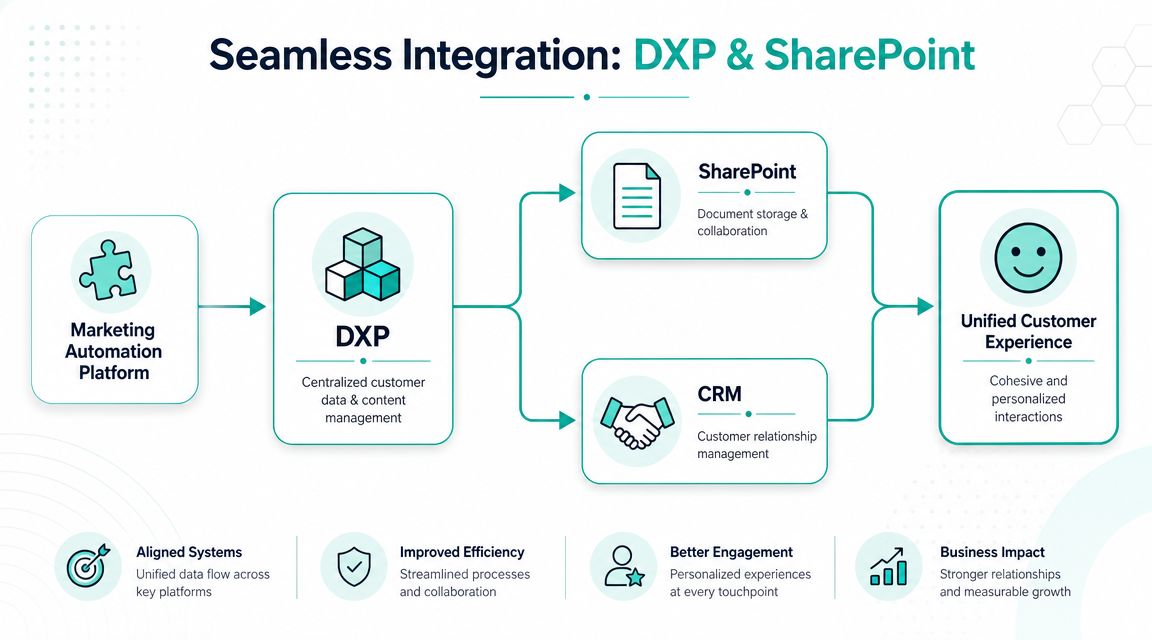
Integration is where many marketing automation programs become more complicated than they need to be. Teams keep adding tools because each one solves a local problem, then spend the next year trying to reconcile duplicate audiences, inconsistent triggers, and broken attribution.
Keep the stack small and connected
One useful benchmark is this. A practical guide reports that the average SaaS company uses 91+ tools in 2026, but the most effective stacks contain 8-15 core tools, with CRM, email marketing, analytics, and marketing automation integrated through APIs or native connectors and supported by shared naming conventions, as outlined in this SaaS martech stack guide.
That lines up with what works in enterprise delivery. Fewer core platforms with deeper integration almost always outperform sprawling stacks with shallow syncs.
For Sitecore-centered environments, the integration priorities are usually:
- Customer data flow: Sitecore CDP or your customer data layer should receive behavior and profile updates from core systems without creating parallel records.
- Content and experience flow: XM Cloud should remain the governed content source for owned experiences, even when campaigns trigger those experiences elsewhere.
- Commercial signal flow: CRM and revenue systems need to send lifecycle changes back into the automation layer so journeys can adapt.
The cleanest architecture usually treats the DXP as the experience and content center, the CRM as the relationship system of record, and the automation layer as the orchestration engine. That model is far easier to govern than a set of bilateral point integrations.
A related architectural consideration is whether your customer data model is mature enough to support cross-channel automation. If it isn't, teams should address that before scaling journeys through a broader enterprise customer data platform model.
SharePoint has a real role in the model
SharePoint often gets ignored in marketing discussions, but in enterprise and public-sector environments it plays an important role. It holds documents, internal communications, knowledge assets, policies, and operational content that influence customer-facing workflows indirectly.
The mistake is trying to turn SharePoint into the customer experience layer. It isn't built for that. The better pattern is to connect it where it adds value:
| System | Best role in the architecture |
|---|---|
| Sitecore DXP | External digital experiences, personalization, governed content delivery |
| SharePoint | Internal collaboration, document workflows, controlled content repositories |
| CRM | Contact, account, and opportunity management |
| Automation layer | Journey logic, triggers, suppression, and orchestration |
When SharePoint integration is necessary, keep the contract narrow. Sync approved documents, metadata, or workflow statuses that are relevant to campaign or service execution. Don't attempt to mirror whole repositories into the marketing stack. That creates complexity without improving customer experience.
The best integrations are selective. They move the signals that matter and leave the rest where it belongs.
Implementation Best Practices and Governance
Technology isn't the hard part once the architecture is sound. The harder part is adoption without chaos. Most failed programs don't collapse because the platform lacked features. They fail because ownership, process, and data discipline were left undefined.
Start with operating model, not journeys
Teams often want to begin with a flagship nurture flow or personalization use case. That's understandable, but it puts execution ahead of foundation.
A stronger sequence looks like this:
- Define the business case: Identify the workflows that matter most to the organization. Lead handoff, onboarding, service adoption, upsell, retention, or public information delivery.
- Map system ownership: Decide which platform owns profile data, content, consent, triggers, and outcome reporting.
- Create the data contract: Standardize event names, lifecycle stages, taxonomy, and suppression rules.
- Launch in phases: Start with a controlled set of journeys and a small group of teams, then expand once reporting and governance hold up.
- Train for roles, not features: Marketers, content authors, analysts, and admins need different operating guidance.
This prevents a common failure mode. Teams build a complex journey, then discover halfway through rollout that the data doesn't support reliable triggering or that regional teams can't maintain the content workload.
Governance decides whether the platform scales
Governance has to cover more than approvals. It needs to define how the organization will keep automation accurate, compliant, and manageable over time.
A durable governance model includes:
- Data hygiene rules: Who can create fields, events, taxonomies, and segments.
- Permission boundaries: Which teams can publish journeys, approve audiences, and change identity logic.
- Privacy controls: Consent handling, retention policies, regional compliance workflows, and audit trails.
- Content standards: Naming conventions, modular content design, localization workflow, and accessibility review.
- Performance review cadence: Regular checks on journey overlap, stale segments, broken triggers, and reporting integrity.
A center of excellence doesn't need to own every campaign. It does need to own the standards that keep campaigns from conflicting with each other.
Implementation partners matter here because the job isn't only technical deployment. Enterprises need a team that can work across architecture, delivery, governance, and change management. If your implementation plan focuses mostly on templates and journey canvases, it isn't mature enough yet.
Measuring Success with Real-World Examples
The reporting model should prove whether automation improved business outcomes, not just whether messages went out. That means tracking conversion through stages, audience progression, engagement quality, influenced pipeline, retention-related signals, and the operational health of the automation program itself.
What to measure
The most useful KPI set is usually a mix of commercial, behavioral, and operational measures:
- Commercial metrics: Pipeline contribution, opportunity progression, expansion influence, renewal support.
- Behavioral metrics: Activation milestones, repeat engagement, content consumption tied to lifecycle stage.
- Operational metrics: Time to launch, duplicate audience reduction, journey completion, trigger accuracy.
The highest-value technical pattern is connecting product-event telemetry, CRM data, and revenue metrics into one workflow engine so teams can trigger onboarding, upsell, and retention actions from real behavior rather than static sequences, as described in Gitnexa's guide to SaaS growth patterns.
Two implementation patterns
Consider a global enterprise selling multiple services through the same digital estate. A visitor explores one solution area repeatedly, downloads implementation content, and later attends a webinar. In a weak setup, each action creates separate campaign responses. In a stronger Sitecore-centered model, those signals update the same profile, adjust the web experience, notify CRM when intent is meaningful, and suppress beginner messaging once the account moves forward.
A public-sector example looks different but follows the same architecture. A resident begins a service application, pauses, then returns through a different channel. If identity, content, and workflow systems are connected, the organization can guide that person based on the actual application state, provide the next relevant information, and avoid sending generic reminders that reduce trust.
In both cases, the result doesn't come from automation alone. It comes from coordinated data, governed content, and clear ownership of the workflow engine.
If your organization is evaluating marketing automation SaaS inside a Sitecore or Microsoft environment, Kogifi can help assess architecture, integration scope, and rollout priorities before implementation complexity spreads across teams.