


You already have the platform stack. Sitecore is live. SharePoint holds documents, policies, product files, or internal knowledge. Analytics tracks behavior. CRM knows account history. Commerce knows orders. Marketing automation sends campaigns.
And yet the experience still feels disconnected.
A visitor reads the same generic hero banner after downloading three product sheets. A known customer gets acquisition messaging instead of cross-sell content. Regional teams publish content in SharePoint that never informs website personalization. The AI features are there, but the inputs are weak, fragmented, or late.
That’s usually the core issue. Not a lack of channels, content, or ambition. It’s the absence of a reliable data foundation that can collect, organize, and activate signals across systems in a way your DXP can use. A data management platform matters because modern digital experiences don’t fail at the presentation layer first. They fail at the data layer.
The Data Disconnect in Your Digital Experience
A pattern shows up in enterprise programs all the time.
The marketing team has invested in personalization. The Sitecore implementation includes rules, components, and maybe even AI-driven decisioning. Content authors are publishing. Campaigns are running. But the output still looks blunt because each system sees only part of the customer.
CRM knows account status. Web analytics knows browsing behavior. Commerce knows cart and order activity. SharePoint contains valuable content signals in documents, product sheets, governance files, and operational content. None of that becomes a coherent view inside the DXP unless someone designs the data flow properly.
What the disconnect looks like in practice
A B2B manufacturer is a good example of this problem. One team runs region-specific campaign pages in Sitecore. Sales works from CRM. Product teams keep technical literature in SharePoint. Support activity sits elsewhere.
The customer journey breaks in predictable places:
- Audience targeting drifts: Media teams build segments from one set of attributes, while Sitecore personalizes pages from another.
- Content relevance drops: A visitor interested in a specific product family keeps seeing top-level brand messaging because the system can't connect their document views, site behavior, and account context.
- AI output weakens: Recommendation logic is only as good as the events and classifications behind it.
Practical rule: If your personalization engine only sees page views, it won't deliver enterprise-grade personalization. It needs audience context, identity logic, and clean metadata.
A data management platform becomes useful in this context. It doesn't replace every other system. It gives them a common operating layer for audience data and activation.
A lot of teams also discover that poor metadata is the hidden cause of weak personalization. If assets, pages, campaign codes, and customer signals aren't classified consistently, segmentation becomes brittle. That’s why metadata discipline matters long before any AI model is switched on. Kogifi’s guide to metadata management is a practical starting point if your taxonomy and tagging model still vary by team.
Why expensive stacks still underperform
The problem usually isn’t that Sitecore or SharePoint can’t do the job. It’s that enterprises often connect systems technically without connecting them operationally.
That leads to familiar outcomes:
- content teams optimize page structure
- media teams optimize acquisition audiences
- data teams optimize pipelines
- no one owns the shared audience model end to end
A data management platform helps close that gap. It turns disconnected signals into usable audience intelligence, then pushes that intelligence into the systems that shape the experience.
What Is a Data Management Platform
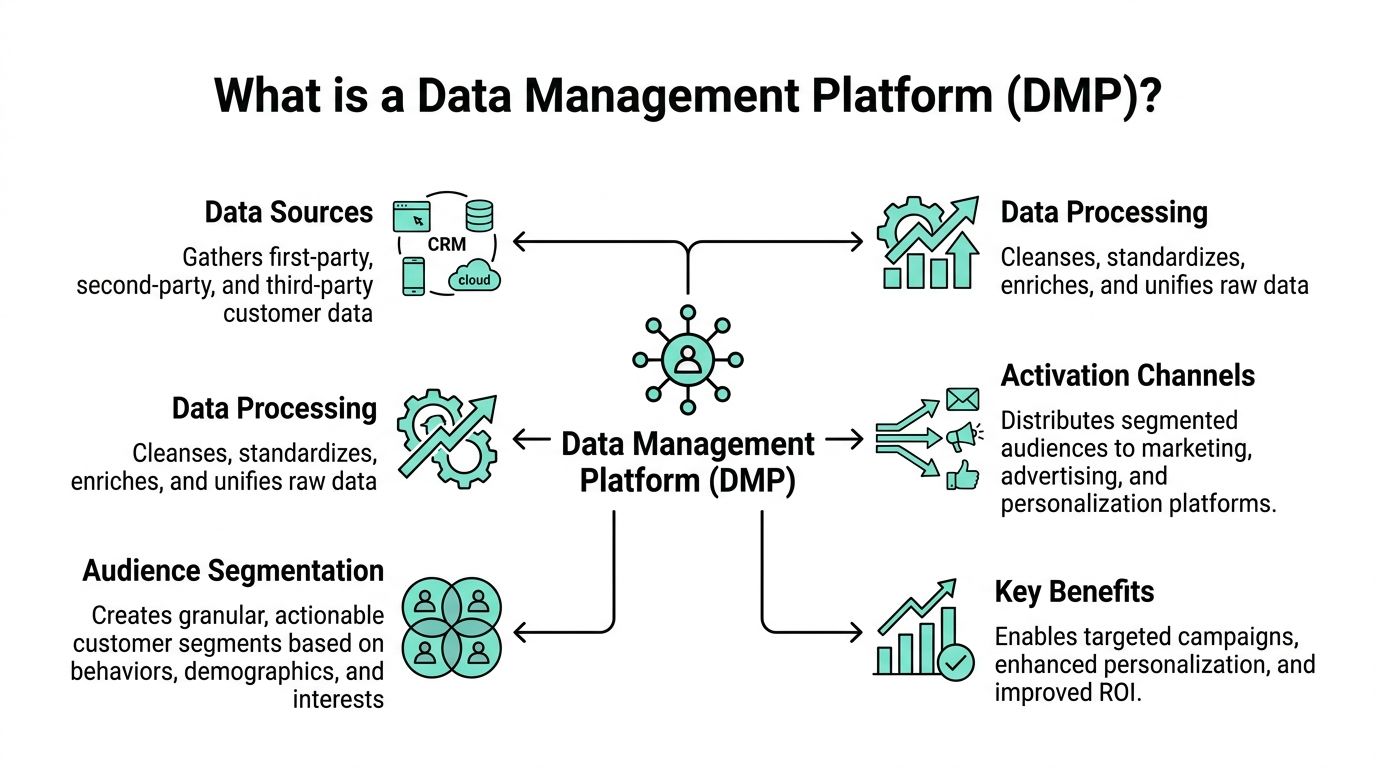
A data management platform, or DMP, is a central system for collecting, organizing, and activating audience data across channels. In practical terms, it acts like a clearinghouse for behavioral and attribute data that marketing and digital teams can use to build segments, target campaigns, and support personalization.
It isn't just a database. It’s an operational layer that turns raw inputs into audiences your stack can act on.
The simplest useful definition
Think of a DMP as a structured audience engine.
It ingests signals from websites, apps, campaigns, analytics tools, CRM-adjacent feeds, and other sources. It then cleans and classifies those signals so teams can define groups such as high-intent visitors, repeat product researchers, or customers with interest in a specific category.
That audience layer becomes valuable when it feeds downstream systems like ad platforms, analytics environments, and personalization tools.
What a DMP does
A good data management platform usually handles four practical jobs:
Collect data from multiple inputs
Website behavior, campaign engagement, device-level events, and imported datasets are pulled into one place.Normalize and classify it
Raw events are messy. Naming conventions differ. Attributes arrive incomplete. The DMP standardizes those inputs so the same audience logic can work across teams.Create usable segments
The platform becomes operational at this stage. You define audiences by behavior, interest, source, or business rules.Activate those segments elsewhere
Segments don't deliver value sitting inside the DMP. They need to be pushed into media, analytics, and DXP systems where targeting and personalization happen.
Why the category keeps growing
The category is growing because enterprises have more channels, more event data, and more pressure to use it well. One market forecast projects the global data management platform market to grow from USD 2.51 billion in 2024 to USD 7.02 billion by 2033, with a 12.2% CAGR, driven by data growth across mobile devices, websites, and IoT systems, according to Grand View Research’s data management platform market report.
That growth lines up with what implementation teams see on the ground. Organizations don't need more disconnected dashboards. They need systems that can operationalize audience data across the full digital journey.
Where DMPs fit in a privacy-first stack
The old shorthand for DMPs focused heavily on third-party advertising use cases. That’s too narrow now.
Modern enterprise use leans more on compliant audience management, first-party data strategy, and controlled activation into the rest of the customer experience stack. In Sitecore programs, that means the DMP is often less about buying anonymous media reach in isolation and more about improving the quality of audience inputs that feed personalization, journey logic, and campaign orchestration.
A DMP becomes useful when it helps your delivery teams answer one simple question. Which audience should see which experience, on which channel, based on which trusted signals?
That’s the practical test. If the platform can't answer it clearly, it’s just another repository.
DMP vs CDP vs MDM Choosing the Right Data Hub
Many architecture discussions encounter difficulties at this point.
Teams use DMP, CDP, and MDM as if they were interchangeable. They aren’t. They solve different problems, work with different data shapes, and support different decisions.
If you run Sitecore, you often need more than one of them. The key is knowing which job each system owns.
DMP vs. CDP vs. MDM at a Glance
| Attribute | Data Management Platform (DMP) | Customer Data Platform (CDP) | Master Data Management (MDM) |
|---|---|---|---|
| Primary purpose | Audience collection, classification, and activation | Unified customer profiles for engagement and orchestration | Trusted master records for core business entities |
| Typical data focus | Audience and behavioral data used for segmentation | First-party customer data and journey data | Customer, product, supplier, account, and other master entities |
| Best use case | Media targeting, audience building, top-of-funnel segmentation | Personalization, lifecycle engagement, omnichannel coordination | Data quality, consistency, governance across enterprise systems |
| Main value to Sitecore | Feeds segment logic and audience context into experience delivery | Supports persistent profile-based personalization and decisioning | Improves profile accuracy by standardizing customer and product records |
| Main risk when misused | Too detached from real-time serving needs | Becomes a data lake without activation discipline | Turns into a governance-only program with little adoption |
Where each platform earns its place
A DMP is strongest when your team needs broad audience assembly and activation. It gives marketing and digital teams a way to define target groups from many signals, then use those groups in campaigns and experience delivery.
A CDP is stronger when the requirement is persistent customer understanding. In Sitecore programs, that usually means known-user profiles, event histories, consent-aware engagement, and profile-driven personalization across web and other channels.
MDM solves a different class of problem. It creates consistency for key business entities. If one customer exists under multiple IDs, or if the same product appears with different attributes in commerce, ERP, and content systems, downstream personalization becomes unreliable.
According to Alation’s guide to data management software, Master Data Management creates a "golden record" for critical entities, poor data quality from duplicate records can inflate operational costs by 15% to 25%, and AI-powered matching algorithms in modern MDM systems can achieve accuracy rates exceeding 95%.
A practical selection lens
Use this simple lens when you're deciding:
- Choose a DMP when the immediate problem is audience segmentation and activation across acquisition and digital experience channels.
- Choose a CDP when you need persistent customer profiles, known-user journeys, and event-driven personalization.
- Choose MDM when trust in the underlying customer, product, or account record is the limiting factor.
Most enterprise Sitecore programs don't pick only one.
A common pattern looks like this:
- the DMP builds and manages audiences
- the CDP orchestrates customer journeys and profile-aware interactions
- the MDM keeps the core records clean enough for both systems to work reliably
What works well in a Sitecore-centric architecture
If you're operating in a Sitecore ecosystem, the useful question isn't "Which one wins?" It’s "Which system owns which responsibility?"
That responsibility model might look like this:
- DMP owns segment logic used for audience activation
- CDP owns real-time customer profile context used in engagement decisions
- MDM owns authoritative entity quality for customer, account, and product records
This split reduces duplication. It also prevents a common enterprise mistake, where teams expect the CDP to solve master data issues or expect the DMP to act as a low-latency personalization engine.
For organizations evaluating broader customer intelligence stacks, Kogifi’s work around 360 analytics and customer data platforms is relevant because the architecture usually succeeds or fails at the boundaries between those platforms, not inside any single one.
If your Sitecore personalization rules depend on customer or product attributes, and those attributes aren't governed upstream, the problem isn't in Sitecore. It's in the ownership model for your data hubs.
Core DMP Architecture and Capabilities
A data management platform becomes easier to evaluate once you stop treating it as a black box.
Under the hood, most workable DMP setups follow the same broad flow. Data comes in. It gets organized. Segments are defined. Those segments move into channels and experience systems.
Ingestion and collection
Ingestion is the front door. The DMP pulls event and audience data from sites, apps, campaign tools, analytics platforms, and imported business data. In enterprise environments, quality starts to diverge at this point. One source may send rich campaign metadata. Another may only send a page URL and timestamp.
What works is disciplined ingestion design:
- Map event naming early: Don't let every channel invent its own event vocabulary.
- Filter noise: Not every captured event deserves to become part of audience logic.
- Separate operational and analytical feeds: Sitecore decisioning needs a different data contract than broad reporting pipelines.
Unification and classification
After ingestion, the platform has to make the data usable.
That means standardizing fields, applying taxonomies, resolving categories, and labeling signals in a way teams can trust. At this stage, the DMP starts to reflect your business model instead of just your raw tracking setup.
For example, product interest can’t stay buried in URL fragments or campaign parameters. It needs to become a reusable classification that both marketers and developers understand.
Segmentation and rules
Segmentation is where the platform starts producing business value.
Teams define audiences based on combinations of behavior, interest, source, account context, and recency. Good DMP design makes those definitions durable. Bad design creates a long list of brittle one-off segments that no one can maintain.
If your team is refining its audience logic, Formbricks has a useful primer on customer segmentation strategy. It’s worth reading because segmentation quality usually depends more on clarity of business intent than on the number of attributes available.
Activation and downstream use
The final layer is activation.
Segments move into ad platforms, analytics systems, and DXP environments such as Sitecore during activation. The important architectural point is that activation has to match the destination system’s reality. A DMP may be excellent at governance and audience definition, but that doesn't automatically make it suitable for low-latency experience delivery.
That distinction matters a lot in enterprise DXP work. If a personalization decision has to happen during a live page request, segment delivery, cache design, and identity handling all need to be engineered for speed and reliability.
What to look for when evaluating capability
Instead of asking whether a DMP has a feature, ask how well it supports the full chain:
| Capability area | What to inspect |
|---|---|
| Ingestion | Connector quality, event consistency, support for batch and stream inputs |
| Classification | Taxonomy support, metadata handling, audience attribute normalization |
| Segmentation | Rule flexibility, maintainability, exportability into downstream systems |
| Activation | Delivery options, latency fit, support for DXP and campaign destinations |
A polished demo often hides the hard part. The hard part is whether your segmentation model remains usable after six months of new campaigns, new regions, and new content sources.
Integrating a DMP with Sitecore and SharePoint
Many abstract DMP discussions become useful or useless in this context.
A data management platform has value in a Sitecore program only when it improves the actual experience. That means better audience qualification, better content decisions, better AI inputs, and cleaner orchestration between systems that normally sit apart.

How a DMP supports Sitecore
Sitecore is strong at assembling and delivering experiences. It can personalize, test, orchestrate, and increasingly use AI-driven decisioning across content and journeys.
But Sitecore still depends on the quality of the audience context it receives.
A DMP improves that context in several ways:
- Audience preparation: Marketing teams can define segments outside the page rendering layer and pass those segments into Sitecore for targeting.
- Signal consolidation: Behavior from campaigns, websites, and external sources can be turned into a cleaner audience input before Sitecore acts on it.
- Activation discipline: Instead of hardcoding every targeting rule inside the CMS, teams can manage audience logic in a dedicated platform and use Sitecore for delivery.
This matters even more when organizations adopt Sitecore’s AI and personalization capabilities. AI doesn't rescue poor data design. It amplifies it. If the audience layer is inconsistent, AI-driven recommendations and decision models become inconsistent too.
The trade-off in Sitecore integration
The biggest mistake is assuming the DMP should also handle real-time serving.
That’s often where architectures become fragile. DMPs are usually good at audience governance, ingestion, classification, and export. They are often not the system you want directly handling low-latency production experience decisions on every request.
That gap has been called out directly in Tinybird’s analysis of data management platforms, which notes that integrating DMPs with modern DXPs is a key challenge and that many DMPs lack the production-serving infrastructure needed for low-latency personalization, with this gap noted in 70% of enterprise cloud migrations.
Design your architecture so the DMP defines and distributes audiences, while Sitecore handles the experience decision close to the user interaction.
That split is usually more stable than trying to force one platform to do both.
DMP and Sitecore CDP are not the same job
In a Sitecore stack, this distinction matters.
A DMP helps with audience assembly and activation. Sitecore CDP is better suited to persistent customer profiles, event streams, and deeper engagement logic tied to identifiable customer journeys. When teams treat those two products as interchangeable, they either overcomplicate the DMP or underuse the CDP.
A workable pattern looks like this:
- DMP classifies broad audience groups and campaign-ready segments
- Sitecore CDP maintains profile continuity and event-driven context
- Sitecore Personalize uses that context to select content, offers, and journey decisions.
Implementation experience also carries more weight than product brochures. A clean handoff between segment definition, profile enrichment, and content delivery is what makes the stack usable.
One option organizations evaluate in that context is Kogifi’s work on Sitecore CDP implementation and customer data integration, especially when the challenge is mapping external audience data into Sitecore-ready activation patterns rather than just deploying another connector. The broader integration problem is covered well in this guide to customer data integration solutions.
Where SharePoint fits
SharePoint is often ignored in DMP discussions, which is a mistake.
In many enterprises, SharePoint holds large volumes of unstructured but strategically important material: product documentation, sales enablement assets, regional campaign files, governance documents, internal knowledge that shapes customer-facing content. That content usually doesn't belong inside the DMP as-is. But the metadata around it often does.
If a visitor repeatedly engages with Sitecore pages tied to a product line, and sales teams consume SharePoint documents tied to the same taxonomy, you can create a stronger content and audience model by aligning those classifications. That doesn't mean dumping SharePoint into the DMP. It means exposing the right metadata, tags, and content relationships so Sitecore and the audience layer speak the same language.
What works in practice
The cleanest implementations usually follow these principles:
- Keep content and audience responsibilities separate: Sitecore and SharePoint manage content objects. The DMP manages audience logic.
- Share taxonomy across systems: Product families, solution areas, regions, industries, and lifecycle stages should use aligned definitions.
- Push segments into Sitecore, not raw noise: The DMP should send meaningful audiences, not every low-level event.
- Use SharePoint metadata as enrichment, not as a dumping ground: Surface document classifications and relationships that improve segmentation or content strategy.
When teams get this right, Sitecore AI features have better signals to work with, content authors gain more relevant targeting options, and SharePoint stops being an isolated document store.
A Practical Guide to DMP Implementation and Governance
Most DMP projects don’t fail because the connector didn’t work.
They fail because the organization treated governance as a legal review step instead of a design principle. By the time privacy, taxonomy, consent, stewardship, and activation ownership are discussed, the platform is already filling up with inconsistent data and unclear assumptions.
Start with a narrow business purpose
The first implementation mistake is trying to model the whole enterprise at once.
Start with one business outcome that requires better audience data. Good examples include improving campaign audience quality, enabling Sitecore personalization for a defined product area, or aligning regional content targeting across channels. Then define:
- Which data sources matter now
- Which segments must be created
- Which activation destinations will consume them
- Who owns each decision
That last point matters more than teams expect. If no one owns segment quality and taxonomy discipline, the DMP turns into a backlog of unused audience definitions.
Governance has to exist on day one
Privacy and governance pressures are one reason DMPs remain strategically important. According to Future Market Insights’ data management platforms market analysis, stringent privacy laws such as GDPR are a major growth driver for DMPs, and first-party data captured 48.55% of the global market share in 2024 as organizations shifted away from third-party cookies.
That lines up with what enterprise architects already know. You can't build a durable audience strategy on vague ownership and weak consent handling.
The governance controls that matter
A practical governance model should cover at least these areas:
- Data classification: Define which attributes are behavioral, profile-based, consent-sensitive, or restricted.
- Taxonomy ownership: Give named owners responsibility for categories such as product, region, audience type, and campaign classification.
- Activation policy: Decide which segments can be exported to which destinations.
- Retention and review: Remove stale segments and deprecated attributes before they pollute downstream logic.
Governance isn't there to slow down personalization. It's there to stop your personalization model from drifting into inconsistency and risk.
Technical setup that supports compliance
Implementation teams should also design for compliance in the collection layer.
That usually includes stronger event governance, consent-aware capture, and a cleaner separation between what gets collected for analytics versus what gets used for audience activation. In Sitecore environments, this often overlaps with how tracking is implemented at the edge and server layers. If your current setup still depends heavily on browser-side collection with inconsistent event quality, it’s worth reviewing approaches like server-side tracking because better collection discipline improves both governance and audience reliability.
A workable rollout model
A rollout that stays under control usually looks like this:
Define one activation use case
Choose a real outcome, not a platform milestone.Audit source data and metadata
Find naming conflicts, missing classifications, and unusable fields early.Build a limited taxonomy
Don't model every possible audience dimension on the first pass.Create a segment approval process
Someone should validate business meaning before a segment reaches activation.Test handoff into Sitecore or other destinations
Verify not only data movement, but actual usability by marketers and delivery teams.Expand only after adoption
A smaller operating model with real use beats a large dormant one.
What doesn’t work
Some habits create avoidable problems:
- Collecting everything: More data doesn't help if no one trusts or uses it.
- Letting every team define its own audience language: That creates duplicate and conflicting segment logic.
- Treating SharePoint and CMS metadata as unrelated: Content classification needs to align with audience classification.
- Deferring governance until after launch: Cleanup is always harder than design.
The teams that get value from a data management platform are usually the ones that treat governance as product design, not paperwork.
Selecting Your DMP and Planning for the Future
Vendor selection gets distorted when teams chase category labels instead of operational fit.
A DMP should be selected based on how well it supports your architecture, your data contracts, and your activation model. If you run Sitecore, that means evaluating the platform in relation to personalization, audience exchange, taxonomy governance, and the handoff into real experience delivery.
What to evaluate first
Start with the things that will break the program if they’re weak:
- Integration fit: Can the platform exchange audience data cleanly with your DXP, analytics stack, and campaign tools?
- Identity handling: Does it support the identity logic your business uses, or will your team end up building too much custom mapping?
- Taxonomy support: Can business users and technical teams maintain segment definitions without constant redevelopment?
- Activation control: Are exports and downstream uses governed clearly enough for enterprise compliance?
- Operating model: Will marketers, architects, analysts, and content teams all be able to use it without inventing side processes?
Questions worth asking in a proof of concept
A proof of concept should test operating reality, not just feature presence.
Ask vendors and implementation partners to demonstrate:
| Evaluation area | Useful question |
|---|---|
| Segment creation | Can business teams define segments without creating logic that engineering has to rewrite later? |
| Sitecore alignment | How do audiences move into personalization and journey tooling without brittle custom jobs? |
| Content alignment | How will taxonomy connect across Sitecore, SharePoint, and campaign systems? |
| Governance | How are permissions, approvals, and auditability handled in daily use? |
| Future change | What happens when regions, brands, or new channels are added? |
Plan for a cookieless and composable future
A future-proof DMP strategy doesn't assume one platform will own everything.
It assumes your stack will keep changing. Sitecore capabilities will evolve. Privacy rules will change. New channels will appear. Internal ownership will shift. The architecture has to survive those changes without forcing a rebuild every year.
That means planning for:
- stronger first-party data use
- clearer boundaries between DMP, CDP, and MDM responsibilities
- portable taxonomy and metadata models
- composable integrations rather than one-off point connections
For teams refining their operating model, Querio’s write-up on data governance best practices is a useful external reference because long-term DMP value usually comes from repeatable governance, not just initial implementation speed.
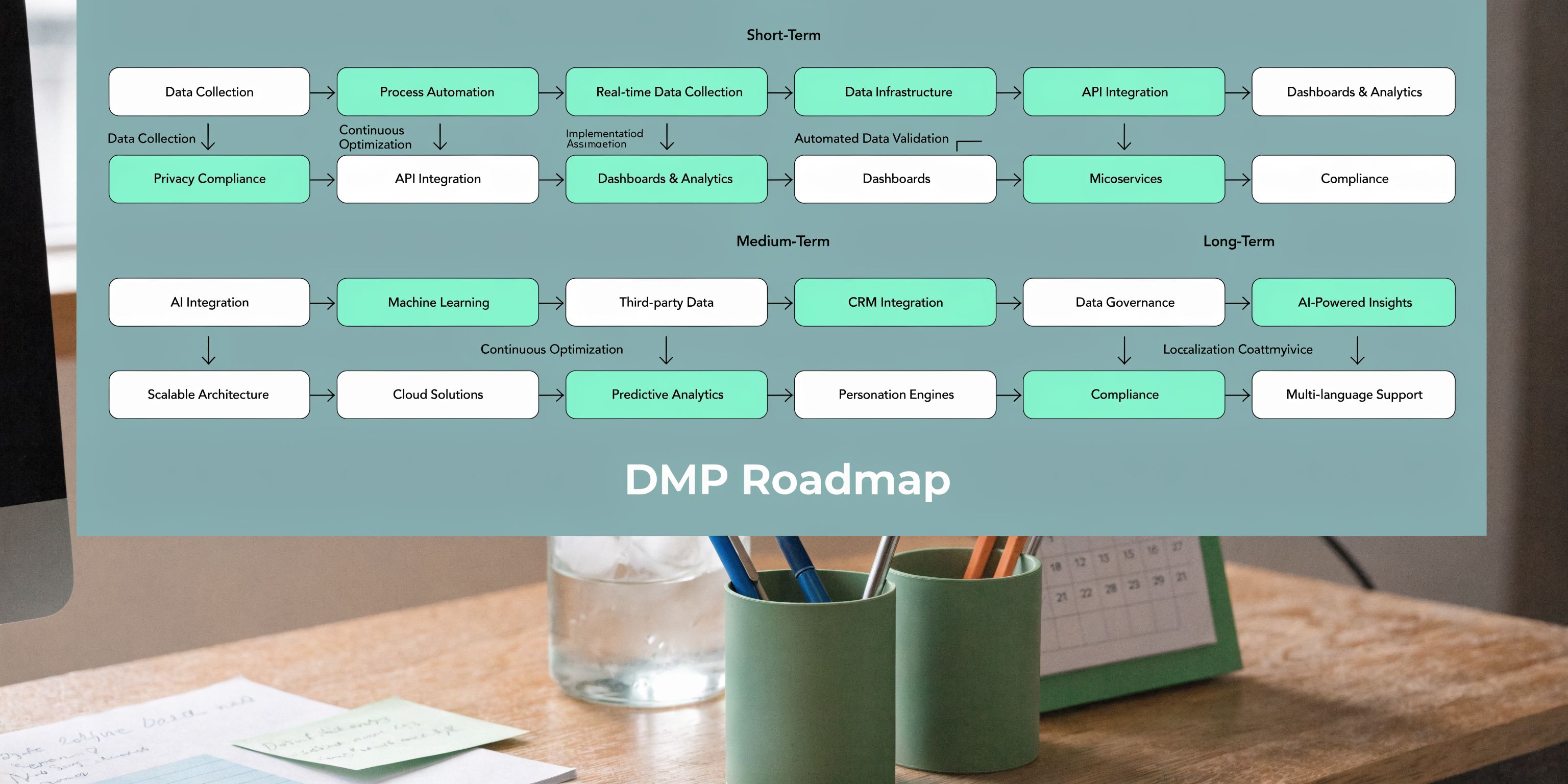
A phased approach is safer than a platform-first rollout
A sensible sequence looks like this:
- Phase one: prove one audience activation use case
- Phase two: connect that audience model into Sitecore personalization and campaign workflows
- Phase three: align content metadata from Sitecore and SharePoint
- Phase four: expand governance, stewardship, and profile enrichment across business units
That phased model reduces disruption. It also gives teams time to validate whether the DMP is improving digital experience outcomes, instead of just adding one more data repository to maintain.
The right choice usually isn’t the vendor with the longest feature list. It’s the one that fits your Sitecore delivery model, your governance maturity, and your ability to operationalize audience data across channels.
If your Sitecore, SharePoint, and data platforms still operate as separate layers, Kogifi can help assess the architecture, define the integration model, and map a practical path from fragmented audience data to usable personalization and governance. Learn more at Kogifi.