


You're probably in the middle of a bigger platform decision than “which analytics tool should we pick?”
Your team is planning a new Sitecore or AEM implementation, or cleaning up an aging one. Marketing wants fast dashboards. IT wants clean governance. Legal wants less exposure. The CIO wants one answer that won't need to be reversed in a year. That's where the Google Analytics vs Adobe Analytics decision becomes important. It isn't a reporting choice. It's a data architecture choice.
In enterprise DXP programs, analytics affects far more than campaign reporting. It shapes how you wire personalization, how you design consent-aware tracking, how you connect web behavior into Sitecore CDP or Personalize, how much effort your analysts need to answer routine questions, and how much control your organization keeps over the data model. If you're investing in a digital experience platform, you're also choosing the measurement foundation underneath it.
Most comparison articles flatten this into a feature checklist. That's not useful for a CIO or enterprise architect. Google Analytics 4 and Adobe Analytics were built with different operating assumptions. One is commonly chosen because it's accessible, quick to deploy, and tightly aligned with Google's marketing ecosystem. The other is commonly chosen because enterprise teams need tighter governance, deeper customization, and more control across complex environments.
Table of Contents
- Choosing Your Analytics Foundation for a Modern DXP
- Google Analytics 4
- Adobe Analytics
- The enterprise lens that matters
- What each platform optimizes for
- Why the same website produces different numbers
- Implementation reality in enterprise teams
- Sitecore and composable experience stacks
- AEM and Adobe-native alignment
- SharePoint and internal experience measurement
- Attribution and segmentation depth
- Reporting freedom versus reporting convenience
- Analytics inputs for AI and personalization
Choosing Your Analytics Foundation for a Modern DXP
If you're building a modern DXP, your analytics platform needs to do more than count visits. It has to support operating decisions across content, personalization, commerce, compliance, and integration. That's why I push clients to treat analytics as a foundation service, not a marketing add-on.
The historical positioning of these platforms still matters. GA4 became Google's standard analytics product after Google announced it in 2020, and Universal Analytics stopped processing standard properties on July 1, 2023. GA4 was positioned as a free entry-level platform with app-and-web reporting in one place, which made it a common default for organizations that needed a lower-cost, fast-to-deploy analytics layer. Adobe Analytics is typically sold as an enterprise product, with pricing commonly starting around $100,000 per year, reflecting a very different target customer and operating model, as outlined in this GA4 and Adobe Analytics comparison.
That split is still visible in real projects. GA4 usually enters the conversation first because it's easy to justify. Adobe Analytics enters when the organization knows it needs stronger governance, deeper segmentation, and reporting flexibility that can survive enterprise complexity.
Here's the blunt version. If your new Sitecore, AEM, or SharePoint estate needs only broad marketing measurement, GA4 is often enough. If your organization needs analytics to function as a governed enterprise capability across brands, markets, business units, and compliance regimes, Adobe Analytics is usually the more credible long-term fit.
| Decision area | Google Analytics 4 | Adobe Analytics |
|---|---|---|
| Typical positioning | Accessible analytics layer for broad adoption | Enterprise analytics platform for governed complexity |
| Cost posture | Free entry-level tier | Enterprise product with materially higher cost |
| Speed to deploy | Faster | Slower |
| Customization depth | Moderate | High |
| Governance strength | Adequate for many teams | Stronger for large organizations |
| Best fit in DXP programs | Standard campaign and behavioral measurement | Deep behavioral analysis and enterprise reporting control |
Pick the tool that matches how your organization operates, not the tool your marketing team can launch fastest.
Understanding the Contenders in an Enterprise Context
GA4 and Adobe Analytics solve related problems, but they don't come from the same philosophy. That difference affects implementation design, reporting expectations, and executive satisfaction after launch.
Google Analytics 4
GA4 is built for breadth, accessibility, and connection into the Google ecosystem. It uses an event-oriented model and works well for organizations that want a relatively fast route to acquisition reporting, campaign measurement, and cross-surface visibility. In practice, that means it fits teams that need to stand up analytics quickly and keep the operating model light.
That doesn't make GA4 “basic.” It makes it opinionated. Google gives you a framework that's meant to work for many organizations without requiring each one to design a highly bespoke analytics program. That's often a good trade when the DXP project already carries enough delivery risk.
For Sitecore programs, that matters. If your team is already managing XM Cloud or a composable stack, adding a lightweight analytics layer can reduce implementation friction. For marketing teams that mainly need to understand traffic sources, engagement patterns, and campaign contribution, GA4 usually gets the job done.
Adobe Analytics
Adobe Analytics was built for organizations that want to shape the model rather than accept a default one. It's designed for more control over data architecture, segmentation, and reporting logic. That matters in businesses where multiple teams need different lenses on the same behavioral data, and where executive reporting can't depend on a one-size-fits-most structure.
In Adobe-heavy environments, that flexibility becomes more valuable. If AEM is central to your stack, or if your organization already works inside Adobe Experience Cloud, Adobe Analytics tends to fit the broader operating model more naturally. Teams that care greatly about governed customer experience management often align that decision with broader Adobe customer experience management priorities.
GA4 is usually chosen because teams want answers quickly. Adobe Analytics is usually chosen because teams want the freedom to ask harder questions later.
The enterprise lens that matters
For a CIO, the question isn't “which interface is nicer?” It's this:
- How much implementation complexity can your team absorb right now
- How much reporting flexibility will your business require later
- How strong does governance need to be across brands and regions
- How tightly should analytics connect to personalization and DXP workflows
- How much platform cost and specialist effort are you willing to carry
If you answer those sincerely, the choice usually becomes obvious.
Core Comparison of Data Models and Tracking
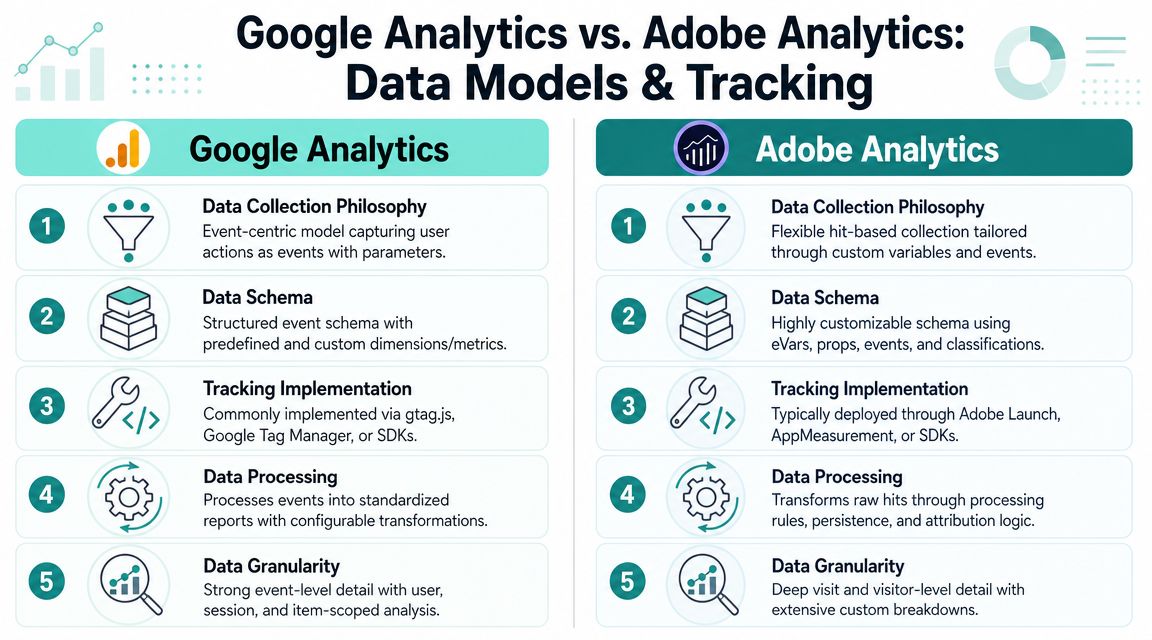
The biggest mistake teams make in the Google Analytics vs Adobe Analytics debate is assuming both platforms measure the same reality in roughly the same way. They don't. Even when both tools track the same site, they can produce different answers because they process metrics differently.
What each platform optimizes for
GA4 pushes teams toward an event-centric model. That's useful because it gives web and app interactions a common structure and encourages cleaner thinking about behavioral signals. For many organizations, that model is easier to adopt than older analytics approaches because it maps well to modern digital journeys.
Adobe Analytics gives teams more control over how data is collected and structured. That stronger architectural control is one reason it shows up more often in large, regulated, or highly customized implementations. In those environments, analytics isn't just tracking. It's part of the operating backbone.
Neither philosophy is definitively better. One is simpler to roll out broadly. The other gives experienced teams more room to model business reality precisely.
Why the same website produces different numbers
Executive frustration often starts when a board pack shows one bounce-related figure in one tool and another figure in the second tool. People assume implementation error. Sometimes it's not error at all. It's definition.
According to Adobe's documentation on processing differences between Google Analytics and Adobe Analytics, Bounce Rate in Adobe Analytics is calculated as “Bounces divided by Entries,” while Google Analytics calculates Bounce Rate as “Single-page sessions divided by Sessions.” That means KPI comparisons across the two platforms are not directly interchangeable.
Critical distinction: If your executive team wants one-for-one KPI comparison between GA4 and Adobe Analytics, set expectations early. The platforms define and process metrics differently.
This matters in DXP programs because analytics often feeds personalization logic, content optimization, and business review cadence. If teams don't understand these processing differences, they'll waste time reconciling reports instead of improving experiences.
Implementation reality in enterprise teams
The tool choice also changes how implementation work feels on the ground.
With GA4, the common pattern is faster deployment and broader accessibility. Teams can move quickly, especially when they already have a clear event plan and practical governance around tags. If your organization wants to improve event tracking in Google Analytics, the work is usually straightforward enough to scale across multiple sites without turning analytics into a major transformation stream.
Adobe Analytics usually asks more from the organization. That's not a flaw. It's the cost of flexibility. More options mean more design decisions, more taxonomy discipline, more governance, and more specialized implementation capability. In a mature enterprise, that's often acceptable because the output quality is higher for advanced use cases.
A simple way to frame it:
| Technical factor | GA4 | Adobe Analytics |
|---|---|---|
| Data model approach | Event-oriented and accessible | More governed and architecturally controllable |
| Metric comparability | Not directly interchangeable with Adobe | Not directly interchangeable with GA4 |
| Implementation posture | Faster, lighter, easier to spread | Heavier, more deliberate, more controlled |
| Enterprise fit | Broad adoption across markets | Better for customized and regulated environments |
The practical consequence is clear. If your organization values speed and standardization, GA4 usually wins. If your organization values control, segmentation depth, and durable reporting architecture, Adobe Analytics is the stronger choice.
Don't treat implementation simplicity as a minor detail. In a global rollout, simplicity affects adoption, governance, and the quality of your data far more than feature lists do.
Integration with Enterprise DXP and CMS Platforms
Analytics only becomes valuable when it fits the systems your teams use. In DXP work, that means Sitecore, AEM, commerce layers, CDPs, personalization engines, and often SharePoint for internal experience scenarios.

Sitecore and composable experience stacks
In Sitecore projects, I rarely start with the analytics vendor. I start with the activation plan. What behavioral data needs to flow into Sitecore CDP, Sitecore Personalize, and broader decisioning workflows? What customer signals are needed for audience building? Which events matter for journey orchestration? That's the right design sequence.
GA4 works well in Sitecore environments when the organization wants a relatively lightweight measurement layer for marketing visibility. It can capture behavior broadly, support campaign reporting, and feed a practical operational view of content performance. For organizations still growing their personalization maturity, that's often enough.
Adobe Analytics is better suited when Sitecore sits inside a more complex ecosystem. If you need stricter event governance, richer business-specific classifications, and more structured behavioral analysis before data is pushed into experience orchestration, Adobe usually gives architects more room to design properly. That becomes especially important when multiple regions, brands, and business models share the same Sitecore estate.
Sitecore AI changes the standard conversation. Once you start using AI-assisted personalization, recommendations, or decisioning, the quality of the behavioral input matters more than the dashboard aesthetics. A messy analytics taxonomy weakens AI outputs. A disciplined one improves them. That's why analytics architecture should be aligned with personalization design from day one.
AEM and Adobe-native alignment
AEM changes the decision because Adobe's ecosystem alignment becomes a strategic advantage. If your content, assets, experimentation, and analytics are expected to operate with minimal platform friction, Adobe Analytics is the cleaner fit. It supports a more coherent Adobe-centric operating model.
GA4 can absolutely be used with AEM. But it usually introduces a more stitched-together pattern. That can be fine if the organization prioritizes lower operating cost or remains more invested in Google Ads and Google-centric campaign measurement. It's less fine if your enterprise expects analytics, content operations, and optimization workflows to feel natively connected.
The technical point is simple. Integration isn't just about whether a connector exists. It's about whether governance, workflows, and reporting logic remain manageable after year one.
SharePoint and internal experience measurement
SharePoint is where many analytics strategies fall apart. Teams treat intranet and employee portal measurement as an afterthought, then discover they can't answer basic questions about content usefulness, search behavior, or engagement by audience segment.
For SharePoint, GA4 is usually enough if the need is directional. Are employees using this hub? Which content types attract engagement? Which entry points lead to useful actions? It's a practical fit for broad internal visibility.
Adobe Analytics becomes more attractive when the intranet carries operational significance and needs more controlled segmentation. That includes scenarios where different business units require formal reporting views, or where internal portal behavior needs to be analyzed with greater granularity. In those cases, Adobe's stronger data control is worth the effort.
From an implementation standpoint, the key is consistency:
- Define business events early. Don't track generic clicks if the primary objective is search success, task completion, or knowledge consumption.
- Align analytics with personalization inputs. In Sitecore and AEM, analytics should support decisioning, not sit beside it.
- Separate reporting layers by audience. Executives, content teams, and optimization specialists should not all consume the same view.
- Treat intranet analytics as real analytics. SharePoint usage data can influence productivity, governance, and content lifecycle decisions.
The right platform depends less on CMS brand and more on how serious your organization is about using behavioral data operationally.
Advanced Analytics Attribution and Customization
At some point, every enterprise hits the limit of standard reporting. That's when the true difference between GA4 and Adobe Analytics shows up.

Attribution and segmentation depth
GA4 gives many organizations enough attribution capability to manage normal digital marketing needs. If your primary questions revolve around channel acquisition, campaign contribution, and top-level conversion paths, it works well. It also stays attractive for teams that want a simpler path from media activity into reporting.
Adobe Analytics operates at a different level. It's built for deeper segmentation and user-path analysis, but that comes with a materially higher cost and implementation burden. Industry analysis notes that Adobe Analytics typically starts around $100,000, while Google Analytics offers a free entry-level tier, with Adobe pricing affected by features, server calls, and negotiation, as described in this comparison of enterprise analytics tools.
That price difference only makes sense when the organization will use the extra capability. Adobe tends to be justified when teams need high-cardinality analysis, extensive custom dimensions and metrics, and complex workspace reporting at scale. If your team mainly wants standard acquisition and campaign measurement, GA4 is usually the smarter financial decision.
Buy Adobe Analytics only if your organization will actively use its analytical depth. Otherwise, you're funding complexity you won't operationalize.
Reporting freedom versus reporting convenience
This is the simplest way to explain the two products to executive stakeholders.
GA4 is designed to help teams get to a useful answer quickly. Adobe Analytics is designed to let expert teams keep asking better questions. If your analysts regularly need to reshape views, compare unusual dimensions, interrogate pathways in more detail, or create highly customized reporting logic, Adobe Analytics is stronger.
If your team is mostly marketers, content leads, and digital managers who want practical access without heavy specialist dependency, GA4 is easier to live with.
A common mistake in DXP programs is overbuying analytics sophistication before the operating model is ready. If your reporting consumers still struggle with taxonomy discipline, campaign naming, or event design, Adobe Analytics won't save you. It will expose the weakness faster.
Analytics inputs for AI and personalization
My recommendation becomes more opinionated: Don't choose an analytics platform based only on dashboard features if your roadmap includes personalization, AI-assisted recommendations, or adaptive experiences.
For Sitecore AI and personalization initiatives, the important question is whether your analytics implementation captures the right behavioral signals with enough consistency to support decisioning. Clean event design, audience structure, and content interaction data matter more than whether the platform offers a shinier default report.
A sensible operating pattern looks like this:
- Capture meaningful events tied to business outcomes, not vanity interactions.
- Preserve audience context so personalization engines can use behavior intelligently.
- Map analytics outputs into activation platforms rather than leaving insight trapped in reporting.
- Use advanced segmentation only where teams can act on it.
Here's a useful overview of how attribution thinking intersects with analytics maturity:
The key point is simple. If analytics won't feed optimization and personalization, you're running a reporting program. Not a DXP program.
Evaluating Privacy Compliance and Data Governance
For global organizations, privacy and governance often decide this platform choice more than reporting features do.
Privacy is now an architecture issue
A lot of Google Analytics vs Adobe Analytics content treats privacy as a short footnote. That's a mistake. A more useful question is which platform is safer and cheaper to operate under modern consent rules and privacy constraints. As discussed in this privacy-focused comparison of Adobe Analytics and Google Analytics, Google Analytics data collection and export can be limited by consent mode, cookie restrictions, and privacy enforcement, while Adobe Analytics is often evaluated more on governance and data control than on marketing convenience.
That changes the enterprise calculation. If your business operates across the EU, the UK, or similarly regulated markets, your analytics program is shaped by consent rates, retention decisions, and collection architecture. Fancy dashboards won't fix low-consent or privacy-constrained data.
Adobe Analytics usually appeals more to enterprises that want stronger control over governance and data architecture. GA4 usually appeals more to organizations willing to accept more platform opinionation in exchange for easier deployment and lower entry cost.
If legal, security, and enterprise architecture are deeply involved in your DXP program, governance isn't secondary. It's one of the main selection criteria.
Server-side design changes the conversation
The most resilient analytics strategies increasingly move away from purely client-side assumptions. That's true for both platforms. Server-side collection can help organizations improve control, shape what gets sent downstream, and build a more privacy-aware measurement approach. It also changes how teams think about consent enforcement, data minimization, and long-term maintainability.
For teams exploring that shift, this overview of server-side tracking architecture is a good starting point.
The practical recommendation is straightforward:
- Choose GA4 if your privacy model is manageable within its constraints and your organization values speed.
- Choose Adobe Analytics if governance, data control, and architectural flexibility carry more weight.
- Rework your tracking design before rollout if your current plan depends on unrestricted client-side collection. That assumption won't age well.
Privacy is no longer a compliance afterthought. It's part of platform design.
Making the Right Choice for Your Architecture
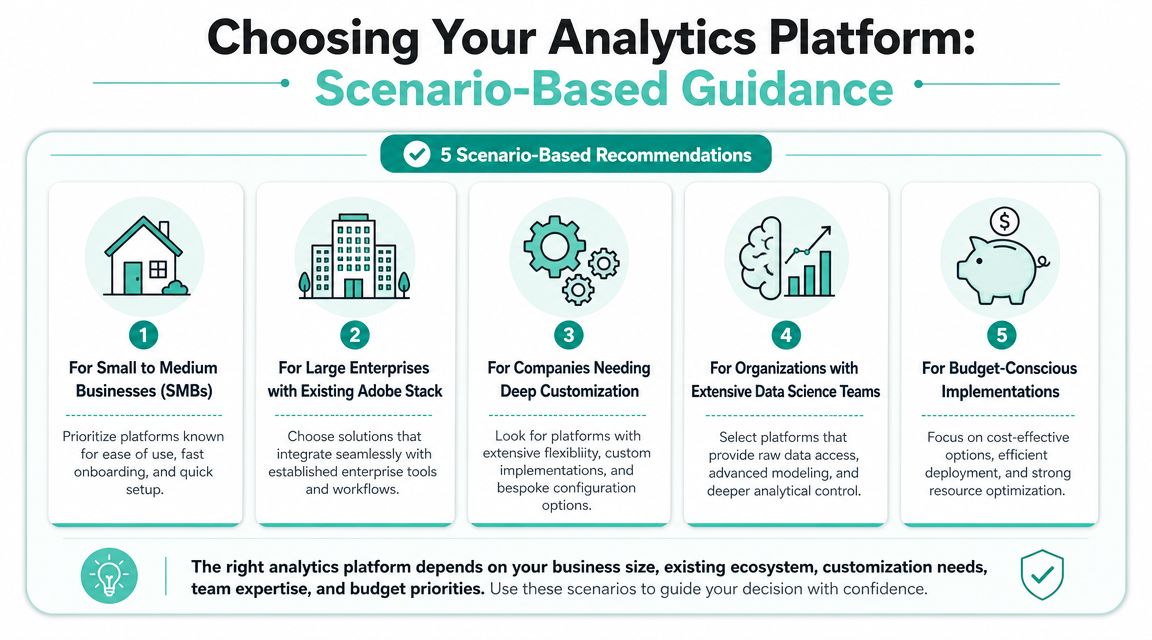
Your CIO signs off on a new Sitecore or AEM program. Six months later, the delivery team is arguing about tags, consent, reporting gaps, and whether personalization can trust the data. That problem usually starts with the wrong analytics foundation, not with poor dashboard design.
When GA4 is the right answer
Choose GA4 if your priority is speed, lower entry cost, and broad adoption across marketing and digital teams. It works well for organizations that need standard acquisition and engagement reporting, want tight alignment with Google Ads, and do not want to fund a specialist analytics engineering function from day one.
For a new Sitecore or SharePoint implementation, GA4 is often the better phase-one decision. It gives teams enough visibility to run the platform, measure campaigns, and support early optimization without turning analytics into a large parallel workstream.
When Adobe Analytics is the right answer
Choose Adobe Analytics if analytics is part of your enterprise architecture, not just a reporting tool for marketing. It fits organizations that need tighter control over variables, processing logic, segmentation, and reporting consistency across regions, brands, or business units.
This is often the better choice when AEM is central to the stack and Adobe platform alignment matters to the program. It also fits complex Sitecore estates where analytics feeds governance-heavy personalization, multi-brand reporting, or stricter operating models that cannot rely on default platform conventions.
When a hybrid model makes sense
Large enterprises sometimes need both.
Use GA4 for accessible marketing reporting and channel visibility. Use Adobe Analytics for governed behavioral analysis, deeper segmentation, and enterprise reporting logic tied to business rules. That split can work well in a DXP estate where marketing, product, and architecture teams need different levels of control and detail.
A hybrid model only succeeds if the measurement design is disciplined from the start. Event definitions, ownership, and platform roles must be explicit. If they are not, you will pay for two tools and still argue over conflicting numbers. Experienced implementation partners usually handle this by designing one event model that supports Sitecore personalization, Sitecore AI use cases, AEM integration patterns, and SharePoint reporting requirements without creating duplicate tracking logic.
My recommendation is straightforward:
| Your scenario | Recommended direction |
|---|---|
| You want speed, lower entry cost, and standard marketing measurement | GA4 |
| You need governed enterprise analytics with deeper customization | Adobe Analytics |
| You run AEM and want tighter Adobe ecosystem alignment | Adobe Analytics |
| You run Sitecore and need practical analytics without heavy overhead | GA4 |
| You need both broad adoption and deep specialist analysis | Hybrid approach |
Choose the platform your organization can operate well. A cheaper tool becomes expensive if it cannot support your governance model. A more flexible tool becomes wasteful if your team lacks the budget, skills, or process discipline to use it properly.
If you're planning a Sitecore, AEM, or SharePoint implementation and need an analytics architecture that supports personalization, governance, and long-term scale, talk to Kogifi. We can help you define the right measurement model before analytics turns into technical debt.