


Enterprise search AI earns its budget when it returns time to people who already work across too many systems. Microsoft Research found that 29% of surveyed AI users were familiar with generative AI, used it at work at least several times per week, and saved more than 30 minutes per day through its use, according to Microsoft Research on generative AI in real-world workplaces. Finding and reusing internal information is exactly where that time is won or lost.
Table of Contents
What Enterprise Search AI Does and Why It Matters
Say an employee needs the current travel policy for a regional office before booking a trip abroad. She finds a global version on the intranet, a regional PDF in SharePoint, and an older copy on a file share. None shows a clear effective date, so she messages Finance and waits.

That hour isn't unusual. Seventy percent of respondents said professionals spend at least one hour searching for a single piece of information, while 23% spend more than five hours, according to Unisphere Research's 2024 Survey on Enterprise Information Discovery, commissioned by Pryon. The cost isn't just delay. People act on the wrong version, or they stop searching and guess.
A Working Definition
Enterprise search AI finds only the content a user is authorized to see across many repositories, ranks it by meaning, freshness and source authority, and writes a short answer grounded in those passages with citations. A traditional index works like a card catalogue matching titles and keywords. Enterprise search AI works like a research librarian who knows which shelves each reader may enter, pulls the relevant pages, and hands over the passage with its footnote.
It isn't three things it's often sold as:
- A general chatbot: A model trained on public web data doesn't know your current policy.
- A reskinned keyword engine: A new interface doesn't fix synonyms, versions or permissions.
- A replacement repository: Sitecore, SharePoint and your file stores remain the systems of record.
What You Should Get Back
Expect two outputs. First, ranked results you can open, filtered by language, market and date. Second, a verifiable answer that cites the passages it used and says so when evidence is incomplete.
Run a quick self-check. If you have multiple repositories, multilingual content, repeated questions landing with support teams, and permissions that differ by group or region, you've outgrown per-system search boxes. That's the problem this category exists to solve.
How the Five-Layer Architecture Fits Together
Trace that travel policy query through the stack and you can see why a model alone can't answer it. This field didn't start with generative AI. The history of enterprise search runs from the Cranfield experiments of the 1960s and their precision and recall framework, through the Text Retrieval Conference launched in 1992 and its Enterprise Track from 2005 to 2008, to Word2Vec in 2013, GloVe in 2014 and BERT in 2019. Retrieval-augmented generation followed in 2020, grounding model responses in an external knowledge base.
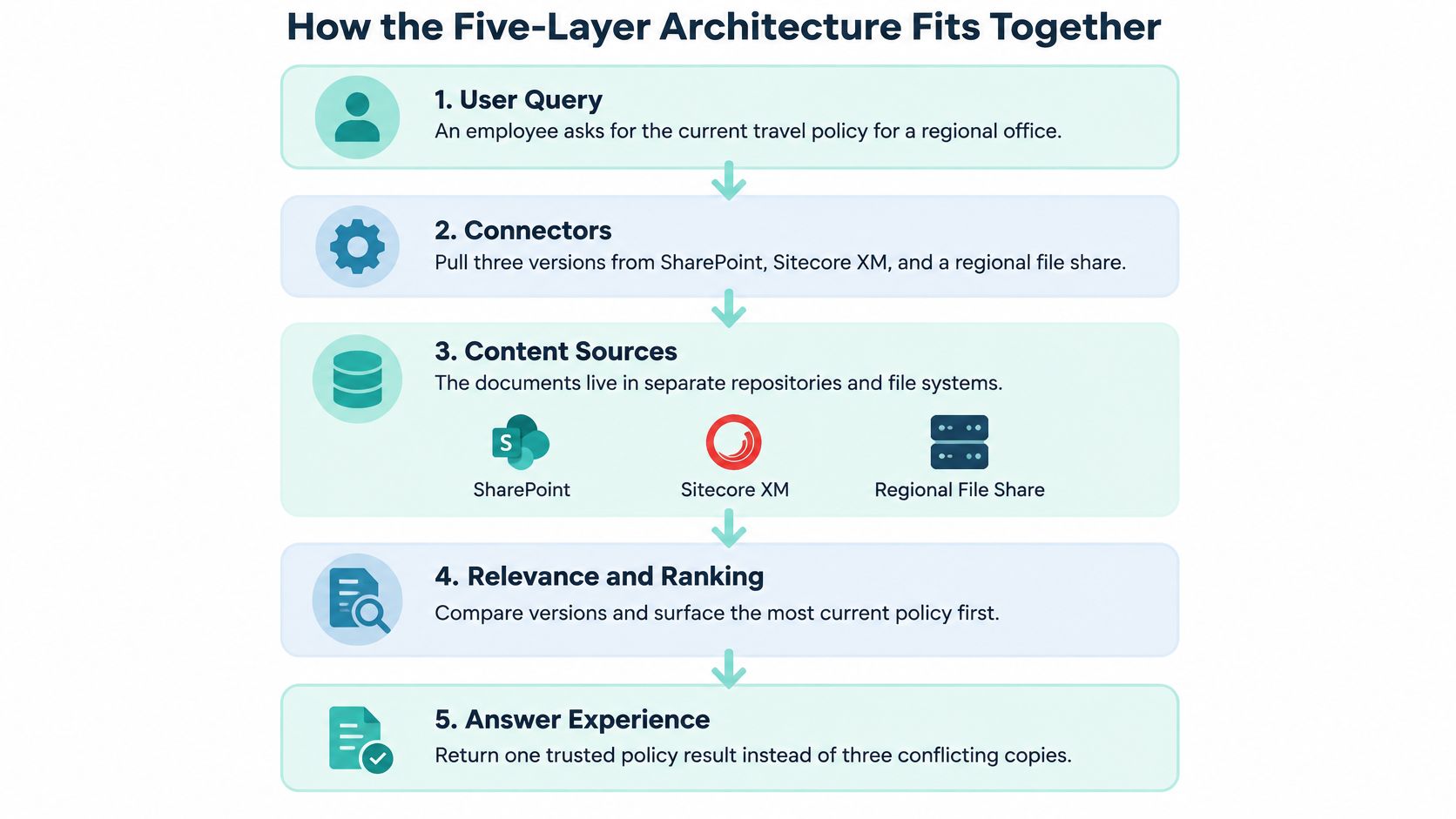
Connectors pull all three policy versions from SharePoint, Sitecore XM and the regional file share, so no copy is missed. Teams modernizing older stacks often start by reviewing what their current engine already indexes, including Apache Solr search behind many Sitecore estates. Before any text is indexed, the permissions layer carries each library's access control lists into the index, so a finance-only draft never reaches a reader without rights to it.
Indexing splits each document at section boundaries and attaches language, owner, business unit and effective date. That's what lets the system prefer the current regional version over the older global one. Retrieval and ranking then combine a keyword match on the policy code with an embedding match on a question about trips abroad, and a reranker orders the shortlist.
The Five Layers at a Glance
| Layer | Job | What breaks without it |
|---|---|---|
| Connectors | Pull content from SharePoint, Sitecore XM, AEM, file shares and ticketing | Search covers only a fraction of the estate and answers go stale |
| Permissions | Carry access control lists into the index and enforce them at query time | Restricted content appears in results and answers |
| Indexing | Split documents into passages and attach language, owner, date and business unit | Answers mix drafts, archived pages and wrong-market content |
| Retrieval and ranking | Combine keyword and embedding search, then rerank the top candidates | Exact identifiers are missed or results ignore intent |
| Generation | Write a short answer from retrieved passages with citations and abstention | Unsupported answers appear with no traceable source |
The generation layer writes a short answer from those passages, cites the effective date and source document, and abstains when evidence covers only part of the question. Run the same query through a language model alone and it has no view of the current policy, no access control and no way to show which document it used.
Practical rule: Trace one of your own high-volume questions through all five steps and note where the path breaks. That break, not the model, is your first project.
Retrieval Methods That Decide What Users See
Two kinds of query pull in opposite directions, and you need both handled well. Exact identifiers such as product codes, clause numbers and personal names need lexical matching. Questions such as how do I request leave for a trip abroad need semantic matching, because the right passage may never use the words in the question.
| Method | Strong at | Weak at | Use it for |
|---|---|---|---|
| Keyword retrieval (BM25) | Exact identifiers, product codes, legal terms, names | Misses synonyms and paraphrases | Clause numbers, SKUs, employee names |
| Dense embeddings | Semantic intent and paraphrased questions | Misses rare exact terms and codes | Natural-language policy questions |
| Hybrid (keyword plus dense) | Covers both failure modes in one index | More indexing and tuning effort | Default for mixed corpora |
| Cross-encoder reranker | Precise ordering of the top candidates | Adds latency to each query | Ordering the top 20 to 50 results |
| Metadata and recency boosts | Locale, owner, business unit and freshness | Depends on clean, consistent metadata | Regional policies, pricing and current procedures |
Why Hybrid Still Isn't Enough on Its Own
Don't assume hybrid retrieval solves hard enterprise questions. The 2025 EMNLP Industry benchmark for deep search tested source-aware, multi-hop retrieval across heterogeneous, sparse and related documents, and its strongest baseline, a hybrid dense-and-sparse retriever, achieved only 20.61% average performance. Enterprise questions often require joining evidence across document types and sources, so embedding similarity alone is insufficient.
That number should change how you debug. A low score isn't automatically a model problem. Look first at these causes:
- Chunk boundaries: Passages split mid-table or mid-clause lose the context that makes them retrievable.
- Missing cross-document links: A policy that references a procedure needs that relationship captured, not guessed.
- Weak metadata: Without owner, locale and effective date, ranking can't prefer the authoritative version.
- No query decomposition: A three-part question sent as one embedding retrieves a blurry average of all three parts.
For multilingual portals, SharePoint intranets, Sitecore estates and AEM repositories, I'd start with this configuration. Run hybrid retrieval with BM25 for exact identifiers and dense retrieval for intent. Apply metadata and permission filters before ranking, not after, so restricted or wrong-market passages never reach the reranker. Rerank only the final shortlist, and decompose multi-part questions into sub-queries whose evidence merges before generation. Structured filtering still matters alongside this, and faceted search best practices cover how facets and AI ranking can share the same results page without fighting each other.
Measure Retrieval and Attribution Separately
A fluent answer built on the wrong passages is a retrieval failure wearing good prose. Score the two stages apart or you'll fix the wrong one.
Track retrieval recall first. Did the correct source reach the shortlist at all? Then track answer attribution. Does every claim in the answer trace to a retrieved passage, and is that passage the right version?
Include multi-hop cases in your test set from day one, because that's where mixed estates fail. Pilot against a representative corpus of policies, technical documents, tables and multilingual content before you commit to a production architecture. If recall is strong but attribution is weak, tighten generation prompts and citation rules. If recall is weak, no prompt will save you, so go back to chunking, metadata and decomposition.
Governing Content, Permissions and Trust
Here's the contrarian point I'd put in front of any steering group. Enterprise AI search is primarily a content-governance problem, not a retrieval-interface problem. A more capable model makes poorly governed content easier to find, quote and act on. That raises risk faster than it raises productivity.
The stakes are already visible. In a 2025 survey of 200 IT directors and executives at U.S. enterprises with at least 1,000 employees, nearly 80% had experienced negative data incidents involving generative AI, 46% cited false or inaccurate query results and 44% reported sensitive-data leakage into AI systems. Those aren't model failures in isolation. They're what happens when duplicated, obsolete or misclassified content meets a system built to surface it confidently.
Before launch, answer four readiness questions for every content domain. Who owns it? What's the retention rule? Where do duplicates and obsolete pages sit? Do permissions inherit correctly across SharePoint libraries, Sitecore roles and region-specific sites? A structured content governance framework gives you a repeatable way to score ownership, metadata quality, duplicate detection, multilingual variants and permissions inheritance instead of auditing ad hoc.
Verification Is the Adoption Barrier
Trust is the second barrier, and internal deployment alone doesn't create it. In a 2025 survey of 4,000 employees at large U.S. and U.K. companies, workers searched across an average of four to six data sources, 42% fact-checked AI-generated responses and 49% had encountered AI hallucinations. If employees must re-verify every answer against the original libraries, your search layer has added a step instead of removing one.
So design the result as a verification workflow, not an answer box. A result someone in a regulated, financial or customer-facing role can act on shows:
- Source and version: Document title, version and effective date, not just a link.
- Why this reader sees it: The permission basis for access, stated plainly.
- Conflicting sources side by side: Both passages shown when versions disagree, with the newer one flagged.
- A human escalation path: A named owner or team for uncertain answers, with an audit log of which content influenced each answer.
Start with a content-and-access audit, then pilot in a high-value, low-risk domain such as approved policies, service procedures or product documentation. Measure answer accuracy, citation coverage, permission violations, stale-content retrieval, zero-result rates and time-to-confirm. Query volume tells you people are trying it. Those six metrics tell you whether they should.
How to Tune Relevance Step by Step
Relevance tuning is unglamorous and it's where enterprise search AI projects succeed. The method below assumes you already have a hybrid index running in a test environment.
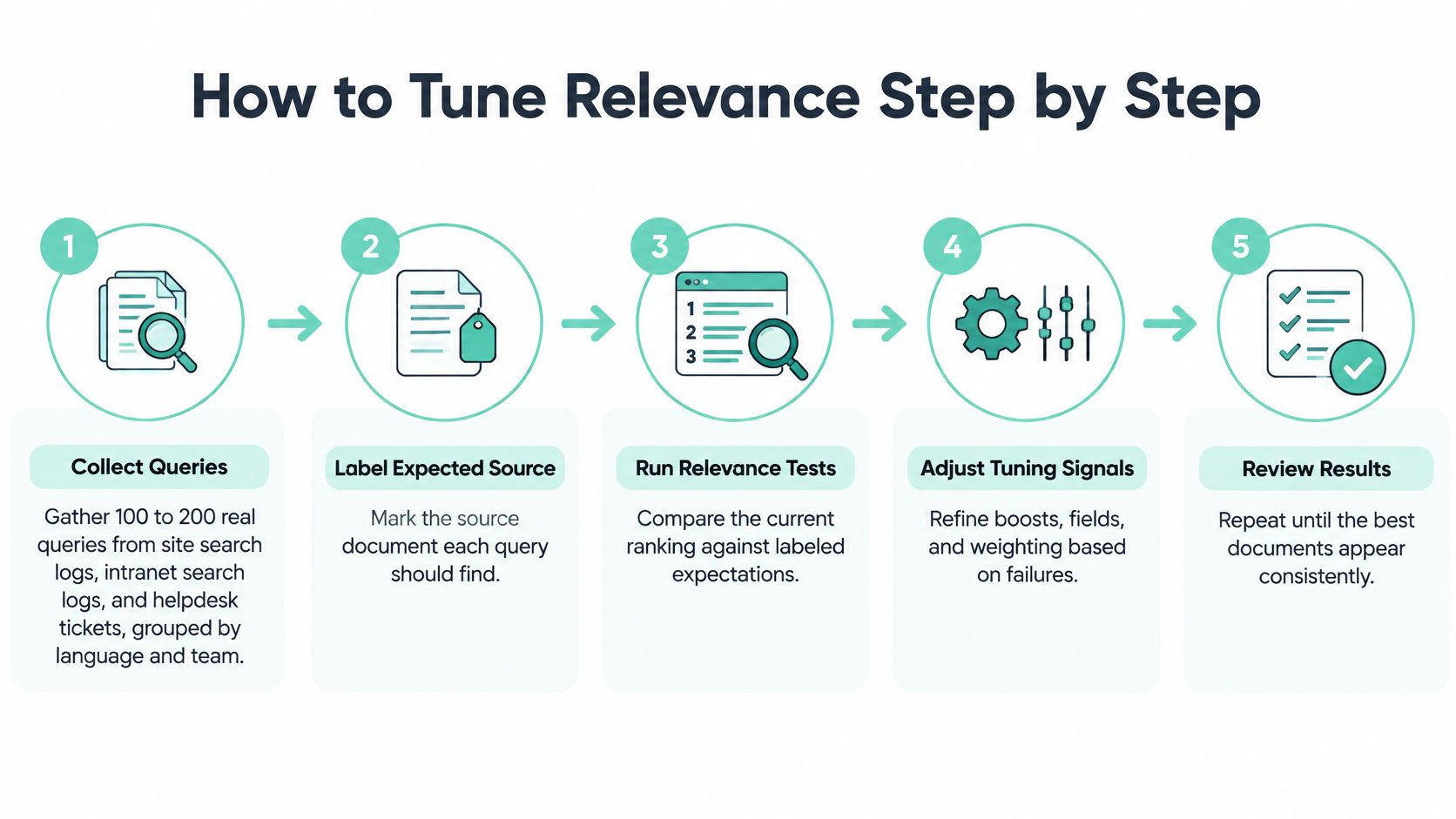
- Collect real queries. Pull 100 to 200 queries from site search logs, intranet logs and helpdesk tickets, grouped by language and team. The common slip is tuning against questions the project team invented, which are always cleaner than reality.
- Label the expected source. Mark the document each query should find, so the set becomes a fixed benchmark. Skip this and every tuning debate degenerates into opinion.
- Record your baseline. Note the zero-result rate and top-3 recall before changing anything. Without a baseline, you can't prove a boost helped or spot one that hurt.
- Build synonym and product-code dictionaries per market. A term that means one thing in Germany may mean another in the US. The slip is creating the list once and never reviewing it as products and terminology change.
- Set field boosts with restraint. Boost owner, locale and freshness, and demote drafts, archived pages and superseded versions. Watch for boosts that bury newer content because it has fewer clicks than the old page it replaced.
- Turn on reranking for the top 50. Compare recall at 3 and at 10 before and after. Check translated content separately, because a reranker that improves your English set can degrade other languages.
- Decompose multi-part questions. Split them into sub-queries and merge the evidence before generation. The slip here is merging without deduplication, so one loud source drowns out the others.
- Rerun the full labelled set after every change. Keep a change log with the reason for each boost and who approved it. Six months later, that log is the only thing standing between you and mystery ranking behaviour nobody dares touch.
Agree the Finish Line First
Set the acceptance threshold before tuning starts. A team tuning toward a number it agreed in advance can stop, ship and monitor. A team tuning toward general satisfaction never stops.
Pick concrete targets for top-3 recall, zero-result rate and permission violations, with the last of those at zero tolerance. Test each language market against the same thresholds rather than blending them into a global average that hides a failing locale. When the labelled set passes, freeze the configuration and move to the pilot. Further gains should come from fixing content, not from stacking more boosts.
Connecting Sitecore, SharePoint and Content Stores
Start with Sitecore, because most Sitecore estates already hold the customer-facing content a search layer needs. The Sitecore documentation hub separates the portfolio cleanly. XM creates, manages and publishes website content, xConnect and the Experience Database (xDB) collect and search experience data, Search delivers predictive experiences across content sources, and Personalize handles real-time next-best-action decisioning and testing. A headless XM Cloud front end can call the search layer with the same permission context as the page, so a result never exceeds what the visitor may see, which is core to how we approach Sitecore platform delivery.

Stream is the AI capability layer across supported Sitecore products. As Sitecore's Stream AI capabilities documentation explains, it's built on Microsoft Azure OpenAI Service, supports ideation, content creation, campaign briefs and message personalization, and lets you upload brand documents so outputs follow defined brand guidance. Availability is product and subscription dependent, and some capabilities require the Stream Premium tier, so check your entitlements before promising features to marketing.
In Sitecore Personalize, the Code Assistant accepts natural-language prompts and generates JavaScript for custom audience conditions, programmables in decision models and session traits. That matters for search because session traits become guest profile attributes you can use to personalise ranking and recommendations later.
The walkthrough below shows how these pieces connect in a working estate:
For SharePoint, Microsoft Copilot Search spans Microsoft 365 applications and connected non-Microsoft data sources, while SharePoint Advanced Management reduces oversharing, cleans up inactive sites and enables restricted content discovery during review. Run that cleanup before indexing, not after. The hard limits in Microsoft's Copilot Studio requirements and quotas then decide how you scope each agent:
| Limit | Value | Planning impact |
|---|---|---|
| Site URLs per custom agent | 25 | Group sites into agents by market or business unit |
| Rows returned by a SharePoint list query | First 2,048 rows | Do not rely on live list queries for complete answers |
| Maximum file size | 512 MB | Split very large manuals into sections before indexing |
| Generative answer file size without a Microsoft 365 Copilot license | 7 MB | Budget licenses for pilots that need full-document answers |
Regulated, multi-market estates need an identity pattern on top of all this. Kogifi built a search-driven, partner-facing platform for Siemens Healthineers with federated SSO and Azure-based scalability. It applies market-level content filtering to ensure compliance with regional legal requirements, and uses an OAuth-ready design for easy connection to identity providers and local verification systems. Copy that pattern whenever the same corpus serves markets with different disclosure rules.
Monitoring Search Quality After Launch
Launch day is when relevance starts drifting. New terminology appears, owners rewrite policies, sites get migrated, and your carefully tuned boosts begin pointing at content that no longer exists in the same form.
Log every query with its language, team and business unit, then review the zero-result rate by market each week. A sudden rise usually means new vocabulary you haven't added synonyms for, or a connector that stopped syncing. A slow rise in one locale often means translated content is falling behind the source language.
The Signals That Matter
Sample production traffic and score answers directly:
- Citation coverage: The share of answers where every claim traces to a cited passage.
- Abstention rate: How often the system declines to answer, and whether it declined for the right reasons.
- Stale-content retrieval: Answers citing a superseded version when a current one exists.
- Time-to-confirm: How long users spend verifying an answer, tracked alongside click-through on cited passages.
Treat any permission violation as a release blocker, not a backlog item. If a restricted document appears for a user outside its access group, alert immediately, pull the affected source from the index if you must, and find the inheritance break before re-enabling it.
A fast answer that users open, re-read and double-check against the source is not a time saving. Time-to-confirm catches that false win when click data alone won't.
Rerun your labelled benchmark at every release and add each production failure to that set, so it grows with real use. Set p95 latency budgets per query type, since a reranked multi-hop question legitimately costs more than a code lookup. Assign one named owner for the dashboard and a monthly review that feeds corrections back into synonyms, boosts and content governance. Without that owner, monitoring becomes a chart nobody acts on.
Plan Your First Enterprise Search AI Pilot
Begin with acceptance tests, not with scope. Build a separate suite for each query type, because a system that handles prose lookups can still fail badly on tables and diagrams.
| Test suite | Example question | Metrics to pass |
|---|---|---|
| Factual lookup | What is the current expense limit for a regional trip? | Citation correctness, retrieval recall, latency |
| Table-grounded calculation | What is the total for these quarterly line items? | Numeric accuracy, citation to the exact table cell |
| Policy and compliance | Which approval is required for this contract value? | Abstention rate, effective date shown, permission enforcement |
| Image and diagram interpretation | Which component connects these two systems? | Answer accuracy, escalation rate |
| Multi-hop across sources | Which policy changed and which procedure must follow it? | Recall across sources, attribution for each hop |
Model your pilot corpus on a realistic mix. One enterprise RAG evaluation framework used a 384-page technical manual with 184 questions, 591 financial-report files/pages with 1,000 questions, 4,689 pages of regulatory handbooks containing text, images and tables with 135 questions, and eight architectural documents with diagrams and 43 questions. Mirror the proportions of prose, tables and diagrams in your own estate, and stratify by language, document age and access boundary so failures stay diagnosable.
Track trust metrics alongside accuracy while you're at it. Measure verified task completion, correction rates, time spent validating answers and trust by role, because a pilot that scores well but that legal or finance staff won't act on hasn't actually passed.
Then make the decision in plain terms. Pick one high-value, low-risk domain, one language and one business unit. Name the owner and the escalation path. Approve launch only when the labelled set meets the threshold you agreed before the pilot started. If it doesn't, return to governance and tuning instead of widening scope.
Before rollout, check pilot findings against the whole environment. Our Platform Audits service evaluates Sitecore, Adobe Experience Manager and SharePoint environments for performance, security and compliance, which is the right lens for estates about to expose content through AI answers. Budget carefully, too. Most enterprise Sitecore implementations require custom quotes based on specific requirements, and search pilots scoped per market and per agent are no exception.
If your Sitecore, AEM or SharePoint estate holds the right content but people still can't find a version they trust, Kogifi can audit your content, permissions and retrieval readiness, then build a scoped enterprise search AI pilot measured against labelled acceptance tests. Tell us which domain you'd pilot first and we'll help you set the threshold before a model ever touches it. Start the conversation at Kogifi.