


Your Sitecore site is live, your editors are happy, and then search stops returning results on a Friday evening. Nobody's sure whether the contract covers the index, the identity provider, or only the CMS itself. That's the moment managed support services stop being a procurement line and become an operating question. I judge a support contract by three things you can test before that Friday arrives, recovery evidence, current runbooks, and product entitlements, not by uptime promises or monthly ticket counts.
Table of Contents
Managed Support Service Levels at a Glance
Say a revenue-critical Sitecore site fails at 22:00 on a Friday. Publishing is down, personalization isn't firing, and checkout traffic is still arriving. What happens next depends entirely on the tier you've bought, not on how urgent the incident feels to your team. If the contract doesn't state a coverage window, an owner, or a response target for that hour, treat that value as unknown rather than assuming someone's watching.
Four Tiers Buyers Actually Choose Between
| Tier | Coverage window | Severity 1 response | Best suited to |
|---|---|---|---|
| Business hours | Weekdays during stated office hours | 2 to 4 hours | Internal sites and intranets with low traffic |
| Extended hours | Early morning to late evening, including defined weekend cover | 1 hour | Campaign sites with weekend launches |
| 24/7 monitored | 24 hours, 7 days | 15 to 30 minutes | Revenue-critical portals and customer-facing platforms |
| 24/7 with on-call engineering | 24 hours, 7 days with named on-call engineers | 15 minutes | Multi-brand platforms with contractual uptime commitments |
Business hours cover works when an outage can wait until Monday without harming customers or staff who depend on the intranet. It fails when an internal site becomes business critical but the tier never changes. Extended hours suits launch windows and campaign peaks, provided the contract names the actual hours and time zone. A vague promise of extended cover is worth very little at 21:30 on launch night.
Monitored 24/7 cover means an alert reaches a person who can triage it, not just a dashboard that records it. On-call engineering goes further, because the person who answers can deploy a fix, roll back a release, or rebuild an index. The price difference between those two tiers is really the price of engineering authority outside office hours.
Practical rule: Response time is only the first clock. Ask what target applies to workaround and restoration before you compare tiers on price.
Before you choose, read how service levels are structured and what each clock measures and map your own peak hours against the coverage window. If your traffic peaks on Sunday, a weekday tier with a fast Monday response doesn't protect revenue. I would start from the busiest hour your platform must survive, then buy the tier that puts a named engineer on it.
What Managed Support Covers on Enterprise Platforms
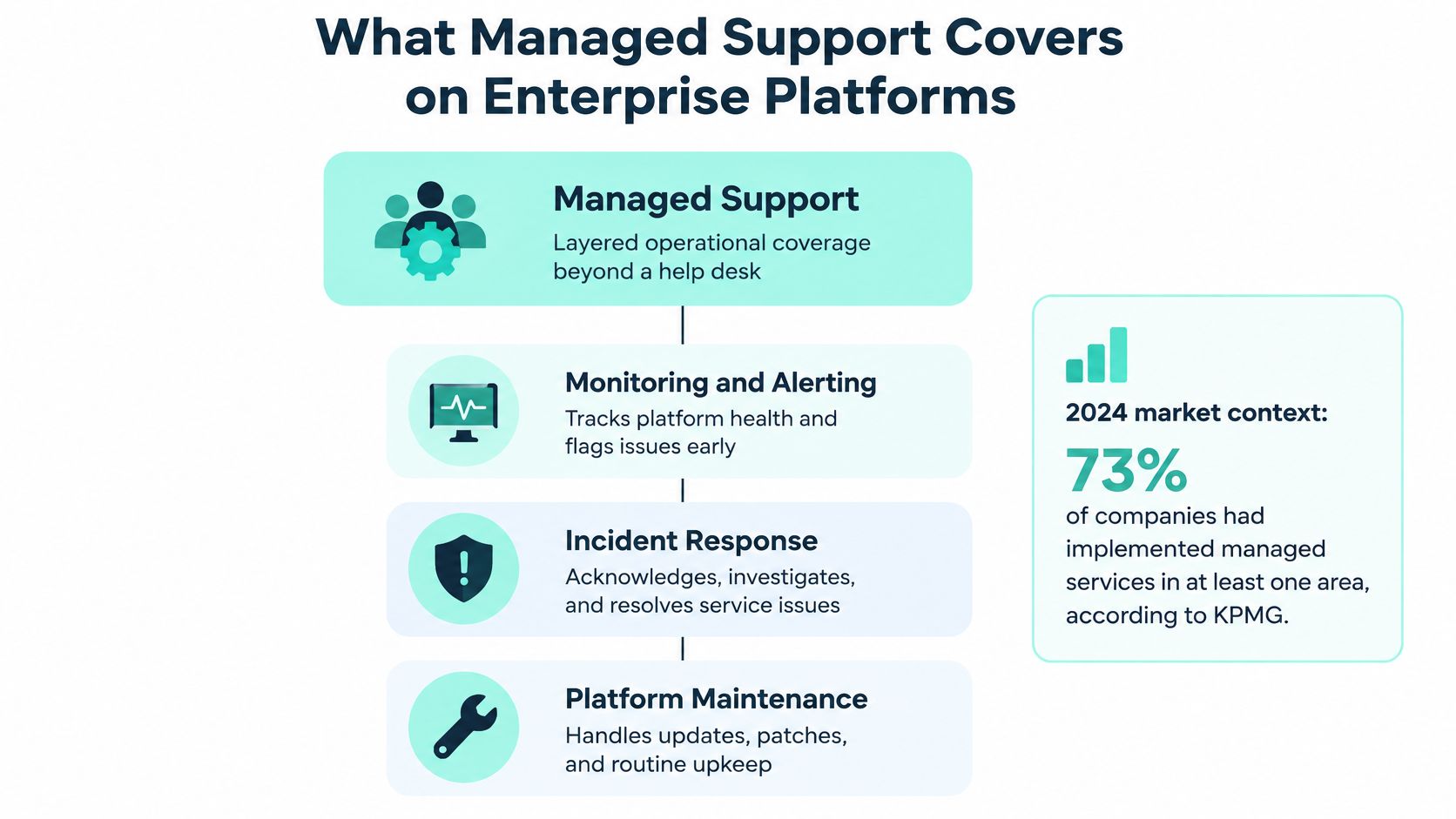
Most buyers meet managed support as a help desk, and that's the wrong mental model. In 2024, 73% of companies had implemented managed services in at least one area of their business, according to KPMG's survey of more than 1,000 global business leaders. Adoption at that scale reflects a layered operating service, not a ticket queue. Think of a building's facilities contract compared with a single repair call-out. One maintains the building so it keeps working, the other charges you each time something breaks.
The diagram below shows the three components that sit inside that layered model.
The Layers From Hosting to Specialist Change
The base layer is where the platform lives. Our Support and Hosting service includes DXP hosting, environment provisioning, automated scaling, real-time health monitoring and performance tuning. Without that layer, incident response starts from guesswork because nobody controls scaling, log retention, or environment parity. With it, you know which environment failed, what changed last, and whether capacity caused the problem.
Above hosting sits planned change. Our Updates and Upgrades work includes version migrations, patch management and service-pack updates for Sitecore, AEM and SharePoint. That distinction matters because patching a CMS without testing search, identity, and integrations often creates the next incident. A ticket-only contract usually excludes this layer, so versions drift until an upgrade becomes a project instead of routine maintenance.
The full Sitecore service set we work to is Support and Hosting, Platform Implementation, Updates and Upgrades, Platform Audits, Bugfixing and Recovery, Outsourcing and Migrations. Audits find configuration drift, slow queries, oversized media, and cloud waste before users feel them. Specialist change requests then handle the work that isn't a fault at all, such as a new integration, a taxonomy change, or a component variation for a campaign.
Use this checklist to spot gaps in any proposed scope.
- Hosting and scaling: Who provisions environments, tunes performance, and pays attention to capacity before a peak?
- Patching and upgrades: Are version migrations, patches, and service packs included or quoted separately each time?
- Recovery: Does the scope cover root-cause work and platform recovery, or only incident logging?
- Audits and cost control: Will someone review platform health and cloud spend on a schedule, not only after a complaint?
- Specialist change: How are small feature changes priced, approved, and released between larger projects?
If two or more answers are unclear, you're not comparing managed support services. You're comparing a facilities contract with a call-out fee.
How Incident Response Runs From Alert to Closure
A good incident process has separate clocks for separate problems. NIST's incident handling guidance supports tracking elapsed time from onset to discovery, impact assessment, containment, recovery, and closure, alongside team labor and escalation time. That separation lets you tell detection latency from remediation latency. Monitoring may find faults faster while a fragile deployment process still makes every recovery slow.
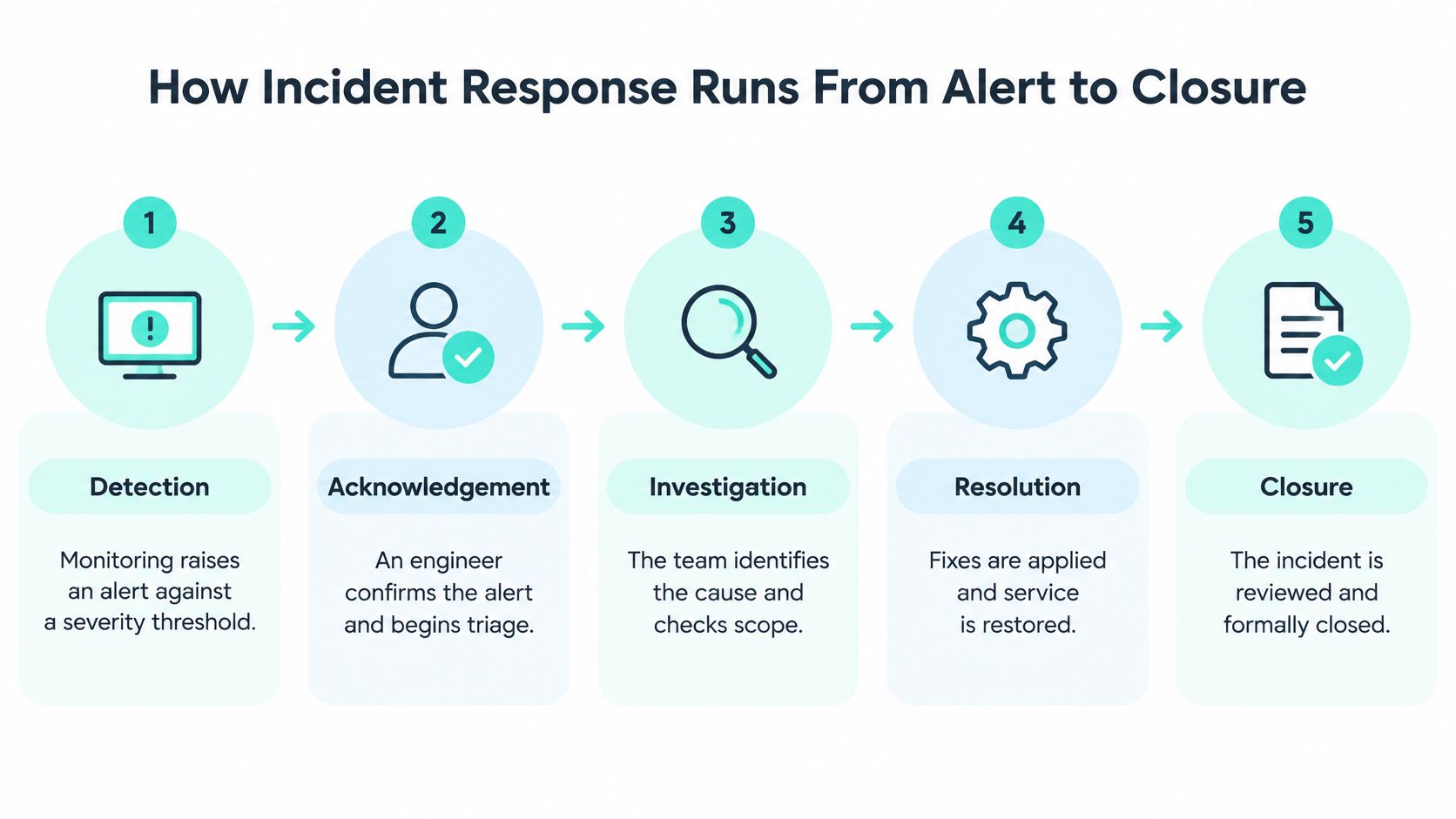
The flow below simplifies the lifecycle into the stages your team should be able to see on every major incident.
Six Stages and the Slip at Each One
- Detection: Monitoring raises an alert against a severity threshold tied to a real service, such as publishing, sign-in, or search. The common slip is an alert that fires into a mailbox nobody owns at night.
- Acknowledgement: A named engineer confirms ownership inside the severity target and starts triage. An auto-reply isn't acknowledgement, because it doesn't put a person on the problem.
- Impact assessment: The team links the fault to business impact, for example unavailable publishing, failed authentication, impaired search, or lost transaction capability. Without that link, a minor log error and a broken checkout can look identical in a ticket count.
- Containment and workaround: Restore a usable service first, even if the root cause is still open. Teams slip here when they chase root cause while users stay locked out.
- Root-cause analysis and emergency patch: Our Bugfixing and Recovery service includes root-cause analysis, emergency patches, and fixes applied in both production and staging systems. A fix applied only in production returns at the next deployment.
- Recovery and closure: Confirm normal service, then close with incident reporting and knowledge transfer to your team. Closure without a written review leaves runbooks and monitoring thresholds unchanged.
For a practical view of ownership and escalation, see incident management practices that keep major incidents moving. I look for a dashboard segmented by service, severity, root-cause category, recurrence, and customer impact. Raw ticket volume doesn't compare fairly across platforms with different definitions and complexity.
A monitoring dashboard doesn't provide 24/7 support on its own. Certified specialists on standby, with authority to act, do.
Between incidents, our certified DXP specialists are on standby 24/7 for proactive maintenance, security audits and rapid troubleshooting. That quiet work, threshold tuning, certificate checks, index health, and patch readiness, is what keeps stage one from firing at all. When it does fire, post-incident reviews should update the runbook that the next engineer will use.
KPIs and Recovery Tests That Prove Service Quality
A monthly ticket count can look healthy while a platform takes days to recover. Tickets measure activity. They don't measure restoration, and a provider can close plenty of easy items while the hard faults recur. The evidence that matters is recovery: how fast critical services return, and whether the same root cause shows up again next quarter.
Metrics That Reveal Restoration, Not Busywork
| Measure | What it reveals | Target style |
|---|---|---|
| Time to detect | Gap between incident onset and alert | Per severity, measured in minutes |
| Time to acknowledge | Whether an engineer owns the incident | Per severity, measured in minutes |
| Time to workaround | How fast users get a usable service back | Per severity, measured in hours |
| Time to restore | Full return to normal service | Per severity, against agreed RTO |
| Systems restored by interval | Whether the recovery order protects key journeys first | Percentage at 12-hour intervals |
| Recurrence rate | Whether root causes are being fixed | Count per quarter by root-cause category |
| Backup restore test pass rate | Whether recovery works, not just backups exist | Percentage of scheduled tests passed |
| Post-incident review completion | Whether runbooks and monitoring are updated | Percentage of major incidents reviewed within agreed days |
Utilization figures need the same scepticism. A fully utilized team can still be slow to restore your platform, which is why it helps to spot misleading MSP utilization numbers before accepting them as proof of quality. A short report on restoration by component is more useful evidence than a glossy chart showing engineers were busy. Ask for it by component and by severity, with the restore time next to the objective it was measured against.
Map Dependencies Before You Need Them
NIST's recovery guide, SP 800-184 identifies recovery metrics including downtime, restoration cost, affected-system recovery percentages over defined time increments, backup quality, dependency-map accuracy, SLA performance, and the time required to restore 100% of affected systems. Incomplete dependency mapping or untested backups increases recovery uncertainty even when monitoring reports normal operation. A green infrastructure dashboard can hide a search index that takes longer to rebuild than the site itself.
Classify each component separately, then assign a recovery time objective and recovery point objective by business criticality.
- Content and data: Content databases, media assets, and configuration that editors can't recreate quickly.
- Findability and access: Search indexes and identity services, because a restored site nobody can sign into or search isn't restored.
- Connections and delivery: Integration endpoints, deployment pipelines, and front-end delivery layers that carry transactions and personalization.
Tracking the percentage of services restored at 12-hour intervals shows whether recovery protects valuable customer journeys first. Azure-based autoscaling delivered reliable performance during seasonal peaks for Siemens Healthineers and improved cost control compared with overprovisioned setups. That is capacity evidence, and it doesn't replace a restore test. Ask for four tests in writing: scheduled restore tests, synthetic availability checks, configuration drift detection, and recovery-time reporting by component.
Finish with three direct questions. When was the last full recovery exercise, what did it measure against the agreed RTO, and what's the tested RPO for each critical platform? Compare actual recovery time and data loss with those objectives after every event, quantify lost productivity or revenue exposure, and feed the gaps back into architecture, runbooks, and SLA revisions. A runbook nobody has executed under time pressure is a document, not a control.
Sitecore and SharePoint Support Requirements
Start with Sitecore lifecycle status, because it limits what any provider can deliver. Under Sustaining Support, Sitecore no longer provides security updates, fixes or hotfixes, though documentation and upgrade help remain available. Since 1 June 2026, Sitecore security fixes in Extended Support are paid under a separate agreement with your Sitecore account representative. Sitecore supports upgrades only to a version in Mainstream support, which is 10.4 or 10.5.
The image below captures the kind of lifecycle review your team should do before signing a support term.
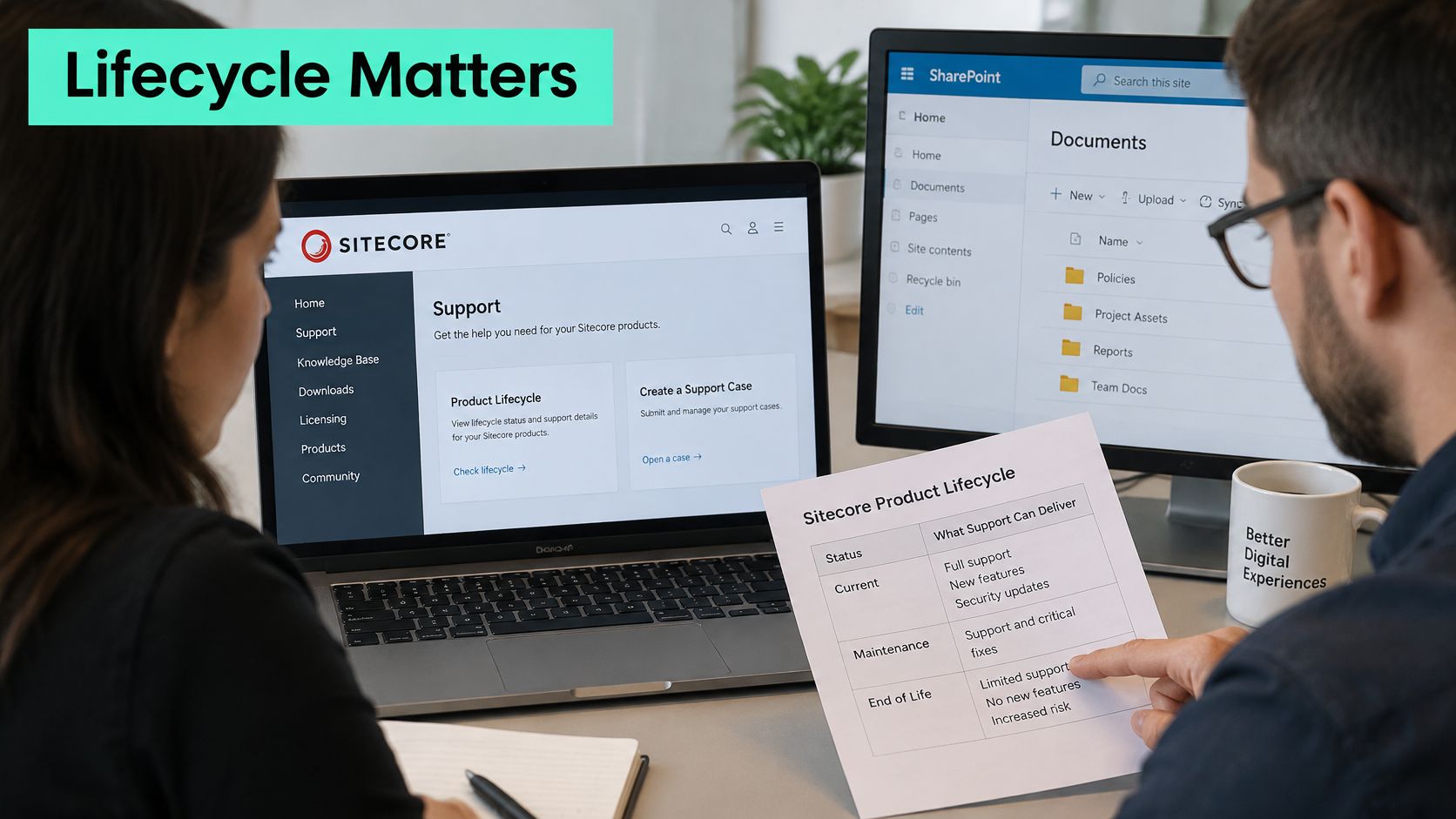
If your version sits outside Mainstream support, a provider can add compensating controls and plan an upgrade, but it can't conjure vendor hotfixes that no longer exist. That's why lifecycle belongs in the contract, with a dated path to a supported version. Our guide to Sitecore support services and lifecycle planning covers how those checks fit together.
SitecoreAI Entitlements Are Not Automatic
SitecoreAI is a connected portfolio centered on XM Cloud, with CDP and Personalize, Search, and Content Hub in the broader offering. The SitecoreAI developer FAQ says Content Hub remains a separate application that can be provisioned on request rather than being automatically provisioned. Your agreement must confirm which products are entitled, provisioned, integrated, and covered, because portfolio packaging doesn't prove a working connection.
Stream adds another entitlement layer. Sitecore documentation describes Stream as the AI layer across XM Cloud, Content Hub, XP, CDP, Personalize, and Search, with some functionality requiring the Stream Premium tier. In Content Hub, AI-assisted work includes generated image alt text, field-level text generation, brand awareness, visual search, and smart briefs. Each feature creates support work you should name in scope, including asset indexing quality, brand-rule configuration, metadata validation, and accessibility review of generated alt text.
The short video below is a useful prompt for checking which SitecoreAI products your own estate has switched on.
SharePoint Limits Shape Monitoring and Migration
SharePoint Online looks simpler because Microsoft runs the service, but plan limits still decide where alerts and migration batches must sit. Microsoft's SharePoint Online limits specify the thresholds in the table below.
| Limit | Value |
|---|---|
| Default storage allowance | 1 TB plus 10 GB per licence |
| Maximum per site collection | 25 TB |
| Site collections per organization | Up to 2 million |
| Items per list | Up to 30 million |
| Files and folders per document library | Up to 30 million |
| Total taxonomy terms | 1 million |
Those numbers affect storage monitoring, taxonomy design, migration sizing, and incident diagnosis. A bilingual SharePoint intranet built with SPFx components and Power Platform automations also needs support for custom code, flows, permissions, and term store growth, not only Microsoft service health. State the capacity headroom the provider will maintain and the alert threshold that triggers action.
Run three checks before you sign. Confirm entitlement for every SitecoreAI and Stream feature you expect to use, confirm version support against Mainstream status, and confirm capacity headroom for SharePoint storage, lists, libraries, and taxonomy. Managed support services that skip those checks will discover the gaps during an incident.
Criteria for Comparing Managed Support Providers
Every provider will claim 24/7 coverage. Compare evidence instead. Ask for dated recovery results, current runbooks, named standby roles, and contract language that ties service credits to outcomes such as restoration and security posture. A buyer who asks for the last recovery test date and receives a vague answer has learned more than any brochure reveals.
A Scorecard You Can Use in the Meeting
| Criterion | Question to ask | Red flag |
|---|---|---|
| Severity-based SLA | Which targets cover detection, workaround and restoration? | Only a response time is stated |
| Tested recovery | When was the last full recovery exercise, and what were the results? | No dated test records |
| Runbooks | Are there current runbooks for each critical platform? | Runbooks promised but not shown |
| Specialist coverage | Who is on standby outside office hours? | Escalation only to a general queue |
| Product depth | Which Sitecore, AEM or SharePoint versions do your engineers support? | Generic answer across all platforms |
| Knowledge transfer | How does your team hand knowledge to ours? | No handover in the contract |
| Findings ownership | Who owns the options paper from a readiness review? | Findings stay with the provider |
| Scaling | How does a dedicated team grow with our roadmap? | Fixed headcount with no change process |
Ask whether the contract ties payment or credits to uptime, recovery time, cost reduction, or security posture rather than to services delivered. Market reporting summarized in a 2025 managed IT services update describes a shift toward outcome-based SLAs of that kind. If a provider can't write outcome terms into the SLA, I would treat that as a risk, not a pricing detail.
Capacity matters when your roadmap outgrows a small support rota. Our Outsourcing service provides dedicated teams for Sitecore, Adobe Experience Manager and SharePoint development, support and maintenance, including custom features, integrations, and 24/7 monitoring and helpdesk. Staff augmentation can fill a specialist gap, but the contract still needs one accountable owner for incidents and releases.
The options paper from a readiness review belongs to you, whoever does the follow-on work. Put that ownership in writing before the review starts.
Tooling costs belong in the comparison too. If a provider's service desk economics depend on its PSA platform, a HaloPSA subscription pricing guide helps you understand what sits behind per-technician charges. Then use a structured vendor selection process with weighted evidence so the scorecard, not the sales meeting, decides the shortlist.
Confirm Scope and Budget Before You Sign
Don't start with the retainer price. Start with exposure, then price the scope that removes it. Four checks in sequence will protect you from the common trap, a cheap contract that excludes recovery, upgrades, and AI governance until you need them.
Four Checks in Order
- Run a Sitecore Support Readiness Check first. It covers your version, environments, and the support each has today, plus security including current patch level, hosting, and compensating controls, and what's needed before AI agents work in your CMS. The Single package covers 1 Sitecore instance, up to 3 sites, over 1 to 2 weeks, from €6,500, $7,000 or £5,500, credited to follow-on work, and active clients receive it free.
- Compare retainers on scope, not headline price. Sitecore support retainers start from about €3,000 a month, but that figure means little until you know whether patching, recovery tests, audits, and specialist change are included. Price the same scope across providers or don't compare prices at all.
- Separate AI and automation costs from the base price. Automation can cut repetitive ticket work, but it adds licensing, integration, governance, model oversight, and security review. An ISG 2025 enterprise study found nearly 70% of enterprises were only moderately satisfied or dissatisfied with AI-service pricing, so ask for each cost line separately and define what evidence proves total cost fell.
- Sign only when the evidence is written down. The contract should state severity targets for detection, workaround, and restoration, the last recovery test date and results, tested RTO and RPO values, product entitlements, and ownership of the options paper.
Ask which activities are priced per user, per platform, per incident, or against an outcome. For a Sitecore, AEM, or SharePoint estate, the budget should also show platform health checks, release support, cloud consumption, observability, security tooling, disaster recovery tests, and specialist change requests. If those lines are missing, they won't be free later. They'll arrive as change requests during an incident.
Bring the scorecard to the readiness review and use its findings to set the retainer scope. That's how managed support services become a measurable operating discipline instead of an insurance policy you've never tested. I would not sign a multi-year term until a provider has shown one dated restore, one current runbook, and one entitlement list that matches your live estate.
Request a Sitecore Support Readiness Check and we'll review your version, environments, security posture, AI readiness, and recovery evidence before you commit to a retainer. You'll keep the options paper whoever does the follow-on work, and you can use it to compare any proposal on restoration evidence rather than promises. Visit Kogifi to start that review and talk through the right support tier for your Sitecore, AEM, or SharePoint platform.