


Your Sitecore platform is probably already telling you what's wrong. Tickets linger, upgrades keep slipping, and the team keeps assuming the vendor will cover the edge cases until a real incident proves otherwise. That's the trap with Sitecore support services, the official support layer is narrow, and if you don't define the operational boundaries yourself, the gaps show up during outages, not planning meetings.
For a CTO, the right question isn't “do we have support?” It's “who owns incident response, patch timing, environment hygiene, and upgrades when Sitecore's formal support stops?” If that answer is fuzzy, your support model is too weak for an enterprise estate.
Table of Contents
- Reactive support is not the same as platform ownership
- Proactive support is where outages are prevented
- The response window tells you how the vendor will behave
- Managed Cloud still leaves work on your plate
- Pick the model that fits your actual capacity
- Budget certainty is useful, but only if the scope is real
- Co-managed support is the most realistic enterprise compromise
- Start with access, inventory, and decision rights
- Use a ninety-day ramp with visible checkpoints
- Watch for the classic handoff mistakes
- Measure what affects production, not just ticket volume
- Price the work so the incentives stay aligned
- Avoid the traps that quietly weaken the contract
What Sitecore Support Services Actually Cover
A retailer's Sitecore front end goes dark on a Friday evening. The internal team opens a ticket, then realizes the problem isn't the same thing as the fix. Sitecore can acknowledge the platform issue, but nobody on the vendor side is there to run the upgrade rollback, check the integrations, restore the monitoring baseline, and keep the release train moving.
That's the practical split. Vendor support is one layer. Operational support is the other. If you only buy the first one, you still own the work that keeps production stable.
Reactive support is not the same as platform ownership
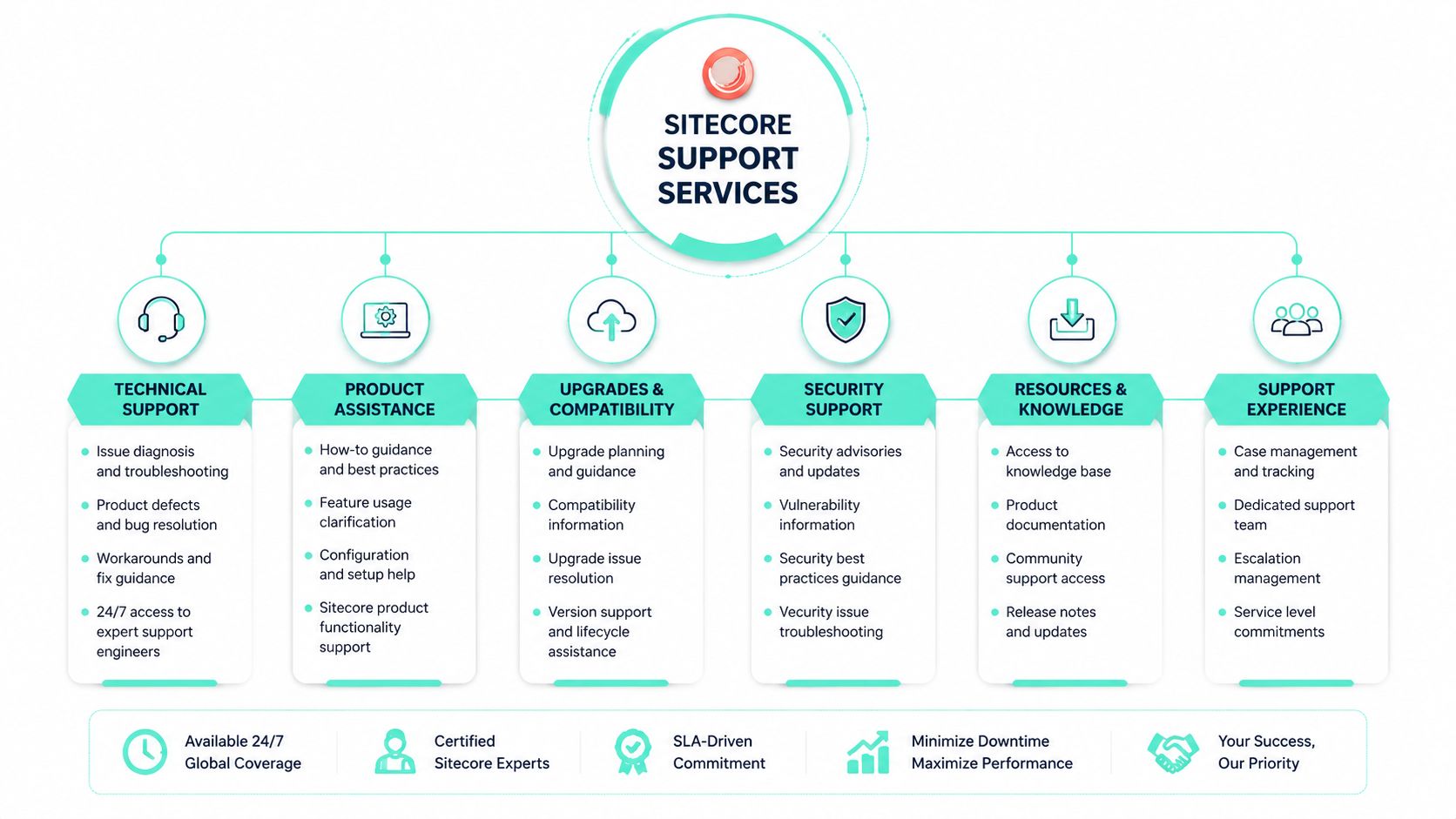
Sitecore's formal support intake starts in the support portal, and the model is built around Standard Support and 24x7 Premium Support. The official overview says low-priority issues can get a response in up to three business days, while critical issues can be handled in as little as one hour (Sitecore support overview). That's fast enough to matter in an incident, but it does not mean Sitecore will run your environment.
In practice, reactive support covers break-fix, vendor case management, and escalation handling. It does not magically cover the day-to-day work that keeps incidents from happening. That means monitoring, performance tuning, security patching, and release readiness still need an owner on your side.
Practical rule: if nobody in your support model owns the environment after the ticket is opened, the ticket is only a symptom tracker.
Proactive support is where outages are prevented
The enterprise value sits in the proactive layer. Teams need somebody watching platform health, mapping dependencies, reviewing log noise, and planning upgrades before the support window narrows. That is where a partner earns its keep, because most delays are not caused by a missing vendor response. They're caused by missing preparation.
If your roadmap includes platform modernization, the upgrade work matters just as much as incident handling. A strong partner covers upgrade planning, stability reviews, and the transition between versions, not just the rescue call after things fail. If you want a useful mental model for that boundary, the update and upgrade work should be treated as a separate operating discipline, not a side task, and this upgrade services overview fits that mindset well.
The blunt recommendation is simple. Treat Sitecore as the platform vendor, and treat support operations as your delivery responsibility unless a partner explicitly owns them. Anything less is an outage waiting for a holiday weekend.
Understanding Sitecore Official Support Tiers and Lifecycle
A CTO should read Sitecore's support model closely. The official structure centers on Standard Support and 24x7 Premium Support, with Premium covering Critical and High severity cases 24 hours a day, 365 days a year (Sitecore support overview). That is the outer boundary of what the vendor commits to, and it matters for distributed teams that cannot wait for local business hours.
The response window tells you how the vendor will behave
The most useful part of the support overview is the response expectation, because it shows how Sitecore prioritizes incidents. Sitecore says low-priority issues can receive a response in up to three business days, while critical issues can be handled in as little as one hour. Those numbers define the handoff point between vendor support and your own incident process.
Do not design an enterprise support model around the slowest allowable response. Design it around the fastest incident path your business actually needs.
The product lifecycle sets the other boundary. Sitecore states that support packages can provide up to 8 years of support from the general availability date of a product (Sitecore lifecycle overview). For Sitecore XP 10.4, the published lifecycle notes April 30, 2024 as the release date, mainstream support through the end of 2027, and extended support through 2030. Older 9.x releases are currently on a path to extended support end on December 31, 2026, after which they move to sustaining status with no security patches (Sitecore lifecycle overview).
Managed Cloud still leaves work on your plate
That lifecycle boundary is why Sitecore Managed Cloud has to be treated as a bounded service, not a full operating model. For Managed Cloud Standard, PaaS 2.0, Sitecore limits support to operational support for infrastructure and technical support for Sitecore XP instances hosted only on supported Azure services/topologies and tiers for XM/XP v10.3.1 and later (Managed Cloud scope). The customer is explicitly responsible for scheduling and performing platform upgrades (Managed Cloud scope).
That boundary creates most of the failure cases. Sitecore can keep the hosted layer within scope, but it does not own version lifecycle management for you. If your support arrangement assumes otherwise, patch windows slip, compatibility checks get delayed, and the next upgrade turns into an avoidable outage risk.
Security patching sits squarely in that gap. If you want a clean operating standard for that responsibility split, keep this security patching guide in your architecture folder and use it to define who patches, who tests, and who signs off. The vendor lifecycle tells you when support exists. It does not tell you who must act on it.
The same boundary applies to partner support. If you rely on offshore outsourcing cost savings, make sure the model still covers incident ownership, upgrade coordination, and release validation across time zones. Cheap coverage without clear operational control usually becomes expensive during a production issue.
Comparing Support Delivery Models for Enterprise Needs
Support delivery models fail when teams choose them by habit instead of by operational reality. A lean in-house Sitecore team with good DevOps habits needs a different arrangement than a multinational brand with multiple site owners, regional release calendars, and fragile integrations. The support contract should match the operating model, not the org chart.
Pick the model that fits your actual capacity
Here's the useful comparison.
| Delivery Model | Best For | Cost Structure | Response Guarantee | Typical Use Case |
|---|---|---|---|---|
| Break-fix | Very small estates or tactical cleanup | Lower upfront, unpredictable later | Usually limited or ad hoc | One-off incidents, no long-term ownership |
| Retainer-based | Teams needing dependable access to specialists | Predictable monthly spend | Often defined by SLA tiers | Recurring advisory and delivery help |
| SLA-backed | Enterprises that need accountable response times | Fixed fee plus service tiers | Explicit response and escalation commitments | Business-critical production estates |
| Fully managed | Organizations that want the partner to run support operations | Higher but simpler to govern | Strongest operational coverage | Multisite environments with limited internal ops |
| Co-managed | Mature teams with internal delivery capacity | Shared cost and shared ownership | Depends on boundary definition | Internal team owns product, partner owns specialist support |
The right answer depends on who is already in the building. If your internal team can patch, monitor, and coordinate releases, a co-managed model is usually the least painful option. If they can't, a fully managed model is cleaner because it removes ambiguity during incidents.
Budget certainty is useful, but only if the scope is real
Retainers and SLA-backed agreements give finance predictable spend, which is why executives like them. The trap is hidden exclusions. A contract that covers ticket intake but excludes upgrades, security patching, or integration troubleshooting is cheaper on paper and more expensive when the system is unstable.
If you're comparing delivery economics across geographies, the offshore outsourcing cost savings discussion is a helpful background reference, but cost alone should not decide a Sitecore support model. Geography matters, but escalation quality, time zone overlap, and platform expertise matter more.
Co-managed support is the most realistic enterprise compromise
For most enterprise Sitecore estates, co-managed support is the smartest compromise. Your internal team retains architecture control and product knowledge. The partner covers specialized support, incident escalation, and lifecycle execution where in-house bandwidth is thin.
That model works especially well when governance is strict, release windows are narrow, or the business needs regional coverage. It fails when ownership boundaries are vague. If both sides believe the other one is patching, nothing gets patched.
How to Evaluate Sitecore Support Vendors
Most vendor interviews sound good until you ask who wakes up at 2 a.m. and what happens if an upgrade fails halfway through. A serious evaluation process cuts through the pitch deck quickly. You want proof, not promises.
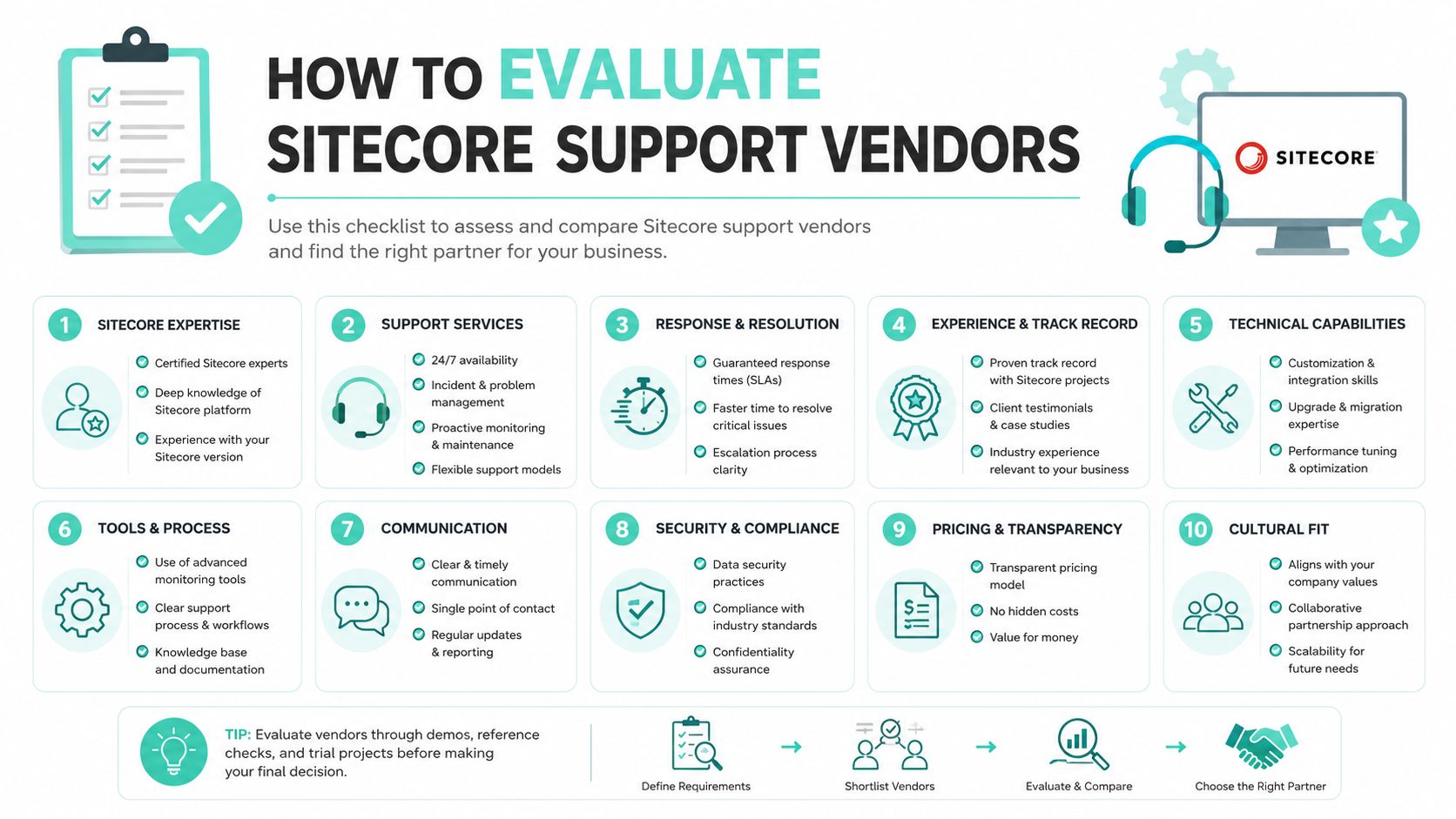
Score the vendor on evidence, not adjectives
Use a simple gate before you even compare prices.
- Enforceable SLAs. Ask what happens when the response window is missed, and make sure the contract says it plainly.
- Clear escalation paths. Critical incidents need named roles, not a shared inbox.
- Verified Sitecore capability. Certifications, delivery references, and named specialists matter more than marketing claims.
- Monitoring depth. A partner should know how incidents are detected, not just how tickets are answered.
- Regional coverage. If you run across the USA, Europe, and the Middle East, support handoffs need to survive time zone changes.
- Complex architecture experience. XM Cloud, headless, and integration-heavy estates need specialists who've handled them.
- Upgrade discipline. Ask how the partner handles version transitions and rollback planning.
- Security awareness. Support without patch and risk ownership is incomplete.
- Communication rhythm. Status cadence during incidents should be fixed, not improvised.
- Ownership boundaries. The contract should say who handles what, especially for environment access and platform changes.
The best vendors answer these questions without wavering. The weak ones keep repeating that they're “flexible.” Flexibility is not a support model.
Ask for process artifacts, not slideware
A serious partner should be able to show case workflows, incident handoff paths, and environment management procedures. If they can't demonstrate how they create or update environment records, that's a warning sign. Sitecore's own workflow ties support to environment records through the Environment Label field and the My Environments page, which means support operations are meant to follow managed records, not loose email chains (Sitecore environment management workflow).
If a partner cannot explain its escalation path without reading from a slide, it is not enterprise-ready.
For a deeper vendor comparison lens, this DXP vendor evaluation framework is a useful complement. The same rule applies there as it does with Sitecore support. Pick the provider that can prove control under pressure.
The video below is worth watching if your team needs a shared vocabulary before vendor selection.
Onboarding and Transition Checklist for New Support Partners
The first ninety days decide whether the handover stabilizes the platform or creates a slow-motion incident. Most failures happen because the new partner gets partial documentation, partial access, and unclear authority. Then everyone assumes the missing pieces will sort themselves out later.
Start with access, inventory, and decision rights
Week one should be about control, not comfort. The partner needs access to the right environments, the right contacts, and the current documentation set. If the previous team used informal knowledge to keep production alive, get that knowledge out of people's heads and into a transfer session immediately.
The Sitecore support portal workflow matters here because support access is tied to permissions and case submission mechanics. Users can open a case through the Sitecore Cloud Portal by choosing Home, then Create a support case, filling in the required fields, and submitting the form (Sitecore cloud portal workflow). If someone can log in but lacks permissions or has portal access problems, Sitecore names SupportPortalAccess@sitecore.com as the dedicated mailbox (Sitecore cloud portal workflow).
If you skip access validation, the handover stalls before the first incident even lands.
Use a ninety-day ramp with visible checkpoints
A clean transition should look like this:
- Week 1, Knowledge transfer: transfer architecture notes, dependencies, contacts, and current incident history.
- Month 1, Environment setup: confirm environment records, monitoring hooks, and escalation paths.
- Month 2, Shadow support: let the new partner observe live ticket handling before they own it.
- Day 90, Review and optimize: measure what broke, what was slow, and what still depends on tribal knowledge.
For teams that need to formalize the stabilization phase around a production go-live or major change, hypercare guidance is the right operating frame. It forces the transition to behave like a project with a finish line, not an open-ended favor.
Watch for the classic handoff mistakes
The common problems are boring, which is why they're dangerous. Documentation is out of date. Escalation contacts are wrong. The partner knows the ticketing flow but not the business priority. Nobody tested the incident bridge until a real outage forced the issue.
The handoff is successful only when the new partner can resolve a real incident without asking the old team to translate the environment again.
Treat onboarding as part of support delivery, not an administrative chore. If the transition isn't managed tightly, you inherit the very instability you were trying to remove.
KPIs, Pricing Models, and Common Pitfalls to Avoid
Support quality gets fuzzy fast unless you measure it. A vendor can say they're responsive while still dragging every critical issue across multiple handoffs. Your reporting needs to expose that gap.
Measure what affects production, not just ticket volume
The KPIs that matter most are the ones tied to platform health and release control. Track mean time to resolution, first-response adherence, upgrade success rate, and the volume of proactive issues prevented. If the report only shows how many tickets were closed, you're measuring activity, not outcomes.
A good support dashboard should also show how often the partner found problems before users did. That is the difference between a helpdesk and an operations function. In Sitecore estates, that distinction is everything because so many failures come from integrations, deployment drift, and lifecycle mismatches rather than obvious application errors.
Price the work so the incentives stay aligned
Fixed monthly retainers work well when the scope is stable and the team wants predictable spend. Tiered SLA packages make sense when incident priority really differs by business function. Time-and-materials is only appropriate for limited advisory work or remediation tasks, because it rewards time spent, not platform stability.
The worst contracts are the ones that charge for speed while excluding the work that makes speed useful. If upgrades, patching, and stabilization are outside scope, the vendor has no financial reason to reduce long-term risk. That's how enterprises end up paying twice, once for support and again for emergency remediation.
Avoid the traps that quietly weaken the contract
Watch for three patterns.
- Ticket factory behavior. High ticket closure counts can hide weak root-cause work.
- Scope gaps. If upgrades or security support are excluded, the agreement is incomplete.
- Soft SLAs. A response commitment without accountability is a marketing statement, not a service level.
The right model rewards resolution, not motion. That sounds obvious, but a lot of contracts don't do it. Make the partner accountable for the health of the estate, not just for answering email.
Why Kogifi Delivers Enterprise-Grade Sitecore Support
Kogifi fits the enterprise support profile because it combines platform delivery with operational coverage, which is exactly what Sitecore estates need. The company positions itself as a Sitecore Silver Partner, with 70+ DXP projects, 12+ years in operation, and a 50+ specialist team, plus 24/7 SLA-backed support for ongoing operations. It also works across the USA, Europe, and the Middle East, which matters when support handoffs span regions and time zones.
The technical part matters too. Kogifi's Sitecore work includes XM Cloud and headless architectures, and its delivery model extends into AI-driven personalization and broader experience orchestration. That combination is useful because modern Sitecore support is no longer only about keeping the application online. It's about keeping the experience platform stable while the business keeps changing the architecture underneath it.
For multinational organizations, the strongest fit is usually a partner that can handle support, upgrades, governance, and multilingual delivery without forcing three different vendors into the same operating chain. Kogifi's cloud-native delivery patterns, governance model, and accessibility focus line up with that requirement. It is also one of the few options in this space that can speak credibly about both Sitecore and Microsoft 365/SharePoint when the digital estate includes intranets, portals, and internal knowledge systems.
If you want a support model that actually closes the operational gaps around Sitecore, Kogifi can help you define the boundary between vendor support and partner ownership, then put the right operating model around it. Visit Kogifi to review support, upgrade, and managed delivery options built for enterprise Sitecore estates.