


A platform team can tell when an enterprise DXP has drifted, even before the dashboards confirm it. A Sitecore XM Cloud release triggers Slack alerts because personalization latency is climbing. An AEM author environment times out during a Friday content push. A SharePoint Online intranet slows under a quarterly HR campaign while licensing and automation costs keep accumulating in the background.
These incidents rarely come from one defective component. They usually reflect a platform operating beyond the assumptions behind its architecture, caching policy, integrations, content model, or governance. Platform stabilization is the discipline that turns that recurring firefighting into predictable operations. It applies to SitecoreAI, AEM, and SharePoint Online alike, but the controls differ by platform.
The financial side matters too. Consumption-based services, AI capabilities, search workloads, storage, and support effort can make technical drift visible in the budget long before someone labels it a reliability problem. Teams evaluating that exposure can also use cloud cost optimization guidance to connect infrastructure decisions with operational accountability.
Table of Contents
Why Platform Stabilization Matters Now
The most difficult DXP mornings start with several small failures rather than one dramatic outage. A marketing team reports that a personalized campaign feels slow. Developers discover that a recent XM Cloud deployment passed its pipeline but produced unexpected behavior in production. The AEM team sees authoring timeouts while editors publish a campaign, and the SharePoint owner receives complaints that an intranet page packed with embedded reports takes too long to become useful.
Each team can usually explain its immediate symptom. The problem is that the symptoms share a deeper cause: the platform has drifted past its design envelope. Content volume has changed, integrations have multiplied, release patterns have accelerated, and new AI or personalization workloads have been added without revisiting the operating model.
Reliability is now a continuous obligation
Modern digital estates operate continuously, including outside normal office hours. A dataset covering 1.8 million monitored website outages found that 61.4% of sites went down at least once, the average site experienced 47 outages, the median outage lasted 1.9 minutes, and 98.6% of outages were resolved within one hour. The same dataset found that 68% of outages began outside the 9-to-6 workday, which makes nights, weekends, alert routing, and recovery automation part of stabilization rather than optional support extras. The outage analysis illustrates why a platform can look healthy on a daily dashboard while still creating repeated user-facing risk.
Availability expectations leave little room for casual operations. Global average uptime is benchmarked around 99.95%, while enterprise sites average about 99.97% and mid-market sites about 99.94%. Detection time averages 47 to 51 seconds, with sector benchmarks ranging from 99.98% for e-commerce to 99.89% for education. Website monitoring benchmarks show how stabilization has moved from basic recovery toward near-continuous availability and rapid detection.
AI raises the cost of weak foundations
SitecoreAI expands the surface area that platform owners must govern. XM Cloud, Sitecore Search, Sitecore Personalize, Customer Data Platform, Content Hub, and Agentic Studio connect content, discovery, targeting, assets, customer profiles, and automated marketing work. If the underlying estate has weak observability or uncontrolled deployment practices, AI doesn't remove the instability. It can amplify it through additional calls, data dependencies, workflows, and governance requirements.
The same principle applies to AEM as a Service and Microsoft 365 environments using Copilot, Power Platform, and SharePoint Online. A stabilization program therefore needs to protect performance, reliability, cost, and trust at the same time. Treating it as a one-off rescue project only postpones the next incident.
What Platform Stabilization Actually Means
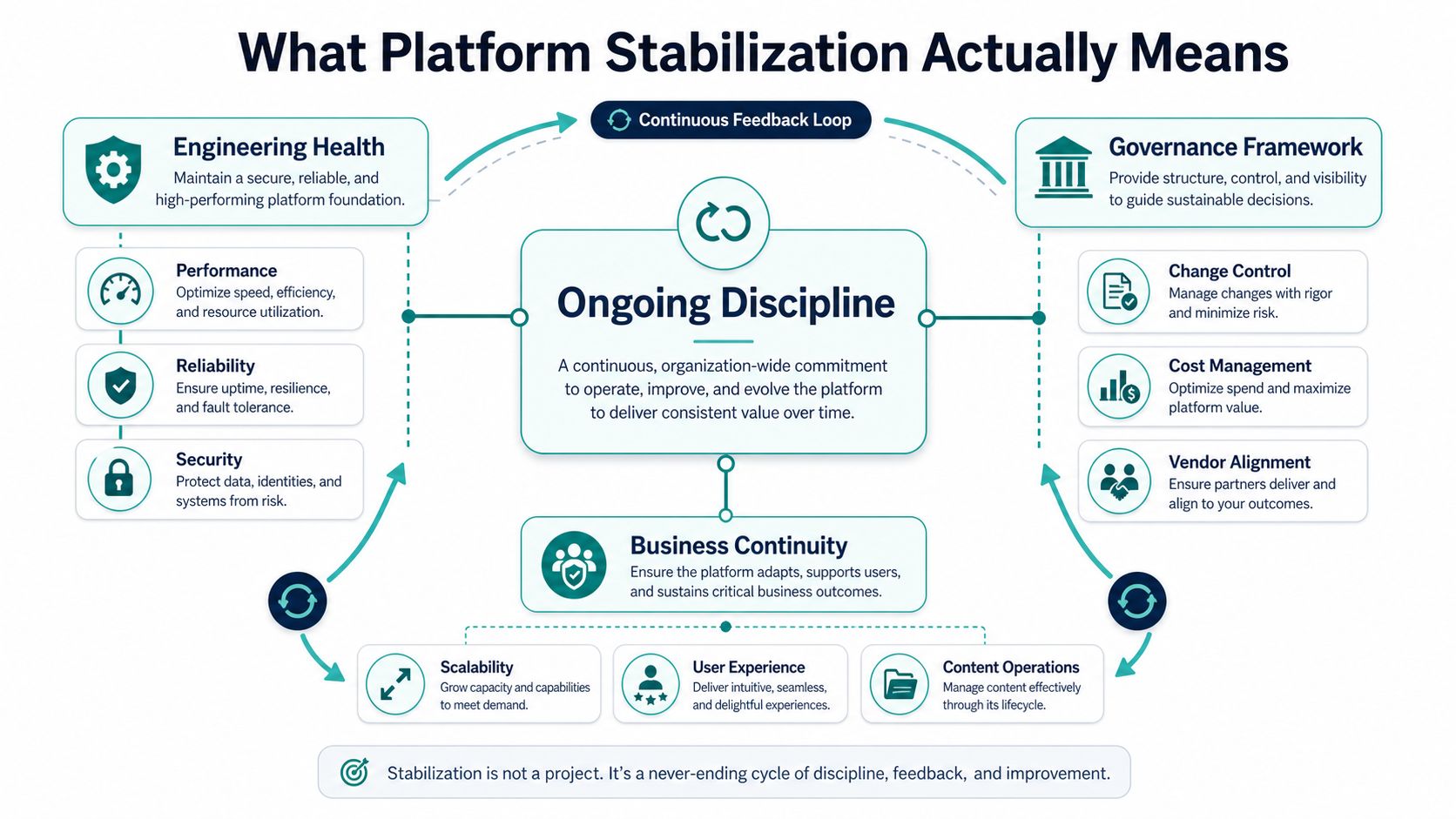
Platform stabilization is the ongoing engineering and governance discipline that keeps an enterprise DXP within agreed performance, reliability, security, and cost envelopes. It gives teams a repeatable way to detect drift, prioritize corrective work, validate changes, and prevent regression across Sitecore XM Cloud, AEM, or SharePoint Online.
That definition separates stabilization from several activities that often receive the same label.
A performance tuning sprint changes queries, caching, code, or infrastructure for a defined period. It can produce valuable improvement, but it ends unless someone monitors the result and maintains the controls. Replatforming replaces or materially changes the underlying technology. It may be the right decision, but migration doesn't automatically create reliable operations. A vendor-led managed services handover transfers responsibility for support, yet a service provider can't compensate for unclear SLOs, weak ownership, or an ungoverned content model.
Stabilization is the connective tissue between those activities. It tells you whether a tactical fix is sufficient, whether an upgrade is justified, and whether the platform remains healthy after the project team leaves.
Five characteristics of a stable operating model
Predictable response times under load. Teams understand how the platform behaves during campaigns, releases, search activity, and content publication, rather than discovering limits in production.
Repeatable deployments. Pipelines validate dependencies, configuration, content, and rollback paths. A successful deployment means more than a green build.
Controlled cost trajectories. Owners can connect consumption to features, sites, environments, search, personalization, storage, and automation. Unallocated spend is an operational defect.
Audit-ready security and compliance. Access, data handling, consent, residency, change approval, and recovery procedures have named owners and usable evidence.
Observable telemetry. Engineers can see latency, traffic, errors, saturation, deployment health, content operations, and cost signals before users describe the impact.
Teams building this capability may benefit from platform engineering hiring insights when deciding which responsibilities belong with product engineering, a platform team, or an external delivery partner. Stabilization needs durable ownership, not just a temporary incident squad. It also belongs within the wider digital experience platform model, because content, experience, data, and delivery decisions affect one another.
Practical rule: If a fix has no owner, telemetry, rollback path, or review date, it isn't stabilization. It's deferred risk.
Symptoms and Root Causes Across Performance, Reliability, and Cost
Diagnosis improves when teams stop describing the estate as “slow” or “unstable” and identify the signal, boundary, and likely cause. The same symptom can mean different things on Sitecore, AEM, and SharePoint, so platform-specific evidence matters.
| Symptom Cluster | Sitecore XM Cloud Signals | AEM Signals | SharePoint Online Signals |
|---|---|---|---|
| Performance | Rising p95 or p99 response times, slow personalization lookups, search latency, rendering bottlenecks | Dispatcher cache misses, Oak query latency, authoring timeouts, asset workflow delays | Heavy pages, slow Power BI embeds, inefficient web parts, search response delays |
| Reliability | Failed deployments, content publishing errors, index issues, integration failures | Replication queue backups, failed workflows, publish instability, dispatcher misconfiguration | Service health degradation notices, Power Automate failures, permission or provisioning errors |
| Cost | XM Cloud consumption spikes, excessive Search or Personalize usage, inefficient environments | Asset storage growth, workflow overhead, infrastructure and support burden | Premium licensing expansion, automation consumption, storage growth, unused entitlements |
Performance symptoms need a causal trail
A rising tail response time may point to uncached controllers, oversized bundles, inefficient content queries, or unbounded personalization rules. In XM Cloud, teams should inspect rendering behavior, Experience Edge delivery, JSS requests, search calls, and personalization dependencies. In AEM, dispatcher rules and Oak indexes deserve attention. In SharePoint, page composition, web part behavior, embedded analytics, and client-side requests often explain the user experience better than server availability alone.
Load balancing remains a core control because distributing traffic across servers reduces the chance that one node becomes overwhelmed and can preserve asset availability when a node fails. Cloudflare's web performance guidance treats traffic distribution as part of practical availability and latency management.
Reliability and cost often share the same root
Failed deployments and replication backlogs usually expose change-control weaknesses, dependency drift, insufficient capacity planning, or missing runbooks. Cost spikes often reveal the same debt from another angle. A feature that creates excessive search calls, stores unnecessary assets, runs redundant automation, or bypasses caching may degrade both the user experience and the operating budget.
A useful audit therefore connects incidents to consumption. Record which release, content operation, integration, query, workflow, or AI feature preceded the signal. Then compare the result with the platform's agreed SLOs and cost boundaries. A detailed DXP performance audit approach can help teams turn scattered telemetry into a prioritized diagnosis rather than a list of symptoms.
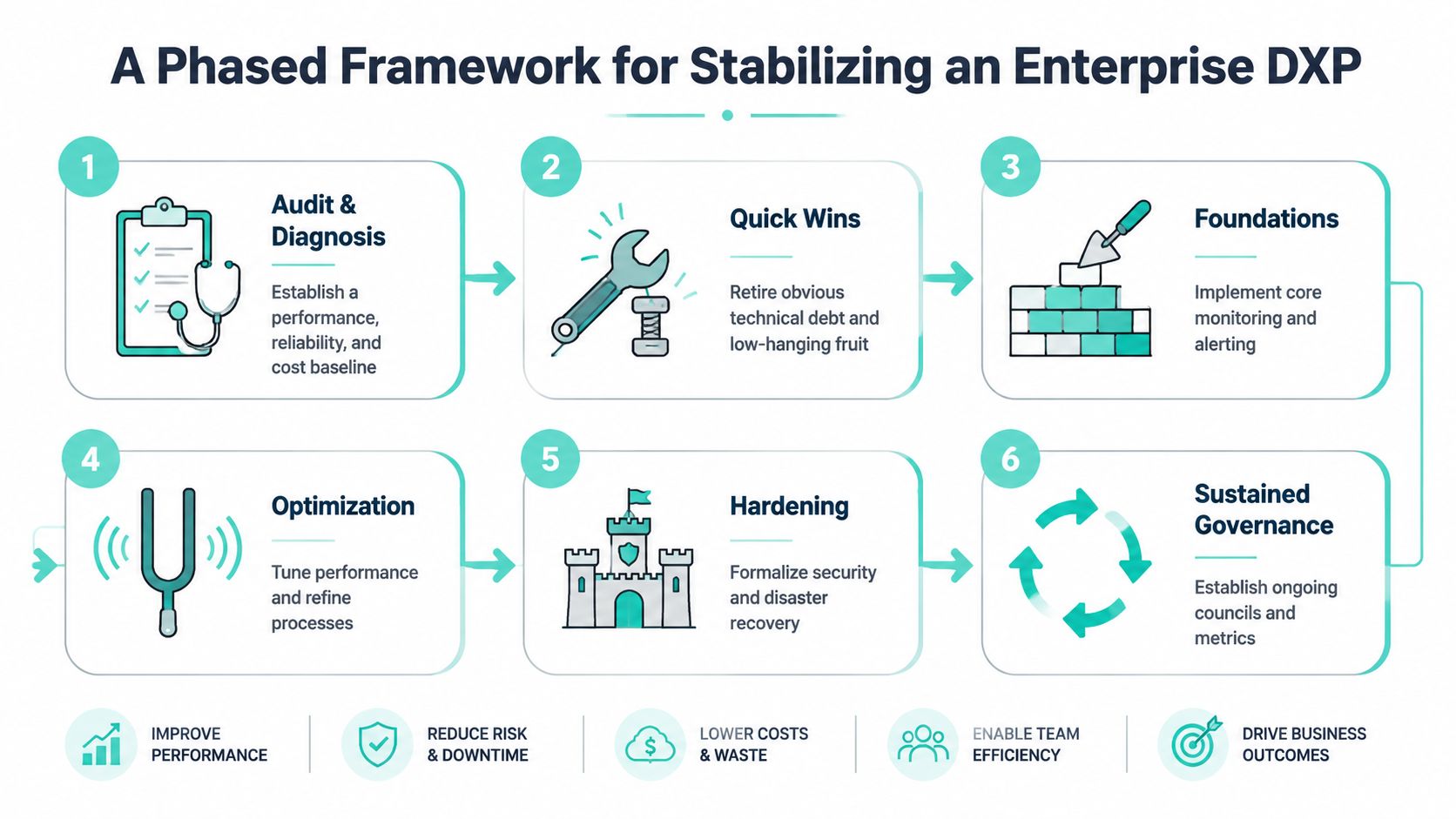
A Phased Framework for Stabilizing an Enterprise DXP
A stabilization program works best as a sequence of decisions, not an endless backlog. Each phase should produce evidence that supports the next investment.
Audit and diagnosis. Establish the baseline for performance, reliability, security, and cost. Trace requests through the CDN, rendering layer, APIs, search, analytics, integrations, and content services. Review query plans, cache behavior, deployment history, incident records, and ownership. The exit decision is simple: proceed only when the team can identify the highest-impact constraints and define the measurements that will prove improvement.
Quick wins. Remove obvious debt without disguising deeper architectural problems. Correct cache headers, eliminate redundant requests, resize oversized assets, retire unused integrations, fix noisy alerts, and document immediate rollback steps. Go forward when the change improves the agreed signal without creating a new risk. Pivot when the symptom remains after the tactical fix.
Build foundations before tuning everything
Architecture and code foundations. Redesign cache layers, analyze query plans, upgrade dependencies, simplify rendering paths, constrain personalization, and separate content or asset concerns where the model has become unmanageable. For XM Cloud, validate the headless topology and Next.js rendering approach. For AEM, inspect Oak indexes and dispatcher behavior. For SharePoint, reduce uncontrolled web parts and automation dependencies. The phase is complete when structural changes produce repeatable results in a representative environment.
Migration or upgrade. Stabilization sometimes exposes a platform version, hosting model, licensing structure, or architectural constraint that makes further remediation uneconomic. Compare the cost and risk of fixing the current estate with moving to XM Cloud, AEM as a Cloud Service, or a cleaner Microsoft 365 architecture. A go decision requires a funded migration path, content plan, integration inventory, cutover strategy, and rollback or recovery design.
Monitoring and SRE practice. Define SLIs, SLOs, error budgets, alert thresholds, and incident ownership. Run controlled failure tests, including dependency interruption, cache failure, deployment rollback, and recovery drills. SRE practice centers on four golden signals, latency, traffic, errors, and saturation, and connects them to actionable service objectives. SRE guidance for DevOps provides useful context for applying those signals to platform operations.
Governance. Establish a recurring review for releases, AI features, cost, content operations, security, vendor changes, and post-incident actions. Governance is successful when the team can show that new work passes defined checks and that unresolved risks have owners. A practical delivery plan should record those decisions, dependencies, milestones, and acceptance criteria, as described in a structured project implementation plan.
- Performance impact: Measure added requests, indexing work, personalization lookups, authoring steps, and response-time effects.
- Cost implication: Set guardrails for search calls, model or token consumption, asset processing, storage, and environment usage.
- Operational overhead: Assign owners for prompts, models, content review, incident response, access, and rollback.
- Trust and compliance: Record provenance for generated assets, consent and residency requirements for personalization, and evidence for agent decisions.
- Recovery design: Define how the team disables an underperforming agent, reverts a prompt or model version, or returns to a known-good content workflow.
- Golden signals: Latency, traffic, errors, and saturation have dashboards, thresholds, and named responders.
- Deployment safety: Pipelines include validation, approvals where required, rollback, dependency checks, and post-release verification.
- Runbook completeness: Operators can diagnose common failures without relying on one engineer's memory.
- On-call health: Alerts are actionable, escalation paths are current, and support covers the platform's operating hours.
- Incident learning: Post-incident reviews produce owned actions, not just narrative documentation.
- AI controls: Prompts, models, agents, content provenance, consent, relevance, and cost have review points.
Decision point: Escalate to replatforming when the platform cannot meet its SLOs or cost boundaries after the highest-value fixes, not simply because the technology feels old.
Applying the Framework to Sitecore, AEM, and SharePoint
The same stabilization framework produces different technical work on each platform. Treating all three as generic CMS products is how teams apply the wrong remedy.
| Phase | Sitecore XM Cloud | AEM | SharePoint Online |
|---|---|---|---|
| Baseline | Review XM Cloud topology, Experience Edge delivery, JSS requests, xDB and analytics flows, search indexes, and personalization rules | Inspect author and publish behavior, Oak indexes, dispatcher cache, replication, and asset workflows | Review hub sites, page composition, search, permissions, Power Automate, and usage reports |
| Quick wins | Remove redundant personalization calls, correct rendering and caching behavior, reduce noisy integrations | Tune dispatcher rules, fix inefficient queries, clear workflow bottlenecks, optimize assets | Remove heavy web parts, simplify pages, reduce unnecessary flows, improve navigation and permissions |
| Structural work | Use supported headless patterns, shared components, controlled content models, and governed search or Personalize usage | Tune Oak indexes, redesign cache boundaries, rationalize workflows, and assess AEM as a Cloud Service | Rationalize hub architecture, evaluate SharePoint Embedded versus classic libraries, and control automation sprawl |
| Hardening | Validate deployment rollback, index recovery, consent controls, and feature-level monitoring | Test replication recovery, dispatcher failover, backup paths, and cloud-service operational procedures | Test access recovery, service dependencies, flow ownership, retention, and business continuity |
| Governance | Review SitecoreAI changes, content provenance, personalization consent, and consumption | Govern workflows, asset rights, release compatibility, and cloud-service changes | Govern Microsoft 365 changes, Copilot use, Power Platform ownership, and information architecture |
Where the same lever behaves differently
Caching is a clear example. In XM Cloud, teams must understand headless delivery, Experience Edge, Next.js rendering modes, and the effect of personalization on cacheability. Sitecore states that XM Cloud is a headless CMS and supports Next.js as the preferred rendering SDK for the full feature set, including Static Site Generation, Incremental Static Regeneration, and Server-Side Rendering. Sitecore's XM Cloud documentation also describes the bundled Experience Manager, Pages editor, SXA, Headless Services, Next.js SDK, and Experience Edge.
AEM teams work more directly with dispatcher rules, publish tiers, Oak indexes, and replication paths. The stabilization question is whether the cache protects the right content without hiding invalidation defects. SharePoint Online teams have less control over the underlying service, so they stabilize page composition, web part behavior, information architecture, permissions, and automation around the managed platform.
Sitecore's guidance recommends Next.js and describes headless JSS publishing to Experience Edge. It also notes that XM Cloud supports headless implementations, not MVC-based solutions, and that some SXA toolbox, theme, and Creative Exchange capabilities aren't supported in a JSS and Experience Edge implementation. Sitecore's migration guidance should be treated as an architectural constraint during remediation, not as an afterthought.
Every platform carries trade-offs. Migration introduces content and integration effort. Upgrades can create compatibility work. Licensing may shift rather than disappear. Users may experience temporary changes while teams alter navigation, authoring, caching, or personalization. A credible stabilization plan makes those costs visible before approval.
Governing SitecoreAI and Modern Features During Stabilization
SitecoreAI changes the stabilization question from “does the site work?” to “does the entire content and experience system remain controlled as new capabilities are activated?” XM Cloud provides the content foundation, while Sitecore Search, Personalize, Customer Data Platform, Content Hub, and Agentic Studio extend discovery, targeting, customer data, assets, and marketing execution. SitecoreAI portfolio coverage describes this broader composable SaaS direction and the need to govern AI workflows, copilots, agents, and brand-aware AI across the lifecycle.
Use feature gates, not enthusiasm, to control rollout
Every new capability should pass a stabilization-first review.
The change advisory board should review these gates alongside normal deployment risk. SLOs should include relevance, recommendation quality, content accuracy, and agent behavior where those qualities affect users or business processes. Those measures don't replace latency and error monitoring. They extend the definition of a healthy experience.
Sitecore's acquisition of Scrunch in 2026 added an AI search optimization capability to its portfolio, according to coverage of the acquisition. That direction makes discoverability part of stabilization. Teams need to understand which content is surfaced, how brand context is applied, and how changes affect search behavior before they scale the feature.
Governance principle: An AI feature isn't stable because it produces an answer. It's stable when the team can measure its behavior, constrain its actions, trace its inputs, and reverse its rollout.
KPIs, Checklists, and Knowing When to Replatform
A stabilization dashboard should make trade-offs visible to engineering, marketing, finance, security, and operations. Track the same categories across platforms, then map each measure to the telemetry available in the product.
KPI pack for operating reviews
Performance should include p95 and p99 response time, CMS editor save latency, cache hit behavior, search response time, and the effect of personalization or embedded content on page delivery. XM Cloud teams can correlate Experience Edge, Next.js, Search, and Personalize activity. AEM teams should pair application telemetry with Oak-based logs, dispatcher behavior, and replication evidence. SharePoint teams should use page and service usage data, web part behavior, and Microsoft 365 reports.
Reliability should cover incident MTTR, change failure rate, deployment rollback frequency, error budget burn, replication or publishing backlog, automation failures, and recovery-test results. A dashboard that reports uptime but can't show failed changes or recovery readiness is incomplete.
Cost should connect platform consumption to requests, environments, search, personalization, assets, storage, licenses, and support effort. Track idle entitlements and unowned automation. The useful measure isn't total spend. It's whether the team can explain why spend changed and whether the change produced approved business value.
For teams evaluating load and failure testing tools, a comparative network stress testing platforms review can help frame tool selection. Choose tests that reflect real traffic paths, integrations, cache behavior, authoring activity, and recovery procedures rather than relying on a single synthetic page test.
SRE readiness checklist
A practical scorecard
Score each dimension from 0 to 3, then require evidence for the assigned score.
| Dimension | Score 0, Critical | Score 1, At Risk | Score 2, Acceptable | Score 3, Healthy |
|---|---|---|---|---|
| Performance | User-facing degradation is unexplained | Signals exist but ownership is unclear | Targets are tracked and reviewed | Trends, budgets, and regressions are actively controlled |
| Reliability | Recurring incidents lack recovery plans | Runbooks or alerts are incomplete | Incidents have owners and review actions | Recovery is tested and improvements are sustained |
| Change safety | Releases regularly create uncertainty | Validation is inconsistent | Rollback and verification are defined | Delivery is repeatable with measurable failure control |
| Cost governance | Spend changes are unexplained | Some services are tracked | Owners review consumption | Features and consumption have active guardrails |
| Security and compliance | Evidence is missing | Controls depend on manual effort | Reviews and access records are maintained | Controls are auditable and integrated into change |
| AI and feature governance | Features launch without review | Pilots have limited monitoring | Rollouts have gates and owners | Behavior, relevance, cost, and rollback are continuously managed |
Replatforming becomes a responsible business decision when three or more KPIs miss their targets for two consecutive quarters and quick wins are exhausted. That condition doesn't mean the existing platform has failed automatically. It means the stabilization team should stop absorbing technical debt and build a properly funded comparison of remediation, upgrade, and migration.
Kogifi supports enterprise Sitecore, AEM, and SharePoint estates through audits, performance tuning, bug fixing, monitoring, recovery planning, and cloud platform delivery. Visit Kogifi to discuss a stabilization assessment that maps your platform signals, SitecoreAI governance needs, and replatforming decision criteria into an actionable operating plan.