


ADA compliant means a site provides equal access for people with disabilities, and for digital products that's most often measured against WCAG 2.1 Level AA. The U.S. Department of Justice's April 2024 Title II rule makes that standard a federal requirement for state and local government websites and mobile apps serving the public.
If you're inheriting an accessibility mandate on a Sitecore estate, a SharePoint intranet, or a mixed DXP stack, that's usually the core question behind the search. The legal duty comes from the Americans with Disabilities Act, signed in 1990, but the practical test for websites lives in the design system, templates, components, and authoring workflow, not in a certificate on a shelf.
Table of Contents
What ADA Compliant Means in Plain English
If you're the marketing lead, platform owner, or IT director who just got handed an accessibility action item, the plain-English answer is simple. ADA compliant means people with disabilities can use the experience on equal terms, not just in a technically available sense, but in a way that works for them. The ADA is a U.S. civil-rights law signed in 1990, and the Department of Justice says it guarantees people with disabilities the same opportunities to enjoy employment opportunities, purchase goods and services, and participate in state and local government programs (ADA introduction).
That's why the phrase gets used for websites even though the law predates the commercial web. The obligation is about access, and modern public-facing digital experiences are now part of how people buy, apply, register, learn, and request service. For enterprise teams, that means the CMS, component library, and content governance model all matter.
The difference between the law and the standard
The ADA creates the obligation. WCAG 2.1 Level AA is the most common technical target used to prove the work is real. In practice, many auditors treat that level as the baseline for accessible digital design, because it gives teams something concrete to build and test against rather than arguing over a vague notion of “accessible enough” (enterprise accessibility guidance).
A useful way to explain it internally is this, the ADA says you must provide equal access, WCAG tells your designers and developers how to make that happen.
That distinction matters when you're working across a Sitecore, AEM, or SharePoint estate. A page-by-page fix can hide a broken shared component for months. A governance-led approach forces accessibility into templates, tokens, navigation patterns, and authoring rules, which is what enterprise auditors want to see.
If your organization is trying to define roles for remediation, it helps to know who usually owns what. This practical overview of assistive technology professional careers is useful because accessibility work usually spans design, development, QA, and assistive-tech testing, not just one specialist.
How the ADA Evolved Into a Digital Standard
The ADA started as a law about discrimination in public life, not as a web standard. The federal baseline for built environments came later, with the 2010 ADA Standards for Accessible Design, which set minimum scoping and technical requirements for newly designed, constructed, or altered facilities (ADA design standards). That matters because it shows how the ADA has always depended on implementing standards, not just broad principles.
Why WCAG became the yardstick
As websites and mobile apps became the front door for public services and commerce, courts and regulators increasingly treated them as part of public-facing access obligations. That's the bridge enterprise teams need to understand. The ADA is the law, but WCAG is the operational target that lets legal, design, development, and QA teams speak the same language.
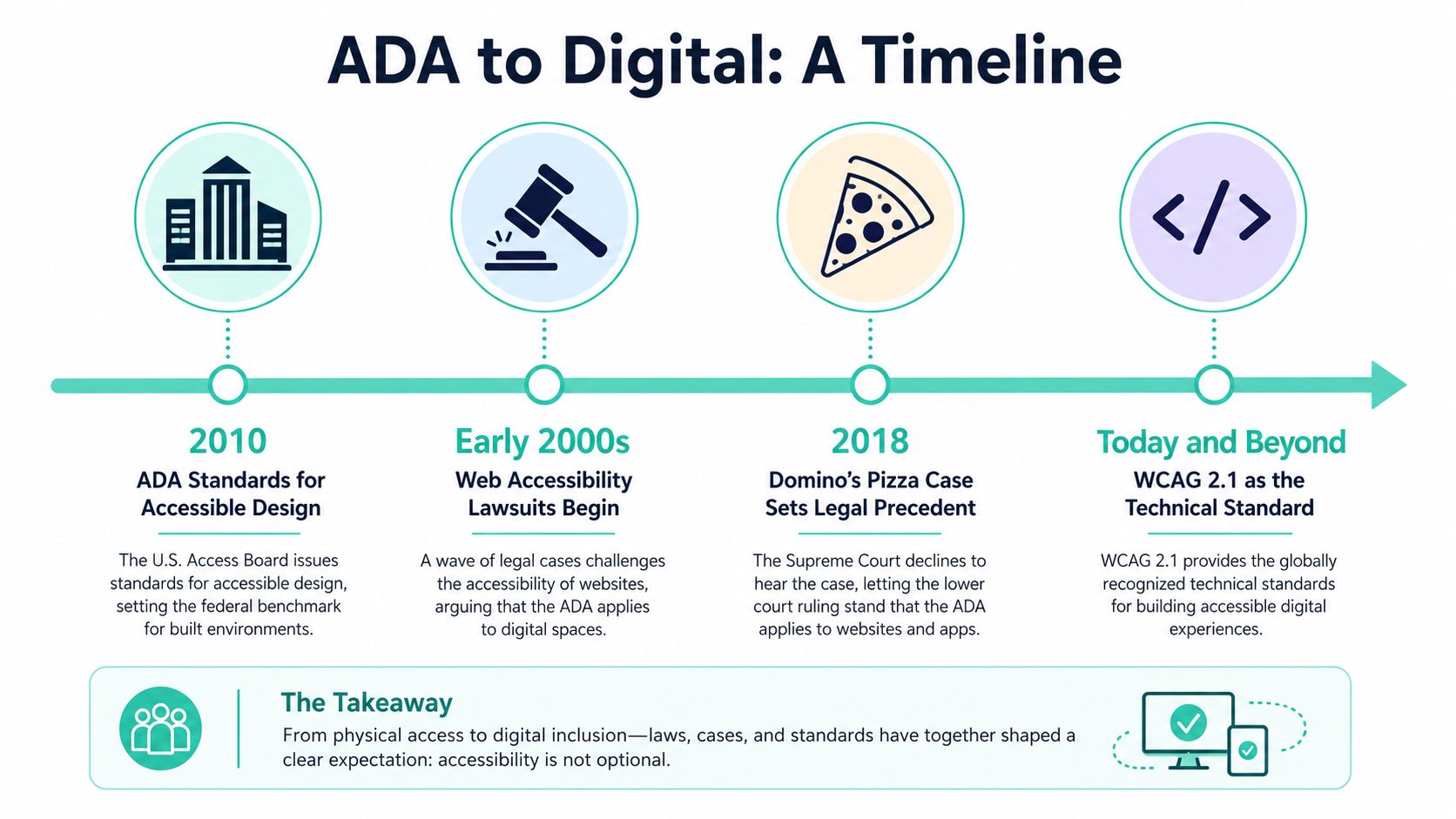
The clearest federal turning point came in April 2024, when the U.S. Department of Justice issued a rule requiring state and local government websites and mobile apps to conform to WCAG 2.1 Level AA. The deadlines are April 24, 2026 for large public entities serving 50,000 or more people and April 26, 2027 for smaller entities (WebAbility summary of the DOJ rule). The practical signal for enterprise roadmaps is obvious, accessibility is no longer a side initiative for public-sector digital teams.
If your platform strategy still treats accessibility as page cleanup, the 2024 rule should end that debate.
For private-sector teams, the legal picture is still shaped by enforcement, litigation, and risk tolerance, but the technical benchmark has settled in practice around WCAG 2.1 AA. That's why modernization programs on Sitecore XM Cloud, AEM, or SharePoint Online should treat accessibility as a release requirement, not a post-launch repair.
The WCAG 2.1 AA Requirements That Actually Matter
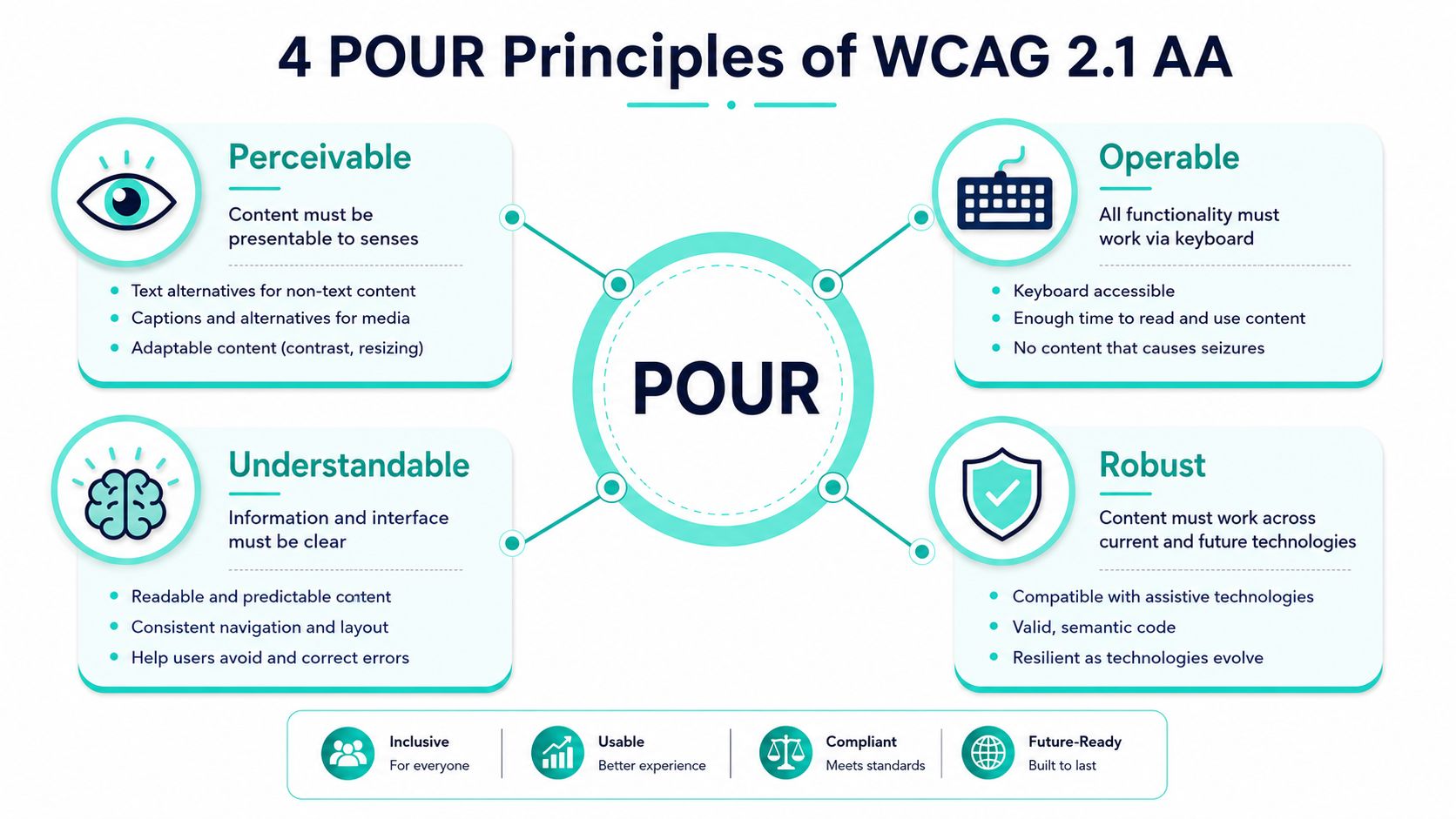
WCAG can look abstract until you translate it into interface behavior. The framework is built on four principles, perceivable, operable, understandable, and stable, often shortened to POUR (WCAG-based accessibility guidance). In enterprise work, those principles map cleanly to components, templates, and content patterns.
What POUR means in real interfaces
Perceivable means content has to be available to the senses. On a Sitecore homepage, that usually means meaningful alt text for hero imagery, captions for video, and text that isn't trapped inside an image file. Operable means every action works with a keyboard, including menus, dialogs, carousels, and form submissions. If focus disappears inside a mega-menu or modal, that's not a styling issue, it's a usability failure.
Understandable is where forms, labels, and error handling get tested hard. A checkout form or a SharePoint request workflow needs consistent labels, predictable navigation, and clear error messages that tell users what went wrong and how to fix it. Reliable means the markup has to survive current and future technologies, which is why semantic HTML, correct ARIA usage, and clean heading structure matter so much in custom components.
The most commonly discussed Level AA thresholds include visible focus states, color contrast at 4.5:1 for standard text, and explicit error identification in forms. Teams often get those wrong not because they don't know the standard, but because design systems ship tokens and components without accessibility rules baked in.
The fastest way to brief a design lead is to tie each principle to a component decision. If the component library supports keyboard focus, proper labels, and contrast-safe tokens, your audit becomes much easier. If it doesn't, every new landing page multiplies the same defect.
For teams that want a practical reference point, this accessibility website design guide is a useful internal-level benchmark for translating WCAG into production decisions.
Most Common Accessibility Failures on Enterprise Sites
Auditors don't usually find mysterious edge cases first. They find the same failures repeated through shared components, page templates, and content habits. On enterprise estates, the issues cluster by user impact, and each cluster tends to show up in a predictable place.
Where the breakdown usually starts
Visual failures are the easiest to spot. Missing alt text on hero imagery, low contrast in call-to-action buttons, and text embedded in images all break the perceivable side of WCAG. On a Sitecore or AEM marketing site, these issues often live in reusable promo blocks, banner components, and authored image cards.
Motor failures are just as common, and usually more disruptive. Keyboard traps in mega-menus, inaccessible carousels, and missing skip links block users who don't use a mouse. That's the kind of problem auditors flag in shared navigation, header frameworks, and modal dialogs, because one defect in a central component affects every page that uses it.
A shared header is the highest-risk place to hide an accessibility defect, because it can spread the same keyboard problem across the entire estate.
The failures that damage real journeys
Cognitive and technical failures often show up together. Inconsistent navigation labels, poor error messaging in forms, and timeouts without warning confuse users who rely on predictable behavior. Autoplaying video without captions, broken ARIA, and inaccessible PDFs linked from marketing pages are also frequent findings, especially in campaign sites and document-heavy portals.
The pattern matters more than the individual defect. A single inaccessible PDF can block a benefits enrollment flow. A form error that doesn't identify the problem can turn a simple lead capture into abandonment. A broken ARIA label in a custom React component can make an entire interaction unreadable to screen readers.
For enterprise teams, the practical takeaway is to stop thinking in isolated pages. If the issue sits in a shared component, a design token, or an authored document template, remediation has to happen upstream. That's how you keep the same audit finding from reappearing every sprint.
How Sitecore, AEM, and SharePoint Approach Accessibility
Accessibility doesn't look the same across DXPs, but the governance pattern is similar. The platform can help with semantic structure, editing workflows, and checker integrations, but it won't save you from inaccessible custom work. That's especially true in enterprise builds where front-end freedom is a strength and a risk.
What the platforms give you, and what they don't
Sitecore XM Cloud and XP can support accessibility well when teams use SXA component libraries and disciplined headless front ends, especially with Next.js rendering patterns. The advantage is architectural, shared components can carry semantic structure and keyboard behavior across many pages. The gap is usually custom React work, third-party widgets, and authoring that breaks heading order or link text.
Adobe Experience Manager gives teams a strong component model, but accessibility still depends on how templates, dialogs, and authoring workflows are configured. Coral and Universal Editor flows can support good structure, yet enterprise teams still need to test custom components, embedded assets, and anything pulled in from external services. The platform helps, but it doesn't automatically cure poor template design.
SharePoint Online can be very workable for intranets when teams build with SPFx and use Microsoft accessibility tooling well. That said, intranet accessibility often breaks in custom web parts, permission-driven content, and documents uploaded without tagging discipline. For regulated workforces, the governance question is usually stricter than the feature list.
| Platform | Built-in Accessibility Strengths | Typical Enterprise Gaps | Governance Lever |
|---|---|---|---|
| Sitecore | Semantic component libraries, headless flexibility, reusable templates | Custom front ends, shared navigation, authored content patterns | Helix-style design-system control |
| AEM | Structured component model, editable templates, publishing workflows | Custom widgets, dialog behavior, embedded media | Template and authoring governance |
| SharePoint Online | Native Microsoft accessibility support, familiar intranet editing, checker integrations | SPFx customizations, docs, third-party embeds | Permission and content-policy controls |
For a deeper platform view, the Sitecore platform overview is relevant when you're deciding whether accessibility problems belong in architecture, implementation, or governance.
The right question is not, “Does this CMS support accessibility?” It's, “Can this platform keep a component-level accessibility rule intact across hundreds of pages and multiple authors?”
That distinction matters more than the brand name. Enterprise accessibility succeeds when the platform, component library, and content workflow all point in the same direction.
Auditing and Remediation Workflows That Actually Hold
A durable audit program has to be layered. Automated scanning gives you coverage at speed, manual review catches the interaction problems tools miss, and assistive-tech testing shows whether the experience works in real use. That sequence is what keeps teams from overtrusting a scan report or underestimating the human side of accessibility.
How to turn findings into work
Start with automated scanning to establish baseline coverage, then move to manual expert review for focus order, keyboard traps, and page-state changes. After that, test with screen readers and keyboard-only sessions so you can validate what happens when someone tries to complete a task. The point isn't to produce a bigger report, it's to produce better remediation tickets.
That workflow is especially important in a Helix-style Sitecore estate or a SharePoint SPFx backlog, where shared components can generate many findings at once. Fix the component before the page. Update design-token contrast rules before tweaking individual templates. If the source pattern is broken, page-level patches will just create more maintenance.
The operational layer matters too. Teams need an accessibility statement that reflects current residual risk, not a marketing promise detached from the codebase. That statement becomes much more credible when it's backed by repeated testing and documented fixes.
For teams building a formal backlog, this website accessibility remediation guide is a practical reference for sequencing the work without turning the program into a one-off fire drill.
Practical ADA Compliance Checklist and When to Bring in a Partner
The fastest self-assessment is component-led, not page-led. If your design system and content model are sound, most of the visible issues disappear before launch.
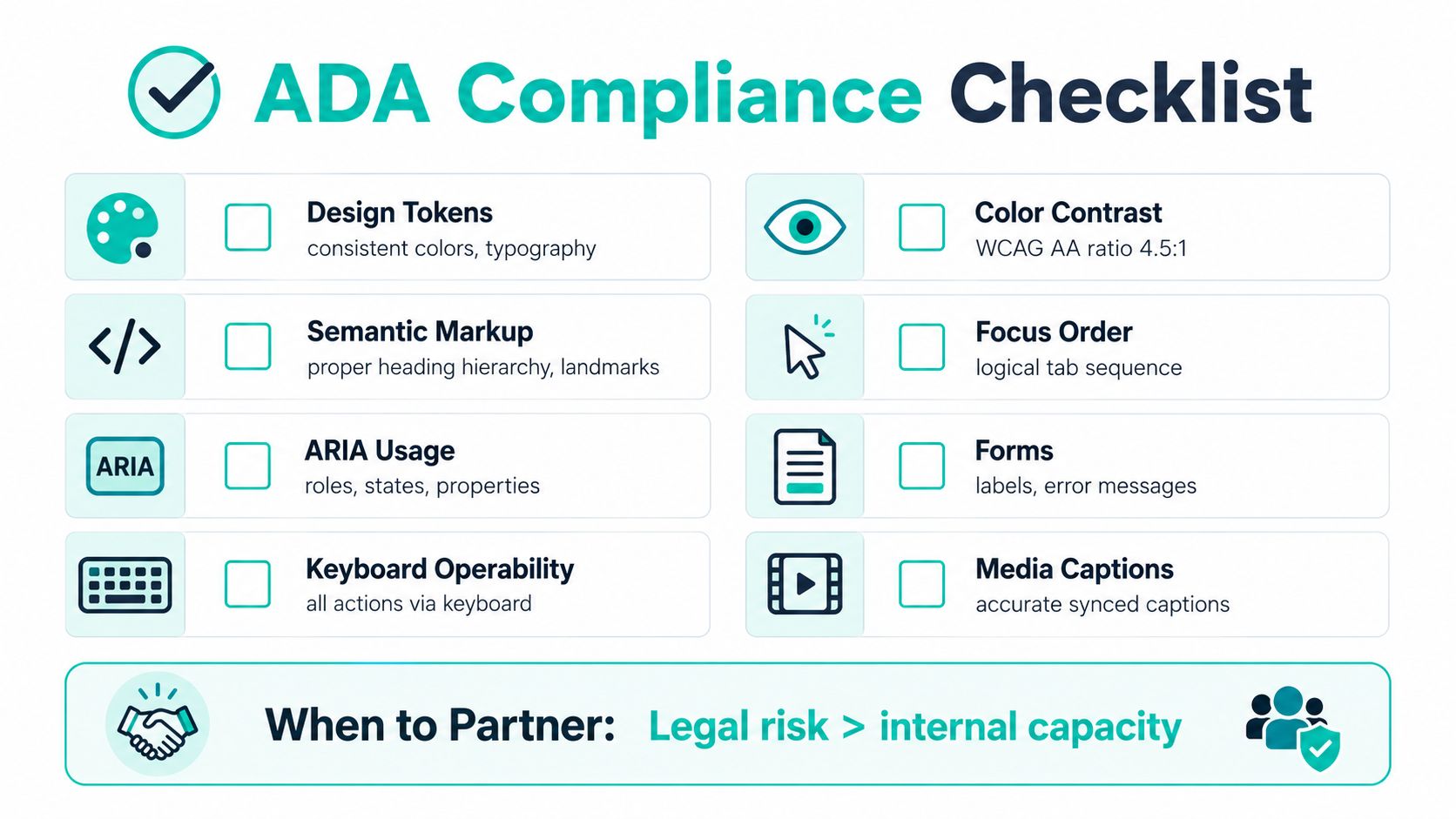
Checklist for enterprise teams
- Design tokens: Confirm color, typography, and spacing choices don't create contrast or readability problems.
- Semantic markup: Use proper heading hierarchy, landmarks, and meaningful structure.
- ARIA usage: Apply roles, states, and properties only where native HTML can't do the job.
- Keyboard operability: Make sure every action works without a mouse.
- Color contrast: Verify text and controls stay readable at WCAG AA levels.
- Focus order: Check that tab order follows the visual and logical flow.
- Forms: Label every field and make errors explicit.
- Media captions: Provide accurate, synced captions for video and other time-based media.
- Accessibility statement: Publish the current status and known limitations.
The trigger for outside help is usually governance pressure, not a single defect. Multi-brand estates, replatforming to XM Cloud or composable AEM, SharePoint intranets serving regulated workforces, and any team facing the 2026 Title II deadline without in-house WCAG expertise all justify specialist support. The earlier you get architecture, content, and QA aligned, the less expensive the fix tends to be in operational terms.
If legal exposure is rising faster than internal capacity, you've already crossed the point where a partner makes sense.
For audit planning, this website audit checklist is the kind of working artifact teams use when they need a repeatable review process rather than a one-time inspection.
Next Steps for Enterprise Digital Experience Teams
Treat the next 90 days like a release-gate program. Run an automated audit, add manual review for the highest-traffic templates, fix shared components first, and publish an accessibility statement that reflects reality. Then lock checks into the CI/CD pipeline so regressions get caught before release, not after a complaint lands.
That approach works because it matches how enterprise DXPs operate. Sitecore, AEM, and SharePoint estates change constantly, so accessibility has to live in governance, component libraries, and test automation, not in one cleanup sprint. Teams that get this right protect the brand, reduce legal exposure, and keep multilingual and multi-brand delivery moving.
If your organization needs to move quickly against the 2026 deadline, Kogifi's enterprise accessibility, Sitecore, AEM, and SharePoint services are built for exactly that kind of remediation and governance work. Visit Kogifi to talk through an audit, a remediation roadmap, or a platform-level accessibility plan for your estate.
Kogifi helps enterprise teams turn accessibility from a compliance scramble into a platform discipline. If you're working through Sitecore, AEM, or SharePoint remediation and need a partner that can handle architecture, component libraries, and governance together, start a conversation with Kogifi and map out the next release with confidence.