


When people get stuck on the "docker compose vs dockerfile" question, it's usually because they're missing the key difference: scope. A Dockerfile is a recipe for building a single container image—think of it as the blueprint for one specific application component. Docker Compose, on the other hand, is the conductor for a multi-container application, defining how all the different services run and work together.
They aren't competitors. In fact, they’re designed to be collaborators.
Understanding Docker for Enterprise Digital Platforms

For a modern Digital Experience Platform (DXP) like Sitecore, no application is ever just a single service. It’s a whole ecosystem of interconnected parts. This is where understanding the roles of Dockerfile and Docker Compose becomes essential for IT leaders and dev teams.
A Dockerfile gives you the exact, step-by-step instructions to build a container image. It's the architectural plan for a single building. In a Sitecore project, you'd use separate Dockerfiles for each role:
- The Content Management (CM) instance
- The Content Delivery (CD) server
- An xConnect service for collecting interaction data
- A processing or reporting service
Each Dockerfile spells out the base OS, dependencies, application code, and startup commands. This guarantees every instance of that service is perfectly identical and reproducible.
Orchestrating the Full DXP Stack
But those individual services aren't much use on their own. A working Sitecore environment needs them to talk over a network, share data using volumes, and start up in the right order. That's where Docker Compose takes over. It acts as the master blueprint for the entire DXP, using a docker-compose.yml file to define how all the individual containers—each built from its own Dockerfile—run and interact.
This kind of orchestration is the bedrock for building scalable, AI-driven digital platforms. It's no surprise that enterprise container adoption is projected to hit 92% by 2026, as these tools are now standard for achieving flexibility in DXP deployments. You can find more on this trend by exploring the latest industry analysis of Docker's dominance.
A Dockerfile builds the actors (your individual Sitecore services), while Docker Compose directs the play (the complete, running DXP environment). You need both to deliver a successful performance.
The table below breaks down the primary jobs of each tool in an enterprise environment, especially for platforms like Sitecore or integrated SharePoint solutions. If you want to dive deeper into the cloud models that enable these technologies, check out our guide on IaaS, PaaS, and SaaS in cloud computing.
| Criterion | Dockerfile | Docker Compose |
|---|---|---|
| Primary Purpose | Defines the build instructions for a single container image. | Defines and runs a multi-container application. |
| Scope of Control | A single service (e.g., a Sitecore CD instance). | The entire application stack (e.g., Sitecore, SQL, Solr). |
| Artifact Produced | A portable container image. | A running set of interconnected containers. |
| Execution Phase | Used at build-time to create the image. | Used at run-time to start and stop the environment. |
What Is a Dockerfile? The Blueprint for Your Application

A Dockerfile is simply a text file with a set of instructions that Docker follows to build a container image. Think of it as a step-by-step recipe for a single part of your application. It spells out everything needed to get that one service running—from the base operating system and dependencies to your own application code and startup commands.
This is the secret sauce for consistency. Every container built from that image will be identical, no matter whose machine it runs on. In an enterprise DXP like Sitecore or a complex SharePoint deployment, you don't just have one Dockerfile; you have several. Your Sitecore Content Delivery (CD) instance will have a completely different Dockerfile than your xConnect service because their jobs and requirements are totally different.
The Anatomy of a Dockerfile
At its core, a Dockerfile is just a list of commands that run one after the other. Each command adds a new "layer" to the image, building on the one before it. This layered approach is incredibly efficient because Docker can cache layers and only rebuilds the ones that have actually changed, which saves a ton of time during development.
Let's break down the most common instructions you'll see, especially when working on a DXP project.
FROM: This is always the first instruction. It defines the base image you’re building from. For a Sitecore XM Cloud rendering host, you might start with a Node.js image likemcr.microsoft.com/sitecore-xm-cloud/node.WORKDIR: This sets the working directory for all the commands that follow (RUN,CMD,COPY, etc.). It’s a simple way to keep your file paths clean and predictable inside the container.COPY: This command is your workhorse for getting files into the container. It copies files and folders from your local machine right into the container's filesystem, which is how you add your application code, config files, and other assets.RUN: This executes commands during the image build. You'll use it to install system packages, runnpm installto grab dependencies, or handle any other setup tasks.CMD: This sets the default command that runs when a container starts. You only get oneCMDper Dockerfile, and it can be overridden if you specify a different command when you rundocker run.
These instructions are the building blocks that turn your application into a self-contained, portable unit.
A Practical Example for a Sitecore Service
To make this a bit more concrete, here's a simplified Dockerfile for a custom .NET Core service that might interact with a Sitecore instance, like a service for processing form submissions.
1. Start from a .NET 7 base image
FROM mcr.microsoft.com/dotnet/aspnet:7.0 AS base
WORKDIR /app
EXPOSE 80
EXPOSE 443
2. Set up the build environment
FROM mcr.microsoft.com/dotnet/sdk:7.0 AS build
WORKDIR /src
COPY ["MyProject.csproj", "."]
RUN dotnet restore "MyProject.csproj"
COPY . .
RUN dotnet build "MyProject.csproj" -c Release -o /app/build
3. Publish the application
FROM build AS publish
RUN dotnet publish "MyProject.csproj" -c Release -o /app/publish
4. Create the final, smaller image
FROM base AS final
WORKDIR /app
COPY --from=publish /app/publish .
CMD ["dotnet", "MyProject.dll"]
This is a multi-stage build, which is a common best practice. It uses a larger SDK image to build and publish the app, then copies only the necessary published files into a much smaller, more secure runtime image for the final product.
A well-structured Dockerfile is your first line of defense in a secure and optimized container strategy. It ensures that only essential components are included in the final image, reducing the attack surface and improving performance—a critical requirement for high-availability DXP architectures.
By defining this precise blueprint, the Dockerfile gets rid of all those "it works on my machine" headaches and lays the foundation for Docker Compose to orchestrate a complete application environment.
Docker Compose: The Conductor for Multi-Container Applications
While a Dockerfile is perfect for building one container, real-world enterprise applications are rarely that simple. A platform like Sitecore or an integrated SharePoint solution is a complex ecosystem of services that have to run and communicate in perfect harmony. This is where Docker Compose steps in, acting as the essential orchestration layer.
If a Dockerfile is the blueprint for a single actor, Docker Compose is the director's script for the entire play. It uses a single, declarative YAML file—usually named docker-compose.yml—to define and manage a complete multi-container application. This file lays out every service, how they connect, what data they share, and the order they should start.
For enterprise teams, this is a game-changer. It solves the massive headache of trying to recreate a full DXP environment on a local machine or in a testing environment.
How a Compose File Manages Your Stack
Docker Compose makes managing a complex stack incredibly simple by handling several critical jobs right from its YAML configuration. It turns what would be a series of long, error-prone docker run commands into a single, repeatable command: docker-compose up.
The compose.yml file handles a few key functions:
- Service Definition: Each piece of your application stack (e.g., Sitecore CM, xConnect, SQL Server, Solr) is defined as a
service. This section specifies the Docker image to use, which can be a pre-built image from a registry or one built locally from a Dockerfile. - Networking: Compose automatically creates a dedicated virtual network for all services in the file. This lets containers find and talk to each other using simple service names as hostnames, so you don't have to worry about tracking container IP addresses.
- Volume Management: To keep data safe for stateful services like databases, Compose manages volumes. This allows data to exist outside the container's lifecycle, so it isn’t lost when a container is stopped or removed.
- Dependency Ordering: You can set dependencies between services using
depends_on. This makes sure that, for example, your SQL Server container is up and running before your Sitecore CM container tries to connect to it.
Orchestrating a Sitecore XP Environment
The true power of Docker Compose shines when you apply it to a Sitecore XP environment. A standard setup involves numerous interdependent services, all of which need to be running and configured correctly to work.
Docker Compose is the key to simplifying complex DXP environments. It transforms the daunting task of launching an entire Sitecore stack—with its many services—into a single, reliable command.
For complex Digital Experience Platforms that span backend services, frontend applications, and databases, Docker Compose has become an essential tool. Its declarative YAML file makes it fundamentally easier for teams to manage these deployments, which is critical for keeping application behavior consistent across the entire development lifecycle. You can find more detail by exploring these insights on why you need both a Dockerfile and Docker Compose.
Imagine trying to manually orchestrate all the moving parts of a Sitecore stack:
- Sitecore CM (Content Management): The main authoring environment.
- Sitecore CD (Content Delivery): The public-facing web server.
- xConnect: The service for collecting analytics and interaction data.
- Identity Server: Manages user authentication.
- SQL Server: The database for content and other system data.
- Solr or Azure Search: The search index provider.
- Redis: A caching layer for session state management.
Starting and networking these seven containers by hand would be a nightmare of terminal commands. With Docker Compose, this entire stack is defined in one docker-compose.yml file. A developer can just clone the repository, run docker-compose up, and have a fully functional Sitecore instance running locally in minutes. It's an indispensable tool for productivity and consistency on any serious DXP project.
A Detailed Comparison of Dockerfile vs Docker Compose
While a Dockerfile is the recipe for a single, self-contained service, Docker Compose is the conductor for the entire orchestra. The classic "Dockerfile vs. Docker Compose" debate isn't about picking a winner; it's about understanding their distinct jobs—one for build-time and the other for run-time. To see how they really work together in an enterprise DXP project, we need to break down their roles.
This is especially true for complex platforms like Sitecore AI, where a working environment is a web of interdependent services. A Dockerfile might define a custom rendering host, but it’s Docker Compose that brings it to life alongside the database, identity server, and content management instances.
Purpose and Scope: A Single Blueprint vs. a Full Stack
The most fundamental difference is what each one is built to do. A Dockerfile has a singular mission: to be the blueprint for a single container image. It lists the step-by-step instructions for assembling one component of your application, like a Sitecore Content Delivery (CD) instance or a custom SharePoint web part service. Its scope is narrow and laser-focused.
In contrast, Docker Compose is designed for multi-container orchestration. Its job is to define and manage a complete application stack. For a Sitecore project, this means orchestrating the CM, CD, xConnect, SQL Server, and SOLR/Elasticsearch containers, making sure they can all talk to each other and run as a cohesive system. Its scope is the entire application environment.
In a Sitecore AI deployment, you'll use a Dockerfile to build your custom
solr-initimage that populates schemas. You then use Docker Compose to run thatsolr-initcontainer, the mainsolrcontainer, and thecmcontainer that depends on both. One builds the part; the other runs the machine.
The Generated Artifact: Image vs. Running Environment
The output of each tool is another key differentiator. When you run a docker build command, it processes a Dockerfile and produces a container image. This image is a static, portable, and unchangeable package holding your application code, dependencies, and runtime. It's a template you can store in a registry and use to spin up countless identical containers.
On the other hand, the output of a docker compose up command is a live, running environment. It takes the images described in your docker-compose.yml file—some built from Dockerfiles, others pulled from registries—and launches them as active containers, connecting them on a shared network and attaching storage volumes. The artifact isn't a static file but a dynamic, operational application.
Use Case: Build-Time vs. Run-Time
This brings us to their primary roles in the development lifecycle. The Dockerfile is a build-time tool. Its instructions are executed once to create an image. This process is a core part of any CI/CD pipeline, where images are built, tested, and pushed to a container registry. Keeping these files under strict version control is crucial for reliable deployments, a topic we cover in our guide on version control in CI/CD pipelines.
Docker Compose, however, is fundamentally a run-time tool. It’s used to start, stop, and manage the application during local development, automated testing, or even in simple single-host production setups. It defines how the containers, once built, should behave when they are actually running.
To make this crystal clear, here’s a quick breakdown of how they compare in a DXP context.
Dockerfile vs Docker Compose Feature and Purpose Comparison
| Criterion | Dockerfile | Docker Compose |
|---|---|---|
| Primary Role | Image Blueprint: Defines the contents and instructions for building a single container image. | Application Orchestrator: Defines and runs a multi-service application environment. |
| Scope | Single Container: Manages the build for one service (e.g., a Sitecore CD instance). | Full Application Stack: Manages the runtime for all services (e.g., Sitecore, SQL, Solr). |
| Output | A container image: A static, portable template for a service. | A running environment: A live set of interconnected containers. |
| Phase of Use | Build-Time: Used during the CI phase to create images with docker build. | Run-Time: Used during development or deployment to manage services with docker compose up. |
By understanding these core differences, development teams can use both tools effectively in tandem. Dockerfiles ensure each component of a Sitecore or SharePoint solution is built consistently. Docker Compose provides the power to assemble and run the entire platform with a single command, dramatically improving developer productivity and environment consistency.
When to Use Each Tool for DXP Deployments
Deciding between a Dockerfile and Docker Compose isn't about picking a winner. It's about knowing which tool to grab for the job at hand. One builds the individual parts; the other assembles the final machine.
For complex DXP stacks like Sitecore AI or integrated SharePoint solutions, this distinction is fundamental. Getting it right from the start leads to a clean, efficient workflow that everyone on the team can follow.
Defining Service Blueprints With a Dockerfile
A Dockerfile is your blueprint for a single, self-contained service. You use it to package one component of your application into a portable, reproducible image. Think of it as creating the perfect, standardized building block.
This is your go-to tool in a few key scenarios:
- Building a Base Environment: When you need to define the foundation for a service—the OS, runtime like .NET or Node.js, and system-level dependencies—a Dockerfile is the only way to go. For a Sitecore project, this means creating distinct base images for your CM, CD, and xConnect roles.
- Packaging Application Code: To bundle your application’s source code, configurations, and all its dependencies into a single, portable unit, you’ll use a Dockerfile. This guarantees your service runs the same way, every time, no matter where it's deployed.
- Creating CI/CD Artifacts: In a CI/CD pipeline, the Dockerfile is what builds your final, deployable artifact: the container image. This image is then pushed to a registry, ready to be pulled into any environment.
If you're asking, "How do I build this one piece of my application?" the answer is always a Dockerfile.
Orchestrating Environments With Docker Compose
Docker Compose, on the other hand, steps in when you need to run multiple services together as a single, functioning application. Its job is to define and launch your entire DXP stack, not just an individual part.
Here’s when you’ll reach for Docker Compose:
- Local Development: For developers on a Sitecore or SharePoint project, Docker Compose is a lifesaver. It lets them spin up the entire application stack—web servers, databases, search indexes, and caching layers—with a single
docker compose upcommand. - Integration Testing: When you need to test how different services interact, Docker Compose creates a clean, isolated environment with all the necessary components. It's perfect for running automated tests that validate the system as a whole.
- Simple Single-Host Deployments: For smaller applications or staging environments running on a single server, Docker Compose offers a straightforward way to deploy and manage all the required services. If you want to learn more about managing infrastructure at scale, check out our guide on IaC tools for multi-cloud environments.
This quick guide helps visualize when to use which tool based on what you’re trying to accomplish.
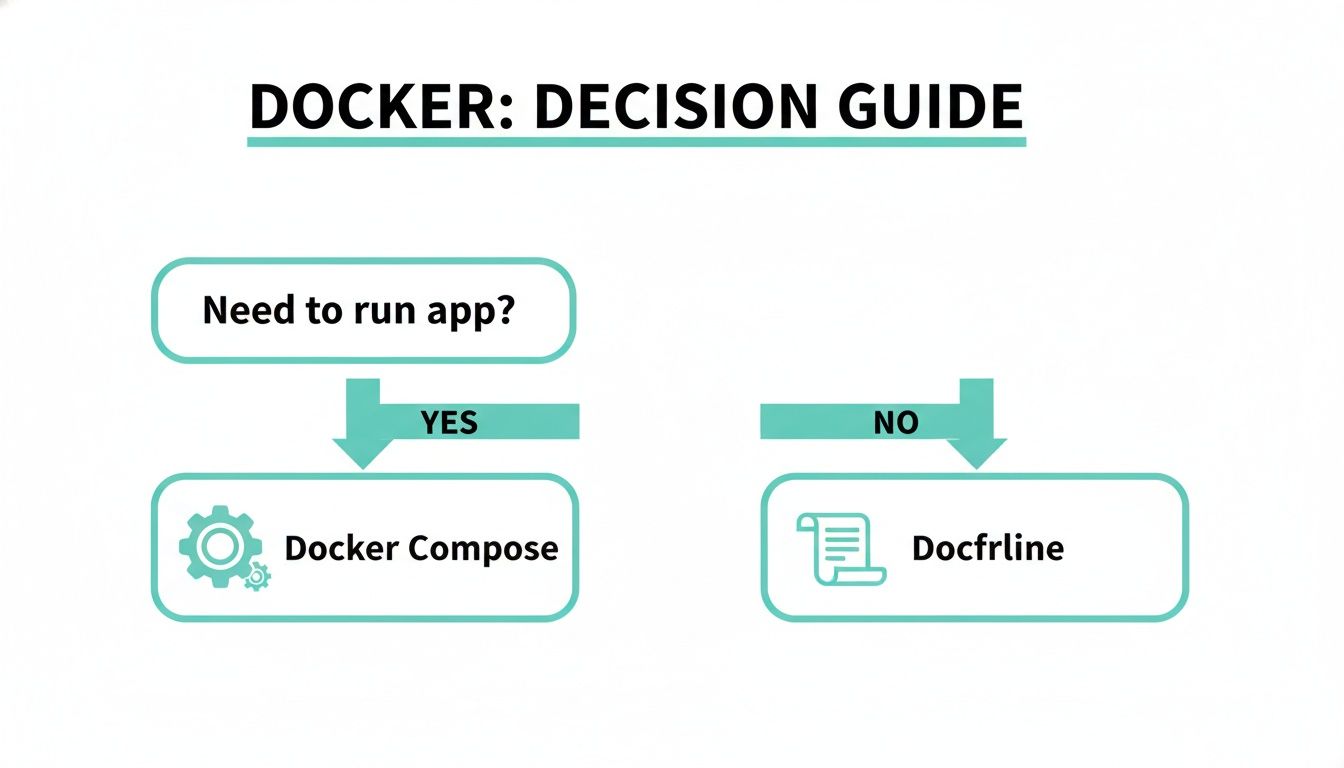
The flowchart makes it clear: if you need to run an app with multiple pieces, you use Docker Compose. If you need to define a single piece, you use a Dockerfile.
The real power comes from using these tools together. A developer doesn't choose one over the other; they use both in concert to build and run sophisticated applications efficiently.
Imagine a developer is tasked with adding a new Sitecore AI feature. They'd start by writing a Dockerfile to build an image for their new machine-learning service. Once that's done, they would update the project's docker-compose.yml file to include this new service.
With that simple change, they can instantly launch the entire Sitecore environment, with their new feature running right alongside everything else. This workflow perfectly captures the "better together" nature of these two essential tools.
Expert Recommendations for Your Enterprise Container Strategy
When it comes to enterprise container strategies, especially for complex DXP environments like Sitecore AI or integrated SharePoint solutions, the "Dockerfile vs. Docker Compose" debate is a false choice. The real path to success is understanding that they are not alternatives—they are two essential tools that work together in a single, efficient workflow.
It all starts with building a solid foundation using well-structured Dockerfiles. For organizations looking to streamline container deployments and boost operational efficiency, integrating a robust solution for application and infrastructure automation, such as DevOps as a Service, can make a significant difference.
Standardize and Secure Your Images
Your first step should be to standardize Dockerfile best practices across all your development teams. This means mandating multi-stage builds to create lean, production-ready images and setting clear guidelines for managing base images and dependencies.
This standardization accomplishes two critical things:
- Security: It shrinks the attack surface by ensuring only the necessary components are included in the final images.
- Optimization: It results in smaller, more efficient images, which means faster deployments and lower resource consumption.
For building the secure, high-performance services that run a Sitecore or SharePoint platform, this discipline is non-negotiable. A well-crafted Dockerfile is the first line of defense in a resilient system.
Empower Developers with Consistent Environments
Next, use Docker Compose to give your developer productivity a serious boost. By providing a single docker-compose.yml file, you give every developer a one-command method to spin up a complete, consistent local environment that perfectly mirrors production. This simple step finally puts an end to the "it works on my machine" problem.
A well-thought-out Docker Compose setup is a force multiplier for your development team. It dramatically cuts down on environment setup time, freeing up engineers to focus on building features for Sitecore AI or SharePoint, not debugging local configurations.
Finally, integrate both tools into your CI/CD pipeline. Use Dockerfiles to build and version your application images, and then use Docker Compose files for automated integration testing to confirm all services work together seamlessly before deployment. For those looking to take their operational maturity to the next level, exploring professionally managed cloud services is a smart move. You can learn more about how to offload infrastructure burdens by reading our overview of managed cloud services. By mastering both tools, you build a scalable, maintainable, and AI-ready digital presence.
Frequently Asked Questions
When you’re deep in a project, the practical differences between a Dockerfile and docker-compose.yml can get a little blurry. Here are some straightforward answers to the questions we hear most often, especially from teams working with DXP platforms like Sitecore AI or SharePoint.
Can I Use Docker Compose Without a Dockerfile?
Yes, you absolutely can. One of the main jobs of Docker Compose is to pull together and run multiple services, and those services don't have to be built from scratch on your machine. You can define a service in your docker-compose.yml file and point it directly to a pre-built image from a public or private registry like Docker Hub.
A perfect example is setting up a Sitecore environment. You’ll often pull official images for dependencies like SQL Server or Redis directly, without ever needing to see or touch their Dockerfiles.
Using Docker Compose without a Dockerfile is the way to go when you need to plug standard, off-the-shelf services into your application. It lets your team focus on building your custom application services while relying on trusted, pre-built images for all the common dependencies.
How Does Docker Compose Handle Environment-Specific Configurations?
Docker Compose is fantastic at managing configurations for different environments, like development, testing, and production. The magic happens with .env files. By default, Docker Compose automatically looks for a file named .env in the project directory and uses it to substitute variables into your docker-compose.yml file.
This setup lets you keep sensitive data like API keys, database connection strings, or environment-specific URLs out of your version-controlled docker-compose.yml. For a Sitecore project, you can have a different .env file for each environment, making sure the right database credentials or service endpoints are used for that specific deployment.
Is Docker Compose Suitable for Large-Scale Production?
For simple, single-host deployments, Docker Compose can work just fine in production. However, it’s critical to understand that it is not a full-scale orchestration tool in the same way Kubernetes is. Docker Compose wasn't built for managing complex, high-availability clusters and lacks the features you’d need, such as:
- Auto-scaling: Automatically adding or removing containers based on traffic.
- Self-healing: Detecting and replacing failed containers on its own.
- Rolling updates: Deploying new versions with zero downtime.
Think of Docker Compose as your go-to tool for local development and testing. Once you're ready to deploy a complex, high-availability DXP like Sitecore AI, the industry standard is to move to a true orchestrator like Kubernetes.
At Kogifi, we specialize in building and managing high-performance DXP architectures. Let us help you implement a container strategy that scales with your business.