


Your platform probably isn't failing because it lacks features. It's failing because people can't use those features without friction.
That's the pattern I see in large DXP and workplace platform programs. The business invests heavily in Sitecore, SharePoint, integrations, migration work, security reviews, content models, and rollout planning. Then adoption stalls. Editors avoid the new workflow. Internal teams keep a spreadsheet on the side. Business users ask for more training when the core problem is that the product asks them to think like the platform instead of doing their job.
That's where enterprise UX design stops being a visual exercise and becomes an operating discipline.
In enterprise environments, the target isn't a prettier interface. The target is better work. Teams need faster task completion, fewer errors, clearer decisions, stronger governance, and less dependency on tribal knowledge. That's why enterprise UX emerged as a distinct discipline focused on efficiency, productivity, accuracy, and operational impact, with success measured through metrics such as task completion time, error rates, adoption rates, support ticket volume, and support costs, as outlined in this enterprise UX overview.
For Sitecore and SharePoint programs, that distinction matters. These platforms can support advanced enterprise experiences, but only if the UX model respects how content teams, marketers, IT, compliance, and regional stakeholders work. Good enterprise UX design bridges business goals and platform constraints. It turns composable architecture into usable workflows. It makes AI features trustworthy enough for real decisions. It creates governance that survives beyond launch.
Table of Contents
- Where scalability and consistency usually break
- Accessibility localization and personalization in real delivery
- Sitecore AI and composable UX in practice
- SharePoint as a working digital workplace
- What implementation teams should enforce
- Governance is what keeps UX alive
- Design systems must connect design content and code
- How to handle stakeholder politics without stalling delivery
Introduction Why Your Enterprise Software Needs More Than a Facelift
A redesign won't rescue a platform that still forces users through the wrong workflow.
That's the first hard truth in enterprise UX design. If your Sitecore editors need a workaround to publish a campaign, or your SharePoint users can't tell where the current document lives, the problem isn't visual polish. It's structural. The system may be technically sound and commercially important, but the experience still creates drag.
Enterprise software is different because users don't approach it the way they approach consumer products. They aren't browsing for pleasure. They're trying to complete work inside rules, permissions, deadlines, and internal politics. The UX has to support that reality. It has to reduce ambiguity, surface the right options at the right time, and help people move confidently through high-volume tasks.
Why enterprise fixes often miss the mark
A lot of enterprise projects overinvest in screens and underinvest in operating logic. Teams debate homepage layouts while ignoring role conflicts, fragmented ownership, and content governance. They add features before they simplify decisions. They train users on broken journeys instead of removing the friction.
What works is more disciplined:
- Start with tasks: Focus on what users must complete, not what stakeholders want to showcase.
- Map the dependencies: Include permissions, content states, integrations, approvals, and exceptions.
- Design for scale: Assume more regions, more teams, more content types, and more governance over time.
- Treat UX as part of the platform: The interface, content model, workflow, and integration logic have to align.
Practical rule: If adoption depends on extra training, your UX probably hasn't solved the real problem.
In Sitecore and SharePoint programs, architecture and UX meet. A composable platform gives flexibility, but it also multiplies decisions. Without a strong UX model, flexibility turns into inconsistency. With the right model, the same platform becomes easier to govern, easier to scale, and far easier to justify to the business.
Defining Enterprise UX Design Beyond the Buzzwords
A team rolls out a polished new intranet. The visual design lands well in stakeholder reviews, but six weeks later editors are still asking where content belongs, managers are bypassing workflows, and regional teams have created their own workarounds in SharePoint lists and spreadsheets. That is the gap enterprise UX design has to close.
Enterprise UX gets mistaken for a larger version of consumer UX. It is a different discipline with different success criteria. The job is to help people complete high-consequence work across roles, systems, approvals, and governance constraints, without slowing the business down or creating new failure points.
Why enterprise software follows different rules
Consumer products usually optimize for quick orientation and low-friction decisions. Enterprise systems have to support repeatable execution. Users need clear status, predictable logic, and interfaces that match how the organization operates.
The difference shows up fast in delivery.
A clean interface can still fail if permissions hide the wrong action, if metadata rules are unclear, or if approval logic changes from one business unit to another. In Sitecore and SharePoint programs, those issues are not edge cases. They are the product experience.
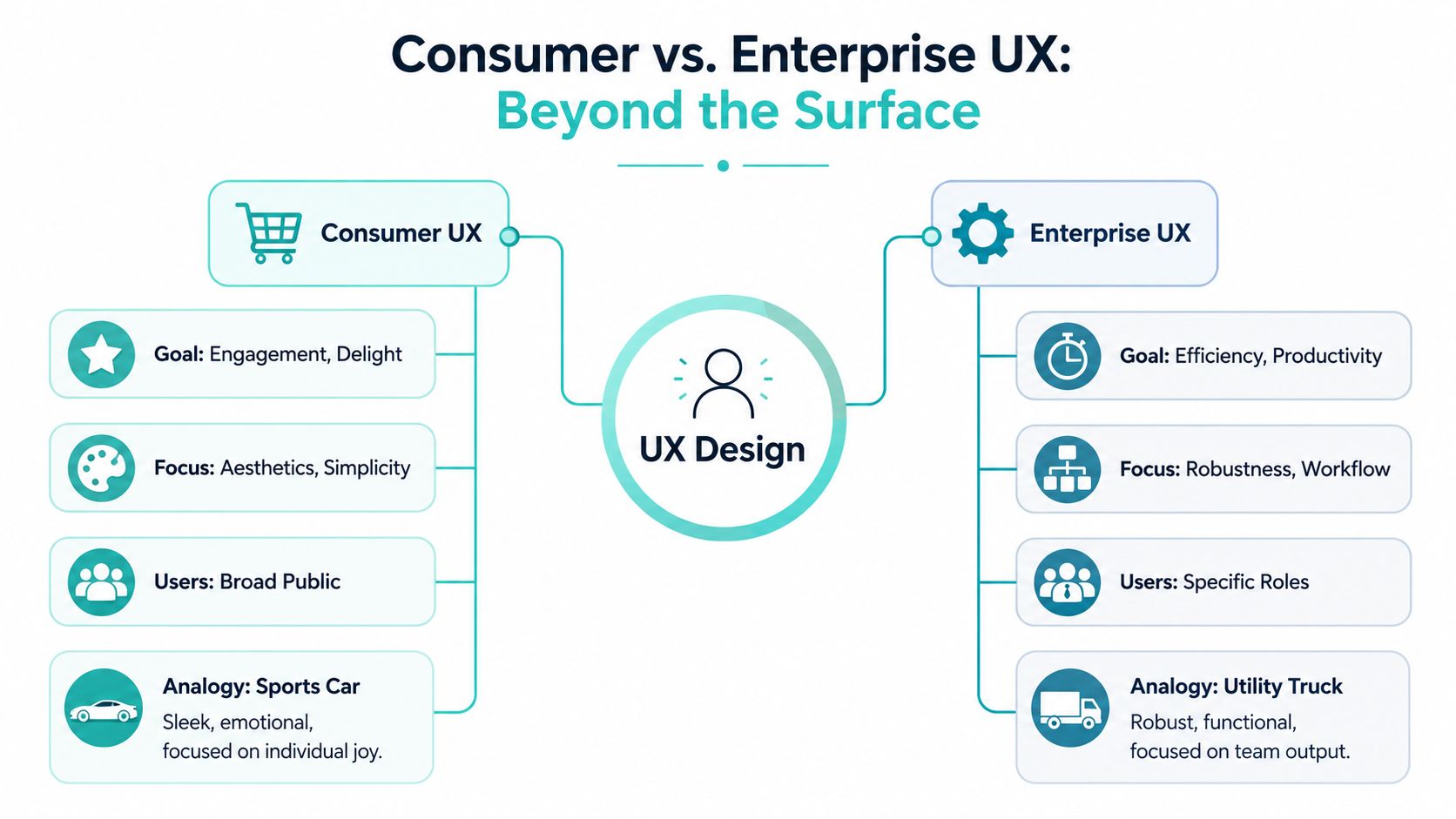
Copying consumer patterns into enterprise tools often creates expensive friction. Minimal interfaces can hide audit context that users need to make a safe decision. Simplified forms can force expert users through extra steps hundreds of times per week. Friendly labels can blur the difference between draft, approved, published, and archived states, which then creates support tickets, compliance risk, and rework.
What enterprise teams actually need
Enterprise users are rarely one audience. A publishing platform may need to support a central content team, local market owners, compliance reviewers, and occasional contributors who log in once a month. Each group needs a different level of guidance, speed, and control.
That is why a usable model for enterprise UX starts with operating reality. A strong UX strategy for enterprise delivery defines how journeys, content structures, permissions, and workflow rules fit together before teams start polishing components.
| Need | What good UX does | What bad UX does |
|---|---|---|
| Role clarity | Shows what each role can act on | Exposes everything to everyone |
| Task speed | Reduces navigation and repeated input | Adds decorative steps |
| Data confidence | Makes status and source visible | Hides context behind abstraction |
| Operational continuity | Handles edge cases and approvals | Assumes happy-path usage |
Good enterprise UX removes unnecessary complexity and structures the complexity that remains.
That matters even more in composable DXP environments. Sitecore AI can improve relevance and personalization, but only if content models, decision rules, and governance are clear enough to support it. SharePoint can scale across departments and regions, but without defined ownership and interaction patterns, the experience fragments quickly. Enterprise UX design sits in the middle of those trade-offs. It translates business goals into workflows, components, and governance choices that teams can maintain over time.
The Five Pillars of Effective Enterprise UX
Enterprise UX design holds up when five things are built into the platform from the start: scalability, consistency, accessibility, localization, and personalization. Miss one, and teams usually compensate with manual effort, extra support, or local workarounds.
Where scalability and consistency usually break
Scalability isn't about whether the infrastructure can handle more traffic. In UX terms, it's whether the experience still works when more teams, sites, workflows, and markets enter the system. A publishing flow that works for one central team often collapses when regional teams need different approval paths or content ownership rules.
What works is modularity. Shared components, predictable templates, and workflow patterns that can be extended without redesigning everything.
Consistency reduces cognitive load across a large ecosystem. Users shouldn't have to relearn basic interactions every time they move between tools, subsites, or modules. In Sitecore, that often means standardizing component behavior across SXA or headless builds. In SharePoint, it means aligning page templates, navigation patterns, metadata behavior, and content ownership rules.
The foundation for both is usually a clear information architecture for enterprise platforms. If your taxonomy, naming, and content structure are inconsistent, the interface can't rescue the experience.
Here's the trade-off teams often miss:
- Rigid standardization creates resistance when business units have valid local needs.
- Unlimited flexibility creates fragmentation and support overhead.
- Controlled variation is the workable middle ground.
Accessibility localization and personalization in real delivery
Accessibility isn't a compliance afterthought. It's part of operational usability. Keyboard access, clear focus states, readable structure, proper labeling, and assistive technology support all affect whether employees can complete tasks reliably. In public sector, education, and global enterprise environments, accessibility also influences procurement, governance, and long-term platform viability.
Localization goes beyond translation. Enterprise UX has to account for different content governance models, legal language, date formats, approval chains, and regional content responsibilities. A layout that works in one language can break in another. A workflow that fits a central team can fail in a distributed organization.
Personalization matters differently in enterprise systems than in public marketing journeys. The goal isn't novelty. It's relevance. Role-based dashboards, permission-aware navigation, task-focused content blocks, and context-sensitive guidance reduce noise and help users act faster.
A practical way to think about the last three pillars:
- Accessibility asks: Can every intended user operate the system?
- Localization asks: Can every region use the system without forced compromise?
- Personalization asks: Can each role see what matters without wading through everything else?
If users keep creating side documents, side channels, or side processes, one of these pillars is probably missing.
The best enterprise experiences don't try to make every screen universally simple. They make each role's path clearer, safer, and more efficient within the realities of the organization.
Integrating Enterprise UX with Your DXP Ecosystem
Enterprise UX design becomes real when it touches the platform. Strategy alone won't fix a disconnected DXP stack. The experience has to be expressed through content architecture, component logic, workflow design, search behavior, permissions, and the way AI features surface recommendations.
That's why Sitecore and SharePoint need different implementation patterns, even when the UX principles are shared.

Sitecore AI and composable UX in practice
Sitecore is strongest when teams stop treating it as a page builder and start treating it as an experience operating system. With XM Cloud, headless delivery, Search, and AI-driven capabilities, the platform can support complex enterprise journeys across channels. But the UX only succeeds if the implementation team translates composability into usable editorial and operational patterns.
That means making deliberate choices about:
- Component boundaries: Editors need components that match real content jobs, not abstract technical chunks.
- Content modeling: Reuse should be intentional. Over-normalized models slow authors down. Flat models become impossible to govern.
- Search and discovery: Search needs role-aware logic, useful metadata, and results users can trust.
- AI-assisted interaction: Recommendations, summaries, and generated content must stay inspectable.
The hard part with AI isn't adding it. The hard part is trust. Users need access to the underlying data behind AI-generated recommendations or summaries rather than opaque outputs, and the key design question is how users can verify, override, and safely rely on AI in high-stakes workflows, as discussed in this enterprise AI UX guidance.
That principle matters directly in Sitecore AI scenarios. If AI suggests content, segments, summaries, or experience variants, users need visible rationale and a safe review path. They need to know what source content informed the output, what can be edited, and what happens if they reject it.
A composable build also depends on architecture discipline. An API-first approach for enterprise platforms helps teams keep frontend flexibility without sacrificing consistency across channels and services.
SharePoint as a working digital workplace
SharePoint gets undervalued because many organizations use it as a storage layer instead of a user experience layer.
Done well, it can support a modern digital workplace with structured knowledge, clear ownership, collaboration patterns, and cleaner employee journeys. Done poorly, it becomes a maze of team sites, outdated pages, duplicate files, and navigation that reflects org charts rather than tasks.
Useful SharePoint UX work usually focuses on a different set of problems than Sitecore:
| Platform area | UX priority | Common failure |
|---|---|---|
| Intranet navigation | Task-based findability | Department-first menus |
| Document experience | Clear status, ownership, metadata | Duplicate and stale content |
| Collaboration spaces | Consistent team patterns | Each site reinvented locally |
| Knowledge access | Search that reflects user intent | Search that exposes clutter |
For organizations running both platforms, a practical split often works best. Sitecore handles branded, composable, high-governance digital experiences. SharePoint handles collaboration, internal knowledge, and operational content where Microsoft 365 integration matters most.
What implementation teams should enforce
A DXP ecosystem doesn't become coherent by accident. Delivery teams need standards that connect UX intent to platform behavior.
One option is working with a specialist implementation partner such as Kogifi, which provides UX and DXP delivery across Sitecore and SharePoint environments. The important point isn't the vendor label. It's whether the team can align architecture, editorial workflow, governance, and user experience in one delivery model.
A few implementation rules consistently help:
- Design for authoring, not just consumption: Editors and internal teams are users too.
- Use AI where verification is possible: Never force blind trust into business-critical flows.
- Separate shared patterns from local exceptions: That keeps scale manageable.
- Model governance in the platform: Don't leave approvals, ownership, and lifecycle rules to policy documents alone.
Later in delivery, this is what determines whether the platform feels coherent or merely expensive.
A useful example of how platform capabilities translate into enterprise UX can be seen here:
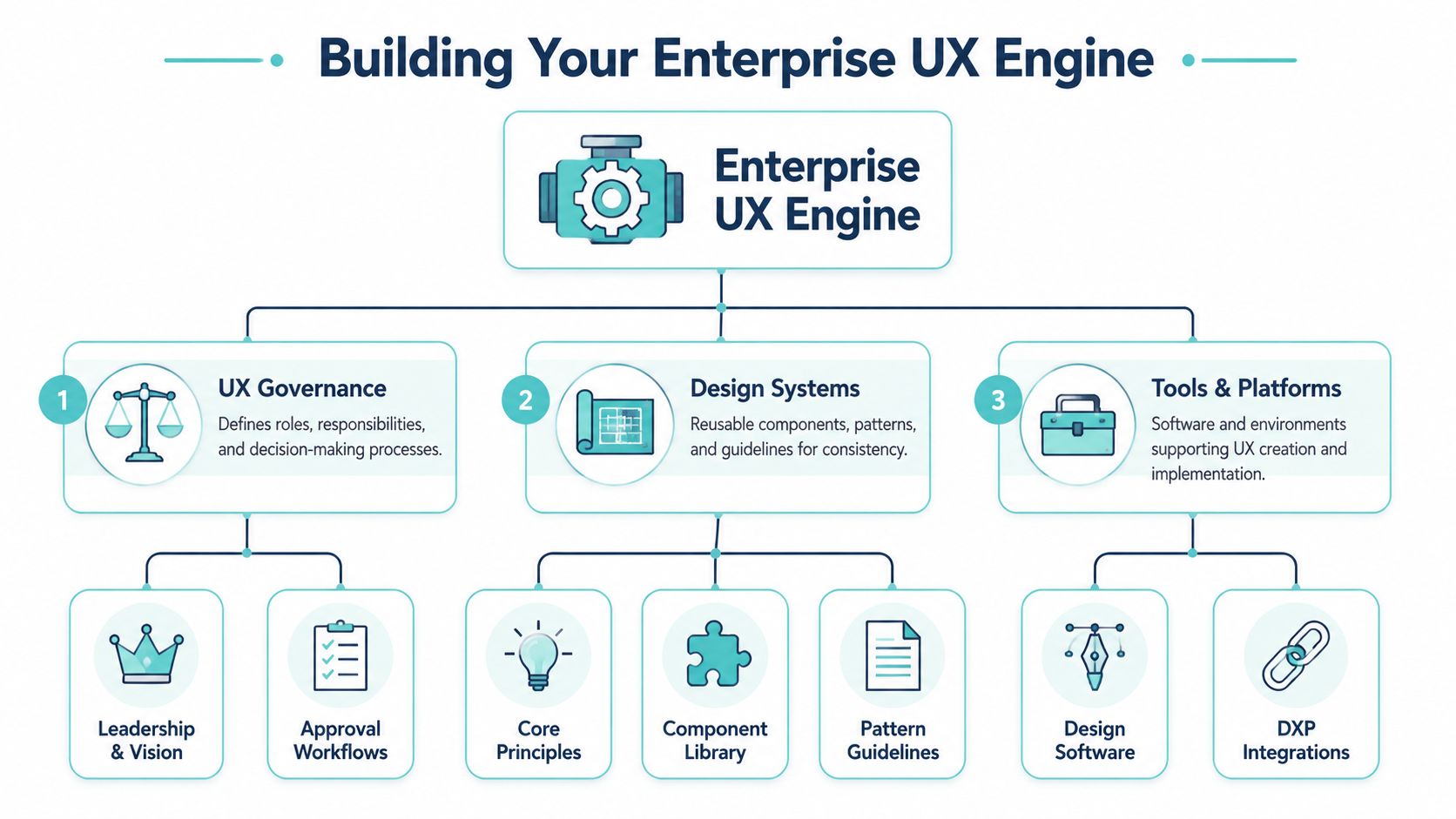
Building Your UX Engine Governance and Design Systems
Most enterprise UX problems don't start in Figma. They start in ownership gaps.
One team creates a pattern. Another team bypasses it. A regional stakeholder asks for an exception. Development ships a workaround because the approval path is too slow. Six months later, the platform looks inconsistent, the backlog is clogged, and every new release costs more than it should.
That isn't a design failure alone. It's a governance failure.
Governance is what keeps UX alive
Enterprise UX success depends on making UX work visible, aligning to stakeholder goals, and using research to steer decisions early. Many initiatives fail not at the UI layer but because of poor organizational coordination, change management, and lack of cross-functional buy-in, as described in this practitioner perspective on enterprise UX challenges.
That matches what happens in large Sitecore and SharePoint programs. By the time teams realize stakeholders aren't aligned, the platform build is already expensive to change. UX governance has to show up early in the form of decision rights, review paths, exception handling, and agreement on what counts as a standard.
A practical governance model usually defines:
- Ownership: Who approves patterns, content rules, and deviations
- Cadence: When design, development, content, and business teams review changes
- Evidence: What research or usage signal is required before major UX decisions
- Escalation: How teams resolve conflicts without freezing progress
Enterprise UX doesn't work in stealth mode. Visible progress builds trust faster than polished surprises.
Design systems must connect design content and code
A design system isn't a slide deck or a component gallery. In enterprise delivery, it's a shared operating asset. It should connect visual guidance, interaction patterns, component definitions, content rules, accessibility requirements, and implementation notes.
The strongest systems do three jobs at once:
- They speed delivery because teams reuse proven patterns.
- They improve quality because accessibility and behavior are standardized.
- They reduce political friction because discussions shift from taste to agreed rules.
For DXP programs, the system should also map directly to platform realities. A Sitecore component library should align with content models and editorial behavior. A SharePoint pattern library should reflect page templates, web parts, metadata expectations, and governance constraints.
A documented content governance framework for enterprise teams helps here because content decisions and UX decisions are tightly linked. If ownership, lifecycle, and naming are undefined, the design system stays cosmetic.
How to handle stakeholder politics without stalling delivery
Politics aren't separate from enterprise UX design. They are part of it.
The most effective teams don't try to eliminate politics. They make it manageable. They tie UX changes to stakeholder outcomes. They show prototypes early. They bring content owners, developers, and business leads into the decision process before code hardens.
A simple pattern works well:
| Situation | Weak response | Strong response |
|---|---|---|
| Stakeholder conflict | Debate preferences | Anchor on task evidence |
| Regional exception request | Reject or accept instantly | Evaluate against system rules |
| Late UX feedback | Treat it as disruption | Route through change control |
| Pattern drift | Fix manually each time | Update the design system and governance record |
Working rule: If a recurring UX issue needs repeated negotiation, it belongs in governance, not in another meeting.
That's the engine. Without it, enterprise UX remains a project. With it, the organization can scale quality across teams, platforms, and releases.
Measuring the ROI of Enterprise UX
A redesign gets approved. Six months later, the service desk is still flooded, authors still bypass the workflow, and business leaders ask why the platform investment is not producing results. That is the point where enterprise UX has to be measured as an operating model, not as a visual improvement.
The ROI case for enterprise UX is straightforward when it is tied to work. Better UX reduces task time, lowers avoidable errors, cuts support demand, and increases adoption of the systems the business already pays for. In Sitecore and SharePoint programs, those gains show up in places executives care about: publishing throughput, case handling time, search success, training effort, and governance compliance.
Metrics that executives and delivery teams both understand
Start with workflow metrics, not opinion scores.
The measures that hold up in steering groups and delivery reviews are task completion time, error rate, adoption rate, support ticket volume, workflow completion rate, and rework volume. They translate cleanly into labor cost, operational risk, and platform value.
Use the metrics in combination so the story is credible:
- Task completion time plus error rate shows whether the process became faster without creating more failure downstream.
- Adoption rate plus support ticket volume shows whether rollout quality is improving or whether users are only complying because they have no alternative.
- Workflow completion rate plus rework volume shows whether the experience supports clean handoffs across teams, systems, and approval stages.
In enterprise environments, a baseline matters as much as the target. Measure the current workflow first. Then measure the redesigned workflow under the same conditions, with the same user groups, and against the same business rules. That discipline prevents inflated claims and gives finance, platform owners, and delivery leads something they can trust.
How to frame the business case
Broad UX research helps establish that design quality has financial impact. Forrester's analysis for IBM reported returns as high as 100 dollars for every 1 dollar invested in UX. Separate research published by Forrester on design-led companies found materially higher revenue growth and total returns to shareholders than industry peers. Adobe also reported that CEOs increasingly treat design and customer experience as competitive differentiators. Those studies are not limited to enterprise software, but they explain why UX now gets board-level scrutiny.
For enterprise platforms, the strongest ROI model usually has three parts:
- Productivity gains: less time spent completing recurring tasks such as content publishing, document retrieval, approvals, and employee service requests.
- Risk reduction: fewer mistakes, fewer exceptions, and less variation in regulated or high-visibility workflows.
- Support efficiency: lower training and service desk demand because the system is easier to use correctly the first time.
I usually advise clients to start with one expensive workflow, not a broad platform-wide claim. In Sitecore, that might be campaign publishing across multiple brands, with delays caused by unclear component choices, approval bottlenecks, or inconsistent metadata. In SharePoint, it is often document findability, duplicate content, or navigation paths that force users into Teams messages and email workarounds.
That is where the ROI argument gets practical. If a redesign cuts publishing time, reduces rework, and increases template compliance, the business gets value beyond aesthetics. It gets faster campaign delivery, fewer governance issues, and less custom support from developers and administrators.
AI adds another layer, but it has to be measured carefully. Sitecore AI personalization or assisted content operations can improve relevance and speed. It can also create review overhead, governance risk, and model mistrust if the implementation is weak. Count the savings only when the AI output reduces real effort or improves task success under controlled conditions.
Your Enterprise UX Implementation Roadmap
Most organizations don't need another abstract maturity model. They need a sequence they can start.
A practical enterprise UX design roadmap works best when it moves from evidence to standards, then from pilot to scale. Keep it narrow enough to execute and broad enough to influence the platform long term.
Phase one through phase five
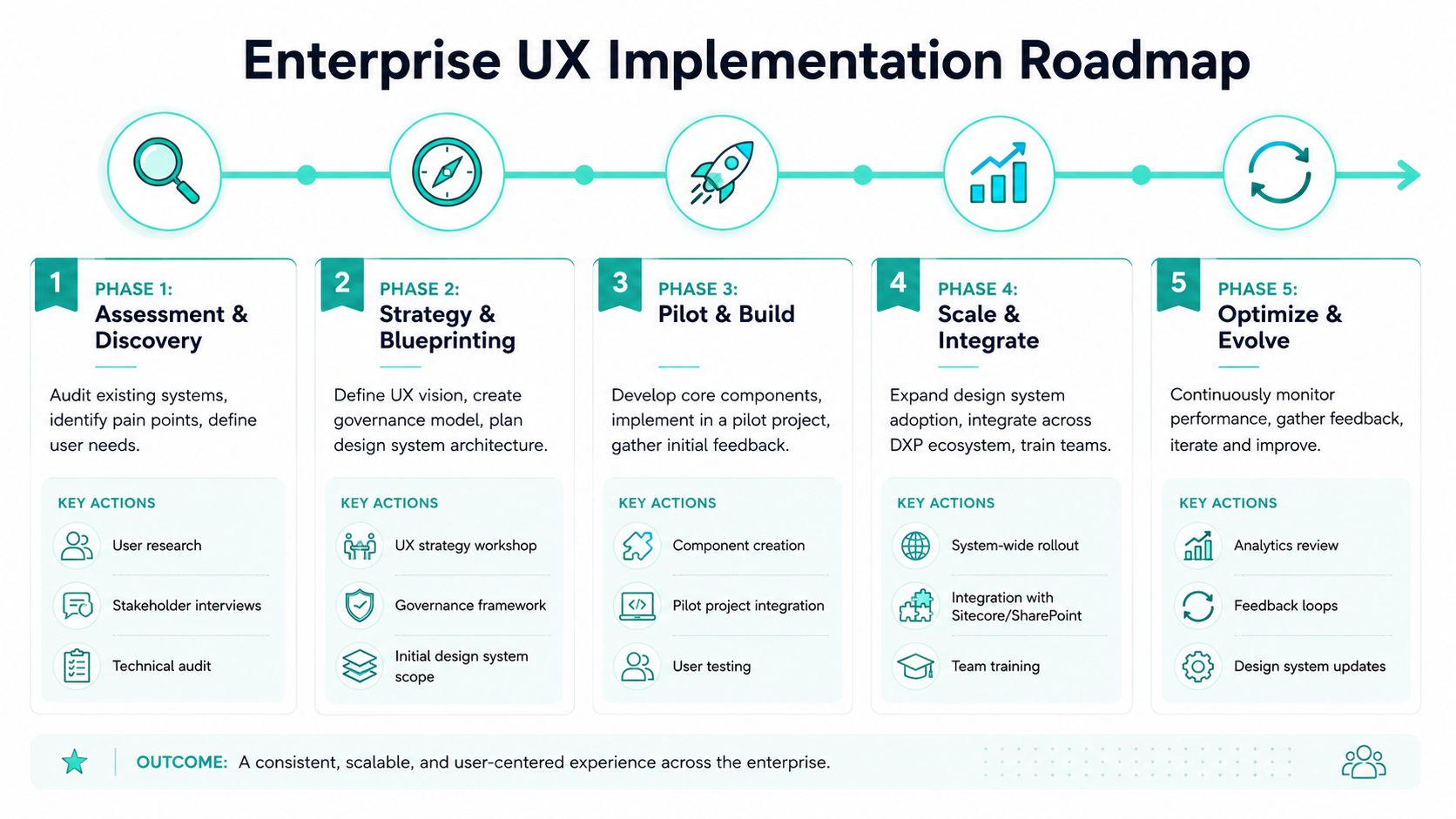
Phase 1: Assessment and discovery
Audit the current experience across user roles, workflows, content structures, and platform constraints. Focus on high-friction tasks, not broad opinions. Review Sitecore authoring patterns, SharePoint navigation, workflow handoffs, search behavior, and where users leave the intended process.
Phase 2: Strategy and blueprinting
Define the target operating model. That includes UX principles, governance ownership, exception rules, platform boundaries, and the first version of the design system. This is also where AI use cases should be filtered. Keep only the ones users can verify and safely control.
Phase 3: Pilot and build
Choose a narrow but meaningful pilot. Good candidates include a high-value Sitecore content workflow, a SharePoint knowledge hub, or a cross-team approval journey. Build shared components, validate with real users, and document what should become standard.
Start with a workflow that matters to the business and is painful enough that improvement will be visible.
Phase 4: Scale and integrate
Expand patterns into adjacent teams and channels. Connect the design system to development pipelines, editorial guidance, and platform governance. Standardize where reuse creates value. Allow exceptions only when they're explicitly justified.
Phase 5: Optimize and evolve
Use operational metrics, support signals, and structured feedback to refine the experience. Enterprise UX doesn't stay finished. Organizational structures change. Content volumes grow. New roles appear. AI capabilities evolve. The model has to absorb change without fragmenting.
A simple roadmap table helps keep teams aligned:
| Phase | Main output | Common mistake |
|---|---|---|
| Assessment | Clear task and system evidence | Jumping to solutions |
| Strategy | Governance and pattern decisions | Leaving ownership vague |
| Pilot | Tested reusable foundations | Picking a low-impact use case |
| Scale | Cross-platform adoption | Allowing uncontrolled variation |
| Optimize | Ongoing improvement loop | Treating launch as the finish line |
Enterprise UX design succeeds when business goals, platform architecture, and user reality are designed together. That's true for Sitecore. It's true for SharePoint. And it's usually the difference between a platform people tolerate and one they use.
If you're planning a Sitecore or SharePoint program and need to connect UX decisions with architecture, governance, and rollout realities, Kogifi can help you shape that work into a practical delivery model.