


A campaign is queued, approvals are done, and your Sitecore homepage switch is scheduled for the top of the hour. Then the page renders half-correctly. Search returns nothing useful. Personalization falls back to generic content. At the same time, employees in another region report that the SharePoint intranet is timing out just as a policy update needs to go live.
Many teams don't experience that as a neat “security incident” or a tidy “platform ticket.” They experience it as confusion. Marketing asks whether to pause spend. IT asks whether this is a deployment issue, a data issue, or an access issue. Comms wants wording. Leadership wants impact, owner, and recovery time. If no one has pre-agreed roles, the first hour disappears into meetings and message threads.
That's where an incident response team earns its keep. In digital experience estates, the challenge often isn't just finding the fault. It's getting the right people to make the right decisions in the right order, under pressure.
Sitecore, AEM, and SharePoint estates make that harder because each platform carries its own operational shape. Sitecore XM Cloud introduces composable dependencies across authoring, front end, integrations, and delivery edge. AEM brings its own publishing and workflow concerns. SharePoint incidents can affect collaboration, policy access, and Microsoft 365 surfaces at the same time. You need one governance model that can work across all of them, not three disconnected support habits.
Many enterprise teams already formalize this through Sitecore support services, on-call structures, and SLA-backed operations. The important point is broader than support coverage. Response has to be designed as a cross-functional business capability, not left as an improvised technical rescue.
Table of Contents
- Start with triage and severity
- What a usable runbook includes
- Cut decision latency during live incidents
- Metrics that tell you whether the team is actually ready
- Tabletop exercises should test decisions, not just detection
When Your DXP Goes Dark and Who Answers the Call

A familiar pattern shows up in large DXP programs. A site outage starts as a technical symptom, but the damage spreads through process. Content editors stop publishing. Paid media points to broken journeys. Sales teams lose trust in dashboards. Regional teams create side channels because they can't tell who's in charge.
Why ad hoc response breaks down
An ad hoc response usually creates four parallel problems:
- Ownership confusion: Infrastructure, CMS, front-end, and integration teams each assume someone else is coordinating.
- Business noise: Executives ask for updates before the technical lead has enough verified detail.
- Escalation drift: Legal or communications joins too late, after statements or customer messages should already have been prepared.
- Recovery uncertainty: Teams restore service but can't yet prove every dependency is healthy.
That's why mature organizations treat incident response as a managed operating model. The team handling the issue needs technical skill, but it also needs authority boundaries, communication rules, and platform-specific runbooks.
A broken page is rarely just a broken page in an enterprise DXP. It can be a content issue, a release issue, a search issue, an identity issue, or a governance issue wearing a technical disguise.
What enterprise owners usually need answered first
Marketing and IT owners typically ask practical questions, not theoretical ones:
- Who declares the incident?
- Who decides whether a launch pauses?
- When does executive leadership get involved?
- What evidence is needed before saying service is restored?
- Which dependencies matter for Sitecore, AEM, and SharePoint specifically?
Those questions matter because digital estates now span authoring tools, headless front ends, search, data activation, workflow apps, and collaboration channels. A good response model doesn't just contain damage. It protects continuity of publishing, governance, and trust.
What an Incident Response Team Is and How It Works
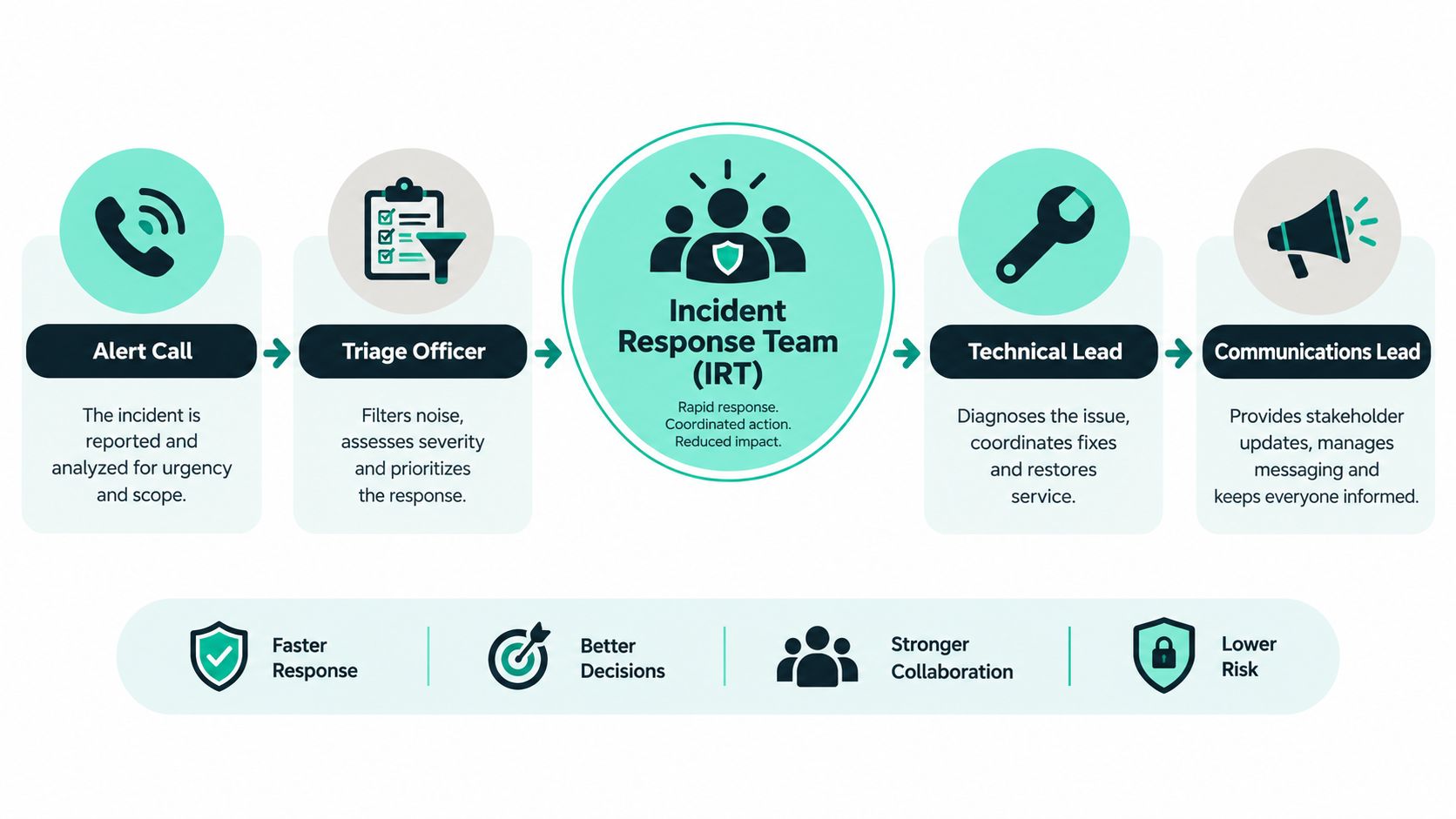
An incident response team is the business equivalent of an emergency crew. One person takes the call, one triages the situation, one leads the technical action, and one manages communication so everyone else can keep working from the same facts.
NIST defines incident response teams, also called CSIRTs, as groups that receive reports of possible incidents, investigate them, and take action to minimize damage. NIST's glossary also defines a computer incident response team as a group, usually of security analysts, organized to coordinate containment, eradication, and recovery for computer security incidents. NIST's incident response guidance runs through SP 800-61, with Revision 3 published in April 2025 after Revision 2 was withdrawn on April 3, 2025, as reflected in the NIST incident response publication history and glossary context.
The lifecycle in plain language
Teams work through a recognizable sequence.
Preparation
People define roles, create runbooks, set communication paths, and make sure logging, access, and support contacts are ready.Detection and triage
Someone notices a problem. The team confirms whether it's a real incident, how serious it is, and what systems or journeys are affected.Containment
The goal is to stop the problem from spreading. In a DXP setting, that might mean halting a deployment, disabling a faulty integration, or isolating a publishing path.Eradication
The team removes the root cause. That could involve correcting a configuration, rolling back bad code, rotating access, or cleaning up compromised components.Recovery
Service comes back in a controlled way. This matters more than turning things back on. The team needs confidence that publishing, search, personalization, and forms are working as intended.Lessons learned
The incident becomes an input to better runbooks, access models, approval rules, and tests.
For a practical framing of how organizations map incidents from intake through resolution, the Capgo incident management overview is a useful companion read because it translates response into operational stages rather than abstract theory.
Why this function exists
The point of an incident response team isn't perfection. It's damage control with discipline. Teams that improvise every major incident often lose time deciding who speaks, who approves technical changes, and which facts are confirmed.
A lot of organizations also forget that this discipline has a long history. The creation of CERT/CC in November 1988 came directly in response to the Morris Worm, and the wider CSIRT ecosystem expanded quickly afterward. One SEI study reports that FIRST grew to 151 teams by 2003, with registered teams doubling from 79 in 1999 to 158 in 2002. The same study shows operational scale too, with 10% of participating teams handling more than 8,000 incidents per year and education CSIRTs averaging between 1,000 and 4,000 incidents annually, according to the SEI CSIRT development study.
Practical rule: If your team can't explain who investigates, who approves, who communicates, and who validates recovery in one page, your incident response team is still too informal.
For DXP owners, the same logic applies whether the trigger is malicious activity, a release failure, or a broken customer journey. Mature teams don't wait to define the chain of command during the outage. They use incident management best practices that were agreed before it happened.
How to Structure and Govern Your Team for Enterprise DXP
The hardest design choice isn't whether you need an incident response team. You do. The harder choice is how to structure it across brands, regions, and platforms.
In practice, most enterprise DXP estates land in one of three models. A centralized team controls everything from a single command layer. A distributed model gives regional or brand teams more autonomy. A hybrid model keeps governance central while letting local teams execute platform-specific actions.
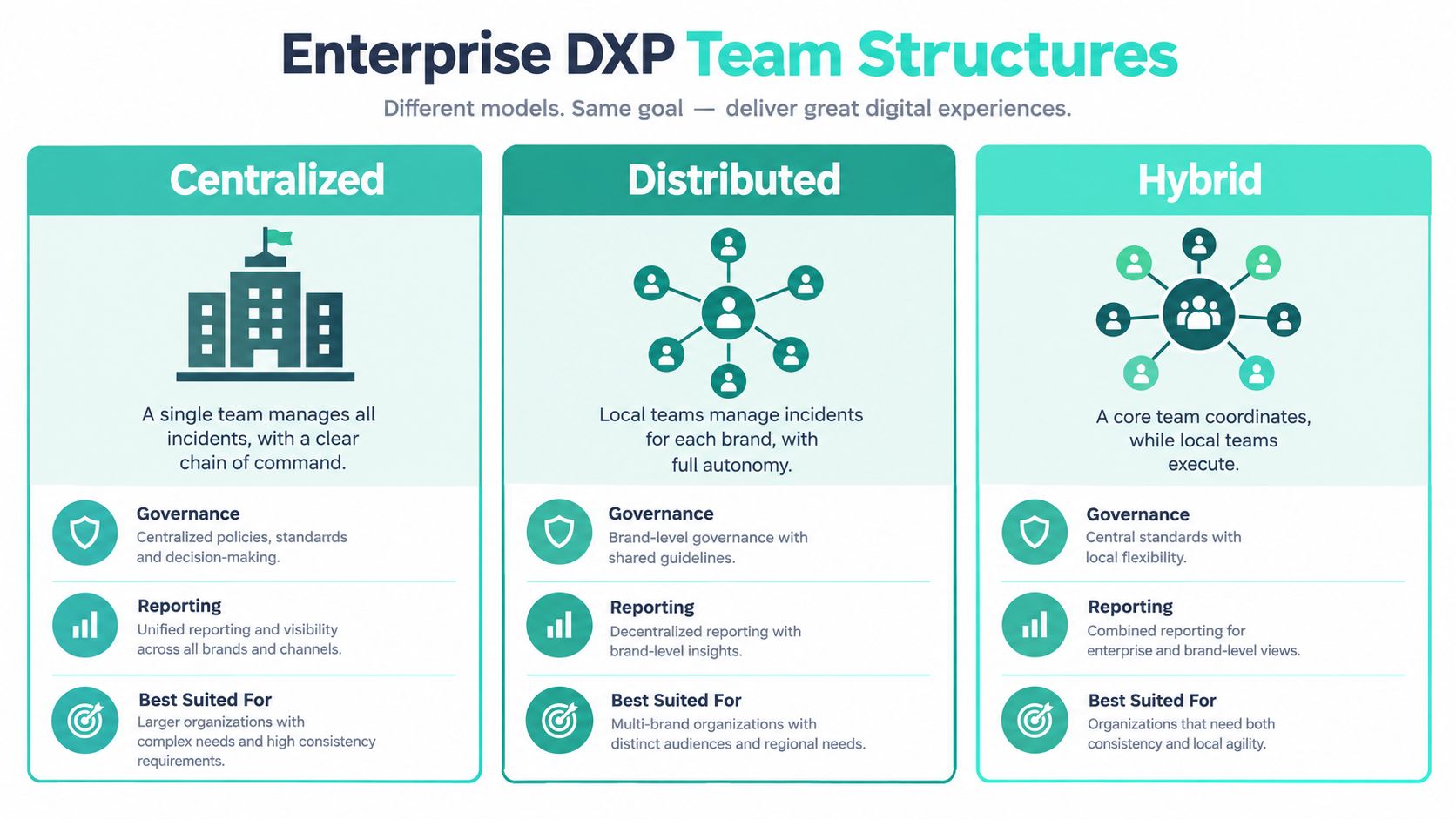
Choosing the operating model
| Model | Best For | Strengths | Trade Offs |
|---|---|---|---|
| Centralized | Highly regulated estates, shared global platforms, strict release governance | Clear authority, consistent reporting, simpler audit trail | Local teams may wait too long for decisions |
| Distributed | Autonomous brands, local content ownership, region-specific operations | Faster local action, stronger platform context close to the issue | Inconsistent standards and fragmented communications |
| Hybrid | Multi-brand composable estates using shared patterns and regional delivery teams | Central governance with local speed, better fit for follow-the-sun support | Requires disciplined RACI and escalation design |
A centralized model often works well when one Sitecore XM Cloud foundation serves many sites through shared components and a common front-end practice. A distributed model can fit separate AEM business units with distinct publishing rules. A hybrid model is usually the most realistic for enterprises running Sitecore, AEM, and SharePoint together.
Governance matters more than the org chart
A chart tells you where people sit. Governance tells you who decides.
The cross-functional point is critical here. Independent 2026 research found 73% of organizations were not fully ready for a major cyberattack, 90% expected stakeholder-coordination problems, 75% said uncertainty about legal and communications involvement slows decisions, and 89% reported limited executive or board involvement in readiness, according to the 2026 readiness findings summarized by The Hacker News. Even though those figures come from cyber readiness, the governance lesson applies directly to DXP incidents. Teams often fail at handoffs, not only at technical action.
For Sitecore XM Cloud estates, that means naming owners across authoring, front end, integration, and business approval paths. Sitecore describes XM Cloud as a fully managed, self-service, headless CMS platform that bundles Pages, SXA, Headless Services, the Sitecore Next.js SDK, and Experience Edge, as shown in the Sitecore XM Cloud developer documentation. That bundled architecture is powerful, but it also means one customer-facing incident may cross several responsibility boundaries.
A good governance design includes:
- A named incident commander: One person owns coordination and final working status.
- Decision rights by severity: Teams know who can pause publishing, roll back a release, or approve customer communications.
- Business representation: Marketing, legal, and communications aren't optional observers. They need entry points and triggers.
- Regional coverage: Global estates need handoff rules across time zones, not just after-hours phone numbers.
If your runbook lists technical steps but doesn't identify who can approve a public statement or a launch pause, the runbook is incomplete.
Building Your Playbook From Triage to Communication
A playbook is what turns stress into sequence. Without it, every responder rebuilds the process from memory. With it, the team can move from signal to action without stopping to debate basics.
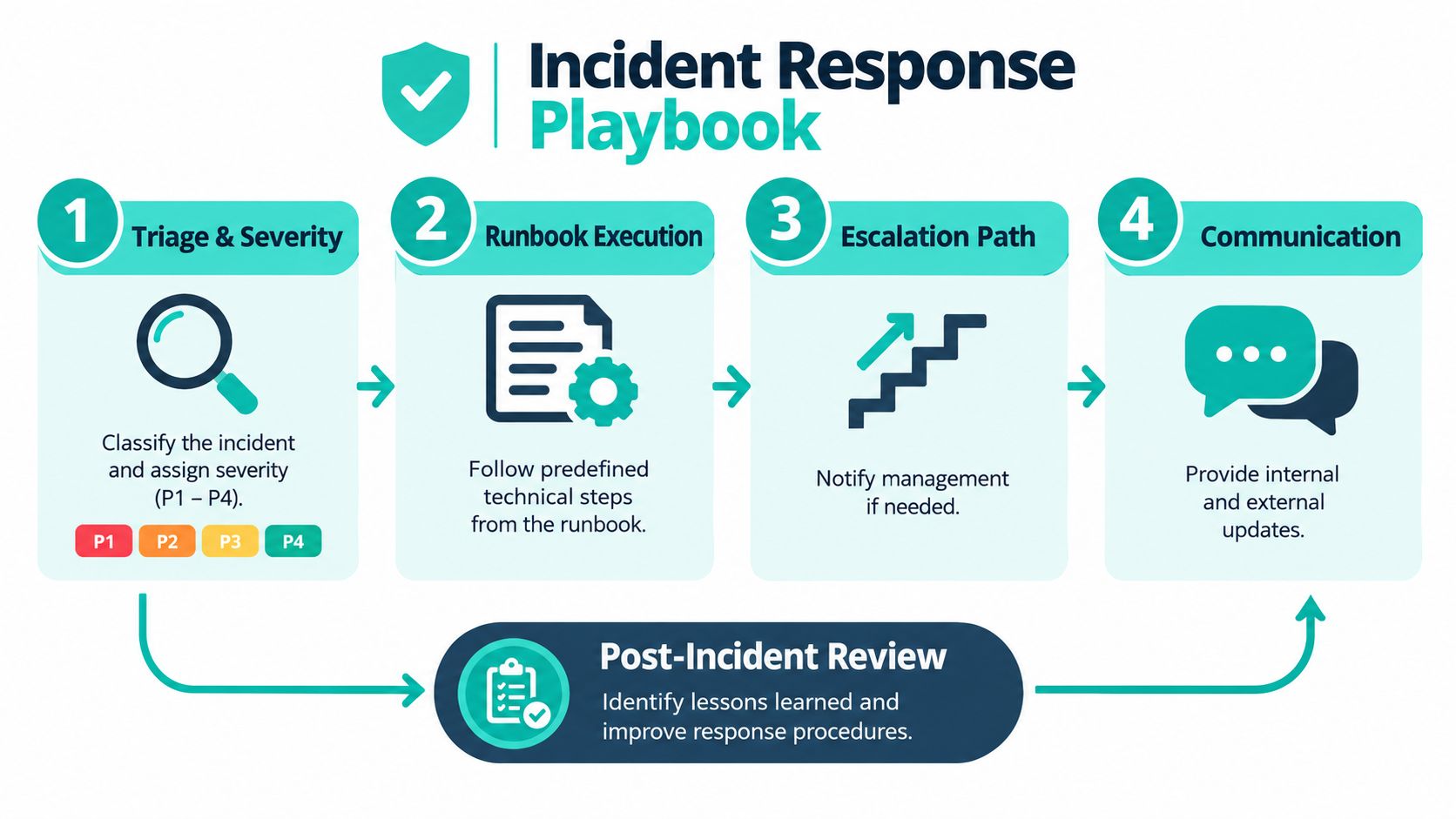
Start with triage and severity
Not every issue deserves the same response shape. A homepage outage during a launch window isn't the same as a broken authoring workflow affecting a small editorial group.
The simplest way to keep calm is to classify incidents by business impact, affected environment, and urgency. Sitecore Content Hub's own incident-response documentation shows this clearly by defining severity through incident priority and environment, with response targets ranging from 1 business day for Standard SLA P1 production incidents to 1 hour for Premium SLA P1 production incidents, alongside specific targets for P2, P3, and P4 cases in the Sitecore Content Hub incident response guidance.
That doesn't mean you should copy those exact targets for every platform. It does show the right pattern. Severity should be tied to environment and impact, not just technical symptoms.
What a usable runbook includes
A runbook should answer operational questions fast.
- Entry conditions: What triggers this runbook? Example: failed XM Cloud publish, broken search indexing, inaccessible SharePoint home page.
- Immediate checks: What must the first responder confirm before escalating?
- Containment options: Which actions are reversible, and who can approve them?
- Dependencies to verify: Identity, APIs, search, CDNs, workflow automations, analytics, and authoring access.
- Communication prompts: Internal status wording, business impact wording, executive summary wording.
For estates with multiple products, separate runbooks by incident family often work better than one giant document. One runbook for publishing failure. One for search degradation. One for identity and access issues. One for intranet-wide availability.
Cut decision latency during live incidents
One major reason teams struggle is context gathering. In 2026, UpGuard reported that security teams spent 43% of response time on manual context gathering, and 79% of organizations were first alerted by third parties rather than internal detection. The same UpGuard summary also cites M-Trends 2026 findings that internal detection improved to 52% in 2025, meaning 48% still learned of compromises from someone else, and that global median dwell time rose from 11 days in 2024 to 14 days in 2025. It also notes wider readiness gaps, including ENISA findings that 36% of SMEs had no incident response plan and only 2% had plans that are tested and regularly reviewed, while other 2026 research found 40% lacked an end-to-end incident response partner and 37% lacked an incident response plan, all summarized in the UpGuard incident response research review.
For DXP teams, the practical lesson is simple. Don't wait for the incident to assemble architecture context, escalation contacts, or business messaging paths.
A focused support model can help here. One option is a retained partner that handles platform monitoring, bug fixing, and recovery coordination for Sitecore, AEM, or SharePoint estates. Kogifi, for example, documents this kind of operational support in its work around website uptime monitoring.
Measuring Readiness With KPIs Tabletop Exercises and Reviews
Many teams measure the wrong thing. They celebrate that an incident was “closed,” but they don't check whether the work was completed before closure.
FIRST's CSIRT metrics framework points to more useful operational indicators, including unresolved tasks at incident closure, time to complete tasks, and whether incidents meet successful-resolution criteria, as outlined in the FIRST CSIRT metrics framework. That matters because closure speed alone can hide weak eradication, missing evidence handling, or incomplete follow-up.
Metrics that tell you whether the team is actually ready
A practical readiness dashboard for DXP incidents should include a mix of technical and governance signals:
- Completion quality: Did the team finish root-cause work, rollback verification, access review, and stakeholder communication before closure?
- Open actions after recovery: How many items were deferred, and were they accepted by the right owner?
- Handoff performance: Did legal, comms, and executive stakeholders join when the trigger said they should?
- Environment confidence: Can the team prove customer-facing journeys and authoring journeys are both healthy?
These measures are especially useful when you're designing SLAs and staffing models. They surface whether the team is under-resourced, over-escalating, or closing incidents too early.
Tabletop exercises should test decisions, not just detection
A tabletop works best when it pressures the team's decision path. Don't just test whether someone can find the log line. Test whether marketing knows when to pause a campaign. Test whether the intranet owner knows when HR communications move to backup channels. Test whether the incident commander can ask for a rollback without waiting for five approvals.
Recovery validation should include the business journey, not just the technical service. A “green” status means little if editors still can't publish or users still can't search.
Blameless post-incident reviews also matter. The purpose isn't to assign fault. It's to tighten runbooks, remove approval bottlenecks, and improve visibility across your environment. Teams usually learn more from reviewing the awkward handoff than from reviewing the obvious error message.
Real World Scenarios for Sitecore AEM and SharePoint Estates
The same incident framework looks different depending on the platform. That's why generic runbooks often fail in mixed DXP estates. The response model can be shared, but the validation steps must reflect product reality.
Sitecore XM Cloud scenario
A Sitecore team deploys a front-end change and suddenly key pages render with missing components. In XM Cloud, the operational picture often spans authoring, rendering, and edge delivery. Sitecore's documentation describes XM Cloud as a managed headless platform that bundles Pages, SXA, Headless Services, the Sitecore Next.js SDK, and Experience Edge. That means triage should check component contracts, rendering host behavior, content model alignment, and delivery output together, not as separate queues.
If the affected journey also includes personalization or audience logic, the runbook should widen fast. Sitecore's CDP is defined as combining real-time behavioral insights with customer data, and Sitecore says it captures behavioral and transactional data about users, typically integrated through the Sitecore Engage SDK or the Cloud SDK for sites connected to XM Cloud, according to the Sitecore CDP product documentation. A rendering issue might be visible as a content problem while the root cause sits in data activation or event flow.
Search is another common trap. Sitecore Search is described as an AI-driven, headless content and product discovery platform for predictive and personalized search, and Sitecore notes that XM Cloud customers who purchase Search must integrate the two products to enable search on XM Cloud-built sites, as shown in the Sitecore Search integration guidance. If search fails after a release, the recovery check can't stop at “page loads again.” It has to validate indexing, query behavior, and the customer path from browse to find.
AEM and SharePoint scenarios
AEM incidents often look similar on the surface but differ in execution. A publishing queue delay, broken workflow, or integration fault may affect regional releases unevenly. The response team needs a shared severity model, but it also needs AEM-specific rollback and cache validation steps.
SharePoint incidents feel even less like classic security events and more like business continuity events. Microsoft states that the SharePoint Framework (SPFx) is designed for building business applications surfaced across Microsoft 365, including Microsoft Viva, Microsoft Teams, Outlook, the Microsoft 365 app, and SharePoint, as described in the Microsoft SPFx platform overview. That means an intranet issue may spill into employee communications, embedded apps, and workflow entry points well beyond one portal page.
For mixed estates, the strongest pattern is shared command with platform-specific recovery checks. Teams should also document fallback paths and disaster recovery procedures for each platform so they can prove not only that systems are back, but that business-critical journeys are usable.
Next Steps to Strengthen Your Incident Response Capability
The main shift is simple. Stop treating incident response as a narrow technical containment exercise. In enterprise DXP estates, it's a governance discipline that spans platform operations, business continuity, communications, and recovery proof.
A strong incident response team does four things well. It defines clear authority. It maintains platform-specific playbooks. It validates recovery against real user journeys. It rehearses handoffs before a live incident forces them. Tooling still matters, especially in composable Sitecore and Microsoft 365 environments, but tooling doesn't remove ambiguity on its own.
A practical next step list for the next quarter looks like this:
- Map decision rights: Name who declares incidents, who approves rollback, and who signs off on external communication.
- Split runbooks by incident family: Publishing, search, identity, integration, and intranet availability usually need different checks.
- Add recovery validation: Require proof for customer journeys, editor workflows, and internal communications paths.
- Run one tabletop per major platform: Sitecore, AEM, and SharePoint should each get a scenario that tests both technical and business response.
- Review closure criteria: Don't let teams mark incidents complete while follow-up actions remain undefined.
If you're leading a multi-region DXP estate, the maturity question isn't whether incidents will happen. They will. The better question is whether your organization already knows who answers the call, who makes the decisions, and how you'll prove recovery is real.
Kogifi supports enterprise teams with Sitecore, AEM, and SharePoint operations that include 24/7 support, incident response, platform stabilization, and recovery planning for complex digital estates. If you need to tighten runbooks, validate governance, or add a stronger operational layer around your DXP, visit Kogifi.