


Most guides treat marketing automation personalization as a toggle inside an email tool. Flip on a dynamic first-name tag, load a few AI-generated subject lines, and let the campaign engine run. That advice sounds convenient, yet it's the fastest way to scale generic messaging to people your systems barely recognize.
Real personalization isn't a campaign setting. It's a decisioning system that connects live event data, identity resolution, governed content components, and human review into a continuous operational loop. According to Nielsen's 2025 Global Annual Marketing Survey, 59% of global marketers identified AI for campaign personalization and optimization as the most impactful marketing trend. Turning that priority into measurable revenue takes architecture, not just another generative copy tool.
Inside an enterprise stack, platforms such as Sitecore AI connect upstream content operations, unified customer profiles, and real-time decisioning across multi-brand web estates, while Microsoft SharePoint Online brings parallel governance discipline to personalized internal portals. Understanding how those moving parts fit together is what separates conversion lifts from expensive noise.
Table of Contents
- What Marketing Automation Personalization Really Means
- How Automation and Personalization Converged
- The Data and Workflow Foundations That Make It Work
- How Sitecore AI Connects Automation to Personalization
- Use Cases That Show the Loop in Action
- Governance, Privacy and the Limits of Personalization
- How to Implement It Step by Step
- Decide Your First Move Before You Buy a Tool
What Marketing Automation Personalization Really Means
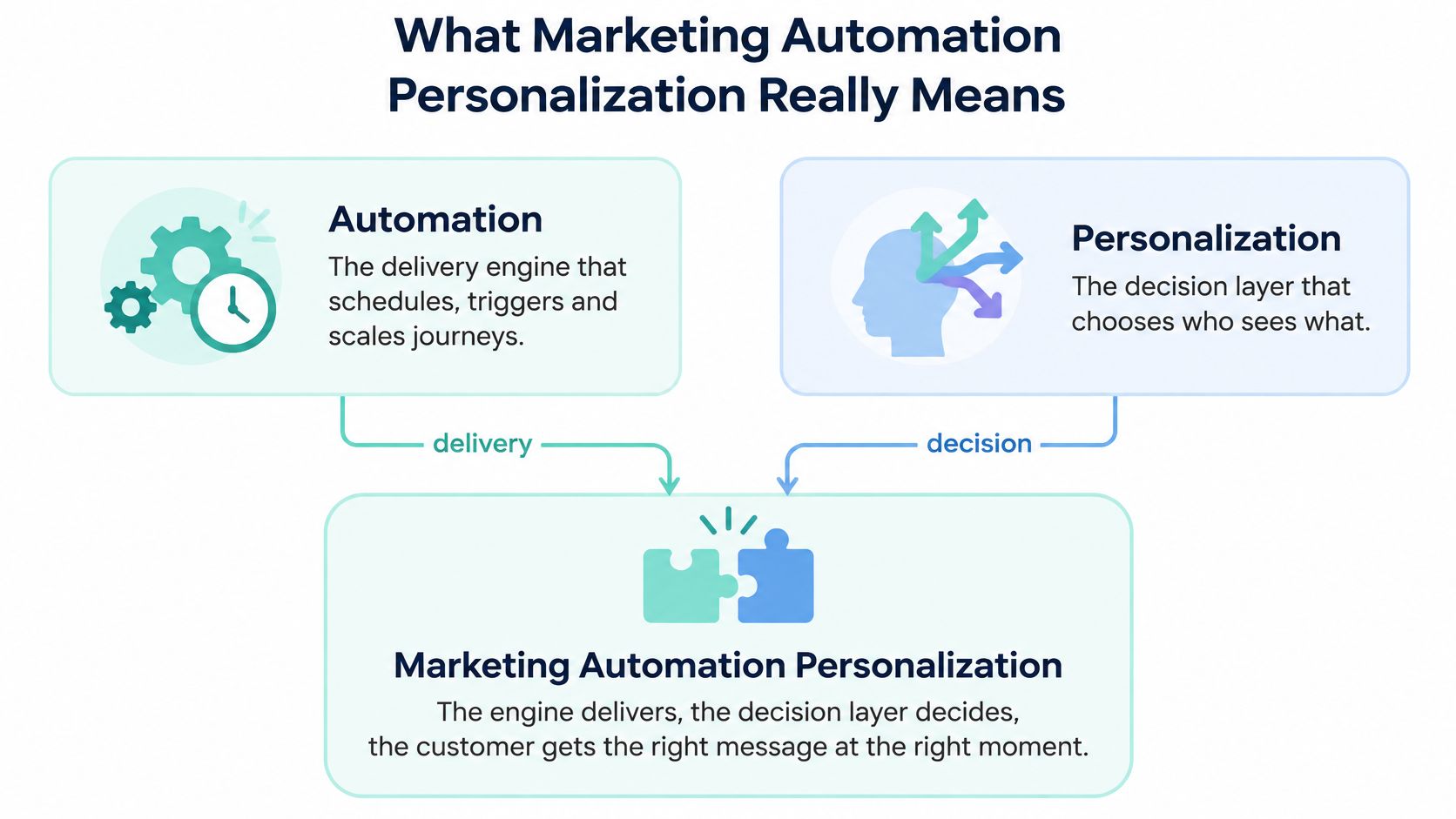
Two separate disciplines sit inside this phrase, and teams run into trouble when they blur them. Marketing automation is the delivery engine that schedules, triggers, and scales customer journeys across channels. Personalization is the decision layer that chooses which person sees which content block, offer, or next step at a given moment.
Running either half alone hits a hard ceiling. Personalization without automation stays manual, expensive, and stuck on a handful of static landing pages. Automation without personalization broadcasts the same generic message to every contact at industrial speed.
When you connect delivery and decisioning, they form a closed operational loop across five stages. The concept map below shows how the delivery engine and decision layer join into a single customer experience.
The Five-Stage Automation and Personalization Loop
Every enterprise stack, whether built on a composable DXP or a hybrid cloud platform, has to execute five connected stages in sequence. If a single handoff breaks, downstream campaigns lose context and revert to guesswork.
| Stage | Input | Platform action | Output |
|---|---|---|---|
| 1. Capture signals | Page views, clicks, transactions, form fills, partner attributes | Event collection via APIs and SDKs into CDP and analytics | Behavioral and transactional event stream |
| 2. Resolve identity and consent | Anonymous and authenticated IDs, consent states, regional rules | Profile unification, consent-aware segment membership | One profile per person with purpose-based permissions |
| 3. Decide the experience | Profile, segment rules, propensity or affinity features, context | Real-time decisioning, next-best content or offer selection | Chosen variant, journey branch or recommendation |
| 4. Activate | Decision plus content components | Trigger emails, dynamic web blocks, commerce offers across channels | Delivered experience in email, web, app, commerce |
| 5. Measure and learn | Conversions, revenue, lifetime value, opt-outs | A/B tests, holdouts, reporting, model feedback | Incremental lift data that updates rules and models |
Why Isolated Tools Stall
Look closely at the inputs and outputs across that table. The loop only works when your CRM, customer data platform (CDP), CMS or DXP, and workflow automation engine share the same definitions for events, consent states, and content variants. An isolated email tool can fire scheduled drips, yet it can't see what a buyer searched for on your website five minutes ago or swap a homepage hero block when that buyer returns.
Architectural reality: Personalization quality is capped by the weakest handoff between your customer data layer and your content repository.
This architecture also changes how marketing operations teams spend their week. Instead of manually building one-off email blasts and duplicating landing pages for each region, operators maintain shared event schemas, reusable component libraries, consent rules, and experiment holdouts. The team stops acting as a campaign assembly line and starts governing a live decisioning system.
How Automation and Personalization Converged
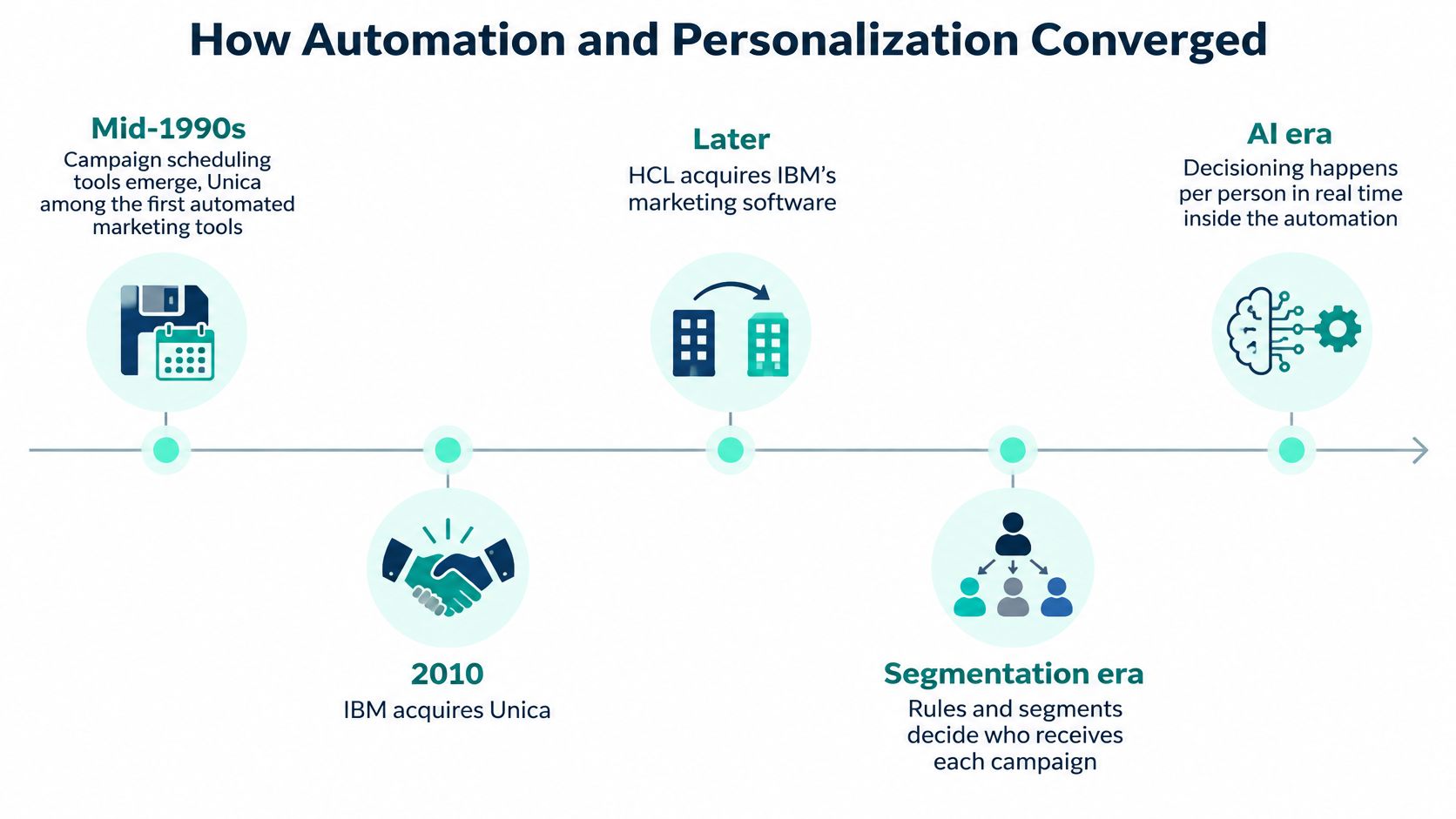
Automated marketing didn't start as a real-time decisioning engine. As documented in Emailmonday's marketing automation statistics overview, Unica emerged in the mid-1990s as one of the first automated marketing tools focused on campaign scheduling; IBM acquired Unica in 2010, and HCL later acquired IBM's marketing-automation assets. Over three decades, those scheduling utilities expanded into enterprise platforms built to segment audiences and tailor customer journeys continuously.
By 2019, the House of Marketing survey cited in that overview found 48% of surveyed marketers using marketing automation, placing it among the four most popular methods for creating personalized experiences. Yet capability adoption broke down unevenly: 64% used email automation, 26% used profiling and targeting, and only 23% used dynamic-content personalization.
Why the Maturity Ladder Still Constrains Modern Stacks
Those adoption percentages aren't just historical trivia. They reveal a maturity ladder that repeats in every generation of marketing technology:
- Delivery comes first: Teams automate scheduled emails and basic drip sequences because outbound triggers require minimal integration work.
- Segmentation follows: Organizations connect CRM fields and behavioral tracking so rules can route buyers into distinct audience tiers.
- Dynamic content arrives last: Individualizing web modules, product recommendations, and cross-channel offers demands structured content components and shared identity records.
Buying a modern AI layer won't let an enterprise skip rungs on that ladder. Even when predictive models and copilots come pre-packaged inside a SaaS DXP, they still depend on standardized tracking events, unified profiles, and modular content before they can serve relevant experiences across multilingual, multi-brand estates.
When those foundations are in place, the commercial payoff is well established. According to McKinsey's 2021 personalization analysis summarized by Omnibound, companies with strong personalization programs generated 40% more revenue from those activities than slower-growing peers, with personalization typically producing a 10% to 15% revenue lift overall (spanning roughly 5% to 25% depending on sector and execution). Earlier McKinsey analysis in the same summary estimated that effective personalization can cut customer-acquisition costs by up to 50% and raise marketing ROI by 10% to 30%. None of those returns happen automatically; they depend on clean data, valid consent, sharp segmentation, and disciplined measurement.
The Data and Workflow Foundations That Make It Work
Most personalization programs stall in the plumbing layer, not the algorithm layer. Building reliable automation requires standing up four technical layers in strict sequence, because each one prevents a specific failure mode downstream.
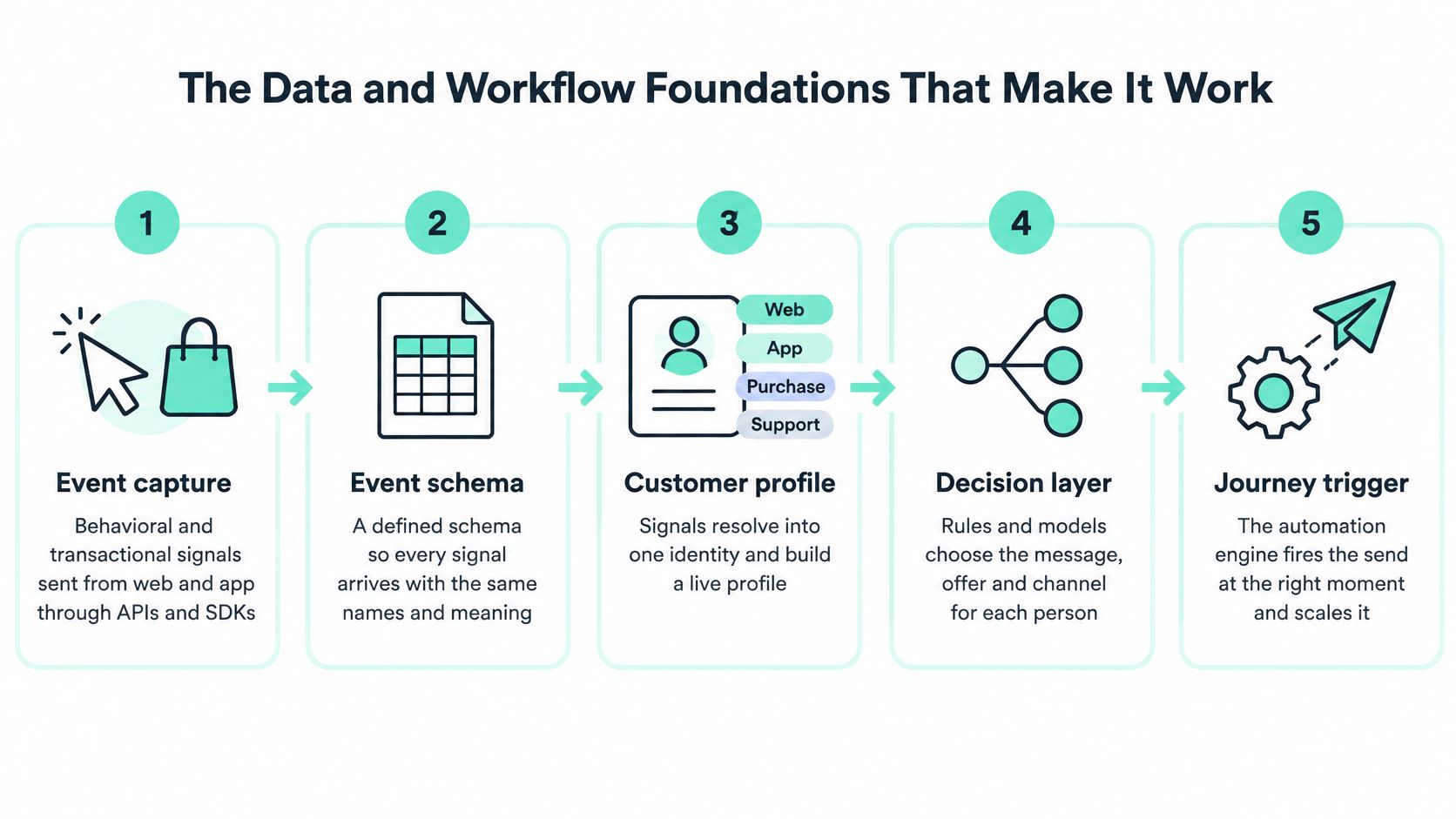
The process flow below maps how raw behavioral events move through schemas, unified profiles, and decisioning before triggering a journey.
Layer One Event Capture and Schema Discipline
Start by capturing behavioral and transactional events from web properties, mobile apps, and commerce checkouts through server and client APIs or SDKs. Every team and brand must write to a shared event schema so fields like product category, region, or quote submission carry the exact same names and data types everywhere.
In the Sitecore stack, Sitecore Personalize documentation details how web applications pass guest, behavioral, and transactional data through the Stream API to power real-time decisioning, context-aware personalization, goal-driven A/B testing, analytics, and experimentation. For JSS Next.js or JSS Angular storefronts connected to SitecoreAI, the Sitecore Cloud SDK serves as the recommended integration route. Skip schema governance here, and your decision models inherit mismatched event names that drop high-intent signals.
Layer Two Identity Resolution and Unified Profiles
Event streams mean little until you stitch anonymous browsing sessions to known buyer records. Sitecore CDP collects customer and visitor data from websites, apps, and connected back-office systems to build a unified profile for each person, holding partner, firmographic, and lifecycle attributes alongside live behavioral events.
Teams often assume a CRM handles this role, yet understanding the boundaries when comparing a CDP and a CRM prevents costly rework. CRMs track known sales accounts and pipeline stages well, whereas a CDP resolves anonymous visitor behavior across devices in real time before a prospect ever fills out a form. Skip identity resolution, and your automation sends welcome offers to existing enterprise customers who just logged into a support portal.
Layer Three Consent and Purpose Rules
Unified profiles must carry explicit consent states and processing purposes as first-class attributes. Your segment logic needs to evaluate consent before firing any decision model, ensuring that a visitor who declines behavioral targeting still gets a fast, coherent, non-targeted fallback experience.
If consent sits bolted onto a cookie banner rather than enforced inside the profile layer, automated journeys will keep emailing opted-out contacts or trigger regional compliance violations across European and international markets.
Layer Four Workflow Orchestration and Human Checkpoints
Once signals, identities, and permissions are reliable, wire them into event-triggered journeys, dynamic content blocks, and CRM-synced audience attributes. Include human approval checkpoints for high-risk communications, regulated financial claims, or executive account outreach so automation accelerates execution without removing editorial accountability.
For a closer look at how these platform components fit together in practice, watch this walkthrough of connected customer data and automated experience delivery.
Skip the workflow governance layer, and even accurate recommendations misfire: overlapping campaigns flood the same inbox, stale offers linger after a purchase completes, and teams lose visibility into why a specific visitor saw a specific variant.
How Sitecore AI Connects Automation to Personalization
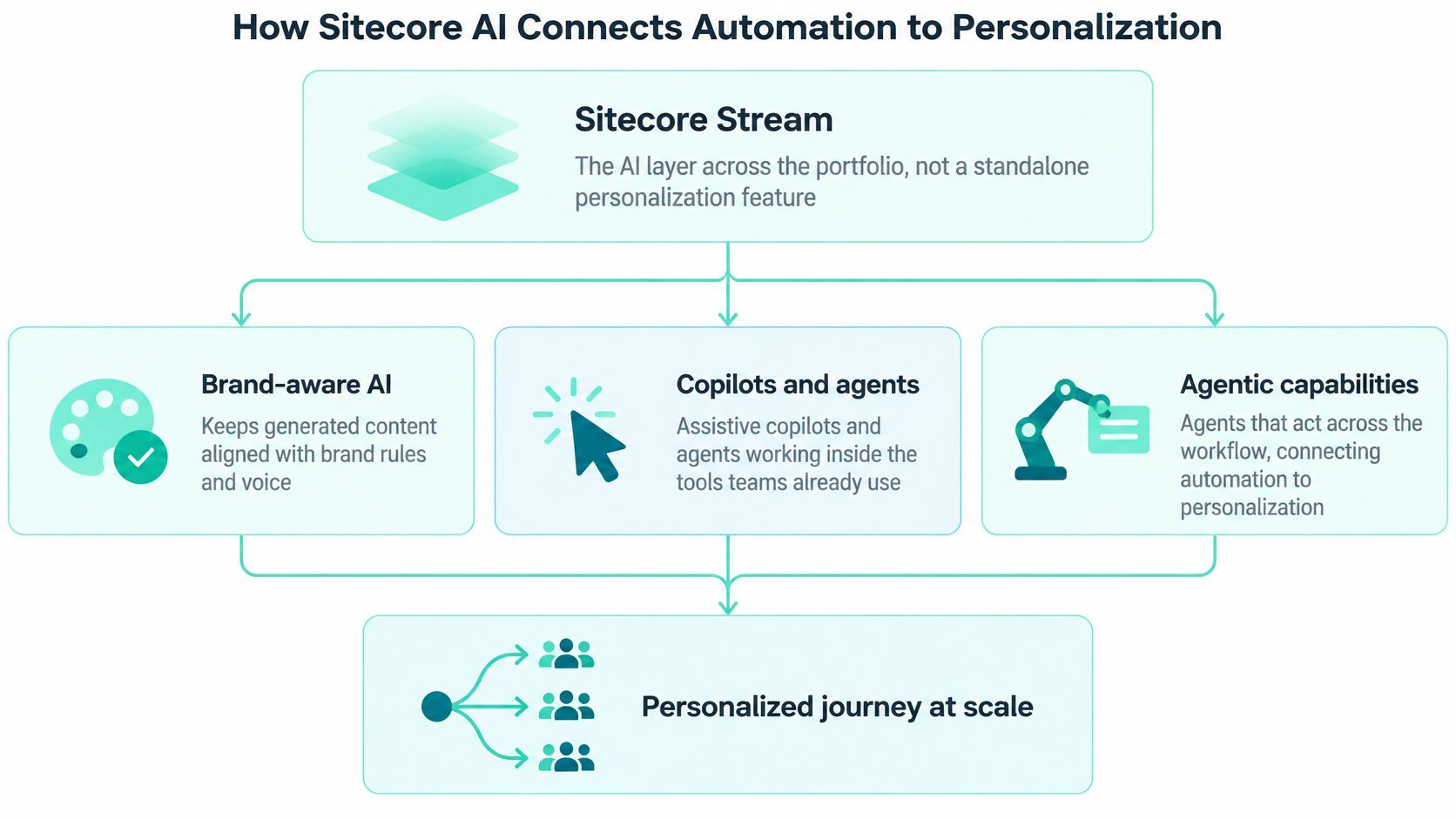
Bolting an isolated AI widget onto a single landing page creates another silo. Instead, Sitecore Stream documentation positions Sitecore Stream as the AI layer across Sitecore's entire product portfolio, delivering three core capabilities: brand-aware AI, copilots and agents, and agentic workflows. Because Stream is embedded across Content Hub, Experience Platform (XP), CDP, Personalize, and Search, teams can link upstream content creation and campaign planning directly to live audience tailoring.
The hierarchy diagram below shows how those three AI capabilities bridge platform tools into coordinated customer journeys.
Mapping the Sitecore Portfolio to the Personalization Loop
Viewing the portfolio as a connected architecture clarifies what each module handles inside the five-stage loop:
- Sitecore Content Hub: Houses reusable, brand-approved assets and structured copy blocks so personalization rules select from vetted content rather than improvising off-brand messaging.
- Sitecore CDP and Personalize: Sitecore Personalize works directly with Sitecore CDP, which supplies the unified customer data powering real-time decisioning and controlled experimentation. Teams designing a Sitecore CDP and Personalize architecture centralize behavioral signals and decision logic in one place rather than duplicating rules across channels.
- Sitecore Send: Executes outbound email journeys using a drag-and-drop editor, event-driven automation workflows, and open-and-click reporting tied back to campaign goals.
- Sitecore Search: Included at entry level in SitecoreAI, Search handles on-site discovery while feeding query intent and click-through signals straight back into visitor profiles.
Putting AI inside the content repository and the decision engine at the same time solves the classic enterprise bottleneck: having smart audience rules with no approved content variants to serve them.
Agentic Workflows and Enterprise Delivery
Operational scale accelerates inside SitecoreAI Agentic Studio, which provides prebuilt AI agents and lets teams assemble custom agents using modular skills and brand kits. For regulated enterprises, flows in Agentic Studio support human checkpoints so editors, legal reviewers, or regional brand managers approve outputs before campaigns go live. On the data-protection side, SitecoreAI does not share customer data with external providers or train external models on it, keeping proprietary customer signals inside your governance perimeter.
Under the hood, a hybrid-headless SaaS DXP model makes this viable across multi-brand, multilingual web estates. Teams build reusable front-end experiences with modern frameworks and publish through a shared edge delivery layer, allowing localized brand variants to consume centralized decisioning without duplicating infrastructure for every country site.
Use Cases That Show the Loop in Action
Abstract diagrams only go so far. Seeing how specific signals trigger concrete decisions across different industries shows where marketing automation personalization generates measurable pipeline and operational speed.
Behavioral Web Personalization in Manufacturing
On the FANUC website, customer behavior captured through the Sitecore Experience Database (xDB) drives personalized on-site experiences. The signal is on-site browsing across robotics categories and technical documentation; the decision adjusts recommended product lines and engineering resources on the web channel; the primary metrics are qualified specification downloads and distributor inquiries.
Account-Based B2B Journeys in Healthcare Technology
The Siemens Healthineers platform tailors experiences using a combination of historical visitor behavior and partner attributes. Rather than treating a clinical procurement director and a technical service partner identically, the decision layer reads account context alongside prior portal activity to surface relevant diagnostic equipment workflows and support documentation. Teams track repeat portal engagement and pipeline progression across partner tiers.
Multi-Brand Content Reuse and Search-Driven Discovery
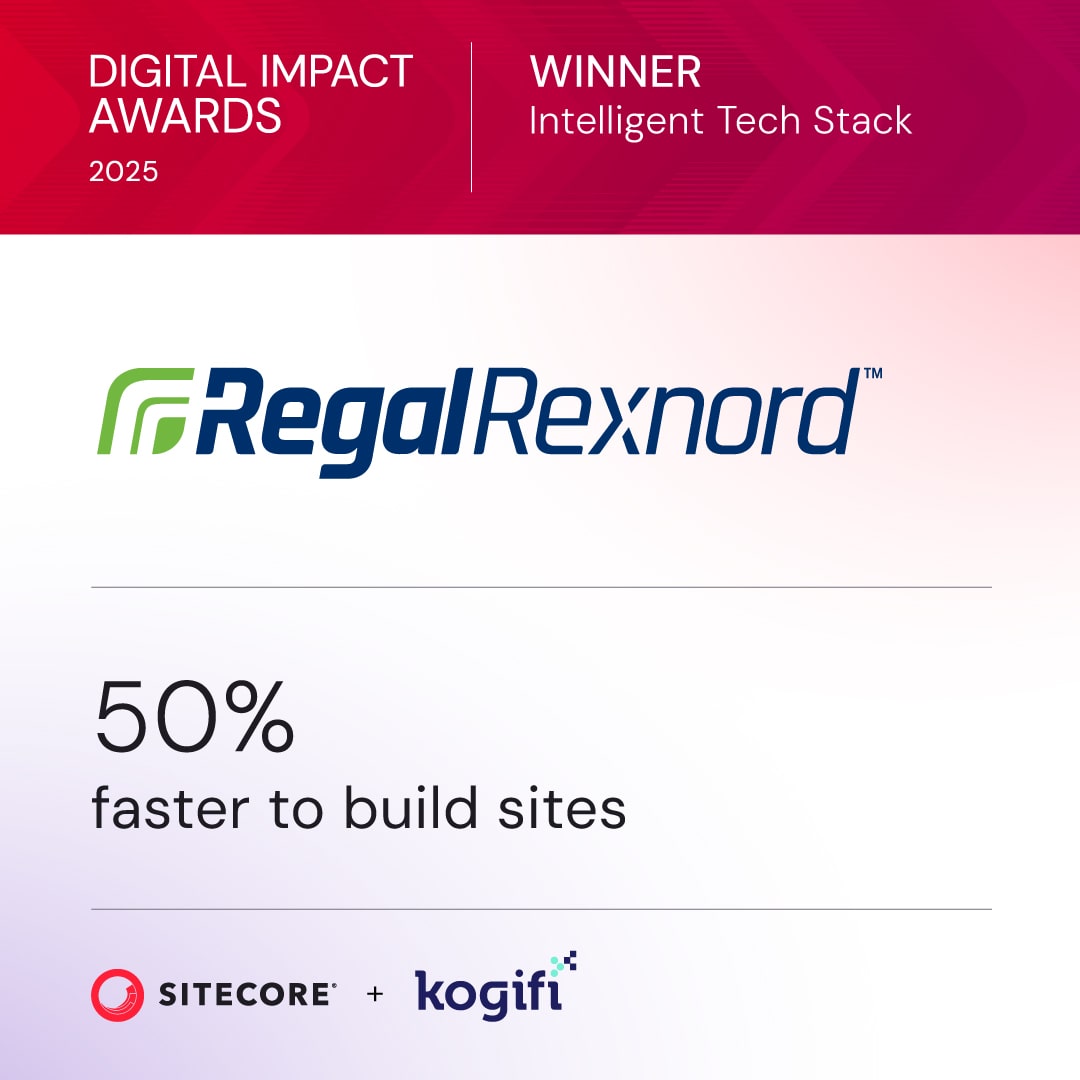
Multi-brand industrial companies hit a different bottleneck: shipping localized campaigns without maintaining ten separate codebases. Regal Rexnord moved from on-prem Sitecore XP to headless Sitecore XM Cloud using a Next.js hub-and-spoke model where brand-specific tweaks ship through a shared component library. That architecture cut go-live timelines by 35 to 50 percent and made publishing twice as fast, giving marketing teams the agility to deploy personalized components across brands without engineering bottlenecks.
In high-volume travel commerce, we modernized Grecos' travel portal on Sitecore with a personalized, search-driven experience integrated directly with its booking engine. Search queries, destination filters, and session history feed real-time ranking decisions across the web portal, measured directly against booking conversion rates and search-to-checkout velocity.
Triggered Email Journeys and Empirical Proof
Outbound email sees some of the sharpest gains when messages adapt to firmographic or jurisdictional context rather than relying on generic newsletters. Designing these sequences around clean customer journey orchestration ensures email triggers react to real CRM attributes and web events instead of arbitrary calendar blasts.
Controlled evidence backs up that approach. In a field experiment across 2,918 crypto-related firms in five European jurisdictions documented in a TalTech empirical study, a personalized email incorporating firmographic and jurisdiction-specific context reached a 63.28% open rate compared to 43.17% for a generalized message (an absolute lift of 20.11 percentage points), while click-through rate jumped to 16.68% versus 6.16%.
Broader enterprise modeling shows similar durability beyond email opens. Using difference-in-differences and related econometric methods, an ACM econometric study reported statistically significant 10% to 15% conversion-rate increases and 20% to 30% customer-lifetime-value increases following AI/ML personalization rollouts, estimating that a one-point increase in an AI/ML implementation score corresponded to a 0.215-percentage-point gain in conversion rate.
To replicate results like these without fooling yourself, test one personalization dimension at a time (such as region, industry, or lifecycle stage) against a persistent control group. Always report absolute lift alongside relative percentages, and watch unsubscribe rates, spam complaints, deliverability, and downstream qualified conversions so short-term click spikes don't erode pipeline quality.
Governance, Privacy and the Limits of Personalization
More personalization doesn't automatically equal better performance. Push data collection too far, and buyers feel watched rather than helped, driving opt-outs and eroding brand equity faster than any conversion tweak can recover.
Evidence from Experian's consumer insights report exposes that friction clearly: 64% of consumers prefer personalized experiences, yet only 39% believe the benefits justify the privacy costs, and 32% feel uncomfortable with many data-driven personalization tactics. A separate global study of more than 7,600 consumers across 18 countries cited in that same report found that while 90% trust at least some brands, only 15% absolutely trust brands with their personal data.
Designing a Privacy-First Personalization Architecture
Closing that trust gap takes operational controls, not vague privacy policies. Enterprise teams should build five safeguards into their stack:
- Preference centers and purpose-based profiles: Let users choose communication topics and targeting levels explicitly, storing those choices as profile attributes that decision engines read on every request.
- Consent-aware decisioning: Integrate your consent management platform directly with your CDP so anonymous visitors, authenticated users, and regional privacy regimes follow enforceable data rules automatically.
- Audit trails: Log which profile attributes, rules, or model outputs drove a personalized offer so compliance teams can answer regulatory inquiries quickly.
- Graceful fallbacks: Design high-converting default experiences for visitors with blocked cookies or revoked consent so journey continuity never breaks when behavioral signals disappear.
Scaling Controls Across External Sites and SharePoint Portals
Governance pressure intensifies across multi-brand, multilingual enterprises. According to the Marketing Industry Trends Report, 47% of surveyed practitioners identify data plumbing as their central personalization challenge. When automation connects dozens of regional sites, a single flawed rule or unapproved AI claim can publish across every market simultaneously.
Build a clear control plane to contain that risk: govern core components and audience taxonomies centrally, approve localized copy variants regionally, enforce human checkpoints for high-risk segments, set model confidence thresholds, monitor decisioning latency, and assign explicit rollback authority. Keep localization separate from personalization. Language, currency, and statutory legal disclosures are mandatory baseline requirements, never optional audience attributes. Likewise, audit dynamic component swaps for WCAG accessibility so injected banners or modals never break keyboard focus order, ARIA landmarks, or color contrast.
Internal employee portals demand the same architectural rigor. When enterprises personalize and automate employee communications on Microsoft SharePoint Online, platform thresholds directly shape site topology and workflow design. As detailed in Microsoft's SharePoint Online limits guide, a single list supports up to 30 million items and a library up to 30 million files and folders, navigation caps at 500 child links per level, and unique item-level permissions cap at 50,000 per list or library. Compliance planning faces strict hold boundaries too: automatically included SharePoint or OneDrive locations support 13 holds, while configurations targeting specific included or excluded locations support up to 2,600 holds. Using SPFx as the supported client-side extensibility model, enabling the no-script setting to block unmanaged script customizations, and enforcing a documented governance plan keeps automated intranet personalization fast and compliant.
Never judge a personalization program by click-through rate alone. Measure opt-out rates, complaint rates, repeat engagement, and incremental lift segmented by consent state using randomized holdouts or staggered rollouts, so ordinary seasonal demand isn't misattributed to automation.
How to Implement It Step by Step
Rolling out marketing automation personalization across an enterprise estate works best as an eight-stage sequence with clear ownership, tangible deliverables, and bounded timelines.
- Run a baseline audit (Marketing ops and solution architect, 2 to 3 weeks). Inventory current event tracking, identity match rates, consent states, reusable content components, and active journeys to produce a prioritized gap scorecard. Running a structured Sitecore Support Readiness Check covering exposure, security, three paths, integrations, content and personalization, and AI readiness gives leadership an objective starting point before committing budget.
- Define the central event schema and taxonomy (Data engineering and analytics, 2 to 4 weeks). Publish a versioned event dictionary and audience taxonomy used by every brand and regional team. This stops regional agencies from inventing incompatible tracking tags that fracture downstream models.
- Stand up unified profiles and consent-aware segments (Data engineering and legal, 4 to 6 weeks). Configure CDP ingestion, identity resolution rules, CRM and partner attribute syncs, and consent-aware fallback logic. Output: live unified profiles verified against regional privacy requirements.
- Build the reusable component library and brand kits (Content ops and front-end engineering, 4 to 8 weeks). Deliver modular UI components, structured content templates, and brand-approved guidelines so personalized variants assemble cleanly without developer intervention. On the technical integration path, SitecoreAI developer documentation outlines a cloud-native, SaaS, hybrid-headless DXP equipped with an open-source Content SDK (including a Next.js starter supporting personalization, tracking, localization, and multi-site builds), an ASP.NET Core SDK for SitecoreAI or XM/XP content, a Sitecore Cloud SDK for JSS Next.js and JSS Angular apps, and Experience Edge as a shared publishing target across XM, SitecoreAI, Content Hub, and Content Hub One.
- Launch two or three event-triggered pilot journeys (Marketing ops, 3 to 4 weeks). Build tightly scoped journeys (such as abandoned quote follow-ups or onboarding sequences) that test one personalization dimension each against a persistent unpersonalized control group. Output: verified baseline lift and deliverability metrics.
- Activate real-time decisioning and experimentation (Platform team and CRO, 4 to 6 weeks). Connect web and app behavioral streams to live decision models, expanding into next-best-content and offer recommendations. We embed analytics and A/B testing from day one and refine content, UX flows, and conversion funnels based on real user behavior rather than initial assumptions.
- Institute the operational control plane (Platform team, legal, and QA, 2 to 3 weeks). Formalize human review checkpoints for regulated segments, localization and accessibility QA gates, latency monitoring, and incident rollback runbooks. Teams extending automation internally apply parallel governance on SharePoint Online, as we delivered for the Riyadh Airport intranet using SPFx custom components, Power Platform automation, and Microsoft 365 integrations.
- Scale market by market with staggered rollouts (Regional marketing leads and central ops, ongoing in 4-week waves). Expand proven journeys and component libraries across brands and languages sequentially, publishing incremental lift reports broken down by consent state after each wave.
External digital experience partners typically bridge specialized capacity gaps at stages one, four, and six, handling technical readiness audits, headless Next.js architectures, legacy content migrations, and hands-on team enablement so internal operators own day-to-day execution confidently.
Decide Your First Move Before You Buy a Tool
Adding another software license won't fix a broken loop. Match your current operational bottleneck to one of three concrete starting moves before evaluating new vendors:
- If event data is sparse and identity stays fragmented: Pause campaign ideation and build your shared event schema, CDP identity resolution, and consent framework first. Personalizing on incomplete data wastes budget and erodes buyer trust.
- If unified profiles already exist, yet campaigns remain manual CSV exports: Pick two high-value lifecycle moments and launch event-triggered journeys testing a single personalization dimension against a persistent control group. Prove incremental lift before expanding channel complexity.
- If automated journeys run smoothly, yet every brand rebuilds creative from scratch: Invest in a governed component library, structured content repository, and brand kits. Removing content bottlenecks enables multi-brand scale far faster than tweaking predictive algorithms.
Enterprise personalization's competitive advantage sits in architectural discipline: clean first-party event streams, reusable content blocks, consent-aware decisioning, and human oversight working as one system. Teams that master those fundamentals outperform peers chasing isolated AI features every time.
Most enterprise Sitecore implementations require custom quotes based on specific architectural and integration requirements. Across the USA, Europe, and the Middle East, we build Sitecore-powered websites with analytics, personalization, advanced search, and marketing automation, embedding analytics and A/B testing from day one to refine content, UX flows, and conversion funnels on real user behavior. Our services span UX and UI design, web development, AI personalization, DXP and CMS delivery, audits and optimization, Content Hub and Search, Experience Commerce, CDP and Personalize training, SharePoint Online intranets, omnichannel orchestration, deep traffic analysis, and 24/7 support.
If you're planning a Sitecore AI personalization roadmap, modernizing a multi-brand DXP estate, or governing an enterprise SharePoint Online intranet, our architects can audit your current data, content, and readiness gaps before you commit to tooling. Explore our Sitecore, AEM, and Microsoft 365 capabilities and connect with our team at Kogifi.