


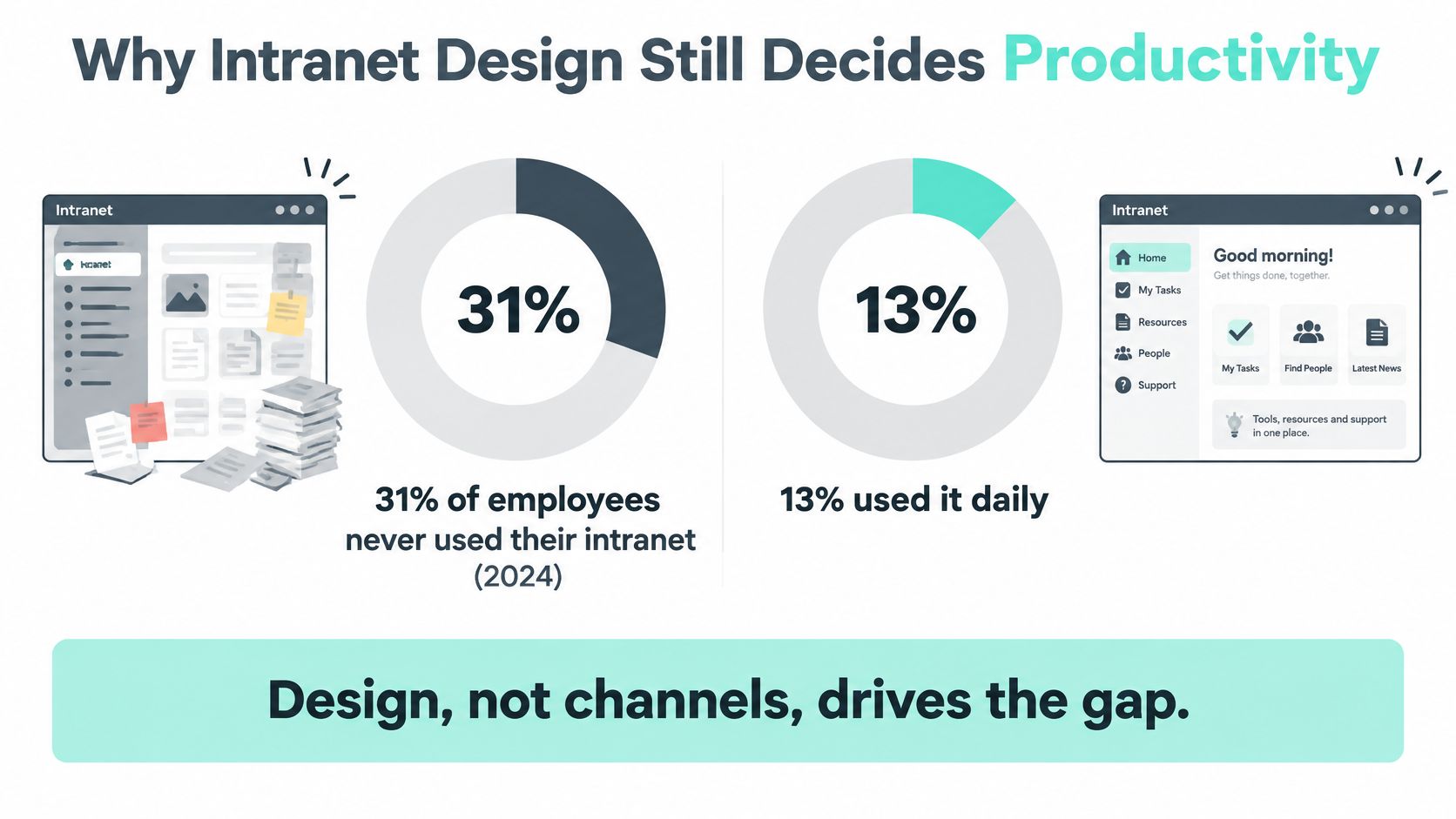
In 2024, 31% of employees said they never used their organization's intranet, and only 13% opened it daily, according to Happeo's intranet statistics. Most organizations read a number like that as a communications failure and answer it with a new homepage banner and a monthly newsletter.
It's a findability and trust problem, and the homepage is rarely where it starts. I treat intranet design as a governed system with three layers: a taxonomy that makes content reachable, components that make it usable, and a governance model that keeps both honest long after launch. The rest of this article works through that system, from the diagnostic you can run in two weeks to where Sitecore AI and SharePoint Framework builds earn their place.
Table of Contents
- Why Intranet Design Still Decides Productivity
- Ten Design Pillars of a Working Intranet
- Benchmarking Your Intranet Design Against These Pillars
- Architecture and Findability as One System
- Accessibility and UX Built Into Every Component
- Microsoft 365 Build Choices That Shape the Result
- Sitecore AI as the Governed Experience Layer
- Where AI and Personalization Belong on the Intranet
- Lessons From a Delivered Bilingual Intranet
- Decide Whether to Redesign or Repair First
Why Intranet Design Still Decides Productivity
The participation gap is a design outcome before it's a channel outcome. People stop opening the intranet when the first few clicks don't produce the document, form or answer they came for, and they route around it through chat and email. The split between daily and never is stark enough to pin to a wall.
Usability testing across 57 intranets and more than 285 employees found people finished tasks in an average of 78 seconds on centralized intranets compared with 123 seconds on distributed ones, a 36.6% reduction in task time, as Nielsen Norman Group's intranet usability research reports. The same body of work estimated that search usability explained 43% of the productivity difference between high- and low-usability intranets, and that a mid-sized company could gain approximately $5 million per year in employee productivity by reaching top-quartile design.
Test worth running: hand five employees five real tasks. If half of them ask a colleague instead of searching, you have a navigation problem, not an engagement problem.
Age isn't the excuse. In 2025, 57% of surveyed intranets were less than four years old, according to Arctus's Intranet Observatory, based on responses representing more than 5.8 million employees. Most intranets aren't old, they're undermanaged. The payoff for fixing that shows up in engagement: organizations with modern, purpose-built intranets reported 21% higher employee engagement in Simpplr's survey of nearly 800 internal communications, HR and IT professionals.
Ten Design Pillars of a Working Intranet
Ten pillars, three layers, each written as a test you can run rather than a principle you can admire. The foundation carries the load, and everything above it collapses if the foundation is missing.
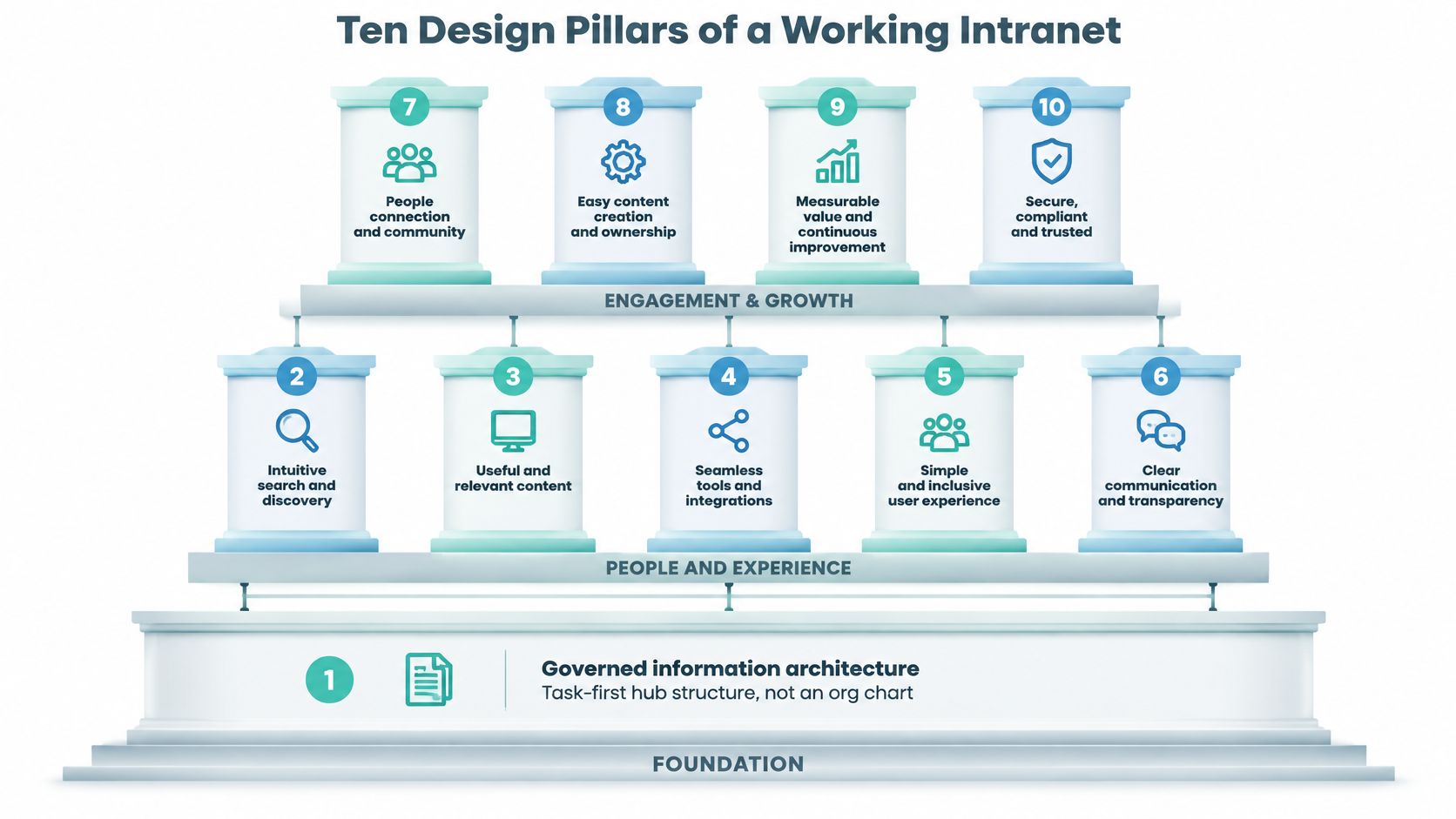
- Governed information architecture. A task-first hub structure that answers what someone is trying to do, not who owns it.
- Findability. Search indexes web pages and governed document repositories together and applies role-aware filtering.
- Content ownership. Every page carries a named owner and a review date, visible to the reader.
- Role-based home experiences. A frontline worker and a desk-based manager should land in different places on day one.
- Accessible components. WCAG 2.2 AA is an acceptance criterion in the component library, not a launch audit.
- Mobile and Teams-first delivery. Many employees only ever meet the intranet inside Microsoft Teams or Viva Connections, so design for that frame.
- Transparent change communication. Publish decision rationales and keep a non-AI path to the same information.
- Responsible AI use. Visible source provenance and verify-before-use prompts on anything high risk.
- Performance and reliability budgets. A hub page that takes four seconds to render has already failed its job.
- Measurable outcomes. Task success, time to first useful result and zero-result rate, reported monthly to someone who acts on them.
Information architecture is the building, personalization is the signage, and AI is a concierge at the desk. None of them rescue a building with no floor plan.
The walkthrough below is worth twenty minutes if you're about to brief a rebuild, because it shows the pillars assembled into something employees use.
Benchmarking Your Intranet Design Against These Pillars
Before you scan a single row of the table, write down five tasks employees perform every week: book leave, find the expense policy, raise a ticket, find a colleague in another region, read the latest restructure announcement. Vague tasks produce vague results. Then run each task with five employees from different roles and record completion, time and where they hesitated.
| Pillar | Weak-intranet symptom | Signal to measure | Target or benchmark |
|---|---|---|---|
| Information architecture | Employees navigate by org chart and give up | Task success on 5 to 10 representative employee tasks | 80% or better on representative employee tasks |
| Findability and search | People ask a colleague instead of searching | Zero-result rate, reformulation rate, first-page selection | Zero-result queries under 5%, most selections from page one |
| Task efficiency | Repeated clicks to reach common pages | Time on task for top tasks | Time on top tasks falls quarter over quarter after each fix |
| Content ownership | Pages with no named owner or review date | Share of pages reviewed in the last 12 months | Every hub page has an owner and a review date |
| Accessibility | Keyboard users can't complete core tasks | Keyboard-only completion, WCAG 2.2 AA checks on shared components | WCAG 2.2 AA enforced in CI/CD, not only at launch |
| Role relevance | Same homepage for every employee | Task completion by role and region | Results segmented by frontline, remote and desk-based staff |
| Trust and AI governance | Staff can't find the AI policy | Policy comprehension, inappropriate-data incidents | AI policy findable in two clicks, provenance on AI answers |
| Adoption | High page views, low usefulness | Daily participation, unanswered-question rate | Daily participation climbs against your pre-redesign baseline |
The trust row deserves a second look, because it is the one most diagnostics skip. If employees use an AI answer they cannot trace back to a source, you do not have a findability system. You have an ungoverned chatbot wearing an intranet's clothes. Measure whether the policy itself is findable before you measure anything the AI produces.
How to run the diagnostic in two weeks
Week one is data: pull twelve months of search analytics and sort queries by volume, then list the top fifty queries that returned nothing. Each of those queries is an employee who asked the intranet for help and got silence, so treat the list as your fix backlog rather than a curiosity. Week two is people: run the five tasks, watch where hands leave the keyboard, and score the results against the table.
Two rules keep the exercise honest. Score task success, not satisfaction, because people are polite about interfaces they've given up on. And never present page views as evidence of value, since a page everyone bounces off still counts as a view and tells you nothing about whether the employee found the answer.
Architecture and Findability as One System
Most intranet search failures are taxonomy failures wearing a search box. A leave policy tagged "HR" and a leave form tagged "People Ops" won't both surface for the same query, and after two misses employees stop searching and start messaging a colleague.
Start with hubs, not departments
The top level should map to jobs employees are trying to do. In the Riyadh Airports intranet we built, that produced seven hubs: Home, For You, Systems, News & Announcements, Company, Knowledge and Blogs. "Systems" exists because people need to reach a tool, not because a department owns one. When your top navigation mirrors the org chart, every reorganization turns into a navigation project with a deadline attached.
Make metadata carry the ranking
Navigation and search are two access paths into the same taxonomy, and the taxonomy only works when metadata is consistent. Expose department, content type, owner, date, language and security scope on every item, then add controlled vocabularies and synonyms so "leave policy", "annual leave" and "PTO" converge on one page. Nielsen Norman Group's intranet research, built on testing across 57 intranets and more than 285 employees, adds 82 search recommendations on top of its 300-plus design guidelines, and its search and findability guidance treats findability as a recurring failure rather than an edge case.
- Role-aware filtering stops search returning a document the user can't open, which is worse than no result at all.
- Freshness signals push recently reviewed content up and let stale pages decay in ranking.
- Ownership fields make it obvious who to chase when a page is three years out of date.
The governance loop is unglamorous and essential: monthly search analytics reviews, stale-content removal, redirects for retired URLs, and task-based usability tests. Evaluate with success rate, time to first useful result, reformulation rate, zero-result rate and first-page selection. Those are the mechanics behind the mid-sized-company productivity gain that better search usability underpins, and they're also the cheapest part of information architecture done properly. For multilingual enterprises, localize taxonomy, search and content together. Translating pages one by one fractures findability in ways no search engine can repair.
Accessibility and UX Built Into Every Component
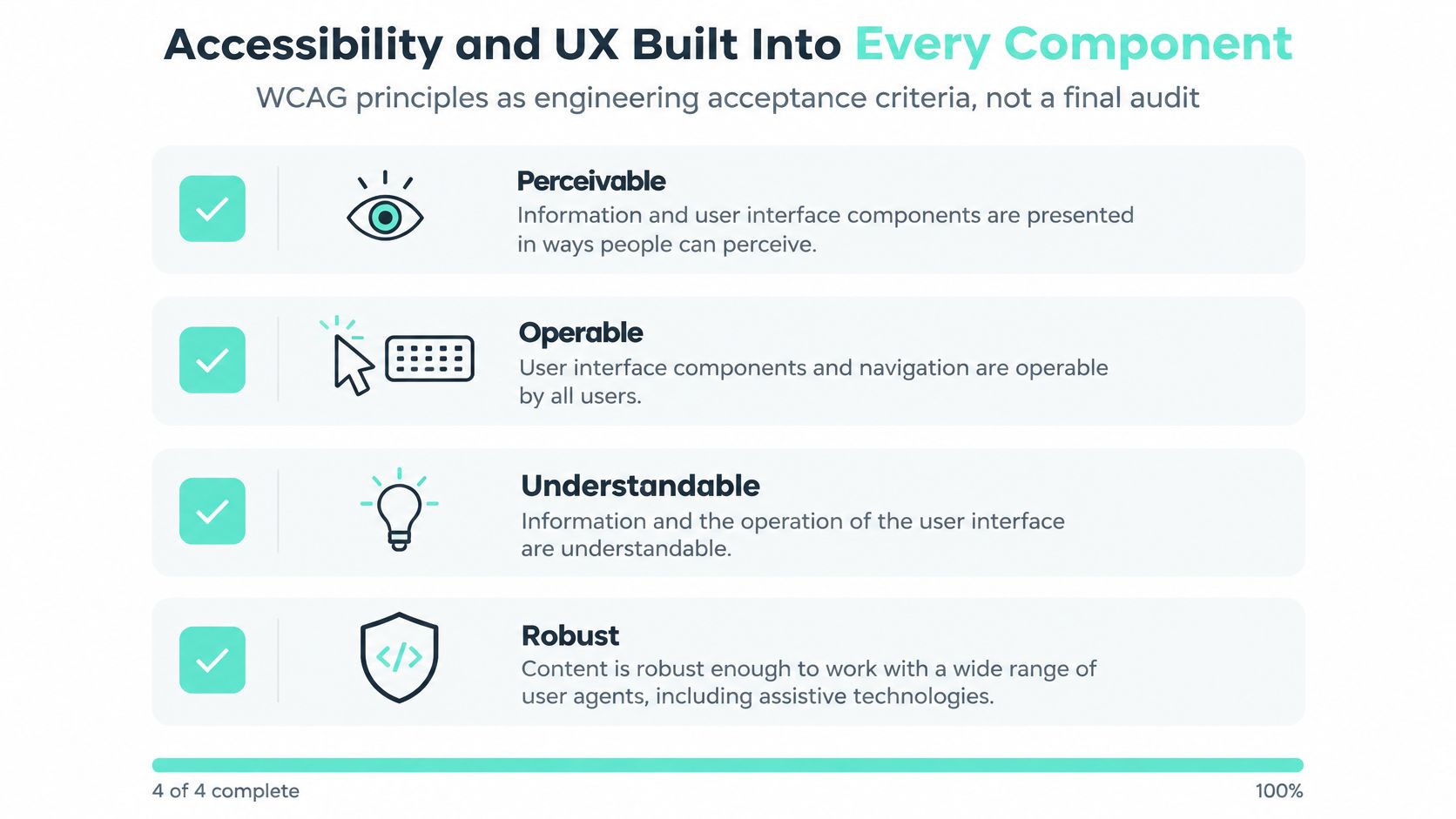
Accessibility fails when it's booked as an audit and passes when it's a merge requirement. The W3C's Web Content Accessibility Guidelines organize requirements under four principles, perceivable, operable, understandable and compatible, with testable success criteria at Levels A, AA and AAA. The WCAG 2.2 techniques documents translate those criteria into component-level tests, which is exactly what a design system needs.
Pair every control with the failure it prevents
- Keyboard-complete interaction and visible focus. Weak focus management strands keyboard users on a control they can see but can't leave.
- Semantic headings and landmarks. Without them, a screen reader reads a flat wall of text and the structure of the page disappears.
- Programmatic form labels and errors that explain the fix. Ambiguous validation messages are a leading reason people abandon a form mid-task.
- Contrast, reflow and meaningful link names. Low contrast shuts out users with reduced vision, fixed widths break at 200% zoom, and "click here" tells a screen reader nothing.
Closed corporate networks add a wrinkle the public web doesn't have. Accessibility-supported technology matters more inside an intranet, so document the approved browser, mobile, identity and assistive-technology combinations instead of assuming public-web conditions. Treat this as part of designing accessible digital products rather than a compliance appendix, and fold the same discipline into everyday accessibility and website design practice. Then wire automated checks and keyboard regression tests into CI/CD so shared SPFx, React or CMS components are tested on every release instead of re-audited once a year.
Microsoft 365 Build Choices That Shape the Result
Two decisions shape an M365 intranet before anyone designs a page: what you configure and what you write code for. Get that split wrong and you either overbuild the content hubs or underbuild the experiences that carry the intranet's value.
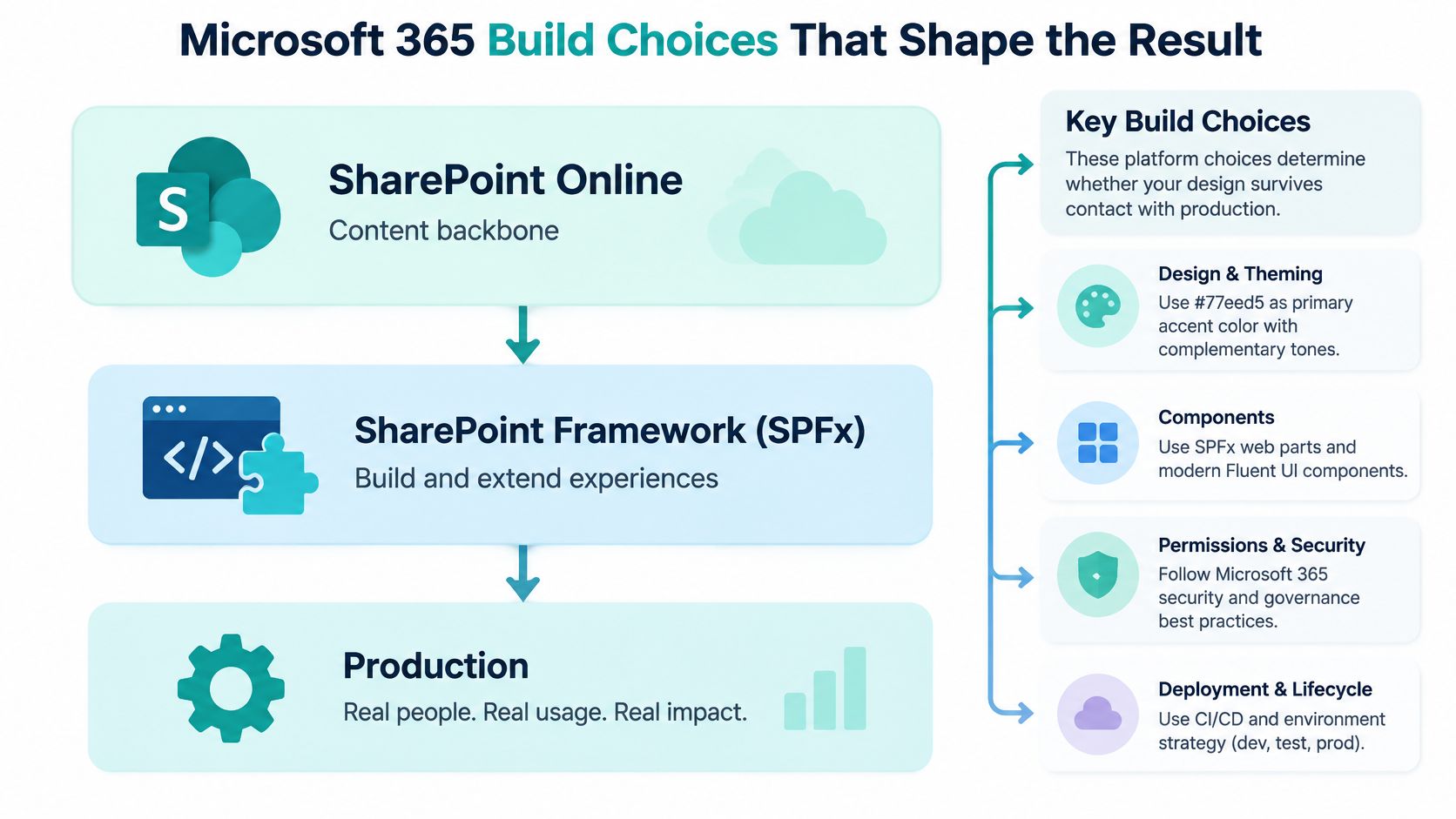
SharePoint Online is the content backbone, and the SharePoint Framework is Microsoft's recommended customization and extensibility model, giving you a client-side page and web-part model with access to SharePoint data, as the SharePoint Framework overview sets out. The part teams underestimate is the surface count: SPFx extends SharePoint Online, Microsoft Teams and Viva Connections, and it's the only extensibility and customization option for Viva Connections, where you build Adaptive Card Extensions.
Configure the wide base, build the narrow top
- Standard pages and web parts carry the 80% of content that is news, documents and links. They ship faster, cost less to maintain and survive service updates without a code review.
- Custom SPFx components earn their keep on dashboards, employee cards and integrations, where the intranet's value lives.
- Power Platform automation handles approval and publishing workflows so content owners don't file tickets to get a page live.
Multilingual delivery is a build decision, not a translation task. Stand up a bilingual root site with managed translation and make search metadata language-aware, because localization that ignores metadata fractures findability across the whole estate. Governance closes the loop: one team owns the component library, shared web parts go through a change process, and the release cadence accounts for SharePoint Online's continuous updates. The pattern works at scale. We rebuilt Riyadh Airports Company's legacy intranet as a bilingual English/Arabic SharePoint Online root site, delivered with SPFx custom components, Power Platform automation and Microsoft 365 integrations, and the same architecture choices apply across the wider Microsoft 365 ecosystem.
Sitecore AI as the Governed Experience Layer
Sitecore AI is easiest to govern when you stop treating it as a writing assistant bolted onto the CMS. Sitecore documents Stream as an AI capability layer embedded across Content Hub, Experience Platform, CDP, Personalize and Search, covering brand-aware AI, copilots, agents and agentic workflows for content creation, marketing operations, campaign management, message personalization and audience targeting. That portfolio structure matters: AI lands across content, customer data, experimentation and search rather than living in a separate authoring tool nobody governs.
In Content Hub, the documented use cases (simplifying content creation, finding images for campaigns, and applying brand-awareness controls so generated output reflects the organization's identity, tone and guidelines) are described in Sitecore's Content Hub AI guidance. Sitecore states that most of its AI capabilities require Sitecore Stream. Those brand controls are the governance mechanism, and they matter more than the generation itself. They keep generative output inside tone and guideline boundaries instead of treating it as ungoverned copy. For an intranet owner, that is the difference between AI that strengthens trust in published content and AI that erodes it.
Personalize carries the same logic into decisioning. Its AI-powered Code Assistant takes natural-language prompts and generates JavaScript for three supported areas: Conditions, which filter the audience for an experience or experiment; Programmables, which support offer decisioning in decision models; and Session Traits, which aggregate session events, calculate results at session end and store the outcome in a guest-profile attribute, per Sitecore's Personalize AI documentation. Use those traits to reshape intranet layout and shortcuts by role, since a finance user and a field technician should not wade through the same homepage.
One boundary holds everywhere: keep enterprise-wide policy content on governed paths where personalization can't hide it. A personalized intranet that surfaces the right shortcuts is a findability win. A personalized intranet that decides who gets to see the expense policy is a governance failure, and no amount of brand-aware generation will repair the trust it costs.
Where AI and Personalization Belong on the Intranet
Adding a chatbot is the least interesting thing AI can do to an intranet. The harder question is which tools are approved, how sensitive information is handled, how outputs get checked, and whether employees understand the decisions an AI system is making on their behalf.
The readiness data is uncomfortable. A 2025 global study covering more than 48,000 people across 47 countries found that 58% of employees intentionally use AI at work, yet only 47% had received AI training and only 40% said their workplace had a generative-AI policy or guidance, according to KPMG's trust in AI research. The same release reports that 66% of employees had used AI output without evaluating it and 56% had made work mistakes because of AI.
Design rule: if an answer can influence a decision about a person, a payment or a policy, the intranet should show its source and ask the employee to check it before acting.
That flips a common instinct. An intranet should sometimes slow people down rather than optimize for frictionless answers. Useful patterns include visible source provenance, "verify before use" prompts on high-risk content, policy-aware search permissions, clear escalation routes and role-specific AI literacy content. The gap is widest in multinational enterprises, where privacy, records retention, regulated information and language differences make a universal chatbot experience unsafe.
Personalization is a different risk category and deserves defending. Reshaping layout and shortcuts by role improves relevance; hiding enterprise-wide information behind a profile creates inconsistent interpretations across regions. Separate readiness from capability too. Another global study found 73% of employees were using or interested in using generative AI, but only 64% understood how their organization decides which tools to adopt and only 62% said their organization had clearly explained how AI would affect their role, per Perceptyx's Beyond the Hype report. Measure trust outcomes, citation coverage, policy comprehension, correction rates and inappropriate-data incidents, alongside the AI-powered personalization metrics you already report.
Lessons From a Delivered Bilingual Intranet
The framework is easier to trust when you've watched it hold under a real deadline. For Riyadh Airports Company, we rebuilt a legacy intranet as a bilingual English/Arabic SharePoint Online root site for around 500 to 1,000 employees, delivered with SPFx custom components, Power Platform automation and Microsoft 365 integrations.
Each pillar did specific work. A fixed hub taxonomy resolved the navigation argument before design started, because the seven hubs mapped to jobs rather than departments and nobody could lobby a new top-level item into existence. Bilingual metadata kept search working across both languages instead of producing two half-working indexes. SPFx components carried the dashboard and employee cards while standard pages handled the rest, which kept the maintenance surface small.
The intranet is in active production use and ready for a Phase Two covering external integrations and continued enhancements. That's the honest shape of the work: intranet design is a managed product with a roadmap, not a launch event with a ribbon cutting.
The same discipline travels to composable platforms. A Helix-based Sitecore architecture with a reusable component library carried a portal upgrade for E-ON Polska. For Regal Rexnord, a move from Sitecore XP to headless XM Cloud reduced go-live timelines by 35 to 50 percent and made publishing twice as fast, which matters when a multi-brand manufacturer runs thousands of sites. On the accessibility side, we applied WCAG-aligned design patterns and validated the flows on the KAPSARC College website before they reached production. Whether the build sits on SharePoint or a composable DXP, the principles don't move. Only the implementation does.
Decide Whether to Redesign or Repair First
Here's the decision rule I'd use in a steering meeting. If the five-task test shows success above 80% and most hub pages have a named owner, repair the weak pillars and keep the current build. If success sits well below that and most pages have no owner, a structural redesign is the honest option, because you're not fixing a surface, you're rebuilding a taxonomy.
Then sequence the work:
- Run the two-week benchmark and publish the results internally.
- Fix taxonomy and metadata before anyone touches the homepage.
- Put accessibility gates in CI/CD for shared components.
- Rebuild the top hubs with named owners and review dates.
- Layer personalization and governed AI only after those hold.
Where internal capacity is thin, bring in a partner with SharePoint Online and composable DXP delivery behind them. Our Microsoft 365 and SharePoint Online intranet work includes SPFx components, Power Platform automation and bilingual delivery, as with the English/Arabic Riyadh Airports Company intranet, alongside Sitecore and Adobe Experience Manager implementations for organizations whose intranet sits inside a wider digital estate. Our core services span UX and UI design, web development, AI personalization, DXP, CMS, omnichannel, traffic analysis and 24/7 support, which is the range a governed intranet needs.
An intranet is judged by how quickly employees complete real tasks, not by how the homepage looks on launch day.
If your intranet is underperforming, the fastest path forward is a structured diagnostic: five employee tasks, twelve months of search analytics, and a prioritized fix list ranked by effort against impact. Kogifi designs and builds intranets on SharePoint Online and Sitecore, from information architecture and accessibility-gated component libraries to governed AI personalization, and we can run that assessment with your team before you commit to a rebuild. Visit Kogifi to see how we've delivered bilingual, accessible intranets and DXP platforms for enterprise organizations.