


You've shipped a new homepage experience, the build is live, and the flag says the rollout is off. Yet some visitors still see the new version. In an enterprise Next.js estate, the flag evaluation can be correct while a shared cache serves HTML rendered under an older decision. Safe rollout means designing the evaluation rule, the cache behavior, and the rollback path together.
For Sitecore and other content platforms, that decision also affects who can change an experience. Engineers may own release flags in Next.js, while marketers manage page experiments in XM Cloud. SharePoint adds a separate consideration: AI agents must respect the permissions of the person asking. The practical goal is to assign each decision to the right system and make the delivered experience predictable.
Table of Contents
- Where Flags Evaluate in a Next.js App
- How to Wire a Flag from Declaration to Exposure
- Rollout Stages and Guardrails for Live Traffic
- Keeping Cached Pages Correct Across Instances
- Built-In Experiments in Sitecore XM Cloud
- Governing Flags and Confirming Each Release
Where Flags Evaluate in a Next.js App
| Evaluation point | Best for | Main caveat |
|---|---|---|
| Client component hook | Cosmetic UI changes after load | Flicker and layout shift; the variant appears only after hydration |
| Server component or App Router render | Changes to HTML, data, and layout | Bind to a stable subject to avoid variant changes between requests |
Pages Router getServerSideProps |
Per-request changes in existing Pages Router apps | The same identity rule applies; confirm it runs on every request |
| Middleware at the edge | URL-level splits and whole-path A/B tests | It runs before the cache, so the cache key must account for the variant |
| Precomputed static variants with middleware routing | Marketing pages that must stay static | Every variant needs its own build output and a clear fallback |
A client hook is suitable when the change can wait until hydration without confusing or disrupting the visitor, such as changing a small button accent. It's a poor fit for a headline, hero image, or layout: the browser may first render one state and then replace it when the flag arrives.
For server components and App Router renders, evaluate the flag as part of producing the request's HTML. Pages Router applications can use getServerSideProps for the same per-request approach. In both cases, tie the assignment to a durable subject, such as an account or anonymous cohort, rather than rolling a new decision for every request.
Middleware works well when the split changes the route or the whole page. But a shared cache must distinguish the variants; otherwise, it can serve one cohort's response to another. For static marketing pages, precompute the variants and route between their outputs at the edge. That preserves static delivery, but the build must produce each variant and define what happens when the flag can't be evaluated.
Practical rule: If a flag changes HTML, evaluate it on the server. If it changes only a cosmetic detail, client evaluation can be acceptable.
Whichever point you choose, the same flag key must resolve to the same variant wherever the application reads it. For a useful overview of how page structures can be tested, compare layouts on Next.js. Teams planning the content architecture can also review headless CMS patterns for Next.js, especially when shared components must serve multiple brands or markets.
How to Wire a Flag from Declaration to Exposure
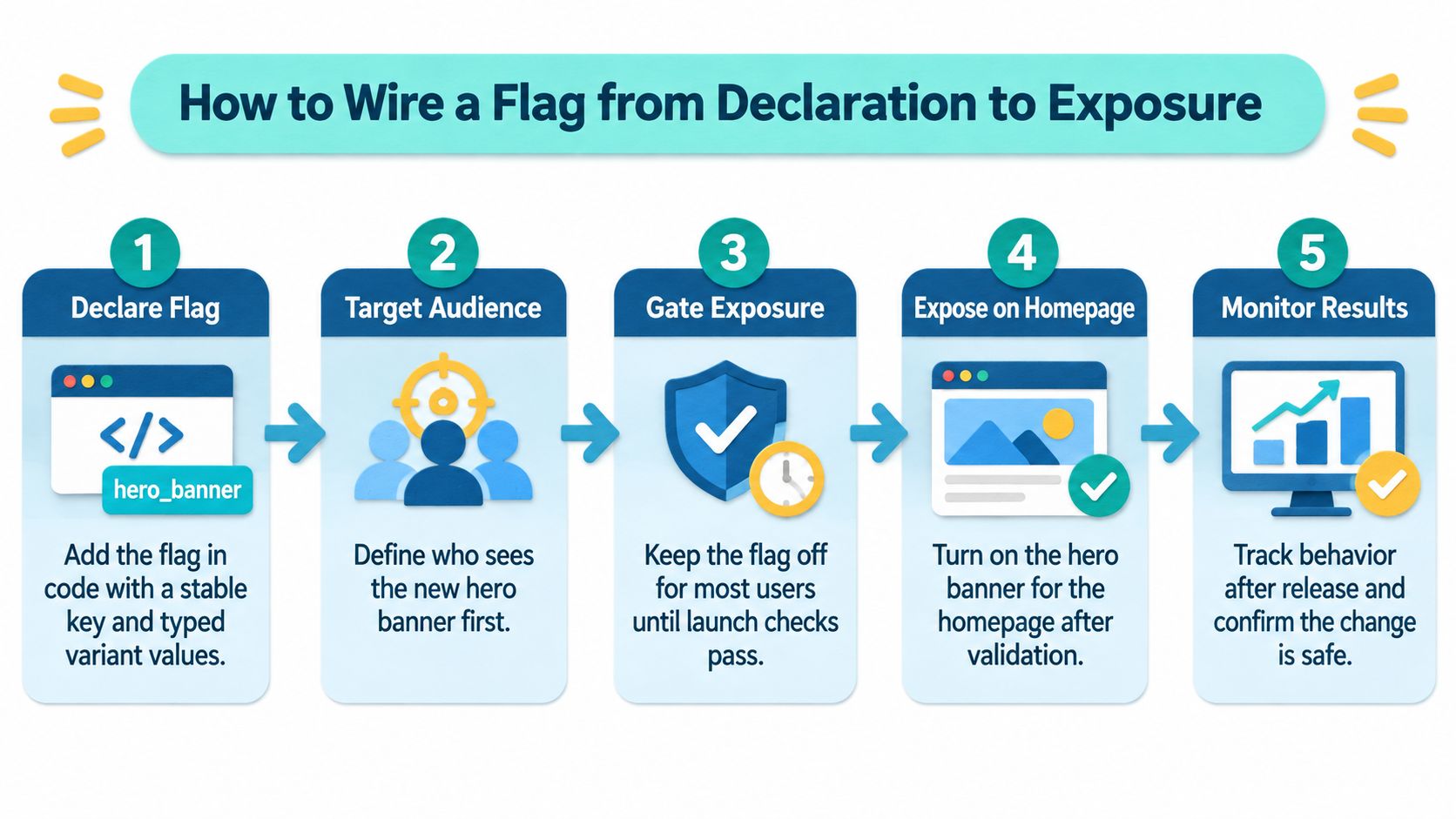
A new hero banner on the homepage is a good working example. The wiring has to connect the code definition to a stable assignment and a recorded exposure. "Flag is on" proves nothing about what a visitor saw.
- Declare a typed flag. Define
newHeroBanneras a string flag withcontrolandnewvariants. A stable key and typed values make the choice explicit and catch typos at build time. The common slip is scattering untyped string checks through components, where one misspelled variant name silently serves control to everyone.
// flags.ts
import { flag } from 'flags/next';

export const newHeroBanner = flag<string>({
  key: 'new-hero-banner',
  decide: () => 'control',
  options: [
    { value: 'control', label: 'Control' },
    { value: 'new', label: 'New hero' },
  ],
});
Evaluate it once on the server. Read the value in the homepage server component, layout, or middleware, then pass the selected variant into the rendered output. The Flags SDK supports typed multi-option flags across the App Router, Pages Router, and middleware (Flags SDK documentation). Evaluating independently in server and client components produces conflicting decisions: the server renders the new hero while a client check reports control, and your exposure data records both.
Bind the assignment to a durable subject. Use an account identifier or a privacy-safe anonymous cohort so a visitor keeps the same hero between requests. Assigning by request makes the banner change on reload and corrupts the experiment, because the same person lands in both groups.
Expose only the selected variant. Render either the control or the new banner, and keep provider secrets on the server. Reading a secret inside a client component places sensitive configuration in a browser bundle. Keep development, preview, and production secrets separate, and treat preview and production values as sensitive.
Record actual exposure. Log the flag key, selected variant, and timestamp when the banner is rendered, then connect that exposure to the outcomes you intend to measure. Counting a visitor who never saw the banner as exposed dilutes the treatment group and flattens the measured effect.
A working preview has a testable shape: the same subject sees the same variant on every reload, and each visit produces an exposure log line. Test the fallback path too, since the fallback is what production serves when evaluation fails. Set a rollback threshold for errors, latency, conversion, or revenue before raising traffic. A sensible progression runs from a hard-coded boolean, to a controlled percentage rollout, to an experiment, and finally to permanent configuration once validated.
Before adopting a wrapper, check whether it is maintained. The owner archived HappyKit Flags, a Next.js feature-flag package, on December 12, 2025; its GitHub repository listed about 1,000 stars and 12 forks (HappyKit Flags repository).
Rollout Stages and Guardrails for Live Traffic
| Stage | Who sees the variant | Traffic share | Advance when |
|---|---|---|---|
| Internal check | Staff and QA sessions on an allow-list | 0% public | Smoke tests pass and exposure logs show the correct variant |
| Canary | Random stable cohort | 1% | Guardrail metrics stay within thresholds set before launch |
| Early expansion | Random stable cohort | 5% | Error rate, latency, and the primary metric hold for the agreed window |
| Majority test | Random stable cohort | 25% to 50% | Statistical sample is reached and the primary metric is decision-ready |
| Full release | All eligible traffic | 100% | The flag is cleaned up or moved to permanent configuration |

Start with staff and QA on an allow-list while public traffic remains at zero. Confirm that the intended variant appears and that the exposure logs record it. This catches wiring mistakes before they affect customers.
The canary should use a stable random cohort, not a fresh assignment on each request. Advance only if the guardrails defined before launch remain within their agreed thresholds. Error rate and latency help detect technical harm; conversion or revenue can show whether the experience is meeting its business purpose.
As traffic expands, the decision criteria need to match the stage. At the early expansion gate, review error rate, latency, and the primary metric over the agreed window. At the majority-test gate, wait until the sample is sufficient and the predeclared primary metric is ready to support a decision. A traffic split is a control parameter, not evidence of lift: a 50% allocation means nothing on its own unless exposure is logged, assignments are stable, and the metric was chosen in advance.
The video below can help teams align on the rollout process before setting their own release gates.
At full release, remove a temporary flag or convert it to intentional permanent configuration. Keep a deterministic fallback and make sure the flag can be switched off without a code deployment. Rehearse that switch before launch; a rollback you've practised is faster than one invented during an incident. Kogifi's update deployments include rollback points and compatibility testing, a useful discipline for changes that touch both application code and platform integrations.
Advance only when the gate is green in both the dashboard and the exposure logs. If the two disagree, pause and find out why before widening the audience.
Keeping Cached Pages Correct Across Instances
The kill switch is on, but some visitors still see the old variant. A flag evaluated during server rendering may have been stored in a cached route or data response, so the cached output continues to carry the earlier decision. That's a cache correctness problem, not proof that the flag provider ignored the switch.
| Cache layer | Safe for flag-dependent output? | Invalidation approach |
|---|---|---|
| Shared HTML or CDN cache | Only if the variant is part of the cache key | Purge by path or tag on change |
| Route or data cache with tags | Yes, when flag-dependent data is tagged | On-demand tag invalidation triggers a fresh render on the next request |
| Time-based revalidated page | Risky for critical flags | Background regeneration can serve stale content until it finishes |
| In-process memory cache on each node | No, not across instances | Send a shared invalidation message to every node; use TTL only as a fallback |
Next.js distinguishes time-based revalidation from on-demand invalidation. With time-based revalidation, a request can receive stale content while regeneration happens in the background. Tag- or path-based invalidation triggers a fresh render on a later request, but only if the invalidation reaches the cache that holds the affected output (Next.js flag and cache guidance).
A short TTL isn't a safety guarantee for a critical kill switch. It leaves a period in which visitors can receive inconsistent variants, and regional or application-node caches may not expire together. Local caches don't automatically coordinate across instances; if a webhook reaches only one node, others can remain stale until their own revalidation runs.
A cache policy is part of the flag contract. If the team can't say which output is shared, what invalidates it, and who owns that invalidation, it hasn't finished designing the rollout.
For Sitecore and other enterprise content estates, evaluate request-specific flags outside shared HTML caches. Tag flag-dependent data, propagate invalidations through a shared mechanism, and test the kill switch across CDN, regional, and multi-node conditions before production. When static content must be refreshed safely, incremental static regeneration in Next.js is relevant, but it doesn't replace an explicit invalidation design.
Kogifi tests custom code, OSGi bundles, and integrations on mirrored staging environments before deployment during updates and upgrades. Apply the same principle to cache behavior: rehearse the invalidation path in a representative environment, not just the flag toggle.
Built-In Experiments in Sitecore XM Cloud
For marketer-led page tests, Sitecore XM Cloud already includes personalization and experimentation in page management. Those core content experiments run without a separate testing tool. Code-level release flags still govern engineering-controlled behavior, so the two paths serve different owners.
| Path | Best for | Who changes it | Main caveat |
|---|---|---|---|
| Flags SDK flags in Next.js code | Release flags, kill switches, and front-end logic | Engineers, through code and provider settings | Two evaluation systems must be reconciled |
| XM Cloud page experiments | Copy and layout tests on page content | Marketers, in the editor | Limited to editor-controlled content; exposure logs are separate |
Sitecore describes real-time personalization and A/B testing as built into every page, using shared customer data and intent signals. Marketers can apply point-and-click rules in the editor based on signals such as location, behavior, account information, and journey stage (Sitecore XM Cloud product information). Page content is a natural fit for editor-led experiments, while application behavior and release safety stay under engineering control.
In a multi-brand estate, keep a release flag and kill switch in Next.js when engineers control whether a feature is available. Use the XM Cloud editor to test copy, layouts, or other page content marketers own. For a closer look at the platform's built-in experiment approach, see this comparison of A/B and N/B testing.
The coordination cost is real. Two systems mean two places to inspect a variant and separate exposure logs, so decide which system owns each test before launch. If a visitor lands in overlapping experiments on the same page, analysts cannot tell which change drove the outcome.
XM Cloud also brings AI assistance for copy tone, content length, SEO, answer-engine optimization, generative-engine optimization, and translation. Run that assistance inside the platform's editorial workflow, and keep experiment ownership explicit: one system controls a given test, and its exposure record is the one analysts use.
SharePoint plays a different role in an enterprise experience stack. Microsoft says SharePoint agents answer questions about site and document-library content only where the asker already has access. Users with site-editing permissions can create or modify agents by setting their content scope, identity, and behavior; interaction requires a Microsoft Copilot license or organizational pay-as-you-go billing (Microsoft guidance on SharePoint agents).
Copilot in SharePoint can also support natural-language operations such as asking questions, running workflows, and creating sites, pages, interactive reports, and Office files from SharePoint content. Availability can depend on release channel and tenant configuration, so confirm the applicable setting and entitlement in the organization's environment (Microsoft Copilot in SharePoint guidance). Whether the capability is a page experiment or an agent, define ownership and permissions before enabling it for a broad audience.
Governing Flags and Confirming Each Release
Feature flags create a lifecycle obligation. A study published in Empirical Software Engineering surveyed practitioners from 38 companies and identified 17 feature-toggle practices across management, initialization, implementation, and clean-up. A related mining study of 100 open-source projects documented 7,593 flags, with a median of 34 flags per project; Chromium had the highest count at 1,790. These findings aren't Next.js-specific, but they show why teams should treat flag cleanup as operational work, not an optional refactor (feature-toggle practices in Empirical Software Engineering).
The same research found that ownership is statistically significantly associated with shorter flag lifespans when the person introducing a flag remains responsible for removing it. Give every temporary flag a named owner and a removal date when it's created. Label temporary release flags separately from permanent configuration, then produce a stale-flag report for entries past their removal date and flags that have stayed at full rollout longer than the team's agreed period.
Every active flag adds a decision branch and another combination to test. That cost is manageable when teams can explain the purpose, owner, and cleanup condition for each flag. It becomes harder when old flags survive across releases and nobody knows whether removing them will change behavior.
Kogifi moved Regal Rexnord from on-prem Sitecore XP to headless Sitecore XM Cloud with a Next.js hub-and-spoke model. For Regal Rexnord, the move reduced go-live timelines by 35 to 50 percent and made publishing twice as fast. Those outcomes don't eliminate the need for release governance; they make it more important to assign ownership across shared components, content, and integrations. Kogifi's code review best practices can help teams make these decisions part of the normal review process.
Pre-release review
Use one review to confirm the flag and rollout are ready:
- Key, owner, and removal date: Confirm all three are present and the flag is marked as temporary or permanent configuration.
- Evaluation point: Run HTML changes on the server; cosmetic changes may be evaluated on the client.
- Stable subject: Verify that the same account or anonymous cohort keeps its assignment across requests.
- Exposure record: Check that logs include the flag key, variant, and timestamp.
- Rollout gates: Define a measurable gate for every stage, including the condition that stops expansion.
- Kill switch: Test the fallback under CDN and multi-node conditions, not only in a local browser.
For teams modernizing a Sitecore estate, Kogifi's Sitecore Support Readiness Check covers what may break or need rework in integrations on each path. Start with the codebase you have: audit existing flags and assign an owner to every one before adding another.
For a Sitecore, AEM, or SharePoint estate, Kogifi can help plan the Next.js evaluation path, cache contract, rollout gates, and platform ownership model. Bring the existing flag and integration inventory to Kogifi to discuss a practical implementation and review plan.