


Organizations typically possess the necessary data. Marketing sees campaign responses. Sales sees pipeline activity. Service sees tickets and resolution times. Product sees usage. The problem is that each team is still looking through its own window, so nobody can explain the full path a customer took before converting, stalling, or leaving.
That's where an analytics customer journey approach changes the conversation. It stops treating touchpoints as isolated reports and starts treating them as one connected sequence. The business case is strong. Companies that implement comprehensive journey analytics strategies achieve a measurable 15 to 20% reduction in customer churn while simultaneously boosting revenue growth by 10 to 15%, according to Fullstory's summary of journey analytics outcomes.
In practice, this isn't just about drawing a prettier map. It's about building a system that lets teams identify friction, route data into action, and personalize experiences while the journey is still happening. If your team is still relying on spreadsheets, campaign reports, and a static workshop artifact, start by grounding the discussion with a practical customer journey mapping template and then move into instrumentation, identity resolution, and activation.
Table of Contents
- What works inside a Sitecore estate
- Where Sitecore AI products fit
- Applying the same discipline to SharePoint
Introduction From Disconnected Data to Unified Journeys
A familiar enterprise pattern shows up in almost every discovery phase. Marketing says lead quality is inconsistent. Sales says prospects arrive without context. Support says the same customers hit preventable issues after launch. Nobody is wrong. They're just working from disconnected evidence.
An analytics customer journey model fixes that by stitching touchpoints into a single timeline. Instead of reading one campaign dashboard, one CRM report, and one service queue snapshot, teams can follow the actual sequence of events that shaped the outcome. That's the difference between observing activity and understanding behavior.
Practical rule: If teams can't agree on the sequence that led to a conversion or a complaint, they're not doing journey analytics yet.
Enterprise experience programs now live or die on orchestration. A customer may click a paid ad, read product content, return through branded search, open an email, talk to sales, and raise a support question before a renewal decision is even possible. If those interactions aren't connected, optimization becomes guesswork.
The common mistake is to treat journey work as a workshop deliverable. The useful version is operational. It ties behavioral data, content exposure, CRM state, service signals, and product interactions into something teams can act on. That's where Sitecore becomes especially relevant, because a composable DXP only pays off when content, personalization, and decisioning share the same behavioral context.
Why unified journeys beat isolated reports
Siloed reports tell you what happened in one channel. Unified journeys show why a customer moved, stalled, or abandoned across channels. That distinction changes what teams build next.
A disconnected model usually creates these problems:
- Duplicate interpretation: Marketing, sales, and service each produce different explanations for the same outcome.
- Weak personalization: Content rules rely on a narrow slice of behavior instead of the broader customer context.
- Delayed response: Teams spot friction after the campaign, not while the customer is still active.
- Poor prioritization: Engineering backlogs fill with requests that sound urgent but aren't tied to business impact.
When teams rebuild around the journey, they stop optimizing page fragments and start optimizing progress.
What Is Customer Journey Analytics
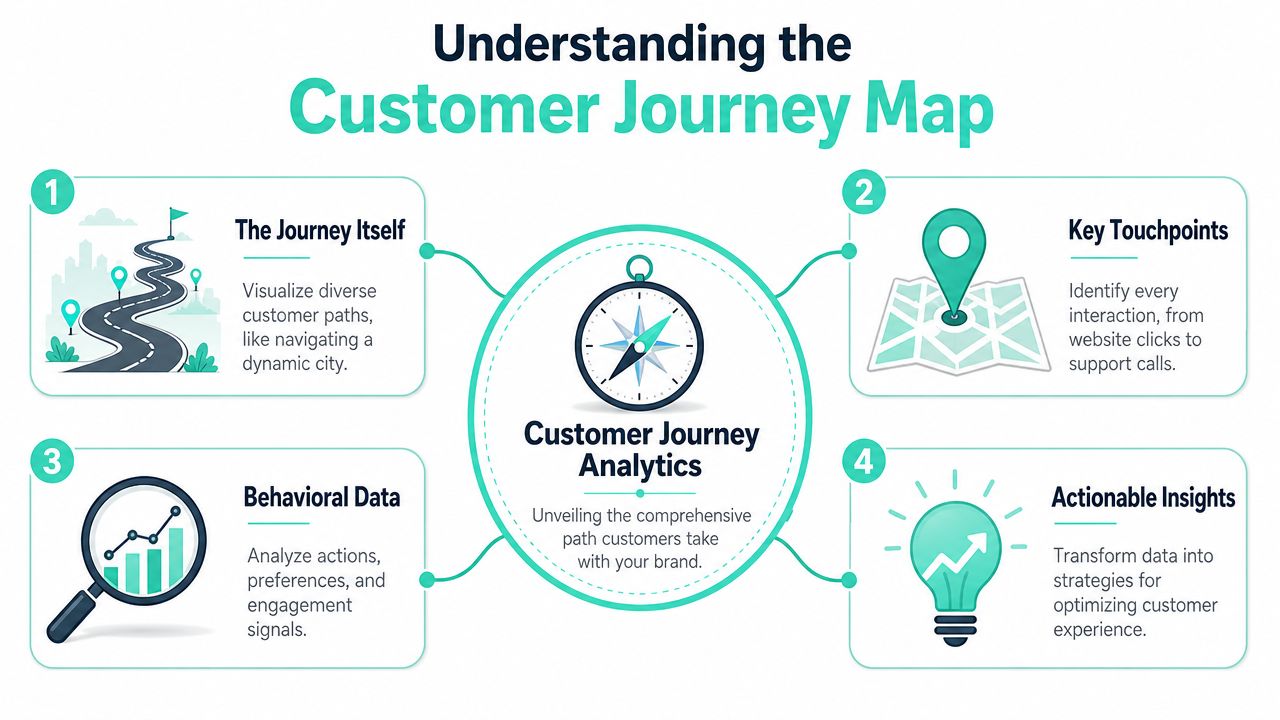
Traditional web analytics is like counting who entered one store and which aisle they visited. Customer journey analytics is more like tracking the same shopper across the whole mall, then connecting that path to a purchase, a return, a support request, and a future repeat visit.
That's why the discipline has to be quantitative. It aggregates behavior from many systems, resolves identity, and builds a timeline that can be queried by business outcome. According to Improvado's explanation of customer journey analytics, it involves technical integration of data from over 500 distinct marketing, sales, and customer systems to normalize schemas and align identities across platforms using email, user IDs, device IDs, and GA4 client IDs.
Journey analytics is broader than web analytics
A lot of teams confuse funnel reporting with journey analytics. Funnels are useful, but they only answer predefined step sequences. Journey analytics answers broader path questions and supports investigation when the route isn't already known.
Here's the practical difference:
| Approach | Primary focus | Typical limitation | Best use |
|---|---|---|---|
| Traditional web analytics | Sessions, pages, campaign traffic | Weak cross-channel continuity | Channel and content reporting |
| Funnel analysis | Drop-off between known steps | Only works when steps are predefined | Conversion diagnostics |
| Customer journey analytics | End-to-end sequence across touchpoints | Requires data unification and identity resolution | Behavioral understanding and orchestration |
For B2B organizations, this gets even more important because the path isn't linear. Buyers move between self-service research, sales contact, and internal stakeholder review. If your team is working through the specifics of optimizing B2B customer journeys, journey analytics gives that strategy a measurable operating model.
What the data model has to do
The data model has one job. It must connect events that happen in different systems to the same person or account with enough confidence to support decisions.
That means the implementation usually needs:
- Identity stitching: Email, CRM identifiers, authenticated user IDs, anonymous device signals, and analytics IDs need a join strategy.
- Schema normalization: “Lead,” “contact,” “subscriber,” and “account” often mean different things across tools.
- Time sequencing: Events have to be ordered consistently so teams can reconstruct the path, not just the totals.
- Segment context: Enterprise teams need to compare journeys by audience, account type, acquisition source, product line, or market.
A useful benchmark is whether business users can answer journey questions without filing a data ticket every time. If they can't, the model may be technically rich but operationally weak. A strong customer 360 view usually becomes the foundation that makes journey analytics usable beyond the analytics team.
The fastest way to fail is to collect everything first and ask the business question later.
Activating Journey Analytics on Sitecore and SharePoint
In enterprise DXP programs, strategy either becomes a working capability or stays a presentation. The analytics customer journey becomes real only when tracking, identity, content delivery, and activation all align.
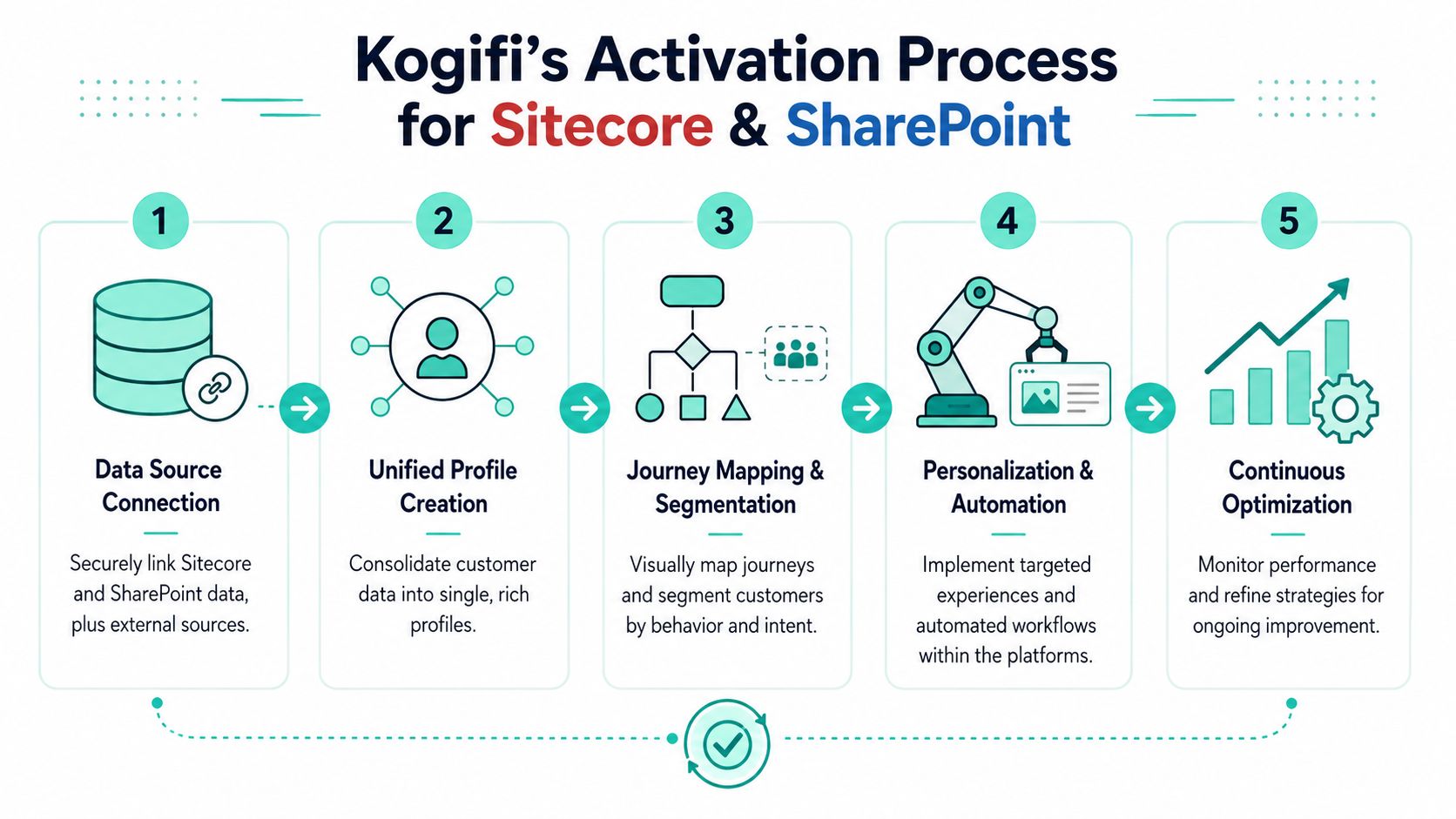
On Sitecore estates, that usually means starting with the content and interaction model, not the dashboard. In XM Cloud or XP, teams need to define which journey states matter, what events indicate movement, and which content or actions should fire in response. Without that design discipline, even a well-built stack produces noisy data and weak personalization.
What works inside a Sitecore estate
The reliable pattern is straightforward. First, define the business question. Then instrument the journey. Then activate the result in the experience layer.
In practice, the implementation tends to follow five technical moves:
Define event taxonomy
Decide which events matter across anonymous and known states. Content views, CTA clicks, form progression, search usage, gated asset downloads, support deflection, and repeat visits usually belong here. Naming matters. If teams can't understand the event from its label, reporting degrades quickly.Connect Sitecore to the broader stack
Sitecore rarely owns the whole journey. CRM, marketing automation, support tooling, product data, commerce, and consent systems all contribute to the path. An enterprise customer data platform approach becomes practical, because the journey only becomes trustworthy when profile data and behavior data can be reconciled.Model audience states
Segments shouldn't be limited to demographics. Strong models include intent, recency, depth of engagement, and service context. A visitor who has consumed comparison content, reopened pricing pages, and started a form is in a different state than someone reading a top-level article.Attach activation rules to those states
Once the state model is stable, Sitecore can adapt content, routing, and downstream communications. It is then that journey analytics becomes useful to editors and marketers, not just analysts.Review the decision logic regularly
Real journeys drift. Product launches, campaign changes, and organizational changes all alter behavior. Teams need a review loop that checks whether the rules still reflect current paths.
Good journey activation starts with a restrained tracking plan. If every click becomes “critical,” nothing is.
A platform-specific note matters here. In headless Sitecore builds with Next.js, teams often focus heavily on rendering performance and component architecture but leave analytics design too late. That creates a gap between front-end delivery and behavioral intelligence. The better pattern is to define event contracts alongside component contracts, especially in Helix-based libraries and multi-brand component sets.
Where Sitecore AI products fit
Sitecore's AI portfolio matters because journey data is only valuable if the platform can react to it. According to the cited product analysis, Sitecore Stream functions as a real-time decisioning engine integrated across Sitecore's composable DXP stack, while Sitecore Send's AI, Audience Discovery, is engineered to strengthen customer connections through 1:1 personalization based on purchase intent.
That split is useful architecturally.
- Sitecore Stream fits the in-session layer. It's about interpreting behavioral and contextual data while the user is active, then choosing the next offer, message, or route.
- Sitecore Send with Audience Discovery fits the follow-up layer. It helps retail and commerce-heavy journeys where purchase intent should shape email content, timing, and audience logic.
For enterprise teams, this means the Sitecore stack can support both immediate and subsequent journey actions. A visitor's behavior on site can change what they see now, and that same behavior can also shape the email or nurture logic that follows.
One practical note from delivery work. AI features work best when the taxonomy is boring and stable. Teams often expect AI to compensate for inconsistent content models, weak tagging, or duplicate audience definitions. It won't. Clean signals produce usable recommendations. Messy signals produce noise.
Kogifi offers implementation support in this space as one agency option, particularly across Sitecore XM Cloud, XP, and Microsoft ecosystems where journey design, composable architecture, and analytics enablement need to land together.
Applying the same discipline to SharePoint
The underused opportunity is the employee journey. SharePoint Online can support the same thinking, especially on intranets where employees search policies, complete tasks, request help, and move between systems.
That doesn't look like consumer personalization, but the analytics model is similar. You still map entry point, intent, task completion, friction, and resolution.
A practical SharePoint pattern usually includes:
- SPFx instrumentation: Capture search behavior, navigation paths, task starts, and document interactions.
- Power Platform workflow signals: Add context from approvals, form abandonment, or repeated submission failures.
- Microsoft 365 integration: Pull in document, communication, and collaboration touchpoints where relevant.
- Role-based segmentation: Compare journeys for frontline staff, managers, HR users, or regional teams.
This is especially useful for onboarding, HR self-service, and service desk deflection. If employees can't find a policy, restart the same workflow, or repeatedly escalate basic requests, that's journey friction just as much as a failed checkout is on a public site.
Sitecore and SharePoint together make sense in large organizations because they solve adjacent journey problems. Sitecore handles customer-facing orchestration. SharePoint supports internal task and knowledge journeys. The common thread is disciplined instrumentation, identity context, and action tied to observed behavior.
Core Analytics Models and Business KPIs
The teams that get value from journey analytics don't start with a giant measurement catalog. They start with one sharp question. Why do high-intent visitors stall before contact? Why do new customers hit service before adoption? Why do some accounts move from research to pipeline while others disappear?
That focus matters because, as Qualtrics notes in its discussion of customer journey analytics, the key is to move past the visual “what” of journey mapping to the data-driven “why” of analytics, focusing on a single business question to avoid “analysis paralysis” and diagnose the root cause of friction.
Three models teams use constantly
A useful way to structure the work is to choose the model that matches the decision.
| Model | Core Question | Business Use Case |
|---|---|---|
| Path analysis | What routes do people actually take? | Find common sequences before conversion, churn, or support contact |
| Attribution modeling | Which interactions influenced the outcome? | Rebalance spend and content investment across touchpoints |
| Cohort analysis | How does one group behave differently over time? | Compare journeys by acquisition source, market, role, or product line |
Path analysis usually reveals the unexpected. Teams often discover that pages assumed to be important barely appear in successful paths, while support, search, or documentation pages show up far earlier than expected.
Attribution modeling helps when internal debates get stuck around channel credit. It doesn't create certainty, but it gives teams a more disciplined basis for budget and content decisions.
Cohort analysis is the one I'd protect if forced to choose. It's often the cleanest way to see whether a journey problem is universal or isolated to a specific audience, campaign, or onboarding motion.
Ask one question the business can act on this quarter. Leave the rest for later.
The KPIs that actually help teams decide
Journey programs go sideways when they inherit generic web KPIs. Page views and visits still have uses, but they won't explain whether a journey is healthy.
The more practical KPI set usually includes:
- Journey friction score: A composite view of struggle signals such as repeated navigation, return loops, abandoned forms, support escalation, or stalled progression.
- Time to value: How long it takes a new user, customer, or employee to reach the first meaningful outcome.
- Channel effectiveness: Which channels introduce people into journeys that progress, not just attract traffic.
- Stage progression rate: How reliably people move from one meaningful state to the next.
- Self-service success: Whether users complete tasks without needing assisted support.
These aren't universal formulas. Teams define them based on business model and platform behavior. What matters is that each KPI ties to a decision owner. If nobody can act on the metric, it doesn't belong in the core scorecard.
For teams trying to connect journey data to budget accountability, this broader discussion of optimizing marketing ROI with AI is a useful companion read because it frames how measurement should influence spending decisions, not just reporting.
Driving Personalization with AI and Real-Time Data
Historical analysis tells you what just happened. Real-time journey intelligence lets the platform intervene before the session is lost.

That shift changes how teams operate. Instead of reviewing a dashboard after a campaign underperforms, they can look for active friction and respond while customers are still navigating. According to Covisian's discussion of journey analytics trends, the emerging trend is the use of AI Agents to ask journey-level questions like “Where are users dropping off?” in real time without SQL, moving beyond static reports and breaking down the data silos that are the most challenging step for 70% of enterprises.
Real-time signals change the operating model
In Sitecore environments, the difference between basic personalization and real journey orchestration comes down to signal quality and timing.
A few examples make this concrete:
- High-intent browsing without conversion: A visitor repeatedly returns to a product family, opens pricing content, and starts but doesn't finish a form. The right response might be a more specific proof point, a lighter-friction CTA, or a sales-assisted route.
- Support struggle during onboarding: A customer lands in help content shortly after activation, loops through related articles, and revisits setup guidance. The right response might be a proactive support prompt or role-specific onboarding content.
- Employee task failure in SharePoint: A staff member opens the same policy library, uses intranet search several times, and exits without completing a workflow. The right response might be better content routing, a workflow shortcut, or revised page architecture.
That's why teams increasingly combine journey analytics with operational monitoring. If you're also trying to optimize website with RUM insights, performance and behavior should be reviewed together. Slow pages, broken interactions, and confusing routes often show up as the same business problem from two different angles.
Real-time personalization fails when the platform reacts fast to the wrong signal.
From insight to intervention
The activation loop needs governance. Someone has to own which signals matter, who approves automated responses, and how experiments are evaluated. Otherwise, teams pile on personalized variants that conflict with each other.
A healthy loop usually looks like this:
- Observe a repeat pattern of friction or intent.
- Form a clear intervention hypothesis.
- Implement the response in Sitecore or SharePoint.
- Review whether progression improved qualitatively or quantitatively within the team's existing scorecard.
- Keep, revise, or retire the rule.
For teams building this capability in Sitecore, a practical reference point is real-time personalization in enterprise DXP, especially when multiple channels and content owners are involved.
A short walkthrough helps show how these pieces work together in practice:
The important discipline is restraint. Not every signal deserves a personalized response. Focus on moments where timing and context can reduce friction or move the user forward.
Building a Cycle of Continuous Optimization
Journey analytics isn't a project you finish. It's an operating loop. Customer behavior changes, content changes, teams change, and channel mix changes. If the model stays static, the insights get stale and the rules drift away from reality.
The workable pattern is simple. Measure behavior. Form a hypothesis. Test a change. Review the result. Then repeat with better context than you had before.
A workable operating cadence
The strongest programs usually run on a regular review rhythm shared across marketing, product, service, and platform teams. Not everyone needs access to every report, but each owner needs clarity on which journey problems they're expected to fix.
A practical cadence often includes:
- Weekly signal review: Look for new friction patterns, broken steps, or unexpected path changes.
- Monthly rule review: Check whether personalization logic, segment definitions, and routing assumptions still make sense.
- Quarterly journey reset: Reassess the business questions, especially after launches, rebrands, or major process changes.
- Backlog linkage: Tie every optimization candidate to a journey issue, not just a stakeholder opinion.
That operating model also prevents one of the most common failure modes. Teams often keep adding dashboards while core issues sit unresolved in content design, workflow design, or page architecture.
A journey program matures when the backlog starts reflecting observed behavior instead of internal guesswork.
Governance is what keeps the model usable
Composable architecture gives teams flexibility, but it also creates governance pressure. Different brands, regions, and business units may define events differently, tag content differently, or interpret stages differently. That's how a promising analytics customer journey initiative turns into reporting noise.
To keep the model usable, enterprises need a few essentials:
- Shared taxonomy: Event names, audience states, and content tags need clear ownership.
- Identity rules: Teams must agree how anonymous and known profiles connect, and where they should not.
- Consent and security controls: Journey analysis only works when the data is trusted and handled correctly.
- Version discipline: When components, forms, or workflows change, the tracking contract has to change with them.
This is especially important in Sitecore XM Cloud, XP, and SharePoint programs that span multiple regions or brands. Reusable components speed delivery, but only if analytics instrumentation is treated as part of the component standard, not an afterthought.
If your organization still has fragmented reports, reactive personalization, or intranet journeys nobody can explain, the next step isn't another dashboard. It's a cleaner operating model, a tighter event strategy, and platform implementation that turns signals into decisions.
Kogifi helps enterprise teams build that model across Sitecore, SharePoint, and composable DXP programs, from journey instrumentation and personalization design to platform modernization, governance, and ongoing optimization.