


A regional team can find its policies in SharePoint, discuss the same work in Teams, receive approvals through Power Automate, and publish a related customer experience through Sitecore, yet still feel as if every system belongs to a different company. Employees search twice, managers approve requests manually, marketers distrust operational content, and administrators discover access problems only after someone leaves. That's the practical starting point for Microsoft 365 integration in 2026.
The answer isn't another connector added to an already crowded estate. It's an architecture that gives SharePoint Online, Teams, Exchange, OneDrive, Power Platform, Microsoft Graph, Entra ID, and a Sitecore-led digital experience platform clear boundaries and shared responsibilities. Microsoft's enterprise footprint makes that discipline foundational. Office 365 passed 400 million paid commercial seats in January 2024, up 9% year over year, after reaching 100 million seats in April 2017, 200 million in October 2019, and 300 million in December 2021, as reported by Office 365 IT Pros.
Table of Contents
The Integration Gap Between Enterprise Systems
A 12,000-employee manufacturer can have a SharePoint 2013 farm in its data center, a Teams workspace for every region, a Sitecore marketing site that marketing does not trust, and Power Platform apps nobody can inventory. Each platform may work adequately on its own. The employee experience breaks because the boundaries reflect procurement history rather than the way work moves through the business.
The symptoms are concrete: duplicate document repositories, manual handoffs between Teams and the intranet, inconsistent search results, and compliance gaps when former employees retain access. An HR manager can publish a policy in SharePoint, announce it in Teams, email a copy through Exchange, and still lack reliable evidence of which version employees read. A plant supervisor can approve an incident in a Power App while the authoritative record remains elsewhere.
This is systems integration in the operational sense described by Kogifi's guide to systems integration. The work involves deciding which platform owns identity, content, workflow state, search relevance, and employee-facing presentation, then enforcing those decisions across the Microsoft 365 and Sitecore architecture.
Architectural rule: Give Microsoft 365 services shared responsibilities and clear ownership boundaries, rather than treating them as unrelated products.
The boundary problem
SharePoint Online should own structured pages, documents, metadata, and publishing relationships. Teams should provide the collaboration shell, not become an unmanaged records repository. Exchange should remain the messaging and calendar substrate, while OneDrive handles personal working files rather than departmental knowledge. Graph should expose governed data and actions across those services, with Sitecore XM Cloud presenting approved content through headless employee or public experiences.
Entra ID sits beneath every request. If identity, group membership, device posture, or departure status is inconsistent, a polished intranet only conceals the risk for a short time. A successful Microsoft 365 integration therefore sets ownership boundaries and access rules before developers build connectors or Power Platform workflows.
Hybrid deployment can be a legitimate transition pattern. Microsoft's integration guidance supports coexistence with on-premises Active Directory Domain Services, Exchange Server, Skype for Business Server 2015, and SharePoint Server. Teams can modernize one workload at a time while preserving identity continuity and validating governance, compliance, and networking before each cutover.
Core Components of the Microsoft 365 Integration Stack
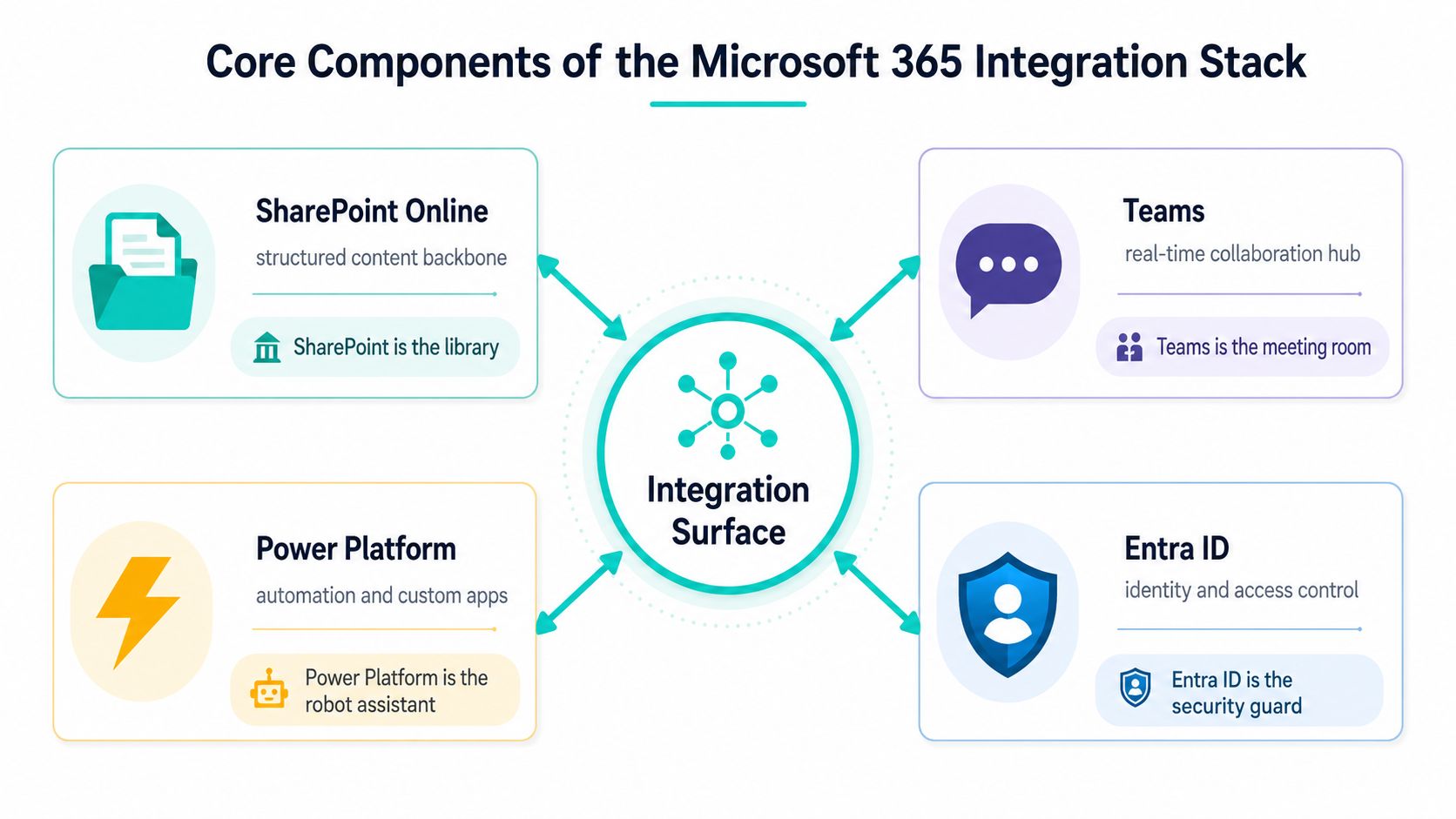
The stack becomes easier to design when each service has a plain-language job. SharePoint Online is the library, holding structured pages, documents, metadata, permissions, and hub relationships. Exchange Online is the conversation layer, carrying mail, calendars, and availability. Teams is the meeting room, where channels and tabs bring collaboration into a focused workspace. OneDrive is the personal workbench, useful for drafts before content earns a shared home.
Microsoft Graph is the nervous system. It provides a unified way to query and act across identities, mail, files, calendars, Teams, and other Microsoft 365 workloads. Entra ID is the security guard, issuing identity tokens and enforcing the access context that downstream services inherit. Power Platform adds the automation and app-building layer, while a Sitecore front end can present governed content as a polished public or employee-facing experience.
How the layers cooperate
Think of the architecture as concentric rings. Entra ID sits at the center. Graph connects the services around it. SharePoint, Teams, Exchange, OneDrive, and Power Platform provide content, collaboration, and process capabilities. The DXP sits at the outer edge, shaping the experience without pretending to own every underlying record.
A SharePoint intranet can render Teams channel links, show Exchange presence, retrieve files through Graph, and submit a workflow request through Power Platform. The user sees one navigable workplace, while each system retains a defined responsibility. That division prevents the common failure mode where a DXP copies content because the source system is difficult to query.
For physical venues or distributed operations, identity integration often extends beyond Microsoft 365 itself. A resource such as Splash Access for hospitality venues is useful when architects need to consider how Azure AD identity can participate in access experiences outside the standard intranet boundary. The principle remains the same: authenticate once where possible, then enforce policy at every integration edge.
Sitecore XM Cloud adds a different kind of capability. Sitecore describes it as a fully managed, self-service platform that bundles Experience Manager, Pages, Headless SXA, Headless Services, the Sitecore Next.js SDK, and Experience Edge, as documented in its XM Cloud product documentation. It's a strong fit when Microsoft 365 supplies enterprise collaboration and Sitecore supplies composable content delivery.
Integration Patterns That Fit Enterprise Workloads
Choose an integration pattern by workload and ownership, not by the connector that is easiest to demonstrate. The patterns below address different enterprise needs. Combining them without clear boundaries leads to duplicate content, unexpected licensing exposure, and disputes over who operates each connection.
| Pattern | Primary Use | Best Workload |
|---|---|---|
| Embedded experiences | Surface apps, pages, or components inside a work context | Frontline collaboration and HR portals |
| Single sign-on | Apply one identity and access model across systems | Employee and partner access |
| Content synchronization | Move authoritative content into a governed index | DXP search and trusted publishing |
| Event-driven workflows | React to changes and route actions | Approvals, provisioning, and CRM updates |
| Federated access | Retrieve content without cloning it | Partner and sensitive-data scenarios |
Embedded experiences fit when context switching causes the main operational friction. An HR workspace can present a SharePoint page, a Power App, and a Teams conversation where employees already work. That improves access, but it does not correct poor information architecture. Embedding a confusing application only places the same confusion closer to the user.
Single sign-on through Entra ID provides the identity foundation for internal experiences. A Sitecore front end, SharePoint intranet, and connected SaaS estate can share authentication and conditional access policies. SSO reduces repeated sign-ins, while authorization still requires explicit design. Define application roles, group ownership, privileged access, and offboarding behavior before connecting systems.
Content synchronization fits a DXP that must search or present trusted documents. SharePoint hubs, hub sites, Graph delta queries, and an indexing pipeline can transfer only authoritative content into the experience layer. The trade-off is freshness and duplication. Synchronization improves retrieval and presentation control, but the additional index needs monitoring, reconciliation, and a retirement process when source content changes.
Event-driven workflows use Power Automate and Graph change notifications to start approvals, provisioning, notifications, or downstream CRM updates. They suit business events that should trigger action without waiting for a page request. Build idempotency, retry handling, an accountable owner, and an exception queue into the workflow. A flow that succeeds in a demonstration but lacks operational ownership becomes technical debt.
Federated access leaves the source of truth in place and retrieves content when required. SharePoint Embedded and governed external sharing can support partner scenarios without copying every document into a Sitecore-led DXP. The approach reduces duplication, but each live dependency can affect resilience and response time. Use it when source boundaries and current content matter more than local indexing. The architecture should make that choice explicit, rather than treating every document as DXP content.
Developer Tools and How They Map to Real Jobs
A productive Microsoft 365 engineering team starts with jobs, not feature lists. Microsoft Graph is the read and write backbone for identities, mail, files, calendars, Teams, and related services. Use it when an experience needs governed cross-service data, and design pagination, throttling, permissions, and retry behavior before the first production call. Microsoft's Microsoft 365 integration documentation is a useful reference for the broader service ecosystem.
SharePoint Framework, or SPFx, is the right path for SharePoint Online and Teams extensions that should inherit Microsoft 365 governance. React-based web parts can deliver employee dashboards, navigation components, and contextual content without creating a separate authentication island. The trade-off is platform coupling. Teams and SharePoint upgrades remain part of the delivery lifecycle, so teams need disciplined packaging and release management. Practical implementation detail belongs in SPFx web parts guidance.
Power Platform handles a different class of work. Power Automate is effective for approvals and notifications, Power Apps for business forms and lightweight applications, and connectors for wrapping external services into a common workflow surface. Low-code delivery is fast, but environment strategy, solution packaging, connection references, DLP policies, and maker ownership determine whether that speed survives production.
Entra ID provides app registrations, identity, conditional access, and authorization foundations. Connectors can shorten integration time, but they can also hide data movement, licensing dependencies, and failure behavior. Use low-code when the process is bounded and observable. Use pro-code when you need complex transformations, strict test coverage, custom resilience, or a reusable API contract.
Sitecore XM Cloud belongs at the headless DXP edge. Sitecore describes it as headless, cloud-native, API-first, with demand-based scaling and Next.js as the preferred rendering SDK for its full feature set. It supports headless implementations only, not MVC-based solutions, and separate rendering hosts are needed for .NET Core, React, Angular, or Vue when Next.js isn't used, according to the XM Cloud documentation.
| Job To Be Done | Primary Tool | Best Fit | Watch Out For |
|---|---|---|---|
| Query cross-service work data | Microsoft Graph | DXP personalization and employee dashboards | Throttling, consent, and pagination |
| Extend SharePoint and Teams | SPFx | Governed React components | Package lifecycle and platform coupling |
| Automate bounded processes | Power Platform | Approvals, forms, and notifications | Environment sprawl and connector licensing |
| Control identity and access | Entra ID | SSO, app registrations, and policies | Overbroad roles and incomplete offboarding |
| Deliver public experiences | Sitecore XM Cloud | Headless Next.js DXP delivery | Rendering-host and headless constraints |
Sitecore's AI portfolio makes the DXP more than a presentation layer. Its product messaging highlights AI workflows, generative copilots, and brand-aware AI, while Sitecore Stream documents AI-assisted visual search, content generation in text fields, natural-language questions over content collections and Sitecore Search domains, and Gensights for insights from Sitecore CDP dashboards. Those capabilities matter when the integration design protects content context rather than flattening every source into a generic feed.
Security, Governance, and the Post-Go-Live Reality
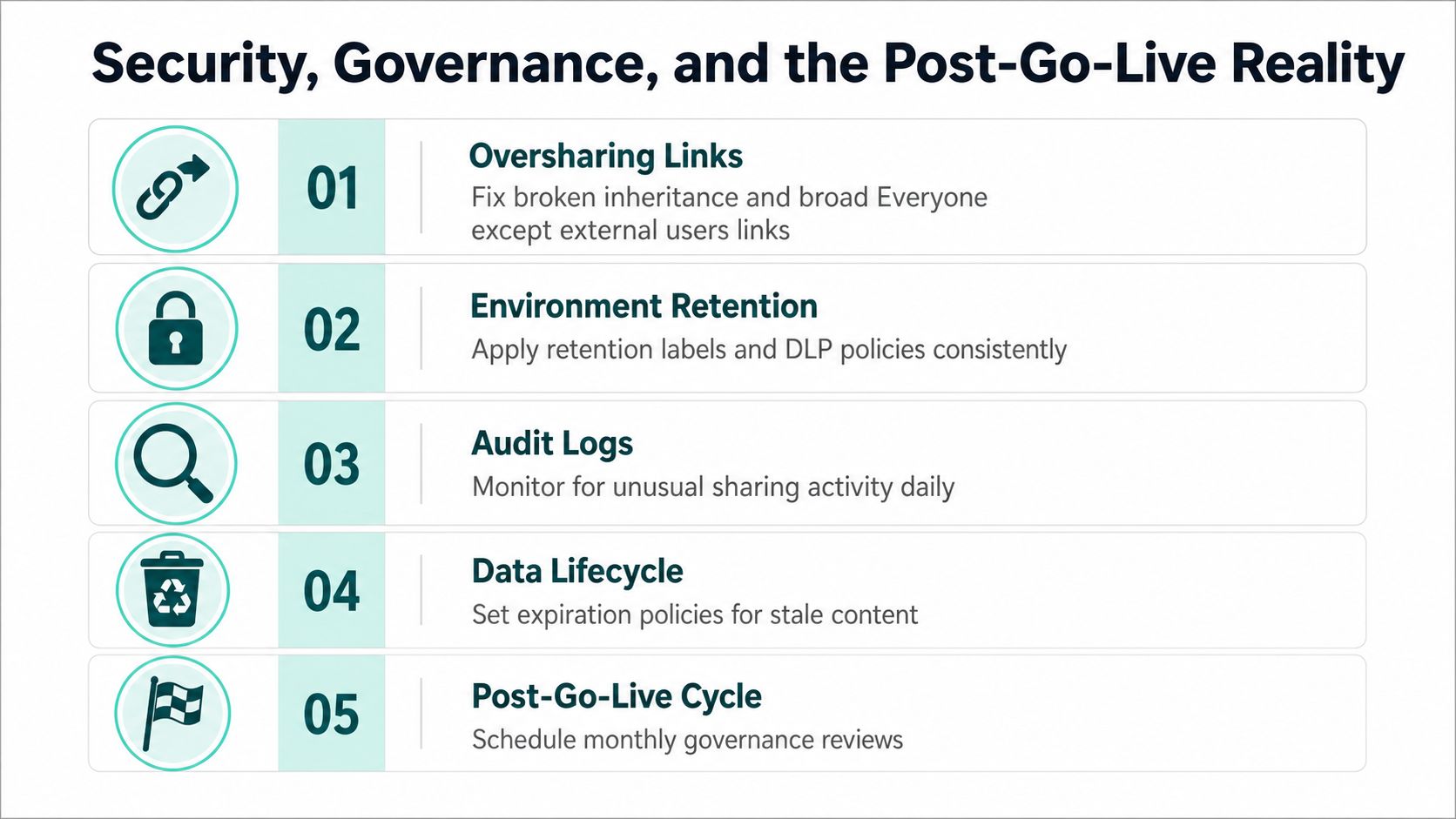
Go-live is the point at which governance becomes visible, not the point at which governance ends. SharePoint and OneDrive oversharing often comes from broken inheritance, broad “Everyone except external users” links, abandoned groups, and permissions granted for convenience. Teams then amplifies the problem by creating workspaces faster than administrators can classify them.
The risk is growing as AI experiences and agents reach more content. Microsoft's governance guidance treats apps, flows, and agents as a lifecycle problem involving environment strategy, reactive controls, and management of default and Teams environments. Microsoft also describes a governance hub for its 2025 wave 2 strategy to manage intelligent agents and automated workflows across the ecosystem, which reinforces the need to govern ownership and policy, not only APIs.
The content problem behind the AI problem
Independent coverage of Gartner-linked survey findings reports that 71% of organizations cite governance issues as the main barrier to Copilot rollout, 67% report unmanaged Teams and SharePoint content sprawl, and 63% fear oversharing and data loss, as summarized in Microsoft's adoption and administration guidance. The same verified brief cites another industry report where 33% of IT managers remain concerned about governance, backup, and user adoption after migration, while 29% haven't finalized a SharePoint 2016/2019 migration plan, all from that linked coverage.
The remedy is operational. Use SharePoint Advanced Management to identify risky sites and sharing behavior, sensitivity labels to classify information, DLP policies for endpoints and services, and Conditional Access to bind access to identity and device context. Add retention, records management, content ownership, audit review, and a documented Power Platform environment model.
A useful intranet login experience still depends on those controls. Teams evaluating the employee entry point can reference SharePoint intranet login considerations, but the visible login is only the surface. The core control plane is the combination of identity, permissions, lifecycle rules, and review cadence.
Implementation Roadmap From Pilot to Production
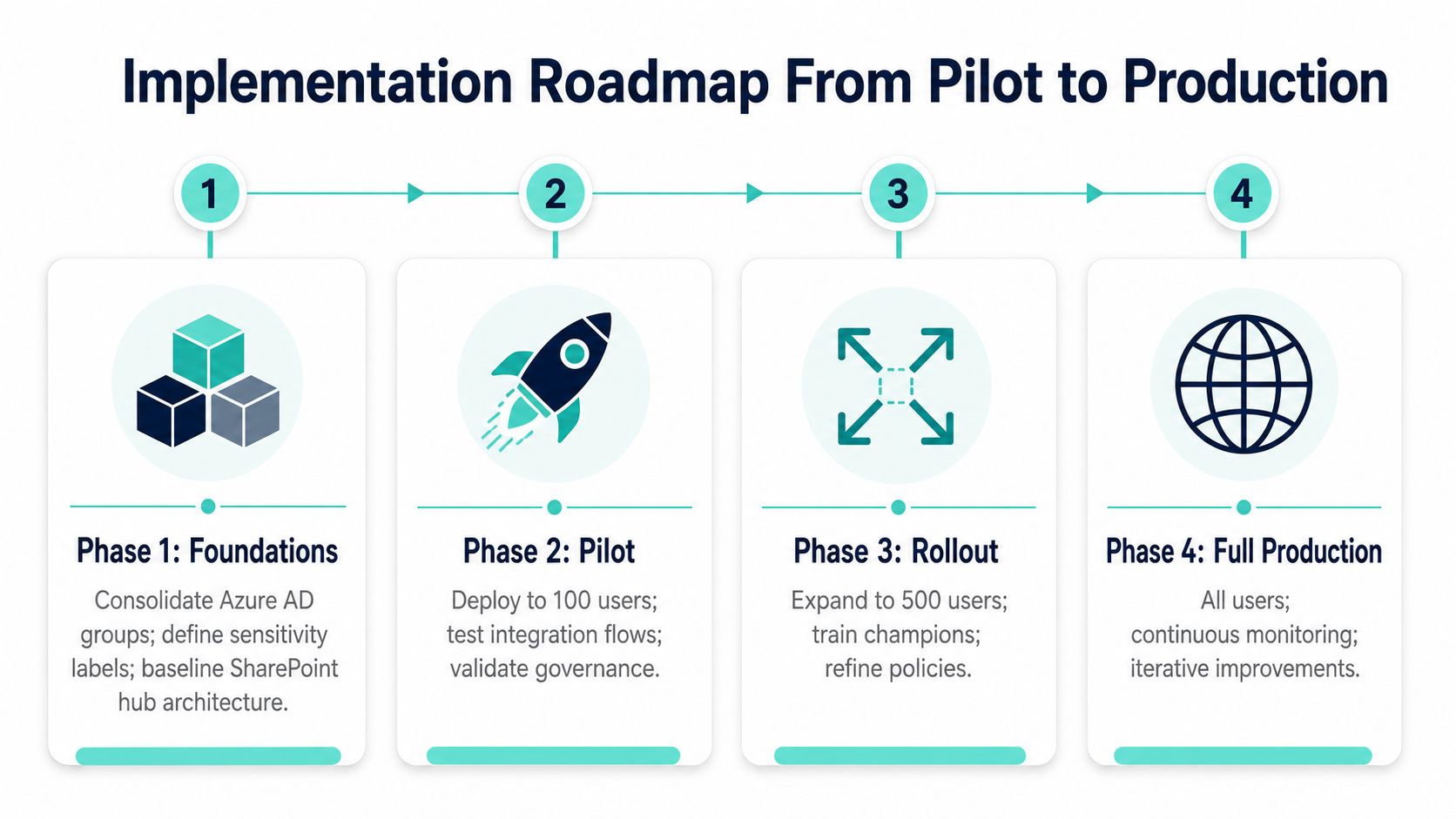
A dependable rollout begins with foundations rather than a visually impressive home page. The program should produce evidence at every phase, including identity readiness, content quality, performance behavior, and cost exposure.
Four phases with explicit checkpoints
Foundations: Consolidate Entra ID groups, define sensitivity labels, establish the SharePoint Online hub architecture, and create one Teams governance template. Confirm who owns each identity group, site, environment, and content domain before migration work begins.
Pilot: Select one business unit. Deploy SPFx intranet components and one Graph-driven scenario, such as a leave dashboard. Measure response behavior, Graph calls, search quality, permission outcomes, and licensing consumption before expanding the scope.
Scale: Add Power Platform workflows and connectors, introduce Copilot governance, expand Teams templates, and onboard additional SharePoint hubs. Require each new workload to declare its data owner, environment, retention approach, and failure path.
Optimise: Tune Graph throttling and pagination, retire duplicate sites, formalize application lifecycle management, and review licensing against actual use. Optimization means removing unnecessary integration, not adding more automation.
The phase names in the visual describe a practical movement from foundations to pilot, rollout, and full production. The detailed checkpoints matter more than the labels. A pilot that proves only that a page renders hasn't proved identity continuity, content trust, or operational resilience.
The video below provides another visual entry point for teams discussing the implementation journey.
Keep the pilot narrow enough to observe. A single well-instrumented workflow tells the steering group more than a broad launch with unmeasured Graph calls, unclear ownership, and unreviewed sharing links.
Enterprise Intranet and DXP Use Cases in Practice
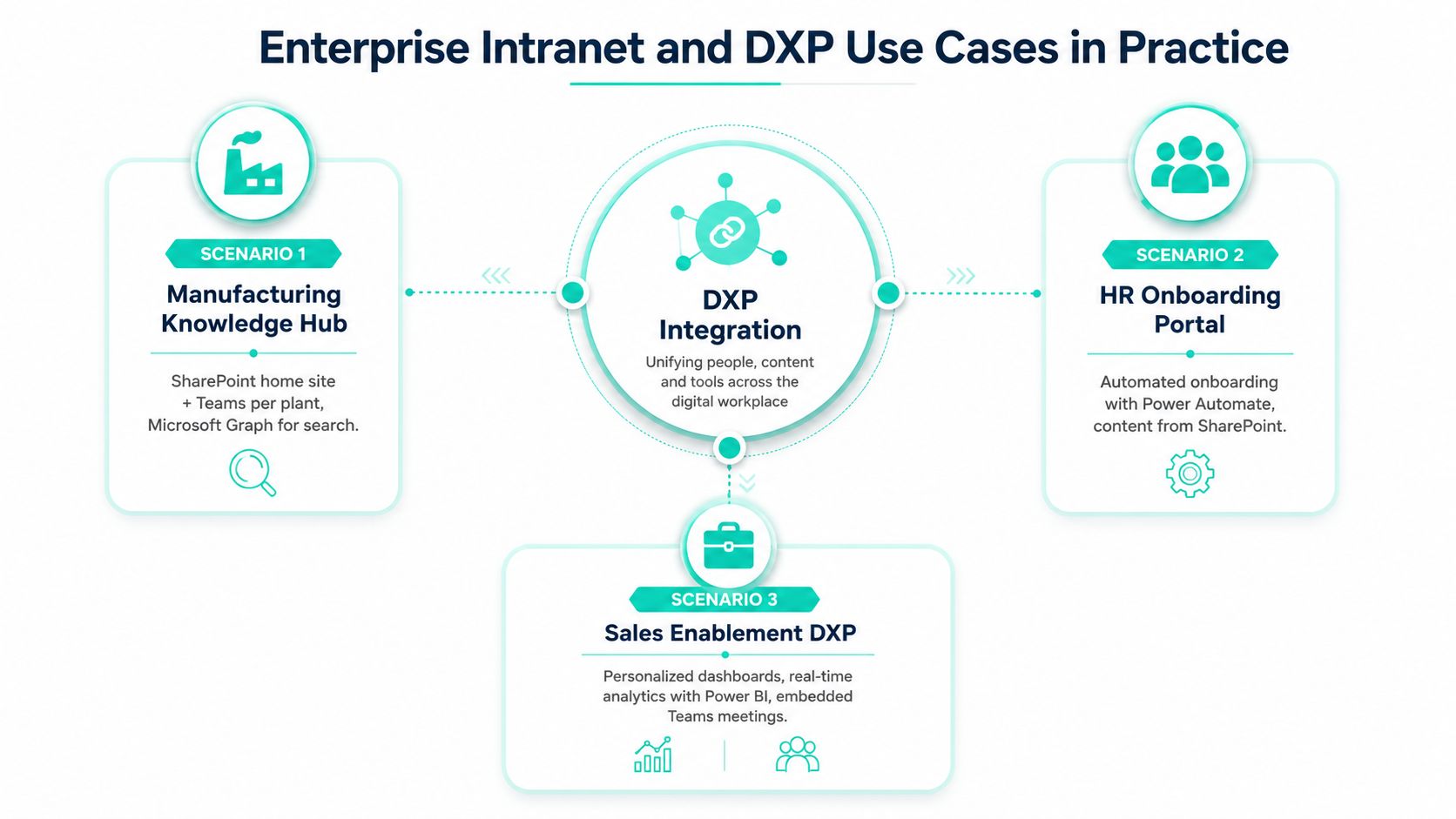
The architecture earns its keep when each platform solves the part of the problem it understands best. A manufacturing knowledge hub can use a SharePoint Online home site for policies and plant resources, Teams spaces for local collaboration, Graph to surface parts-catalog data from Azure SQL, and Power Automate to route safety incidents to the right shift supervisor. SharePoint owns the published knowledge, Teams owns the conversation, and the workflow carries an event to a responsible person.
Where the DXP changes the experience
A multilingual airport portal can place XM Cloud at the public-facing edge while SharePoint holds operational standard operating procedures behind the firewall. Teams supports shift handovers, and a Graph-connected translation workflow can localize approved news into five languages. The critical decision is to keep public experience content and restricted operational records distinct, with controlled retrieval between them.
A financial services workspace needs a tighter boundary. Entra ID Conditional Access can govern entry to a SharePoint records center, Graph can provide audit trails, and a Power Platform agent can draft compliance responses inside a narrowly scoped data boundary. The agent shouldn't become a shortcut around records policy. Its usefulness depends on the quality of the content and permissions it can reach.
Sitecore's platform direction supports these composable experiences. Sitecore's 10.3 release notes describe Headless SXA and Headless Services 21.0 as enabling headless use of the Experience Platform with modern front-end frameworks, including Next.js 12.3.x and React 18, as documented in the Sitecore 10.3 release information. For organizations planning a SharePoint-led employee workplace, the same headless principles can support a separate public DXP without forcing both audiences into one content model.
Teams planning the employee-facing layer can use SharePoint intranet development guidance to evaluate the practical relationship between SPFx, SharePoint Online, and Microsoft 365 services. The architectural test remains straightforward: every integration should have an authoritative source, a defined consumer, an identity boundary, and an owner for failure handling.
Bringing It All Together and What to Do Next
The fragmented manufacturer from the opening doesn't need one giant portal. It needs one navigable surface backed by clear service ownership. SharePoint provides the structured content backbone, Teams supplies contextual collaboration, Graph connects governed data and actions, Power Platform routes work, Entra ID controls identity, and Sitecore XM Cloud delivers a headless DXP experience where public or branded presentation requires more composability.
A steering committee can test readiness with a short checklist:
- Identity strategy: Confirm the Entra ID tenant model, group ownership, application registrations, Conditional Access, and offboarding process.
- Content topology: Approve the SharePoint home site or hub-and-spoke model, authoritative repositories, metadata, retention, and duplication rules.
- Graph behavior: Document permissions, pagination, delta queries, throttling responses, retries, and monitoring.
- Power Platform controls: Define development, test, and production environments, DLP policies, solution packaging, connection ownership, and maker support.
- DXP boundary: Decide which content stays in SharePoint, which belongs in XM Cloud, and whether the experience needs synchronization or federated retrieval.
- Commercial guardrails: Separate per-user licensing from consumption-based connectors and review actual usage before scaling.
Three actions for the next quarter
First, instrument a baseline of Graph calls and SharePoint storage. Without that baseline, the team can't distinguish a performance problem from a content-architecture problem or explain rising consumption.
Second, run a two-team pilot using one integration pattern before scaling. Choose embedded collaboration, event-driven workflow, content synchronization, or federated access based on the workload, then measure identity, content, performance, and operational outcomes.
Third, schedule a governance workshop before production rollout. Review oversharing reports, Copilot and agent scope, sensitivity labels, retention, environment ownership, and external sharing posture. Sitecore's emphasis on AI workflows and brand-aware AI makes content quality especially important, because a DXP can only personalize or generate safely when the underlying information model is trustworthy.
The practical conclusion is simple. Microsoft 365 integration succeeds when architecture, content governance, and experience design are planned together. A connector can move data, but only an operating model can keep that data accurate, authorized, discoverable, and useful after launch.
Kogifi designs and delivers Sitecore XM Cloud experiences, SharePoint Online intranets, SPFx components, Power Platform workflows, and Microsoft 365 integrations for enterprise environments. Visit Kogifi to discuss an architecture assessment, modernization roadmap, or governed pilot that connects your DXP and digital workplace.