


A commerce team launches a new XM Cloud journey with a familiar disagreement. Marketing wants the homepage to adapt automatically for returning visitors, while product wants customers to choose their own categories, language, and display preferences. Both teams call the result “personalised,” yet they're proposing different operating models, different data responsibilities, and different consent obligations.
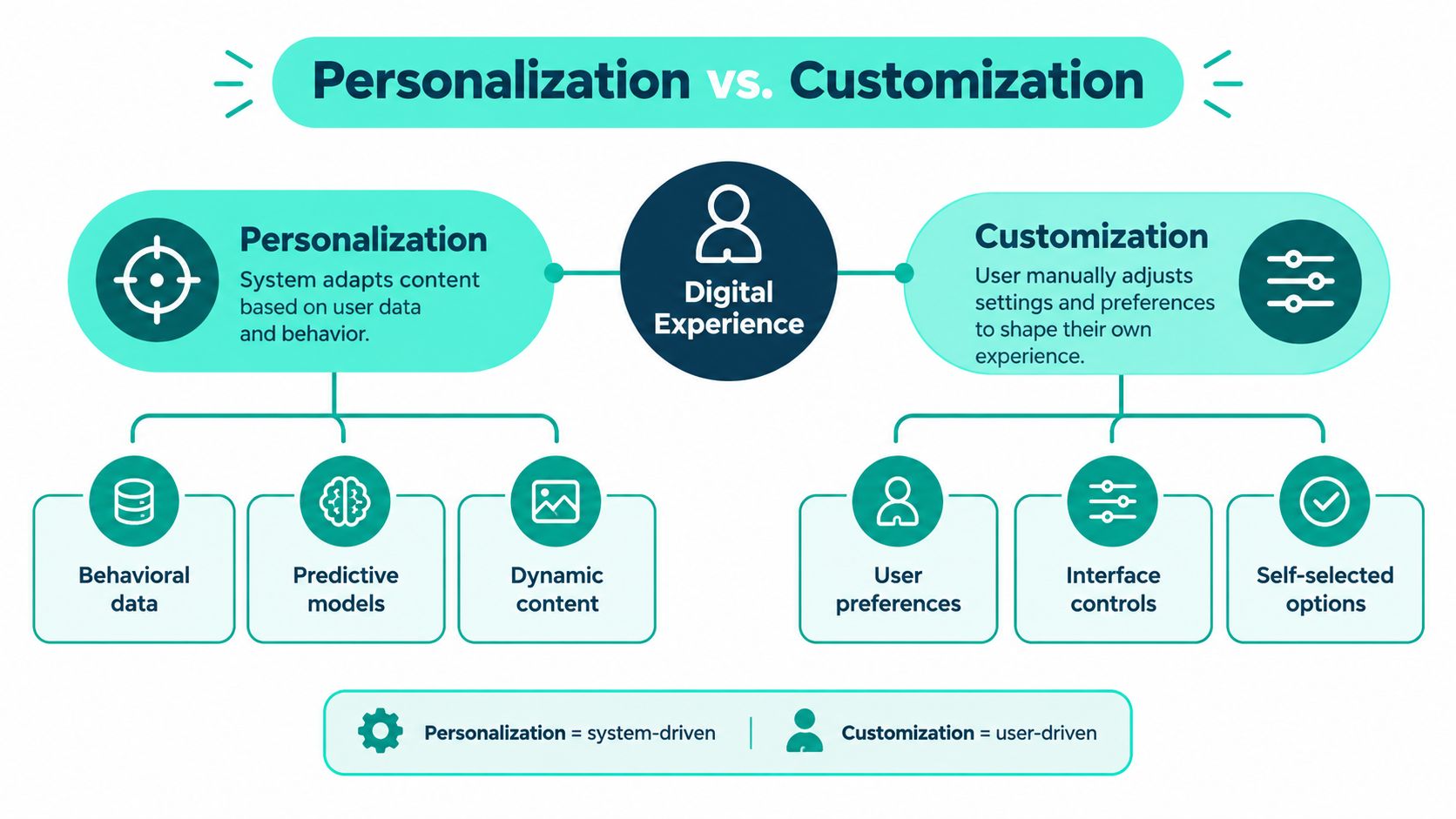
That distinction matters across Sitecore, AEM, and SharePoint. Personalisation is system-driven relevance. Customisation is user-directed control. Confusing the two produces unclear ownership, weak testing, and experiences that can feel intrusive rather than useful. The practical decision is not whether one is better. It's where each belongs, how much control the visitor should retain, and when a rule or machine-learning model has enough evidence to act.
Table of Contents
- Rules provide the boundary conditions
- Search needs explicit controls
- Generative assistance still needs grounding
Why the Distinction Shapes Enterprise Outcomes
A global manufacturer launches a Sitecore commerce journey for industrial pumps. An anonymous visitor arrives from a pump campaign, so the system can surface sizing guidance, related products, and a regional contact path from observed behaviour. That is personalisation. The visitor can also choose metric units, save a preferred language, or configure a comparison view. Those are customisation controls.
The operating consequences differ. Personalisation infers relevance from available context. Customisation records an explicit decision. Treating inferred interest as a customer choice can make an experience feel intrusive. Treating a product preference as permission to personalise every later interaction creates a separate consent and governance risk.
The commercial case for relevant experiences has been visible for years. In a 2017 survey of 1,000 consumers aged 18–64, 90% said personalised experiences were appealing, while 80% said they were more likely to do business with a company offering them (Epsilon's survey findings). The finding supports investment in relevance, not unrestricted automation. Teams still need evidence, consent, and a useful default when a signal is weak.
Where enterprise teams lose control
Ownership is usually distributed. Marketing may maintain campaign rules in Sitecore XM Cloud, analytics may manage behavioural data, and a platform team may govern the component library. In AEM, Target or an external decisioning service can add another boundary. In SharePoint, administrators or content authors may control audience targeting for news, navigation, or dashboards.
Before designing components, review what personalization means in practice so ownership starts from a shared definition. Without that agreement, each group optimises its own layer:
- Marketing changes content variants without recording the activating signal.
- Product adds preference controls that fail to persist across channels.
- IT exposes data to a model without defining retention, consent, or reset behaviour.
- Analytics reports clicks without testing task completion or repeat value.
The user's agency provides a practical boundary. A setting chosen by the person is customisation. A platform decision based on context or behaviour is personalisation. The practical explanation of the true meaning of personalization can help teams establish shared vocabulary before they define components, rules, or model inputs.
The decision framework
Across an XM Cloud or AEM estate, answer four questions before building a variation:
- Who triggers the change? The visitor, an editor, a rule, or a model?
- What evidence supports it? An explicit preference, a current-session signal, or an inferred pattern?
- What happens without evidence? The standard experience must remain useful.
- How can the visitor reverse it? Resetting a preference should be as deliberate as setting it.
This framework places personalisation under relevance and measurement controls while keeping customisation visible, reversible, and owned by the user.
Understanding Personalization and Customization in Digital Experiences
Customisation lets users alter an experience themselves. They might select a language, choose notification preferences, configure a product, save a dashboard layout, or decide which content categories appear first. The platform stores and applies an explicit choice.
Personalisation uses data, context, or behaviour to tailor the experience proactively. A system might reorder content after observing a visitor's interactions, select a recommendation, or show a regional task path based on known context. The visitor may not have directly requested the change.
Assign the right owner
Customisation usually belongs to product and UX teams because the organisation must define clear controls and preserve the selected state. A SharePoint user choosing a preferred intranet audience or saving a dashboard arrangement expects the setting to remain stable and understandable.
Personalisation needs broader ownership. Marketing defines the experience objective, product defines the user journey, data teams define eligible signals, and engineering ensures that decisions render consistently across channels. On Sitecore XM Cloud, that may mean a shared component supports fixed rules and AI-selected variants. In AEM, it may mean coordinating content fragments, experience fragments, delivery APIs, and an experimentation or decisioning layer.
Map the experience across touchpoints
A preference that exists only on one page is weak customisation. A recommendation that works on the website but not in mobile or a customer portal is incomplete personalisation.
Use a simple mapping exercise:
- Websites and commerce: product recommendations, content ordering, language, currency, and saved configurations.
- Headless front ends: structured content, reusable components, and decision outputs delivered through APIs.
- Portals and intranets: audience-specific navigation, news, dashboards, and resource links.
- Known and anonymous journeys: explicit preferences for authenticated users, cautious fallbacks for anonymous visitors.
The distinction also changes the fallback. A customisation control should default to a sensible setting and let the user change it. A personalisation model should have a standard variant when confidence is low, consent is absent, or the signal is stale. Treating every visitor as a known segment is neither technically strong nor respectful.
Detailed Comparison of Control Effort and Business Impact
The choice becomes clearer when teams compare operating consequences rather than product labels. Customisation is usually easier to explain because the user initiates it. Personalisation can produce more timely relevance, but it requires stronger data discipline, testing, and governance.
| Criterion | Personalization | Customization |
|---|---|---|
| Trigger | System detects context, behaviour, or an eligible audience | User selects a setting, preference, or option |
| Data dependency | Behavioural, contextual, profile, or transaction data | Explicit preference data |
| Control | Marketers and product teams define rules or model boundaries | Users control the visible choice |
| Scaling effort | Requires decisioning, instrumentation, fallbacks, and measurement | Requires durable preference storage and cross-channel propagation |
| Relevance | Can adapt before a user states an intent | Reflects declared intent, but may be narrower |
| Privacy risk | Higher when the signal is inferred or unexpected | More limited when the choice is explicit and proportionate |
| Best fit | Recommendations, content ordering, next-best actions, discovery | Language, layout, saved settings, product configuration |
| Main failure | Irrelevant or intrusive output | A preference that is ignored or inconsistently applied |
The demand for relevant interactions is not theoretical. McKinsey reported that 71% of consumers expected personalised interactions, while 76% became frustrated when those interactions did not occur (McKinsey's personalisation analysis). That expectation supports system-driven relevance, but it doesn't remove the need for user control.
The differentiator: Personalisation predicts what may help. Customisation records what the user has chosen.
When customisation wins
Use customisation when the consequence of being wrong is high, the preference is stable, or the user needs to understand and control the result. Language, accessibility settings, notification frequency, measurement units, and product configuration are obvious examples. In an employee portal, a worker should be able to choose visible resources rather than rely on an opaque model to decide what information matters.
Customisation also works well when the organisation lacks enough behavioural evidence. A new visitor shouldn't receive an elaborate inferred profile when a simple preference prompt can establish intent directly.
When personalisation wins
Use personalisation when the experience contains discovery, changing context, or a large volume of eligible content. Search recommendations, related technical documents, commerce suggestions, and campaign landing pages can benefit from adapting to observed behaviour.
The cost is operational. Teams must define eligible signals, prevent stale decisions, retain a standard experience, and test whether the change improves more than clicks. A high-performing audience can hide a deteriorating experience for another audience if reporting uses only an aggregate average.
Technical Approaches From Rules to Machine Learning
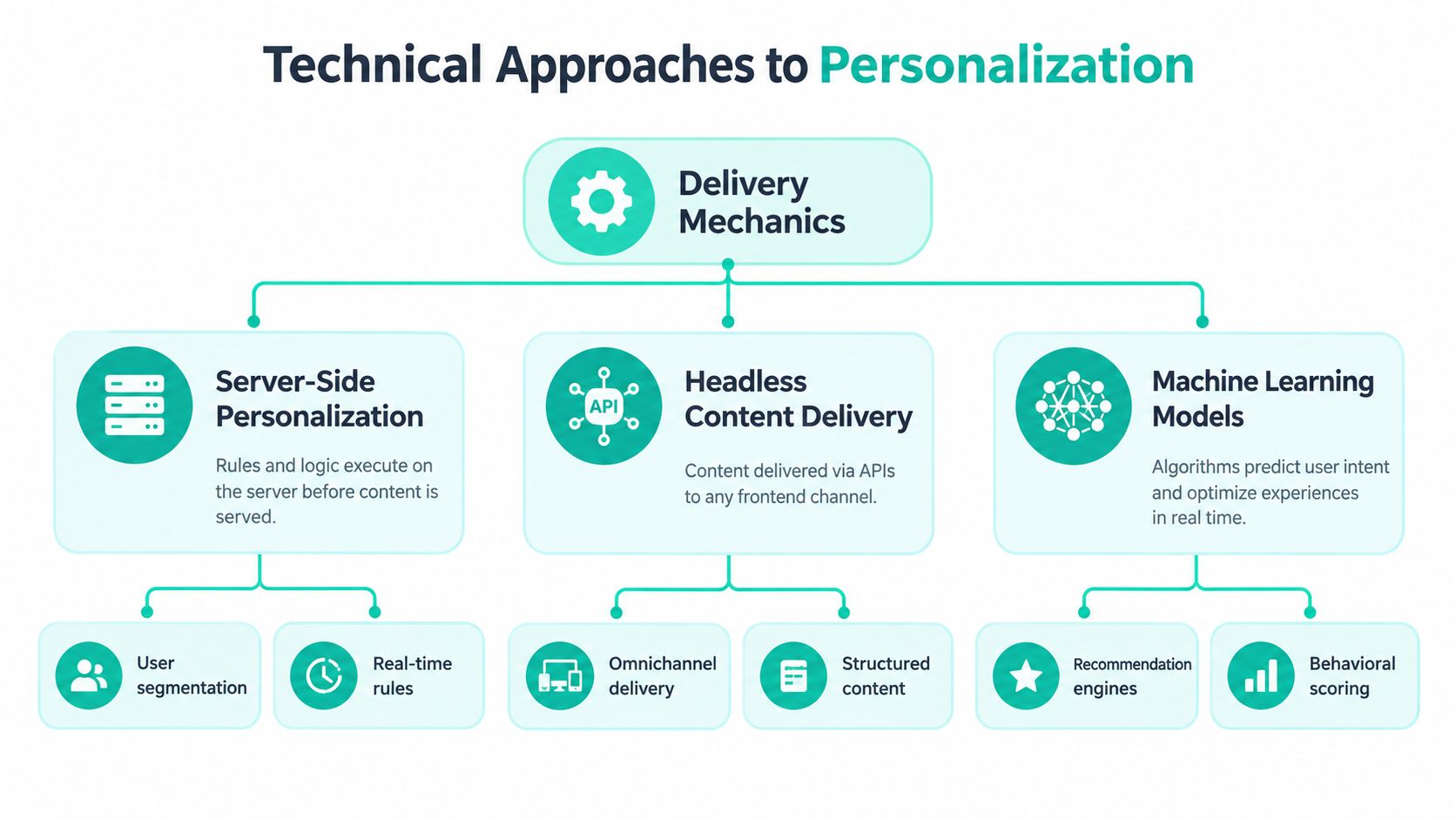
Implementation starts with the delivery path, not the model. In a server-rendered Sitecore or AEM application, a decision can execute before the response reaches the browser. In a headless XM Cloud build using Next.js, the front end may request structured content and a decision separately, then render the selected component. Both patterns can work, but they create different caching, latency, and invalidation concerns.
Rules provide the boundary conditions
Rule-based personalisation remains the right starting point for many enterprise journeys. A marketer can define a known audience, a campaign period, a region, a referral context, or a signed-in state. The benefit is explainability. Teams can inspect the condition, identify the component variant, and reverse the change without waiting for a model to learn.
Sitecore AI Automated Personalization operates within existing component-personalisation rules. It can select the most effective content variant for an individual visitor by analysing website actions and behavioural signals, without requiring marketers to define user segments in advance. A rule can therefore use a fixed variant for one condition and allow Sitecore AI to choose among eligible variants for another.
That hybrid pattern is safer than handing the whole page to a model. For example, anonymous visitors might receive AI-selected recommendations, while signed-in users receive a predefined experience. A team can also activate AI selection only during a specified month. Sitecore's Standard machine-learning service can train up to 20 personalised components, which supports component-level testing rather than a single site-wide decision.
Search needs explicit controls
Sitecore Search offers configurable mechanics through Affinity and MLT modes. Affinity uses items a visitor has interacted with previously, while MLT finds content similar to specified documents. The important architectural point is that teams can control how much history influences the result and how strongly personalisation affects relevance.
The documented controls are concrete:
- Last N Events determines the number of previous visitor events considered. The recommended range is 3–5, with a default of 5.
- Minimum Number of Events sets the activity threshold before personalisation starts. The recommended range is 1–3, with a default of 2.
- Boost Weight controls the influence of personalised results on relevance scoring. The recommended range is 0.1–2.0, with a default of 0.5.
These values should be treated as operating controls, not universal settings. Teams need to enable the relevant attributes, configure global widget or widget-rule options, and re-index sources before changes take effect. The real-time personalization implementation perspective is useful for connecting these decisions to front-end delivery and runtime behaviour.
Generative assistance still needs grounding
Sitecore Stream adds brand-aware generative AI through uploaded brand documents, a reusable brand-knowledge base, retrieval-augmented generation, and copilots or agents. It supports campaign brief development, on-brand drafting, message personalisation, and AI-based page personalisation that can generate or rewrite text for different audiences.
That doesn't make the output self-governing. Brand documents define the knowledge boundary, while editorial workflows still need owners, approval states, accessibility review, localisation checks, and a way to reject an unsuitable suggestion. Keep rules for legal, safety, eligibility, and high-impact decisions. Let models assist with ranking or variant selection where the candidate content and fallback are already controlled.
Enterprise Use Cases Across Sitecore AEM and SharePoint
A Sitecore XM Cloud commerce journey often combines all three modes. A visitor's current product category can influence related content, a signed-in account can receive a predefined business-customer experience, and the visitor can still choose language, units, or saved comparison settings. The component contract should expose both the decision output and the reason or rule context needed for troubleshooting.

For a headless implementation, the front end shouldn't assume that a personalised response always exists. Next.js components need a standard variant, a loading strategy, and a failure path if a decisioning service is unavailable. Content authors should manage eligible variants in Sitecore, while developers preserve a stable schema so the same decision can render on a web page, mobile experience, or authenticated portal.
AEM supports orchestration across content estates
An AEM estate typically has to coordinate reusable content fragments, experience fragments, assets, localisation, and external services. A product education page might prioritise technical content for a visitor who repeatedly reads specification material, while an explicit user preference controls language or content format.
The practical challenge is avoiding a fragmented decision layer. If AEM authors define one audience rule, an external targeting service defines another, and the front end applies a third, the same visitor can receive contradictory experiences. Integration work, such as the patterns described in this AEM Target integration resource, should begin with ownership, signal definitions, consent state, and fallback behaviour, not only with connector configuration.
SharePoint favours configured audience targeting
SharePoint Online provides a different model. Administrators and authors can enable audience targeting for web parts, page libraries, and navigation links. Targetable items include news posts, dashboard cards, and resource links, with audiences selected from organisational groups such as Microsoft 365 Groups.
The timing of publication matters. Assigning an audience doesn't make a change effective automatically. A news post must be republished, and a dashboard must be published before targeting takes effect. That makes SharePoint audience targeting a practical visibility and prioritisation mechanism, rather than behaviour-based automatic variant selection.
A multilingual employee portal might use Microsoft 365 group membership to prioritise regional news, while users customise notification settings or saved links. The same discipline applies to airports, finance, education, and public-service portals. Relevance must not hide safety-critical information, accessibility support, security guidance, or essential tasks.
Governance Consent and Measurement That Protect Value
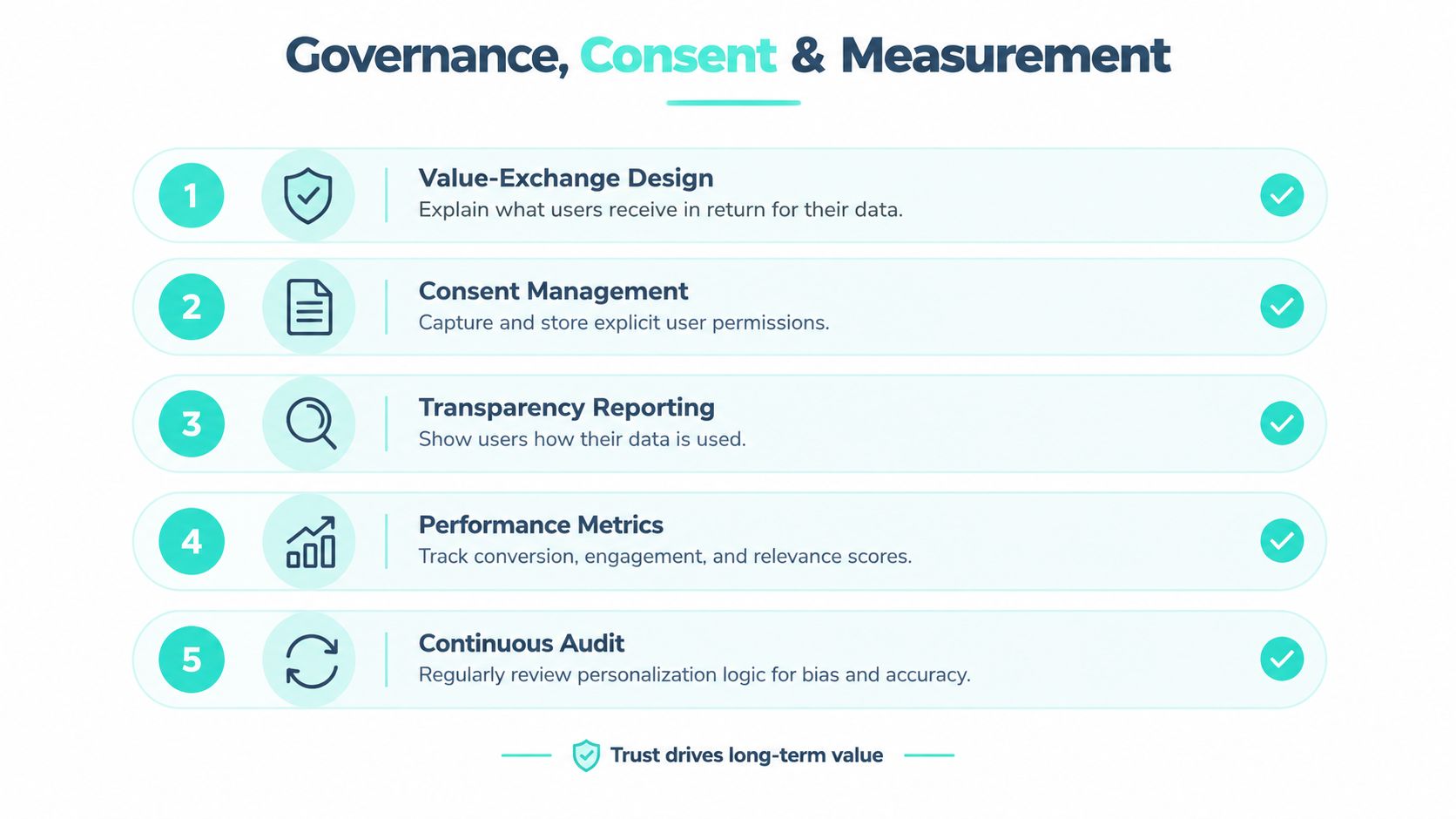
Personalisation earns trust when the user can understand the exchange. Explain the benefit before collecting a signal, request only proportionate data, provide visible preference controls, and offer a useful standard experience for people who decline or cannot be identified.
A consent banner alone isn't a governance model. Consent and preference state must propagate across brands, regions, devices, and anonymous-to-known journeys. The platform should also record which decision was made, which signal qualified the visitor, which content variant was served, and how the visitor can reset the experience.
Design for inclusion and reversibility
Do not infer sensitive characteristics to make an experience appear more relevant. Personalise language, navigation, content format, and task support where the benefit is clear, but preserve keyboard access, screen-reader semantics, contrast, and reduced-motion requirements. A visitor using assistive technology should receive a more useful experience, not a more decorative one.
The same principle applies to people sharing devices, travelling, withholding consent, or changing circumstances. Provide a visible reset or “show standard experience” option. For high-stakes finance, education, employee, or public-service journeys, human review and transparent eligibility logic should take priority over opaque optimisation.
A practical governance framework guide can help teams structure accountability, but the implementation still needs platform-specific controls and named owners. Consent management should be connected to component rules, search behaviour, analytics, and content delivery rather than maintained as an isolated legal workflow. The consent management platform guidance provides a useful reference point for that integration work.
Measure ranking quality and business value
Personalisation should be evaluated as both a ranking-quality and business-outcome problem, not by conversion uplift alone. For recommendation or search components, use offline metrics such as RMSE for rating prediction and NDCG, MAP, or F-measure for ranked content. Supplement those with online CTR, conversion rate, revenue per visitor, and retention, as described in the research on online personalisation evaluation.
Maintain a randomised control group that receives the generic experience. Compare treatment and control by audience segment and channel, and report confidence intervals rather than relying on an aggregate average. Test the complete experience, including component ordering, labels, imagery, navigation paths, offers, and content language. A changed hero banner can receive more clicks while making the overall task harder.
Recommended Strategy for Enterprise Commerce and Content
Start with the journeys where intent is clear and the cost of a wrong decision is limited. Use explicit rules for campaign context, region, authenticated state, product category, and known preferences. In SharePoint, begin with audience targeting for news, navigation, dashboards, and resource links, then verify publication and fallback behaviour.
Next, standardise the component contract across XM Cloud or AEM. Each component should define eligible variants, required signals, consent conditions, cache behaviour, accessibility requirements, and the standard experience. Reusable headless components make it easier to extend a proven pattern across brands and channels without allowing every team to invent its own decision logic.
Only then introduce Sitecore AI variant selection or search personalisation where there's enough instrumentation and a clear measurement plan. Keep the model inside defined component boundaries, set minimum activity thresholds, monitor segment-level results, and provide a rollback path. The same sequence works for AEM estates, even when the decisioning service differs.
A mature roadmap has explicit gates:
- Rule gate: the audience, content, fallback, owner, and business objective are documented.
- Data gate: signals have a legitimate purpose, consent behaviour is known, and stale data is handled.
- Experience gate: the full journey works for anonymous users, known users, assistive-technology users, and multiple locales.
- Measurement gate: treatment, control, ranking quality, and business outcomes are reported together.
- Scale gate: the team can support model changes, content operations, incident response, and cost review.
Kogifi works across Sitecore XM Cloud, AEM, and Microsoft 365/SharePoint, including headless delivery, component libraries, personalised commerce, intranets, audits, upgrades, and ongoing platform support. For teams also evaluating a B2B marketing automation agency, keep the same boundary clear: automation can activate journeys, but the experience architecture still owns consent, content quality, fallbacks, and measurement.
Kogifi can assess your Sitecore, AEM, or SharePoint estate, define a consent-first personalisation model, and implement rules, reusable headless components, or Sitecore AI where the evidence supports them. Visit Kogifi to discuss an audit, modernisation plan, or managed support approach for your enterprise experience platform.