


The 2026 WebAIM Million study found 95.9% of the top one million homepages had detected WCAG 2 failures, with 56,114,377 distinct accessibility errors, an average of 56.1 errors per page (WebAIM Million). That result changes the practical question for enterprise teams. Website accessibility compliance isn't an audit-day checkbox. It's an operating discipline that must survive content changes, personalization, integrations, component reuse, and release pressure.
A scanner can identify obvious defects. It can't prove that a keyboard user can complete a purchase, that a screen reader understands a dynamic form, or that a personalized Sitecore experience preserves the same accessible journey as the default version. Those outcomes depend on architecture, governance, authoring controls, testing, and accountable remediation.
This guide focuses on the decisions that hold up across enterprise DXP estates, especially Sitecore XM Cloud, SitecoreAI, and SharePoint Online. For broader context on how accessibility obligations affect operational teams outside traditional web departments, the accessibility info for fleet managers is a useful example of accessibility being treated as a business responsibility rather than a purely technical concern. A practical introduction to inclusive design principles is also available in this guide to accessibility in website design.
Table of Contents
- Sitecore AI needs accessibility controls around variation
- SharePoint governance must reach authors and extensions
What Website Accessibility Compliance Really Means in 2026
Website accessibility compliance is the alignment of technical standards, legal obligations, and operational practice. WCAG provides testable success criteria. Laws and procurement rules create exposure in particular markets. Design systems, CMS workflows, code repositories, and release pipelines determine whether teams can meet those requirements consistently.
The WebAIM finding matters because it shows that noncompliance persists across highly visible websites, not only small or poorly maintained properties. The same report records a backward step after several years of gradual improvement, so accessibility isn't a condition an organization can achieve once and then archive. A redesign, third-party integration, content migration, or new personalization rule can reopen risk.
Conformance is narrower than usability
A conformance assessment asks whether a product satisfies selected WCAG criteria at a defined level, usually WCAG 2.1 Level AA for enterprise work. It should cover authored content, templates, dynamic interfaces, documents, embedded services, and other components that users need to complete important tasks.
Usability asks a broader question. Can people with different disabilities understand the page, move through it efficiently, recover from errors, and complete their objective with the assistive technology they use? A site can technically satisfy a criterion and still create friction through confusing headings, unpredictable focus movement, dense forms, or poorly designed content.
Practical rule: Define the conformance target, then test the real journeys that matter to customers, employees, and regulators.
That distinction affects DXP architecture. A shared component library needs semantic HTML and predictable behavior. Content authors need safe patterns for headings, links, tables, images, and documents. Product owners need accessibility acceptance criteria. Legal and procurement teams need evidence that suppliers and third-party services have been evaluated.
A defensible program therefore produces more than a scan export. It creates a repeatable record of scope, test methods, findings, ownership, remediation, retesting, and exceptions. The record should make clear which templates and flows were tested, which content remains outside the technical platform, and who accepted any residual risk.
The Standards and Laws That Shaped Today's Baseline
The modern baseline developed through a gradual interaction between law and technical standards. In 1996, the U.S. Department of Justice clarified that websites could fall within the concept of public accommodations under Title III of the ADA. The World Wide Web Consortium published the first WCAG edition in 1999, giving organizations a common technical vocabulary for perceivable, operable, understandable, and resilient content.
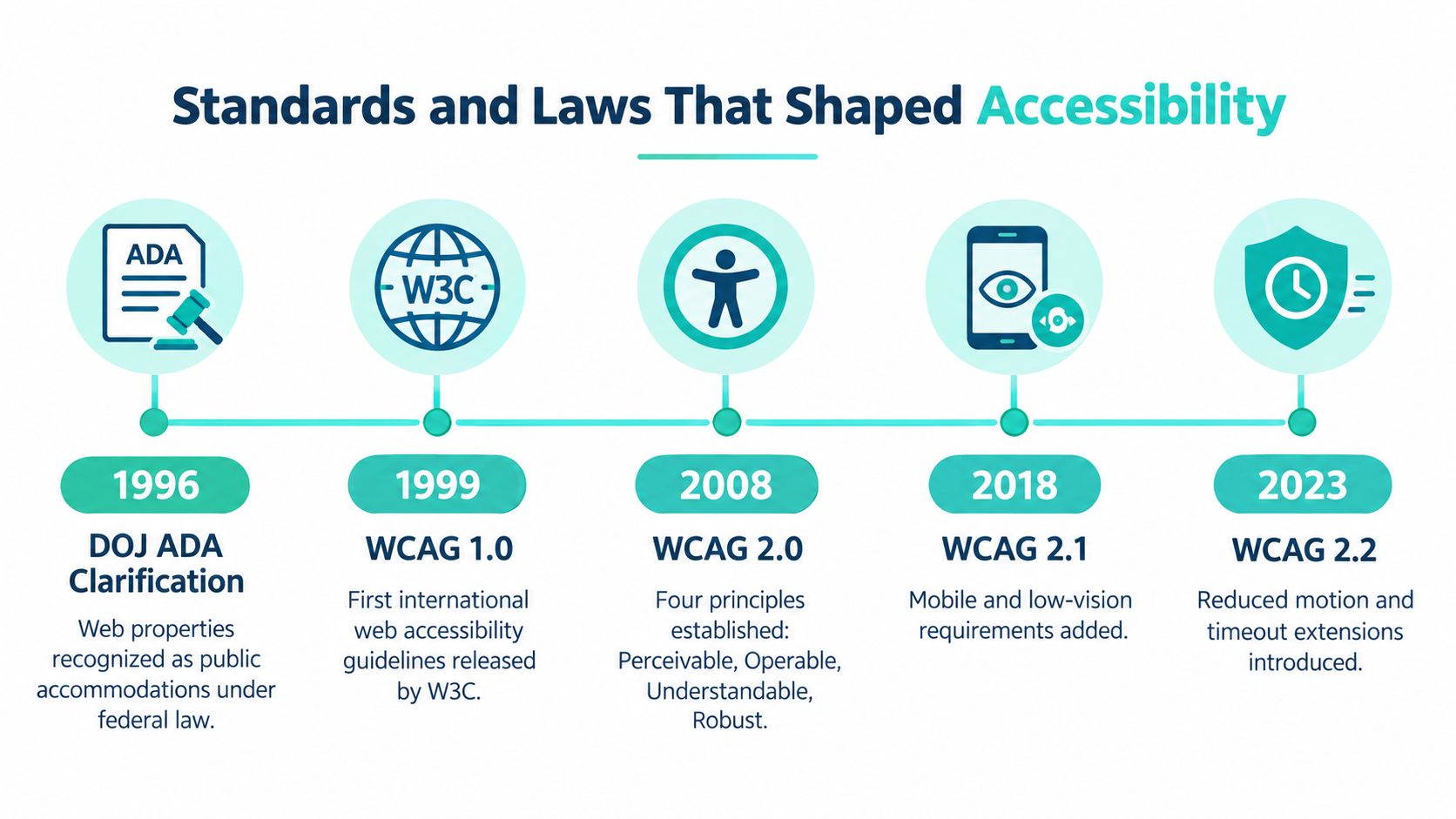
WCAG 2.0 followed in 2008, WCAG 2.1 in 2018, and WCAG 2.2 in 2023. Later versions retained the four-principle structure while adding criteria relevant to mobile use, low vision, cognitive needs, input modalities, focus behavior, and interaction patterns. The practical result is that teams must distinguish between the version named by a rule or contract and the version they choose as their engineering target.
How regional requirements converge
The United States has no single codified technical standard inside ADA Title III that applies uniformly to every private website. In litigation and accessibility programs, WCAG 2.1 AA has become the practical reference point. Section 508 applies to U.S. federal agencies and the digital products they develop, procure, maintain, or use, with the 2017 refresh incorporating WCAG 2.0 AA requirements.
In Europe, EN 301 549 incorporates WCAG 2.1 AA for web and mobile content. The European Accessibility Act adds obligations for covered products and services, including conformity assessment and market-surveillance responsibilities. The United Kingdom, Canada, Australia, and other major markets also use frameworks that map closely to WCAG, which is why multinational teams usually standardize on a common baseline instead of maintaining unrelated regional implementations.
The history is useful because it explains why accessibility work now belongs in procurement, architecture, and release governance. The plain-language explanation of ADA compliance helps non-specialists understand the legal concept, but implementation teams still need a documented technical target and evidence that the target applies across the whole experience.
Comparing the Major Frameworks Side by Side
No single framework answers every enterprise question. WCAG defines testable criteria. ADA Title III creates a legal obligation without prescribing one complete technical checklist. Section 508 governs federal technology and procurement. EN 301 549 extends accessibility requirements across European ICT products and services, while the European Accessibility Act adds obligations around covered products, services, conformity, and market surveillance.
| Framework | Jurisdiction | Technical baseline | Conformance level | Enforcement | Primary use case |
|---|---|---|---|---|---|
| WCAG 2.1 and WCAG 2.2 | International technical standard | WCAG success criteria | A, AA, or AAA, as selected | Contractual, regulatory, or audit requirement | Product design, development, testing, and procurement |
| ADA Title III | United States | No single codified web standard | WCAG 2.1 AA is the practical litigation baseline | Litigation and settlement exposure | Public-facing commercial websites and services |
| Section 508 | United States federal sector | WCAG 2.0 AA through the 2017 refresh | A and AA criteria | Federal procurement and agency obligations | Government systems, vendors, software, documents, and intranets |
| EN 301 549 | European Union and related procurement contexts | Includes WCAG 2.1 AA for web and mobile content | WCAG-aligned requirements | Procurement, regulatory, and organizational enforcement | ICT products, services, public-sector procurement |
| European Accessibility Act | European Union | Technical requirements rely substantially on EN 301 549 | Depends on the covered product or service | Conformity assessment and market surveillance | Covered consumer products and digital services |
The practical target for many multinational estates is WCAG 2.1 AA, supplemented by selected WCAG 2.2 criteria where the organization wants to reduce future rework. Guidance on accessibility laws across major markets notes that building to WCAG 2.2 AA can position an organization ahead as standards evolve (country-by-country accessibility law guidance).
Choosing a defensible combination
For a commercial Sitecore site serving U.S. and European audiences, combine ADA-aware legal review with WCAG 2.1 AA testing and EN 301 549 mapping where relevant. For a federal-facing SharePoint service, add Section 508 documentation and an Accessibility Conformance Report. The combination that covers most enterprise exposure is a WCAG 2.1 AA engineering baseline, market-specific legal mapping, and evidence from manual and assistive-technology testing.
How an Accessibility Assessment Actually Works
A credible accessibility assessment starts with scope, not a crawler. Enterprise estates span public domains, authenticated portals, campaign pages, transactional applications, PDFs, embedded tools, mobile interfaces, and reusable components. An incomplete inventory produces a conformance statement that covers only part of the experience.
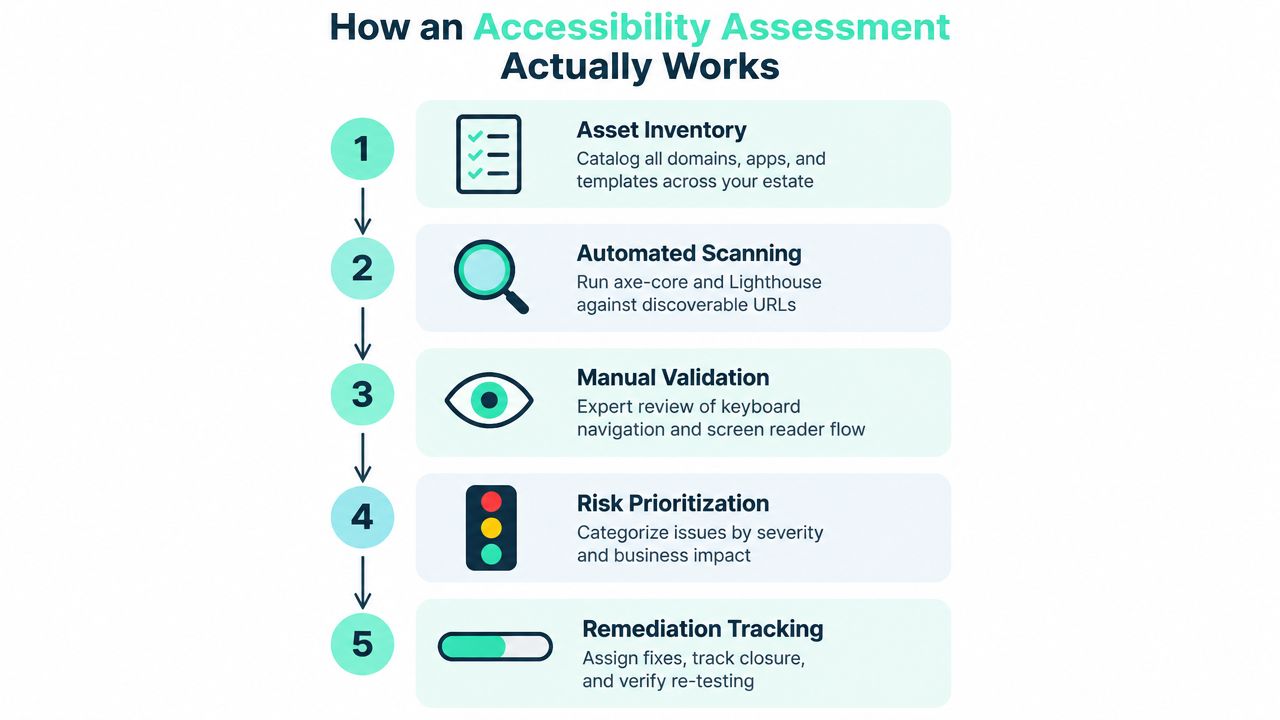
The five stages
Inventory the estate. Catalog domains, applications, templates, content types, integrations, documents, and critical journeys. Record ownership and authentication boundaries. This separates changes the delivery team can make from defects requiring supplier action.
Scan automatically. Use axe, Lighthouse, and enterprise crawlers where scale demands them. Automation repeatedly checks detectable issues, but it typically identifies only about 20–40% of accessibility issues (WCAG audit coverage guidance). Treat the results as defect signals, never as a compliance verdict.
Audit representative templates manually. Review headings, landmarks, accessible names and descriptions, keyboard behavior, focus order, error handling, tables, documents, dynamic updates, and component states. Sample pages across rendering variations. A clean page does not prove that every Sitecore component or SharePoint template behaves correctly.
Test assistive technology and alternate input. Use relevant combinations such as NVDA, JAWS, VoiceOver, and Dragon, together with keyboard-only navigation and zoom paths. Verify that users can perceive information, operate controls, understand status changes, and complete core tasks. Device lists have little value without task-based evidence.
Report and retest. Each finding needs a reproducible location, criterion, severity, business impact, owner, remediation guidance, and retest status. Where procurement requires it, maintain a VPAT or Accessibility Conformance Report that accurately describes product behavior and known limitations.
Scanner-only engagements are easy to repeat but weak under legal scrutiny because they miss context, component states, and user journeys. Hybrid assessments combine automation with representative manual sampling and suit estates with consistent, well-governed component libraries. Full manual audits with user testing provide the strongest issue capture, with one benchmark reporting 95%+ issue capture for full manual audits with user testing, compared with 70–80% for hybrid audits. The right model depends on scope and risk. No model removes the need for manual validation.
For Sitecore XM Cloud and SharePoint Online, store findings against components, templates, owners, and release controls. That turns an audit into operational governance, allowing AI-assisted triage and reusable component checks to support continuous compliance rather than an audit-day scramble.
Why Most Accessibility Programs Stall at Audit Time
Most programs stall because teams treat accessibility as a retrofit. By the time an audit begins, the design tokens are fixed, component contracts are undocumented, procurement has approved inaccessible suppliers, and content authors have published thousands of rich-text variations. Remediation then competes with committed release work instead of shaping it.
Research cited in recent accessibility coverage reports 93% of websites in Europe failing accessibility requirements and only a 1% year-over-year improvement, while Forrester coverage describes proactive adoption as limited, with 28% of organizations starting accessibility during planning and 27% during design (Forrester accessibility guidance). These figures point to process weakness, not a shortage of scanning tools.
The recurring failure pattern
A Sitecore author can insert a visually styled heading that has the wrong semantic level. A SharePoint contributor can upload a document with an unusable structure. A front-end developer can implement a modal that looks correct but leaves keyboard focus behind the overlay. Each defect may pass through a delivery process that has no accessible component contract or release gate.
| Root Cause | Where It Shows Up | Operational Fix |
|---|---|---|
| Accessibility starts after build decisions | Design reviews, sprint planning, preproduction audits | Add WCAG acceptance criteria and accessibility review to discovery and architecture |
| Tokens omit semantic behavior | Color systems, typography, spacing, focus styles | Define accessible tokens and require component-level evidence |
| Components lack behavioral contracts | Modals, menus, carousels, forms, dynamic status messages | Document keyboard, focus, name, role, state, and error behavior |
| Procurement ignores accessibility | SaaS tools, forms, analytics, chat, media, documents | Request current VPATs or ACRs and test critical supplier workflows |
| Releases have no quality gate | Pull requests, content publishing, deployment pipelines | Run automated checks on changed components and manually review risk-based journeys |
| Ownership is unclear | Legal, product, design, engineering, content | Assign decision rights, remediation owners, escalation paths, and reporting cadence |
The operational fix isn't to audit less. It's to make every audit teach the platform team how to prevent recurrence. A detailed website accessibility remediation approach is most valuable when findings become component changes, authoring guardrails, test cases, and backlog rules rather than isolated tickets.
Operationalizing Compliance Across Sitecore XM Cloud and SharePoint
In Sitecore XM Cloud, accessibility belongs in the component contract and the release workflow. Each rendering should define semantic HTML, accessible names, keyboard behavior, focus management, ARIA states, and content constraints. Helix or SXA component libraries can enforce those decisions across sites, provided teams test rendered output instead of relying on design files.
Sitecore AI needs accessibility controls around variation
Sitecore describes SitecoreAI as an AI-centered, composable SaaS evolution of XM Cloud that brings together content, data, personalization, search, and operations. Agentic Studio introduces 20+ out-of-the-box agents (SitecoreAI overview). Sitecore also describes XM Cloud AI as a marketing copilot that uses site goals, audience definitions, brand tone, and component engagement patterns to suggest personalization, including suggestions that can trigger A/B testing (Sitecore on XM Cloud).
AI-generated or AI-selected variations still require platform controls. Check heading structure, link purpose, labels, and reading order for each variant. Test experiments for consistent keyboard and screen-reader paths, because a compliant base component can become inaccessible through altered content or injected behavior. Use Chromatic or Playwright with axe in CI for changed components, then reserve manual testing for semantics, focus movement, dynamic updates, and task completion.

SharePoint governance must reach authors and extensions
Microsoft's SharePoint accessibility resources direct organizations to apply their established accessibility guidelines when customizing sites. A product Accessibility Conformance Report may document Level A conformance as “Yes,” but it does not certify every custom page, SPFx extension, uploaded document, or integrated workflow (SharePoint Online conformance report).
Set hub-site rules, Microsoft Accessibility Checker policies, SPFx linting, author training, and publishing reviews. For implementation patterns, see our guidance on SharePoint intranet development for hub-site governance and SPFx controls. A practical CI/CD flow can run pre-commit linting, scan changed components in pull requests, block critical violations, manually review high-risk journeys, and update the conformance record at release.
Building a Continuous Compliance Program With the Right Partner
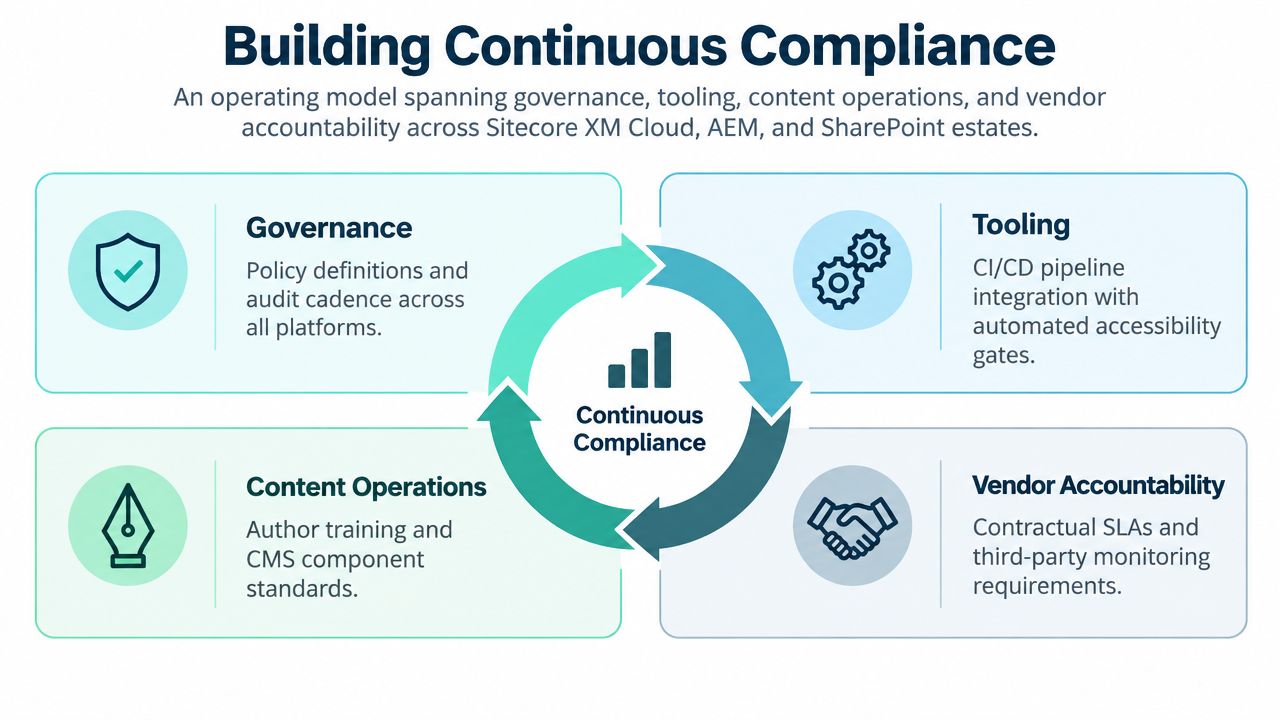
Continuous compliance is an operating model across governance, tooling, content operations, and vendor accountability. It should cover Sitecore XM Cloud, AEM, and SharePoint estates, including the shared services that sit outside the CMS. The partner's job isn't to produce a large report and leave. It should help the internal team build controls that remain useful after the engagement ends.
Four phases that create operating discipline
Baseline and gap analysis establishes scope, target standards, representative journeys, component families, content risks, third-party dependencies, and current evidence. The output should distinguish platform defects from authoring defects and supplier limitations.
Remediation sprints turn findings into a prioritized backlog. Fix shared components before individual pages, because a corrected form, navigation pattern, or modal can remove the same defect across many experiences. Each ticket should include reproduction steps, acceptance criteria, and retest ownership.
Pipeline and authoring integration moves controls into daily work. Harden the component library, add linting and automated checks to CI/CD, introduce safe CMS fields and validation, and train authors to produce accessible headings, links, media, tables, and documents.
Managed monitoring retests affected journeys after releases, integrations, personalization changes, and major content model updates. A governance forum reviews exceptions, supplier issues, new components, and evidence required for procurement or regulatory responses.
Deliverables and measures
An enterprise should expect a WCAG 2.1 AA conformance statement, a roadmap sequenced to release trains, a governance charter assigning ownership to product, design, engineering, and content teams, and recurring attestations. Track defect escape rate, time to remediate, and the percentage of components shipped from the accessible library. Those measures show whether the program is changing delivery behavior, not merely generating audit activity.
A partner such as Kogifi can support accessibility work within Sitecore, AEM, and SharePoint delivery programs, including component-library hardening, CMS and intranet implementation, CI/CD integration, and ongoing platform support. The essential test is whether the resulting controls are owned by the teams that design, build, publish, buy, and release the experience.
Kogifi helps enterprise teams assess and remediate accessibility across Sitecore XM Cloud, AEM, and SharePoint estates, then embed WCAG-aware components, authoring guardrails, and release testing into everyday delivery. Visit Kogifi to discuss a practical baseline, remediation roadmap, and continuous compliance model for your DXP environment.